Gotchas of PhoneGap

What's in?
PhoneGap or Cordova

PhoneGap is a distribution of Apache Cordova. You can think of Apache Cordova as the engine that powers PhoneGap, similar to how WebKit is the engine that powers Chrome or Safari. (Browser geeks, please allow me the affordance of this analogy and I’ll buy you a beer later.)
Over time, the PhoneGap distribution may contain additional tools that tie into other Adobe services, which would not be appropriate for an Apache project. For example, PhoneGap Build and Adobe Shadow together make a whole lot of strategic sense. PhoneGap will always remain free, open source software and will always be a free distribution of Apache Cordova.
Why PhoneGap?
Building applications for each device–iPhone, Android, Windows Mobile and more–requires different frameworks and languages.

PhoneGap solves this by using standards-based web technologies to bridge web applications and mobile devices.
Advantages:
- Fast to develop
- Cover almost all mobile OS
- Web Magic
Disadvantages:
- Can't promise on reliability
- Guaranteed 99.9% look and feel
- Submission to stores is bit pain
- Device specific problems
- Version compatibility
To be Watched out?
#1 300 ms delay on click event
If you go to a site that isn't mobile optimised, it starts zoomed out so you can see the full width of the page. To read the content, you either pinch zoom, or double-tap some content to zoom it to full-width. This double-tap is the performance killer, because with every tap we have to wait to see if it might become a double-tap, and that wait is 300ms.
#2 Force GPU Acceleration
When an element is rendered in hardware, the element and all of its children are first rendered to a bitmap, and then the bitmap is uploaded to the GPU as a texture. Once the texture is uploaded to the GPU, the element can be transformed very quickly. Whenever the element or its children need to be redrawn, the element must be re-rendered to a bitmap and uploaded to the GPU again.
It stands to reason that larger or more complex elements will take longer to render to a bitmap and subsequently upload to the GPU.
#3 Native Scrolling
Webkit scrolling is too fast and thereby it kill the native feel
#4 CSS Reset and Image pre-loading
Each browser implemented what it felt was right.
The aim is to reduce HTTP requests. In addition, sometimes the compressed sprite will weigh less than the original images.
#5 Frameworks and Libraries
Avoid using full-stack framework and make use of light-weight libraries.
#6 Make it as "Single Page" app
#7 Caching
Minimise the network access and make use of HTML5 file storage, mobile Db and files.
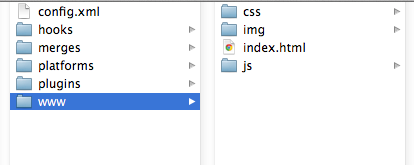
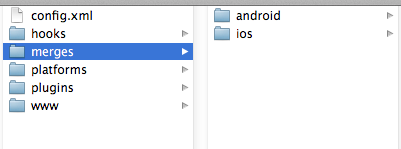
#8 Have a common Code base
Queries??

Thank you!!!
Gotcha in Phonegap
By praveen_jegan