Wordpress實戰開發

原型駭客網路有限公司
講師:Mike

我是誰
教育:
2008, 台大工科系畢業
2012, 密西根電機碩士
工作:
2008, 就開始接案這條不歸路
2012,
IT Strategists, LA
AsiaFusion Tech, Taipei
Digbil, Taipei
Prototype Hacker, Taipei
Facebook:
Medium:
這堂課的目標
可以自己完成一個簡單的客製化個人部落格佈景主題 (theme)。
theme: https://wordpress.org/themes/
target: http://www.fubiz.net/
什麼是Wordpress
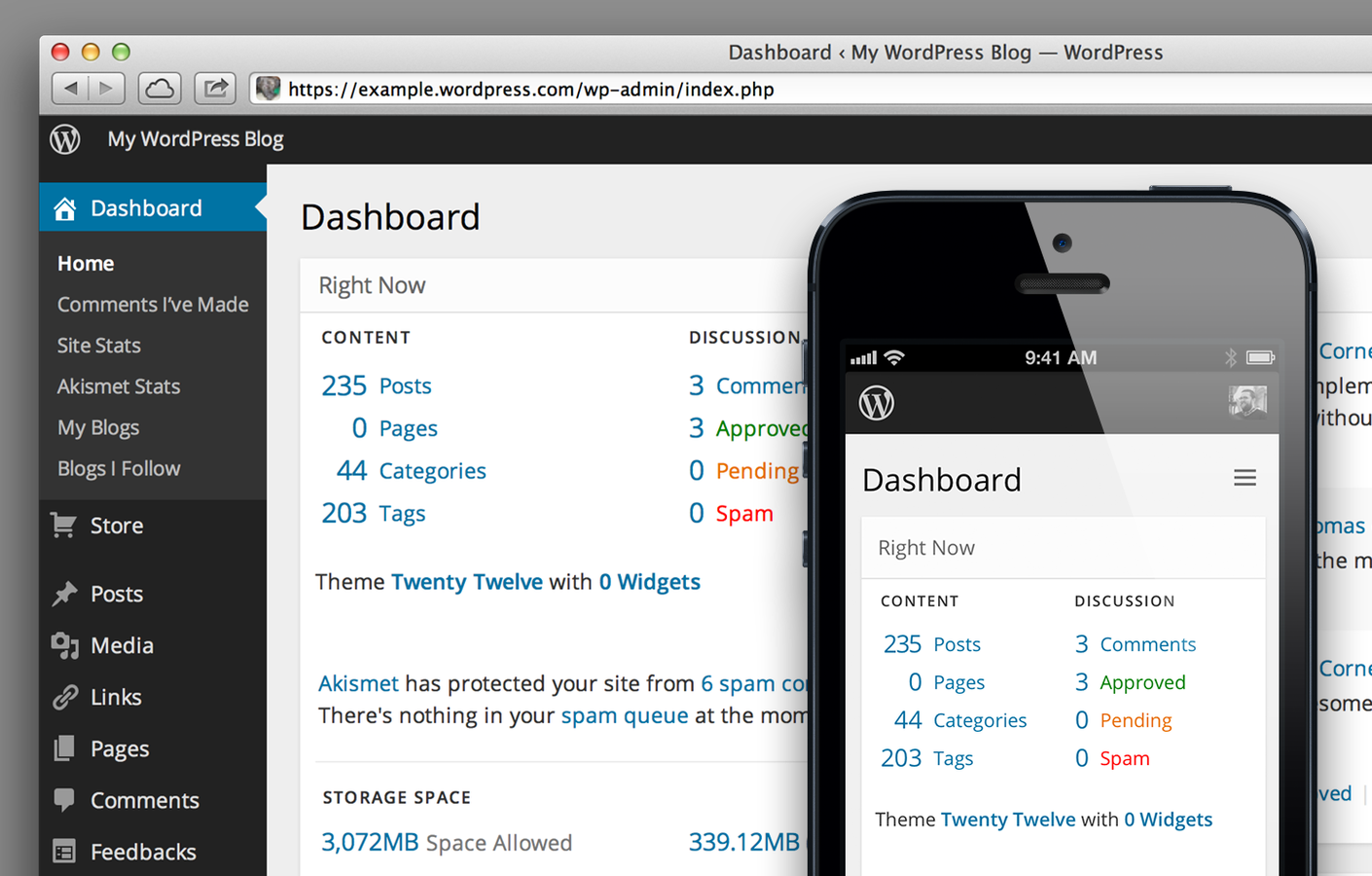
- Wordpress是一套以PHP程式為基底去開發出來的內容管理系統(Content Management System)
- 簡單來說即是有後台的網站系統,網站管理者可以從後台(需帳號密碼)更改或是上傳新的資料,而一般使用者則是可以看到網站實際呈現的畫面。
什麼是Wordpress
- 資料統一儲存於資料庫(Database),不了解資料庫的話想像它是一份整理完善的Excel表格檔案。
- 前台網頁呈現:從資料庫提取資料搭配網頁畫面呈現,後台主要用來修改、新增、刪除資料庫的資料。
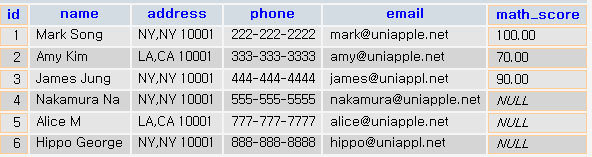
Ex. 會員資料表
為什麼要用Wordpress
- Wordpress是一套已經寫好的open source開源軟體,免費下載安裝即可開始撰寫。
- Wordpress包含了會員系統、部落格系統、評論系統、檔案上傳系統、URL覆寫系統。
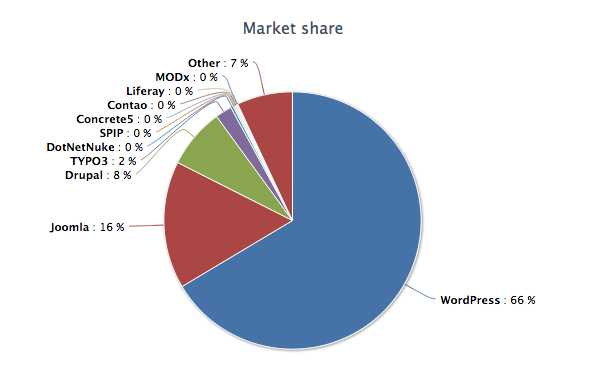
- 社群力量大!有很多寫好的插件(plugins)供您擴充功能使用。(數量多到你無法想像)
安裝Wordpress
安裝Wordpress
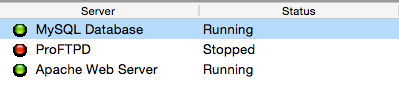
1. 開啟XAMPP的Apache以及MySQL
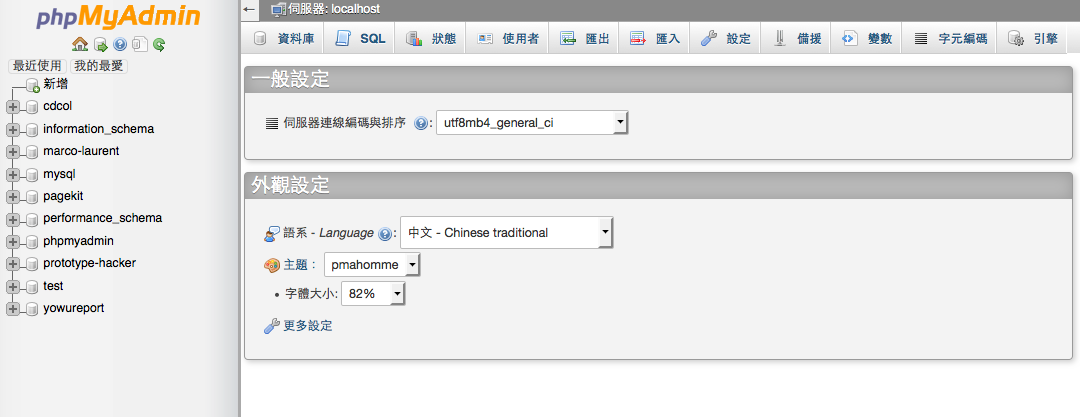
2. 打開瀏覽器在網址列輸入 http://localhost/phpmyadmin
,並看到以下畫面:
安裝Wordpress
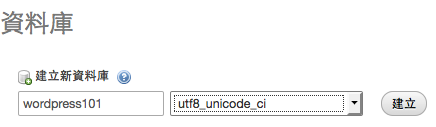
3. 新增一個資料庫,命名為你想要的名字。
舉例來說下圖 wordpress101即為資料庫的名字
4. 下載Wordpress程式檔案最新版,並解壓縮,解壓縮後會看到wp-content, wp-includes, wp-admin三個資料夾。
安裝Wordpress
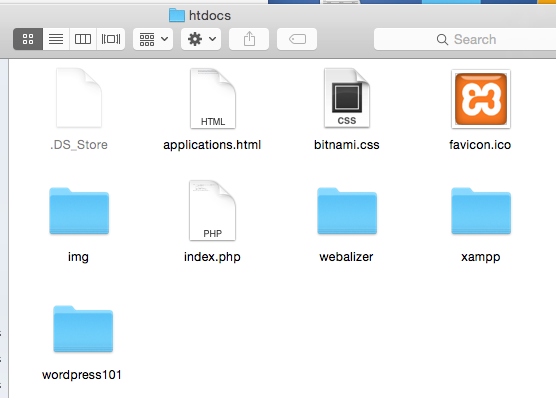
5. 在xampp的htdocs資料夾底下新增一個你的專案名稱的資料夾。舉例:wordpress101
安裝Wordpress
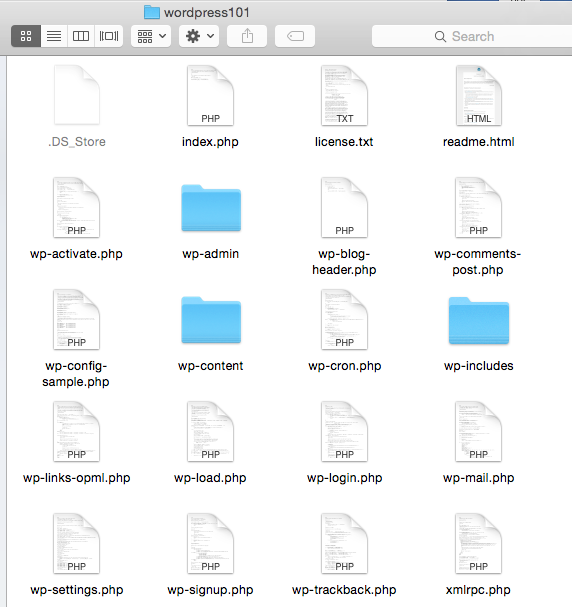
6. 將剛剛下載的Wordpress資料夾裡面的整包檔案丟到你新增的資料夾裡。
安裝Wordpress
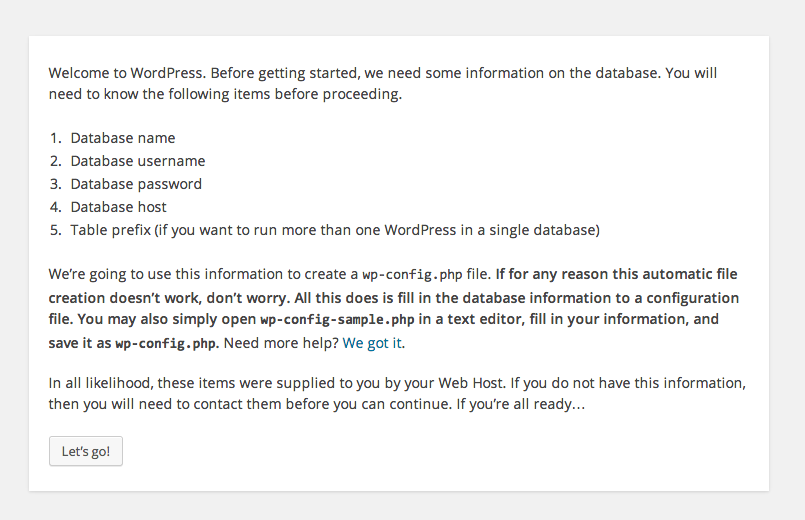
7. 到瀏覽器列輸入 http://localhost/wordpress101 進入安裝畫面。 (/此處為你的資料夾名稱)
安裝Wordpress
8. 照著步驟輸入正確資訊後,會看到twenty forteen的佈景主題畫面。
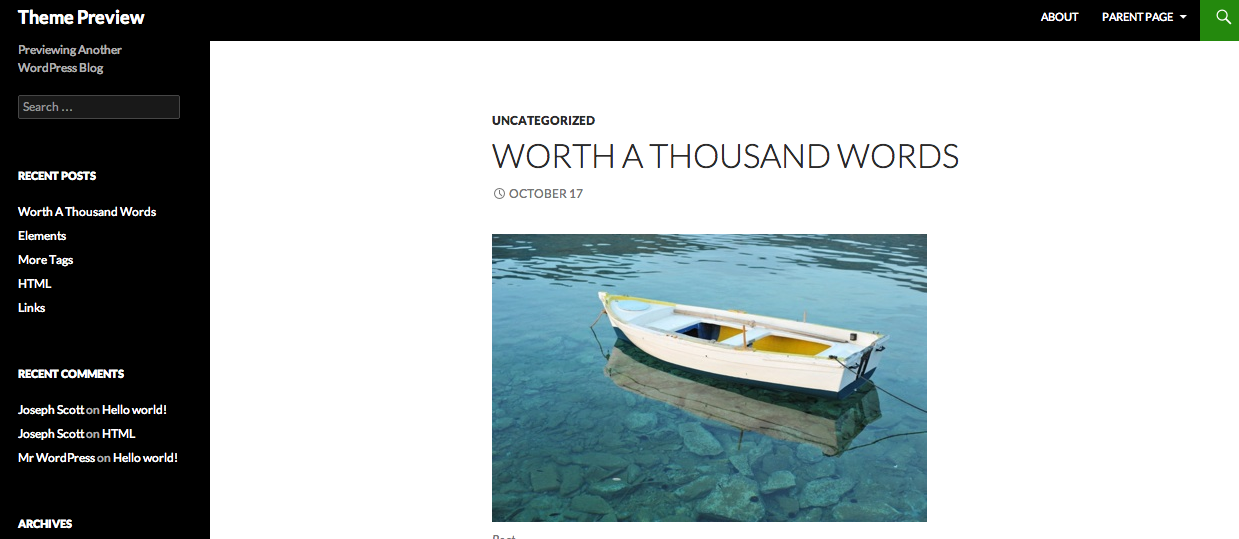
安裝Wordpress
9. 試著來安裝一個新的免費佈景主題吧!
認識Wordpress
接下來的內容其實不太需要投影片...
- 選單 menu
- Posts 文章
- 分類 category
- 標籤 taxonomy
- Page 頁面 (靜態)
- 媒體 media
- 設定 setting
- 插件 plugins
- 使用者 users
PHP基礎
PHP為伺服器的語言,伺服器運算完資料邏輯後,回傳的http頁面上並不會看到任何的PHP程式碼。
PHP有眾多的函式庫可供使用,遇到時再查如何使用即可。
PHP也有幫忙與資料庫連線的函式庫可供使用。
(關鍵字:PDO)
<?php

?>
一定要用<?php ?>包起來
每句程式結尾要有分號 ;
PHP基礎
變數的使用為錢號開頭: $
變數: 儲存資料的空間
變數的型態根據你給的資料類型,PHP會幫你指派
<?php
    $name = 'Mike'; /* string */
    $score = 96; /* integer */
    $skill = 'programming'; /* string */
    $collegeGraduate = true; /* boolean */
    $name == $collegeGraduate;
?>
等號 = 為指派的意思: 指派字串Mike到name變數裡
判斷相等 == : 兩個等號用於判斷變數是否相等
PHP基礎
運算: 加減乘除 + - * / 餘數 %
<?php
    $a = 2+2;
    $b = 3-2;
    $c = 3*2;
    $d = 2/2;
    $e = 2%2;
    echo $a.' '.$b.' '$c.' '.$d.' '.$e;
    var_dump($a);
?>輸出到畫面上: echo
完整檢查變數資料型態: var_dump(), debug常用
PHP基礎
太太對先生說:下班幫我買菜回家,如果看到賣包子的就買兩顆。結果先生只買了兩個包子...
判斷式: if(condition){ } else{ }
<?php
    if(看到賣包子){
        買兩顆;
    }
    else{
        買菜;
    }
?>
<?php
if(2%2===0){
echo 'even';
}
else{
echo 'odd';
}
?>PHP基礎
for($i=0;$i<100;$i++){ }
for迴圈: for(start;condition;interative){}
照理說教到這裡應該可以印出九九乘法表到螢幕上了,不過先練習印出1-99到螢幕上吧!
<?php
    for($i=1;$i<100;$i++){
        echo $i;
    }
?>
<?php
for($i=1;$i<100;$i++){
print $i;
}
?>hint: echo '<br>'; 可以換行
PHP基礎
$fruitArray = array( 'apple', 'guava', 'banana' );
array 變數 $a = array();
<?php
    $fruitArray = array('apple', 'guava', 'banana');
    echo count($fruitArray);
?>
hint: count() 可以回傳陣列的大小值
PHP基礎
$fruitArray = array( 'apple', 'guava', 'banana' );
foreach迴圈使用 foreach($things as $thing){ }
<?php
    $fruitArray = array('apple', 'guava', 'banana');
    foreach($fruitArray as $fruit){
        echo $fruit;
    }
?>
PHP基礎
function addUp(parameters){ ... }
function的使用
<?php
    function addUp($a, $b){
        return $a+$b;
    }
?>
Wordpress佈景主題開發
佈景主題的必要條件 (一定要有的)
1. 一個資料夾命名為你的佈景名稱 ( Ex. wordpress 101)
2. 資料夾裡面一定要有的檔案:
style.css (must)
index.php (must)
screenshot.png (optional) 佈景示意圖
functions.php (optional) 與功能串接以及新增處
Wordpress佈景主題開發
Template Hierarchy
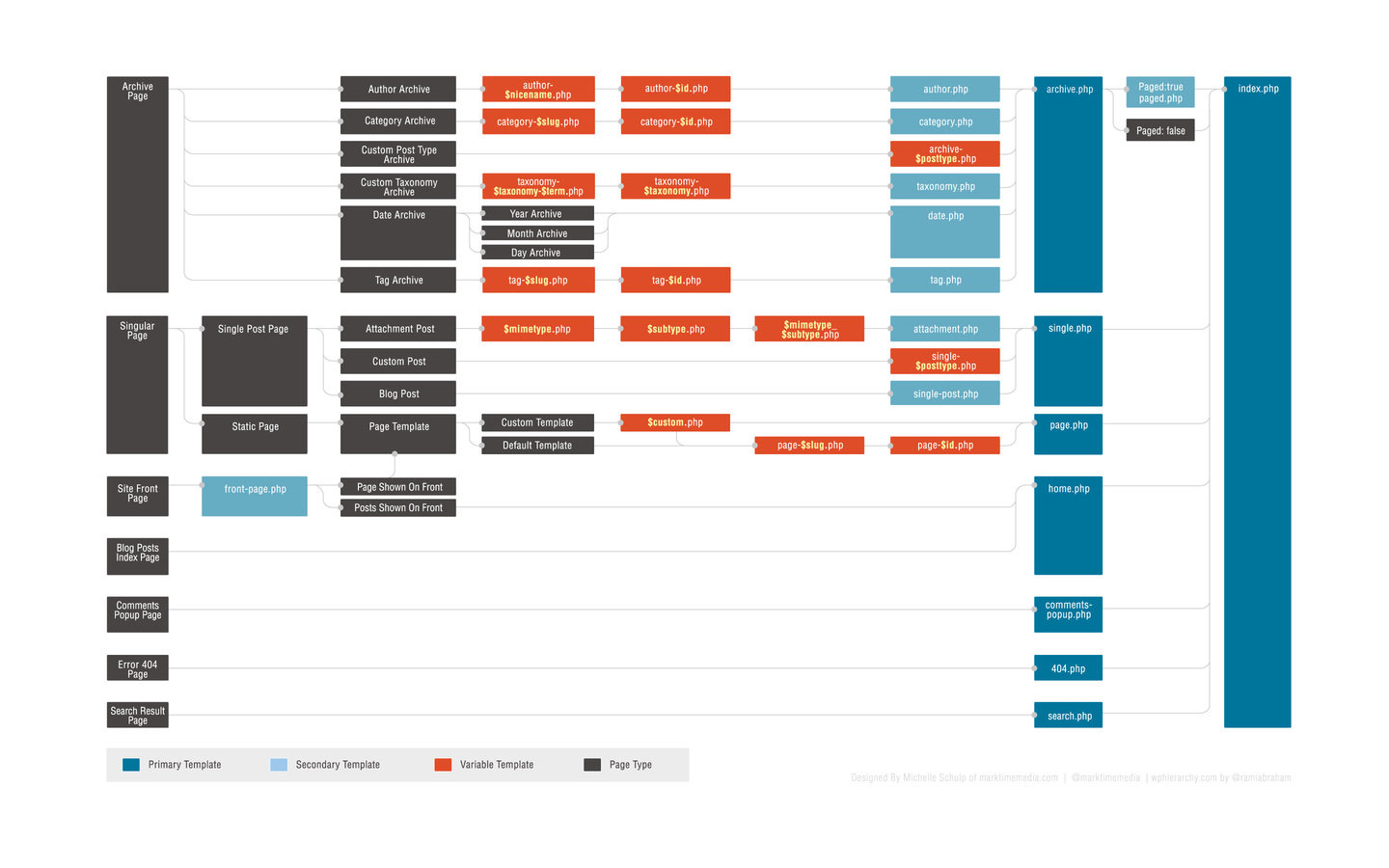
Wordpress佈景主題開發
Template Hierarchy
首頁: front-page.php > home.php > index.php
使用front-page.php或者是home.php的方式要另外做設定,個人建議是使用最直覺的index.php即可。
Wordpress佈景主題開發
Template Hierarchy
Posts:
Archive: archive-{post-type}.php > archive.php
Single: single-{post-type}.php > single.php
Archive的用法需要搭配url的設定,預設的archive.php是以日期分類,如果想要有好看的並有邏輯性的url,最常見的用法是開一個靜態頁面並特別寫一個靜態template給Archive page。
Wordpress佈景主題開發
Template Hierarchy
Page: 靜態頁面
可任意命名template檔案,當然有語意會比較好,將以下的註解加在檔案裡即完成page templae的註冊。
/*
Template Name: Post Archive
*/
Wordpress佈景主題開發
Template Hierarchy
Category: category-{slug}.php > category.php
用在陳列分類的文章總覽
Wordpress佈景主題開發
切割頁面 Design your Template
全站會重複使用的頁面,切割出一個單一檔案重複使用就好。 Ex. header.php(頁首) and footer.php(頁尾)
<?php get_header(); ?>
<?php get_footer(); ?>
頁面上引入方式:
Wordpress佈景主題開發
設計頁首 Design your Header
header.php
<!DOCTYPE html>
<html>
	<head>
	    <!-- 所有該出現在head的東西 -->
	    <?php wp_head(); ?>
	</head>
	<body>
           <header>
               頁首的選單
           </header>
Wordpress佈景主題開發
設計頁尾 Design your Footer
footer.php
	<footer id="footer">
           <!-- 你的footer選單 -->
	</footer>
	<script src="<?php bloginfo( 'stylesheet_directory' ); ?>/js/main.js">
        </script>
        <?php wp_footer(); ?>
    </body>
</html>
Wordpress佈景主題開發
functions.php
functions.php的作用: functions.php這隻檔案用來為你的佈景主題與Wordpress後台本身的功能做連接以及增加。
舉凡創建選單、註冊js file、修改後台登入畫面、修改後台選單顯示icon、註冊custom post type或是自己撰寫function hook等等與後台或是系統相關的功能。
Wordpress佈景主題開發
functions.php: 註冊選單
/****
*
*	register wordpress menu
*
****/
function register_my_menus() {
    register_nav_menus(
	array(
	      'main-menu' => __( 'Main Menu' ),
	      'footer-menu' => __( 'Footer Menu' ),
	)
    );
}
add_action( 'init', 'register_my_menus' );
Main Menu, Footer Menu可自由命名
Wordpress佈景主題開發
functions.php: 註冊內建的jquery
/****
*
*	enqueue js files
*
****/
function add_js_method() {
	wp_enqueue_script('jquery');
	wp_enqueue_script('bootstrap', get_template_directory_uri().'/js/bootstrap.min.js','3.0');
}
add_action( 'wp_enqueue_scripts', 'add_js_method' );
內建的jquery有Wordpress特定的使用方法,之後用到會再詳細論述。
wp_enqueue_script來註冊需要使用的js檔案。
Wordpress佈景主題開發
themes template 常用的function
1. <?php bloginfo('name'); ?><?php wp_title( '|', true, 'left' ); ?>
bloginfo可讀取許多網站的設定值,上方的例子為網站名稱,常搭配wp_title做為網站瀏覽器上方顯示的Title。
wp_title可讀取所在頁面的文章標題,三個參數第一個是顯示的分割符號,第二為是否echo輸出,第三為分割符號加在左邊還是右邊。
Wordpress佈景主題開發
themes template 常用的function
2. <?php bloginfo( 'stylesheet_directory' ); ?>
可回傳目前style.css所在的資料夾目錄
用在render自己的圖片檔案以及include css and js files。
Wordpress佈景主題開發
themes template 常用的function
3. <?php bloginfo('stylesheet_url'); ?>
可直接得到theme的style.css所在路徑
用在header link include css進來
Wordpress佈景主題開發
themes template 常用的function
4. <?php wp_head(); ?>
所有註冊在head的相關程式,都會在這區塊出現,結果: 一定要放在你的</head> tag的結尾前就是。
Wordpress佈景主題開發
themes template 常用的function
5. 顯示你註冊的選單
<?php
$args = array(
'theme_location' => 'main-menu',
);
wp_nav_menu( $args );
?>
theme_location去讀取出你註冊的選單名稱,用wp_nav_menus()還呼叫並輸出 echo。
Wordpress佈景主題開發
Header 與 Footer 開發
1. 得到後台的選單 wp_nav_menus()
2. 簡單的設計並開發header, footer
Wordpress佈景主題開發
首頁開發 index.php
1. query_posts()
	$newsletters = query_posts(
		array (
			'category_name' => 'newsletter',
			'posts_per_page' => 2,
			'orderby' => 'date',
			'order' => 'DESC',
		)
	);
Wordpress佈景主題開發
首頁開發 index.php
2. get_the_category()
http://codex.wordpress.org/Function_Reference/get_the_category
$catArray = get_the_category( $post->ID );Wordpress佈景主題開發
首頁開發 index.php
3. wp_get_attachment_image_src( $attachment_id, $size, $icon );
Returns an ordered array with values corresponding to the (0) url, (1) width, (2) height, and (3) scale
回傳的是矩陣: 1. URL, 2. 寬度, 3. 高度
Wordpress佈景主題開發
首頁開發 index.php
4. get_post_thumbnail_id( $post_id );
搭配wp_get_attachment_image_src(),可以完整得到圖片的url,如此可以自由搭配html的class,更有彈性地做css style。
Wordpress佈景主題開發
首頁開發 index.php
5. get_the_post_thumbnail( $post_id, $size, $attr );
echo系統會直接送出正確的<img> tag (帶有src, class...)
Wordpress佈景主題開發
首頁開發 index.php
6. get_the_author_meta( $field, $userID );
取出你需要的作者欄位,搭配當篇的作者ID。
Wordpress佈景主題開發
分類頁面開發 category.php
1. get_query_var( $var, $default )
取出目前所在分類頁面的分類
$catId = get_query_var('cat');Wordpress佈景主題開發
分類頁面開發 category.php
2. get_posts()
得到分類裡的文章
	$args = array(
		'category'=> $catId,
		'orderby' => 'date',
		'order'    => 'DESC',
		'posts_per_page' => '10'
	);
	$posts = get_posts( $args );
Wordpress佈景主題開發
分類頁面開發 category.php
3. setup_postdata(), wp_reset_postdata()
wordpress幫你設定global post data
	<?php
		foreach ( $posts as $post ) : setup_postdata( $post );
                // what you need to do
                endforeach;
                wp_reset_postdata();
        ?>
Wordpress佈景主題開發
分類頁面開發 category.php
4. paginate_links( $args )
	<?php
		global $wp_query;
		$big = 999999999; // need an unlikely integer
		$args = array(
			'base' 	=> str_replace( $big, '%#%', get_pagenum_link( $big ) ),
			'current' => $paged,
			'prev_text' => __('« '),
			'next_text' => __(' »'),
			'total' => $wp_query->max_num_pages,
			'suppress_filters'  => 1,
		);
		echo paginate_links( $args );
        ?>
Wordpress佈景主題開發
分類頁面開發 category.php
承接上 get_posts( 參數改變 )
	<?php
	    // check if it's paginated
	    $paged = (get_query_var('paged')) ? get_query_var('paged') : 1;
	    $pageNum = get_option( 'posts_per_page' );
	    $offset = $pageNum*($paged-1);

            $args = array(
                ....
                'offset' => $offset,
                ....
            );
        ?>
Wordpress佈景主題開發
Wordpress Loop
Wordpress為了單一的post而特別做的一個屬於自己的迴圈,在迴圈裡可以使用Wordpress提供的各種functions。
<?php
if ( have_posts() ) {
	while ( have_posts() ) {
		the_post();
		//
		// Post Content here
		//
	} // end while
} // end if
?>
Wordpress佈景主題開發
Single.php開發
運用上面的所有functions,已經可以輕鬆開發single.php了!
Note:
wpautop(), 得到原始的content內容(換回html tag)
http://codex.wordpress.org/Function_Reference/wpautop
do_shortcode(), 支援Wordpress內建的shorcode機制
Wordpress佈景主題開發
about us 靜態頁面的開發
<?php
/*
Template Name: About Us
*/
?>
宣告此檔案為靜態頁面的樣板,再搭配Wordpress loop使用,如同single post。
Wordpress佈景主題開發
Custom Post Type
常常有時候,一個文章的區塊是不夠用的...因為客戶的要求常常很ooxx
function create_posttype() {
	register_post_type(
                'products',
		array(
			'labels' => array(
			'name' => __( '產品' ),
			'singular_name' => __( '產品' )
		    ),
		'public' => true,
		'has_archive' => true,
		'menu_icon' => '',
		'supports' => array( 'title', 'editor', 'thumbnail'),
		'rewrite' => array('slug' => 'products'),
		)
	);
}
add_action( 'init', 'create_posttype' );
Wordpress佈景主題開發
Custom Post Type
客製化一下那個後台的icon
function fontawesome_dashboard() {
  wp_enqueue_style('fontawesome',
  'https://maxcdn.bootstrapcdn.com/font-awesome/4.4.0/css/font-awesome.min.css',
  '', '4.4.0', 'all');
}
add_action('admin_init', 'fontawesome_dashboard');

function fontawesome_icon_dashboard() {
    echo "<style type='text/css' media='screen'>
	           icon16.icon-media:before,
                   #adminmenu .menu-icon-products div.wp-menu-image:before {
        	           font-family: Fontawesome !important;
        	           content: '\\f06b';
                   }
	</style>";
}
add_action('admin_head', 'fontawesome_icon_dashboard');
Wordpress佈景主題開發
Custom Dashboard Login
後台的登入畫面也是可以客製化的
	function my_login_screen() { ?>
	    <style type="text/css">
	        body.login{
	        	background: url(<?php echo get_stylesheet_directory_uri(); ?>/css/img/yowu-loginbg.jpg) no-repeat center center fixed;
			    -webkit-background-size: cover;
			    -moz-background-size: cover;
			    -o-background-size: cover;
			    background-size: cover;
	        }
	        body.login div#login h1{

	        }
	        body.login div#login h1 a {
	            background-image: url(<?php echo get_stylesheet_directory_uri(); ?>/css/img/yowu-loginlogo.png);
			    background-size: 170px 80px;
			    width: 170px;
			    height: 80px;
	        }
	        body.login div#login p a{
	        	color: #ed403a;
	        	font-weight: bold;
	        }
	        body.login div#login p a:hover{
	        	color: #ed403a;
	        	text-decoration: underline;
	        }
	        body.login div#login #loginform{
	        	background-color: rgba(255,255,255,0.7);
	        }
	        body.login div#login #loginform input:focus{
	        	border-color: #ed403a;
	        }
	        body.login div#login #loginform .submit #wp-submit{
	        	border-radius: 0px;
	        	background-color: #ed403a;
	        	border: none;
	        }
	        body.login div#login #loginform .submit #wp-submit:hover{
	        	color: #000;
	        }
	    </style>
	<?php }
	add_action( 'login_enqueue_scripts', 'my_login_screen' );
Wordpress佈景主題開發
Custom taxonomy
註冊其他標籤(tags)給single post
function texonomy_init() {
    // create taxonomy
    register_taxonomy(
	'new-arrival',
	'products',
	array(
	    'label' => __( '新品新貌' ),
	    'rewrite' => array( 'slug' => 'new-arrival' ),
	    'update_count_callback' => '_update_post_term_count',
	)
    );
}
add_action( 'init', 'texonomy_init' );
Wordpress佈景主題開發
Custom fields
註冊新的欄位至頁面上,需搭配Wordpress Loop使用
// in the loop
the_meta();
// outside loop
get_the_meta( $postId, $key, $boolean );
the_meta(), get_the_meta()
Wordpress佈景主題開發
好用的外掛(plugins)與工具
1. underscore 配備好基礎功用的佈景主題
2. regenerate thumbnail 搬站的時候常漏了圖片的連結,重新建立文章與圖片的連結。
3. akismet 預設的外掛,可有效阻擋廣告spam,目前一個帳號可免費使用一個站。
Wordpress佈景主題開發
好用的外掛(plugins)與工具
4. smush.it 圖像壓縮
5. contact form
6. disqus論壇留言系統介接
Wordpress佈景主題開發
好用的外掛(plugins)與工具
7. advanced custom fields
搭配repeater + gallery = 無敵!
(只是repeater and gallery是要付費的)
8. woocommerce 購物車系統
Wordpress佈景主題開發
好用的外掛(plugins)與工具
9. 多語言 multi-language
10. Theme options
Wordpress內建的multi-site feature
11. Social Login
Wordpress佈景主題開發
好用的外掛(plugins)與工具
12. All in one SEO
Wordpress佈景主題開發
怎麼搬家?
1. 檔案整包複製一份
2. 資料庫SQL要dump一份
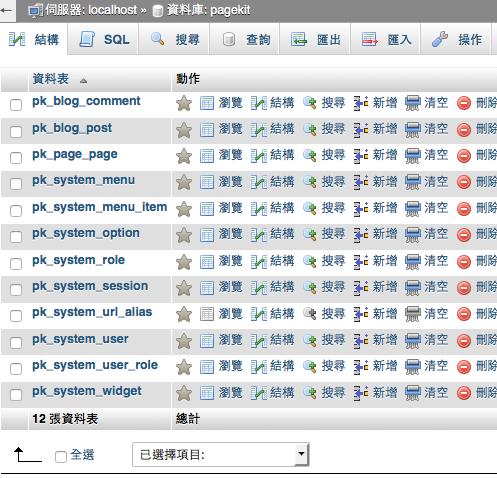
3. 開新的網站並設定好資料庫連線
5. 將備份的sql匯入(更改域名)
4. 將備份的檔案放入指定主機的資料夾
Wordpress佈景主題開發
By prototype-hacker
Wordpress佈景主題開發
Wordpress佈景主題開發課程 hosted by 原型駭客網路有限公司