Jumpstart for Web App Development
Ruyan Chen
Essentials: Terminal
- Easy file management
- SSH to other servers
Command Line Tools
- Grep, cat, other utilities
- Git/Subversion/Version Control
- Emacs/Vim
- Frameworks (Rails, Node, etc.)
- Deployment
- Less memory intensive
Unix system highly recommended
Essentials: Version Control
Most popular: Git

Essentials: Text Editor
-
Vim vs Emacs
- Atom.io
- Sublime Text
- Notepad++
- Java/Android: Eclipse
- Obj-C/iOS: Xcode
- C/C++/C#: Visual Studio
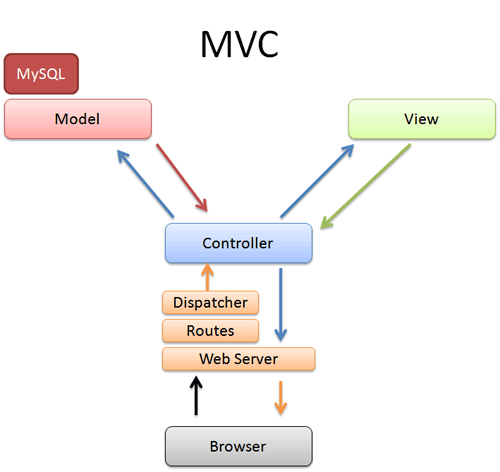
Model-View-Controller
Design
Models: Objects / Relations
Controller: Methods
View: Front-end/GUI
Good design is the least complicated way
to fully achieve your goals.
Good design takes the user into account.
Enter NodeJS
Getting started: http://nodejs.org
NodeJS is a software platform using the javascript language to build scalable web applications. It uses the asynchronous nature of Javascript to drive events that easily handle I/O. It's one of the languages driving web application development today and is very popular among developers for its quick deployment and flexibility.
Blocking vs Non-Blocking
PHP
$big_file = file_get_contents("huge_file.txt");
// ^ blocks process until done
$rows = count_rows($big_file);
echo "There are $rows rows";
Node
fs.readFile('huge_file.txt', function(file_contents){
// adds nonblocking callback, allowing other operations to continue
callback(file_contents.split("\n").length);
What does this mean?
Node is well-suited for real-time applications
and one pagers that update using ajax.
app.route('/poll', function(response){
// can wait a LONG time for the response
//  without much processor load, or opening tons of threads
  when('message_sent', function(message){
    response.setOk();
    response.send(message);
  }
}
Hello World
var http = require('http');
http.createServer(function (req, res) {
  res.writeHead(200, {'Content-Type': 'text/plain'});
  res.end('Hello World\n');
}).listen(1337, '127.0.0.1');

console.log('Server running at http://127.0.0.1:1337/');
You can run this from the console using
> node <filename>.jsand view it at http://localhost:1337/
Explanation
var http = require('http');
// ^ here we require node's http library, into the http object

http.createServer(function (req, res) {
// ^ this method is a node api method to create a http server

  res.writeHead(200, {'Content-Type': 'text/plain'});
  res.end('Hello World\n');
  // ^ callback when we get a request, to respond to it asynch.

}).listen(1337, '127.0.0.1');
// ^ calls the listen function of the new node http.Server object.

console.log('Server running at http://127.0.0.1:1337/');
// ^ console.log for debugging outputs to stdout, just like web inspectors on the frontend
MEAN Stack
-
MongoDB
-
Express
- AngularJS
- NodeJS
Alternatives include Ruby on Rails and
LAMP (Linux, Apache, MySQL, PHP/Python)
Install Express
http://expressjs.com
npm install expressvar express = require('express')
, app = express();
// express takes care of the routing, and request/response helpers
app.get('/http.txt', function(req, res){
var body = 'hello world!';
res.setHeader('Content-Type', 'text/plain');
res.setHeader('Content-Length', body.length);
res.end(body);
});
// or have express do more for you:
app.get('/hi.txt', function(req, res){
res.end('hello world!');
});
app.listen(3000);
Node Package Manager
NPM is the node package manager
http://npmjs.org
Usage
Usage: npm <command>

where <command> is one of:
    init, install, isntall, la, link, list, ll,
    ln, login, ls, outdated, owner, pack, prefix, prune,
    publish, r, rb, rebuild, remove, restart, rm, root,
    run-script, s, se, search, set, show, shrinkwrap, star,
    start, stop, submodule, tag, test, tst, un, uninstall,
    unlink, unpublish, unstar, up, update

npm <cmd> -h     quick help on <cmd>
npm -l           display full usage info
npm faq          commonly asked questions
npm help <term>  search for help on <term>
npm help npm     involved overview

Specify configs in the ini-formatted file:
    /Users/iain/.npmrc
or on the command line via: npm <command> --key value
Config info can be viewed via: npm help config

npm@1.1.70 /Users/iain/.nvm/v0.8.5/lib/node_modules/npm
Additional Resources
Web Application Development
By Ruyan Chen