The Vue from up Here
Scaling with a Progressive JS Framework

What do you mean, a "Progressive Framework"?
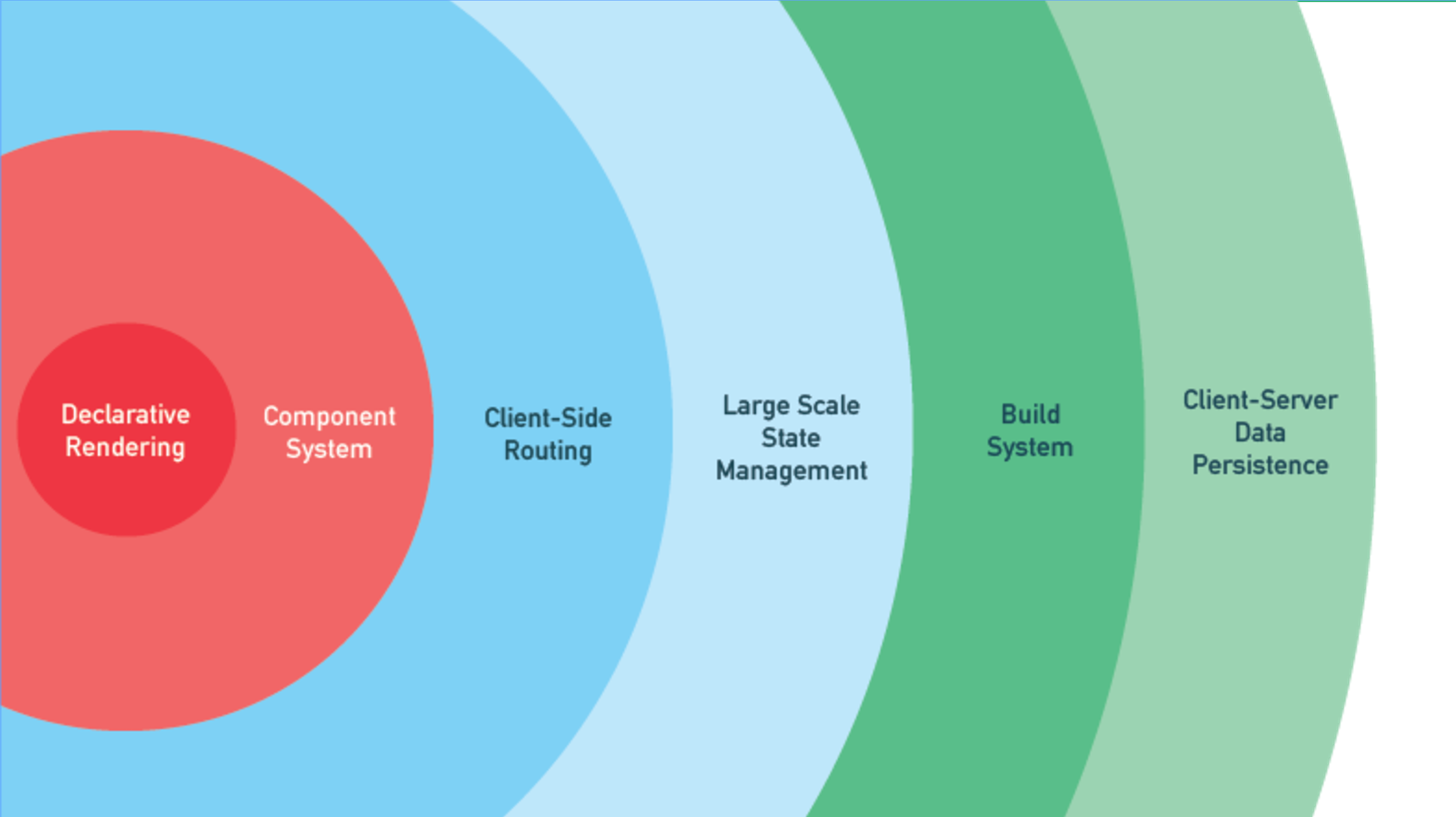
Levels of Complexity
Declarative
Rendering
Components
Client-side
Routing
Large Scale
State Management
Code Example
github.com/ryanhightower/...
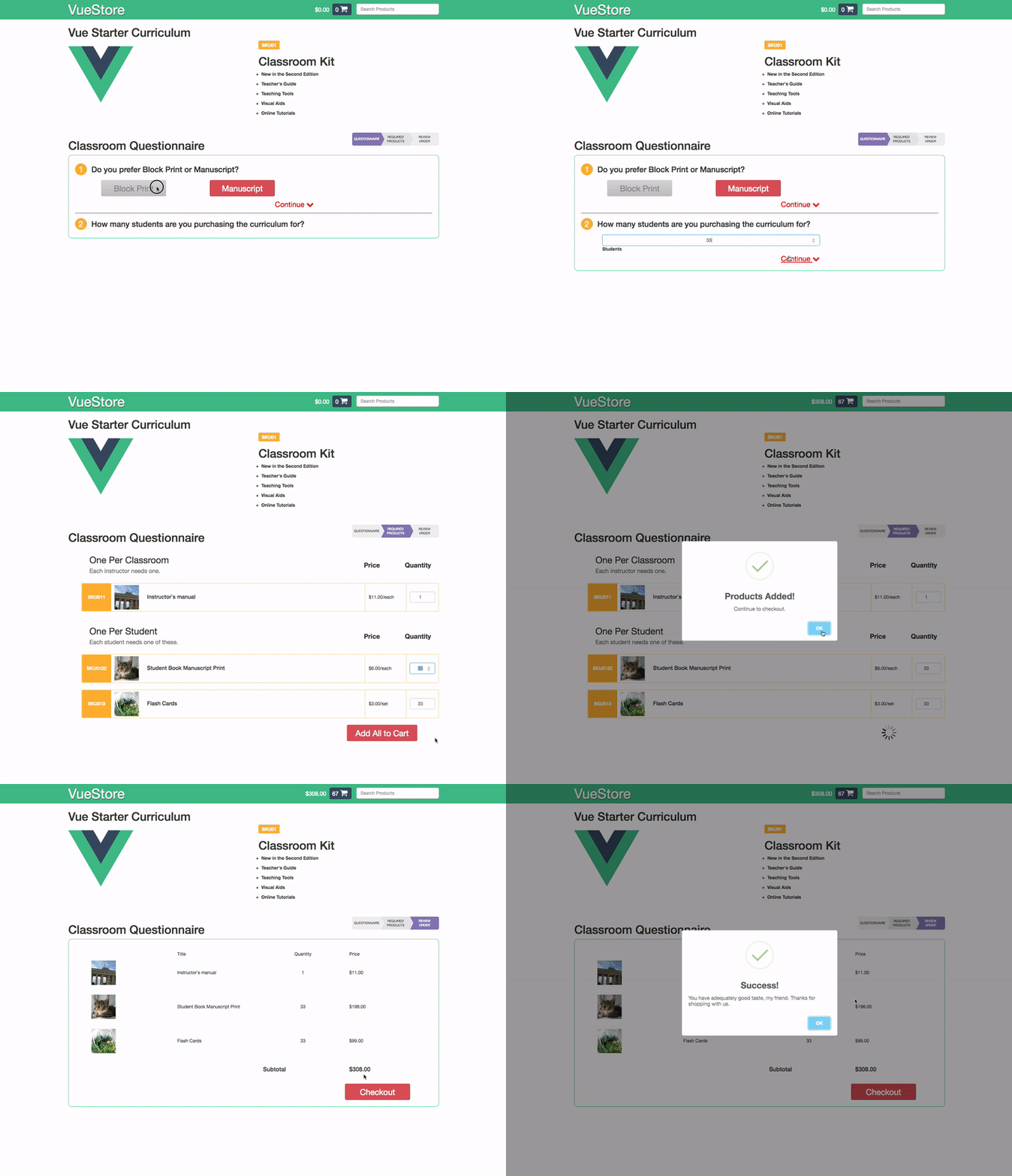
Code Example (html)
<form name="questionnaire-form" id="questionnaire-form" method="post">

    <div class="question heading">
        <h3>Do you prefer Block Print or Manuscript?</h3>
    </div>
    <div class="answer">

        <input type="radio" name="text_style" id="block" value="block" checked="checked">
	    <label for="block">Block Print</label>

	<input type="radio" name="text_style" id="manuscript" value="manuscript">
            <label for="manuscript">Manuscript</label>

	<a id="continue-1" href="#"> Continue </i></a>
    </div>

    <div class="question heading">
	<h3>How many students are in your class?</h3>
    </div>
    <div class="answer">

        <input type="number" name="num-students" id="num-students" min="1" value="1">
            <label for="num-students">Students</label>

	<a id="continue-2" href="#"> Continue </a>
    </div>

    <div class="question heading">
	<h3></h3>
    </div>
    <div class="answer">

        <input type="submit" id="submit-curriculum" value="Calculate Materials">
    </div>
</form>
Code Example (js)
// ----------------------------------------------------------
// curriculum.js
// used to show questionnaire
// ----------------------------------------------------------
$(document).ready(function(){
	// variables
	var $form = $("#curriculum-form"); // cache DOM elements for speed and easy access.
	var $result = $('span.result');
	var $next = $('a[id*=continue]');
	var $numStudents = $('#num-students');
	var $studentInputs = $('#num-students').find('input[name*="students"]');

	var valid = {

	}

	$form.accordion();

	$form.on('submit', submitHandler);

	function submitHandler (e) {
		e.preventDefault();
		return false;
	}

	$form.find('#submit-curriculum').on('click', function(e){
		e.preventDefault();
		$form.submit(e);
		swal('Form Submitted', 'Way to go there, Tiger!', 'success');
	});

	// radio buttons
	var $label = $form.find("input[type='radio'] + label");
	$label.click(function(){
		$(this).parent().siblings('p.continue').find('a').addClass('red-text');
	});


	// Send them to the itemized form if needed.
	$next.eq(0).click( function(e){
		e.preventDefault();
		// console.log( $form.find('[name=returning]:checked').val() );

		if( $form.find('[name=returning]:checked').val() == "YES" ){
			// alert("go to next page");
			// window.location = "/kindergarten-curriculum/itemized-form/";
			// return false;
			swal('Did you know?', 'If you`ve already purchased the curriculum, you can find the individual items on the next page.', 'info');
		} else {
			$result.eq(0).html("NO")
			openNext($form);
		}
	});

	// Block or Manuscript
	$next.eq(1).click( function(e){
		e.preventDefault();
		// console.log( $form.find('[name=returning]:checked').val() );
		var val = $form.find('[name=image_option]:checked').val();
		$result.eq(1).html( val )
        if($('#ui-id-5').hasClass('hide')){
            $form.accordion('option','active', 3);
        }else{
            openNext($form);
        }

		if( val == "Manuscript" ){
			$result.eq(1).addClass('script');
		} else {
			$result.eq(1).removeClass('script');
		}
	});


...
Problems
- The HTML is constrained by the jQuery conventions.
- Adding features is cumbersome and difficult, both to implement and read.
- The validation naturally uses thed DOM directly as its source of truth.
Declarative Rendering
Make me a sandwich
how many steps does it take to make a sandwich?
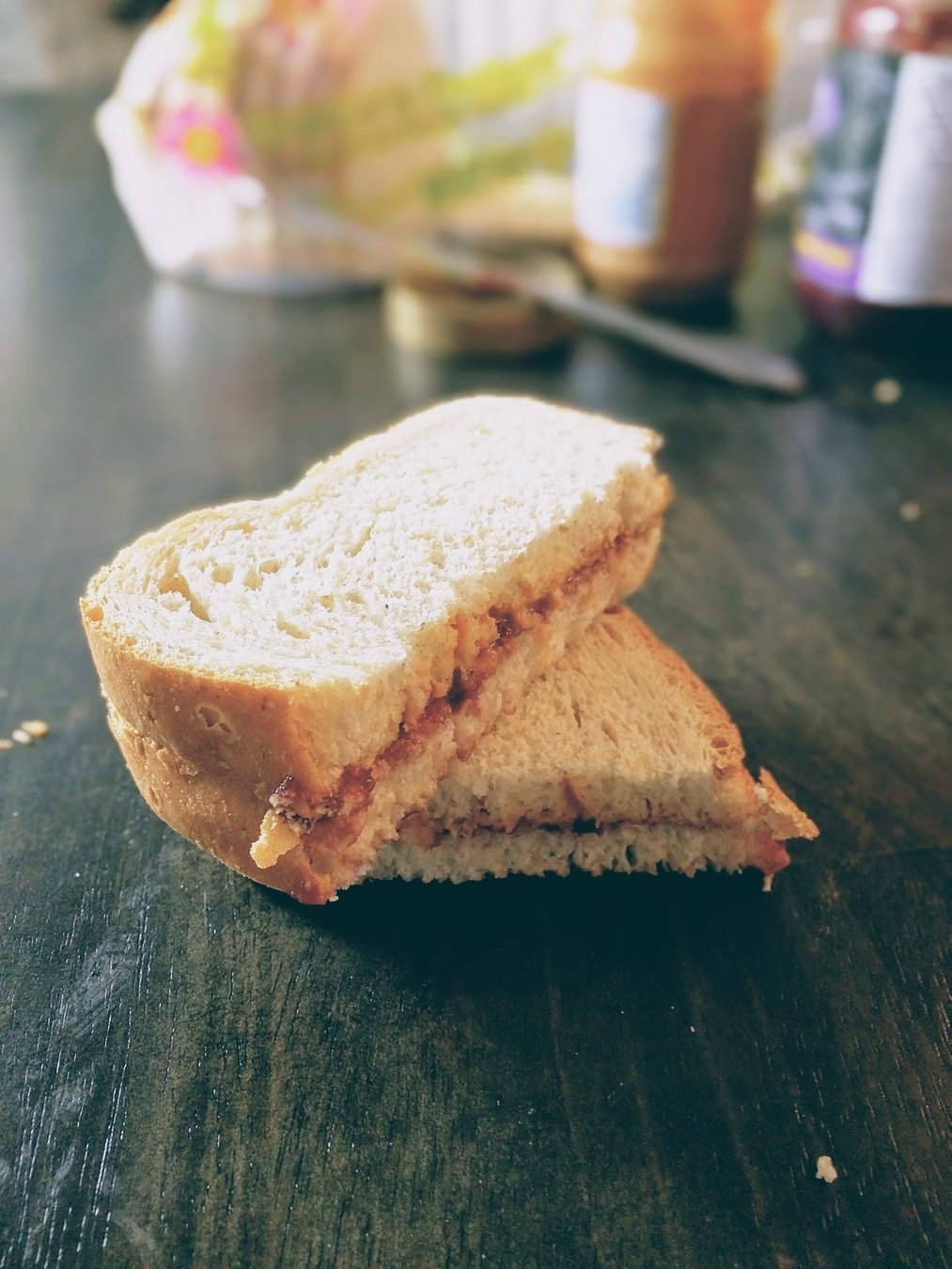
Imperative Process

- Pull out two pieces of bread.
- Grab the peanut butter and jam.
- Get out a butter knife.
- Lay the pieces of bread on a flat surface.
- Open the peanut butter
- Dip the knife in the peanut butter and scoop about 2 tablespoons worth out of the jar....
Declarative Process

- Make a sandwich.
- Give sandwich to child.
- Enjoy some of the hidden snacks while your child is occupied.
What does this look like with Vue?
Code Example (js)
  var app = new Vue({
    el: '#app',
    data: {
      show: {
        sections: {
          'q1': true,
          'q2': false,
          'submit': false
        }
      },
      answers: {
        'style':'',
        'students': 1
      }
    },
    methods: {
      toggleQuestion (section) {
        this.show.sections[section] = !this.show.sections[section];
      },
      submitQuestionnaire () {
        // your ajax method here
        if( ! this.validateAnswers() ) {
          swal('Oops!', 'You didn`t answer one or more questions correctly. Try again.', 'error');
          return;
        }
        swal('Way to go, Tiger!', 'Your answers have been received!', 'success');
      },
      validateAnswers () {
           return this.answers.students >= 1
                  && this.answers.style === 'block'
                  || this.answers.style === 'manuscript'
      }
    }
  });
Code Example (html)
<form name="questionnaire-form" method="post" action="">
  <!-- Question 1 -->
  <div class="question heading">
    <h3>Do you prefer Block Print or Manuscript?</h3>
  </div>
  <div class="answer bookStyle" v-show="show.sections.q1">
    <input type="radio" name="image_option" id="blockimage" value="block" checked="checked"
        v-model="answers.style">
        <label class="btn block" for="blockimage">Block Print</label>

    <input type="radio" name="image_option" id="manuscript" value="manuscript"
        v-model="answers.style">
        <label for="manuscript">Manuscript</label>

    <p class="continue"><a href="#"
        @click.prevent="toggleSection('q2')">Continue</i></a></p>
  </div>

  <!-- Question 2 -->
  <div class="question heading">
    <h3>How many students are you purchasing the curriculum for?</h3>
  </div>
  <div class="answer numStudents" v-show="show.sections.q2">
    <input type="number" name="num-students" min="1" value="1"
        v-model="answers.students.number">
        <label for="num-students">Students</label>

    <!-- Continue -->
    <p class="continue"><a href="#"
        @click.prevent="toggleSection('submit')">Continue</a></p>
    </div>
  </div>
  <!-- Submit -->
  <div class="answer text-right" v-show="show.sections.submit">
    <div class="col-sm-8">
      <input type="submit" value="Calculate Curriculum"
          @click.prevent.stop="submitQuestionnaire">
    </div>
  </div>
</form>
Directives
are special attributes that apply reactive behavior to the rendered DOM.
Directives (v-show)
<!-- index.html -->
  <!-- Question 2 -->
  ...
  <div class="answer numStudents" v-show="show.sections.q2">
    ...
  </div>
// questionnaire.js
const app = new Vue({
el: "#app",
data: {
show: {
sections: {
'q1': true,
'q2': false,
'submit': false
}
}
}
});
Directives (v-on)
  <!-- Question 1 -->
  ...
    <a href="#" v-on:click.prevent="toggleSection('q2')">Continue</a>
const app = new Vue({
el: "#app",
data: {
show: {
sections: {
'q1': true,
'q2': false,
'submit': false
}
}
},
methods: {
toggleSection (section) {
this.show.sections[section] = ! this.show.sections[section];
}
}
});
Directives (v-on)
  <!-- Submit -->
  ...
    <input type="submit" value="Calculate Curriculum"
          @click.prevent.stop="submitQuestionnaire">
data: {
show: {...},
answers: {
'students': 1,
'style': 'block'
},
methods: {
toggleSection (section) {...},
submitQuestionnaire () {
if( ! this.validateAnswers() ) {
alert('Oops! You didn`t answer one or more questions correctly.');
return false;
}
document.questionnaireForm.submit();
},
validateAnswers () {
return this.answers.students >= 1
&& this.answers.style === 'block'
|| this.answers.style === 'manuscript'
}
}
Data Binding (v-model)
<input type="radio" name="text_style" value="block" v-model="answers.style">
<input type="radio" name="text_style" value="manuscript" v-model="answers.style">
<input type="number" name="num-students" min="1" value="1" v-model="answers.students">
    data: {
      show: {...},
      answers: {
        'students': 1,
        'style': 'block'
    },
    methods: {
        toggleSection (section) {...},
        submitQuestionnaire () {
            if( ! this.validateAnswers() ) {
              alert('Oops! You didn`t answer one or more questions correctly.');
              return false;
            }
            document.questionnaireForm.submit();
        },
        validateAnswers () {
            return this.answers.students >= 1
                && this.answers.style === 'block'
                || this.answers.style === 'manuscript'
        }
    }
Data Binding (demo)


Components
Components
<!-- index.html -->
...
   <rh-questionnaire></rh-questionnaire>
...
<script src="js/components/questionnaire.js"></script>
// questionnaire.js
const rhQuestionnaire = Vue.component('rhQuestionnaire', {
template: `<form name="questionnaire-form">...</form>`,
data () {
return {
show: { ... },
answers: { ... }
}
},
methods: {...}
});
const app = new Vue({
el: '#app',
components: {
rhQuestionnaire
}
});Components
Product Form
component
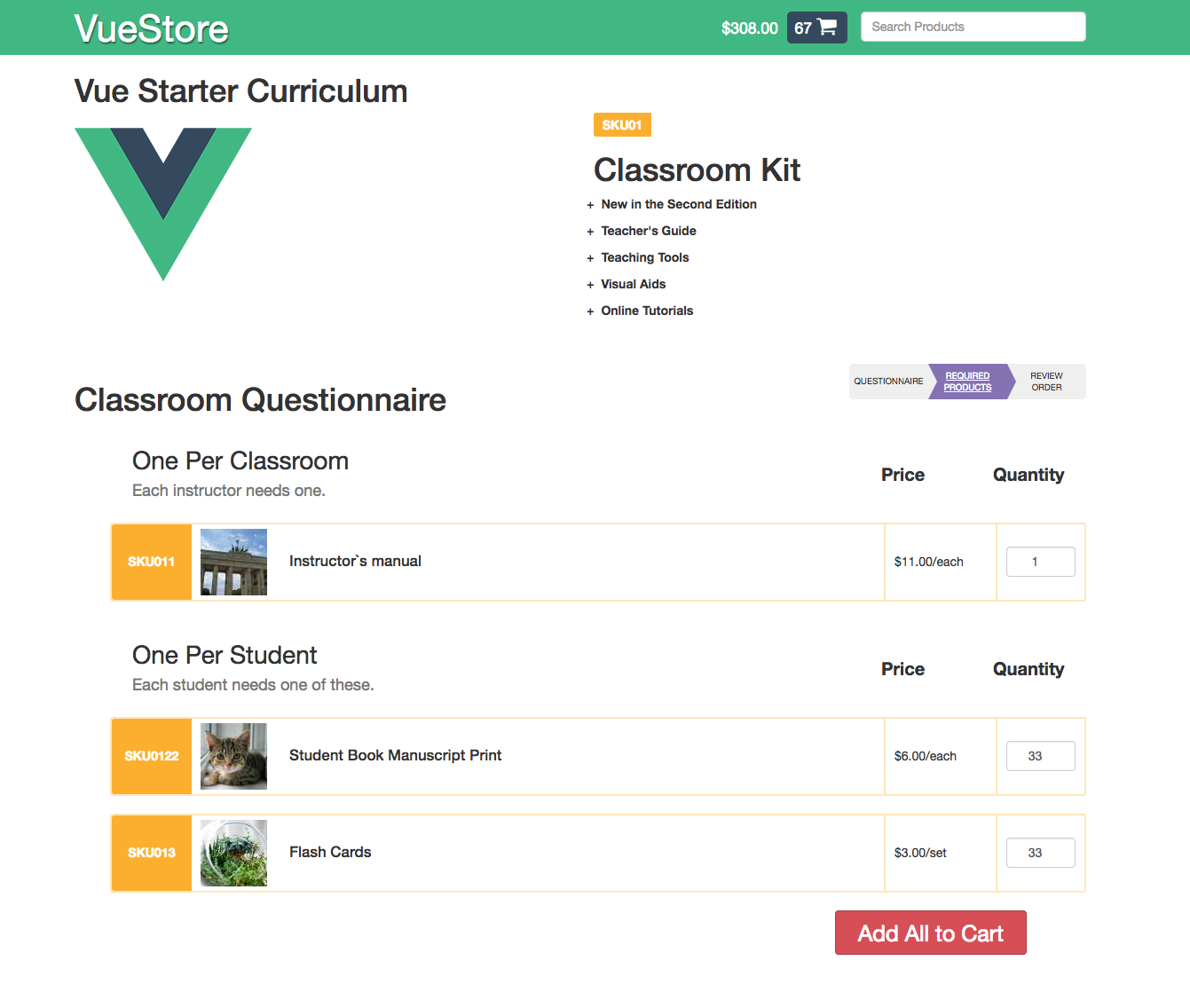
Components
<!-- index.html -->
...
   <rh-questionnaire></rh-questionnaire>
   <rh-product-form :products="myProductsArray"></rh-product-form>
...
<script src="js/components/product-row.js"></script>
<script src="js/components/product-form.js"></script>
// product-form.js
const rhProductForm = Vue.component('rhProductForm', {
props: ['products'],
template: `<form name="product-form">...
<product-row v-for="product in products" :product="product"></product-row>
... </form>`,
components: { productRow }
data () {...},
methods: {...}
});
const app = new Vue({
el: '#app',
components: {
rhQuestionnaire,
rhProductForm
}
});Components
Product Form
Product Row
Client-side Routing
VueRouter
VueRouter
<!-- index.html -->
  ...
    <router-view></router-view>

<script src="vendor/js/vue.min.js"></script>
<script src="vendor/js/vue-router.min.js"></script>
<script src="js/main.js"></script>
<!-- component scripts -->
// main.js
const router = new VueRouter({
routes: [
{ path: '/', component: 'rhQuestionnaire' },
{ path: '/products', component: 'rhProductForm' },
{ path: '/review', component: 'rhReviewOrder' }
]
});
var app = new Vue({
router, // shorthand for router: router
data: { ... }
}).$mount('#app');VueRouter
<!-- index.html -->
  ...
<ul>
    <router-link to="/">Questionnaire</router-link>
    <router-link to="/products">Required Products</router-link>
    <router-link to="/review">Review Order</router-link>
</ul>

====

<!-- rendered html -->
<ul>
    <a class="router-link-active">Questionnaire</a>
    <a class="">Required Products</a>
    <a class="">Review Order</a>
</ul>
<!-- index.html -->
...
<ul>
<router-link tag="li" to="/"><a>Questionnaire</a></router-link>
<router-link tag="li" to="/products"><a>Required Products</a></router-link>
<router-link tag="li" to="/review"><a>Review Order</a></router-link>
</ul>
====
<!-- rendered html -->
<ul>
<li class="router-link-active"><a>Questionnaire</a></li>
<li class=""><a>Required Products</a></li>
<li class=""><a>Review Order</a></li>
</ul>
VueRouter
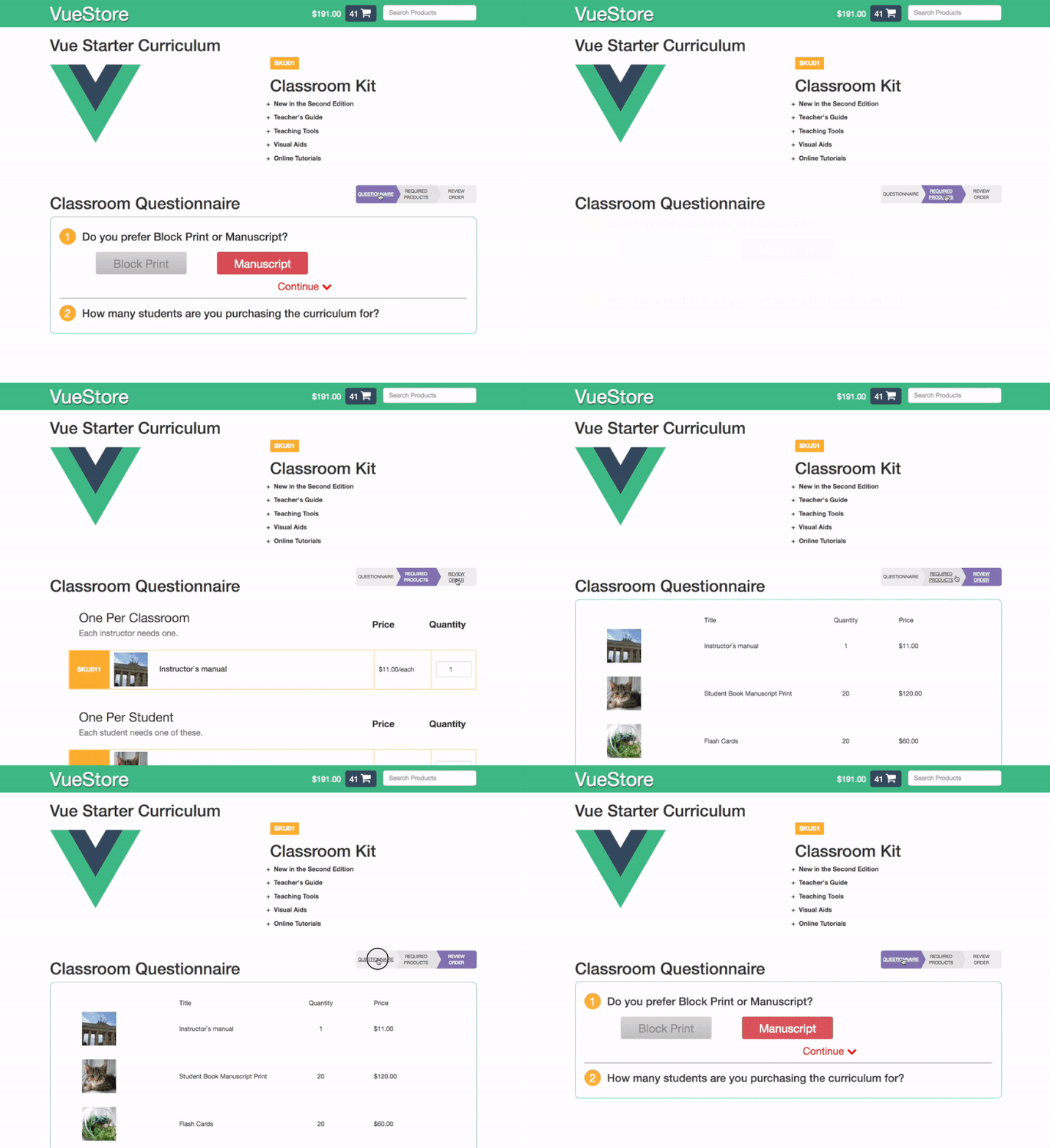
VueRouter
// questionnaire.js
...
    template: `...
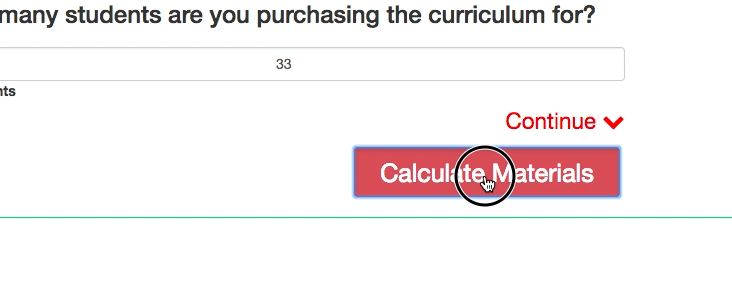
        <input type="submit" @click.prevent="submitQuestionnaire" value="Calculate Materials">
    ...`,
    methods: {...
        submitQuestionnaire () {
            if (! this.validateAnswers()) {...}
            this.$router.push('/products');
        }
    }
});
But wait, there's more!
- Nested routes
- Named views
- Route guards
- Lifecycle hooks
- and more!
State Management
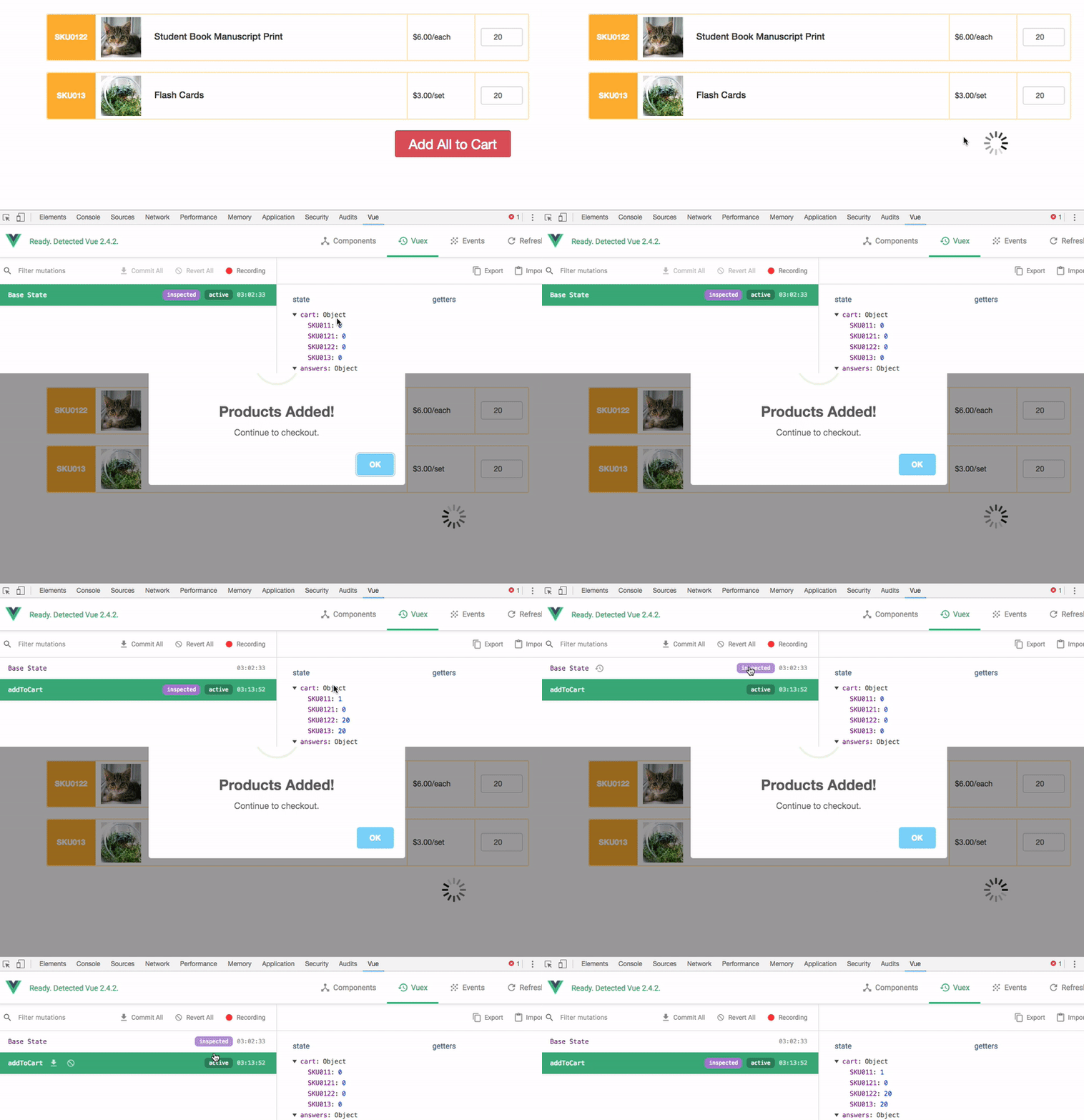
Vuex
State Management Pattern + Library

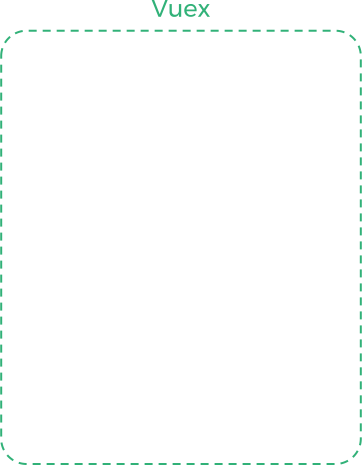
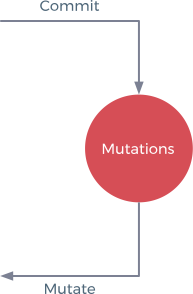
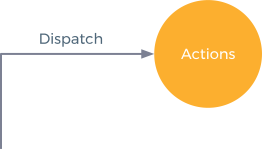
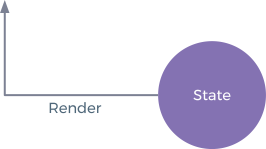

Vuex
//store.js
const store = new Vuex.Store({
  state: {
    cart: {
      'SKU011': 1,
      ... },
    answers: {...},
    products: [...]
  },
  mutations: {
    addToCart (state, products) {
      new Map( Object.entries(products) ).forEach((quantity, sku)=>{
        if(state.cart[sku]){
          state.cart[sku] += quantity
        }else {
          Vue.set(state.cart, sku, quantity);
        }
      });
    }
  },
  actions: {
    addToCart (context, products) {
      myApi.addToCart(products)
        .then((response) => {
          context.commit('addToCart', response.data.products)
        })
        .catch((error) => {
          // log error and inform user ...
        });
    }, ...
  }
});
Vuex
//product-form.js
data () {
    return {
        localCart: {...},
        isSubmitting: false
    }
},
computed: {
    answers () { return this.$store.state.answers; }
},
methods: {
    addToCart () {
        if(! this.validateForm()) return false;
        this.isSubmitting = true;
        this.$store.dispatch('addToCart', this.localCart)
          .then( () => swal('Products Added!', 'Continue to checkout.', 'success') )
          .then( (res) => {
            if(res){
              this.goToCheckout();
            }
          })
          .catch((error) => { // handle error })
          .then(()=>{ this.isSubmitting = false; });
    },
    updateSuggestedQuantities(){
        this.studentProducts.map((product)=>{
            this.localCart[product.sku] = this.answers.students;
        });
    },
    goToCheckout () {
        this.$router.push({path:'review'});
    },
    validateForm () { return true; }
}, ...
Vuex
Ryan Hightower
social: @ryanhightower
email: ryan@yours.co

hate mail: up@yours.co
https://yours.co
Global State Obejct
<!-- indext.html -->
<script>
    const state = {
        products: [
          {
            sku: 'SKU011',
            price: 10,
            category: 'curriculum',
            img: '/imgs/instructor-manual.png'
          }, ...
        ],
        cart: {
            'SKU011': 0,
            'SKU012': 0,
            ...
        },
        answers: {...}
    }
</script>
Global State Obejct
<!-- indext.html -->
<script>
    const state = {
        products: [...]
        cart: {...}
        answers: {...}
    }
</script>
// questionnaire.js
template: `...`,
data: {
answers: state.answers,
show: {...},
},
methods: {...}
...
// product.js
    template: `...`,
    data: {
        answers: state.answers,
        products: state.products,
        cart: state.cart
    },
    methods: {...}
...
Global State Obejct
// product-form.js
    template: `
        <h3>One Per Student</h3>
        <li is="rh-product-row"
            v-for="product in studentProducts"
            :cart="cart"
            :product="product"></li>
    `,
    data: {
        answers: state.answers,
        products: state.products,
        cart: state.cart
    },
    computed: {
        studentProducts () { ... },
    },
    methods: {
        updateSuggestedCartValues () {
            this.studentProducts.map((product)=>{
                this.cart[product.sku] = this.answers.students;
            });
        }
    },
    created () { // Lifecycle Hook: This happens when the component is loaded
                 // by the Router before being displayed on the page
        updateSuggestedCartValues();
    }
...
Global State Obejct
// review-order.js
    template: `
      <ul>
        <li v-for="product in cartProducts">
          {{ product.title }}  |  subtotal: {{ '$' + product.price * cart[product.sku] }}

        </li>
      </ul>
    `,
    data: {
        products: state.products,
        cart: state.cart
    },
    computed: {
        cartProducts () {
            return this.products.filter((product)=>{
                return this.cart[product.sku] > 0;
            });
        }
    },
    methods: {...}
...
Wait a minute...


The Vue from up Here
By Ryan Hightower
The Vue from up Here
Scaling up with a Progressive Javascript Framework.