ThreeJS
An introduction to 3d graphics on the web
Graphics on the web
CSS
.my-cool-design {
  background: red;
  border: 1px solid black;
  color: white;
}
<div class="my-cool-design">
Hello World
</div>- Used mostly for UI
- Declarative
- Realy Optimized by the browser vendors
- Not ideal for custom shapes/graphics
<svg width="391" height="391" viewBox="-70.5 -70.5 391 391">
<rect fill="#fff" stroke="#000" x="-70" y="-70" width="390" height="390"/>
<g opacity="0.8">
	<rect x="25" y="25" width="200" height="200" fill="lime"
    		stroke-width="4" stroke="pink" />
	<circle cx="125" cy="125" r="75" fill="orange" />
	<polyline points="50,150 50,200 200,200 200,100" stroke="red"
    		stroke-width="4" fill="none" />
	<line x1="50" y1="50" x2="200" y2="200" stroke="blue" stroke-width="4" />
</g>
</svg>
- XML based like HTML
- Vector graphics
- Could be used for complex drawing/visualization like graphs (d3)
- Easy to use with JS/CSS/HTML
- Used for designs and scalable images
- Uses DOM tree with complex drawings it becomes slow
- Used also as an image format by all design apps
const canvas = document.getElementById('canvas');
const ctx = canvas.getContext('2d');

ctx.beginPath();
ctx.arc(75, 75, 50, 0, Math.PI * 2, true); // Outer circle
ctx.moveTo(110, 75);
ctx.arc(75, 75, 35, 0, Math.PI, false);  // Mouth (clockwise)
ctx.moveTo(65, 65);
ctx.arc(60, 65, 5, 0, Math.PI * 2, true);  // Left eye
ctx.moveTo(95, 65);
ctx.arc(90, 65, 5, 0, Math.PI * 2, true);  // Right eye
ctx.stroke();
- Fast enough for most 2d rendering
- Easy to learn
- Widely used for graphic-intensive
applications like graphs - 2d only
- Could be used for Image manipulation

class CheckerboardPainter {
  paint(ctx, geom, properties) {
    const colors = ['red', 'green', 'blue'];
    const size = 32;
    for(let y = 0; y < geom.height/size; y++) {
      for(let x = 0; x < geom.width/size; x++) {
        const color = colors[(x + y) % colors.length];
        ctx.beginPath();
        ctx.fillStyle = color;
        ctx.rect(x * size, y * size, size, size);
        ctx.fill();
      }
    }
  }
}
registerPaint('checkerboard', CheckerboardPainter)
<style>
textarea {
background-image: paint(checkerboard);
}
</style>
<textarea></textarea>
<script>
CSS.paintWorklet.addModule('checkerboard.js');
</script>
WebGL
- Low-level graphics API (OpenGL for web)
- Programmable shaders GLSL
- Very fast rendering on GPU
- 2D/3D graphics
- Very hard to learn
- Requires lots of Math
- Follows OpenGL ES 2.0 standard
- Used as a rendering target for lots
- Has two versions
- Limited/Legacy
WebGPU
- New General purpose GPU API
- Modern API built on top (Vulkan, Metal, DirectX12)
- New Shading language WGSL
- Full control over the GPU but very verbose
- Still WIP
- Desktop Implementations (wgpu-rs)
Where is ThreeJS?
- ThreeJS is a 3D rendering engine used to create 3D content on the web
- It uses multiple rendering backends (Canvas, WebGL, WebGPU)
- It has a scene graph
- It abstracts a lot of complex stuff (Math, Loading, Scene graph)
- Really powerful
- Similiar libs (BabylonJS, PixiJS(only 2d))
3D World
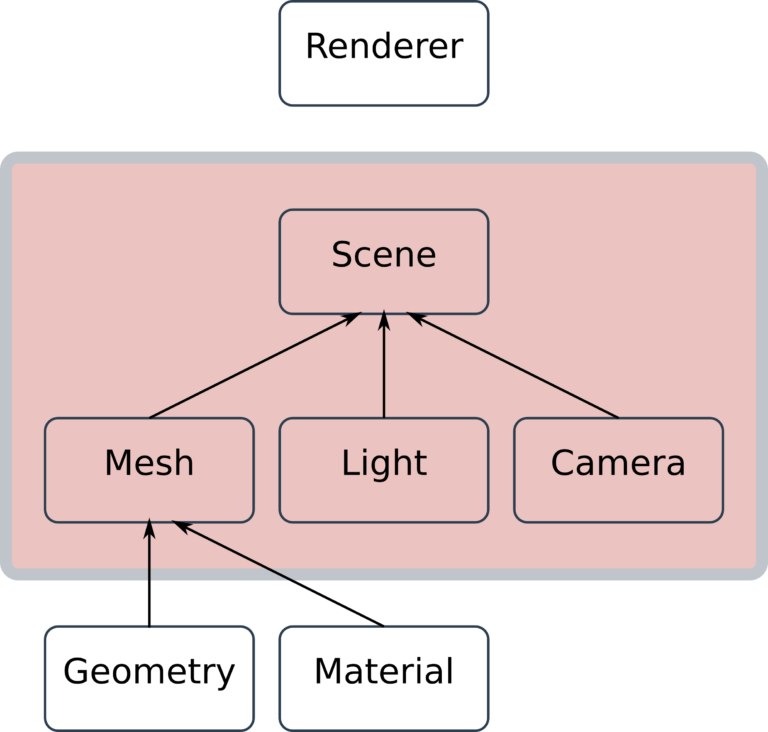
Scene
This is the base class for most objects in three.js and provides a set of properties and methods for manipulating objects in 3D space.
Object3D
Scenes allow you to set up what and where is to be rendered by three.js. This is where you place objects, lights and cameras.
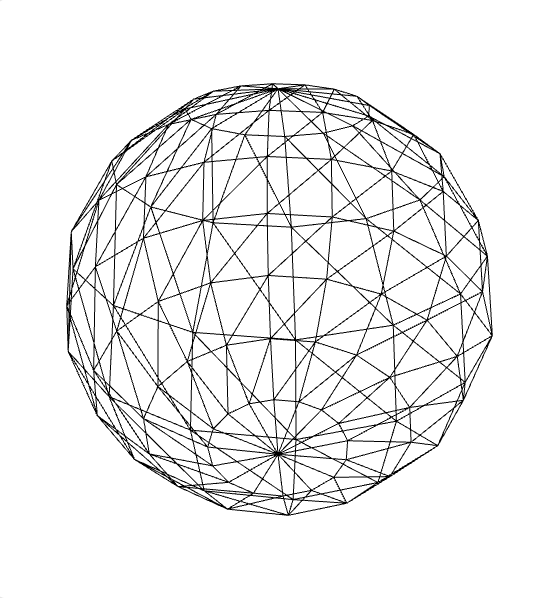
Class representing triangular polygon mesh-based objects and composed of two concepts:
- Geometry – The 3D object’s geometric form
- Material – The visual aspect of their rendering options (color, brightness, opacity, texture…)
Mesh

Like in our real world, our virtual universe needs lighting for us to observe its component elements.
Thus, lighting is an important actor in our application. Without light, it would usually be impossible to view 3D objects in a scene.
There exists a large, diverse range of light classes
Light
The Camera is an indispensable element of all Three.JS applications. We use this special object from the scene to define the position and observational angle of the point of view.
Camera
A camera that uses perspective projection.
This projection mode is designed to mimic the way the human eye sees. It is the most common projection mode used for rendering a 3D scene.
PerspectiveCamera
Represents the 3D engine that will be used to generate the 3D rendering in our Scene, from the point of view of a Camera.
There are several types of Renderer, Most used one is the WebGLRenderer
Renderer
Let's bring it all together
Demos
?
Introduction to 3D graphics on the we
By Salama Ashoush