TypeScript
Advanced
I am not gonna
- Give some tips/tricks to memorize.
- Write runtime/react/etc code with typescript
- Cover everything about typescript
I am gonna
- Teach you how to write type-level algorithms.
- Explain different ways to think about types.
- Make you do a lot of exercises from easy to god level
But most importantly
- We will struggle together.
- I am not a guru (like Matt Pocock).
- I can and will make mistakes.
Types & Values
Javascript
doesn't have types, so naturally all of JavaScript is value-level code:
// A simple Javascript function:
function sum(a, b) {
  return a + b;
}
Typescript
Let us add type annotations to JavaScript and make sure the sum function we wrote will never be called with anything other than numbers
// Using type annotations:
function sum(a: number, b: number): number {
  return a + b;
}
But the type system of TypeScript is much more powerful than that.
The real-world code we write sometimes needs to be generic and to accept types we don't know in advance.
// Using type level programming:
function genericFunction<A, B>(a: A, b: B): DoSomething<A, B> {
  return doSomething(a, b);
}
This is what type-level programming is!
// This is a type-level function:
type DoSomething<A, B> = ...

// This is a value-level function:
const doSomething = (a, b) => ...
The language of types
Type-level TypeScript is a minimal, purely-functional language.
type SomeFunction<A, B> = [A, B];
/*                ----    ------
                   ^         \
                  type        return type
               parameters

     \-------------------------/
                 ^
              Generic
*/
Type-level TypeScript doesn't have a lot of features. After all it was designed exclusively to type your code! That said, it does have enough features to be (almost) Turing Complete, which means you can solve problems of arbitrary complexity with it.
Here are some of the things you can do with Type-Level TypeScript:
- Code branching: executing different code paths depending on a condition.
- Variable assignment: declaring a variable and using it in an expression.
- Functions: re-usable bits of logic like the one we have seen in the previous example.
- Loops: usually through recursion.
-
Equality checks:
==but for types! - And much more!
And here are some things you can not do:
-
No Mutable state: You can't re-assign a variable to a new value at the type level.
- No Input/Output: You can't perform side effects
- No Higher-Order Functions: You can't pass a function to another function in type-level TypeScript.
Challenge time
Types are just data
Every programming language is about transforming data and Type-level TypeScript is no exception
TypeScript provides us with 5 main categories of types:
Five categories of types
type Primitives =
  | number
  | string
  | boolean
  | symbol
  | bigint
  | undefined
  | null;
type Literals =
| 20
| "Hello"
| true
| 10000n
/* | ... */;type DataStructures =
| { key1: boolean; key2: number } // objects
| { [key: string]: number } // records
| [boolean, number] // tuples
| number[]; // arraystype Union = X | Y;
type Intersection = X & Y;An interesting feature of TypeScript is that a value can belong to more than one type.
Types are sets
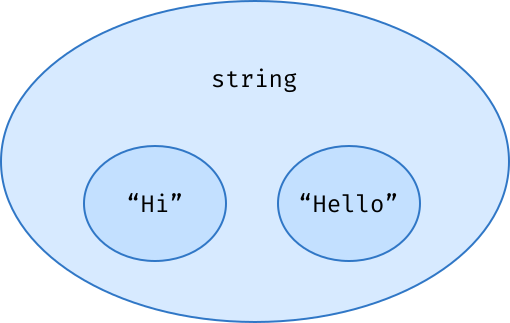
the value 2 can be assigned to a variable of type number, but also to a variable of type 2, or even of type 1 | 2 | 3. This property is called subtyping
it means that types can be included in other types, or, in other words, that types can be subsets of other types.
let hi: "Hi" = "Hi";
let hello: "Hello" = "Hello";

let greeting: string;

greeting = hi; // ✅ type-checks!
greeting = hello; // ✅ type-checks!

hello = greeting; // ❌ doesn't type-check!
Everything we have seen so far looks somewhat similar to concepts we are used to at the value level, but unions and intersections are different. They are really specific to the type level, and building a good mental model of how they work is essential, although a little more challenging.
Unions and Intersections
We tend to think of | and & as operators, but in fact, they are data structures too.
Creating the union X | Y doesn't turn X and Y into a new opaque type the way an operator would. Instead, it puts X and Y in a sort of box, from which we can extract them later.
// either a value of type X or of type Y
type Union = X | Y;
// a value that is simultaneously of type X and Y
type Intersection = X & Y;
when you start thinking about types as sets of values, assignability becomes much more intuitive — “A is assignable to B” means “the set B includes all values within the set A”, or “A is a subset of B”.
Types are sets
let greeting: string = "Hello";
let age: number = greeting; // ❌ doesn't type-check.
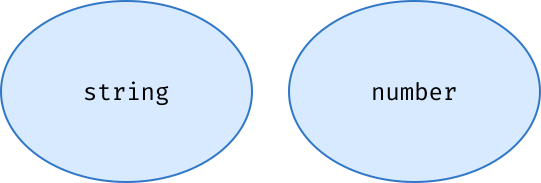
The type string and the type number are mutually exclusive: they don't overlap because no value can belong to both sets at the same time.
Unions join sets together
type CanCross = "green" | "orange";
type ShouldStop = "orange" | "red";

// this is equivalent to "green" | "orange" | "red"
type TrafficLight = CanCross | ShouldStop;

let canCross: CanCross = "green";
let shouldStop: ShouldStop = "red";

let trafficLight: TrafficLight;
trafficLight = shouldStop; // ✅
trafficLight = canCross; // ✅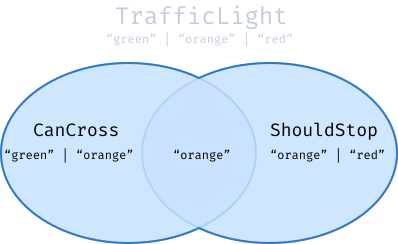
TrafficLight is a superset of CanCross and of ShouldStop.
Notice that "orange" is there only once in TrafficLight. This is because sets can't contain duplicates so neither can union types.
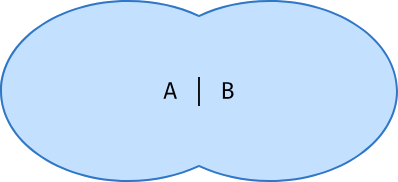
If you know a bit of Set Theory, you know that the union of two sets is the set containing those 2 sets, so A | B is the type containing all values of type A and all values of type B
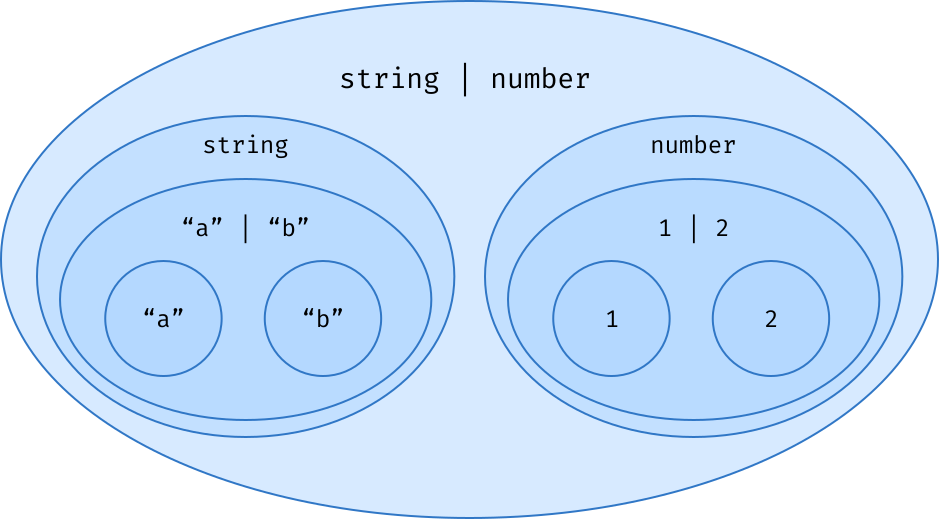
Union types contribute to the creation of a hierarchy of nested sets within which every type belongs. Since we can always put 2 types in a union, we can create an arbitrary number of subtyping levels:
At this point, you may be wondering, if all types can belong to other types, when does this hierarchy of nested types stop? Is there a type that's the final boss and contains every other possible type in the universe?
unknown — the top of the subtyping hierarchy
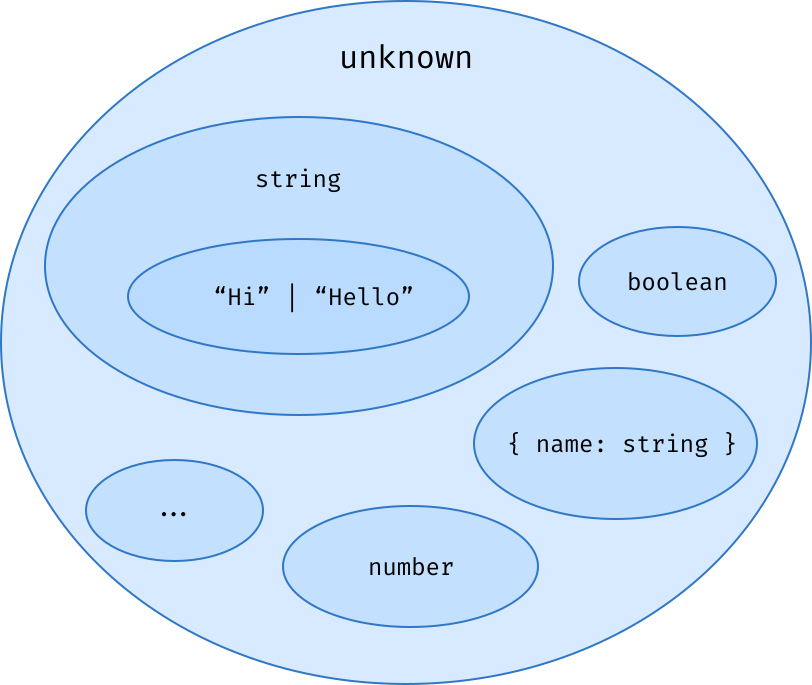
// You can assign anything to a variable of type unknown:
let something: unknown;
something = "Hello";            // ✅
something = 2;                  // ✅
something = { name: "Alice" };  // ✅
something = () => "?";          // ✅
// it also means you can't do much with a variable of type unknown
// because TypeScript doesn't have a clue about the value it contains!
let something: unknown;
something = "Hello";
something.toUpperCase();
//       ^ ❌ Property 'toUpperCase' does not exist on type 'unknown'.
unknown — the top of the subtyping hierarchy
The union of any type A with unknown will always evaluate to unknown. That makes sense because, by definition, A is already contained in unknown:
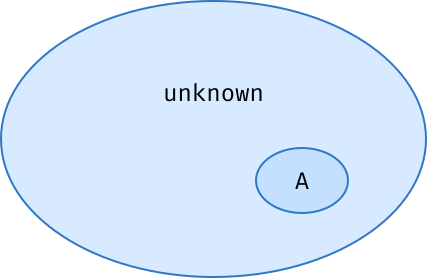
A | unknown = unknown
A & unknown = A
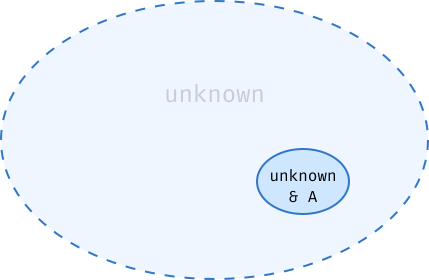
The intersection of any type A with unknown is the type A:
That's because intersecting a set A with a set B means extracting the part of A that also belongs to B! Since any type A is inside unknown, A & unknown is just A
Intersections
Intersections are just the opposite of unions: A & B is the type of all values that simultaneously belong to A and to B:
type WithName = { name: string };
type WithAge = { age: number };

function someFunction(input: WithName & WithAge) {
  // `input` is both a `WithName` and a `WithAge`!
  input.name; // ✅ property `name` has type `string`
  input.age; // ✅ property `age` has type `number`
}
what happens if we try to intersect two types that do not overlap at all? What does it even mean to intersect string and number for instance?
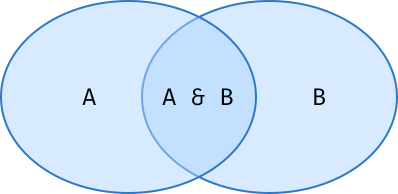
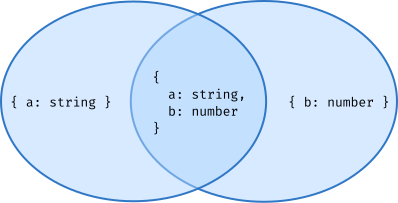
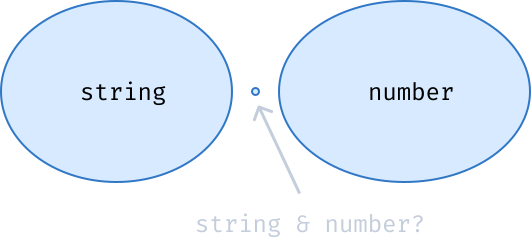
Intersections are particularly convenient with object types because the intersection of 2 objects A and B is the set of objects that have all properties of A and all properties of B:
never — the empty set
The type never doesn't contain any value, so we can use it to represent values that should never exist at runtime. For instance, a function that always throws will return a value of type never
function panic(): never {
  throw new Error("🙀");
}
const oops: never = panic(); // ✅
An interesting property of never is that it's a subtype of every other types — it's at the very bottom of our hierarchy of sets. That means you can assign a value of type never to any other type:
const username: string = panic(); // ✅ TypeScript is ok with this!
const age: number = panic(); // ✅ And with this.
const theUniverse: unknown = panic(); // ✅ Actually, this will always work.
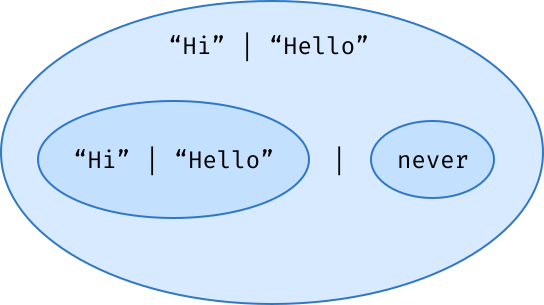
If you put never in a union with an existing union type, it leaves it unchanged:
type U = "Hi" | "Hello" | never;
// is equivalent to:
type U = "Hi" | "Hello";
// It's just like merging an empty set with another set.
A | never = A
// what if you intersect A with never
A & never = never // ?
What about any?
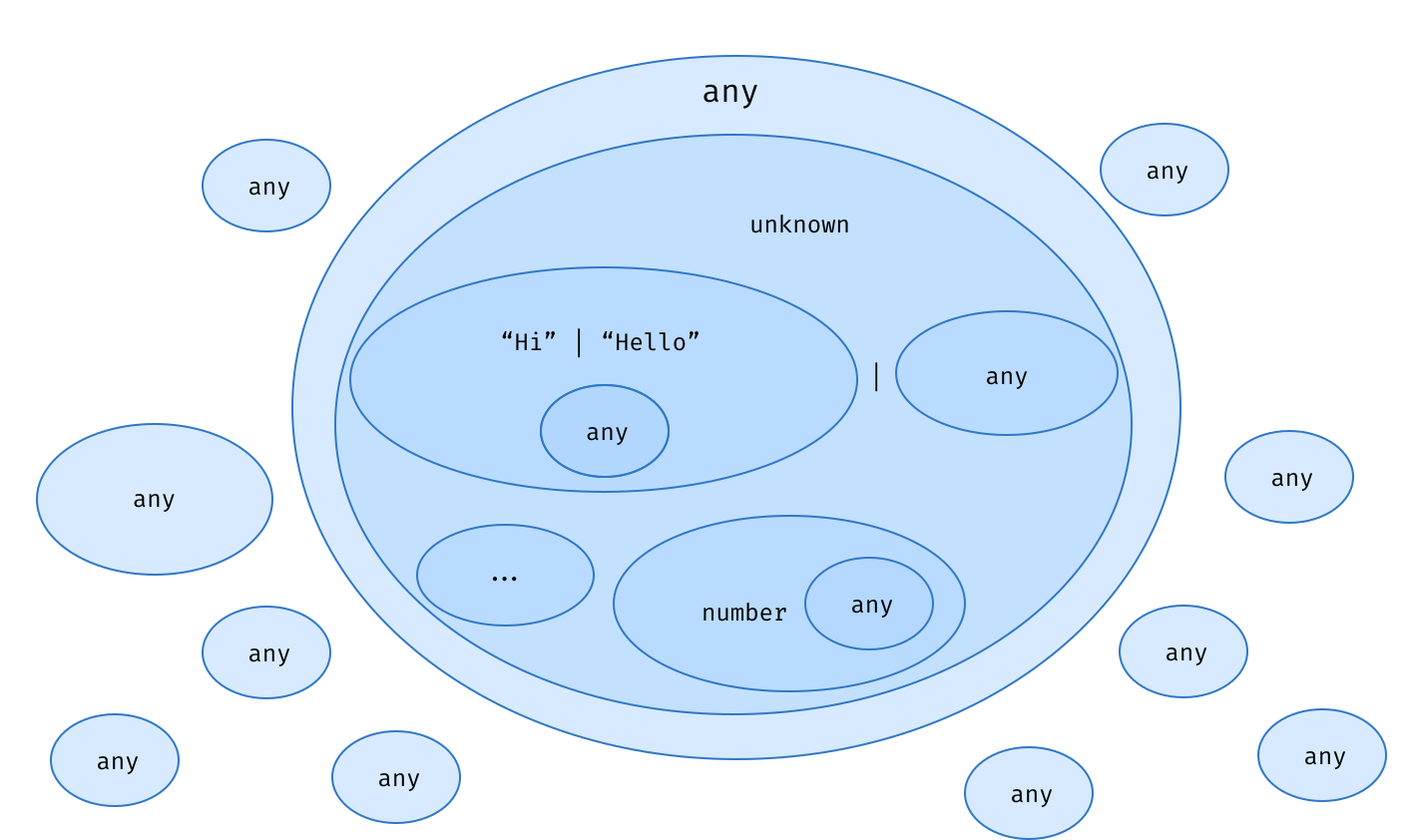
any doesn't fit well in our mental model because it doesn't respect the laws of Set Theory. any is both the supertype and the subtype of every other TypeScript type. any is all over the place:
A | any = any
A & any = any
Summary
- In our type-level programs, types are just data.
- There are 5 main categories of types: primitives, literals, data structures, unions, and intersections.
- Types are sets. Once you wrap your head around this concept, everything starts to make sense!
- Union types are data structures that join sets together.
-
unknownis the final superset — it contains every other type. -
neveris the empty set — it is contained in every other type. -
anyis weird because it's the subset and the superset of every type.
Challenge time
Objects & Records
Object types
type User = {
  name: string;
  age: number;
  isAdmin: boolean;
};

// ✅ this object is in the `User` set.
const salama: User = {
  name: "Salama",
  isAdmin: true,
  age: 28,
};

// ❌
const bob: User = {
  name: "Bob",
  age: 45,
  // <- the `isAdmin` key is missing.
};

// ❌
const peter: User = {
  name: "Peter",
  isAdmin: false,
  age: "45" /* <- the `age` key should be of type `number`,
                   but it's assigned to a `string`. */,
};
Assignability of objects
const alice: User = {
  name: "Alice",
  age: 35,
  isAdmin: true,
  bio: "...",
/* ~~~~~~~~~
       ^  ❌ This doesn't type-check. */
};
If you try assigning an object to a variable with an explicit type annotation like what we've been doing so far, TypeScript will reject extra properties,
What if we were assigning a pre-existing object with extra properties to alice instead?
const looksLikeAUser = {
  name: "Alice",
  age: 35,
  isAdmin: true,
  bio: "...", // <- extra prop!
};

// ✅ This works just fine!
const alice: User = looksLikeAUser;
The definitive answer is that objects with more properties are assignable to objects with fewer properties, but in contexts where objects are defined inline, TypeScript has extra rules to make sure we don't mistakenly assign props that we couldn't use afterward because our types would forbid us to do so.
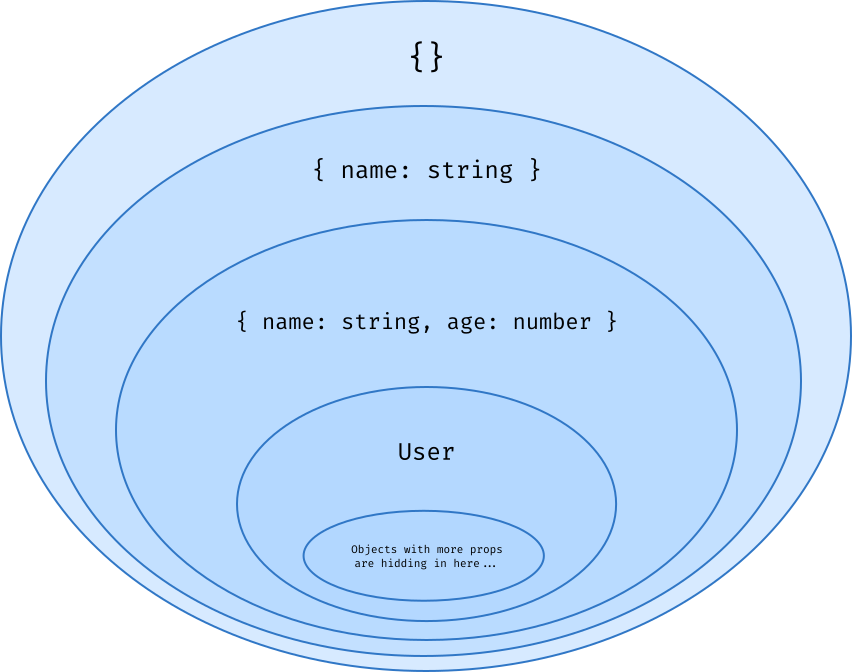
You have absolutely no guarantee that an object of some type does not contain extra props!
Working with Object types
type User = { name: string; age: number; isAdmin: boolean };

// reading props
type Age = User["age"]; // => number
type Role = User["isAdmin"]; // => boolean
// dot notation does not work with types
type Age = User.age;
//             ^ ❌ syntax error!

// you can read multipe props at once with unions
type NameOrAge = User["name" | "age"]; // => string | number
// is the same as
type NameOrAge = User["name"] | User["age"]; // => string | number

// retrieve the union of all keys in an object type
type Keys = keyof User; // "name" | "age" | "isAdmin"

// Since keyof returns a union of string literals, we can combine it with the square brackets notation
// to retrieve the union of the types of all values in this object!
type UserValues = User[keyof User]; //  string | number | boolean

// we can even create a generic utilty for it
type ValueOf<Obj> = Obj[keyof Obj];
type UserValues = ValueOf<User>; //  string | number | boolean
Working with Object types
type BlogPost = { title: string; tags?: string[] };
//                                   ^ this property is optional!

// ✅ No `tags` property
const blogBost1: BlogPost = { title: "introduction" };

// ✅ `tags` contains a list of strings
const blogBost2: BlogPost = {
  title: "part 1",
  tags: ["#easy", "#beginner-friendly"],
};

// why do we need some special syntax where it we could do that?
type BlogPost = { title: string; tags: string[] | undefined };
const blogBost1: BlogPost = { title: "part 1" };
//             ^ ❌ type error: the `tags` key is missing.

// ✅
const blogBost2: BlogPost = { title: "part 1", tags: undefined };
Working with Object types
type WithName = { name: string };
type WithAge = { age: number };
type WithRole = { isAdmin: boolean };
// we can merge object with &
type User = WithName & WithAge & WithRole;
type Organization = WithName & WithAge; // organizations don't have a isAdmin
It turns out that the intersection of two objects contains the union of their keys
type A = { a: string };
type KeyOfA = keyof A; // => 'a'

type B = { b: number };
type KeyOfB = keyof B; // => 'b'

type C = A & B;
type KeyOfC = keyof C; // => 'a' | 'b'
Conversely, the union of two objects contains the intersection of their keys
type A = { a: string; c: boolean };
type KeyOfA = keyof A; // => 'a' | 'c'

type B = { b: number; c: boolean };
type KeyOfB = keyof B; // => 'b' | 'c'

type C = A | B;
type KeyOfC = keyof C;
// => ('a' | 'c') & ('b' | 'c') <=> 'c'
Another way to think about this is that if you have a value of either type A or type B, the only key that will be present in both cases is "c".
keyof (A & B) = (keyof A) | (keyof B)
keyof (A | B) = (keyof A) & (keyof B)
Caveats of intersections of objects
First, intersections are applied recursively on all object properties, so if some property is present on both types it will be intersected too!
type WithName = { name: string; id: string };
type WithAge = { age: number; id: number };
type User = WithName & WithAge;

type Id = User["id"]; // => string & number <=> neverSecondly, intersections of objects can sometimes be detrimental to type-checking performance
If your type definitions are static (meaning that they don't depend on type parameters), you can achieve the same result using interfaces and the extends keyword
interface User extends WithName, WithAge, WithRole {}
interface Organization extends WithName, WithAge {}
Records
Just like Object types, Records also represent sets of objects. The difference is that all keys of a record must share the same type.
// You can read this as "any key assignable to string has a value of type boolean.
type RecordOfBooleans = { [key: string]: boolean };
// Records can also be defined using the built-in Record generic:
type RecordOfBooleans = Record<string, boolean>;
// which is defined as follows
type Record<K, V> = { [Key in K]: V };
// you can also use union of string litrals for keys
type InputState = Record<"valid" | "edited" | "focused", boolean>;
// or without using record
type InputState = { [Key in "valid" | "edited" | "focused"]: boolean };
// Which is equivalent to:
type InputState = { valid: boolean; edited: boolean; focused: boolean };
Helper functions
type Props = { value: string; focused: boolean; edited: boolean };
type PartialProps = Partial<Props>; // makes all props as optional
// is equivalent to:
type PartialProps = { value?: string; focused?: boolean; edited?: boolean };
type Props = { value?: string; focused?: boolean; edited?: boolean }
type RequiredProps = Required<Props>; // makes all props as required
// is equivalent to:
type RequiredProps = { value: string; focused: boolean; edited: boolean };
type Props = { value: string; focused: boolean; edited: boolean };
// removes all keys that aren't assignable to the type of key
type ValueProps = Pick<Props, "value">;
// is equivalent to:
type ValueProps = { value: string };
type SomeProps = Pick<Props, "value" | "focused">;
// is equivalent to:
type SomeProps = { value: string; focused: boolean };type Props = { value: string; focused: boolean; edited: boolean };
// removes all object properties that are assignable to given type
type ValueProps = Omit<Props, "value">;
// is equivalent to:
type ValueProps = { edited: boolean; focused: boolean };
type OtherProps = Omit<Props, "value" | "focused">;
// is equivalent to:
type OtherProps = { edited: boolean };Summary
- Object types and Records both represent sets of JavaScript objects.
- Object types are sets of objects containing at least all properties defined on this type, but they can also contain more properties.
- Record types are sets of objects that share the same type for all properties.
- Intersections let us "merge" objects together in types containing all of their properties.
- TypeScript provides several built-in functions like
Partial,Required,PickandOmitto transform object types.
Challenge time
Arrays & Tuples
Tuples
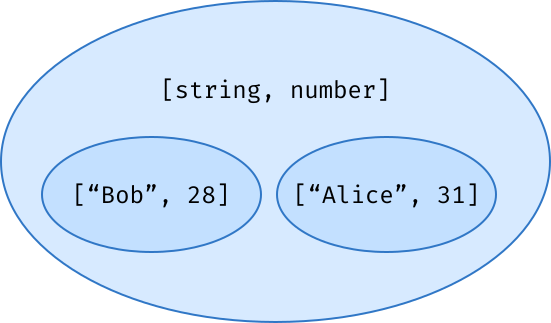
Tuple types define sets of arrays with a fixed length, and each index can contain a value of a different type.
For example, the tuple [string, number] defines the set of arrays containing exactly two values, where the first value is a string and the second value is a number
type Empty = [];
type One = [1];
// types can be different!
type Two = [1, "2"];
// tuples can contain duplicates
type Three = [1, "2", 1];
Working with Tuples
type SomeTuple = ["Bob", 28, true];
// you can access a value inside a tuple by using a numerical index
type Name = SomeTuple[0]; // "Bob"
type Age = SomeTuple[1]; // 28
// you can also read several indicies
type NameOrAge = SomeTuple[0 | 1]; // => "Bob" | 28
// you can read all indicies with the number type
type Values = SomeTuple[number]; // "Bob" | 28 | true

// concat
type Tuple1 = [4, 5];
type Tuple2 = [1, 2, 3, ...Tuple1]; // => [1, 2, 3, 4, 5]

// merge
type Tuple1 = [1, 2, 3];
type Tuple2 = [4, 5];
type Tuple3 = [...Tuple1, ...Tuple2]; // => [1, 2, 3, 4, 5]
// ... are called Variadic Tuples

// Named indcies help disambiguate the purpose of values of the same type
type User = [firstName: string, lastName: string];

// Optional indecies
type OptTuple = [string, number?];
//                             ^ optional index!
const tuple1: OptTuple = ["Bob", 28]; // ✅
const tuple2: OptTuple = ["Bob"]; // ✅
const tuple3: OptTuple = ["Bob", undefined]; // ✅
//    ^ we can also explicitly set it to `undefined`
Arrays
In TypeScript, array types are extremely common.
They represent sets of arrays with an unknown length. All of their values must share the same type, but since this type can be a union, they can also represent arrays of mixed values
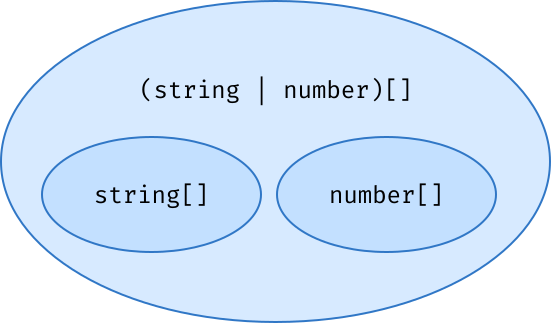
Working with Arrays
type Tags = string[];
type Users = Array<User>; // same as `User[]`
type Bits = (0 | 1)[]; // you can use unions for item type

// Extracting the type in an Array
type SomeArray = boolean[];
type Content = SomeArray[number]; // boolean

// you can mix Arrays and Tuples
// number[] that starts with 0
type PhoneNumber = [0, ...number[]];

// string[] that ends with a `!`
type Exclamation = [...string[], "!"];

// non-empty list of strings
type NonEmpty = [string, ...string[]];

// starts and ends with a zero
type Padded = [0, ...number[], 0];
Tuples & Function Arguments
type UserTuple = [name: string, age?: number, ...addresses: string[]];
// It looks just like functions arguments
function createUser(name: string, age?: number, ...addresses: string[]) {}
// We could also have used our UserTuple to type the same function:
function createUser(...args: UserTuple) {
  const [name, age, ...addresses] = args;
  //     ~~~~  ~~~     ~~~~~~~~~
  //      ^     ^          ^
  //  string   number   string[]
}
createUser("Gabriel", 29, "28 Central Ave", "7500 Greenback Ln"); // ✅
createUser("Bob"); // ✅ `age` is optional and addresses can be empty.
createUser("Alice", 0, false);
//                     ~~~~~ ❌ not a `string`!
// Using tuples to type function parameters can be convenient
// if you want to share the types of parameters between several different functions
function createUser(...args: UserTuple) {}
function updateUser(user: User, ...args: UserTuple) {}
// or if your function has several signatures:
type Name =
  | [first: string, last: string]
  | [first: string, middle: string, last: string];

function createUser(...name: Name) {}
createUser("Gabriel", "Vergnaud"); // ✅
createUser("Gabriel", "Léo", "Vergnaud"); // ✅
createUser("Gabriel"); // ❌
createUser("Oups", "Too", "Many", "Names"); // ❌
Leading Rest Elements
type ZipWithArgs<I, O> = [
  ...arrays: I[][], // <- Leading rest element!
  zipper: (...values: I[]) => O
];

declare function zipWith<I, O>(...args: ZipWithArgs<I, O>): O[];
const res = zipWith(
  [0, 1, 2, 3, 4],
  [1930, 1987, 1964, 2013, 1993],
  [149, 170, 186, 155, 180],
  (index, year, height) => {
    // index, year, and height are inferred as
    // numbers!
    return [index, year, height];
  }
)
// You couldn't type this function with regular parameter types
// because the JavaScript syntax doesn't support leading rest elements
declare function zipWith<I, O>(
  ...arrays: I[][], /* ~~~
   ^ ❌ A rest parameter must be last in a parameter list */
  fn: (...values: I[]) => O
): O[];
The good news is that they are supported at the type level!
Summary
In this chapter, we learned about the true arrays of the type level — Tuples.
We have seen how to create them, how to read their content, and how to merge them to form bigger tuples!
We have also talked about Array types, which represent arrays with an unknown number of values all sharing the same type. Arrays and tuples are complementary — we can mix them together in variadic tuples.
Challenge time
Conditional Types
if (trafficLight === "green") go();
else stop();
After learning about the many kinds of types we can play with in the three previous chapters, it's time to implement our first type-level algorithms! We finally get to write some actual code in the language of types. Yay! 🎉🎉🎉
Being a Turing Complete programming language, the type system of TypeScript of course supports code branching! But what are use cases for executing different code paths in our types, and how would we even do that? Let's find out!
Anatomy of a Conditional Type
type TrueOrFalse = A extends B ? true : false;
/*                 -----------   ----   -----
                      ^          /         \
                 condition    branch     branch
                             if true    if false

                   \-------------------------/
                                ^
                        Conditional Type
*/
Since the language of types is functional, it tends to guide developers towards writing expressions rather than statements.
There are no if or else statements at the type level. Instead, we will exclusively write ternary expressions using ? and :
The extends keyword
type IsMeaningOfLife<N> = N extends 42 ? true : false;

type OK = IsMeaningOfLife<42>; // => true
type KO = IsMeaningOfLife<41>; // => false
"A extends B" means "Is A assignable to B?"
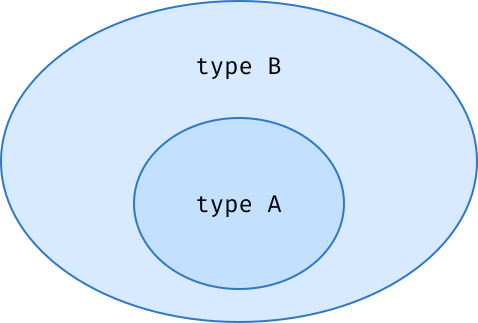
We check if N is assignable to the literal 42, return true if it is, and false if it isn't. With a literal type on the right-hand side, extends essentially behaves like an ==
type IsMeaningOfLife<N> = N extends 42 ? true : false;

type wat = IsMeaningOfLife<never>;
//   ?^ never 🤔
type T1 = Expect<Equal<wat, true>>; // ❌
type T2 = Expect<Equal<wat, never>>; // ✅
consider never a special case. When put on the left side of extends in a conditional type, it always evaluates to never
type If<A extends boolean, B, C> = A extends true ? B : C;

type a = If<true, number, string>; // number
type b = If<false, {}, []>; // []
we can even implement an If type-level function that takes a boolean, two arbitrary types and returns one or the other depending on the boolean value:
As you can see, we use the extends keyword twice here. Once after the type parameter A, and another time in the A extends true condition. Even though we use the same keyword, these two occurrences of extends don't exactly have the same meaning.
// The boolean type has 4 subtypes: true, false, boolean and never.
// Remember never, the empty set? It's a subtype of every other type
type T1 = If<true, number, string>; // ✅ => number
type T2 = If<false, number, string>; // ✅ => string
type T3 = If<never, number, string>; // ✅ => never
type T4 = If<"not a boolean", number, string>;
//           ~~~~~~~~~~~~~~~ ❌ not assignable to type `boolean`.
let us make sure that one of our type-level function's parameters will always be assignable to some type.
Intuitively, you can think of constraints as a way to type our type-level function parameters. They are the types of our types! 🤯
Type constraints
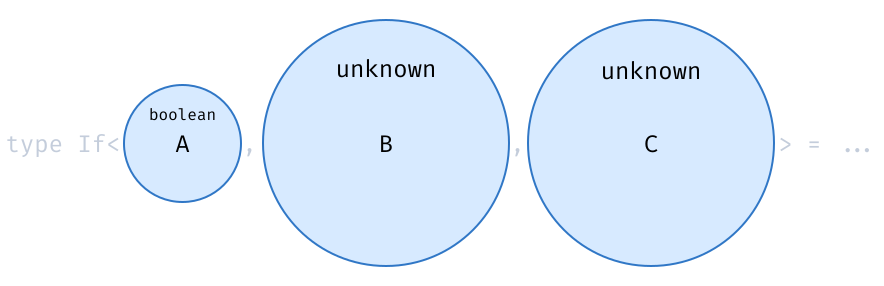
By default, type parameters have no constraints, which is equivalent to constraining them with the unknown type:
// Imagine we have a function taking a string and wrapping it in an object
const createUser = <S>(name: S) => ({ name });
// If we give this function the string "Salama"
// we hope to get a value of type {name: "Salama"} back
const user = createUser("Salama");
//     ^? { name: string } 😿
const createUser = <S extends string>(name: S) => ({ name });
//                              👆
//              We add a `string` constraint on `S`.
const user1 = createUser("Salama");
//      ^? { name: "Salama" } 🎊
const user2 = createUser("Alice");
//      ^? { name: "Alice" } 🎈
Type constraints can not only prevent invalid inputs, but also make TypeScript infer precise types for our parameters
Narrowing input types
When TypeScript sees a constraint on a type parameter, it will try to infer it to a subtype of this constraint! We are going to use this a lot in upcoming chapters to write functions that lift as much information as possible to the type level and improve their type safety.
const inferAsTuple = <
  T extends [unknown, ...unknown[]]
  //                  👆
  //   We use a non-empty array of unknown values.
>(tuple: T) => tuple;

const t1 = inferAsTuple([1, 2]);
//    ^? [number, number]
// instead of number[]

const t2 = inferAsTuple(["a", 2, true]);
//    ^? [string, number, boolean]
// instead of (string | number | boolean)[]
Regular arrays like number[] aren't assignable to a non-empty array but tuples are. By constraining the set of possible inputs of this function, we make TypeScript infer a more precise type that keeps track of the length and the type of each index of this array.
// Nested conditions
type GetColor<I> =
    I extends 0 ? "black"
  : I extends 1 ? "cyan"
  : I extends 2 ? "magenta"
  : "white";
Granted, nested ternaries are a little hard to read sometimes. The thing is, the type-level language doesn't provide us with many alternatives for code branching, so we have to roll with them.
Nesting conditions
type GetColor<I extends 0 | 1 | 2 | 3> = {
  0: "black";
  1: "cyan";
  2: "magenta";
  3: "white";
}[I];
// Note that it only works thanks to the type constraint on I.
// Without it, we would get the following error:
// Type 'I' cannot be used to index type
// '{ 0: "black"; 1: "cyan"; 2: "magenta"; 3: "white"; }'. (2536)
That said, There is an interesting trick when branching on unions of literals. We can declare an object type with a key for each of our cases, and use our literal as a property accessor:
type IsUser<T> =
  T extends { name: string; age: number }
    ? true
    : false;

type T1 = IsUser<{ name: "Salama" }> // => false
type T2 = IsUser<{ name: "Alice", age: 32 }> // => true

// Pattern matching is powerful because it's recursive.
// We can simultaneously check several properties of our types,
// at any depth of nesting:
type IsUser<T> = T extends {
  name: string;
  team: { memberCount: number };
}
  ? true
  : false;

type T1 = IsUser<{
  name: "Salama";
  team: {
    memberCount: 12;
    name: "sign"; // <- extra prop
  };
}>; // => true

type T2 = IsUser<{ name: "Alice" }>; // => false
Pattern Matching
type Plan = "basic" | "pro" | "premium";
type Role = "viewer" | "editor" | "admin";

// branching on several types by wrapping
// them in a tuple:
type CanEdit<P extends Plan, R extends Role> =
  [P, R] extends ["pro" | "premium", "editor" | "admin"]
  ? true
  : false;

type T1 = CanEdit<"basic", "editor">; // => false
type T2 = CanEdit<"premium", "viewer">; // => false
type T3 = CanEdit<"pro", "editor">; // => true
type T4 = CanEdit<"premium", "admin">; // => true
Using pattern matching, we can also branch on several type parameters at once. We only need to wrap them in a data structure first, like a Tuple
Since extends checks if the type on the left is assignable to the type on the right, we can use it with any type, however complex. Neat!
// Here, the function GetRole checks
// if User is assignable to { name: string; role: any }.
// If it is, we declare a variable Role
// that contains the type of the role property and we return it.
// If User isn't assignable to this pattern, we return the never type.
type GetRole<User> =
  User extends { name: string; role: infer Role }
    ? Role //                          ^ new! 🤔
    : never;

type T1 = GetRole<{ name: "Salama"; role: "admin" }>;
// => 'admin'

type T2 = GetRole<{ role: "user" }>;
// => `never` because the input type doesn't have a `name` property.

// you can give any name to your variable.
// You can only use it in the truthy code branch:
type GetRole<User> =
  User extends { name: string; role: infer lol }
    /*                                     👆
                               We can give it any name!     */
    ? lol // ✅ we can use `lol` here
    : lol // ❌ but not here.
infer is the real superpower of Conditional Types. It enables us to declare a type variable by destructuring the type on the left-hand side of extends
The infer keyword
type GetRole<User> =
  User extends { role: infer Role } ? Role : never;

// `GetRole` is the type-level equivalent of:
const getRole = ({ role }) => role;
infer might look similar in spirit to JavaScript's Destructuring Assignments
The infer keyword
type Fn<A> = A extends { a: { deeply: { nested: { prop: infer P } } } }
  ? P
  : never; // We have to handle the "else" case too!
But since infer can only be used on the right-hand side of extends, it makes Conditional Types even more similar to Pattern Matching
Notice that we don't even need to add a type constraint on our type parameter to be able to pattern-match on it. It's ok because we have to handle the falsy case anyway.
type Head<Tuple> = Tuple extends [infer First, ...any] ? First : never;
// `Head` is the type-level equivalent of:
const head = ([first]) => first;
type T1 = Head<["alpha", "beta", "gamma"]>; // => "alpha"
type T2 = Head<[]>; // => never

// or the rest of the list
type Tail<Tuple> = Tuple extends [any, ...infer Rest] ? Rest : [];
// `Tail` is the type-level equivalent of:
const tail = ([first, ...rest]) => rest;
type T1 = Tail<["alpha", "beta", "gamma"]>; // => ["beta", "gamma"];
type T2 = Tail<["alpha"]>; // => []
type T3 = Tail<[]>; // => []

// You're also allowed to use infer several times in a pattern
type FirstAndLast<Tuple> = Tuple extends [infer First, ...any[], infer Last]
  ? [First, Last]
  : [];

type T1 = FirstAndLast<[1]>; // => []
type T2 = FirstAndLast<[1, 2]>; // => [1, 2]
type T3 = FirstAndLast<[1, 2, 3]>; // => [1, 3]
type T4 = FirstAndLast<[1, 2, 3, 4]>; // => [1, 4]
infer can be used inside any kind of type-level data structure, including tuples!
infer with Tuples
// this type
type IsEqual = (a: number, b: number) => boolean;
// contains the same type-level information as this one
type IsEqual = {
  inputs: [a: number, b: number];
  output: boolean;
};
at the type level, function types are data structures too!
infer with function types
// get list of parameters as a tuple using infer
type Parameters<F> = F extends (...params: infer P) => any ? P : never;
type Fn = (name: string, id: number) => boolean;
type T1 = Parameters<Fn>; // => [name: string, id: number]

// get the return type
type ReturnType<F> = F extends (...params: any[]) => infer R ? R : never;
type Fn = (name: string, id: number) => boolean;
type T1 = ReturnType<Fn>; // => boolean

// Parameters<F> and ReturnType<F> are actually built into TypeScript's standard library.
// Now you know how they are implemented!
With that in mind, it makes sense that we can use infer inside function types too!
can also be used in place of a generic type parameter. For example, you can extract the type of values contained in a Set with it
infer with custom generics
type SetValue<S> = S extends Set<infer V> ? V : never;

type T1 = SetValue<Set<number>>; // => number
type T2 = SetValue<Set<string>>; // => string

// you can do the same with your genrics as well
type MyOwnGeneric<A, B> = { content: A; children: B[] };

type ExtractParams<S> = S extends MyOwnGeneric<infer A, infer B>
  ? [A, B]
  : never;

type T1 = ExtractParams<MyOwnGeneric<number, boolean>>;
// => [number, boolean]
type T2 = ExtractParams<MyOwnGeneric<string[], unknown>>;
// => [string[], unknown]
how to assign a local variable in a type-level expression!
Variable assignment
type Fn<I> = SuperHeavyComputation<I> extends infer Result
  //                                     ^  🤯  ^
  ? [Result, Result, Result]
  : never; // this branch can never be reached
That's right! We can use infer directly after extends. This will have the effect of assigning the result of SuperHeavyComputation<I> to a variable. The downside is that we need to declare an "else" code branch even though we know it will never be reached because any type is assignable to infer Result.
There is no standard syntax for declaring block-scoped variables at the type level. This is a shame because we know how much more readable the code can be by declaring intermediary variables with sensible names. It can also help performance — we can store the result of an expensive computation to reuse it multiple times later without having to recompute it every time.
But as often with TypeScript, there is a trick:
- At the type level, we use Conditional Types for code branching.
- Conditional types must be of the form
A extends B ? T : F. A extends Bmeans "A is assignable to B".- We can also use
extendsto declare a type constraint on a type parameter. - The
inferkeyword lets us assign a variable by extracting a piece from a data-structure type. infercan only be used within a conditional type, on the right-hand side ofextends.- Even though conditional types look like value-level ternaries, they are much more powerful because they let us pattern-match on types.
Summary
Challenge Time
Loops with Recursive Types
Two styles of loops
// imaginary imperative language 🤖
do that;
while (condition is true) {
  do this repetitive thing;
}
// and don't ask questions, computer!
Most programming languages we use today are spiritual children of the C language. They have a similar syntax and are grounded in an imperative programming style. In the imperative style, we tell the computer what to do in a series of instructions that should be executed sequentially, in the right order.
To tell the computer that a block of code should be executed several times, we have keywords like while or for. This programming style is definitely the most common. Python, JavaScript, Ruby, Go, and many, many other languages support this.
Type-level TypeScript, however, does not support imperative programming. Just like other functional languages, it tends to use functions for everything, including loops! If we want to perform a repetitive task, we just call the same function over and over again.
// Using JS as a functional language 🌈
const doRepetitiveTask = (some, input) =>
  condition === true
    ? doRepetitiveTask(again, withSomeOtherInput) // <- recursion
    : something;
Our doRepetitiveTask function calls itself from the inside in order to keep looping. This is called recursion
// Here is our previous example again,
// but this time written in the language of types:
type DoRepetitiveTask<Some, Input> =
  Condition extends true
    ? DoRepetitiveTask<Again, WithSomeOtherInput>
    : Something
Here is our previous example again, but this time written in the language of types:
Notice that we did not need any new syntax to write a loop. We already covered all the necessary building blocks in previous chapters:
- Defining and calling functions with Generic Types.
- Code branching with Conditional Types.
A recursive loop always contains a condition. If it did not, the loop would never stop and the type-checker wouldn't be happy about your code. That's why the official documentation refers to these types as Recursive Conditional Types.
Using recursion instead of a for loop may feel like a constraint at first, but know that every imperative loop can be rewritten as a recursive one, without exception. Mutating temporary variables is replaced by passing different arguments to our recursive function, and breaking the loop is just returning a value (or a type!)
Looping over Tuples
// Columns contain lists of values
type Column = {
  name: string;
  values: unknown[];
};

// A table is a non-empty list of columns
type Table = [Column, ...Column[]];

// `UserTable` is a subtype of `Table`:
type UserTable = [
  { name: "firstName"; values: string[] },
  { name: "age"; values: number[] },
  { name: "isAdmin"; values: boolean[] }
];
Recursively looping on an array consists of three steps:
- Splitting the list into two parts: the first element and the rest of the list.
- Computing something using the first element.
- Recursively calling the function on the rest of the list.
Looping over Tuples
const users: UserTable = [
  { name: "firstName", values: ["Gabriel", "Bob", "Alice"] },
  { name: "age", values: [29, 43, 31] },
  { name: "isAdmin", values: [true, false, false] },
];
const firstNames = getColumn(users, "firstName");
// We would like `firstNames` to be inferred as a `string[]`
const isAdmins = getColumn(users, "isAdmin");
// and `isAdmins` to be inferred as a `boolean[]`

declare function getColumn<
  T extends Table,
  N extends string
>(table: T, columnName: N): GetColumn<T, N>;
/*                          ~~~~~~~~~~~~~~~
 *                               ^ 🤔
 */
Now, let's say we want to write a getColumn(table, columnName) function that takes a table, a column name, and returns the values inside this column. We also would like the return type of getColumn to be inferred based on the provided column name:
What should the type signature of this function look like?
// We need to define a type-level GetColumn function that finds the right column in the list:
type Result1 = GetColumn<UserTable, "firstName">;
//         ^?  string[]
type Result2 = GetColumn<UserTable, "isAdmin">;
//         ^?  boolean[]


type GetColumn<List, Name> = // 🤯
  List extends [infer First, ...infer Rest] // we pattern-match on the list!
    ? First extends { name: Name, values: infer Values } // if the name is the right one
      ? Values // we return the `Values` property!
      : GetColumn<Rest, Name> // Call the same function with the rest of the list!
    : undefined; // We choose to return undefined if the list is empty.

declare const products: [
  { name: "productName"; values: string[] },
  { name: "price"; values: number[] },
  { name: "location"; values: [lat: number, long: number][] }
];

const locations = getColumn(products, "location");
//            ^?  [lat: number, long: number][]

const result2 = getColumn(products, "oops");
// ^? undefinedWow. This is by far the most complex type we've seen in this workshop!
The Structure of a recursive loop
type SomeLoop<List /* ... other params */> =
  // 1. Split the list:
  List extends [infer First, ...infer Rest]
    // 2. Compute something using the first element.
    //    Maybe recurse on the `Rest`:
    ? SomeLoop<Rest /* ... modified params */>
    // 3. Return a default type if the list is empty:
    : SomeDefault;
All recursive loops share a similar structure. The pattern we have seen in the previous example will come up over and over again:
If you have been writing JavaScript or TypeScript for a while, you probably know about map, filter and reduce. These are native array methods that encapsulate loops
return [1, 2, 3, 4]
  .map((x) => x * x)               // [1, 4, 9, 16]
  .filter((x) => x > 5)            // [9, 16]
  .reduce((sum, x) => sum + x, 0); // 25
map, filter and reduce are Higher-Order Functions. This barbarian name only means these functions take other functions as parameters. At the type level, it is unfortunately not possible to pass a function as a parameter to another function
map loops
// map loop structure
type SomeMapLoop<List> =
  List extends [infer First, ...infer Rest]
    ? [ /* ... 🤖 your logic */ , ...SomeMapLoop<Rest>]
    : [];

// Example
type Names = ToNames<[
  { id: 1; name: "Alice" },
  { id: 2; name: "Bob" }
]>;
// => ["Alice", "Bob"]

type ToNames<List> =
  List extends [infer First, ...infer Rest]
    ? [GetName<First>, ...ToNames<Rest>]
    : [];

type GetName<User> =
  User extends { name: infer Name } ? Name : "Anonymous";
filter loops
// filter loop structure
type SomeFilter<List> =
  List extends [infer First, ...infer Rest]
    ? First extends  /* ... ❓ your condition */
      ? [First, ...SomeFilter<Rest>]
      : SomeFilter<Rest>
    : [];

// Example
type Numbers = OnlyNumbers<[1, 2, "oops", 3, "hello"]>;
// => [1, 2, 3]

type OnlyNumbers<List> =
  List extends [infer First, ...infer Rest]
    ? First extends number
      ? [First, ...OnlyNumbers<Rest>]
      : OnlyNumbers<Rest>
    : [];
reduce loops
// reduce loop structure
type SomeReduce<Tuple, Acc = /* ... 📦 initial value */> =
  Tuple extends [infer First, ...infer Rest]
  ? SomeReduce<Rest, /* ... 🤖 logic */>
  : Acc;
// Example
type User = FromEntries<[
  ["name", "Gabriel"],
  ["age", 29]
]>;
// => { name: "Gabriel"; age: 29 }

type FromEntries<Entries, Acc = {}> =
  /* `Acc` is optional, with a `{}` default value */
  Entries extends [infer Entry, ...infer Rest]
    ? FromEntries<
        Rest,
        Entry extends [infer Key, infer Value]
          ? Acc & { [K in Key]: Value }
          : Acc
      >
    : Acc;
A reduction operation needs two things:
- An initial value for the accumulator.
- Some logic to compute the next value of our accumulator from its previous value and the current list element.
reduce loops
// FromEntries is Tail-Recursive
type FromEntries<Tuple, Acc = {}> = ...
  ? FromEntries<...> // <- Because we just return the recursive
  //                       result, without modifying it.
  : ...;
Another interesting aspect of this code is that it is Tail-Recursive.
Tail-Recursiveness means that we do not update the result of the recursive call in any way before returning it
This is an important detail because TypeScript can perform tail-recursion elimination on tail-recursive types, tail-recursive functions can take larger inputs and have better type-checking performance than regular recursive functions.
Recursion and Type Constraints
type Append<Tuple extends any[], Element> = [...Tuple, Element];
//                         👆
//       `tuple` has to be assignable to `any[]`

type T1 = Append<[1, 2], 3>; // ✅ [1, 2, 3]
type T2 = Append<{ oops: "!" }, 3>;
/*               ~~~~~~~~~~~~~
                 ^ ❌ not assignable to any[]
In the previous chapter, we learned that putting type constraints on type parameters was a nice way of ensuring that no unexpected inputs could be given to one of our type-level functions. Constraints are filling the role of types for our types!
As our types become more complex, this extra safety is even more relevant, so why haven't we been putting constraints on parameters in previous examples?
type User = { name: string };

type ToNames<List extends User[]> =
  // Expects a list of users 👆
  List extends [{ name: infer Name }, ...infer Rest]
    ? [Name, ...ToNames<Rest>]
    /*                  ~~~~
         ❌ Type 'Rest' does not satisfy
            the constraint 'User[]'.       */
    : [];
Well, because type constraints do not play nicely with conditional types. Variables declared with infer do not inherit the constraint of their parent type
Even though we're 100% sure that Rest is assignable to User[] here, TypeScript loses track of this information. That's a real bummer because our recursion no longer type-checks!
Luckily, there are ways to circumvent this limitation of the type-checker.
type User = { name: string };

type ToNames<List extends User[]> =
  List extends [
    { name: infer Name },
    ...infer Rest extends User[] // <- constraint
  ]
    ? [Name, ...ToNames<Rest>] // ✅
    : [];
1. Adding a constraint to our infer type variable
Since version 4.7, it's possible to add a type constraint when declaring a type variable with infer. This way, we can tell the type-checker that Rest is in fact assignable to User[]:
This is a bit verbose and repetitive, but this works!
type ToNames<List extends User[]> =
  List extends [{ name: infer Name }, ...infer Rest]
    ? [
        Name,
        ...ToNames<Rest extends User[] ? Rest : never> // ✅
      ]
    : [];
// ToNames still works as expected:
type Names = ToNames<[
  { id: 1; name: "Alice" },
  { id: 2; name: "Bob" }
]>; // => ["Alice", "Bob"]
2. Inferring constraints with conditional types
Another way to convince TypeScript that Rest is assignable to User[] without resorting to new syntax is to use a conditional type before recursing:
TypeScript infers a type constraint on Rest from the conditional type! To make our code a little cleaner, let's create an As generic that handles the "casting"
type As<A, B> = A extends B ? A : never;
type ToNames<List extends User[]> =
  List extends [{ name: infer Name }, ...infer Rest]
    ? [Name, ...ToNames<As<Rest, User[]>>] // ✅
    : [];
All in all, both of these options make the code more verbose. Keep in mind that not using a constraint is often a viable option too.
some people tend to only add constraints when they need to use some syntax that isn't available for all types like the ... spread syntax, which requires an any[] constraint.
Summary
- In Type-Level TypeScript loops are defined recursively and not imperatively.
- Any imperative loop can be rewritten as a recursive one.
- To loop over a tuple type, you always perform the 3 same steps: split the list, use the first element and recurse on the rest of the list.
- Type constraints can be challenging to use with recursion, but there are ways to make them work!
Challenge time
Template Literal Types
More than just string interpolation
// I'm sure you use template literals all the time to concatenate strings together
//  at the value levelconst firstName = "Albert";
const lastName = "Einstein";
const name = `${firstName} ${lastName}`; // <- template literal
// => "Albert Einstein"

// Well, template literal types let you do the same thing with types:
type FirstName = "Albert";
type LastName = "Einstein";

type Name = `${FirstName} ${LastName}`; // <- template literal ✨type✨!
// => "Albert Einstein"
Despite their apparent simplicity, Template Literal Types open a world of possibilities. They let us build fully-typed, string-based Domain Specific Languages (DSLs) and enable some pretty cool meta-programming techniques.
// A simple example is inferring the type of a DOM element based on a CSS selector:
const p = smartQuerySelector("p:First-child");
//    ^? `HTMLParagraphElement | null` instead of `HTMLElement | null` 🎊
// Or safely accessing a deeply nested object property using an "object path" string:
declare const obj: { some: { nested?: { property: number }[] } };
const n = get(obj, "some.nested[0].property");
//    ^? `number | undefined` instead of `unknown` 🎉
Templates containing primitive types
// Template Literal Types let you interpolate other things than strings
// like numbers or booleans
type Index = 20;
type Accessor = `users[${Index}].isAdmin`;
// => "users[20].isAdmin"
type EqualsTrue = `${Accessor} === ${true}`;
// => "users[20].isAdmin === true"

//Templates containing primitive types
type FirstName = "Salama";
type Salama = `${FirstName} ${string}`; // `Salama ${string}`

const name1: Salama = "Salama Ashoush"; // ✅
const name2: Salama = "Salama Fauré"; // ✅
const name3: Salama = "Salama "; // ✅ because "" is a string.
const name4: Salama = "Who's there?"; // ❌
const name5: Salama = "Hello Salama"; // ❌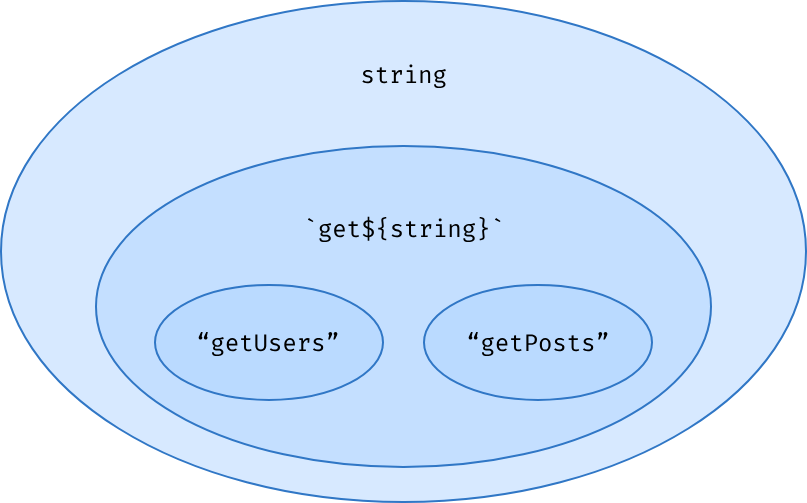
Template Literal Types sit right in between primitive types and string literals in our dear subtyping hierarchy:
type Age = `I was born in ${number}.`;

const age1: Age = "I was born in 1993."; // ✅
const age2: Age = "I was born in 3.141592."; // ✅
const age3: Age = "I was born in a galaxy far, far away..."; // ❌
// "a galaxy far, far away..." is not a number!

declare function ping(localDomain: `localhost:${number}`): void;

ping("localhost:3000"); // ✅
ping("localhost:8080"); // ✅
ping("localhost:three-thousand"); // ❌


// Almost all primitive types can be used in a template:
type StringifiableTypes =
  | string | boolean | number
  | bigint | null    | undefined;
// The only exception is the symbol type,
// which makes sense since symbols cannot be stringified in JavaScript either.
what's even cooler is that you can use them to create patterns containing numbers or booleans too.
As you can see, Template Literal Types are more than just a way to concatenate strings. They behave more like data structures containing string fragments and primitive types.
Templates and union types
type Size = "sm" | "md" | "lg";
type ClassName = `size-${Size}`;
// => "size-sm" | "size-md" | "size-lg"

// Now, what if we try to interpolate several union types in the same template?
type Variant = "primary" | "secondary";
type Size = "sm" | "md" | "lg";

type ButtonStyle = `${Variant}-${Size}`;
// => | "primary-sm"   | "primary-md"   | "primary-lg"
//    | "secondary-sm" | "secondary-md" | "secondary-lg"
What if we dropped a union type in a template? Let's find out:
We get back the union of all possible combinations of our two input union types. This behavior may seem a bit arbitrary, but unions tend to turn the code inside out like this in a lot of different contexts. This is an expression of the distributive nature of union types. We'll explore this concept in depth in The Union Type Multiverse.
type X = "left" | "right";
type Y = "top" | "bottom";

function getArrow(x: X, y: Y) {
  const diagonal = `${x}-${y}` as const;
  /*                              👆
     `as const` tells TypeScript to infer this
      type as `${X}-${Y}` instead of `string`.
                                                */
  switch (diagonal) {
    case "left-top": return "↖";
    case "left-bottom": return "↙";
    case "right-top": return "↗";
    // case "right-bottom": return "↘";

    default: return exhaustive(diagonal);
    /*                         ~~~~~~~~
       ❌ The "right-bottom" case isn't handled!
                                                 */
  }
}

function exhaustive(arg: never): never {
  throw new Error('non exhaustive.');
}
In any case, this behavior is extremely useful when we need to branch on all possible combinations of two union types in a single switch statement:
type D = 0 | 1 | 2 | 3 | 4 | 5 | 6 | 7 | 8 | 9;
type USPhoneNumber = `+1 ${D}${D}${D} ${D}${D}${D} ${D}${D}${D}${D}`;
type T1 = "+1 123 456 7890" extends USPhoneNumber ? true : false; // => true?
type T2 = "+33 1 23 45 67 89" extends USPhoneNumber ? true : false; // => false?
So, What happens if we generate a giant union type?
When I mentioned that Template Literal Types were similar to regular expressions, you may have been tempted to try to use them for some crazy matching, like checking that a phone number string is well-formed:
This sounds like a good idea. At least until you realize that we just generated a union type of 10^10 elements, 10 billion of them!
As you might expect, TypeScript isn't too happy about it. If we try to run this code, we get the following error:
Expression produces a union type that is too complex to represent. (2590)
The hard limit before TypeScript throws this error is 100 000 items within a single union type. This is already a huge number, so be careful if you don't want the type-checking of your project to take ages!
Helper functions
// There's Uppercase, which turns every letter in the string into uppercase:
type T1 = Uppercase<"hello">; //   =>   "HELLO"

// Lowercase performs the opposite transformation and turns every letter into lowercase:
type T2 = Lowercase<"HELLO">; //   =>   "hello"

// Capitalize only puts the first letter of the string in uppercase:
type T3 = Capitalize<"hello, world!">; //   =>   "Hello, world!"

// And Uncapitalize puts the first letter of the string in lowercase:
type T4 = Uncapitalize<"HelloWorld">; //   =>   "helloWorld"
TypeScript has four built-in functions to change the casing of string literal types
With different languages using different naming conventions for variables and object keys (looking at you, Python and JavaScript!) we often need to rename them in our API layer. These type-level helper functions are pretty useful for that, though insufficient if we want to automatically rename, say, snake_case names to camelCase.
Solving this problem will require building a Recursive Type! Luckily, we've become pretty good at this in the previous chapter! 💪
Templates and object properties
type Method = "GET" | "POST";
type Resource = "user" | "blogPost";
type PropName = `${Lowercase<Method>}${Capitalize<Resource>}`;
// => "getUser" | "getBlogPost" | "postUser" | "postBlogPost"
Computing object properties is another area where Template Literal Types really shine. Let's say we have an HTTP service that should define a GET and POST method for all of our resources. We can compute the names of all the necessary fetch functions pretty easily:
type HTTPService = Record<PropName, Function>;
// => { getUser: Function; getBlogPost: Function; postUser: Function; ... }
Here, we generate the combinations of our Methods and Resources, and we use two of the helper functions we've just seen to format them as method names. To create an object type, the only thing left to do is to drop our PropName type in a Record:
const httpService = {
  getUser: () => Promise.resolve({ name: "Gabriel" }),
  postUser: (user: User) => Promise.resolve(),
  postBlogPost: (blogbost: BlogPost) => Promise.resolve(),
} satisfies HTTPService;
/*          ~~~~~~~~~~~
                 ^
   ❌ Doesn't type-check because we forgot `getBlogPost`!
                                                         */

const user = await httpService.getUser();
// => `{ name: string }` 👌
The HTTPService type from before isn't super useful on its own, but using the new satisfies keyword that the TypeScript team introduced in version 4.9, we can tell the type-checker that our httpService implementation has to be assignable to HTTPService while letting it infer a more precise type for each method:
This way, if we ever add a new resource to our Resource union type, we are 100% sure that we won't forget to update the httpService object accordingly.
Pattern matching on string literal
type GetNameTuple<Name> =
  Name extends `${infer FirstName} ${infer LastName}`
    ? [FirstName, LastName] //    ^
    : never;      /*      notice the space 🪐   */

type T1 = GetNameTuple<"Hermione Granger">; // ["Hermione", "Granger"]
type T2 = GetNameTuple<"Ron Weasley">; // ["Ron", "Weasley"]
As often in Type-Level TypeScript, it's Conditional Types that reveal the full potential of Template Literal Types. Using the infer keyword, we can pattern-match on a string literal to split it in several parts.
The ${infer FirstName} ${infer LastName} pattern uses a space character as a separator to assign the part of the string that's before it to a FirstName variable and the part of the string that's after it to a LastName variable. These two variables are then wrapped into a tuple and returned
type SplitDomain<Name> =
  Name extends `${infer Sub}.${infer Domain}.${infer Extension}`
    ? [Sub, Domain, Extension]
    : never;

type T1 = SplitDomain<"www.google.com">;
//   =>   ["www", "google", "com"]

type T2 = SplitDomain<"en.wikipedia.org">;
//   =>   ["en", "wikipedia", "org"]

type T3 = SplitDomain<"github.com">;
//   =>   never. The subdomain part is missing.
Our template literal patterns can get as complex as we need them to be. In fact, as with every data structure, infer can be used any number of times in a template
Each infer assignment is separated by a dot, which makes it pretty easy for TypeScript to infer which part of the string should be assigned to which variable.
type GetNameTuple<Name> =
  Name extends `${infer FirstName} ${infer LastName}`
    ? [FirstName, LastName]
    : never;
type T = GetNameTuple<"Albus Perceval Wulfric Brian Dumbledore">;
//   =>   ["Albus", "Perceval Wulfric Brian Dumbledore"]

// The string is split at the first space character.
// It looks like the type checker traverses our string from left to right!
// The direction in which TypeScript goes is even more obvious when we do not include any separator in our pattern:
type SplitString<Input> =
  Input extends `${infer A}${infer B}`
    ? [A, B] //           ^ no separator 🤔
    : never;
// The string is split after the first character in this case!
type T1 = SplitString<"some string">;// ["s", "ome string"]
type T2 = SplitString<"what">;//  ["w", "hat"]
Ambiguous patterns
In the two conditional type examples we have seen so far, our template matched the input string in a single, non-ambiguous way. This is all well and good, but what if there were several ways for our template literal to match the input string? For instance, how would TypeScript react if we were passing a string containing multiple spaces to our GetNameTuple generic?
type SplitString<Str> = Str extends `${infer First}${infer Rest}`
  ? [First, Rest]
  : never;
type T = SplitString<"Albus">;
// => ["A", "lbus"]
Practically speaking, this choice makes a ton of sense. Being able to get the first character and the end of a string is extremely useful in type-level algorithms where we need to loop through each character.
Doesn't this remind you of something?
This looks pretty similar to the way we were splitting tuple types inside recursive loops in the previous chapter:
type SplitTuple<Tuple> = Tuple extends [infer First, ...infer Rest]
  ? [First, Rest]
  : never;
type T = SplitTuple<["A", "l", "b", "u", "s"]>;
// => ["A", ["l", "b", "u", "s"]]
This is no coincidence. We are going to put this to good use very soon 😊
type T = GetNameTuple<"Albus Perceval Wulfric Brian Dumbledore">;
//   =>   ["Albus", "Perceval Wulfric Brian Dumbledore"]
Accessing the last chunk of a split string
Since "Perceval", "Wulfric" and "Brian" are all middle names of Dumbledore, It would make more sense if our function returned ["Albus", "Dumbledore"] instead! But since TypeScript always goes from left to right, is there a way to retrieve only the last word in a string?
type GetLastWord<Str> =
  // 1. Split the first word from the rest of the string:
  Str extends `${string} ${infer Rest}`
    // 2. Keep doing this until there are no more spaces:
    ? GetLastWord<Rest>
    // 3. Return the input string if there are no spaces:
    : Str;
// Now we can update our GetNameTuple generic to use GetLastWord under the hood:
type GetNameTuple<Name> =
Name extends `${infer FirstName} ${infer Rest}`
? [FirstName, GetLastWord<Rest>]
: never;
type T1 = GetNameTuple<"Albus Perceval Wulfric Brian Dumbledore">;
// => ["Albus", "Dumbledore"] 🧙♂️ ✨// takes a "Title Case" string and turns it into "snake_case":
type T1 = TitleToSnake<"Hello, Type Level TypeScript Member!">;
// => "hello_type_level_typescript_member"Transforming strings with Recursive Types
How would you approach this problem if you were building this function at the value level?
// I would decompose it into smaller sub-problems.
const titleToSnake = (str) => {
  // 1. Replace spaces with underscores.
  const snakeStr = spacesToUnderscores(str);
  // 2. Remove punctuation characters.
  const noPunctStr = removePunctuation(snakeStr);
  // 3. Turn the string to lowercase.
  return noPunctStr.toLowercase();
};
Composing several functions together is a powerful way of dividing the complexity of our code into smaller units, and we can apply this technique to the type level too
type TitleToSnake<Str extends string> =
    Lowercase<RemovePunctuation<SpacesToUnderscores<Str>>>;
//   Step 3  <-    Step 2      <-      Step 1
type SpacesToUnderscores<Str> =
Str extends `${infer Start} ${infer Rest}`
? `${Start}_${SpacesToUnderscores<Rest>}` // <- recursion
: Str; // <- str doesn't contain spaces!
type Yay = SpacesToUnderscores<"yay it works now">;
// => "yay_it_works_now"
type TitleToSnake<Str extends string> =
Lowercase<RemovePunctuation<SpacesToUnderscores<Str>>>;
// Step 3 <- Step 2 <- Step1: ✅ Done 1. Mapping spaces to underscores
First, let's implement this SpacesToUnderscores generic. One thing is for sure, we need to split our string using a space separator:
type Punctuation = "." | "!" | "?" | ",";
// now, could we reuse the code of SpacesToUnderscores with different separators to split and join the string?
type RemovePunctuation<Str> =
  Str extends `${infer Start}${Punctuation}${infer Rest}`
    //                              ^
    //     We use the `Punctuation` union as a separator
    ? `${Start}${RemovePunctuation<Rest>}`
    //         ^ No separator here.
    : Str;

type T1 = RemovePunctuation<"Hello, world!">;
/*   => | "Hello, world"
        | "Hello"
        | "Hello, world world"
        | "Hello world"
1. Removing punctuation
Removing punctuation seems very similar to the problem we've just solved. Again, we need to replace some characters by other characters, but instead of replacing " " by "_", we need to replace punctuation characters with the empty string "". The first question we need to answer is "What's a punctuation character?"
Oh no 😱 This is not at all what we were expecting! Why do we get this weird-looking union instead of "Hello world"?
// so this
Str extends `${infer Start}${Punctuation}${infer Rest}` ? ... : ...
// actually becomes
Str extends ( | `${infer Start}.${infer Rest}`
              | `${infer Start}!${infer Rest}`
              | `${infer Start}?${infer Rest}`
              | `${infer Start},${infer Rest}` ) ? ... : ...
The issue comes from the fact that Punctuation is a union type. As we have seen earlier, union types turn Template Literal Types into unions of templates, so this line:
Because "Hello, world!" contains two different punctuation characters, ',' and '!', TypeScript has to make a choice between:
- Using the pattern
`${infer Start},${infer Rest}`, and assign Start to"Hello"and Rest to" world!". - Or using the pattern
`${infer Start}!${infer Rest}`, and assign Start to"Hello, world"and Rest to"".
TypeScript decides not to decide. Instead, it evaluates all possible code branches and assigns the union of all possible values to our variables.
type SplitTest<Str> =
  Str extends ( | `${infer Start},${infer Rest}`
                | `${infer Start}!${infer Rest}` )
    ? [Start, Rest]
    : never;
type T = SplitTest<"Hello, world!">
// => ["Hello" | "Hello, world", " world!" | ""]
This behavior leads to super unpredictable outputs! My advice is to never use template literals containing unions on the right-hand side of extends. If you want to split the string using a union, the simplest is to loop through each character, and check if they are assignable to your union one by one.
// Let's re-implement our RemovePunctuation generic with this technique:
type RemovePunctuation<Str, Output extends string = ''> =
  // Split the string after the first char:
  Str extends `${infer First}${infer Rest}`
    ? First extends Punctuation
      // If `First` is a punctuation char, drop it:
      ? RemovePunctuation<Rest, Output>
      // Otherwise, keep it in the output:
      : RemovePunctuation<Rest, `${Output}${First}`>
    : Output;
type T1 = RemovePunctuation<"Hello, world!">;
//   =>   "Hello world"
Recognize this pattern? This is one of the "filter" loops we've before, except we applied it to a template literal type instead of a tuple!
type TitleToSnake<Str extends string> =
    Lowercase<RemovePunctuation<SpacesToUnderscores<Str>>>;
//  Step 3 ✅   <-  Step 2 ✅    <-    Step1 ✅
type T1 = TitleToSnake<"Hello, Type Level TypeScript Member!">;
//   =>   "hello_type_level_typescript_member" 🙌
type T2 = TitleToSnake<"Do you enjoy this chapter?">;
//   =>   "do_you_enjoy_this_chapter" 💪
3. Assembling the pieces
We can cross the RemovePunctuation item from our to-do list, and since Lowercase is built into TypeScript, we can cross that one as well:
This was a heck of a ride, so let's recap what we've learned.
- First, function composition is a very nice way to turn a complex problem into several simpler ones.
- Second, splitting strings using a union type as a separator doesn't quite work as expected. There is sometimes no other way than looping over every single letter in the string.
- Third, the different kinds of loops we have seen in the previous chapter (find, filter, map and reduce) can also be used with template literal types. In the end, strings are just lists of characters!
Summary
- Template Literal Types can not only be used to concatenate literal types together but also to represent sets of string literal types with a specific structure.
- Interpolating a union type in a template turns it into a union of templates.
- Conditional types let us split template literals into several parts.
- In ambiguous cases, TypeScript will use the first occurrence of your separator to split the string.
- Recursive types let us build type-level parser functions.
Challenge Time
The Union Type Multiverse
Union types are awesome because they let us perfectly model the finite set of possible states our applications can be in. Without them, our types would be so imprecise that they would hardly be of any value.
type DataState = {
  status: string;
  data?: number;
  error?: Error;
};

// Can you have an error property if status is equal to "success"?
// Can you have some data and an error at the same time?
// We just don't know!
let state: DataState = {
  status: "success",
  error: new Error("This is fine. 🔥🐶☕️🔥"), // This type-checks.
};
Let's say we are building an application that fetches data. We could represent its state using this type:
With a union type, it's a different story:
type DataState =
  | { status: "loading" }
  | { status: "success"; data: number }
  | { status: "error"; error: Error };

// Our type doesn't let us create invalid states anymore!
let state: DataState = {
  status: "success",
  error: new Error("ooooops"), // ❌ does NOT type-check!
};
This example is deliberately simple but illustrates perfectly why union types are so common in our day-to-day TypeScript code.
Looking at the type system from the perspective of learning a new programming language has been super fruitful so far. Types and values have a lot in common, but if I had to pick a single feature that sets the language of types apart, it would be union types. There are no good JavaScript analogies to fully describe their behavior. Yet, if we want to build useful type-level algorithms, it's crucial to have a deep understanding of the way they work
What do we know about Union Types?
we discovered that types were really sets of values, and that union types were data structures joining several sets together to form larger sets.
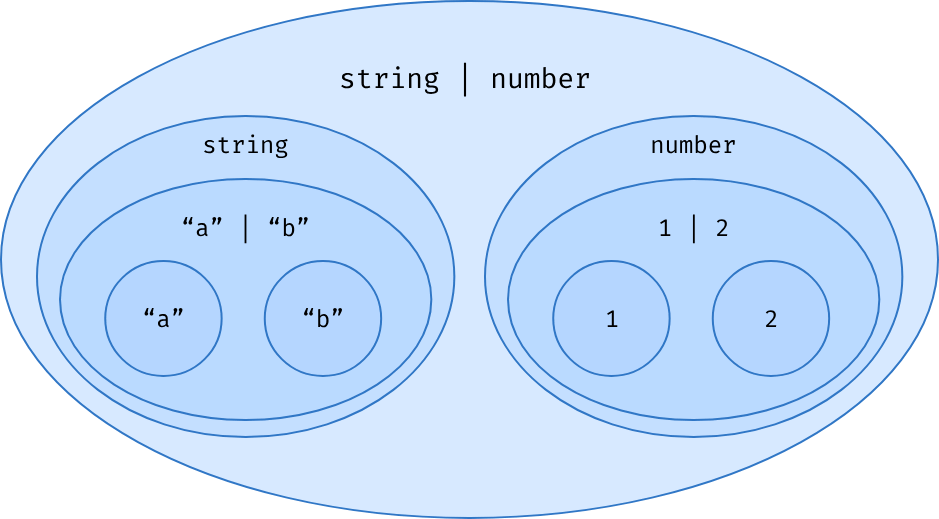
We have also encountered several cases where unions seemed to behave in astonishing ways. For example, when reading several properties from an object using a union of literals, we get a union of values back:
type User = { name: string; age: number };
type Value = User["name" | "age"];
// => string | number

// Something very similar seems to happen
// when interpolating a union in a Template Literal Type:
type Size = "sm" | "md" | "lg";
type ClassName = `button-${Size}`;
// => "button-sm" | "button-md" | "button-lg"
The union propagates to the outside of the expression. Why is that?
To answer this question, let's take a step back and remember what union types represent. At the type-level, union types are indeed data structures, but unlike object types, they do not represent value-level data structures. Unions do not have a runtime equivalent!
// Let's say I want to read from a config object:
const config = { env: "dev", port: 3000 };
// At runtime, I can only access one property at a time:
const c1 = config["env"]; // string
// later...
const c2 = config["port"]; // number
// I do not know which property I'm accessing anymore,
// but I can use a union type to represent the different possibilities
function logConfig(prop: "env" | "port") {
  const value = config[prop]; // string | number
  console.log(value);
}
// It doesn't change the fact that I'm accessing one property at a time:
logConfig("env");
// later...
logConfig("port");
from the perspective of the type-checker, it's like all possible code paths were happening simultaneously! It evaluates the type of config[prop] when prop is equal to "env" and when prop is equal to "port", and collects their types as a union representing all possible values I could be reading: string | number.
This demonstrates what union types are:
different versions of reality!
Since unions do not represent a single runtime thing but rather different versions of the runtime reality, I like to visualize them as a superposition of states. It's like each member of a union type was a different parallel universe.
The Union Type Multiverse
type TrafficLight = "green" | "orange" | "red";
const trafficLight: TrafficLight = "green";
the runtime trafficLight variable will only ever be in one of the three TrafficLight states, but from the perspective of the type-checker, all of them exist at the same time:
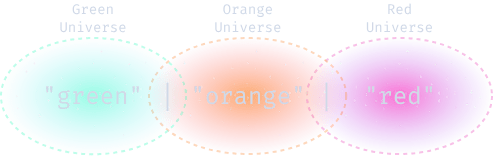

Each member of a union type is a parallel universe.
so We just created a multiverse! 😁
In our Union Type Multiverse, everything that can happen happens. Every time we use a union type in a type-level expression:
type ShouldStop = { green: "no"; orange: "yes"; red: "yes" };
type T = ShouldStop["green" | "orange" | "red"];
It's like all possible branches were occurring separately:
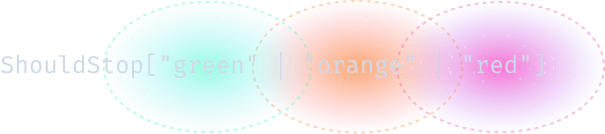
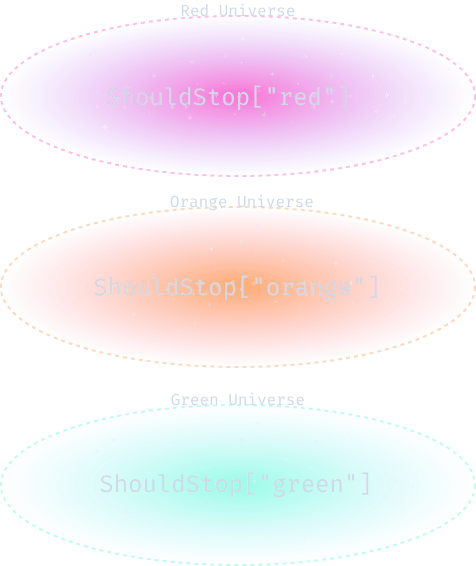
As a result, we get back another union type that represents this new superposition of states.
Sometimes universes branch out, but sometimes they merge back into fewer versions of reality:
// So this
type T = ShouldStop["green" | "orange" | "red"];

// Is turned into:
type T = ShouldStop["green"] | ShouldStop["orange"] | ShouldStop["red"];

// Which evaluates to:
type T = "no" | "yes" | "yes";

// Which simplifies into:
type T = "no" | "yes";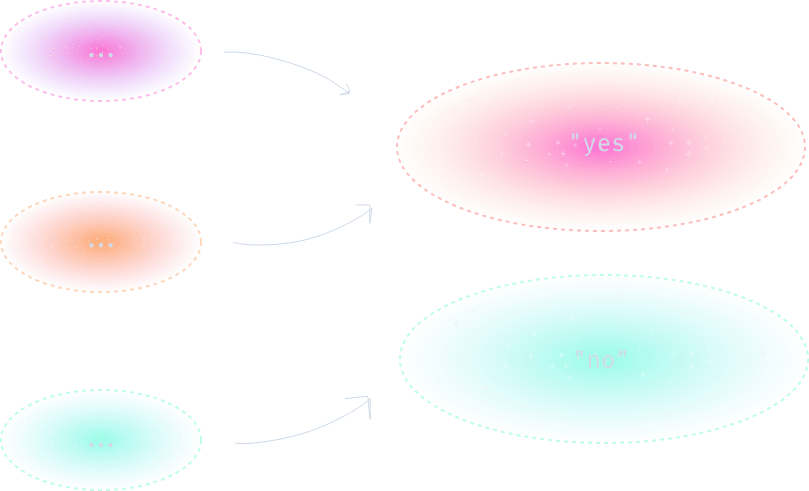
This is what makes union types special. At the type level, they're non-deterministic values. Every time we use a union inside an expression, it turns it into a non-deterministic one. These expressions can return an arbitrary number of results. This is what gives union types their distributive nature.
The Distributive Nature of Union Types
In mathematics, distributivity means that an operation produces the same result whether you operate it on the whole expression, or on each of its parts before collecting their results.
// Multiplication famously distributes over addition:
x * (a + b) <=> (x * a) + (x * b)
//           👆
// This means "Is equivalent to".

// And interpolation of union types has the same property:
type T1 = `x ${"a" | "b" | "c"}`;
// <=>
type T2 = `x ${"a"}` | `x ${"b"}` | `x ${"c"}`;
Template literal types distribute over union types. Our | behaves like a + and the template literal's ${...} interpolation syntax behaves like a *.
type T1 = User["name" | "age"];
// <=>
type T2 = User["name"] | User["age"];
T1 and T2 are equivalent because they represent the same set of values. TypeScript chooses to turn most expressions that involve union types into their distributed form.
It makes practical sense because TypeScript is very good at analyzing the control flow of our code and eliminating handled cases from top-level union types to refine them over time:
type State =
  | { status: "success"; data: number }
  | { status: "error"; error: Error };

function handler(state: State): string {
  if (state.status === "success") {
    // state is *narrowed*:
    state; // { status: "success", data: number }
    return "🎉";
  }
  if (state.status === "error") {
    state; // { status: "error"; error: Error }
    return "😭";
  }
  return state; // never
  /*       ^
    ✅ Even though `state` isn't a `string`,
    This line type-checks because its type
    is narrowed to `never`.                                        */
}
This mechanism is called type narrowing. It's especially effective on discriminated union types. These are unions of objects with a discriminant — a property that contains a different value for each of our objects, like the status property of the previous example.
Why don't objects distribute over union types?
// Why doesn't TS turn this type:
type State = {
  status: "success" | "error";
};
// Into this one:
type State =
  | { status: "success" }
  | { status: "error" };
type CSSProperties = {
color: Color;
display: Display;
position: Position;
// ...
}
// There are already around 140 color names supported by the CSS specification:
type Color =
| "lightseagreen" | "tomato" | "chartreuse"
| "blanchedalmond" | "mediumaquamarine" | "rebeccapurple" //...
// Multiply this by the 41 display values,
// the 9 position values and the number of possible values of the 259 remaining CSS properties
// and you get the number of elements your resulting CSSProperties union would have
// if TypeScript was distributing unions over objects:
type CSSProperties =
| { color: "lightseagreen"; display: "flex"; position: "absolute"; //... }
| { color: "lightseagreen"; display: "inline"; position: "absolute"; //... }
| //... // 12930491028475481029435820 lines later...
| { color: "white"; display: "flex"; position: "fixed";// ... }
| { color: "white"; display: "inline"; position: "fixed"; //... };This combinatorial explosion explains why it's not reasonable to distribute data structure types over unions. It's much more valuable to have a way to represent these large collections of properties and the type-narrowing benefit that distributing would bring is just not worth it. That's why Objects, tuples and function types do not distribute over unions.
Now that we understand why type-level expressions tend to distribute over union types, let's talk about the most important instance of distributive union types for type-level programming — Conditional Types.
Unions & Conditional Types
Conditional types are the secret weapon of type-level programmers. They are the main building blocks of our smart type-inference logic. The most interesting things happen when combining them with other features of the type system, and union types are no exception.
// This IsString generic returns "yes" if the input type is assignable to string and "no" otherwise:
type IsString<T> = T extends string ? "yes" : "no";
type T1 = IsString<"is this a string?">; // "yes"
type T2 = IsString<123>; // "no"
// Now, what if we give a union type to IsString:
type T = IsString<"a" | 2 | "c">; // yes? no? 🤔
Using the knowledge we've acquired in Types Are Just Data and Code Branching with Conditional Type, we can tell that "a" | 2 | "c" isn't assignable to string, which means that the expression IsString<"a" | 2 | "c"> should evaluate to "no", right?
type T = IsString<"a" | 2 | "c">;
//   =>  "yes" | "no"                 ✨ 🪐 ✨
It returns "yes" | "no" instead because conditional types distribute over union types too. We just entered the multiverse again.
Conditional Types distribute over Union Types.

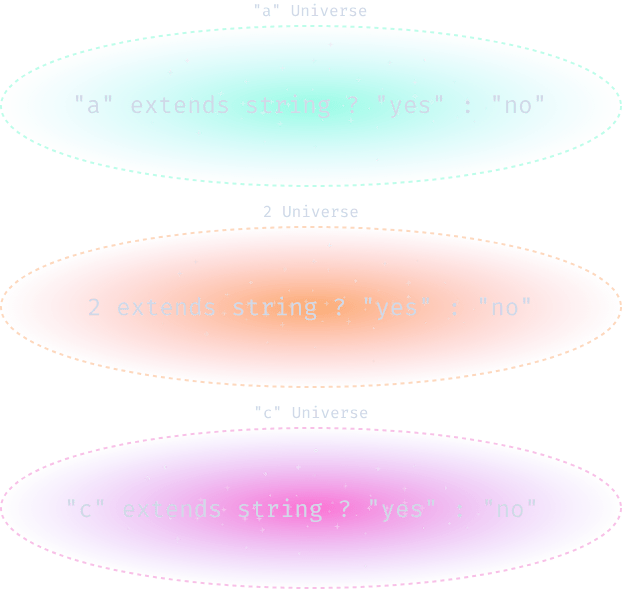
// TypeScript turns
type T = IsString<"a" | 2 | "c">
// into
type T =
    | ("a" extends string ? "yes" : "no")
    | ( 2  extends string ? "yes" : "no")
    | ("c" extends string ? "yes" : "no");
// Which simplifies to:
type T = "yes" | "no" | "yes";
// <=>
type T = "yes" | "no";
Just like before, the type checker evaluates the expression for each element of the union types and collects their results as a union afterward.
Mapping Over Union Types
type MapOverUnion<U> = U extends unknown
  /*                   👆           👆
              The expression      This condition
             distributes here.    always passes.
                                                        */
  ? Transform<U>
  /*          👆
    `Transform` is called with every member, one by one.
                                                         */
  : never;
When we use a conditional type on a union, we apply a transformation to each of its elements. Conditional types have two branches, but if we use a condition that always passes, we can transform all elements in the same way:
Since all TypeScript types are assignable to unknown, U extends unknown always passes, so all members of U will go through the same code branch.
// Let's say we have a generic that puts a type twice in a tuple:
type Duplicate<T> = [T, T];
// If we call it with 1 | 2 | 3 we get a tuple containing this union twice:
type T1 = Duplicate<1 | 2 | 3>;
//   =>  [1 | 2 | 3, 1 | 2 | 3]

// But if we use U extends unknown beforehand, we get a union of tuples instead:
type DistributeDuplicate<U> = U extends unknown ? [U, U] : never;
type T2 = DistributeDuplicate<1 | 2 | 3>;
//   =>  [1, 1] | [2, 2] | [3, 3]

// T1 and T2 are different because
// T1 can contain mixed arrays, but T2 cannot:
const tuple1: T1 = [1, 2]; // ✅ type-checks!
const tuple2: T2 = [1, 2]; // ❌ does not type-check.

// We essentially just mapped Duplicate over our union type!
[1, 2, 3].map((x) => [x, x]);
// => [[1, 1], [2, 2], [3, 3]]
// You might initially think that using keyof would do the trick:
type AllKeys<T> = keyof T;
// But this isn't going to return every key:
type T = AllKeys<{ a: 1; b: 1 } | { a: 1; c: 1 }>;
// This only returns "a".
// As we've seen before keyof only returns keys
// that exist on all objects in the union:
type T = keyof ({ a: 1; b: 1 } | { a: 1; c: 1 });
// => "a"
// to retrieve all existing keys
// you will need to distribute over your union first!
type AllKeys<T> = T extends unknown ? keyof T : never;
// 👆
// We distribute over `T` first!
type T = AllKeys<{ a: 1; b: 1 } | { a: 1; c: 1 }>;
// => "a" | "b" | "c" 🎉
// Now, keyof is applied to each member of the union separately,
// which means we get back the union of all of their keys!
type T = keyof { a: 1; b: 1 } | keyof { a: 1; c: 1 };
// => "a" | "b" | "c"Distributivity & Unions Of Objects
Suppose you want to retrieve every key from a union of objects.
This AllKeys generic can be very handy to merge several object types into a single one.
type AllKeys<T> = T extends unknown ? keyof T : never;
//                👆                        👆
//      This is our union type         This is each item
//      BEFORE distribution.           one by one.
This also demonstrates something interesting to understand. Even though we use the same T variable name inside and outside of the conditional type, they do not mean the same thing!
Note that all unions returned by individual instances of keyof T are flattened into a single union type
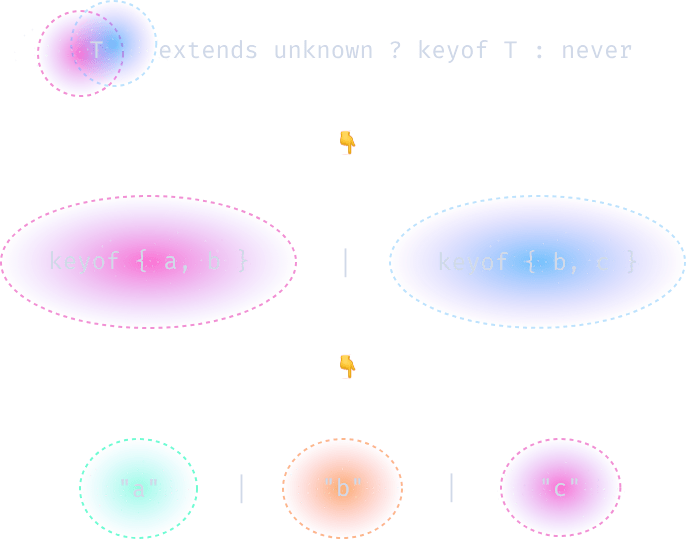
It makes sense since unions can't be nested, but this is also where the analogy between distributive union types and array.map breaks down. Unlike mapping on arrays, the number of elements in our input and output unions may be different.
type FeedItem =
  | { type: "post"; content: string }
  | { type: "likedBy"; user: string; content: string }
  | { type: "followSuggestions"; users: string[] }
  | { type: "image"; src: string }
  | { type: "video"; src: string };

declare const items: FeedItem[];

// How should we type this function?
const only = (items, types) =>
  items.filter((item) => types.include(item.type));
const mediaItems = only(items, ["image", "video"]);
// we would like `mediaItems` to be inferred as:
//  ( | { type: "image"; src: string }
//    | { type: "video"; src: string } )[]
Filtering Union Types
Imagine we are building the newsfeed of a social network. We need to display many different types of posts on a single page. We can represent this data as a union of objects:
We would like to add a "media" section to our page that only lists video and image items. Let's also suppose that filtering a list of objects based on their "type" property comes up over and over in our codebase. We would like to build an only generic function to ease this process:
// Both `Item` and `Type` are union types!
declare function only<
  // Items should have a `type` property
  Item extends { type: string },
  // `Type` strings should be valid type properties.
  Type extends Item["type"]
>(list: Item[], types: Type[]): FilterUnion<Item, Type>[];
                              ~~~~~~~~~~~
// the Item type parameter will be inferred as FeedItem and Type as "image" | "video".
// Now, we need to narrow Item based on Type.
const mediaItems = only(items, ["image", "video"]);

// It turns out we can simply use a conditional type:
type FilterUnion<Item, Type> =
  Item extends { type: Type }
    ? Item
    : never;
Filtering Union Types
If we want only to be truly generic, it should work with all possible arrays, so we want the type of item to be inferred. It should also work with any list of “type” strings, so we'll need a second type parameter:
This looks simple, but how does it work?
Once again we rely on distributivity. Our condition will run for each element in the union. If the element is assignable to {type: Type}, we return it, otherwise, we return never:
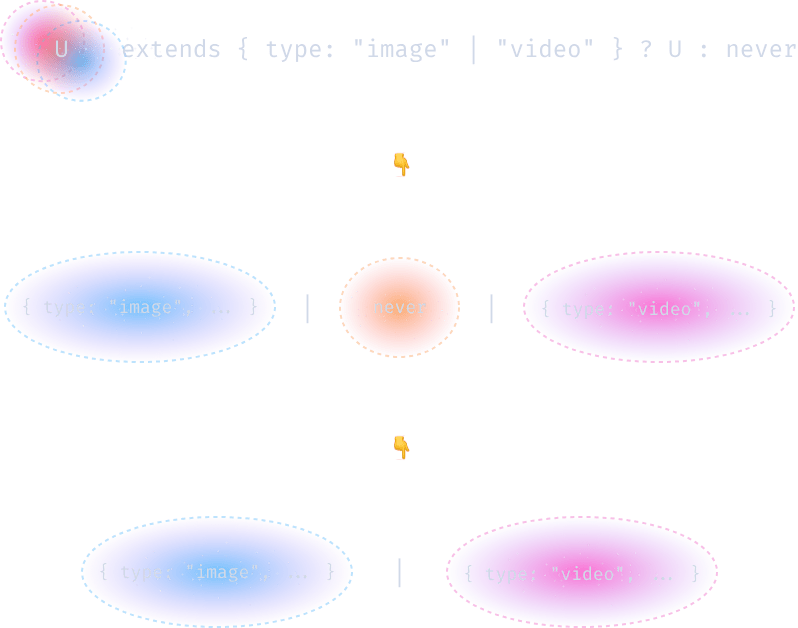
// It turns out we can simply use a conditional type:
type FilterUnion<Item, Type> = Item extends { type: Type } ? Item : never;
// never simplifies out, which means we only get elements passing our condition
type T = FilterUnion<FeedItem, "image" | "video">;
// => | { type: "image"; src: string }
//    | { type: "video"; src: string }
Filtering union types is such a common operation that it could be worth making our FilterUnion generic even more generic! 😅
type FilterUnion<U, C> = U extends C ? U : never;

type T = FilterUnion<FeedItem, { type: "image" | "video" }>;
// => | { type: "image"; src: string }
//    | { type: "video"; src: string }
//
type T1 = FilterUnion<true | "maybe", boolean>;
// => true

type T2 = FilterUnion<1 | "👋" | 2 | "🤯", string>;
// => "👋" | "🤯"
This is great! The only downside is that we just reinvented the wheel a tiny bit. FilterUnion already exists under a different name in TypeScript's standard library. It is called Extract.
Helper functions
type T1 = Extract<"a" | "b" | "c" | null, string>;
// => "a" | "b" | "c"
type T2 = Extract<"value" | "onChange" | "onSubmit", `on${string}`>;
// => "onChange" | "onSubmit"
// Here is its definition:
type Extract<A, B> = A extends B ? A : never;
Extract takes two types, and removes all elements of the first type that aren't assignable to the second one. It works exactly like FilterUnion from the previous section:
type Push<List, Item> = [...List, Item];
//                          ^ ❌ List isn't an array
type As<A, B> = A extends B ? A : never;
type Push<List, Item> = [...As<List, any[]>, Item];

// It turns out we could just have used Extract!
type Push<List, Item> = [...Extract<List, any[]>, Item];
                        ^ ✅ this works too!
If the definition of Extract feels familiar, it's because we've seen it in Loops with Recursive Types under yet another name. We were calling it As at the time, and we used it to infer a type constraint on our type parameters and "force" TypeScript to accept our code:
// It's the opposite of Extract:
type T1 = Exclude<"a" | "b" | "c" | null, null>;
// => "a" | "b" | "c"

type T2 = Exclude<"value" | "onChange" | "onSubmit", `on${string}`>;
// => "value"

type Exclude<A, B> = A extends B ? never : A;
Exclude takes two types, and filters out all elements of the first type that are assignable to the second one.
Distributive conditional types rules
To make the mind-bending concept of distributivity more accessible, I omitted an important detail when presenting how union types and conditional types interact. There's one more rule you should know: Conditional types only distribute over "naked" type variables.
// They do not distribute over union types defined inline:
// This union type is defined inline. Not distributive.
//             👇
type X = string | number extends string ? true : false;
// => `false` instead of `true | false`

// Nor union types resulting from a generic:
// This isn't a naked type variable. Not distributive.👇
type IsString<T> = OrNumber<T> extends string ? true : false;
type OrNumber<T> = T | number;
type X = IsString<string>;
// => `false` instead of `true | false`

// A conditional type will only distribute over a single type variable:
// This is a naked type variable. It distributes.                👇
type IsString<T> = T extends string ? true : false;
type X = IsString<string | number>;
// => true | false
Avoiding distribution
I want to teach you one more trick: preventing distribution from happening. This can be useful if, for example, you want to check if a union is assignable to another one:
type Extends<A, B> = A extends B ? true : false;
//                   👆
//           A is distributed here.
type T = Extends<"a" | "b" | "c", "a" | "b">; // => `boolean`
// `Extends` returns boolean because "a" and "b" are
//  assignable to "a" | "b", but "c" isn't.

// It would make more sense for Extends to return false
// instead of boolean in this case,
// but how can we fix it?
// we have several ways to prevent distribution from happening.
// The simplest is to wrap your union in a data structure before using extends
type Extends<A, B> = [A] extends [B] ? true : false;
//                    👆
//      Wrapping `A` in a tuple prevents
//       the union from distributing.
type T = Extends<"a" | "b" | "c", "a" | "b">;
// => false 🎉
In this example, [A] evaluates to ["a" | "b" | "c"]. The union that used to be at the top level is now nested. Since TypeScript only distributes expressions over top-level union type variables, wrapping a union in a tuple prevents this behavior.
This means we can access our undistributed union in one of our branches if we want to:
type CreateEdge<Id, Condition> =
  [Id] extends [Condition]
    ? { source: Id; target: Id }
    /*          👆          👆
               Here, `Id` is the
            undistributed union type.
                                            */
    : never;

type Edge1 = CreateEdge<"1" | "2" | "3", `${number}`>;
// => { source: "1" | "2" | "3"; target: "1" | "2" | "3" }

type Edge2 = CreateEdge<"a" | "b" | "c", `${number}`>;
// => never

const edge: Edge1 = { source: "1", target: "2" };
//     ^ ✅ type-checks!
Summary
- Union types represent different versions of reality!
- At the type level, they are non-deterministic values. When used in an expression, every possible code path is executed and results are returned as a union type.
- That's what gives union types their distributive nature.
- We can use this principle to transform and filter union types with conditional types!
- Every type is a union type. Single types can be thought of as unions containing a single element, and never can be thought of as an empty union type.
Challenge Time
Loops with Mapped Types
Advanced Typescript
By Salama Ashoush