Fine-Tuning Your Reactivity
Harnessing the Power of Signals
🚦
Hello, I'm Salama Ashoush
Senior Software Engineer@Box
I enjoy experimenting with new ideas and building Apps and tools with JS for the Web, Desktop, and Mobile. As a curious tinkerer, I'm always learning.



What is reactivity?
What is reactivity?
There are so many definitions for reactivity, but I think the simplest one is
Declaratively express the relationship between values that change over time.
Ryan Carniato
C = A + B
A reactive system will make sure this expression is always up to date
What is reactivity?
Coarse-grain reactivity
Change in data would trigger a large amount of JavaScript to execute.
This meant that fast-changing properties such as animation would cause performance issues.
The framework would eventually reconcile all of the changes into the UI.
< 17
without vapor
State changes only update the part of the UI to which the state is bound to.
Fine-grained reactivity
The hard part is knowing how to listen to property changes in a way that has good DX.
>=17
with vapor
What defines a reactive system?
What defines a reactive system?
Reactive unit (wrapper, holder, subject, signal, etc)
Reactions (effect, watcher, autotun, subscription, etc)
Derivations (memo, computed, thunk, etc)
Scheduler (Concurrent updates, tasks, etc)
Dependency tracking (Automatic, Manual)
Algorithm (Push, Pull, Hybrid, Lazy, Eager, etc)
Other implementation details
Rutime
vs
Compile time
Rutime Reactivity
In JS we have two mainstream reactive primitives
Reactive Streams (RxJS) - a series/collection of data events that are emitted over time.
const a = 1;
const b = 2;

const c = a + b;
import { map, combineLatest, BehaviorSubject } from 'rxjs';
// reactive wrappers, that always respond with latest value
const a$ = new BehaviorSubject(1);
const b$ = new BehaviorSubject(2);
// derived/computed state using operators
const c$ = combineLatest(a$, b$).pipe(map(([a, b]) => a + b));
// lazy
// effects, subscriptions are explicit
c$.subscribe((c) => console.log(c)); // 3
// push based
a$.next(2);

Observables/Subjects
Rutime Reactivity
Signals
const a = 1;
const b = 2;

const c = a + b;
Signals are fundamentally a simple pub/sub system that holds a value and represents that value over time.
Rutime Reactivity
import { signal, computed, effect } from 'some-signals-library';


const a = signal(1)
const b = signal(2)

// dervied without memo
const c = () => a.value + b.value;

// or with memo
// depending on the reactivity alogorthim
// this could run immediately (eager) or on read
const cachedC = computed(() => a.value + b.value);

effect(() => console.log(c.value));

// update the wrapped value;
a.value += 1;
Signals
Rutime Reactivity
Comp-time Reactivity
In compile-time reactivity systems, the framework can statically analyze your code and convert it to lower-level code that updates the UI.
const a = 1
const b = 2

const c = a + b
// .svelte
<script>
// it looks like js vars, but it is not
let a = 1
let b = 2
// computed/derived state, compiler will transform this to
// code that keeps this relation alive
$: c = a + b
b += 3
</script>
<p>{c}</p>
Today
Comp-time Reactivity
Change detection is not always reactive
Perceived Reactivity can be achieved through reactive primitives or through techniques like diffing, hooks, and dirty-checking.

Signals-based reactive systems
Signals-based reactive systems
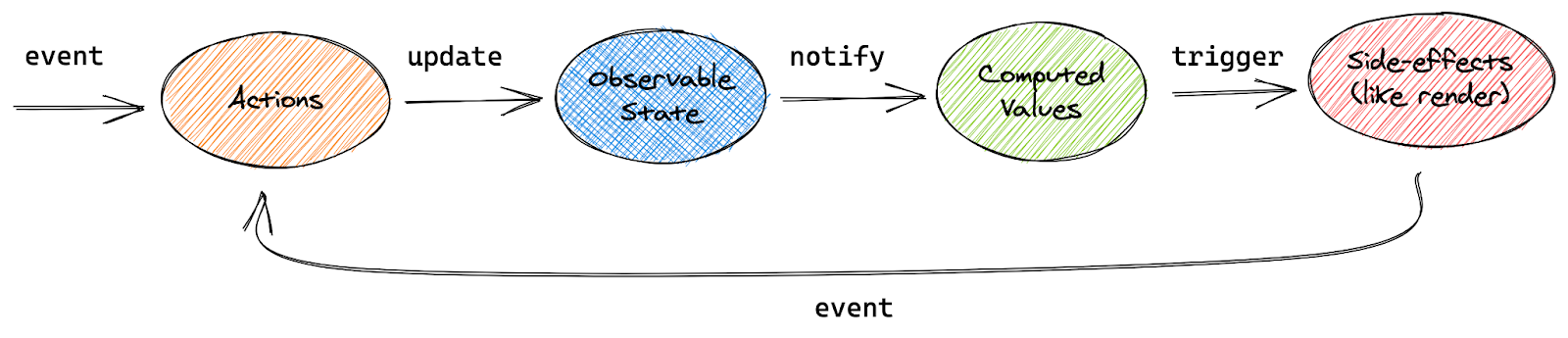
Simple
Composable
Declarative
Brief history of Signals
Reactive signals are not a new concept; in fact, it is inspired by electronic spreadsheets.

// dont confuse it with rxjs observables(streams)
// it is a reactive wrapper around the value (signal)
const a = ko.observable(1);
const b = ko.observable(2);

// computed, dervied state
const c = ko.pureComputed(() => a() + b());

// the name might be confusing but this an effect
// logs whenever doubleCount updates
ko.computed(() => console.log(c()))
around October 2010, also the year of AngularJS (dirty checking)
Brief History of Signals
<!doctype html>
<html ng-app>
  <head>
    <script src="https://ajax.googleapis.com/ajax/li
                 bs/angularjs/1.8.2/angular.min.js"></script>
  </head>
  <body>
    <div>
      <label>Name:</label>
      <input type="text" ng-model="yourName" placeholder="Enter a name here">
      <hr>
      <h1>Hello {{yourName}}!</h1>
    </div>
  </body>
</html>
AngularJS/Knockout (Data binding) = Foot gun/glitches
Brief History of Signals
function Counter() {
  const [count, setCount] = useState();
  return <button onClick={() => setCount(count+1)}>{count}</button>
}
React introduced setState().
This allowed React to know when it should do diffing of the vDOM.
The benefit of this is that unlike AngularJS, which ran dirty-checking on each async task, React only did it when the developer told it to.
So even though React VDOM diffing is more computationally expensive than AngularJS, it would run it less often.
React also introduced strict data flow from parents to children (one way).
Brief History of Signals
The mass adoption of React.
Some people still preferred reactive models and since React was not very opinionated about state management, it was very possible to mix both.
Brief History of Signals
It emphasized consistency and glitch-free propagation.
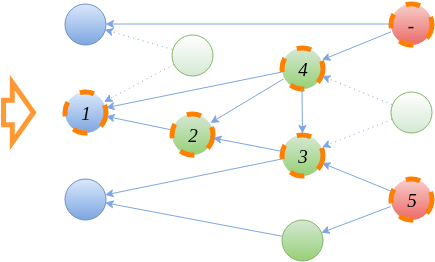
It did this by trading the typical push-based reactivity found in its predecessors with a push-pull hybrid system

Brief History of Signals
Fine-grained reactivity is a variation of the Gang of Four's Observer Pattern.

A Signal keeps a strong reference to its subscribers, so a long-lived Signal will retain all subscriptions unless manually disposed of.
Brief History of Signals
It was modeled more directly after digital circuits where all state change worked on clock cycles.
S.js
// signals
const a = S.data(1);
const b = S.data(2);

// computed/derived signals
const c = S(() => a() + b());

// effect
// the owner will automatically collect and dispose deps
S(() => console.log(c()));
It called its state primitive Signals.
it introduced the concept of reactive ownership.
Brief History of Signals
Vue took the push/pull mechanism one step forward by scheduling when the work would be done.
import { ref, watchEffect, computed } from 'vue'

// reactive ref (signals with anther name)
const a = ref(1)
const b = ref(2)

// dervied/computed
const c = computed(() => a.value + b.value);


// effects, vue calls theme watchers
// automatic deps tracking
watchEffects(() => {
  console.log(c.value)
})
By default with Vue all changes are collected but not processed until the effects queue is run on the next microtask.
Brief History of Signals
import { createSignal, createEffect, createMemo } from 'solidjs'

// Read/Write segregation inspired by react
const [a, setA] = createSignal(1)
const [b, setB] = createSignal(2)

// dervied
const c = () => a() + b();

// memo
const c = createMemo(() => a() + b());


// effects
// automatic and dynamic deps tracking
createEffect(() => {
  console.log(c());
})

setA(3);
SolidJS built DX ergonomics around all prior art and integrated it into a fine-grained/concurrent rendering pipeline
Brief History of Signals
import { component$, useSignal, useVisibleTask$,useComputed$ } from '@builder.io/qwik';

export default component$(() => {
  // signals, notice unlike solidjs, qwik signals
  //  can't be used outside of components
  // and same as react they follow hooks rules
  // but unlike react they dont trigger renders when passed around
  const a = useSignal(1)
  const b = useSignal(2)
  // dervied
  // unlike solidjs qwik compiler can keep this reactive without a wrapper
  // but not in tasks
  const c = a.value + b.value
  // client side only
  useVisibleTask$(() => {
    // same as react this would be stale until you use track
    console.log(c)
  })
  // we need to use computed to track it
  const cC = useComputed$(() => a.value + b.value)
  useVisibleTask$(({track}) => {
     track(() =>cC.value);
    // now this will not be stale
    console.log(cC.value)
  })

  return <button onClick$={() => a.value++}>{c}</button>
});
Brief History of Signals
Qwik takes advantage of the fact that the components have already been executed at the server during SSR/SSG.
Qwik can serialize this graph into HTML. This allows the client to entirely skip the initial "execute the world to learn about the reactivity graph". We call this resumability.
Because components do not execute, or download, on the client, Qwik’s benefit is the instant startup of the application. Once the application is running, the reactivity is surgical, just like that of SolidJS.
Brief History of Signals
Signals
under the hood
export function createSignal(value) {
  const read = () => value;
  const write = (nextValue) => value = nextValue;
  return [read, write];
}
Read/Write
Signals under the hood
const [count, setCount] = createSignal(3);
console.log("Initial Read", count()); // 3

setCount(5);
console.log("Updated Read", count()); // 5

setCount(count() * 2);
console.log("Updated Read", count()); // 10
Signals under the hood
const context = [];

function subscribe(running, subscriptions) {
  subscriptions.add(running);
  running.dependencies.add(subscriptions);
}

export function createSignal(value) {
  const subscriptions = new Set();

  const read = () => {
    const running = context[context.length - 1];
    if (running) subscribe(running, subscriptions);
    return value;
  };

  const write = (nextValue) => {
    value = nextValue;

    for (const sub of [...subscriptions]) {
      sub.execute();
    }
  };
  return [read, write];
}
Signal and deps tracking
Signals under the hood
function cleanup(running) {

  for (const dep of running.dependencies) {
    dep.delete(running);
  }
  running.dependencies.clear();

}

export function createEffect(fn) {
  const execute = () => {
    cleanup(running);
    context.push(running);
    try {
      fn();
    } finally {
      context.pop();
    }
  };

  const running = {
    execute,
    dependencies: new Set()
  };

  execute();
}
Reactions / Effects
Signals under the hood
console.log("1. Create Signal");
const [count, setCount] = createSignal(0);

console.log("2. Create Reaction");
createEffect(() => console.log("The count is", count()));

console.log("3. Set count to 5");
setCount(5);

console.log("4. Set count to 10");
setCount(10);
Signals under the hood
export function createMemo(fn) {
  const [s, set] = createSignal();
  createEffect(() => set(fn()));
  return s;
}
Computed/memo
Signals under the hood
console.log("1. Create");
const [firstName, setFirstName] = createSignal("John");
const [lastName, setLastName] = createSignal("Smith");
const [showFullName, setShowFullName] = createSignal(true);

const displayName = createMemo(() => {
  if (!showFullName()) return firstName();
  return `${firstName()} ${lastName()}`
});

createEffect(() => console.log("My name is", displayName()));

console.log("2. Set showFullName: false ");
setShowFullName(false);

console.log("3. Change lastName");
setLastName("Legend");

console.log("4. Set showFullName: true");
setShowFullName(true);
Signals under the hood
const [firstName, setFirstName] = createSignal("Salama");
const [lastName, setLastName] = createSignal("Ashoush");
const [showLastName, setShowLastName] = createSignal(false);


const fullName = createMemo(() => {
  if(showLastName()){
    return `${firstName()} ${lastName()}`;
  }
  return firstName();
});

createEffect(() => console.log(fullName())) // ?

setLastName("Salama")

setShowLastName(true)

setLastName("Ashoush")
Dynamic Tracking
Signals under the hood
Signals
state primitives

Nested Reactivity
import { createStore } from "solid-js/store";
// stores are proxy based
const [person, setPerson] = createStore({
  name: "Salama",
  age: 30,
  kids:[
   {
     name: "Omar",
     age: 3,
   },
    {
     name: "Ali",
     age: 0.5,
   },
 ]
});

// update a nested
setPerson('kids', 0, 'age', 2.5);
// there is also a mutuble version that allows this
const [person, setPerson] = createMutableStore({...})
kids[0].age = 2.5
Signals state primitives
import { component$, useStore } from '@builder.io/qwik';
export default component$(() => {
  const state = useStore({
    name: "Salama",
    age: 30,
    kids:[
     {
       name: "Omar",
       age: 3,
     },
      {
       name: "Ali",
       age: 0, // 32 days :D
     },
   ]
  });
  return (
    <>
      <button onClick$={() => state.kids[0].age = 2.5}>Update nested</button>
      <p>Count: {state.kids[0].age}</p>
    </>
  );
});
Signals state primitives
Nested Reactivity
import { createResource } from 'solidjs';

// you can pass just a fetch function
const [data, { mutate, refetch }] = createResource(() => fetch("something"));

// or you can pass a signal to be tracked and the fetcher will run when it changes
const [data, { mutate, refetch }] = createResource(someSignal(), () => fetch("something"));

// access the data
data()

// update the data
mutate()

// rerun the fetcher funtion
refetch()
Async Reactivity
Signals state primitives
export default component$(() => {
  const prNumber = useSignal('3576');
  const prTitle = useResource$<string>(async ({ track }) => {
    // it will run first on mount (server), then re-run whenever prNumber changes (client)
    // this means this code will run on the server and the browser
    track(() => prNumber.value);
    const response = await fetch(
      `https://api.github.com/repos/BuilderIO/qwik/pulls/${prNumber.value}`
    );
    const data = await response.json();
    return data.title as string;
  });

  return (
    <>
      <input type="number" bind:value={prNumber} />
      <h1>PR#{prNumber}:</h1>
      <Resource
        value={prTitle}
        onPending={() => <p>Loading...</p>}
        onResolved={(title) => <h2>{title}</h2>}
      />
    </>
  );
});
Async Reactivity
Signals state primitives
Signals and Components
import { render } from "solid-js/web";
import { createSignal } from "solid-js";

function Counter() {
  const [count, setCount] = createSignal(1);
  const increment = () => setCount(count() + 1);

  // since the components only runs once this will lose reactivity
  const doubleCount = count() * 2

  return (
    <button type="button" onClick={increment}>
      {doubleCount}
    </button>
  );
}

render(() => <Counter />, document.getElementById("app")!);
import { render } from "solid-js/web";
import { createSignal, createMemo } from "solid-js";

function Counter() {
  const [count, setCount] = createSignal(1);
  const increment = () => setCount(count() + 1);

  // to fix this you have to ethier wrap it in a thunk
  const doubleCount = () => count() * 2

  // or createMemo
  const doubleCount = createMemo(() => count() * 2)


  return (
    <button type="button" onClick={increment}>
      {doubleCount()}
    </button>
  );
}

render(() => <Counter />, document.getElementById("app")!);
Signals and Components
import { component$, useSignal } from '@builder.io/qwik';

// this all component will run once on the server and never on the client
// untill user interacts with the button
export default component$(() => {
  // to achieve full resumeabilty qwik tie the reactive graph to the component graph
  // which means you can't use signals outside of components
  const count = useSignal(0);
  // unlike solid this will stay reactive
  // thanks to the qwik compiler
  const doubleCount = count.value * 2

  return (
    <button onClick$={() => count.value++}>
      Increment {count.value}
    </button>
  );
});
Signals and Components
Signals into the future

import { useSignal, useComputed } from "@preact/signals";

function Counter() {
  const count = useSignal(0);
  const double = useComputed(() => count.value * 2);

  return (
    <div>
      <p>{count} x 2 = {double}</p>
      <button onClick={() => count.value++}>click me</button>
    </div>
  );
}
Although it signals, it is not fine-grained reactivity since it still relies on the VDOM and React rendering model.
What about react signals?!
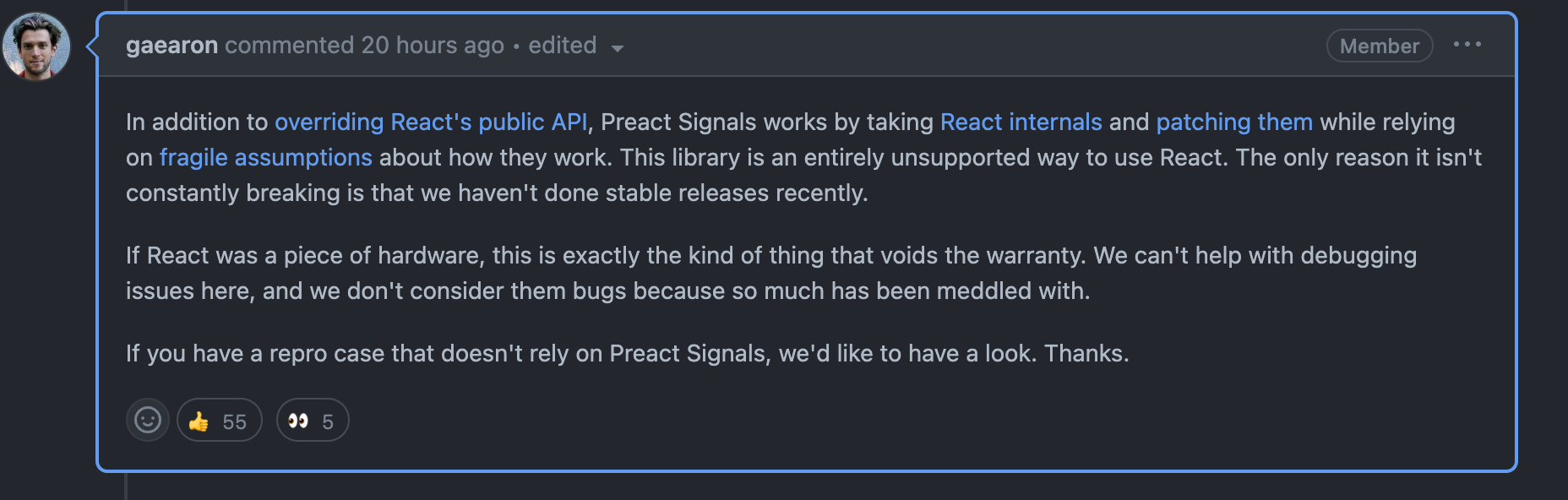
What about react signals?!
// .svelte
<script>
// runes are like compiler macros that add lower level code on compile time
let a = $state(1);
let b = $state(2);

// computed/derived state, compiler will transform this to
// lower level signal primitives
let c = $derived(a + b)

b += 3

// there is also effects
effect$(() => {
  console.log(c);
})

</script>

<p>{c}</p>
V5 Runes
Runes are similar to compile-time macros, but they are essentially just signal primitives used at runtime.
Signals into the future
@Component({
  signals: true,
  selector: 'simple-counter',
  template: `
  <!-- count is invoked as a getter! -->
  <p>Count {{ count() }}</p>
  <p>{{ name }}</p> <!-- Not reactive! -->
  <button (click)="increment()">Increment count</button>`,
})
export class SimpleCounter {
  count = signal(0); // WritableSignal<number>
  name = 'Morgan';

  increment() {
    this.count.update(c => c + 1);
  }
}
Signals into the future
@Component({
  signals: true,
  selector: 'user-profile',
  template: `
    <p>Name: {{ firstName() }} {{ lastName() }}</p>
    <p>Account suspended: {{ suspended() }}</p>
  `,
})
export class UserProfile {
  // Create an optional input without an initial value.
  firstName = input<string>(); // Signal<string|undefined>

  // Create an input with a default value
  lastName = input('Smith'); // Signal<string>

  // Create an input with options.
  suspended = input<boolean>(false, {
    alias: 'disabled',
  }); // Signal<boolean>
}
Signals into the future
@Component({
  signals: true,
  selector: 'form-field',
  template: `
    <field-icon *ngFor="let icon of icons()"> {{ icon }} </field-icon>
    <div class="focus-outline">
      <input #field>
    </div>
  `
})
export class FormField {
  icons = viewChildren(FieldIcon); // Signal<FieldIcon[]>
  input = viewChild<ElementRef>('field'); // Signal<ElementRef>

  someEventHandler() {
    this.input().nativeElement.focus();
  }
}
Signals into the future
use leptos::*;

#[component]
fn App() -> impl IntoView {
    let (count, set_count) = create_signal(0);
    view! {
        <button on:click=move |_| {set_count.update(|n| *n += 2);}>
            "Click me"
        </button>
        <p>
            <strong>"Reactive: "</strong>
            {move || count.get()}
        </p>
        <p>
            <strong>"Reactive shorthand: "</strong>
            {count}
        </p>
        <p>
            <strong>"Not reactive: "</strong>
            {count()}
        </p>
    }
}

fn main() {
    leptos::mount_to_body(App)
}
Finally it is not only JS
Signals are the new v-dom
Thanks

A community meetup that shares knowledge about Qwik and the JS ecosystem in general.

Questions
Fine-tuning your reactivity: Harnessing the power of signals
By Salama Ashoush
Fine-tuning your reactivity: Harnessing the power of signals
Fine-tuning your reactivity: Harnessing the power of signals