WebRTC
demystified
Agenda
- What is WebRTC?
- How does it work?
- What is NAT traversal and how does it affect WebRTC?
- what is STUN and Why do we need it?
- What is TURN and Why do we need it?
- What is ICE?
- What is SDP/SDF?
- What is Signaling?
- Browser WebRTC API
What is WebRTC?
- Stands for Web Real-Time Communication
- Finds a peer-to-peer path to exchange user media in the most efficient and low latency manner
- Standardized API
- Enables rich communication on Browsers, Mobile, IoT, etc
A
B
- A and B Collect all possible ways to connect to it publicly
- A and B signal that information to each other by all other means (Whatsapp, Email, Websockets, HTTP fetch, Etc).
- A Connects to B using the most optimal path
- A and B also exchange their supported media and security
How WebRTC work?
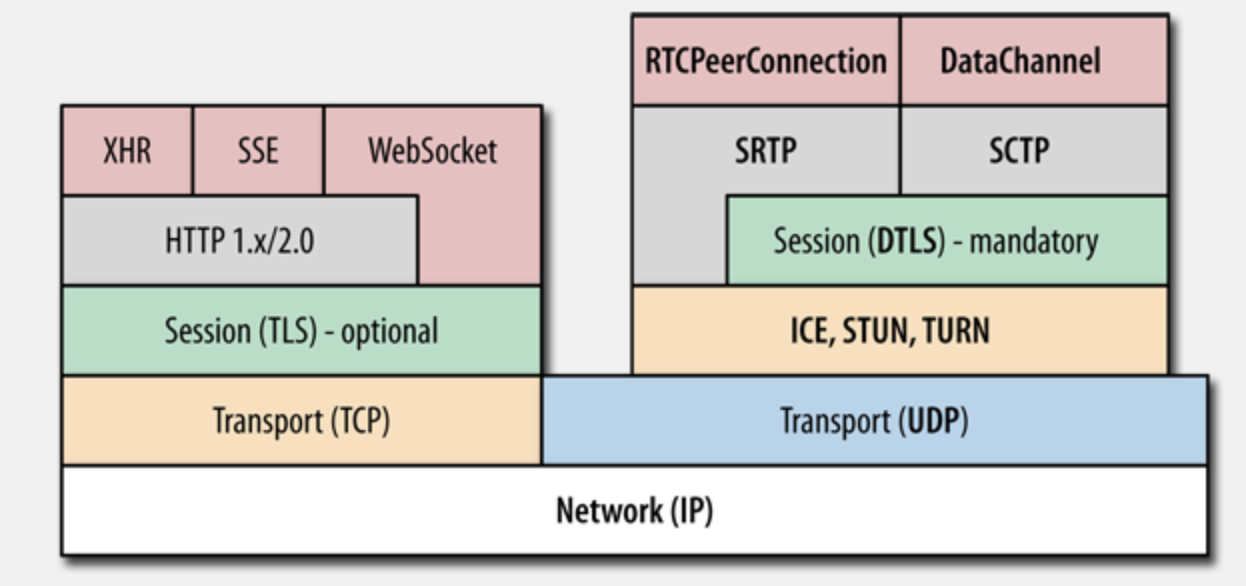
WebRTC archicture
NAT
Network Adress translation
It is the process of mapping IP:port to pairs to anther IP:port
A
B
10.0.0.2:5555
4.4.4.4:80
NAT
10.0.0.1:5555
Router, Gateway, Firewall, etc
| 8889 | 10.0.0.2 | GET / | 4.4.4.4 | 80 |
|---|
A
B
10.0.0.2:5555
4.4.4.4:80
NAT
10.0.0.1:5555
Router, Gateway, Firewall, etc
| 8889 | 10.0.0.2 | GET / | 4.4.4.4 | 80 |
|---|
A
B
10.0.0.2:5555
4.4.4.4:80
NAT
10.0.0.1:5555
Router, Gateway, Firewall, etc
| 5649 | 5.5.5.5 | GET / | 4.4.4.4 | 80 |
|---|
| Internal IP | Internal Port | Ext. IP | Ext. port | Dest IP | Dest Port |
|---|---|---|---|---|---|
| 10.0.0.2 | 8889 | 5.5.5.5 | 5649 | 4.4.4.4 | 80 |
A
B
10.0.0.2:5555
4.4.4.4:80
NAT
10.0.0.1:5555
Router, Gateway, Firewall, etc
| 80 | 4.4.4.4 | ok | 5.5.5.5 | 5649 |
|---|
| Internal IP | Internal Port | Ext. IP | Ext. port | Dest IP | Dest Port |
|---|---|---|---|---|---|
| 10.0.0.2 | 8889 | 5.5.5.5 | 5649 | 4.4.4.4 | 80 |
A
B
10.0.0.2:5555
4.4.4.4:80
NAT
10.0.0.1:5555
Router, Gateway, Firewall, etc
| 80 | 4.4.4.4 | ok | 5.5.5.5 | 5649 |
|---|
| Internal IP | Internal Port | Ext. IP | Ext. port | Dest IP | Dest Port |
|---|---|---|---|---|---|
| 10.0.0.2 | 8889 | 5.5.5.5 | 5649 | 4.4.4.4 | 80 |
A
B
10.0.0.2:5555
4.4.4.4:80
NAT
10.0.0.1:5555
Router, Gateway, Firewall, etc
| 80 | 4.4.4.4 | ok | 10.0.0.2 | 8889 |
|---|
| Internal IP | Internal Port | Ext. IP | Ext. port | Dest IP | Dest Port |
|---|---|---|---|---|---|
| 10.0.0.2 | 8889 | 5.5.5.5 | 5649 | 4.4.4.4 | 80 |
A
B
10.0.0.2:5555
4.4.4.4:80
NAT
10.0.0.1:5555
Router, Gateway, Firewall, etc
| 80 | 4.4.4.4 | ok | 10.0.0.2 | 8889 |
|---|
| Internal IP | Internal Port | Ext. IP | Ext. port | Dest IP | Dest Port |
|---|---|---|---|---|---|
| 10.0.0.2 | 8889 | 5.5.5.5 | 5649 | 4.4.4.4 | 80 |
NAT travseral methods
- 1 to 1 NAT (full cone NAT) - external IP: port always maps to Internal IP:port means anyone is allowed to connect if they have your address and opened port
- Address Restricted NAT - allows only if you visited the address before
- Port Restricted NAT - you have to match both address and port
- Symmetric NAT - IP:port pair must match fully in the NAT table (does not work with WebRTC peer to peer)
STUN
- Session Traversal Utilities for NAT
- Tells me my public IP address through NAT
- Works for full cone, Port/Address Restricted NAT
- Doesn't work for symmetric NAT
- STUN server works on 3478, 5349 for TLS
- Cheap to maintain
TURN
- Traversal Using Relays around NAT
- In the case of symmetric NAT, we use TURN
- It's just a server that relays packets
- TURN default server port 3478, 5349 for TLS
- TURN is also a STUN
- Expensive to maintain
ICE
- Interactive Connectivity Establishment
- ICE collects all available candidates ( local IP addresses, reflexive addresses STUN, and relayed TURN ones)
- Called ICE candidates
- All collected addresses are then sent to the remote peer via SDP
SDP
- Session Description Protocol
- A format that describes ice candidates, networking options, media options, security options, and other stuff
- It is the most important thing in WebRTC
- The goal is to take SDP generated by a user and send it "somehow" to the other party
v=0
o=- 6542080654249767232 2 IN IP4 127.0.0.1
s=-
t=0 0
a=group:BUNDLE 0
a=extmap-allow-mixed
a=msid-semantic: WMS
m=application 9 UDP/DTLS/SCTP webrtc-datachannel
c=IN IP4 0.0.0.0
a=candidate:2781379592 1 udp 2113937151 5da2f2ca-2797-46f3-bed7-a825abb3a884.local 65093 typ host generation 0 network-cost 999
a=ice-ufrag:mpr1
a=ice-pwd:IpYJsifvS1E5/gDGbyCWWfWp
a=ice-options:trickle
a=fingerprint:sha-256 48:9B:5F:6A:F7:AB:57:48:49:05:41:44:0D:3C:A7:55:C6:A2:BE:3F:06:AE:03:26:0F:84:57:FC:01:7C:3A:3C
a=setup:actpass
a=mid:0
a=sctp-port:5000
a=max-message-size:262144
Signaling
- SDP signaling
- Send the SDP that we just generated somehow to the other party we wish to communicate with
- Signaling can be done via any medium, tweet, email, QR code, WebSockets, HTTP fetch, or whatever
- WebRTC standard doesn't say anything about how you do signaling
Browser APIs
- getUserMedia - get and manipulate the video and audio stream
- getDisplayMedia - used for screen sharing
- RTCPeerConnection - Encapsulates all communication parts of webRCT
- RTCDataChannel - Can be used to share any real-time data via webRTC
// creates a local RTC connection
const localConnection = new RTCPeerConnection();

// fires when we get a new ICE canidate, this the moment when we need to share the SDP
localConnection.onicecandidate = (e) => {
  console.log(' NEW ice candidate !! on localconnection reprinting SDP ');
  console.log(JSON.stringify(localConnection.localDescription));
};

// creating a simple data channel to chat peer to peer

const sendChannel = localConnection.createDataChannel('sendChannel');
sendChannel.onmessage = (e) => console.log('messsage received!!!' + e.data);
sendChannel.onopen = (e) => console.log('open!!!!');
sendChannel.onclose = (e) => console.log('closed!!!!!!');

// creating an SDP offer, then set is as our local SDP
localConnection.createOffer().then((o) => localConnection.setLocalDescription(o));
//you can specify a STUN server here
const iceConfiguration = {};

iceConfiguration.iceServers = [];

//turn server
iceConfiguration.iceServers.push({
  urls: 'turn:my-turn-server.mycompany.com:19403',
  username: 'optional-username',
  credentials: 'auth-token',
});

//stun  server
iceConfiguration.iceServers.push({
  urls: 'stun:stun1.l.google.com:19302',
});

const localConnection = new RTCPeerConnection(iceConfiguration);
// set offer with the SDP value from other peer using signaling via any meduim you want
 const offer = '...'
const remoteConnection = new RTCPeerConnection();

remoteConnection.onicecandidate = (e) => {
  console.log(' NEW ice candidnat!! on localconnection reprinting SDP ');
  console.log(JSON.stringify(remoteConnection.localDescription));
};

remoteConnection.ondatachannel = (e) => {
  const receiveChannel = e.channel;
  receiveChannel.onmessage = (e) => console.log('messsage received!!!' + e.data);
  receiveChannel.onopen = (e) => console.log('open!!!!');
  receiveChannel.onclose = (e) => console.log('closed!!!!!!');
  remoteConnection.channel = receiveChannel;
};

// here we set the other party SDP as our remote SDP and we do the same on the other party
remoteConnection.setRemoteDescription(offer).then((a) => console.log('done'));

//create answer which also trigger new SDP, we also must set the local SDP with that answer
await remoteConnection
  .createAnswer()
  .then((a) => remoteConnection.setLocalDescription(a))
  .then((a) => console.log(JSON.stringify(remoteConnection.localDescription)));

//send the answer to the client
// set offer with the SDP value from other peer using signaling via any meduim you want
 const offer = '...'
const remoteConnection = new RTCPeerConnection();

remoteConnection.onicecandidate = (e) => {
  console.log(' NEW ice candidnat!! on localconnection reprinting SDP ');
  console.log(JSON.stringify(remoteConnection.localDescription));
};

remoteConnection.ondatachannel = (e) => {
  const receiveChannel = e.channel;
  receiveChannel.onmessage = (e) => console.log('messsage received!!!' + e.data);
  receiveChannel.onopen = (e) => console.log('open!!!!');
  receiveChannel.onclose = (e) => console.log('closed!!!!!!');
  remoteConnection.channel = receiveChannel;
};

// here we set the other party SDP as our remote SDP and we do the same on the other party
remoteConnection.setRemoteDescription(offer).then((a) => console.log('done'));

//create answer which also trigger new SDP, we also must set the local SDP with that answer
await remoteConnection
  .createAnswer()
  .then((a) => remoteConnection.setLocalDescription(a))
  .then((a) => console.log(JSON.stringify(remoteConnection.localDescription)));

//send the answer to the client
Example
Questions
webrtc
By Salama Ashoush