Modern Javascript
21+
> 0.1 + 0.2
0.30000000000000004
Modern javascript
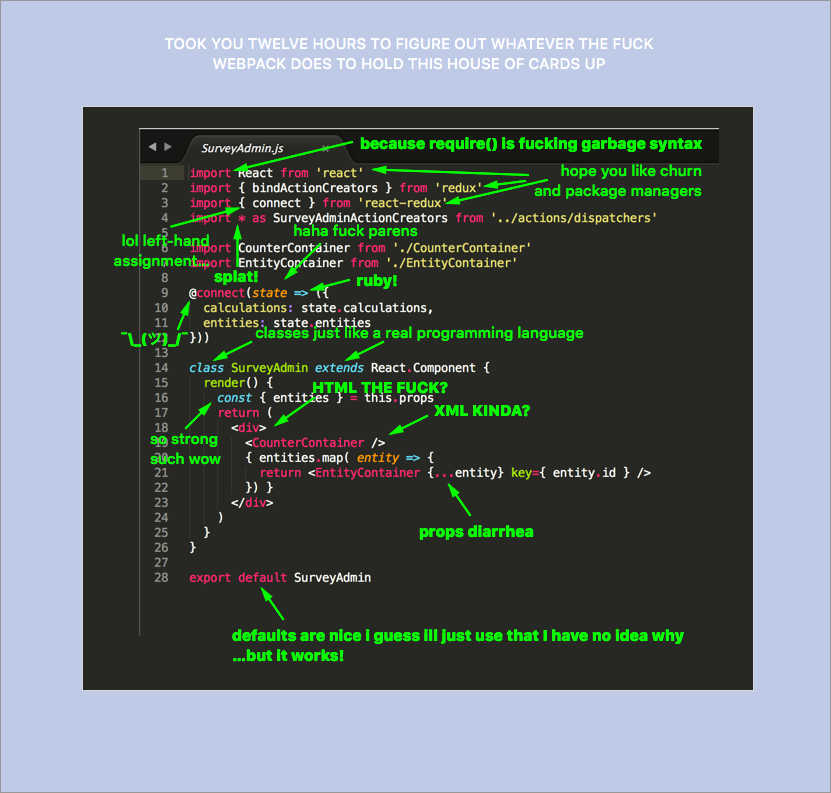
Modern javascript
They said JS was slow. Now it's fast. Said we had no dev tools. We have the best. Said it sucks for big apps. We rock them. @BrendanEich
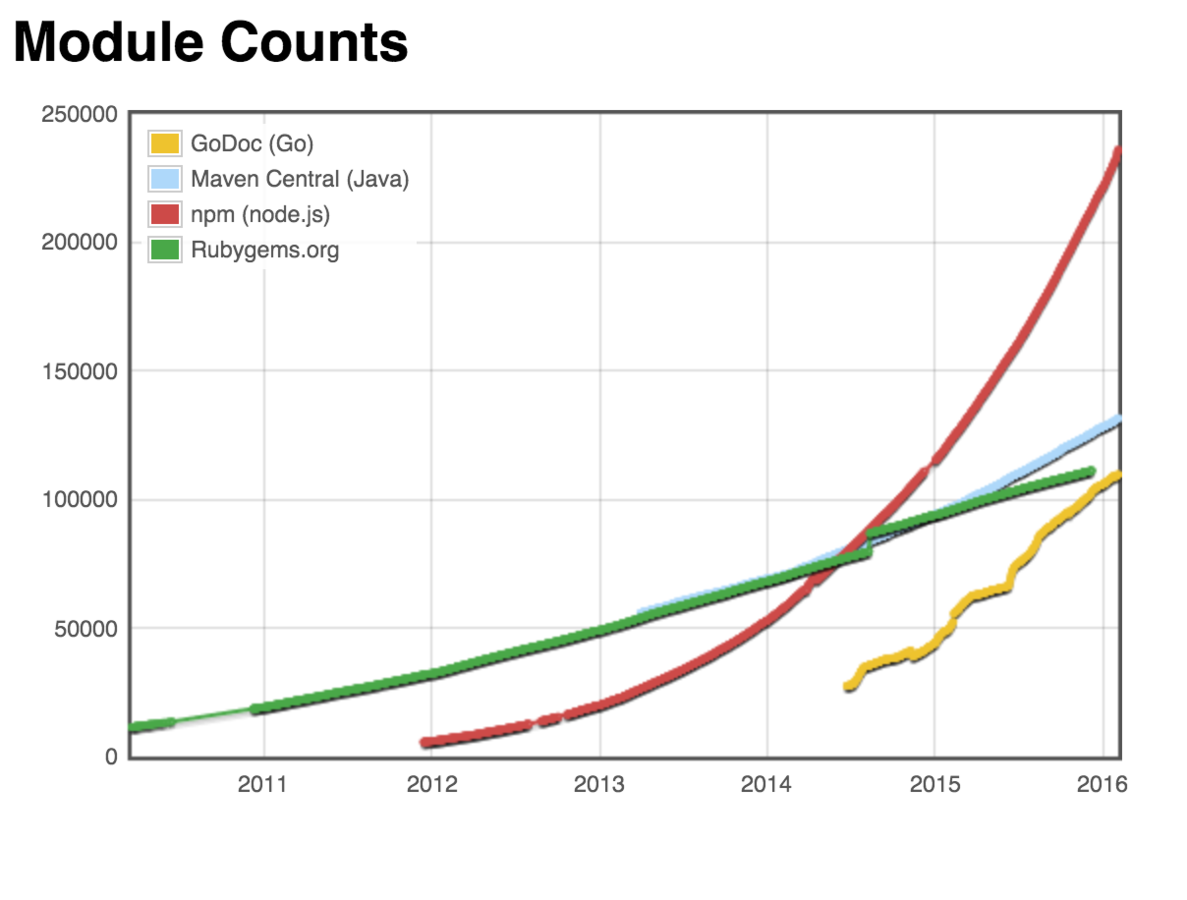
Javascript ecosystem is the most fast growing
ES Next/ES 6/ES 2015
Symbol Type
Scoping
Arrow Function
Constant
Modules
Classes
Generator
Promise
Proxy
Extended Parameter Handling
Extended Literals
Enhanced Regular Expression
Enhanced Object Properties
Destructuring Assignment
Template Literals
Map/Set & WeakMap/WeakSet
Typed Arrays
New Built-In Methods
Internationalization & Localization
Influences on ES 2015
Generators - Python
Arrow function - CoffeeScript, C#, Erlang
Constants - name like C++, but it behaves more like Java’s final.
Template literals - E via quasi literals
Destructuring - Lisp via destructuring bind
Modules - CommonJS, AMD
Symbol - Smalltalk
What's next?
Array.prototype.includes
Exponentiation Operator
SIMD
Async Functions
Object.values/Object.entries
String padding
Trailing commas in function parameter lists and calls
Object.getOwnPropertyDescriptors
New release process - every year, per stages.
Stages: 0 - proposals, 4 - release candidate.
ES 2016
ES 2017 (Stage 3)
ES 2015/Symbol
Primitive values
Undefined, Null, Boolean, Number, String and Symbol
Symbol("foo") !== Symbol("foo")
const foo = Symbol()
const bar = Symbol()
typeof foo === "symbol"
typeof bar === "symbol"
let obj = {}
obj[foo] = "foo"
obj[bar] = "bar"
JSON.stringify(obj) // {}
Object.keys(obj) // []
Object.getOwnPropertyNames(obj) // []
Object.getOwnPropertySymbols(obj) // [ foo, bar ]
obj.xyz = 1;
Reflect.ownKeys(obj) // [Symbol(foo), Symbol(bar)'enum', 1]
Examples:
ES 2015/Symbol
<head>
    <script>
        function test(arr) {
            var iframe = frames[0];
            // This code and the iframe’s code exist in
            // different realms. Therefore, global variables
            // such as Array are different:
            console.log(Array === iframe.Array); // false
            console.log(arr instanceof Array); // false
            console.log(arr instanceof iframe.Array); // true

            // But: symbols are the same
            console.log(Symbol.iterator ===
                        iframe.Symbol.iterator); // true
        }
    </script>
</head>
<body>
    <iframe srcdoc="<script>window.parent.test([])</script>">
</iframe>
</body>
Why? Symbol.iterator is the answer.
If an object is iterable in one realm, it should be iterable in others, too.
ES 2015/Symbol
Customizing basic language operations:
Symbol.hasInstance
Customize the behavior of x instanceof O.
Symbol.toPrimitive
Lets an object customize how it is converted to a primitive value.
Symbol.toStringTag
Called by Object.prototype.toString to compute the default string description of an object
ES 2015/Symbol
Symbol.species
Specifies a function valued property that is the constructor function that is used to create derived objects
class MyArray extends Array {
  static get [Symbol.species]() { return Array; }
}
let arr = new MyArray(1,2,3);
let mapped = arr.map(x => x * x);

console.log(mapped instanceof MyArray); // false
console.log(mapped instanceof Array);   // true
ES 2015/Scoping
let - Block-scoped variable
for (var i = 0; i < 5; i++) {
  setTimeout(function() {
    console.log(i);
  }, 1000 * i)
}

// Output:
// 5
// 5
// 5
// 5
// 5
for (let i = 0; i < 5; i++) {
setTimeout(function() {
console.log(i);
}, 1000 * i)
}
// Output:
// 0
// 1
// 2
// 3
// 4for (var i = 0; i < 5; i++) {
setTimeout(function(i) {
console.log(i);
}, 1000 * i, i)
}
// Output:
// 0
// 1
// 2
// 3
// 4ES 2015/Scoping
Block-Scoped functions
{
    function foo () { return 1 }
    foo() === 1// true
    {
        function foo () { return 2 }
        foo() === 2// true
    }
    foo() === 1// true
}
ES 2015/Arrow function
They are less verbose than traditional function expressions:
const arr = [1, 2, 3];
const squares = arr.map(x => x * x);

// Traditional function expression:
const squares = arr.map(function (x) { return x * x });
Their this is picked up from surroundings (lexical). Therefore, you don’t need bind() or that = this, anymore:
function UiComponent() {
    const button = document.getElementById('myButton');
    button.addEventListener('click', () => {
        console.log('CLICK');
        this.handleClick(); // lexical `this`
    });
}
The following variables are all lexical inside arrow functions:
arguments, super, this, new.target
ES 2015/Constant
Constant is block-scoped (like let) and it value can't be changed.
Prefer const. You can use it for all variables whose values never change.
Otherwise, use let – for variables whose values do change.
Avoid var.
const x = 1;
x = 2; // No error
console.log(x);// 1

const x = 2; // throw TypeError


const a = {b: 1};
a.b = 2;
console.log(a.b);// 2
ES 2015/Module
AMD
CommonJS
Asynchronous Module Definition.
Invented by RequireJS and Dojo.
Uses the CommonJS practice of string IDs for dependencies.
Designed for browsers.
define/require syntax
define(function (require, exports, module) {
    var a = require('a'),
        b = require('b');

    exports.action = function () {};
});
define(id?, dependencies?, factory);
require(id, callback?)Started in 2009 at Mozilla .
Sync loading by names or ids.
Several specifications.
require syntax
// package/lib is a dependency we require
var lib = require('package/lib');

// some behaviour for our module
function foo(){
    lib.log('hello world!');
}

// export (expose) foo to other modules
exports.foo = foo;require(id)ES 2015/Module
Module is JavaScript file that is loaded in a special mode.
Module code automatically runs in strict mode.
The value of this in the top level of a module is undefined.
Module must export anything that should be used out of it scope.
//------ lib.js ------
export const sqrt = Math.sqrt;
export function square(x) {
    return x * x;
}
export function diag(x, y) {
    return sqrt(square(x) + square(y));
}

//------ main.js ------
import { square, diag } from 'lib';
console.log(square(11)); // 121
console.log(diag(4, 3)); // 5
System API
Module can be loaded by system loader API:
System.import('some_module')
.then(some_module => {
    // Use some_module
})
.catch(error => {
    ···
});
Promise.all(
        ['module1', 'module2', 'module3']
            .map(x => System.import(x))
    )
    .then(([module1, module2, module3]) => {
        // Use module1, module2, module3
    });
<script type="module" import="impl/main"></script>As HTML script tag:
The module loader API is not part of the ES6 standard.
ES 2015/Module
System.module(source, options?)
evaluates the JavaScript code in source to a module (which is delivered asynchronously via a Promise).
System.set(name, module)
is for registering a module (e.g. one you have created via System.module()).
System.define(name, source, options?)
evaluates the module code in source and registers the result.
ES 2015/Class
Old way:
function PersonType(name) {
    this.name = name;
}

PersonType.prototype.sayName = function() {
    console.log(this.name);
};

let person = new PersonType("Sasha");
person.sayName();   // Sasha
New way:
class PersonClass {
    // equivalent of the PersonType constructor
    constructor(name) {
        this.name = name;
    }
    // equivalent of PersonType.prototype.sayName
    sayName() {
        console.log(this.name);
    }
}

let person = new PersonClass("Sasha");
person.sayName(); // Sasha
ES 2015/Class
Class declarations act like let declarations and so exist in the temporal dead zone.
All code inside of class declarations runs in strict mode automatically.
All methods are non-enumerable.
All methods have no [[Construct]] internal method and so throw an error if you try to call them with new.
Calling the class constructor without new throws an error.
Classes are First-Class Citizens
ES 2015/Class
Class has only static fields.
Class can be extend from any class.
Class can control how it created by new.target
Static members are not accessible from instances.
You must call super() before accessing this in the constructor.
The only way to avoid calling super() is to return an object from the class constructor.
ES 2015/Generator
It's a special variant of functions where the control flow can be paused and resumed, in order to produce sequence of values (either finite or infinite).
function* genFunc() {
    console.log('First');
    yield;
    console.log('Second');
}

genObj.next()
// output: First
// return: { value: undefined, done: false }

genObj.next()
// output: Second
// return: { value: undefined, done: trie }
When you call genFunc, that does not execute its body. Instead, you get a so-called generator object.
ES 2015/Generator
function* range (start, end, step) {
    while (start < end) {
        yield start
        start += step
    }
}

for (let i of range(0, 10, 2)) {
    console.log(i) // 0, 2, 4, 6, 8
}
Generators can be iterators (data producers).
Each yield can return a value via next(), which means that generators can produce sequences of values via loops and recursion.
ES 2015/Generator
function* dataConsumer() {
    console.log('Started');
    console.log(`1. ${yield}`); // (A)
    console.log(`2. ${yield}`);
    return 'result';
}

genObj.next()
//Started
// { value: undefined, done: false }

genObj.next('a')
// 1. a
// { value: undefined, done: false }

genObj.next('b')
// 2. b
// { value: 'result', done: true }
Iterators can be observers (data consumers): yield can also receive a value from next() (via a parameter). That means that generators become data consumers that pause until a new value is pushed into them via next().
ES 2015/Promise
let promise = new Promise(function(resolve, reject) {
    console.log("Promise");
    resolve();
});

promise.then(function() {
    console.log("Resolved.");
});

console.log("Hi!");
Promises are another option for asynchronous programming, and similar functionality is available in other languages under names such as futures and deferreds.
ES 2015/ Promise
var promise = new Promise(function (resolve, reject) {
    setTimeout(function () {
        resolve();
        console.log('Promise resolved');
    }, 5000);
});

var deferred = $.Deferred();
setTimeout(function () {
    deferred.resolve();
    console.log('Deferred resolved');
}, 10000);

Promise.all([promise,deferred]).then(function () {
    console.log('All is done');
});
Promises are based on Promises A+ specification. So promises provide "then'able" code and promises must be async and can be equal.
ES 2015/ Promise
Promise.prototype.catch(rejectCallback)
Promise can be resolved or rejected, but it will be fulfilled. To break promise chains you can throw a error and catch it.
Promise.all(iterable)
Wait until all promises will be fulfilled
Promise.race(iterable)
Wait until one promise will be fulfilled
Promise.resolve(value)
Convert value to promise and resolve it
Promise.reject(value)
Convert value to promise and reject it
ES 2015/ Proxy
The Proxy object is used to define custom behavior for fundamental operations (e.g. property lookup, assignment, enumeration, function invocation, etc).
var p = new Proxy(target, handler);let validator = {
set: function(obj, prop, value) {
if (prop === 'age') {
if (!Number.isInteger(value)) {
throw new TypeError('The age is not an integer');
}
if (value > 200) {
throw new RangeError('The age seems invalid');
}
}
// The default behavior to store the value
obj[prop] = value;
}
};
let person = new Proxy({}, validator);
person.age = 100;
console.log(person.age); // 100
person.age = 'young'; // Throws an exception
person.age = 300; // Throws an exceptionES 2015/ Proxy
The Proxy object can trap:
- getPrototypeOf()
- setPrototypeOf()
- isExtensible()
- preventExtensions()
- getOwnPropertyDescriptor()
- defineProperty()
- has()
- get()
- set()
- deleteProperty()
- ownKeys()
- apply()
- construct()
Reflect API has the same static methods
ES 2015/ Support
IE 11 16%
Edge 13 83%
Chrome 50 91%
Firefox 45 85%
Opera 37 91%
Safari 9 54%
Webkit 82%
Node 5.0 57%
Babel 73%
ES 2015/Common
Modern javascript is universal javascript. You can use javascript in browser and on server.
Node.js:
- current version is 5.6.0
- new major version every 6 month
Node.js use case:
- Gulp
- Grunt
- Stylus
- Webpack
- CLI
ES 2015/Links
P.S.
Here be dragons...
Javascript now
By Sasha Pinchuk