Cross-Platform Desktop Application
Satit Rianpit
25-26 June 2015
Course Outline
- JavaScript
- NodeJS/io.js
- jQuery
- Bootstrap
- nwjs (node-webkit)
- MySQL
- Highcharts
Cross-Platform Desktop Application
with nwjs (node-webkit)
- Run cross platform (Windows, Linux, Mac)
- Built with Web technology (HTML, CSS, JavaScript)
- Use NodeJS modules
bower/npm
bower : ใช้ติดตั้ง package ที่ใช้สำหรับเว็บ เช่น jQuery, Bootstrap, Font-Awesome, lumx
npm : ใช้ติดตั้ง package/module สำหรับ NodeJs/io.js
# bower init // start new project
# bower install jquery
# bower install bootstrap --save  // save to bower.json

# npm init // start new project
# npm install mysql
# npm install gulp -g
# npm install moment --save  // save to package.json

npm install bower -gติดตั้ง bower
การใช้งาน
1
JavaScript
Basic JavaScript: variables, function, class
Basic JavaScript
Variables, comments, array, object
// Single line comment
var a = 10;
var msg = 'Hello world';  // Comment
var b = a + 5; /* b = 15 */

/*
Multiple line comment
*/
function hello(name) {
     alert('Hello, ' + name;
}
// Array
var arr = [];
var fruits = ['Apple', 'Mango', 'Banana'];
fruits.push('Pie Apple');
// Object
var obj = {};
obj.name = 'Satit';
obj.surname = 'Rianpit';Basic JavaScript
string
// String
var name = 'Satit';
var fullname = name + ' Rianpit'; // Satit Rianpit
var myName = ['Satit', 'Rianpit'].join(' '); // Satit Rianpit

var longString = 'Welcome ' +
                 'to ' +
                 'My Application'; // Welcome to My Application

var sql = 'SELECT name, last_name' +
          ' FROM users' +
          ' WHERE id=1'; // SELECT name, last_name FROM users WHERE id=1
Basic JavaScript
(Function and Class)
// named function
var sayHello = function (name) {
    console.log(name);
};

function sayHi(name) {
    console.log(name);
};

sayHello('Satit');
sayHi('Monalisa');
// Class
var say = {
hi: function (name) {
console.log(name);
},
hello: function (name) {
console.log(name);
}
};
// OR
var say = {};
say.hi = function (name) {
console.log(name);
};
say.hello = function (name) {
console.log(name);
};
say.hi('Satit');
say.hello('Monalisa');
Basic JavaScript
(Callback function)
var getUser = function (callback) {
    var db = getConnection();
    var sql = 'SELECT * FROM users';
    db.raw(sql)
        .then(function (rows) {
            callback(null, rows);
        })
        .catch(function (err) {
            callback(err);
        });
};

// Get list
getUser(function (err, rows) {
    if (err) {
        console.log(err);
        alert('Error found!');
    } else {
        // Display users in table
    }
});
var showName = function (name, callback) {
if (name == 'Satit') {
callback(null, 'Satit Rianpit');
} else {
callback('Not found');
}
};
showName('Satit', function (err, fullname) {
if (err) {
alert('Error, not found!');
} else {
alert(fullname); // Satit Rianpit
}
});2
NodeJS
Basic NodeJS: modules
NodeJS/io.js
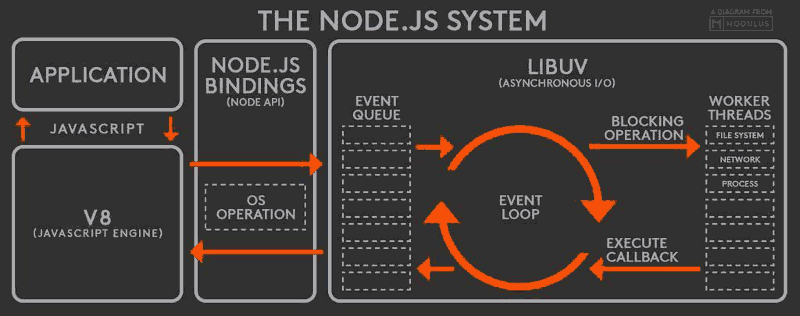
Node.js is an open source, cross-platform runtime environment for server-side and networking applications written in JavaScript. Run on Windows, Linux, FreeBSD and OSX
Platform
NodeJS: Built-in Modules
var os = require('os');

console.log(os.platform()); // dawin, win32, win64, linux
console.log(os.hostname());
console.log(os.networkInterfaces());

var crypto = require('crypto');
var cryptPassword = crypto.createHash('md5')
                    .update('123456')
                    .digest('hex'); //e10adc3949ba59abbe56e057f20f883e
NodeJS: External Modules
// Install module

# npm install fs-extra
# npm install jsonfile --save // save to package.json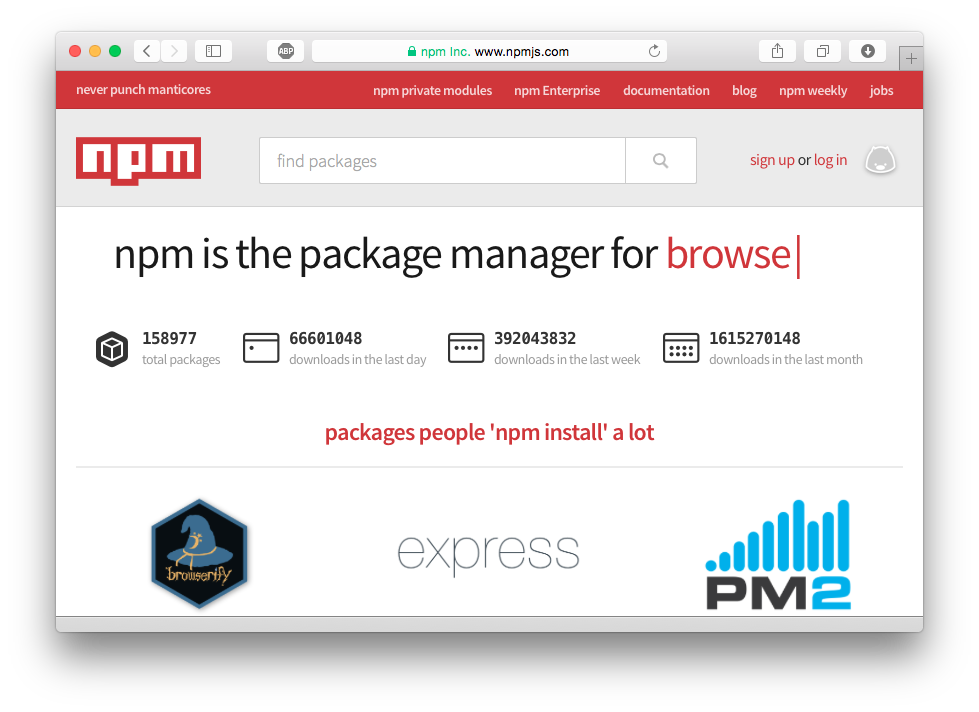
http://www.npmjs.com
NodeJS: External Modules
// Install module

# npm install fs-extra

// app.js
var fse = require('fs-extra');
fse.copy('/tmp/myfile', '/tmp/mynewfile', function (err) {
  if (err) return console.error(err)
  console.log("success!")
}); // copies file


# npm install moment

//app.js
var moment = require('moment');
var today = moment().format('YYYY-MM-DD'); // 2015-06-25
var tomorrow = moment().add(1, 'days'); // 2015-06-26
var theNext = moment().add(7, 'days').add(1, 'months');
var theNext2 = moment().add({days: 7, months: 1});
NodeJS: Custom Modules
// file my-module.js

var MyModule = {
    getName: function () {
        return 'Satit';
    },
    getFullname: function () {
        return 'Satit Rianpit';
    }
};

module.exports = MyModule;

// app.js
var my = require('./my-module');
var name = my.getName(); // Satit
var fullname = my.getFullname(); // Satit Rianpit
3
jQuery
Basic jQuery: DOM, Events
Basic jQuery
// Initial jQuery on page loaded.
$(function () {
    // code here...
});
Initialized
// index.html
<span>Hello</span>
<div id="mydiv">Hello world </div>
<button class="btn btn-success">Button</button>
<input type="text" name="txtName" value="Hello" />
DOM access
// index.js
$(function () {

    var txtSpan = $('span').text(); // Hello
    var divId = $('#mydiv').text(); // Hello world
    var btnClass = $('button.btn').text(); // Button
    var inText = $('input[type="text"]').val(); // Hello

});
Events
// index.html
<input type="text" id="txtName" />
<button type="button" id="btnSubmit">Submit</button>
// index.js
$(function () {
$('#btnSubmit').on('click', function () {
var name = $('#txtName').val();
alert(name);
});
});// Event
$elm.on(event, function () {...});
Event:
- blur - change
- click - dblclick
- focus - hover
...
4
Bootstrap
Basic Bootstrap: Button, Table, Grid, Colors, Modal
Download/Installation
Download: http://getbootstrap.com
# bower install bootstrapBower:
<!DOCTYPE html>
<html lang="en">
  <head>
    <link href="css/bootstrap.min.css" rel="stylesheet">

    <script src="jquery.min.js"></script>
    <script src="js/bootstrap.min.js"></script>
  </head>
  <body>

  </body>
</html>
Components



Other modules/Component
- Grid
- Responsive
- Alert
- Modal
- Table
- Panel
Demo
5
nwjs (node-webkit)
Basic nwjs: Window, nodejs modules, deployment
nwjs (node-webkit)
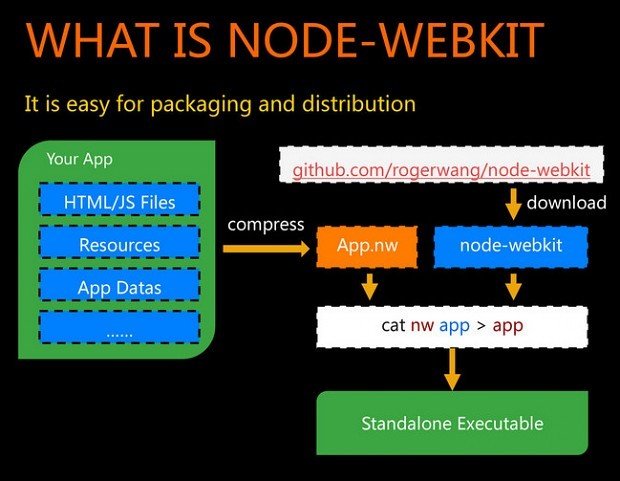
Start new project
Create new app
# npm init -y{
"name": "myapp",
"version": "1.0.0",
"description": "",
"main": "index.html", <-- Change
"keywords": [],
"author": "",
"license": "ISC"
}
index.html
<!DOCTYPE html>
<html lang="en">
  <head>
    <meta charset="utf-8">
    <meta http-equiv="X-UA-Compatible" content="IE=edge">
    <meta name="viewport"
        content="width=device-width, initial-scale=1">
    <title>My App</title>
    <link href="bower_components/bootstrap/dist/css/bootstrap.min.css"
            rel="stylesheet">

  </head>
  <body>
    <h1>Hello, world!</h1>
    <button class="btn btn-success">Click me!</button>
    <script src="bower_components/jquery/dist/jquery.min.js">
    </script>
    <script src="bower_components/bootstrap/distjs/bootstrap.min.js">
    </script>
  </body>
</html>
package.json
Run program
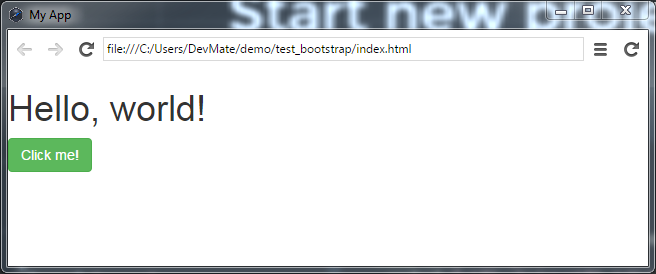
# nw .package.json
{
  "main": "index.html",
  "name": "nw-demo",
  "description": "demo app of node-webkit",
  "version": "0.1.0",
  "keywords": [ "demo", "node-webkit" ],
  "window": {
    "title": "node-webkit demo",
    "icon": "link.png",
    "toolbar": true,
    "frame": false,
    "width": 800,
    "height": 500,
    "position": "center",
    "min_width": 400,
    "min_height": 200,
    "max_width": 800,
    "max_height": 600
  },
  "webkit": {
    "plugin": true
  }
}
https://github.com/nwjs/nw.js/wiki/Manifest-format
Debug
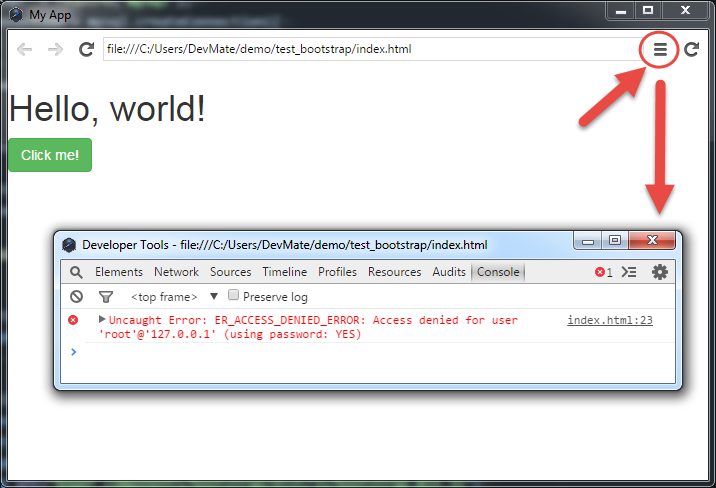
6
nwjs + MySQL
Installation
# npm install mysql --savevar mysql = require('mysql');
var connection = mysql.createConnection({
host : 'localhost',
user : 'me',
password : 'secret'
});
connection.connect();
connection.query('SELECT 1 + 1 AS solution', function(err, rows, fields) {
if (err) throw err;
console.log('The solution is: ', rows[0].solution);
});
connection.end();Example
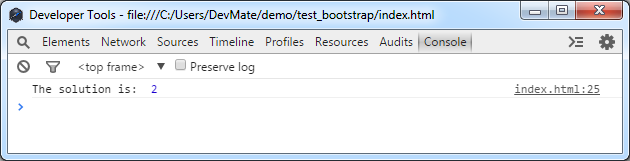
KnexJS
knex.select('title', 'author', 'year').from('books')

Outputs:
select `title`, `author`, `year` from `books`
knex.select('*').from('users').leftJoin('accounts', 'users.id', 'accounts.user_id')
Outputs:
select * from `users` left join `accounts` on `users`.`id` = `accounts`.`user_id`// Raw query
knex.raw('select * from users where id = ?', [1]).then(function(resp) {
...
});Knex.js is a "batteries included" SQL query builder for Postgres, MySQL, MariaDB,SQLite3, and Oracle
http://knexjs.org/
Connection/Run query
var knex = require('knex')({
  client: 'mysql',
  connection: {
    host     : '127.0.0.1',
    user     : 'your_database_user',
    password : 'your_database_password',
    database : 'myapp_test'
  }
});
knex.select('*')
.from('users')
.leftJoin('accounts', 'users.id', 'accounts.user_id')
.then(function (rows) {
// success with results
})
.catch(function (err) {
// error
});Usage:
CRUD Query builder
knex('users')
    .insert({ name: 'Satit', password: '123456' });
knex('users')
.where('id', 1)
.update({ name: 'Satit', password: '123456' });INSERT
UPDATE
knex('users')
    .where('id', 1)
    .delete();
DELETE
knex('users')
    .select('name', 'password');
SELECT
Advanced Query builder
knex('users as u')
    .select('u.name', 't.name as type_name')
    .leftJoin('user_type as t', 't.id', 'u.type_id');
JOIN
innerJoin, leftJoin, rightJoin
knex('users')
    .where('id', 1)
    .whereBetween('user_type', [1, 2, 3])
    .where('name', 'like', '%Satit%')
where
KnexJS demo
7
HighCharts
Basic Dashboard: Bar, Line, Donut
Highcharts
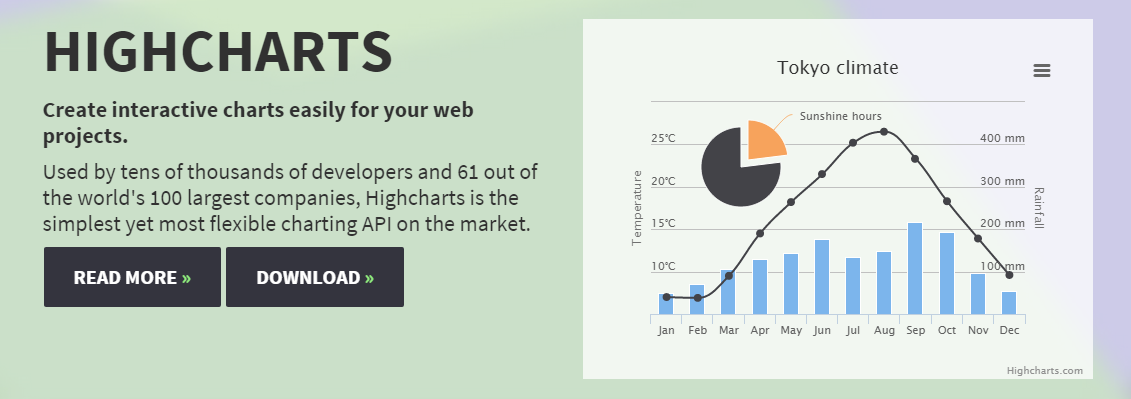
Installation
# bower install highcharts<html>
<head>
<script src="bower_components/jquery/dist/jquery.min.js"></script>
<script src="bower_components/highcharts/highcharts.js"></script>
</head>
<body>
<div id="container" style="width:100%; height:400px;"></div>
<script>
$(function () {
$('#container').highcharts({
chart: { type: 'bar' },
title: { text: 'Fruit Consumption' },
xAxis: { categories: ['Apples', 'Bananas', 'Oranges'] },
yAxis: { title: { text: 'Fruit eaten' } },
series: [{ name: 'Jane', data: [1, 0, 4]},
{ name: 'John', data: [5, 7, 3] }]
});
});
</script>
</body>
</html>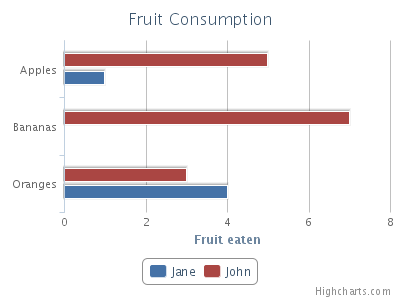
Deployment
Step 1
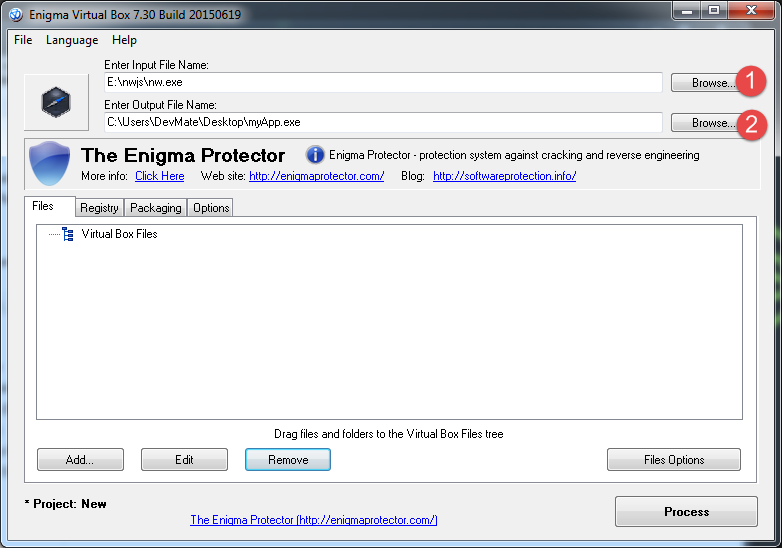
1. เลือกไฟล์ nw.exe ในโฟลเดอร์ที่เก็บโปรแกรม nwjs ที่ได้แตก zip ไฟล์ไว้ (C:\nwjs\nw.exe)
2. เลือกที่อยู่ของไฟล์ Output ที่ต้องการ
Step 2
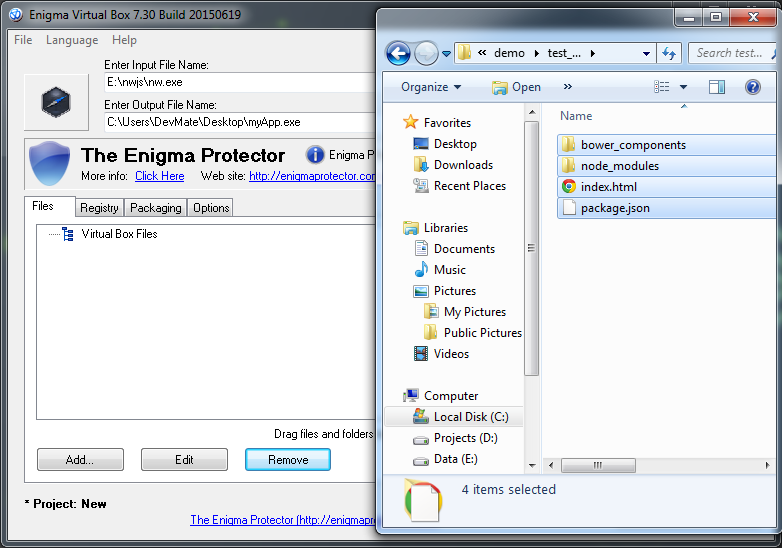
1. เปิด Explorer แล้วทำการลากไฟล์ Project ของเรามาไว้ที่โปรแกรม Enigma Virtual Box ดังรูป
Step 3
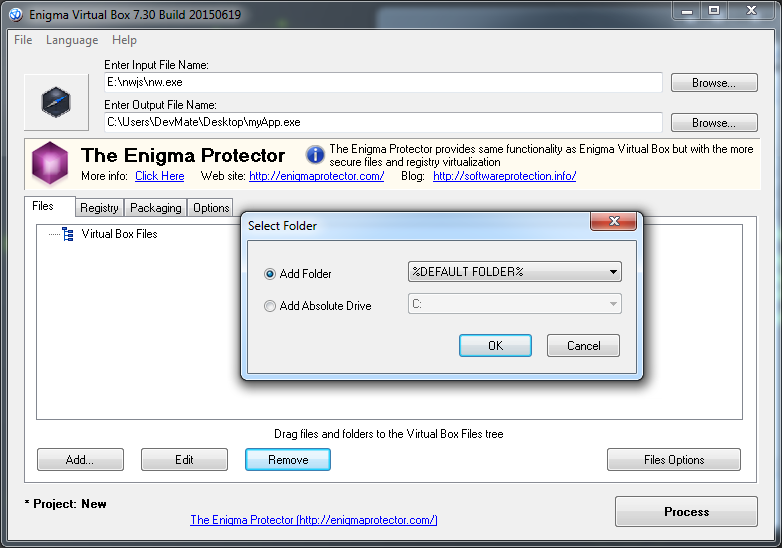
1. ปรากฎหน้าต่างเลือกโฟล์เดอร์ ให้คลกที่ปุ่ม OK
Step 4
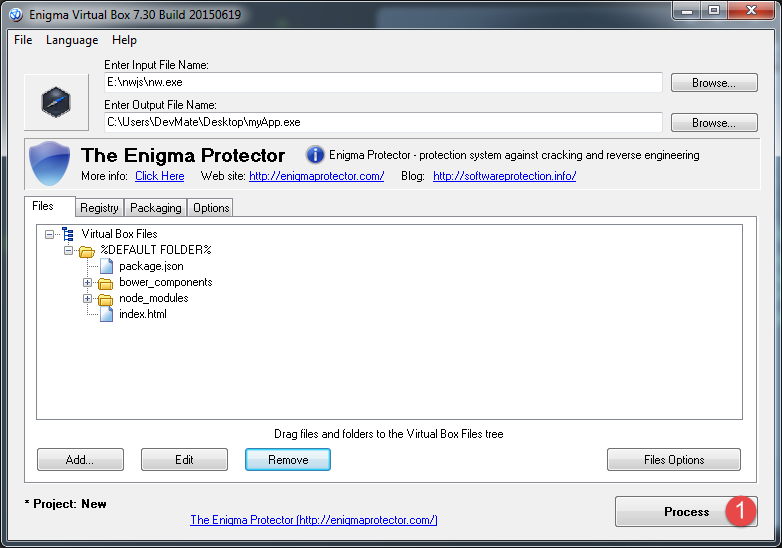
1. เมื่อลากไฟล์ Project ทั้งหมดมาแล้ว จะได้ดังรูป
Step 5
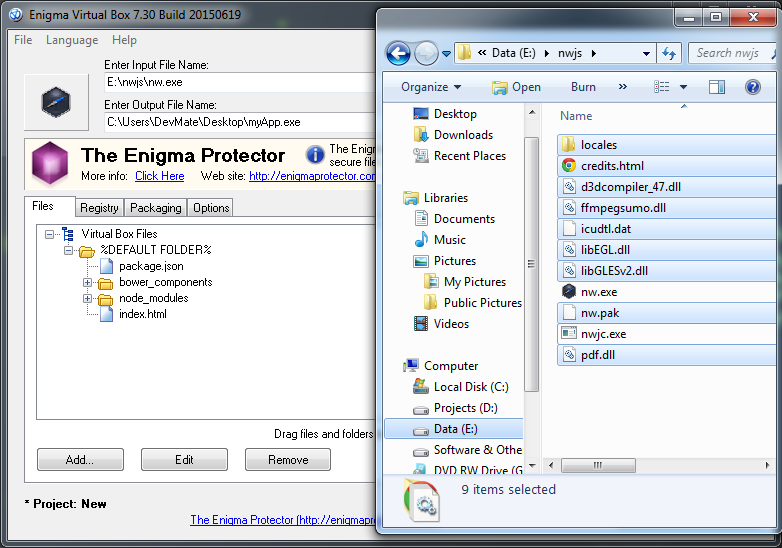
เลือกไฟล์ และ โฟลเดอร์ทั้งหมดในโฟลเดอร์ c:\nwjs ยกเว้น ไฟล์ nwjc.exe แล้วลากมาวางในโปรแกรม Enigma Virtual Box ดังรูป
Step 6
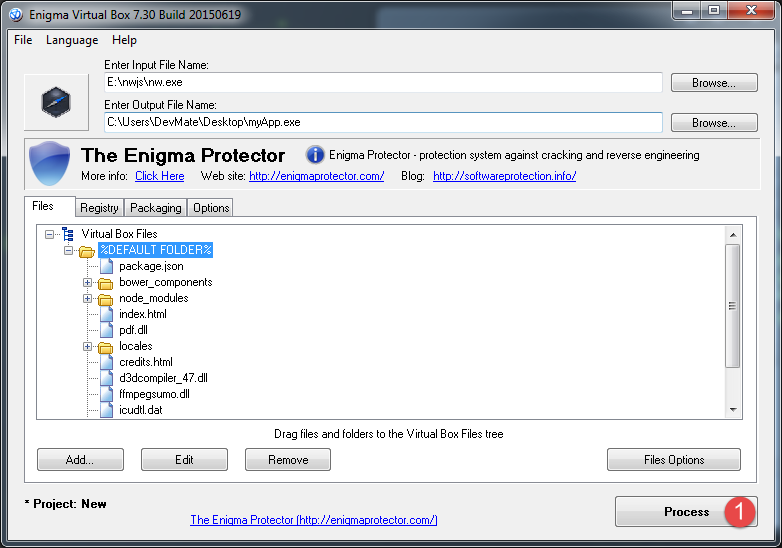
จะได้ไฟล์ทั้งหมด ดังรูป
Step 7
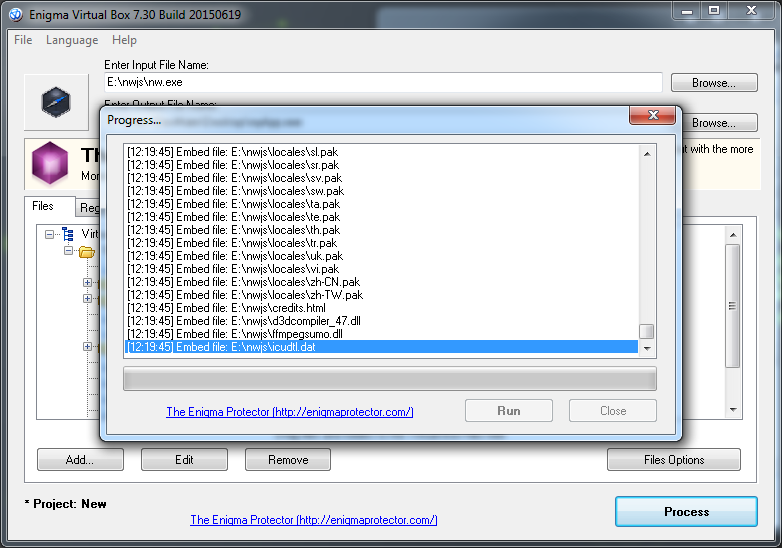
คลิกที่ปุ่ม Process โปรแกรมจะทำการ Compile ตัว Project ให้
Step 8
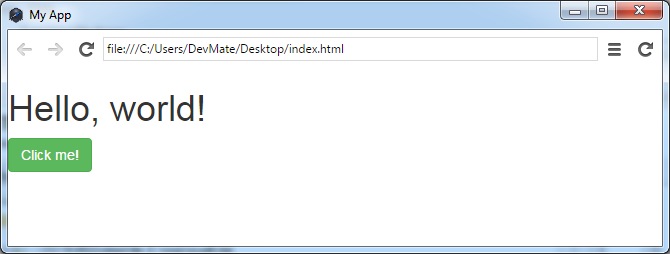
เมื่อเสร็จแล้วสามารถเปิดโปรแกรมที่เราได้ทำการ compile จะได้ผลดังรูป
Cross-Platform Desktop Application
By Satit Rianpit