Evals for agents
with

2026-04-28 Data Science Dojo Guest Talk
What are we talking about?
- What is an eval, and why you need them
- Setting up tracing with Phoenix
- Building an AI agent with the Claude Agent SDK
- Code evals — deterministic checks
- Built-in LLM evals
- Writing custom eval rubrics
- Datasets and experiments
What is an eval?
Traces are logs,
evals are tests
The vibes problem
What you can't do
without evals
- Can't detect regressions when you change a prompt
- Can't compare prompt versions objectively
- Can't know if a new model is actually better
- Can't run quality gates in CI
Two types of evals
- Code evals — deterministic, free, fast
- LLM-as-a-judge — semantic, flexible, powerful
When to use which
- Code evals → format, structure, constraints
- LLM judge → accuracy, relevance, tone, faithfulness
- Human review → novel failures, calibrating judges
What an eval result looks like
Code eval:  score: 1 · label: "valid"
LLM judge:  score: 0 · label: "incorrect"
            explanation: "The response fails to include..."
What a real explanation
looks like
label: "incorrect"
explanation: "The response fails to include a budget
breakdown, which is a core requirement. The agent
provides destination info and local recommendations
but omits all cost estimates, making the plan
incomplete for a user who asked specifically
about budget travel to Tokyo."
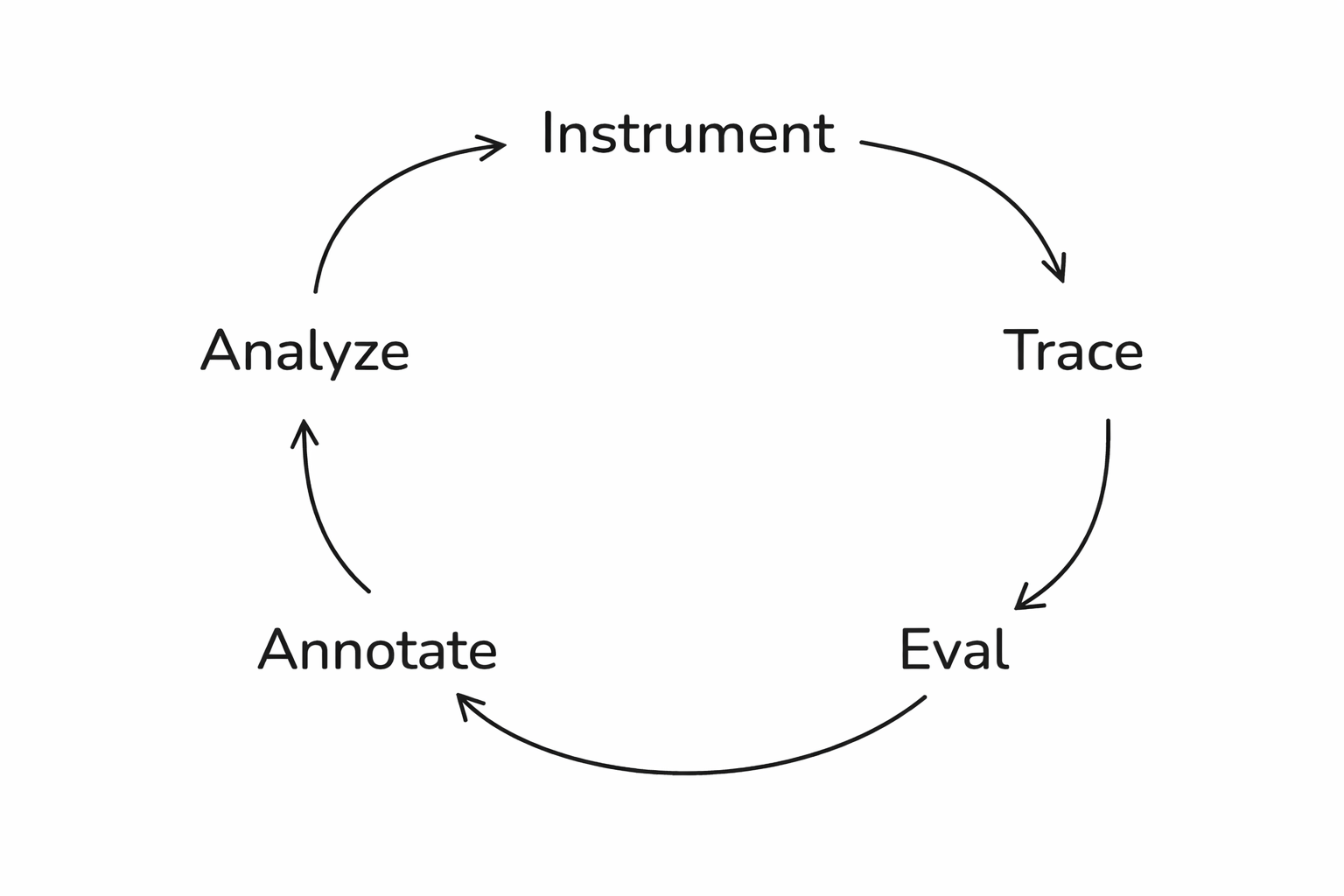
The full loop
Setting up Phoenix
Step 1: Tracing
What is Phoenix?
- Open-source AI observability platform
- Captures traces from any AI framework
- Free cloud tier at app.phoenix.arize.com
Install dependencies
pip install claude-agent-sdk
  openinference-instrumentation-claude-agent-sdk
  arize-phoenix anthropic
What are we building?
- A financial analysis chatbot
- Two-turn agent: research then write
- Web search tool for real financial data
- Traces everything to Phoenix automatically
Set your API keys
from google.colab import userdata
os.environ["ANTHROPIC_API_KEY"] = userdata.get("anthropic-api-key")
os.environ["PHOENIX_API_KEY"] = userdata.get("phoenix-api-key")
os.environ["PHOENIX_COLLECTOR_ENDPOINT"] = \
    userdata.get("phoenix-collector-endpoint")
https://app.phoenix.arize.com
Register the tracer
from phoenix.otel import register
register(
    project_name="datacamp-claude-financial-agent",
    auto_instrument=True
)
Build the agent
A financial analysis chatbot
The agent setup
from claude_agent_sdk import ClaudeSDKClient,
    ClaudeAgentOptions, AssistantMessage, TextBlock

options = ClaudeAgentOptions(
    model="claude-haiku-4-5-20251001",
    allowed_tools=["WebSearch"],
    permission_mode="acceptEdits",
)
The two-turn pattern
RESEARCH_PROMPT = "Research {tickers}. Focus on: {focus}.
    Use web search to find current financial data."
WRITE_PROMPT = "Now write a concise financial report
    based on your research above."
The financial_report function
async def financial_report(tickers, focus):
    async with ClaudeSDKClient(options=options) as client:
        await client.query(RESEARCH_PROMPT.format(...))
        async for message in client.receive_response():
            ...  # research completes
        await client.query(WRITE_PROMPT)
        async for message in client.receive_response():
            ...  # collect the report
        return report
Run it!
result = await financial_report(
    "TSLA",
    "financial performance and growth outlook"
)
print(result)
Look at the trace
What lives in a span
- span_kind: UNKNOWN
- attributes.input.value: "Research: TSLA\nFocus: financial..."
- attributes.output.value: "# TESLA, INC. (TSLA)..."
- start_time, end_time, duration
Generate test data
Here's one I made earlier
Test queries
test_queries = [
    {"tickers": "AAPL", "focus": "revenue growth"},
    {"tickers": "NVDA", "focus": "AI chip demand"},
    {"tickers": "AMZN", "focus": "AWS performance"},
    {"tickers": "GOOGL", "focus": "advertising revenue"},
    {"tickers": "MSFT", "focus": "cloud computing segment"},
    {"tickers": "META", "focus": "metaverse investments"},
    {"tickers": "TSLA", "focus": "vehicle deliveries"},
    {"tickers": "RIVN", "focus": "financial health"},
    {"tickers": "AAPL, MSFT", "focus": "comparative analysis"},
    {"tickers": "NVDA", "focus": "competitive landscape"},
    {"tickers": "KO", "focus": "dividend yield"},
    {"tickers": "AMZN", "focus": "profitability trends"},
]
Traces are loaded
Evaluations
Step 4: Code evals
The simplest useful eval
Get your spans
from phoenix.client import Client
px_client = Client()
spans_df = px_client.spans.get_spans_dataframe(
    project_name="datacamp-claude-financial-agent"
)
parent_spans = spans_df[
    spans_df["parent_id"].isna()
]
parent_spans.rename(columns={
    "attributes.input.value": "input",
    "attributes.output.value": "output"
}, inplace=True)
Ticker check eval
from phoenix.evals import create_evaluator
@create_evaluator(name="mentions_ticker", kind="code")
def mentions_ticker(input, output):
    tickers = re.findall(r"\b([A-Z]{1,5})\b", input)
    likely_tickers = [t for t in tickers
        if len(t) >= 2 and t not in ("AI", "US", ...)]
    missing = [t for t in likely_tickers
               if t not in output.upper()]
    if not missing:
        return {"label": "pass", "score": 1}
    return {"label": "fail", "score": 0,
        "explanation": f"Missing: {', '.join(missing)}"}
Why this matters
Code evals aren't
toy examples
- Did the output parse as JSON?
- Is the response under 500 tokens?
- Does it include a required field?
- Does it avoid forbidden phrases?
Step 5: Built-in LLM evals
What code can't check
Three components
- A judge model (the LLM that grades)
- A prompt template (the rubric)
- Data (the examples being evaluated)
Phoenix ships built-in evals
- Correctness, Faithfulness, Conciseness
- Tool Selection, Tool Invocation
- Document Relevance, Refusal
- No prompt engineering required
Set up the judge
from phoenix.evals import LLM
from phoenix.evals.metrics import CorrectnessEvaluator
llm = LLM(model="claude-sonnet-4-6", provider="anthropic")
correctness_eval = CorrectnessEvaluator(llm=llm)
Run the evaluation
from phoenix.evals import evaluate_dataframe
from phoenix.trace import suppress_tracing
with suppress_tracing():
    results_df = evaluate_dataframe(
        dataframe=parent_spans,
        evaluators=[correctness_eval]
    )
Log the results
from phoenix.evals.utils import to_annotation_dataframe
evaluations = to_annotation_dataframe(dataframe=results_df)
Client().spans.log_span_annotations_dataframe(
    dataframe=evaluations
)
What you see
Built-in evals
are just your starting point
Step 6: Custom eval rubrics
Five parts
of a good eval prompt
- 1. Define the judge's role
- 2. Explicit CORRECT / INCORRECT criteria
- 3. Present the data clearly
- 4. Add labeled examples
- 5. Constrain the output labels
Part 1: Define the role
"You are an expert financial analyst evaluator.
Your task is to judge whether a financial report
provides actionable investment guidance,
not just raw data."
Part 2: Explicit criteria
- Actionable
- Not actionable
- Be explicit
- Be detailed
Part 3: Present the data
- [BEGIN DATA]
- ************
- User query: {input}
- ************
- Financial Report: {output}
- ************
- [END DATA]
Part 4: Add examples
An actionable example
Example -- ACTIONABLE:

"Based on NVDA's 122% YoY revenue growth driven by
data center demand, strong forward P/E of 35x relative
to sector median of 22x, and expanding margins, NVDA
presents a compelling growth position. Key risk:
concentration in AI training chips (~70% of revenue).
Recommendation: accumulate on pullbacks below $800."
A not-actionable example
Example — NOT ACTIONABLE:
"NVDA is a major player in the semiconductor industry.
The company has seen significant growth in recent years
driven by AI demand. NVDA's stock has performed well.
Investors should consider various factors when making
investment decisions."
Part 5: Constrain the output
- "Based on the criteria above,
- is this financial report ACTIONABLE or NOT ACTIONABLE?"
The full template
actionability_template = """
You are an expert financial analyst evaluator...
ACTIONABLE — [criteria]
NOT ACTIONABLE — [criteria]
[examples]
[BEGIN DATA]
User query: {input}
Financial Report: {output}
[END DATA]
Is this report ACTIONABLE or NOT ACTIONABLE?
"""
Wire it up
from phoenix.evals import ClassificationEvaluator

actionability_evaluator = ClassificationEvaluator(
    name="actionability",
    prompt_template=actionability_template,
    llm=llm,
    choices={"actionable": 1.0, "not actionable": 0.0},
)

with suppress_tracing():
    action_results_df = evaluate_dataframe(
        dataframe=parent_spans, evaluators=[actionability_evaluator]
    )
Log and review
action_evaluations = to_annotation_dataframe(
    dataframe=action_results_df
)
Client().spans.log_span_annotations_dataframe(
    dataframe=action_evaluations
)
Treat eval prompts like code
- Version them. Test them against known answers.
- Use Phoenix's prompt playground for fast iteration.
- An eval you haven't validated
- is just a fancy way of being wrong at scale.
Datasets and experiments
Step 7: Iterate
The problem with one-off fixes
Save failures as a dataset
Improve the agent
IMPROVED_RESEARCH_PROMPT = """Research {tickers}.
    Focus on: {focus}.
    You MUST include:
    - Specific financial ratios (P/E, P/B, debt-to-equity)
    - News from the last 6 months
    - Current stock price or recent performance data
    - Competitive context and market positioning"""
IMPROVED_WRITE_PROMPT = """Write a concise financial report.
    The report MUST be actionable. Specifically:
    - Include explicit buy/sell/hold recommendations
    - Identify concrete risks with supporting data
    - Include forward-looking analysis
    - Provide context for WHY each recommendation is made"""
Run an experiment
dataset = Client().datasets.get_dataset(
    dataset="datacamp-financial-agent-fails"
)
async def my_task(example):
    return await improved_financial_report(
        tickers, focus
    )
experiment = await async_client.experiments.run_experiment(
    dataset=dataset,
    task=my_task,
    evaluators=evaluators
)
Compare the results
The eval-iterate cycle
- Find failures
- Read explanations
- Fix the prompt
- Run experiment
- Repeat
What we built today
Start small
Go try it!
- app.phoenix.arize.com
- arize.com/docs/phoenix
- github.com/Arize-ai/phoenix
Thank you!
Follow me on BlueSky 🦋 @seldo.com
Evals for Agents with Arize (DataScienceDojo)
By Laurie Voss