Evals in Action
with

2026-02-27 AI agents a problem-first approach
What are we talking about?
- What is an eval?
- Why should I bother with evals?
- Step 1: Tracing: where your data comes from
- Step 2: Code evals
- Step 3: LLM-as-a-judge evals
- Step 4: Writing your own
What is an eval?
Traces are logs, evals are tests
Two types of evals
- Code evals — deterministic, free, fast
- LLM-as-a-judge — semantic, flexible, powerful
Code evals
- Did the output parse as JSON?
- Is the response under 500 tokens?
- Does it include a required field?
- Does it use a forbidden phrase?
LLM-as-a-judge evals
When to use which
- Code evals → format, structure, constraints
- LLM judge → accuracy, relevance, tone, faithfulness
- Human review → novel failures, calibrating judges
What an eval result looks like
Code eval:  score: 1 · label: "valid"
LLM judge:  score: 0 · label: "incorrect"
            explanation: "The response fails to include..."
What an explanation
looks like
label: "incorrect"
explanation: "The response fails to include a budget breakdown,
which is a core requirement. The agent provides destination
info and local recommendations but omits all cost estimates,
making the plan incomplete for a user who asked specifically
about budget travel to Tokyo."
Why bother with evals?
Because vibes don't scale
What you can't do
without evals
- Detect regressions when you change a prompt
- Compare prompt versions objectively
- Know if a new model is actually better
- Run quality gates in CI
Step 1: Tracing
Before evals, you need data
What a trace looks like
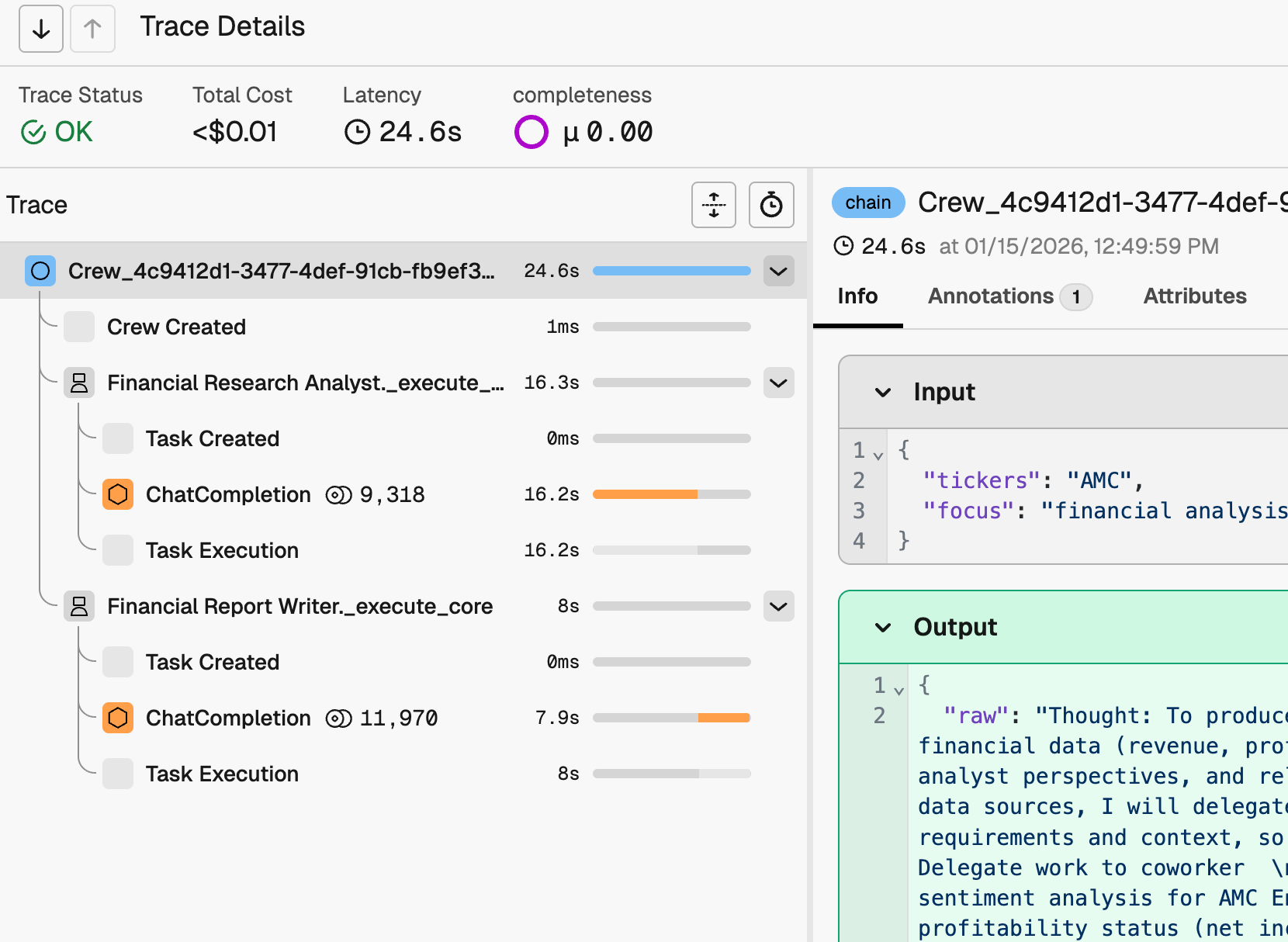
What lives in a span
- span_kind: AGENT
- attributes.input.value: "Plan a trip to Tokyo..."
- attributes.output.value: "Here's a 5-day Tokyo itinerary..."
- attributes.llm.token_count.total: 1847
- start_time, end_time, duration
OpenTelemetry under the hood
Tracing in Python
pip install arize-phoenix openinference-instrumentation-crewaifrom phoenix.otel import register
register(project_name="my-project", auto_instrument=True)Tracing in Next.js
npm install @arizeai/openinference-vercel
// instrumentation.ts
export function register() {
  registerOTel({ spanProcessors: [
    new OpenInferenceSimpleSpanProcessor({ exporter })
  ]})
}
generateText({ experimental_telemetry: { isEnabled: true } })
Step 2: Code evals
The @create_evaluator decorator
from phoenix.evals import create_evaluator
@create_evaluator(
    name="has-answer",
    kind="code",
    direction="maximize"
)
def has_answer(output: str) -> bool:
    return len(output.strip()) > 0
A more useful example
@create_evaluator(name="valid-json", kind="code", direction="maximize")
def valid_json(output: str) -> bool:
    try:
        json.loads(output)
        return True
    except json.JSONDecodeError:
        return False
Code evals
don't have to be brittle
Code evals
use the same pipeline
Step 3: LLM-as-a-judge evals
Three components
- Judge model
- Prompt
- Traces
Configure your judge
from phoenix.evals.llm import LLM
llm = LLM(
    provider="openai",
    model="gpt-4o",
    client="openai",
)
Built-in eval templates
- Correctness — did it answer the question?
- Faithfulness — does it stick to the source docs?
- Toxicity — does it contain harmful content?
- Relevance — is the response on-topic?
- Summarization — is the summary accurate?
Using a built-in template
from phoenix.evals.metrics import CorrectnessEvaluator

correctness_eval = CorrectnessEvaluator(llm=llm)

print(correctness_eval.describe())
Export your spans
from phoenix.client import Client

client = Client()
spans_df = client.spans.get_spans_dataframe(
    project_identifier="my-project"
)
agent_spans = spans_df[spans_df['span_kind'] == 'AGENT']
Bind, run, log
bound_eval = bind_evaluator(
    evaluator=correctness_eval,
    input_mapping={
        "input": "attributes.input.value",
        "output": "attributes.output.value",
    }
)
results = evaluate_dataframe(agent_spans, [bound_eval])
Client().spans.log_span_annotations_dataframe(
    to_annotation_dataframe(results)
)
What you see
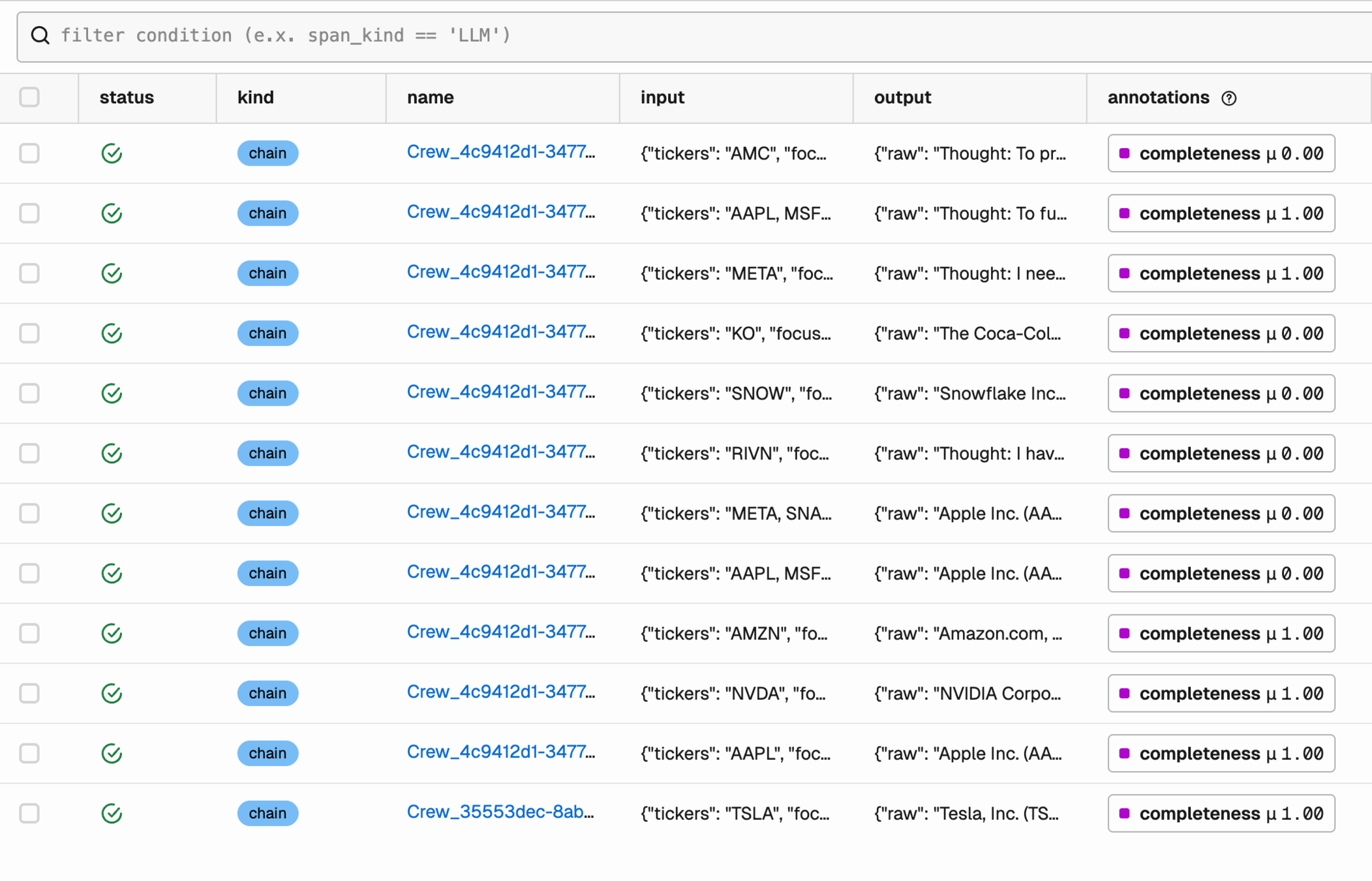
Reading the results
Datasets and experiments
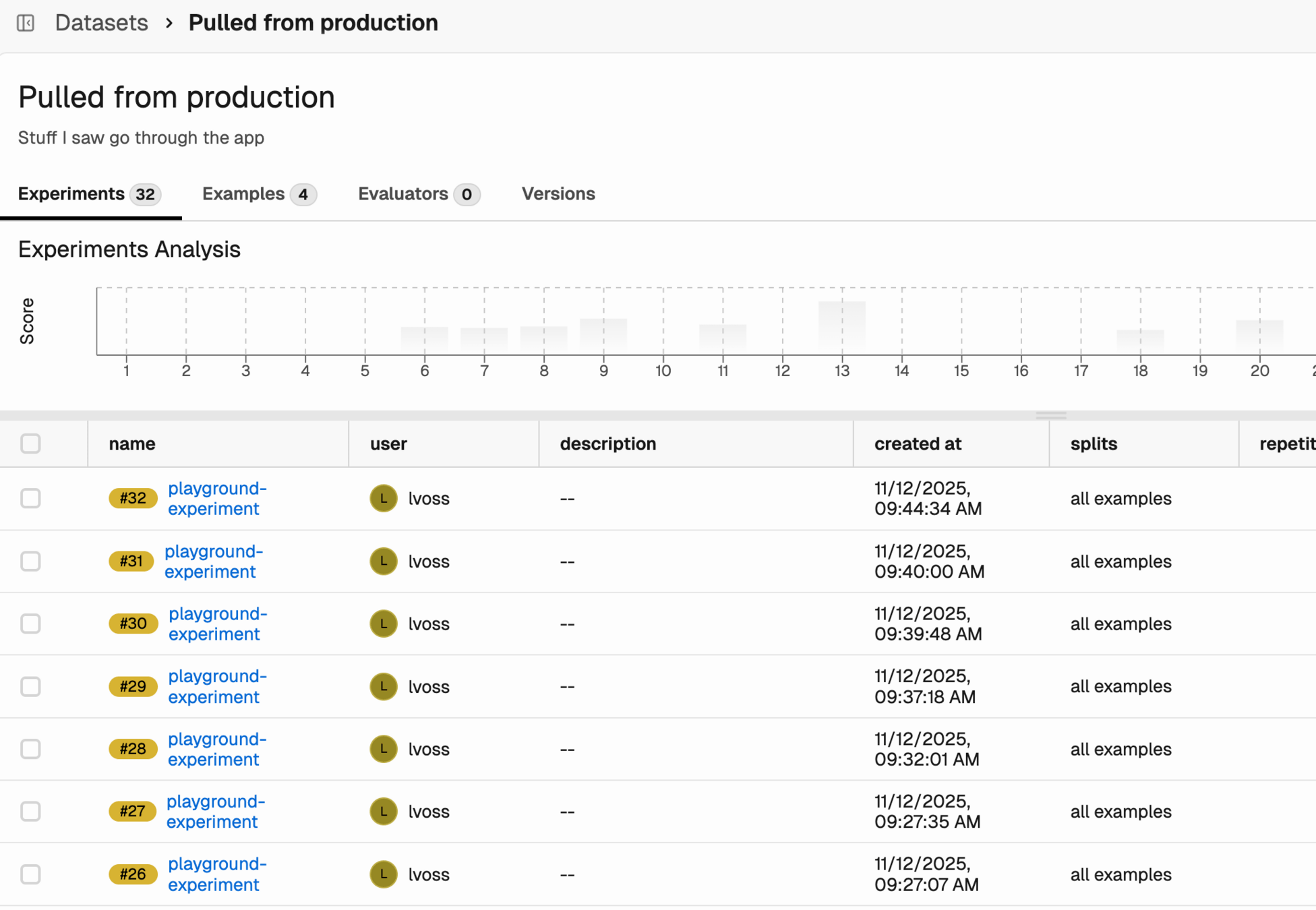
Golden datasets
Step 4: Writing your own evals
Built-ins have limits
A custom evaluator is a prompt
Five parts
of a good eval prompt
- 1. Define the judge's role
- 2. Explicit CORRECT / INCORRECT criteria
- 3. Present the data clearly
- 4. Add labeled examples
- 5. Constrain the output labels
Part 1: Define the judge's role
"You are an expert evaluator judging whether
a travel planner agent's response is correct.
The agent must produce: (1) essential info,
(2) a budget breakdown,
and (3) local recommendations."
Part 2: Explicit criteria
- CORRECT — The response:
- Accurately addresses destination, duration, interests
- Includes essential travel info
- Includes a budget breakdown
- Includes local recommendations matching user interests
- INCORRECT — The response contains:
- Factual errors about the destination
- Missing essential info for a trip plan
Part 3: Present the data clearly
[BEGIN DATA]
************
[User Input]:
{{input}}
************
[Travel Plan]:
{{output}}
************
[END DATA]
Part 4: Add labeled examples
Part 5: Constrain the output
"Is the output correct or incorrect?"
The full template
CUSTOM_CORRECTNESS_TEMPLATE = """
You are an expert evaluator judging whether
a travel planner agent's response is correct...
CORRECT — [criteria]
INCORRECT — [criteria]
[examples]
[BEGIN DATA]
[User Input]: {{input}}
[Travel Plan]: {{output}}
[END DATA]
Is the output correct or incorrect?
"""
Common mistakes
in eval prompts
- Vague criteria
- Too many criteria
- Asking for numeric scores
- Not testing the judge
Wiring it up
custom_eval = ClassificationEvaluator(
    name="travel-plan-correctness",
    llm=llm,
    prompt_template=CUSTOM_CORRECTNESS_TEMPLATE,
    choices={"correct": 1, "incorrect": 0}
)
Treat eval prompts like code
The full loop
From traces to insight
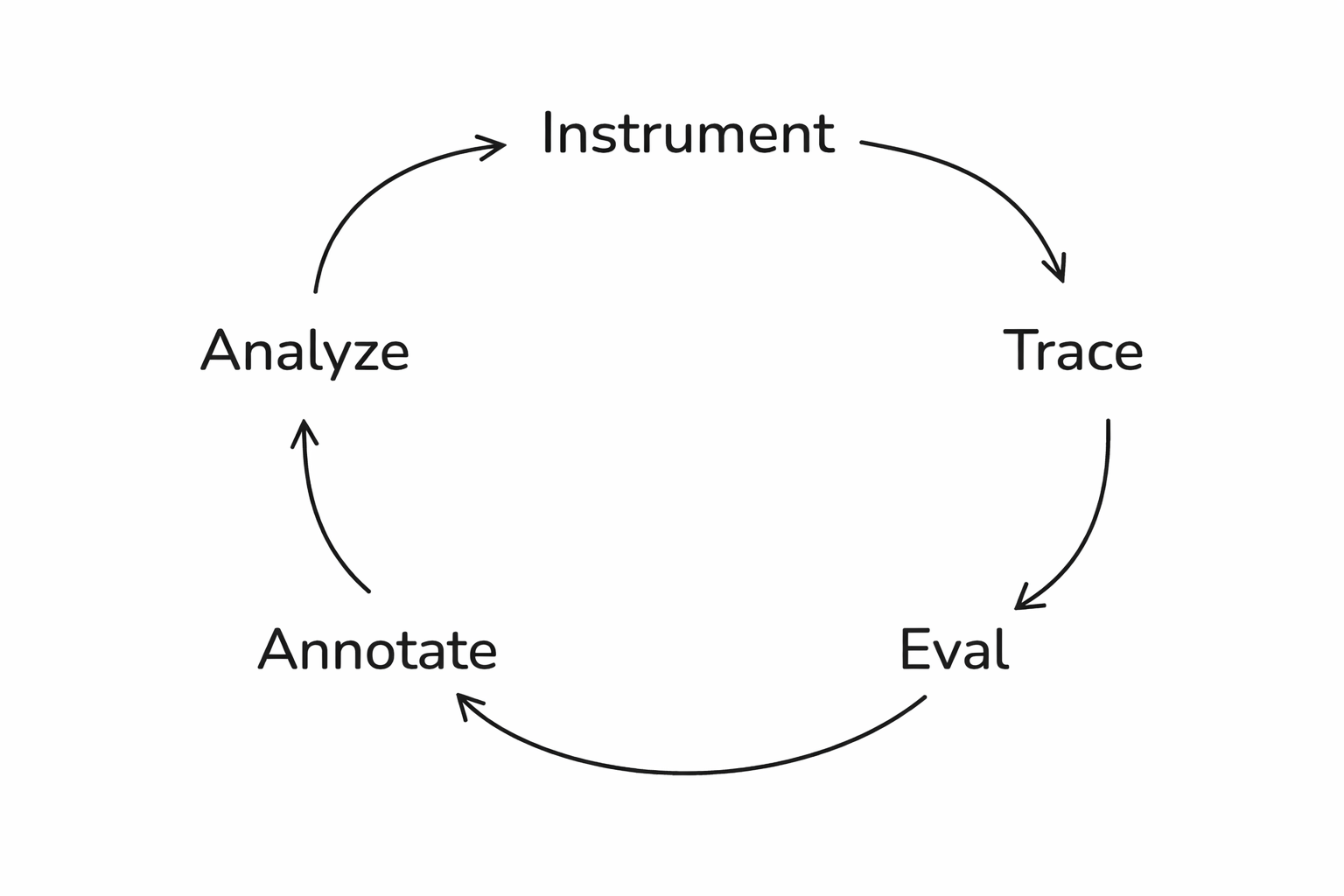
What this enables
- Run experiments → test prompt A vs. prompt B
- Track quality over time → catch regressions
- Eval guardrails → catch failures before users do
Get agents to run evals
The eval-iterate cycle
Start small
Go try it!
Follow me on BlueSky:
🦋 @seldo.com
These slides:
Evals in Action with Arize (Maven)
By Laurie Voss