Tom Hanley
Senior Software Engineer @
Organiser of the Dublin Kotlin User Group
Huge fan of Kotlin





Quick Primer on Coroutines
Why Coroutines?
- Threads are expensive
- Can occupy 1-2mb
- Require Thread pools to manage
Why Coroutines?
- Coroutines can be thought of as lightweight threads
- But they're really state machine objects
- Data for each state
- Index of current state
- Ability to wait patiently
- Small objects are really cheap to create
- These small objects are distributed to run on threads
Launch vs Async
Case Study
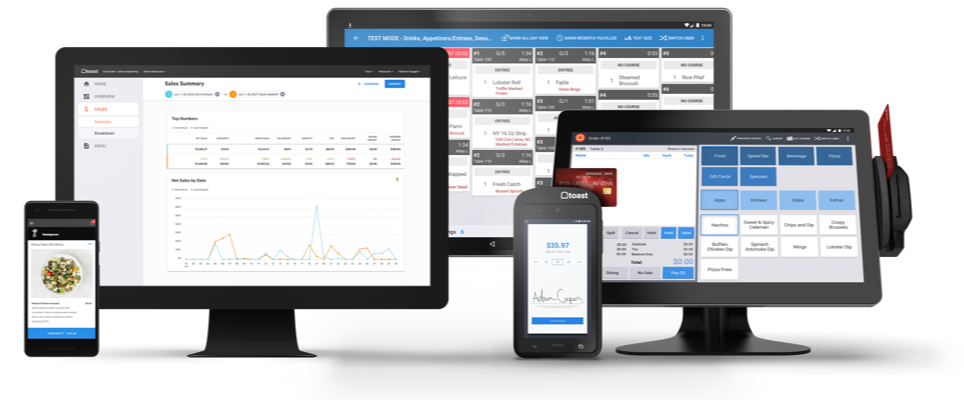
Toast Restaurant Platform
- We are a restaurant company
- Our core products are cloud POS systems and CC payments processing
- All of our in-restaurant technology is on Android tablets
- Web interface for managing restaurants
- Consumer-facing websites and apps for online ordering
- APIs for integrations with dozens of restaurant technology partners
Toast at a Glance
-
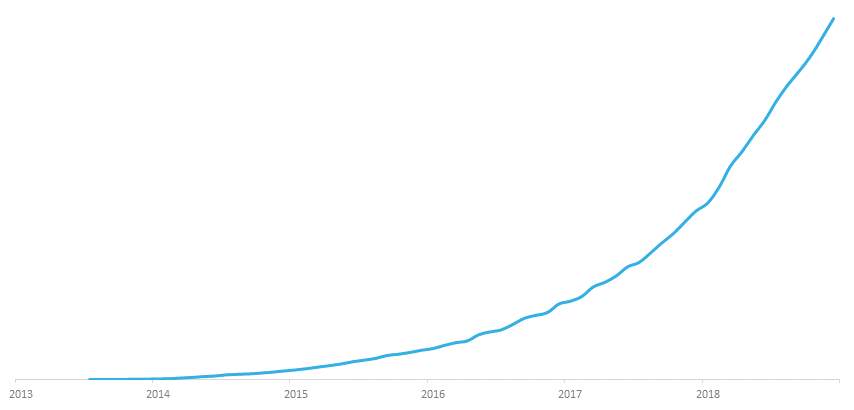
250-person R&D team
-
Tens of thousands of customers in the US
-
Processing billions in payments every year
-
July 2013: First live customer
-
April 2019: $250 million in Series E funding at $2.7 billion valuation
-
< 10% US POS market share so far
-
Lots more growth to come!
2018: Revenue up 148%
Integrating a New Card Reader
- USB connected credit card reader
- Designed and manufactured by an external hardware company who provide an Android SDK
- Project: Integrate it into our Android application
- All calls to the reader need to be asynchronous
The Card Reader API
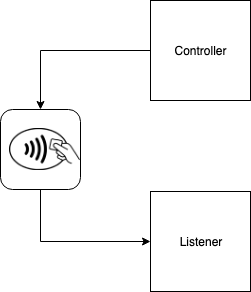
- Two classes to interact with physical reader
- Controller
-
Send commands to the card reader
-
All void methods
-
- Listener
-
Asynchronously returns all information and errors from controller commands
-
Implemented by us
-
- Controller
The Problem
- Very difficult to use correctly and cleanly
- Lets look at a small section of the API to illustrate
- The function to get the device info
- Data object containing Battery level, firmware version, serial number etc.
- The function to get the device info
interface Controller {
    fun getDeviceInfo()
}

interface Listener {
    fun onReturnDeviceInfo(deviceInfo: DeviceInfo)
    fun onError(error: Exception)
}
class MyListener : Listener {
var deviceInfo: DeviceInfo? = null
var error: Error? = null
override fun onReturnDeviceInfo(deviceInfo: DeviceInfo) {
this.deviceInfo = deviceInfo
}
override fun onError(error: Error) {
this.error = error
}
}Naive Listener Implementation
fun getDeviceInfo(): DeviceInfo {
    controller.getDeviceInfo() // returns nothing
    while (listener.deviceInfo == null
            && listener.error == null) {
        //could be an infinite loop
        Thread.sleep(100) //blocks the thread
    }
    if (listener.error != null) {
    	val e = listener.error
    	listener.error = null //null the value for next time
    	throw e
    }
    val returnValue = listener.deviceInfo
    listener.deviceInfo = null // null the value for next time
    return returnValue
}
Naive Implementation to get the DeviceInfo
Life would be much easier if I had a coroutines interface
interface Controller {
    suspend fun getDeviceInfo(): DeviceInfo
}
Let's clean this up by writing a Kotlin Coroutines Extension!
API Extension Goals
-
I wanted to get to a nice clean API where:
- The result of the query is clearly returned by the function itself
- The caller of the function can control the asynchrony
- The implementation doesn’t block the thread
- Its easy to use, and hard to misuse
- You know that one call has completed before starting another
interface ControllerExtension {
    suspend fun getDeviceInfo(): DeviceInfo
}
How to implement this interface?
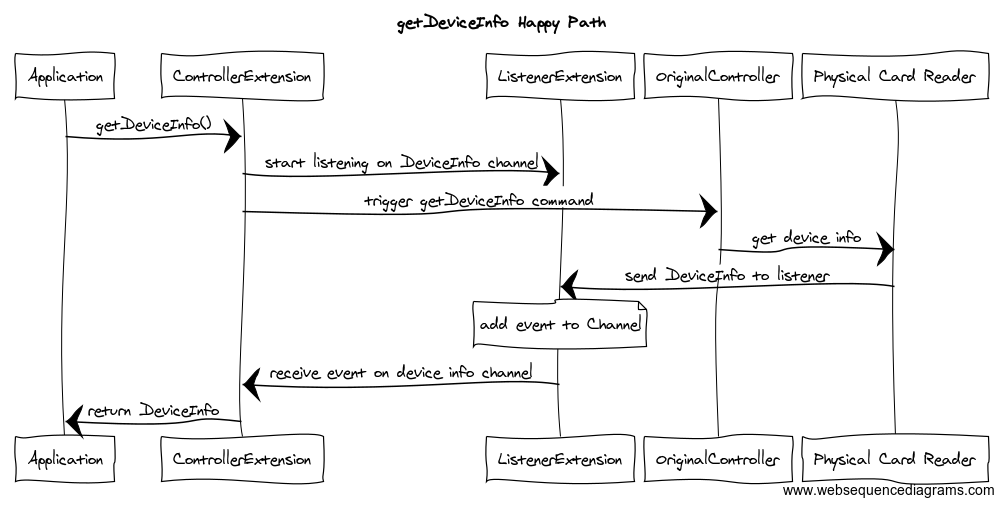
- Start listening for an event/error
- Trigger the event
- Wait until event/error is returned
interface ControllerExtension {
    suspend fun getDeviceInfo(): DeviceInfo
}
Requires asynchrony and inter-thread communication
"Do not communicate by sharing memory;
instead,
share memory by communicating."
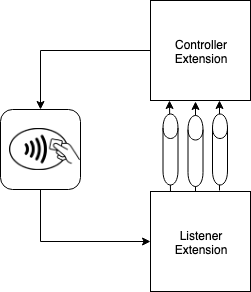
So how can we communicate asynchronously across coroutines?
Enter Kotlin Channels
Channels
class ListenerExtension : Listener {

    val errorChannel = Channel<Error>(UNLIMITED)
    val deviceInfoChannel = Channel<DeviceInfo>(UNLIMITED)

    override fun onReturnDeviceInfo(deviceInfo: DeviceInfo) {
        runBlocking { deviceInfoChannel.send(deviceInfo) }
    }

    override fun onError(error: Error) {
        runBlocking { errorChannel.send(error) }
    }
}
Our New Controller Listener Implementation
class ControllerExtension(
        private val controller: OriginalController,
        private val listener: ListenerExtension
) {
    override suspend fun getDeviceInfo(): DeviceInfo {
        return triggerEventAndGetResult(
            eventTrigger = { controller.getDeviceInfo() },
            eventReceiver = controllerListener.deviceInfoChannel,
            errorReceiver = controllerListener.errorChannel
        )
    }
}
Our Controller Extension Implementation
suspend fun <T : Any> triggerEventAndGetResult(
    eventTrigger: () -> Unit,
    eventReceiver: ReceiveChannel<T>,
    errorReceiver: ReceiveChannel<ControllerException>
): T = coroutineScope {
    val deferredEvent = async<T> {
        select {
            errorReceiver.onReceive { error ->
                throw error
            }
            eventReceiver.onReceive { event ->
                event
            }
        }
    }
    eventTrigger()
    return@coroutineScope deferredEvent.await()
}
Select Expression
Makes it possible to listen to multiple suspend functions simultaneously and select the first result that becomes available.
The Result

Sequence Diagram
Key Lessons
-
Coroutine Exception Handling
-
Debugging Coroutines
-
Keeping Coroutines Testable & Clean
-
Actually, lets not throw exceptions
Coroutine Exception Handling
Key Lesson 1
Structured Concurrency
- Every coroutine is created in a coroutineScope
- Avoid using GlobalScope
- Every coroutine has a parent-child relationship
- Ensures that cancelling a parent coroutine cancels all its children
- But by default this is bidirectional, i.e. if a child coroutine is cancelled it will propagate to the entire scope
private val parentJob = Job()
private val coroutineScope = CoroutineScope(parentJob + Dispatchers.Default)

fun launchProcessing() {
    try {
        coroutineScope.launch {
            throw IllegalStateException()
        }
    } catch (e: IllegalStateException) {
        println("This will never be printed")
    }
}
Launch Error Handling
private val parentJob = Job()
private val coroutineScope = CoroutineScope(parentJob + Dispatchers.Default)


suspend fun calculateNumber(): Int {
    val deferredValue = coroutineScope.async<Int> {
        throw IllegalStateException()
    }

    val value = try {
        deferredValue.await()
    } catch (e: IllegalStateException) {
        println("Unable to get value, defaulting to 0")
        0
    }

    val deferred1 = coroutineScope.async { 2 }

    val deferred2 = coroutineScope.async { 2 }

    return value + deferred1.await() + deferred2.await()
}
async Error Handling
private val parentJob = SupervisorJob()
private val coroutineScope = CoroutineScope(parentJob + Dispatchers.Default)


suspend fun calculateNumber(): Int {
    val deferredValue = coroutineScope.async<Int> {
        throw IllegalStateException()
    }

    val value = try {
        deferredValue.await()
    } catch (e: IllegalStateException) {
        println("Unable to get value, defaulting to 0")
        0
    }

    val deferred1 = coroutineScope.async { 2 }

    val deferred2 = coroutineScope.async { 2 }

    return value + deferred1.await() + deferred2.await()
}
Solution 1: Use SupervisorJob
suspend fun calculateNumberInheritScope(): Int {
    val value = try {
        coroutineScope {
            val deferredValue = async<Int> {
                throw IllegalStateException()
            }
            deferredValue.await()
        }
    } catch (e: Exception) {
        println("Unable to get value, defaulting to 0")
        0
    }

    return coroutineScope {
        val deferred1 = async { 2 }

        val deferred2 = async { 2 }

        value + deferred1.await() + deferred2.await()
    }
}
Solution 2: Use local coroutineScope to group coroutines that are all or nothing
Error Handling tips
-
Use SupervisorJob instead of Job
- Cancellation is propagated only downwards
- Create local coroutineScope to group coroutines that are all or nothing
- Inherits parent coroutine context, but gets its own job for independent cancellation
Debugging Coroutines
- Enable Debug Mode
- Use the Debug Agent
Key Lesson 2
Enable Debug Mode
- To Enable for unit tests, you can either set this property, or use the jvm arg
test {
    systemProperty 'kotlinx.coroutines.debug', 'on'
    //or
    jvmArgs '-ea'
}
System.setProperty("kotlinx.coroutines.debug",
BuildConfig.DEBUG ? "on" : "off");- For Android you can set it in production code based on your build type
What does Debug mode do?
-
Attaches a unique name to every launched coroutine
- Gets appended to the thread name for debugging
- Negligible overhead
-
This can be manually set also
- At the scope level or individual coroutine level
- Much better stack traces
- Normally you just get the stack for coroutine where exception happened - not that useful
- Will piece together the full stack
- Some performance overhead so not recommended for production
Use the Debug Agent
- New module released in coroutines 1.2 in April '19
dependencies {
    testImplementation 'org.jetbrains.kotlinx:kotlinx-coroutines-debug:1.2.1'
}-
Powerful debug capabilities
- JVM agent that keeps track of all alive coroutines
- Introspects and dumps them similar to thread dump command
- Also enhances stacktraces with information where coroutine was created
Example DebugProbes Usage
fun main() = runBlocking {
    DebugProbes.install()
    val deferred = async { computeValue() }
    // Delay for some time
    delay(1000)
    // Dump running coroutines
    DebugProbes.dumpCoroutines()
    println("Printing single job")
    DebugProbes.printJob(deferred)
}
Coroutines Dump
Coroutines dump 2018/11/12 21:44:02

Coroutine "coroutine#2":DeferredCoroutine{Active}@289d1c02, state: SUSPENDED
	at kotlinx.coroutines.DeferredCoroutine.await$suspendImpl(Builders.common.kt:99)
	at ExampleKt.combineResults(Example.kt:11)
	at ExampleKt$computeValue$2.invokeSuspend(Example.kt:7)
	at ExampleKt$main$1$deferred$1.invokeSuspend(Example.kt:25)
	(Coroutine creation stacktrace)
	at kotlin.coroutines.intrinsics.IntrinsicsKt__IntrinsicsJvmKt.createCoroutineUnintercepted(IntrinsicsJvm.kt:116)
	at kotlinx.coroutines.intrinsics.CancellableKt.startCoroutineCancellable(Cancellable.kt:25)
	at kotlinx.coroutines.BuildersKt.async$default(Unknown Source)
	at ExampleKt$main$1.invokeSuspend(Example.kt:25)
	at kotlin.coroutines.jvm.internal.BaseContinuationImpl.resumeWith(ContinuationImpl.kt:32)
	at kotlinx.coroutines.DispatchedTask.run(Dispatched.kt:233)
	at kotlinx.coroutines.BuildersKt.runBlocking$default(Unknown Source)
	at ExampleKt.main(Example.kt:23)
	at ExampleKt.main(Example.kt)

... More coroutines here ...
Single Job Dump
"coroutine#2":DeferredCoroutine{Active}, continuation is SUSPENDED at line kotlinx.coroutines.DeferredCoroutine.await$suspendImpl(Builders.common.kt:99)
    "coroutine#3":DeferredCoroutine{Active}, continuation is SUSPENDED at line ExampleKt.computeOne(Example.kt:14)
        "coroutine#4":DeferredCoroutine{Active}, continuation is SUSPENDED at line ExampleKt.computeTwo(Example.kt:19)
Debug Agent JUnit Rule
    @Rule
    @JvmField
    public val timeout = CoroutinesTimeout.seconds(1)
- Will install debug probes and dump coroutines on timeout
Can be used as a JVM Agent
-javaagent:kotlinx-coroutines-debug-1.2.1.jar- Enable debug probes on application startup
Keeping Coroutines Testable & Clean
Key Lesson 3
Unit test everything!
Use runBlocking
    @Test
    fun `getDeviceInfo returns the expected device info`() = runBlocking {
        assertFalse(controller.getDeviceInfo()).isEqualTo(expectedDeviceInfo)
    }

    suspend fun getDeviceInfo(): DeviceInfo{
        ...
    }
Only use async/launch when you really need concurrency
fun updateData() {
    val newData = getData()
    postData(newData)
    updateUI(newData)
}

suspend fun getData() {}

suspend fun postData(newData: Data) {}

suspend fun updateUI(newData: Data) {}
Error: Suspend function 'getData()' should be called only from a coroutine or another suspend function
fun updateData() {
    coroutineScope.launch(Dispatchers.IO) {
        val newData = getData()
        postData(newData)
        launch(Dispatchers.Main) { updateUI(newData) }
    }
}

suspend fun getData() {}

suspend fun postData(newData: Data) {}

suspend fun updateUI(newData: Data) {}
It might be tempting to launch some new coroutines
suspend fun updateData() {
    val newData = getData()
    postData(newData)
    updateUI(newData)
}

suspend fun getData() {}

suspend fun postData(newData: Data) {}

suspend fun updateUI(newData: Data) {}- Prefer marking a function suspend to launching a new coroutine
- Allows the caller of updateData() to:
-
Control the context & asynchronony
-
Know when its finished
-
suspend fun updateData() {
    val newData = getData()
    postData(newData)
    updateUI(newData)
}

suspend fun getData() {}

suspend fun postData(newData: Data) {
    withContext(Dispatchers.IO){
    }
}

suspend fun updateUI(newData: Data) {
    withContext(Dispatchers.Main){
    }
}
Do control the context where needed using withContext instead of a new coroutine
What to do with functions that launch long running background coroutines?
private val parentJob = Job()
private val coroutineScope = CoroutineScope(parentJob + Dispatchers.Default)

fun launchProcessing() {
    coroutineScope.launch {
        //some processing
    }

    coroutineScope.launch {
        //some other processing
    }

}
Convention:
Any function that returns before completing all its launched coroutines should be an extension method on CoroutineScope
fun CoroutineScope.launchProcessing() {
    this.launch {
        //some processing
    }

    this.launch {
        //some other processing
    }

}
Other option:
-
Make it a suspend function
- Use a coroutineScope block
- This will wait for all coroutines to finish before returning
suspend fun launchProcessing() {
    coroutineScope {
        launch {
            //some processing
        }

        launch {
            //some other processing
        }
    }
}
Actually, lets not throw exceptions
Key Lesson 4
Why were we throwing exceptions?
- When we got an error from the card reader, we were wrapping this in an exception and throwing it
- USB connections are not 100% reliable
- Hardware is not 100% reliable
- We needed to catch these exceptions and recover
- When you actually have to catch and handle exceptions, things get really messy
Whats the problem with exceptions for error handling?
-
Your error handling code becomes
- More error prone
- Less explicit and easily forgotten about
- Less predictable
- Harder to understand the control flow
- Less "functional"
- Performance overhead
- Throwing and catching exeptions is comparable to using goto statements
Exceptions should only be used for fatal things that you can’t recover from.
Avoid throwing and catching exceptions
Instead, return an object that encapsulates the success or failure outcome
What are the Succcess/Failure object options?
-
Kotlin’s Result object
- Some really nice features
- Unfortunately not ready to be used as a return value from a function
-
Arrows Either object
- I found the left and right convention too jarring in terms of readability
-
Arrows Try object
- You need to throw an exception to use this, which I didn't want to do
-
Create our own generic success/failure object
- Felt like reinventing the wheel
-
Create our own Domain specific return objects using Kotlin Sealed classes
- Leads to a bit more code, and some very similar looking classes
- No sacrifice on readability
- Allows each result object to evolve independently
- Error handling is easily enforced by the compiler
- Error handling happens where the error happens
What are the Succcess/Failure object options?
We changed every controller command to return a generic result object
sealed class ControllerResult<R> {
    data class Success<R>(val result: R) : ControllerResult<R>()
    data class Failure<R>(val error: Error) : ControllerResult<R>()
}
We could then map this to the domain specific result object as needed
sealed class DeviceInfoResult {
    data class Success(val deviceInfo: DeviceInfo) : DeviceInfoResult()
    data class Failure(val error: Error) : DeviceInfoResult()
    data class Timeout(val error: Error) : DeviceInfoResult()
}
Each object can evolve independently
sealed class StartUsbResult {
    object AlreadyConnected : StartUsbResult()
    object Success : StartUsbResult()
    data class Failure(val error: Error) : StartUsbResult()
    data class Timeout(val error: Error) : StartUsbResult()
}-
KEEP-127 Encapsulate successful or failed function execution
-
Sealed Classes Instead of Exceptions in Kotlin - Philipp Hauer
- Excellent blog post on how, why, and when to use sealed classes instead of exception
-
Kotlin Coroutines Case Study - Cleaning up an Async API
- Medium blog post of my covering some of the content of this talk
Links
In Summary
-
Coroutines are awesome!
-
They make async programming easier, but not easy
Coroutine Case Study & Lessons Learned
By Tom Hanley