Efficient programming with Scala
and LLMs
Tomasz Godzik
VirtusLab
Maintainer of multiple Scala tools including Metals, Bloop, Scalameta, Munit, Mdoc and parts of the Scala 3 compiler.
Release officer for Scala LTS versions
Part of the Scala Core team as coordinator and VirtusLab representative
Part of the moderation team
What do I do?
How smart are LLMs really
01
02
03
04
Prompting 101
Context Engineering
New tools ecosystem
05
Approaches to working with LLMs
06
Questions
This presentation draws on work by myself, Łukasz Biały, and Piotr Oramus


I will not cover everything that you might need, but just give you a taste of what is currently happening
How smart are LLMs really?
For sure it's easy to fool them!


That was a few months ago


You can still fool it.

LLM has fallen into well known paths
What are modern LLMs, really?
What are modern LLMs, really?
autocomplete on steroids super-soldier serum
Something more?

What are modern LLMs, really?
autocomplete on steroids super-soldier serum
The hype can get too much at times though.
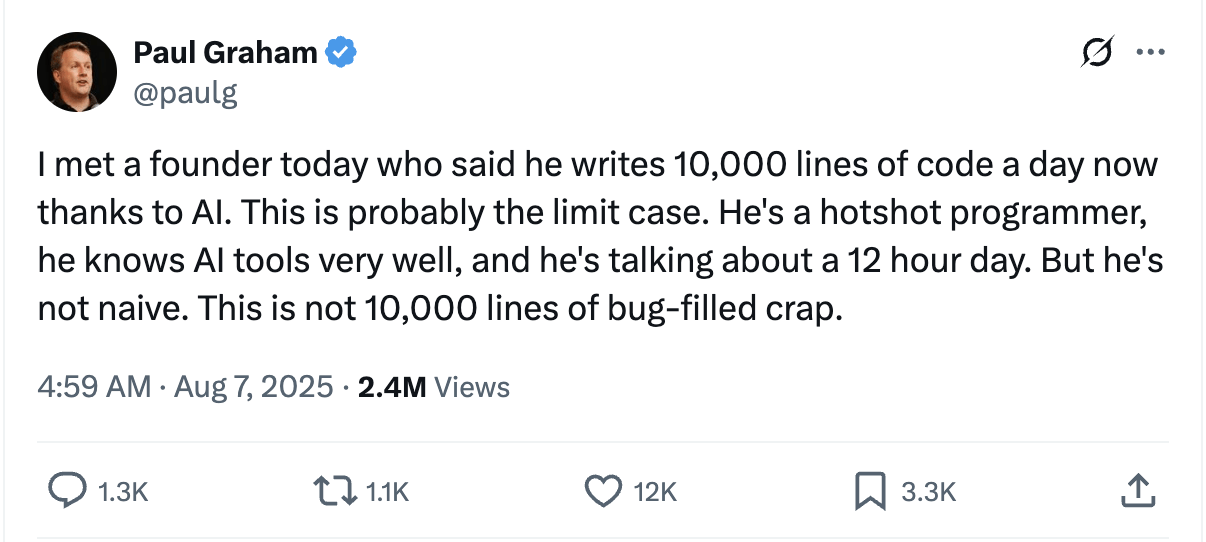
The hype can get too much at times though.
It probably is
One thing is certain, AI will not replace good engineers.
One thing is certain, AI will not replace good engineers.
Not yet!
We need to understand what LLMs are capable of and how to make them work for us.
We need to understand what LLMs are capable of and how to make them work for us.
This is a new tool in your toolbox and there's a learning curve to using it.
I think it was already shown on previous presentations.
Using languages with strong typing helps to reduce the risk of using LLMs in your development
But just take a look at the recent AWS outages where coding agents were heavily involved.
Why Scala and LLMs?
What outages?

Prompting 101

> Create a Scala LSP server
Is this a good prompt?
> Create a Scala LSP server
Is this a good prompt?
Obviously not
You are a Scala compiler and tooling expert tasked with creating a Scala LSP server. Use scala-cli to set up, run and test the project.
Structure of a prompt
You are a Scala compiler and tooling expert tasked with creating a Scala LSP server. Use scala-cli to set up, run and test the project.
Structure of a prompt
persona
task
context
You are a Scala compiler and tooling expert tasked with creating a Scala LSP server. Use scala-cli to set up, run and test the project. Here is some compiler API you can use.
import scala.reflect.internal.util.BatchSourceFile
import scala.reflect.io.AbstractFile
import scala.tools.nsc.*

val settings = new Settings()
settings.classpath.value = "/path/to/classes.jar:/path/to/scala-library.jar"
settings.usejavacp.value = true // or set classpath explicitly
val reporter = new InteractiveReporter {
  override val settings: Settings = settings

}
val global = new Global(settings, reporter) {
  // presentation compiler: override as needed (Metals uses a custom Global)
}
val source = new BatchSourceFile(
  AbstractFile.getFile("/tmp/Example.scala"),
  "object Example { val x = 42 }\n"
)
// Load and typecheck (simplified; real PC uses ask* on a dedicated thread)
val run = new global.Run()
run.compileSources(List(source))
// Inspect units: global.unitOfFile, trees, symbols — API is Global-specific
Structure of a prompt
- Persona competence sizing: expert vs regular - allows to limit the amount of concerns the LLM will try to juggle with.
- In-context learning: few-shot prompting > zero-shot prompting for output fitting the precise requirements
- Bias management: it’s always good to watch how your prompt is biasing the model - maybe the solution you have in mind is not the best one?
Properties
- Multimodal prompting: Different types of input, not just text, but voice, images etc.
-
Prompt chaining: Each conversation produces artifacts for the next prompt.
-
Reasoning models: Ask the model to explain its reasoning, default in some models.
Prompting techniques
- Tree of Thoughts: Explore possible options, make model offer them and choose each time one that suits you better.
-
Meta prompting: Prompt to create new prompts for later models.
-
Agentic simulations: Make agents fulfill some persona and simulate things like recruitment calls etc.
Prompting techniques
It's a bit of an alchemy

Some of the existing techniques made it into tools.
The more people come up with the more the tooling catches up.
The ideas are basically endless.
Prompting
Context engineering

Context is king.

Should we just put a lot of information
into the prompt’s context?
Obviously not
Should we just put all the information
into the prompt’s context?
Obviously not
Should we just put all the information
into the prompt’s context?
Why not?
When the input provided with the initial prompt is big enough, it will confuse the model and lead it astray from the original task.
Problems with context
Context overload
Problems with context
Context drift
When the conversation gets reused for new tasks, the previous results end up confusing the model’s attention mechanisms
More data in context gets attached before the prompt and uses more tokens, which cost money.
Problems with context
Costs!
Rules
1. Provide only the information (and capabilities) necessary to execute the task at hand.
Rules
2. Prefer to work in shorter conversations that don’t reach the full size of the available context window.
Rules
3. Use compaction and external progress tracking to distill and preserve important decisions and insights.Context compaction
> Summarize the current decisions and progress so that we can use it in another conversationWhat context to include
- files with best practices
- specification available for the project
- lazy loaded details for each topic
- information on tools to use
- a lot of that can go into AGENTS.md
Optimizing the costs
-
Always provide the same prefix, each LLM query is cached.
-
If you change it, the model will need to recalculate everything.
-
This cache will only be available for a time.
New tools ecosystem

ask: does not change anything, used for exploration.
plan: create documents needed for further work, any specification timeline etc.
agent: actually apply changes, test code, compile until the results are satisfactory.
Typical usages of LLMs
ask: does not change anything, used for exploration.
plan: create documents need for further work, any specification timeline etc.
agent: actually apply changes, test code, compile until the results are satisfactory.
Typical usages of LLMs
Most of the time you will use
Agents
They can use a variety of tools to enrich their context and verify the results of their work.
Every development tool might be useful for you, but some might need work.
Model Context Protocol
One of the more popular tools to improve the output of LLMs
MCP uses JSON-RPC, so each possible request and response is represented by a JSON schema
Model Context Protocol
Model Context Protocol is very similar to Language Server Protocol, but instead of people it's for agents.
Host with MCP Client
MCP protocol
MCP protocol
MCP protocol
MCP Server 1
MCP Server 2
MCP Server 2
Local Data Source 1
Local Data Source 2
Web API
Model Context Protocol
- tools: longer running tasks that agents can schedule
- resources: static context available to load lazily
- prompts: possible meta prompts for users of the chat
Metals is a model context protocol server.





compilation: compile-full, compile-module, compile-file
test: test
analysis: glob-search, inspect, get-docs, get-usages
utility: import-build, format-file,
find-dep, run-scalafix-rule, list-scalafix-rules
Available tools
Problems with MCP
- The more tools you have the more context is taken up.
- Model efficiency might go down and it might start hallucinating more.
- Data returned from the tools might go through the model adding to the context.
- We need to make LLMs use MCP via either direct prompt or AGENTS.md
Maybe just CLI
- You can always use well designed CLI tools
- scala-cli works quite well
- we are getting more and more new CLI tools:
- nguyenyou/scalex - general purpose inspect tools
- VirtusLab/cellar - lookup any jvm API
Alternative: Executable tools
Instead of ingesting the entire context, create smaller tools to change codebase or extract information.
Using typed languages like Scala makes it significantly more efficient.
Alternative: Executable tools
- The agent queries each toolset it needs and creates executable code
// ./skills/getDocsFor.scala
import metals.mcp.*

@main
def main(nameToLookFor: String) =
  val allMatching = globSearch(fullyQualifiedName, None)
  val fqcns = allMatching.split("\n")
  val result = fqcns.map{
    fullName => getDocs(fullName)
  }.mkString("\n")
  println(result)
}
Tools for agents: Skills
---
name: your-skill-name
description: Brief description of what this Skill does and when to use it
---

# Your Skill Name

## Instructions
[Clear, step-by-step guidance for Claude to follow]

## Examples
[Concrete examples of using this Skill]
Security
- You still need to check the code and make sure it does what you want it to do.
- You cannot YOLO mode it for sure.
- Martin already told you about safe capabilities, which could make it much safer.
- You can also sandbox it! github.com/VirtusLab/sandcat

Approaches to working with LLMs

These scripts could be added as skills to your company repo.
Some of the scripts could improve CI as it doesn't require a lot of code.
Automate any manual work even if normally writing a script would take longer than the work.
Creating small usability scripts
Brownfield projects
These are projects that were previously written using normal engineering practises and we want to add feature or fix bugs.
Brownfield projects
Might be harder to use LLMs in, tasks should be scoped, all data available that the LLM agent might need.
Provide as many tools as needed to make sure the context is spot on.
A lot depends on the complexity and the existing quality of the code.
Brownfield projects
// AGENTS.md

Look into Archtecture.md for system design.
Use Scala CLI as a build.
Use Metals MCP:
- compile tool to verify compilation
- format tool after all changes
// .cursor/mcp.json

{
  "mcpServers": {
    "metals2-metals": {
      "url": "http://localhost:60849/mcp"
    }
  }
}
//.cursor/skills/cellar.md
---
name: Cellar dependency inspection
description: Use cellar CLI tool to
download sources
---
# Cellar Dependency Inspection
## Instructions
### Look up a symbol from your sbt / mill / scala-cli project
cellar get --module lib cellar.handlers.SearchHandler// Architecture.md
The system consists of four components:
- database
- service
- frontend
- service2
To modify...We can also build something from scratch with LLMs in mind.
Makes it possible to create small to mid project almost automatically with guidelines from the developer
Greenfield projects
Exploration
Greenfield projects
Product planning
Component analysis
Implementation
Full product ideaFull project specificationSpecification with all modules plannedHalf a year ago this was not feasible, but becoming more and more so.
It is more expensive and complex to monitor.
But can for example be used to implement multiple components at the same time or make product exploration faster.
Using multiple agents
Summary
Use tools to verify and improve LLM output.
Make sure your prompts are sound and context provided is well scoped.
You need to know your domain to be able to verify the output.
Thank You
Tomasz Godzik
Bluesky: @tgodzik.bsky.social
Mastodon: fosstodon.org/@tgodzik
Discord: tgodzik
tgodzik@virtuslab.com
Useful links
virtuslab.com/blog/scala - plenty of blog posts about Scala and LLMs
Efficient programming with Scala and LLMs
By Tomek Godzik