web组件化
过去
<link href="a.css" rel="stylesheet" type="text/css" />
<link href="b.css" rel="stylesheet" type="text/css" />

<?php include 'a.php';?>
<?php include 'b.php';?>

<script src="a.js"></script>
<script src="b.js"></script>
那么 问题来了
那么 问题来了
- 请求过多
那么 问题来了
- 请求过多
- 依赖后端服务器
现在
- html预处理
- css预处理
- js模块化
html预处理
- jade
- slim
- haml
结构
<link href="index.css" rel="stylesheet" type="text/css" />

== Slim::Template.new('../../module/a.slim').render
== Slim::Template.new('../../module/b.slim').render

<script data-main="index" src="../../vender/require.js"></script>
css预处理/后处理
- less
- sass(scss)
- stylus
- postcss
scss
@import '../modules/a';
@import '../modules/b';
js模块化
- AMD(require.js)
- CMD(sea.js)
- commonjs
- ES2015(babel.js)
require.js
require.config({
  paths:{
    jquery:"../../vender/jquery-1.7.1.min" ,
    elevator:"../../modules/elevator/index"
  }
});

require(['jquery', 'elevator'],function($, elevator){

});
解决了问题
请求过多依赖后端服务器
问题又来了
问题又来了
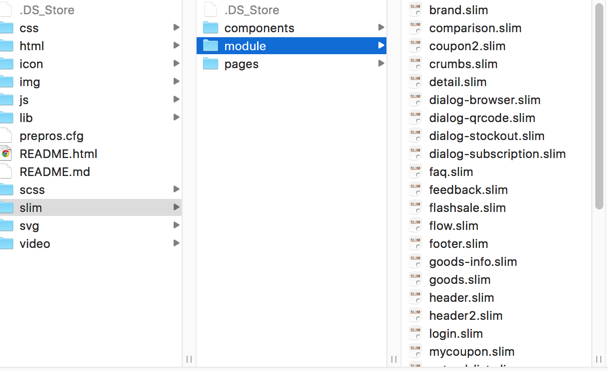
问题又来了
- 组件太分散,模块多了找起来费劲
问题又来了
- 组件太分散,模块多了找起来费劲
- 组件无预览效果,不知道长啥样,得去页面看
问题又来了
- 组件太分散,模块多了找起来费劲
- 组件无预览效果,不知道长啥样,得去页面看
- 不知道图片对应哪个模块,改版下来,很多东西冗余了
改进
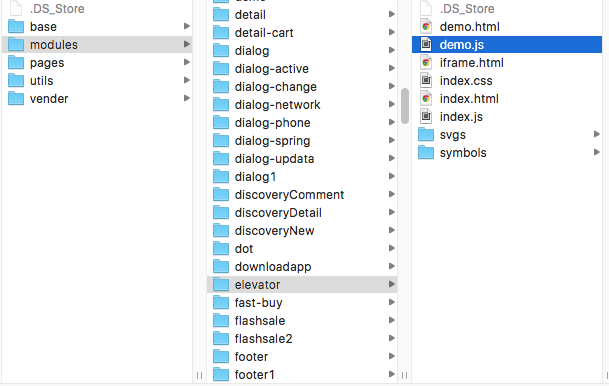
gulp-html-tag-include
<link href="index.css" rel="stylesheet" type="text/css" />

<include src="../../modules/a/index.html"></include>
<include src="../../modules/b/index.html"></include>

<script data-main="index" src="../../vender/require.js"></script>
postcss
@import '../../modules/a/index.css';
@import '../../modules/b/index.css';
gulp-svg-sprites
gulp.task("svg", function () {
  for(var i in modules){
    if(modules[i] !== '.DS_Store'){
      gulp.src("src/modules/"+modules[i]+"/svgs/*.svg")
          .pipe(svgSprite({
            mode: "symbols",
            common: "svg",
            selector: "icon-%f"
          }))
          .pipe(gulp.dest("src/modules/"+modules[i]+"/symbols"))
    }
  }
});
解决了以前的问题
组件太分散,模块多了找起来费劲组件无预览效果,不知道长啥样,得去页面看-
不知道图片对应哪个模块,改版下来,很多东西冗余了
还有什么问题?
还有什么问题?
- 全局命名空间,无法跨项目公用
还有什么问题?
- 全局命名空间,无法跨项目公用
- 命名人工约定,可能会出现样式冲突
未来
web component
web component
- custom elements
- html import
- templates
- shadow dom
custom elements
<hangout-module>
  <hangout-chat from="Paul, Addy">
    <hangout-discussion>
      <hangout-message from="Paul" profile="profile.png"
          profile="118075919496626375791" datetime="2013-07-17T12:02">
        <p>Feelin' this Web Components thing.</p>
        <p>Heard of it?</p>
      </hangout-message>
    </hangout-discussion>
  </hangout-chat>
  <hangout-chat>...</hangout-chat>
</hangout-module>
Templates
<div id="nameTag">Bob</div>
<template id="nameTagTemplate">
<style>
.outer {
  border: 2px solid brown;

</style>
<div class="outer">
  <div class="boilerplate">
    Hi! My name is
  </div>
  <div class="name">
    Bob
  </div>
</div>
</template>
Shadow DOM
<script>
var shadow = document.querySelector('#nameTag').createShadowRoot();
var template = document.querySelector('#nameTagTemplate');
var clone = document.importNode(template.content, true);
shadow.appendChild(clone);
</script>
HTML Imports
<link rel="import" href="/path/to/imports/stuff.html">兼容
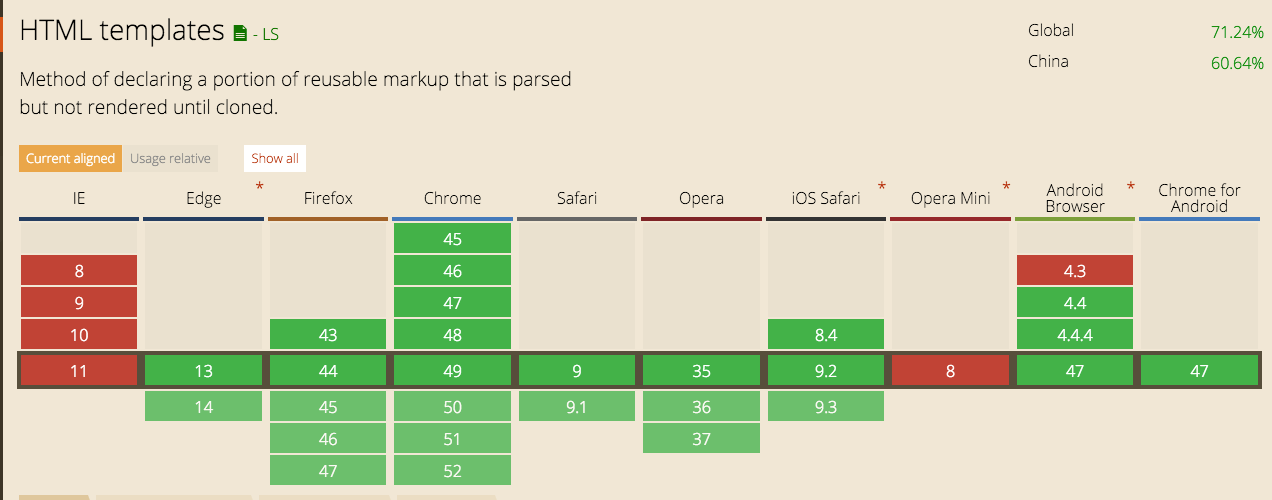
兼容
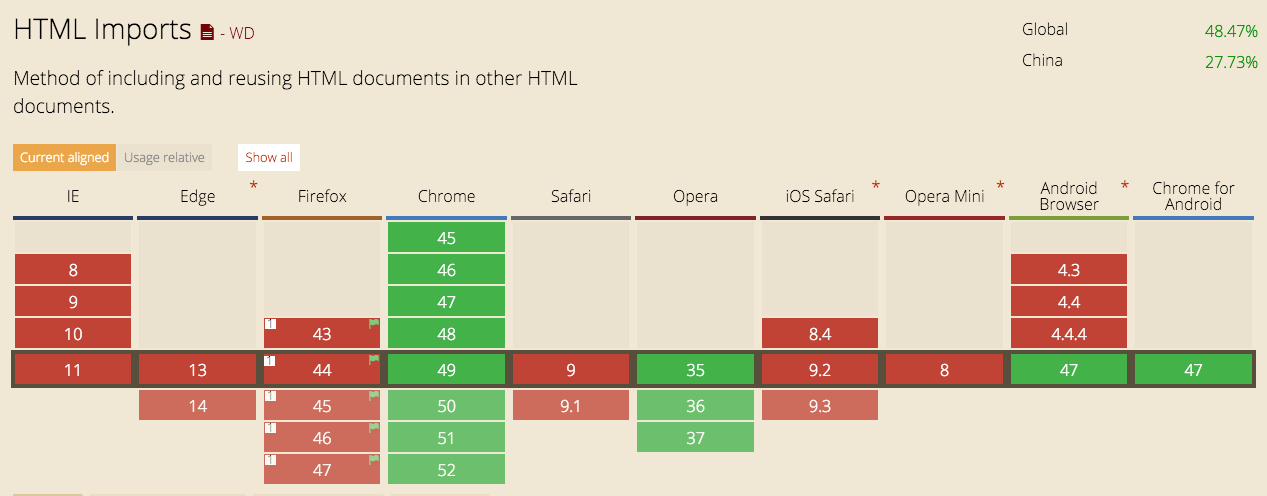
兼容
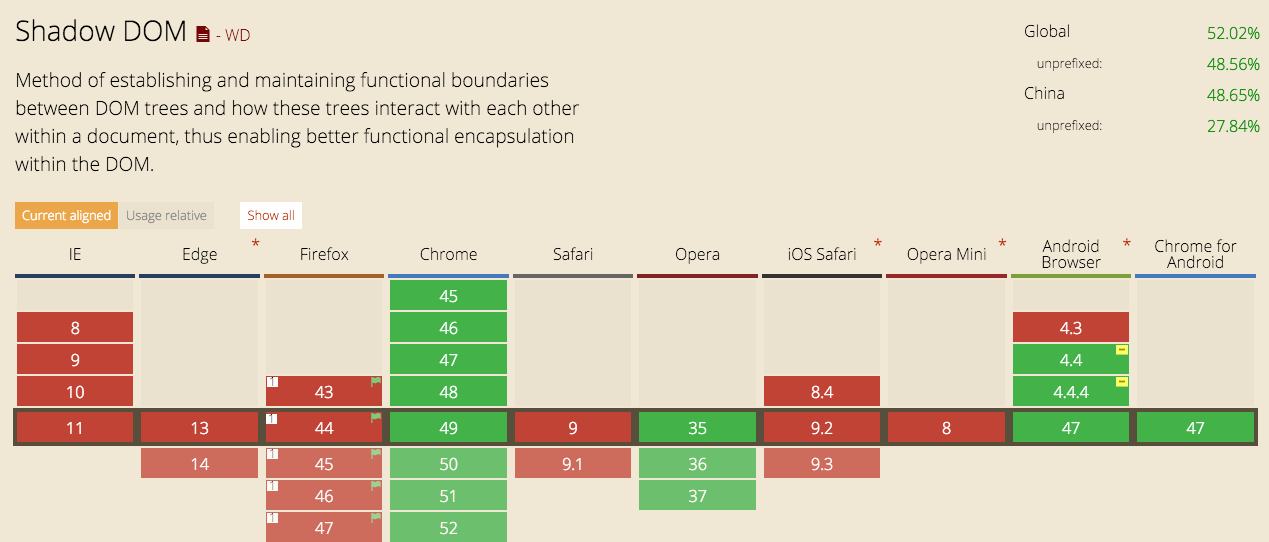
兼容
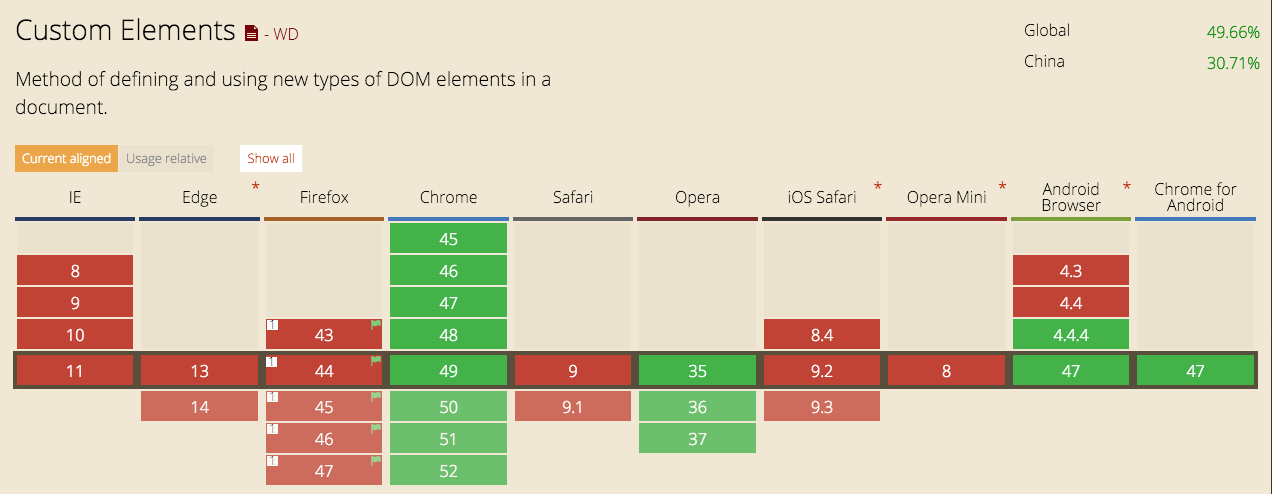
polifills
webcomponentjs
webcompont框架
- polymer
- e-tag
- bosonic
MVVN/MVC框架
- react
- angular
- vue
css模块化
- css modules(css loader)
- scoped css(vue)
- shady dom(polymer)
css modules(before)
import styles from './ScopedSelectors.css';
import React, { Component } from 'react';
export default class ScopedSelectors extends Component {
  render() {
    return (
      <div className={ styles.root }>
        <p className={ styles.text }>Scoped Selectors</p>
      </div>
    );
  }
};
.root {
border-width: 2px;
border-style: solid;
border-color: #777;
padding: 0 20px;
margin: 0 6px;
max-width: 400px;
}
.text {
color: #777;
font-size: 24px;
font-family: helvetica, arial, sans-serif;
font-weight: 600;
}css modules(after)
.ScopedSelectors__root___16yOh {
  border-width: 2px;
  border-style: solid;
  border-color: #777;
  padding: 0 20px;
  margin: 0 6px;
  max-width: 400px;
}

.ScopedSelectors__text___1hOhe {
  color: #777;
  font-size: 24px;
  font-family: helvetica, arial, sans-serif;
  font-weight: 600;
}
<div class="ScopedSelectors__root___16yOh">
<p class="ScopedSelectors__text___1hOhe">Scoped Selectors</p>
</div>scoped css(before)
<style scoped>
.example {
  color: red;
}
</style>

<template>
  <div class="example">hi</div>
</template>
scoped css(after)
<style>
.example[_v-f3f3eg9] {
  color: red;
}
</style>

<template>
  <div class="example" _v-f3f3eg9>hi</div>
</template>
shady dom(before)
<link rel="import" href="../../bower_components/polymer/polymer.html">

<dom-module id="my-greeting">
  <template>
    <style include="shared-styles"></style>
    <style>
      :host {
        display: block;
        color: red;
      }
      input{
        color: red;
      }
    </style>
    <h2 class="page-title">{{greeting}}</h2>
    <span class="paper-font-body2">Update text to change the greeting.</span>
    <!-- Listens for "input" event and sets greeting to <input>.value -->
    <input class="paper-font-body2" value="{{greeting::input}}">
  </template>

  <script>
    (function() {
      'use strict';

      Polymer({
        is: 'my-greeting',

        properties: {
          greeting: {
            type: String,
            value: 'Welcome!',
            notify: true
          }
        }
      });
    })();
  </script>

</dom-module>
shady dom(after)
<my-greeting class="x-scope my-greeting-0">
    <h1 class="page-title style-scope my-greeting">Welcome!</h1>
    <label for="greeting-input" class="style-scope my-greeting">Update text to change the greeting.</label>
    <input id="greeting-input" class="style-scope my-greeting">
  </my-greeting>
.page-title:not([style-scope]):not(.style-scope) {
font-family: 'Roboto', 'Noto', sans-serif;
-webkit-font-smoothing: antialiased;
font-size: 45px;
font-weight: 400;
letter-spacing: -.018em;
line-height: 48px;
}
paper-menu a > *:not([style-scope]):not(.style-scope),paper-menu paper-item > *:not([style-scope]):not(.style-scope),paper-menu paper-icon-item > *:not([style-scope]):not(.style-scope) {
pointer-events: none;
}
@media (max-width: 600px) {
.page-title:not([style-scope]):not(.style-scope) {
font-size: 24px!important;
}
}
解决了以前的问题
全局命名空间,无法跨项目公用命名人工约定,可能会出现样式冲突
参考资料
- http://www.html5rocks.com/zh/tutorials/webcomponents/shadowdom/
- http://www.html5rocks.com/zh/tutorials/webcomponents/shadowdom-201/
- http://www.html5rocks.com/zh/tutorials/webcomponents/shadowdom-301/
- http://www.html5rocks.com/zh/tutorials/webcomponents/customelements/
未来很美好
web组件化
By wenbin5243