Unit testing in Vue.js
(with Jest and Vue Test Utils)
What is unit testing?
The idea behind unit testing is to test functionality that can be separated into small parts (aka "units"), concentrating on their public interface and treating implementation logic as a "black box".
How does unit testing compare to other types of testing (integration, e2e)?
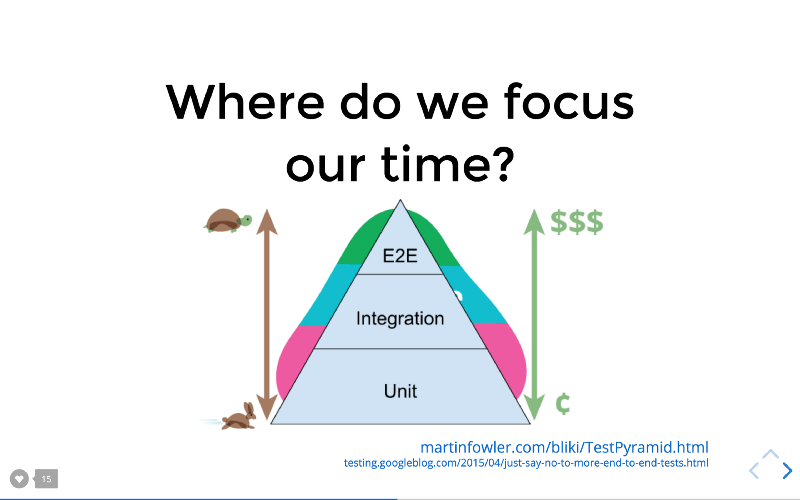
Fair question:
why should we bother writing unit tests if, for example, integration tests do the same job better?
Answer: costs and speed.
- Unit tests care only about functionality of units in isolation. This means that they are relatively easy to implement and maintain, which leads to smaller cost.
- Unit tests are by far the fastest, which means they provide an almost instant feedback loop. This makes for a very comfortable development experience - you can change a line of code, save the file, and instantly see if it breaks any unit tests.
Are there any benefits to writing tests except the obvious?
Yes, code documentation.
Why Jest? Why not, for example, Mocha?
- Batteries included (Mocking & assertion libraries, snapshot testing)
- Zero configuration by default
- Watch mode
- Concurrent testing (as in "runs tests in parallel")
Are there any Jest implementation aspects (specific to Vue.js) that I should know about?
- In addition to Jest's API Vue.js provides its own set of tools - Vue Test Utils. For your tests to be truly effective it is strongly recommended to invest in learning both.
- Single File Components (aka SFCs, aka *.vue files). Jest can only parse JavaScript, we need to parse SFCs to JS before feeding them to Jest. Handled via babel-jest and vue-jest (implementation guide).
I don't want to configure Webpack by hand, it's too much hassle. Is there a simpler option?
Yes,
How should I organize file structure with unit tests in my project?
2 approaches:
- put tests in the root folder
- put tests near the things which they are testing
1. Root folder approach
my-project
├── src
│   ├── App.vue
│   ├── components
│   │   └── HelloWorld.vue
│   └── main.js
└── tests
    └── unit
        └── HelloWorld.spec.js
2. Proximity principle approach
my-project
└── src
    ├── App.vue
    ├── components
    │   ├── __tests__
    │   │   └── HelloWorld.spec.js
    │   └── HelloWorld.vue
    └── main.js
General principle:
Things that change together should live together
Creating a unit test in Jest
/* utils/increment.js */
export function increment(num) {
    if(typeof num !== 'number') {
        throw new TypeError('num must be a number')
    }
    return num + 1
}

/* utils/__tests__/increment.spec.js */
import { increment } from '../increment'

test('increment returns 3 when given 2', () => {
  expect(increment(2)).toBe(3)
})

test('increment throws TypeError when given "duck"', () => {
  function incrementString () {
    increment('duck')
  }
  expect(incrementString).toThrowError(TypeError)
})
Handling asynchronicity
/* utils/increment.js */
export function incrementPromise(num) {
  return new Promise((resolve, reject) => {
    if (typeof num !== 'number') {
      const error = new TypeError('num must be a number')
      setTimeout(function() {
        reject(error)
      }, 1000)
    } else {
      setTimeout(function() {
        resolve(num + 1)
      }, 1000)
    }
  })
}

/* utils/__tests__/increment.spec.js */
import { incrementPromise } from '../increment'

test('incrementPromise returns 3 when given 2', () => {
  incrementPromise(2).then(response => {
    expect(response).toBe(3)
  })
})
However...
test('returns 3 when given "duck"', () => {
  incrementPromise('duck').then(response => {
    /* we break test intentionally... */
    expect(response).toBe(3)
    /* ...but it still passes. */
  })
})

Test fails only if an error is thrown.
Therefore, if an error is not thrown, test passes successfully.
If the error is thrown in promise, Jest needs to know about that.
We need to return the promise.
Promise syntax
/* will break */
test('incrementPromise returns 3 when given "duck"', () => {
  return incrementPromise('duck').then(response => {
    expect(response).toBe(3)
  })
})

/* same, but shorter */
test('incrementPromise returns 3 when given "duck"', () => {
  return expect(incrementPromise("duck")).resolves.toBe(3)
})

test('incrementPromise throws an error when given "duck"', () => {
  const error =
    new TypeError('num must be a number')
  return expect(incrementPromise('duck')).rejects.toMatchObject(error)
})
async/await syntax
test('incrementPromise returns 3 when given 2', async () => {
  await expect(incrementPromise(2)).resolves.toBe(3)
})

test('incrementPromise throws an error when given "duck"', async () => {
  const error =
    new TypeError('num must be a number')
  await expect(incrementPromise('duck')).rejects.toMatchObject(error)
})
Jest is a library for testing JavaScript,
Vue Test Utils is a library for testing Vue.js-specific stuff
Unit testing components in Vue.js
General idea:
render the component, and assert that the markup matches the state of the component.
// ~/components/counter/index.vue

<template>
  <div>
    <span class="count">{{ count }}</span>
    <button @click="increment">Increment</button>
  </div>
</template>

<script>
export default {
  name: "counter",
  data () {
    return {
      count: 0
    };
  },
  methods: {
    increment () {
      this.count++
    }
  }
}
</script>
// ~/components/counter/__tests__/counter.spec.js
import Counter from '..'
import { shallowMount } from '@vue/test-utils'
const wrapper = shallowMount(Counter)
describe('Counter', () => {
test('renders the correct markup', () => {
expect(wrapper.html()).toContain(
'<span class="count">0</span>'
)
})
test('has a button', () => {
expect(wrapper.contains('button')).toBe(true)
})
test('button click increments the count', () => {
const count = wrapper.vm.count
const button = wrapper.find('button')
button.trigger('click')
expect(wrapper.vm.count).toBe(count + 1)
})
})
[draft] Unit Testing in Vue.js (with Jest and Vue Test Utils)
By Yevhen Orlov