Day to day git.
All git commands have their purpose
Get educated, not opinionated!
Let's talk about time and history
Git history
- In Git, history refers to the record of changes made to a repository over time.
- Commits are the fundamental units of history in Git. Each commit represents a snapshot of the project at a given point in time.
- All commits (except the first one) have a parent, this resulting in a graph or tree.
History visualisation
git loggit log --onelinegit log --graph
Git History is a DAG
(Directed Acyclic Graph)
Lol wut!
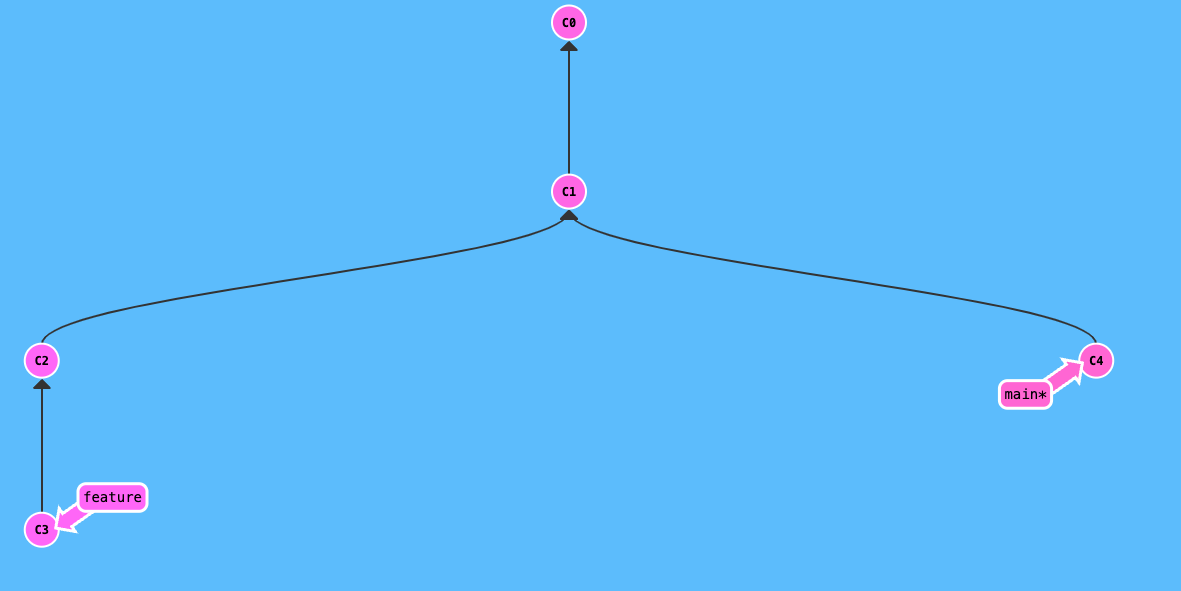
History is made just of commits, branches are just labels on commits.
Notice the arrows pointing up
All a commit wants to know is who to follow and if it's the last in line (or in history)
Like a drunk conga
So with this in mind, let's talk about merge and rebase
Merge
- we worked on a branch and we want that work on another branch
i.e. we worked on a feature branch and we want to have that work on dev
Rebase
- we worked on a branch but we need other people's work in our branch
i.e. we branched from dev, worked a few days, but the `dev`advanced and we want the latest changes
When
Merge
- always on public branches
Rebase
- always on private branches
Where
Public branches
- a collaborative branch on which more developers push work through PRs
- a branch that could be integrated in deploy pipelines
Private braches
- isolated work from one developer
- typically branched from a public branch like
devordevxc3/something
Merge
- does produce a merge commit that points to two parents
- non linear history
- does not rewrite history
Rebase
- does NOT produce a commit message
- linear history
- does rewrite history
Key differences
Let's see how it actually looks.
What drives us crazy.
- Because rebase applies commits one by one, you'll get the same conflicts over and over again. Solution:
git rerere(reuse recorded resolutions)
- Even if the branch is private, it's good practice to push it upstream regularly, so you need to alter the history remote. Solution:
--force-with-leaseinstead of --force
Interactive rebasing
- Rebasing on top of a different branch. We use this like a bulk cherry pick.
git rebase branch-name -i
- Rebasing on top of the same branch to clean up history, reorder, delete commits etc.
git rebase commit-hash -i
Fixing conflicts ⚔️
Merge
- all changes come at once, so you fix them all in one go
Rebase
- changes come commit by commit, so you'll need to treat them on each branch (unless it's the same conflict and rerere solves it for us)
Undoing changes
Revert
- produces a new commit with the changes in reverse
- can produce conflicts
Interactive
rebase
- changes history, produces new commits
Reset
- does not delete the commit, but moves the HEAD
- can be --soft or --hard
Closing thought.
History is equal zero if our commit messages don't actually say what they do.
Thank you.
git
By Anca Spatariu