Git gUd!
Secrets for Confident Version Control

10 years ago
Nu stiu sa lucrez pe Git.
-- Anca, entering the the dev world
anxiety
fear of breaking things
overwhelm
Learning curve
Initial learning curve
Plateau
Mastery
Learning curve
Initial learning curve
Plateau
Mastery
There are days when I feel I'm here
Learning curve
Initial learning curve
Plateau
Mastery
And days when I make stupid mistakes and I feel I'm here
Happy accidents

The beauty of git is that
no matter how badly you screw up
you can go back and fix it.
Hi, my name is Anca
and i have been through all the stages from pain to productivity
Core Software Engineer @ WeVideo
tim.js co-Organizer

...and sometimes speaker
What i learned is that
Confidence is not about not making any mistakes...
It's about knowing what to expect,
understanding how things work,
And trusting yourself to handle anything that comes your way
What to expect from this talk
-
Bite sized pieces of information that you can apply today
-
This is not a "git course"
-
Things that made me a better git user and mentor
-
I assume you have at least a basic understanding of git
WHAT WE'LL TALK ABOUT TODAY
Advanced workflows made approachable
Common mistakes tips on how to fix them
Recovery after making a mistake
Hidden git gems
If you are wondering about the title
Just git gud!
advanced flows
made easy 🚀
Understanding interactive rebase
Understanding interactive rebase
Shopping List
Milk
Bread
Apples
Yogurt
Icecream
Sprinkles
Understanding interactive rebase
- I don't need any bread actually
- I don't want any type of milk
- I want to add the milk next to the yogurt because they are in the same aisle
- I want to buy ice cream that already has sprinkles
Shopping List
Milk
Bread
Apples
Yogurt
Ice cream
Sprinkles
Almond
+
Understanding interactive rebase
$ git log --oneline

345975a (HEAD -> branch) Get sprinkles
9fdda55 Get icecream
118d058 Get yogurt
6b604b6 Get apples
9108b64 Get bread
afb2210 Get milk
aaa387d Older commit
$ git rebase -i aaa387dTake the commit hash of the last commit before your list
Understanding interactive rebase
pick afb2210 Get milk
pick 9108b64 Get bread
pick 6b604b6 Get apples
pick 118d058 Get yogurt
pick 9fdda55 Get icecream
pick 345975a Get sprinkles

# Rebase aaa387d..345975a onto aaa387d (6 commands)
#
# Commands:
# p, pick <commit> = use commit
# r, reword <commit> = use commit, but edit the commit message
# e, edit <commit> = use commit, but stop for amending
# s, squash <commit> = use commit, but meld into previous commit
# f, fixup [-C | -c] <commit> = like "squash" but keep only the previous
#                    commit's log message, unless -C is used, in which case
#                    keep only this commit's message; -c is same as -C but
#                    opens the editor
# x, exec <command> = run command (the rest of the line) using shell
# b, break = stop here (continue rebase later with 'git rebase --continue')
# d, drop <commit> = remove commit
# l, label <label> = label current HEAD with a name
# t, reset <label> = reset HEAD to a label
# m, merge [-C <commit> | -c <commit>] <label> [# <oneline>]
# .       create a merge commit using the original merge commit's
# .       message (or the oneline, if no original merge commit was
# .       specified); use -c <commit> to reword the commit message
#
"~/Documents/projects/timjs.ro-v2/.git/rebase-merge/git-rebase-todo" 34L, 1425B
Understanding interactive rebase
reword afb2210 Get milk
pick 9108b64 Get bread
pick 6b604b6 Get apples
pick 118d058 Get yogurt
pick 9fdda55 Get icecream
pick 345975a Get sprinkles

# Rebase aaa387d..345975a onto aaa387d (6 commands)
#
# Commands:
# p, pick <commit> = use commit
# r, reword <commit> = use commit, but edit the commit message
# e, edit <commit> = use commit, but stop for amending
# s, squash <commit> = use commit, but meld into previous commit
# f, fixup [-C | -c] <commit> = like "squash" but keep only the previous
#                    commit's log message, unless -C is used, in which case
#                    keep only this commit's message; -c is same as -C but
#                    opens the editor
# x, exec <command> = run command (the rest of the line) using shell
# b, break = stop here (continue rebase later with 'git rebase --continue')
# d, drop <commit> = remove commit
# l, label <label> = label current HEAD with a name
# t, reset <label> = reset HEAD to a label
# m, merge [-C <commit> | -c <commit>] <label> [# <oneline>]
# .       create a merge commit using the original merge commit's
# .       message (or the oneline, if no original merge commit was
# .       specified); use -c <commit> to reword the commit message
#
"~/Documents/projects/timjs.ro-v2/.git/rebase-merge/git-rebase-todo" 34L, 1425B
Understanding interactive rebase
reword afb2210 Get milk
drop 9108b64 Get bread
pick 6b604b6 Get apples
pick 118d058 Get yogurt
pick 9fdda55 Get icecream
pick 345975a Get sprinkles

# Rebase aaa387d..345975a onto aaa387d (6 commands)
#
# Commands:
# p, pick <commit> = use commit
# r, reword <commit> = use commit, but edit the commit message
# e, edit <commit> = use commit, but stop for amending
# s, squash <commit> = use commit, but meld into previous commit
# f, fixup [-C | -c] <commit> = like "squash" but keep only the previous
#                    commit's log message, unless -C is used, in which case
#                    keep only this commit's message; -c is same as -C but
#                    opens the editor
# x, exec <command> = run command (the rest of the line) using shell
# b, break = stop here (continue rebase later with 'git rebase --continue')
# d, drop <commit> = remove commit
# l, label <label> = label current HEAD with a name
# t, reset <label> = reset HEAD to a label
# m, merge [-C <commit> | -c <commit>] <label> [# <oneline>]
# .       create a merge commit using the original merge commit's
# .       message (or the oneline, if no original merge commit was
# .       specified); use -c <commit> to reword the commit message
#
"~/Documents/projects/timjs.ro-v2/.git/rebase-merge/git-rebase-todo" 34L, 1425B
Understanding interactive rebase
reword afb2210 Get milk
pick 118d058 Get yogurt
drop 9108b64 Get bread
pick 6b604b6 Get apples
pick 9fdda55 Get icecream
pick 345975a Get sprinkles

# Rebase aaa387d..345975a onto aaa387d (6 commands)
#
# Commands:
# p, pick <commit> = use commit
# r, reword <commit> = use commit, but edit the commit message
# e, edit <commit> = use commit, but stop for amending
# s, squash <commit> = use commit, but meld into previous commit
# f, fixup [-C | -c] <commit> = like "squash" but keep only the previous
#                    commit's log message, unless -C is used, in which case
#                    keep only this commit's message; -c is same as -C but
#                    opens the editor
# x, exec <command> = run command (the rest of the line) using shell
# b, break = stop here (continue rebase later with 'git rebase --continue')
# d, drop <commit> = remove commit
# l, label <label> = label current HEAD with a name
# t, reset <label> = reset HEAD to a label
# m, merge [-C <commit> | -c <commit>] <label> [# <oneline>]
# .       create a merge commit using the original merge commit's
# .       message (or the oneline, if no original merge commit was
# .       specified); use -c <commit> to reword the commit message
#
"~/Documents/projects/timjs.ro-v2/.git/rebase-merge/git-rebase-todo" 34L, 1425B
Understanding interactive rebase
reword afb2210 Get milk
pick 118d058 Get yogurt
drop 9108b64 Get bread
pick 6b604b6 Get apples
pick 9fdda55 Get icecream
squash 345975a Get sprinkles

# Rebase aaa387d..345975a onto aaa387d (6 commands)
#
# Commands:
# p, pick <commit> = use commit
# r, reword <commit> = use commit, but edit the commit message
# e, edit <commit> = use commit, but stop for amending
# s, squash <commit> = use commit, but meld into previous commit
# f, fixup [-C | -c] <commit> = like "squash" but keep only the previous
#                    commit's log message, unless -C is used, in which case
#                    keep only this commit's message; -c is same as -C but
#                    opens the editor
# x, exec <command> = run command (the rest of the line) using shell
# b, break = stop here (continue rebase later with 'git rebase --continue')
# d, drop <commit> = remove commit
# l, label <label> = label current HEAD with a name
# t, reset <label> = reset HEAD to a label
# m, merge [-C <commit> | -c <commit>] <label> [# <oneline>]
# .       create a merge commit using the original merge commit's
# .       message (or the oneline, if no original merge commit was
# .       specified); use -c <commit> to reword the commit message
#
"~/Documents/projects/timjs.ro-v2/.git/rebase-merge/git-rebase-todo" 34L, 1425B
Understanding interactive rebase
Get milk

# Please enter the commit message for your changes. Lines starting
# with '#' will be ignored, and an empty message aborts the commit.
#
# Date:      Sun Jul 6 12:51:20 2025 +0300
#
# interactive rebase in progress; onto aaa387d
# Last command done (1 command done):
#    reword afb2210 Get milk
# Next commands to do (5 remaining commands):
#    pick 118d058 Get yogurt
#    drop 9108b64 Get bread
# You are currently editing a commit while rebasing branch 'branch' on 'aaa387d'.
#
# Changes to be committed:
#       modified:   src/pages/100.astro
#
~
~
~
~
~
~
~
~
~
~
"~/Documents/projects/timjs.ro-v2/.git/COMMIT_EDITMSG" 18L, 556B
Understanding interactive rebase
Get almond milk

# Please enter the commit message for your changes. Lines starting
# with '#' will be ignored, and an empty message aborts the commit.
#
# Date:      Sun Jul 6 12:51:20 2025 +0300
#
# interactive rebase in progress; onto aaa387d
# Last command done (1 command done):
#    reword afb2210 Get milk
# Next commands to do (5 remaining commands):
#    pick 118d058 Get yogurt
#    drop 9108b64 Get bread
# You are currently editing a commit while rebasing branch 'branch' on 'aaa387d'.
#
# Changes to be committed:
#       modified:   src/pages/100.astro
#
~
~
~
~
~
~
~
~
~
~
"~/Documents/projects/timjs.ro-v2/.git/COMMIT_EDITMSG" 18L, 556B
Understanding interactive rebase
# This is a combination of 2 commits.
# This is the 1st commit message:

Get icecream

# This is the commit message #2:

Get sprinkles

# Please enter the commit message for your changes. Lines starting
# with '#' will be ignored, and an empty message aborts the commit.
#
# Date:      Sun Jul 6 12:52:39 2025 +0300
#
# interactive rebase in progress; onto aaa387d
# Last commands done (6 commands done):
#    pick 9fdda55 Get icecream
#    squash 345975a Get sprinkles
# No commands remaining.
# You are currently rebasing branch 'branch' on 'aaa387d'.
#
# Changes to be committed:
#       modified:   src/pages/100.astro
#
~
Understanding interactive rebase
Get icecream with sprinkles

# Please enter the commit message for your changes. Lines starting
# with '#' will be ignored, and an empty message aborts the commit.
#
# Date:      Sun Jul 6 12:52:39 2025 +0300
#
# interactive rebase in progress; onto aaa387d
# Last commands done (6 commands done):
#    pick 9fdda55 Get icecream
#    squash 345975a Get sprinkles
# No commands remaining.
# You are currently rebasing branch 'branch' on 'aaa387d'.
#
# Changes to be committed:
#       modified:   src/pages/100.astro
#
~
~
~
~
~
~
~
~
~
~
~
-- INSERT --
Understanding interactive rebase
$ git log --oneline

be79691 (HEAD -> branch) Get icecream with sprinkles
54c4e8c Get apples
2507c1b Get yogurt
7da26c1 Get almond milk
aaa387d Older commit
$ git log --oneline
345975a (HEAD -> branch) Get sprinkles
9fdda55 Get icecream
118d058 Get yogurt
6b604b6 Get apples
9108b64 Get bread
afb2210 Get milk
aaa387d Older commitVersus what we started with:
Understanding the
detached head state

Understanding the detached head
Imagine you are writing in your journal.
Your write each day and you have a bookmark that you keep where you left off.
Now you want to revisit an older entry...
Understanding the detached head
...but you did not move the bookmark.
Your eyes are on the older entry
HEAD
BRANCH POINTER
We are now in a detached head situation
Understanding the detached head
Most times, your eyes (the HEAD) will point to the bookmark (the branch).
If you add new entries to your journal, the HEAD will not change, it will point to the bookmark which is always at the latest entry.
Understanding the detached head
Revisiting your entry is somewhat of a read-only situation, you just move your eyes (the HEAD).
You can read, you can even write some new pages.
When getting back to your regular place, those pages will be loose and fly away.
Commits
Orphans
Understanding the detached head
But you can bind them and add a new bookmark to know where to find them.
$ git log --oneline

9527d6c (HEAD -> journal) Wednesday
44eebf8 Tuesday
dfa591b Monday
$ git checkout 44eebf8Oh, I remembered I've done something cool on Tuesday!
Understanding the detached head
$ git checkout 44eebf8

Note: switching to '44eebf8'.

You are in 'detached HEAD' state. You can look around, make experimental
changes and commit them, and you can discard any commits you make in this
state without impacting any branches by switching back to a branch.

If you want to create a new branch to retain commits you create, you may
do so (now or later) by using -c with the switch command. Example:

  git switch -c <new-branch-name>

Or undo this operation with:

  git switch -

Turn off this advice by setting config variable advice.detachedHead to false

HEAD is now at 44eebf8 Tuesday
Understanding the detached head
$ git checkout -b journal-addition $ git commit "That cool thing i just remembered"So if we added a commit in the detached state
We can save it by creating a new branch
Our new bookmark
Understanding the detached head
Ways to get in a "detached head state":
- checkout a commit hash
- checkout a tag
- intentionally with the --detach flag
Understanding worktrees
Understanding worktrees
Imagine you're cooking and you have just one stove burner.
But you want to make more than just one thing.
Wouldn't it be nice to have more than one burner so all your pots can simmer at once? 🥘🍳
Understanding worktrees
$ git worktreeAllows you to have multiple branch checkouts at the same time!
$ git worktree add ../pot branch-marinara
$ git worktree add ../pan branch-egg
Let's say i have `main` checked out:
Understanding worktrees
$ git worktree list

/Documents/projects/my-repo       23d4330 [main]
/Documents/projects/pan           b45a0ec [branch-egg]
/Documents/projects/pot           9527d6c [branch-marinara]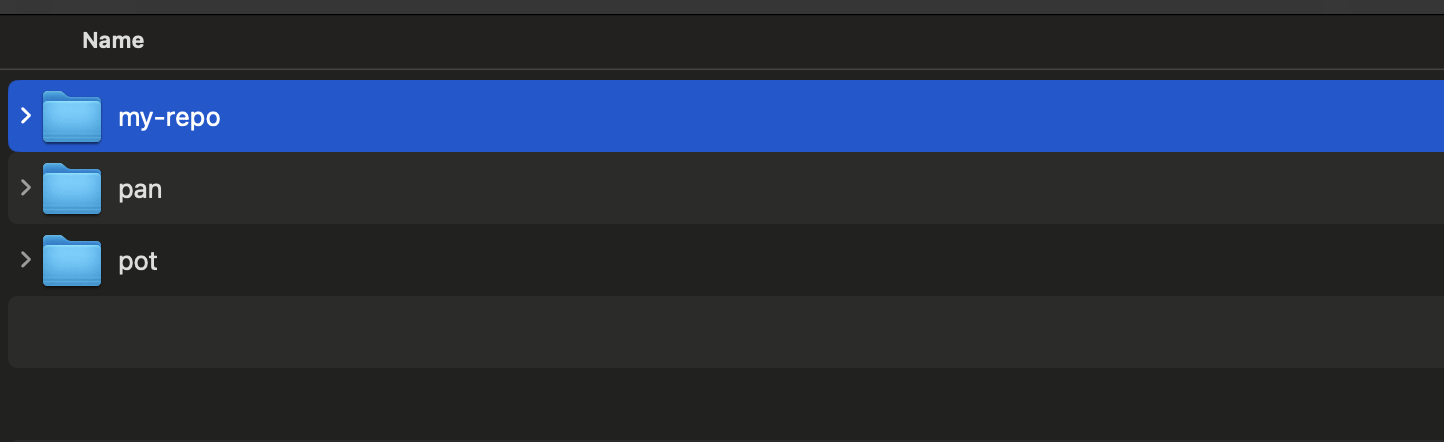
Understanding worktrees
$ cd ../potNow while working on main, i can also stir the pot without needing to stash or commit
And if i decide i don't need one anymore
$ git worktree remove ../panDebugging with bisect
Debugging with bisect
You enthusiastically work on a new feature
70cf04f (HEAD -> branch-recovery) Add user bio
ed322b7 Get profile picture
1f52356 Implement authentication
7303db4 Create login form
1494c0f Add logo
4ee1fc2 Add navbar
9af0197 Create new page
23d4330 Commit 3
5441a19 Commit 2
3e928a0 Commit 1
You are ready to push your work, but oh no... 😱
The end-to-end tests are failing!
Debugging with bisect
🕵️♀️ Which one of you commits is responsible?
70cf04f (HEAD -> branch-recovery) Add user bio
ed322b7 Get profile picture
1f52356 Implement authentication
7303db4 Create login form
1494c0f Add logo
4ee1fc2 Add navbar
9af0197 Create new page
23d4330 Commit 3
5441a19 Commit 2
3e928a0 Commit 1
Debugging with bisect
We know they were broken here here.
70cf04f (HEAD -> branch-recovery) Add user bio
ed322b7 Get profile picture
1f52356 Implement authentication
7303db4 Create login form
1494c0f Add logo
4ee1fc2 Add navbar
9af0197 Create new page
23d4330 Commit 3
5441a19 Commit 2
3e928a0 Commit 1
Debugging with bisect
70cf04f (HEAD -> branch-recovery) Add user bio
ed322b7 Get profile picture
1f52356 Implement authentication
7303db4 Create login form
1494c0f Add logo
4ee1fc2 Add navbar
9af0197 Create new page
23d4330 Commit 3
5441a19 Commit 2
3e928a0 Commit 1
And OK here
We know they were broken here here.
Debugging with bisect
70cf04f (HEAD -> branch-recovery) Add user bio
ed322b7 Get profile picture
1f52356 Implement authentication
7303db4 Create login form
1494c0f Add logo
4ee1fc2 Add navbar
9af0197 Create new page
23d4330 Commit 3
5441a19 Commit 2
3e928a0 Commit 1
$ git bisect start$ git bisect badWe mark the current commit as bad.
❌
Debugging with bisect
70cf04f (HEAD -> branch-recovery) Add user bio
ed322b7 Get profile picture
1f52356 Implement authentication
7303db4 Create login form
1494c0f Add logo
4ee1fc2 Add navbar
9af0197 Create new page
23d4330 Commit 3
5441a19 Commit 2
3e928a0 Commit 1
$ git bisect good 3e928a0
Bisecting: 4 revisions left to test after this (roughly 2 steps)
[4ee1fc238e258c6325a0c36b28f45db1dedb4105] Add navbarWe we tell git which was the last good we know.
✅
❌
Debugging with bisect
70cf04f (HEAD -> branch-recovery) Add user bio
ed322b7 Get profile picture
1f52356 Implement authentication
7303db4 Create login form
1494c0f Add logo
4ee1fc2 Add navbar
9af0197 Create new page
23d4330 Commit 3
5441a19 Commit 2
3e928a0 Commit 1
If this commit is bad.
✅
❌
All of these are bad.
❌
❌
❌
❌
❌
Debugging with bisect
70cf04f (HEAD -> branch-recovery) Add user bio
ed322b7 Get profile picture
1f52356 Implement authentication
7303db4 Create login form
1494c0f Add logo
4ee1fc2 Add navbar
9af0197 Create new page
23d4330 Commit 3
5441a19 Commit 2
3e928a0 Commit 1
✅
❌
❌
❌
❌
❌
❌
$ git bisect bad

Bisecting: 1 revision left to test after this (roughly 1 step)
[23d433059c189c0d05d4a1a1857ed28630532056] Commit 3
Debugging with bisect
70cf04f (HEAD -> branch-recovery) Add user bio
ed322b7 Get profile picture
1f52356 Implement authentication
7303db4 Create login form
1494c0f Add logo
4ee1fc2 Add navbar
9af0197 Create new page
23d4330 Commit 3
5441a19 Commit 2
3e928a0 Commit 1
✅
❌
❌
❌
❌
❌
❌
$ git bisect good

Bisecting: 0 revisions left to test after this (roughly 0 steps)
[9af0197858a7621914bc6f22253e9aa8a5f79a29] Create new page
✅
✅
Debugging with bisect
70cf04f (HEAD -> branch-recovery) Add user bio
ed322b7 Get profile picture
1f52356 Implement authentication
7303db4 Create login form
1494c0f Add logo
4ee1fc2 Add navbar
9af0197 Create new page
23d4330 Commit 3
5441a19 Commit 2
3e928a0 Commit 1
✅
❌
❌
❌
❌
❌
❌
$ git bisect bad

9af0197858a7621914bc6f22253e9aa8a5f79a29 is the first bad commit
commit 9af0197858a7621914bc6f22253e9aa8a5f79a29
Author: Anca Spatariu <anca.spatariu@gmail.com>
Date:   Sun Jul 6 17:23:12 2025 +0300

    Create new page

 src/pages/100.astro | 2 +-
 1 file changed, 1 insertion(+), 1 deletion(-)
✅
✅
❌
👈
FOUND IT!
Common mistakes 🫣
Careless force push
$ git push --force- Forcefully and blindlessly updates the remote branch with the local changes
- If something was pushed after you last pulled, it will overwrite those changes
- Never to be used on shared branches
Careless force push
$ git push --force-with-lease- also force pushes, but with a safety check
- it checks that the remote branch's HEAD matches the local copy of the branch
- it aborts the push if there are new commits since you last pulled
anonymous stashing
$ git stash- By default, git crates a stash entry with a generic name: WIP on branch-name: commit-hash commit-message
- Good luck when you have 10 of these
$ git stash list
stash@{4}: WIP on dev: f29f5ed Commit message
anonymous stashing
$ git stash push -m "I am still waiting on the design"- avoid confusion and make sure you apply the correct stash
- previously git stash save, now deprecated
$ git stash list
stash@{0}: On dev: I am still waiting on the images to add
Rebasing public branches
$ git rebase main- I highly recommend it on own branches
- If others have pulled the original changes, their local history diverges from the rebased branch
On a
public
branch
Rebasing public branches
‼️ Rebasing public branches is like editing a library book without telling anyone.
Rebasing public branches
$ git merge mainOn a
public
branch
- Preserves history and adds a merge commit, making it easy to track
confusing revert and reset
$ git reset$ git revertconfusing revert and reset
- Moves the branch pointer back to another commit, effectively deleting commits from the history
- --soft will keep the changes staged
- --mixed (default) keeps the changes, but unstaged
- --hard will discard the changes
$ git resetconfusing revert and reset
- Adds a revert commit, making it easy to track
- Does not change history, just adds the commit on top
$ git revertUsing reset instead of revert
Use reset it for local cleanup and reorganizing
Using reset instead of revert can cause divergence, team mates will need to force-pull or reset, risking lost work
$ git reset$ git revertUsing revert instead of reset
Ok to use on protected branches, or where you really need the "safety"
Using revert instead of reset can cause cluttered and unnecessary history
$ git reset$ git revertRenaming on case-insensitive file system
$ git mv component.tsx Component.tsxSome systems, like MacOS, are case-insensitive.
component.tsx ➡️ Component.tsx
So this will not be considered a change!
This will trick git into updating its index.
Disaster Recovery ❤️🩹
Accidentally rewriting history
Accidentally rewriting history
🙋 Raise your hand if you ever lost work
due to a git mistake
Accidentally rewriting history
How this can happen:
Using git push --force, git reset --hard
How you can fix it:
Using git reflog
How you can prevent it:
Disallow --force on public branches
what is reflog
🚮 Orphaned commits are git garbage.
They are not for a 30 days.
$ git reflog- tracks your movements, including commits, amends, branch checkouts, rebases, resets, force actions
- it tracks even orphaned commits making it possible to recover them
recovery strategy
$ git commit -m "Commit 1"
$ git commit -m "Commit 2"
$ git commit -m "Commit 3"
$ git reset HEAD~1
$ git reset --hard
recovery strategy
$ git log

commit 5441a1952ed6dd6c5f1dd4001e8c627e7699839e (HEAD -> branch)
Author: Anca Spatariu <anca.spatariu@gmail.com>
Date:   Sat Jul 5 19:14:51 2025 +0300

    Commit 2

commit 3e928a0fe149cd4ca06063c880678c352f199648
Author: Anca Spatariu <anca.spatariu@gmail.com>
Date:   Sat Jul 5 19:14:42 2025 +0300

    Commit 1
recovery strategy
$ git reflog

5441a19 (HEAD -> branch) HEAD@{0}: reset: moving to HEAD
5441a19 (HEAD -> branch) HEAD@{1}: reset: moving to HEAD~1
1c642a6 HEAD@{2}: commit: Commit 3
5441a19 (HEAD -> branch) HEAD@{3}: commit: Commit 2
3e928a0 HEAD@{4}: commit: Commit 1
😱 Oh no! I needed "Commit 3"
$ git checkout -b branch-recovery
$ git cherry-pick 1c642a6
Create a recovery branch and cherry pick the lost commit:
recovery strategy
$ git log

commit 23d433059c189c0d05d4a1a1857ed28630532056 (HEAD -> branch-recovery)
Author: Anca Spatariu <anca.spatariu@gmail.com>
Date:   Sat Jul 5 19:15:06 2025 +0300

    Commit 3

commit 5441a1952ed6dd6c5f1dd4001e8c627e7699839e (branch)
Author: Anca Spatariu <anca.spatariu@gmail.com>
Date:   Sat Jul 5 19:14:51 2025 +0300

    Commit 2

commit 3e928a0fe149cd4ca06063c880678c352f199648
Author: Anca Spatariu <anca.spatariu@gmail.com>
Date:   Sat Jul 5 19:14:42 2025 +0300

    Commit 1
🙌
recovery strategy
$ git checkout -
$ git rebase branch-recovery
Now let's put the commit on the original branch!

Hidden gems 💎
Leaving Notes
$ git notesWhat it does: Adds notes to a commit without changing the commit.
$ git notes add -m "Text"Adding notes
Leaving Notes
Viewing notes
$ git log$ git notes show <commit-hash>Editing notes:
$ git notes edit <commit-hash>Leaving Notes
$ git notes add -m "The bug was already reproducing here"

$ git log

commit 1e1d59dcd639cc6bdaca137e1f7c24da3648b73a (HEAD -> branch, main)
Author: Anca Spatariu <anca.spatariu@gmail.com>
Date:   Thu Jul 3 22:02:53 2025 +0300

    Fix date and location mobile

Notes:
    The bug was already reproducing here
contribution summaries
$ git shortlogWhat it does: Creates a clean commit summary grouped by author
Adrian Fâciu (1):
      Add package lock file

Anca Spatariu (1):
      Update astro.config.mjs

Andrei Pfeiffer (1):
      Add about page content (#17)

Lucian Pacurar (1):
      Add position relative to the center section and picture
Was this merged? 🍒
$ git cherryWhat it does: Compares two branches and shows a list of commits that are not upstream.
➜ git:(branch) git cherry branch2
- 6693eba70e075c018e11e26c57ccf97798ef65d4
+ e717b429d68da4b2eb105e9f701bafef5be144a4
Output:
"+" - unique commits that are not branch 2
"-" - equivalent commits that are on branch 2, but with different hashes (ex. cherry-picked)
blame better 🫵
$ git blame -L <start>,<end> <file>What it does: Blames line by line, showing who modified lines from <start> to <end>/
f95e0bef src/pages/100.astro  (Lucian Pacurar 2025-07-03 19:35:11 +0300 61)   </div>
970126fd src/pages/100.astro  (Lucian Pacurar 2025-06-30 18:22:07 +0300 62)   <Container>
ac0f7b6a src/pages/100.astro  (Anca Spatariu  2025-07-03 21:36:20 +0300 63)     <section>
ac0f7b6a src/pages/100.astro  (Anca Spatariu  2025-07-03 21:36:20 +0300 64)       <p class="...">
Alternatively: Hover line by line like savages... 🙄
RERERE - the unsung hero 🦸
git config --global rerere.enabled true- People avoid bigger rebases because they don't want to deal with the same conflicts over and over again
- Rerere stands for "reuse recorded resolution"
- With rerere true, Git records how you fixed a problem and applies it automatically
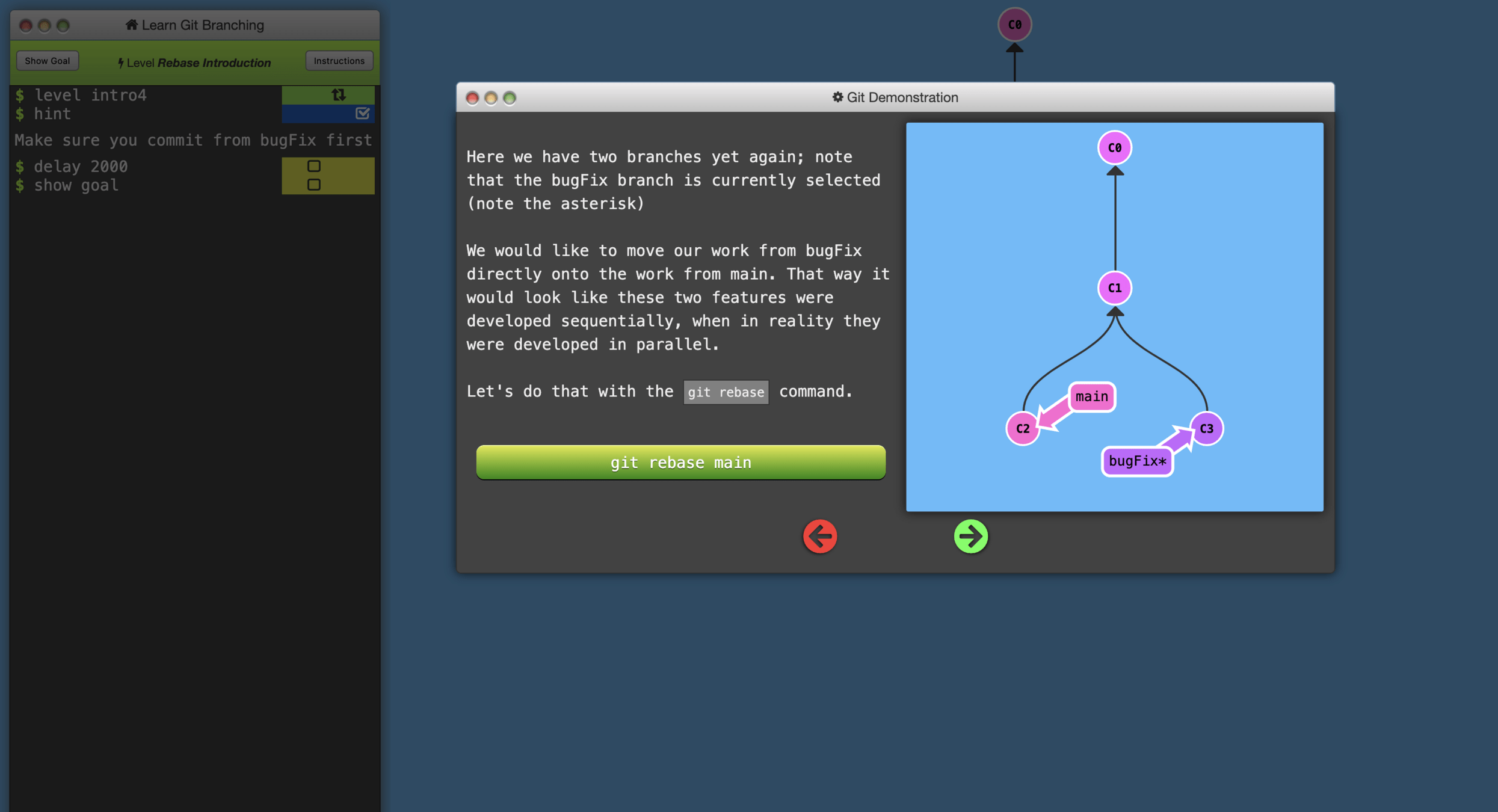
Learning sources

frontendmasters.com
learngitbranching.js.org
Thank you!
questions?
leave your feedback

Git good!
By Anca Spatariu