Graphics Programming Virtual Meetup


Discord

Visibility Buffer Rendering
Charles Giessen
Sources
- Primary Source for this presentation: http://filmicworlds.com/blog/visibility-buffer-rendering-with-material-graphs/
- Visibility Buffer Paper: https://jcgt.org/published/0002/02/04/
- Deferred Texturing: https://www.reedbeta.com/blog/deferred-texturing/
- Nanite In Detail: https://advances.realtimerendering.com/s2021/Karis_Nanite_SIGGRAPH_Advances_2021_final.pdf
Talk outline
- Background
- Visibility buffer
- Hardware Partial Derivatives
- Interpolation and Analytic Partial Derivatives
- Performance considerations
- Conclusion
Background
- Forward rendering
- Computer material properties and lighting in fragment shader
- Implicit step done by the GPU to interpolate inputs
- Light culling/tiling
- Bucket lights into spacial groups, only light a fragment based on lights in the closest bucket
- Orthogonal to Forward or Deferred rendering
- Not discussed here in detail
Background cont'
- Deferred Rendering
- Only compute material properties in fragment shader, store in G-Buffer
- Compute lighting in separate step using G-Buffer as input
- Lighting is evaluated once per pixel, unlike forward rendering which is for every triangle.
- G-Buffer usable in post processing effects
- Still has implicit interpolation step per triangle
Visibility Buffer?
- Split up Interpolation from material evaluation and lighting
- Rasterize triangle and store 'triangle ids' in a buffer
- "Visibility Buffer"
- Still needs depth buffer - can be combined or separate
- Feed visibility buffer into material evaluation
- Can use compute for material/lighting
- Rasterize triangle and store 'triangle ids' in a buffer
But why?
- Use rasterizer only when necessary
- We can fetch and interpolate texture data ourselves
- Geared towards high triangle to pixel ratios
- As 'subpixel triangle' density tend to choke hardware
But how?
- Use the following fragment shader for all triangle rendering
- Visibility buffer contains just the triangle number and draw call number bitpacked together
- Note that all geometry must already be GPU resident buffers so it can be queried later
// Pass 0: Rasterize all meshes, just output thin visibility
U32 VisibilityPS(U32 drawCallId, U32 triangleId)
{
  return (drawCallId << NUM_TRIANGLE_BITS) | triangleId;
}
Two flavors
- Combined Material and Lighting evaluation
- Simpler to implement
- Bigger fragment shader
- Best when only 1 material is used
- Separate passes for material evaluation and lighting
- Generate a G-Buffer from Visibility Buffer
- Feed it into the lighting evaluation step
- More steps
- Allows different materials to be used more easily
- What this presentation will discuss in detail
Material Evaluation
- Sample from visibility buffer at pixel
- Determine where in the triangle it is (interpolate)
- Compute Material and write to G-Buffer
// Pass 1: In a CS convert from triangle ID to BRDF data
BrdfData MaterialCS(float2 screenPos)
{
  U32 drawCallId = FetchVisibility() >> NUM_TRIANGLE_BITS;
  U32 triangleId = FetchVisibility() &      TRIANGLE_MASK;

  Interpolators interp    = FetchInterpolators(drawCallId, triangleId);
  BrdfData      brdfData  = MaterialEval(interp);
  return brdfData;
}
Lighting Calculation
- Injest G-Buffer, output final pixel color
- Already a step in deferred rendering
- After this is when post processing is applied on its way to the final framebuffer output
// Pass 2: In a CS, fetch BRDF data and calculate lighting
LightData LightingCS(float2 screenPos)
{
  BrdfData      brdfData  = FetchMaterial(screenPos);
  LightData     lightData = LightingEval(brdfData);
  return lightData;
}
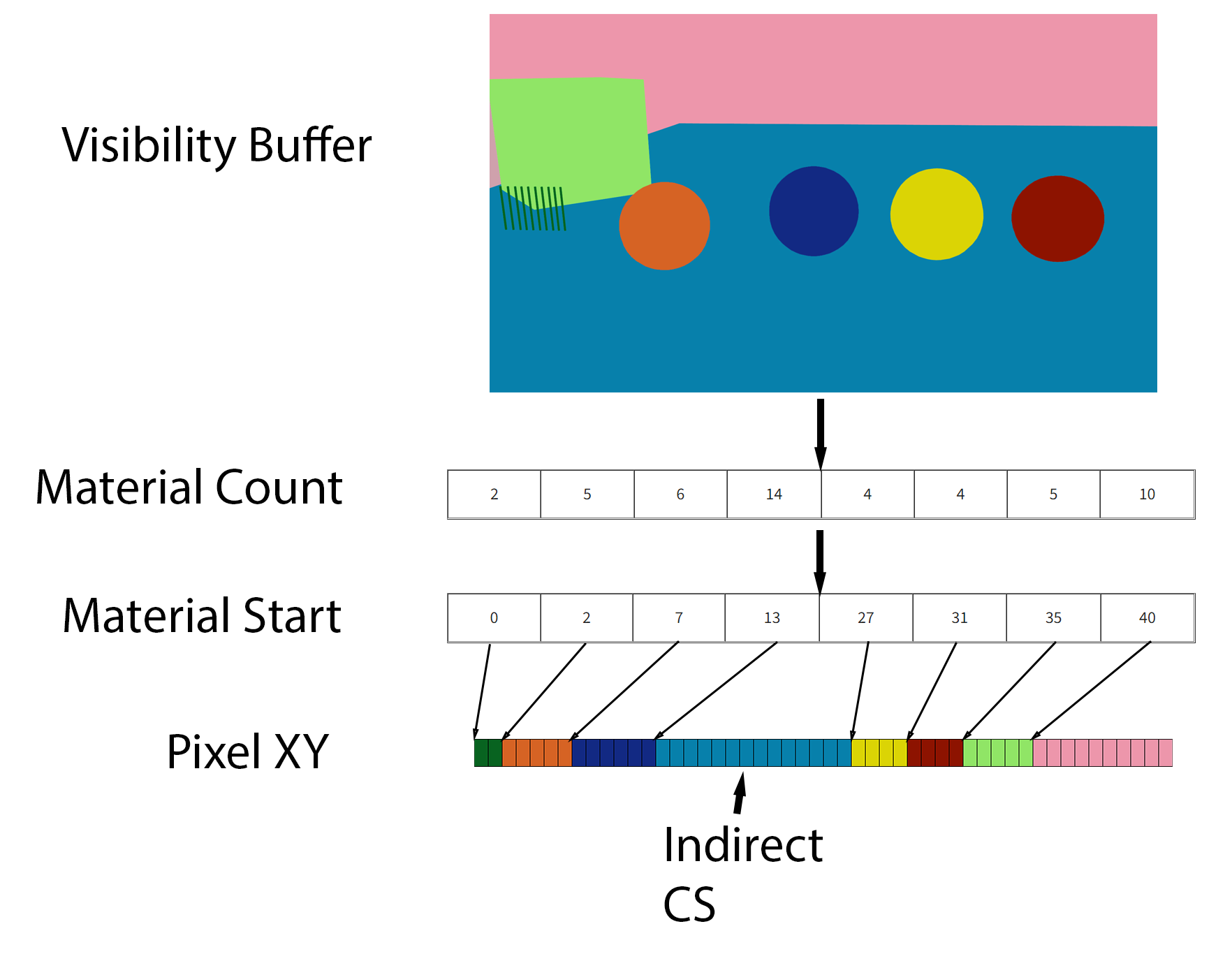
Multiple materials?
- Want to invoke the material shader on only the pixels it applies to.
- Achieved through multiple mechanisms
- Idea presented in this article differs from what I found out in the wild
- Generally, you render a 'fullscreen quad' per material and early-out if the material id doesn't match the material
- Can apply tiling & other fancy culling to bring this down
- The article does an interesting sorting routine to determine how many pixels have each material and sort them by material before dispatching.
Hardware Partial Deriviatives
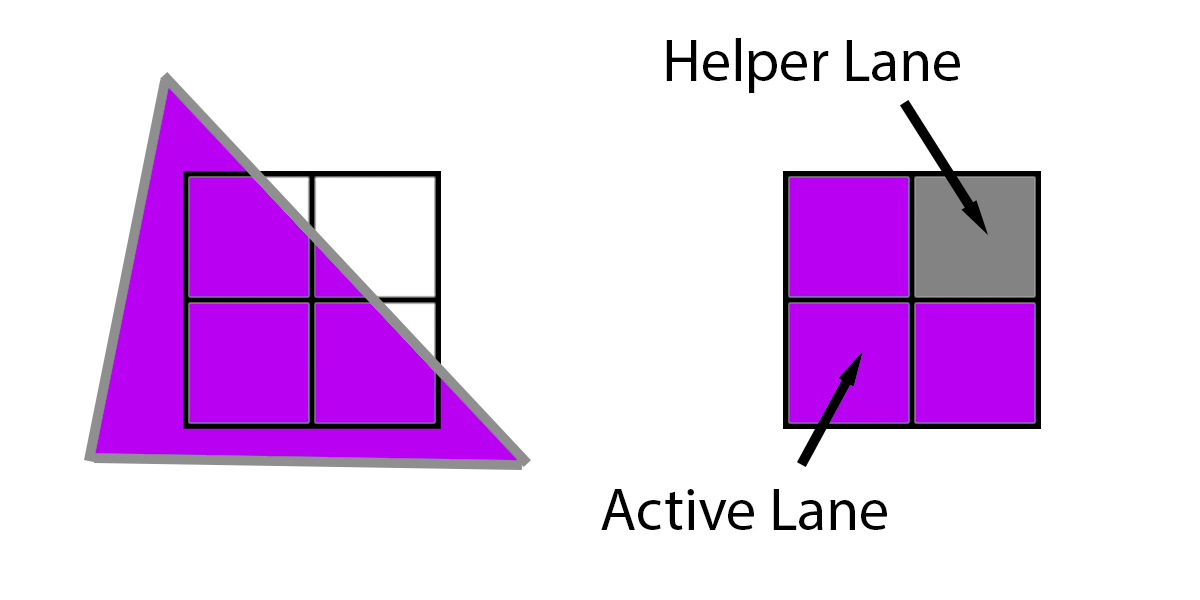
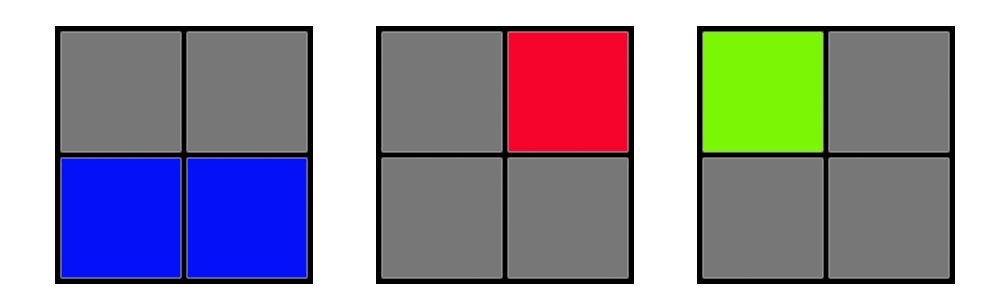
- Pixels aren't computed individually, but in 2x2 quads
- This is to allow partial derivatives to be computed
- Allows use of 'finite difference method' by sampling the value at 4 locations and taking the difference.
- dx = left pixel value - right pixel value
- dy = top pixel value - botton pixel value
- Notice how all 4 lanes are needed to compute deriviatives
- Active lane == Pixel makes it to final output
- Helper lane == Pixel is only needed for deriviatives
- Helper lanes take up lanes from active lanes
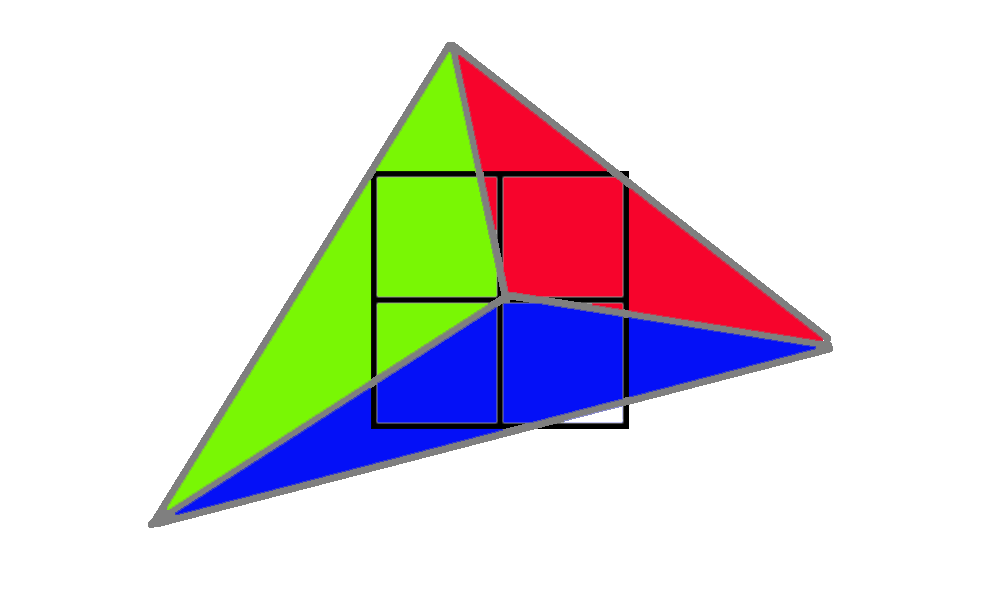
- Note how 12 total quad lanes are needed to render 3 triangles
Quad Utilization Efficiency
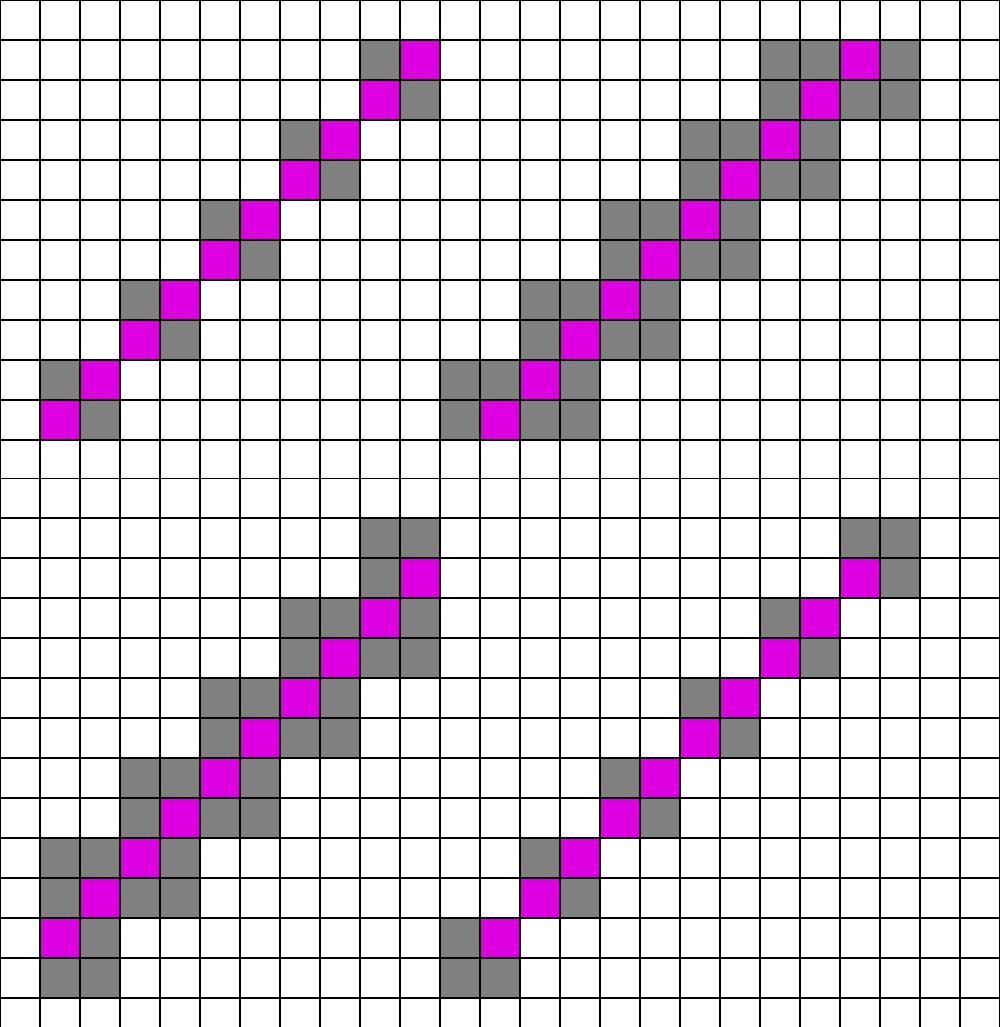
- Quads are underutilized in forward and deferred rendering with small triangles
| Material | Lighting | |
|---|---|---|
| Forward | 4x | n/a |
| Deferred | 4x | 1x |
| Visibility | 1x | 1x |
Extremely bad utilization examples
Interpolation and Analytic Partial Derivatives
- Since we replaced hardware interpolation we gotta do it ourselves
- Fetch the 3 vertices, interpolate using the xy location
- Requires storing vertices in a post transform cache
- Not required, but a good thing to explore
- Reuse barycentrics for all texture samples
- Code samples can be found online
- I think its straightforward to understand
May need to fallback to Finite Difference Method
- Unreal's Nanite tries to use analytic derivatives when possible
- Not always possible, falls back to FDM for derivatives
Performance considerations
- A big win in high triangle density scenes
- Much better quad utilization
- Beware of memory/cache coherence
- Lots of places for memory stalls to occur as triangle data is fetched
- Much harder to do generative geometry
- Need to have all vertices available for shading later
- Doesn't gain much if anything for big triangles
- Multiple materials complicate matters
- Different strategies to make it work
Conclusion
- Its cool
- Its fast
- Implement your own rasterizer in compute shaders and ditch the fixed function pipeline today
- Has some complications with the following techniques
- MSAA
- Variable Rate Shading
- TAA, upscaling, and temporal techniques
Thanks for listening
Questions?
Graphics Programming Virtual Meetup
Visibility Buffer
By Charles Giessen