
Now
- A tool!
- A document definition language.
- A programming language?
A tool
- Not trying to embrace the world
- Limitations are okay
- Keep things simple!
A document definition language
- I write all my notes using Now format
- Text, lists and dicts should be easy to write
- Thought process should be as linear as possible
- Avoid backtracking
- (Imagine taking notes in Python...)
A Programming Language?
- We always want to do things.
- But, still, limitations are okay
- Keep things simple!
Other objectives
- Writability matters
- Everything in one file
- Nowfile + REPL + CLI + Line Processor
$ now :cmd \
    'set who "World"' \
    'print "Hello, $who!"'

$ cat /etc/passwd | now :lp 'filter {:: to.lower | :: contains daemon}'
...
_demod:*:275:275:Demo Daemon:/var/empty:/usr/bin/false
_rmd:*:277:277:Remote Management Daemon:/var/db/rmd:/usr/bin/false
...
Yeah, but why?
Why Now?
- Out of pure curiosity!
- Was working on a more traditional programming language before
-
Creating languages is a good exercise for Architects
- You have to employ a lot of lateral thinking.
Batteries should be included
-
Batteries, not libraries!
- Subcommands
-
make test
-
- Logging
-
LOG_LEVEL=DEBUG
-
- Configuration
-
GIT_SSH_COMMAND="ssh -i ~/.ssh/other-key"
-
- Arguments parsing
-
ssh -i ~/.ssh/yet-another-key cleber@example.com
-
- Subcommands
These things are ALWAYS present!
In Python
-
Subcommands and arg parsing:
- getopt? argparse? optparse? click!
-
Configuration:
- os.environ?
- ini files?
- pydantic
-
Logging: logging
- ugh!
- finicky
- kinda confusing
Freedom vs Practicity
- Zope vs Django
- Zope: lots of freedom!
- Django: limited
- Freedom is hard to use in specific applications
- Specialized tools are limited, and that's actually good
Now Features
- Commands
- Constants
- Configuration (from env vars)
- Logging (that understands LOG_LEVEL)
- Data sources
- Shells and scripts
- Tasks (threads)
- SystemCommands
- Libraries (as subprocesses)
"Pipe-oriented programming"
- The programming language focus a lot on pipelines
- Your line of thought should always advance
- Minimize the size of "mental buffer" needed
- Use less variables!
- Less backtracking
Pipelines are great.

We use
A LOT
of tables
Tables!
| name | limit |
| type | integer |
| default value | 100 |
| name | get_users |
| return type | list[User] |
| description | "Return a list of users" |
docker compose
- service
- name
- build parameters
- links
- ports
- etc...
- network
- name
- etc...
Database Columns
- name
- type
- nullable?
- default value
- etc.
ORM
- Object name
- [Table name]
- Fields
- name
- type
- default value
- nullable?
HTTP Server Routes
- HTTP Method
- Path
- Handler function
- Needs authentication?
HTTP Server Routes Docs
- Method
- Path
- Request payload
- Field
- Type
- Mandatory?
- Default value
- Response payload
- Field
- Type
- Mandatory?
HTTP Requests
- Method
- Path
- Payload
- Headers
- etc...
Functions
- Parameters
- name
- type
- default value
- Return type
Structs and Classes
- Name
- Fields/Properties
- name
- type
- default value
- Methods
- name
- parameters
- name
- type
- etc...
Packages
- Name
- Description
- Version
- Dependencies
- name
- version
- [source]
- Categories
- Keywords
- README
- etc...
CLI arguments
- Arguments and named arguments
- name
- type
- default value
- nullable?
- required?
Tables: issues
- Represent them using the same syntax as our programs
- or we extend the syntax to fit them (Python type hints)
- or use JSON, YAML, TOML, etc.
- or have DSLs
Pydantic
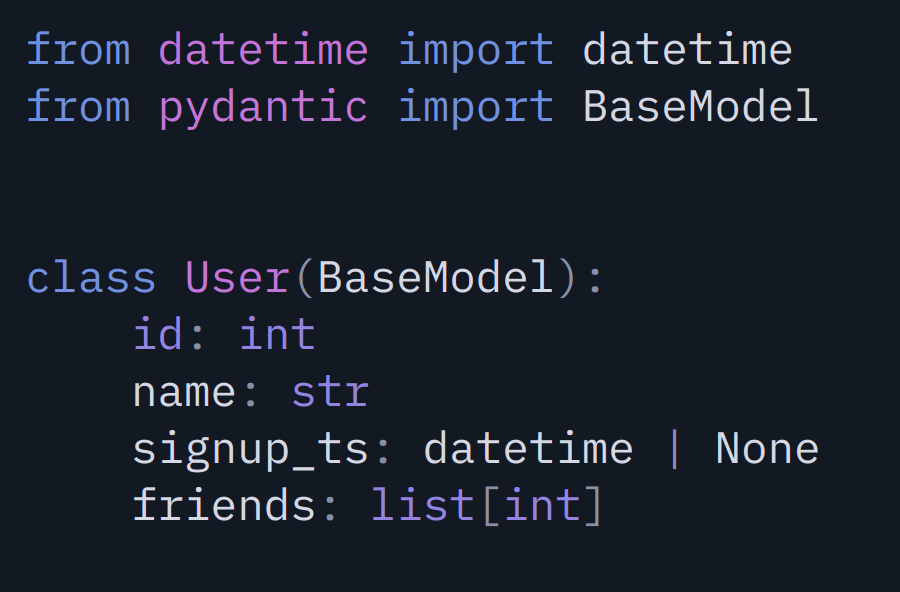
Functions declarations
degrade into tables
def download(bucket, key):def download(
bucket: str
key: str
) -> bytes:
def download(
    bucket: str
    key: str
) -> bytes:
"""Download an object from S3.
Parameters:
bucket (str) -- the bucket name to download from
key (str) -- the object key
Returns:
The downloaded object as bytes.
"""
In short:
We must take tables into consideration when creating a new language!
Example in Now
[commands/hello]
description "Salute someone."
parameters {
    who {
        type string
        default "World"
    }
}

print "Hello, $who!"
(The format is "key value")
[Hello Program]

This program implements the famous "hello, world!" while allowing the user to select who's being saluted.

[commands/hello]
description "Salute someone."
parameters {
    who {
        type string
        default "World"
    }
}

print "Hello, $who!"
A valid Now document
$ now
Hello Program
This program implements the famous "hello, world!" while allowing the user to select who's being saluted.

 hello ----------> Salute someone.
    who : string = World

$ now hello
Hello, World!

$ now hello People
Hello, People!
The result in action
Syntax basics: Document
- [section header]
- section data
- newline
- section body
[Example Section]
is_example true
is_this_a_dict true
can_you_have_lists_here {
  - of
  - course
}

This is the body of the section, after the blank line.
Syntax basics: Code
program:  pipeline [{;|\n} pipeline [{;|\n} ...]]
pipeline: cmd_call [| command_call [| ...]]
cmd_call: name [arg1 [arg2 [...]]]
A program is a list of pipelines
A pipeline is a list of command calls
All command calls follow the same format.
[tasks/connection_handler]
parameters {
    connection {
        type tcp_connection
    }
}
o $connection | foreach data {
    log "Data length: " ($data : length)
    scope "SCGI" {
        o $data | ... # SEE NEXT PAGE

        set msg "Hello, world!"
            | :: length
            | as content_length

        o $connection | :: send "Status: 200 OK
Content-Type: text/plain
Content-Length: $content_length

$msg"
        break
    }
}
o $connection | :: close
ASGI connection handler example
        o $data
            | :: netstrings
            | >> {
                :: as headers_strings body
                log "Headers strings: $headers_strings\nBody: $body"
                return $headers_strings
            }
            | :: first | as headers_string
            | :: c.strings | :: to.pairs | dict | as headers
            | >> {:: get "REQUEST_URI" | as path | log "Path: "}
            | >> {:: get "QUERY_STRING" | as query_params | log "Query parameters: "}
            | >> {:: get "REQUEST_METHOD" | as request_method | log "Request method: "}
Aproximate References:
-
:: - Namespaces -
{} - Ruby blocks (and what |x| does) -
>> - asides (some return, some not)
Now pipes aren't shell pipes
Shell:
Programs run in parallel
Write to pipe until full or closed
Next program read from pipe until closed
That is: the pipe is some sort of queue.
Now:
Program returns a range (think generators)
Next program walks through this range
That is: data is pulled, not pushed.
> range 1 5 | foreach number {print $number}
1
2
3
4
5
`range` returns a... range/iterator/generator
`foreach` walks through the range
Data is being pulled by `foreach`
Alternative syntax:
> range 1 5 | {print}
1
2
3
4
5
> set result [* [+ 1 2] 3]   # Lisp-like, ugh!
> print $result
9

> set result (1 + 2 * 3)     # Kinda Tcl-like -- much better!
> print $result
9

> o (1 + 2 * 3)               # My ideas advance! My ideas RAGE!
    | as result
    | print
9
Little syntax is nice
but sugar is allowed
Simple exercises
- Create a self-contained plantuml diagram
- Get today's weather prediction and notify me every time it changes;
- Generate a docker-compose.yml file using templates
- Tally up a total from a CSV file
deck
By Cléber Zavadniak


