Content ITV PRO
This is Itvedant Content department
AI-Assisted Trade Validation & Risk Analysis
Business Scenario
You are a Middle Office Analyst at an investment bank. Your team is testing how AI can help analyse trade data.
You will provide trade information and clear business rules to an AI tool. The AI will identify trade problems, assign a risk level, and suggest the required action.
You will then compare the AI's results with the expected/manual results to check whether the AI has given the correct answer.
Topic : Weaving the world of Web
1) Navigating the world of Web
2) Building Blocks of Website,
3) Tag Titans: Fundamental Web Construct.
AI_MiddleOffice_Blank.xlsx : Link
Pre-Lab Preparation
Lab File
AI_MiddleOffice_Completed.xlsx : Link
Task 1: Understand Your Spreadsheets & Perform Manual Analysis
Before asking AI to analyse the trades, you must first complete a manual baseline analysis so you have something to check the AI against.
Open AI_MiddleOffice_Blank.xlsx
1
Open the Raw_Trade_Data worksheet
2
Review these columns:
Trade ID
Ticker
FO Quantity
FO Price
Broker Quantity
Broker Price
Confirmation Status
Perform the Manual Analysis
3
Open the Manual_Analysis worksheet. You must complete this sheet using Excel formulas to create your baseline.
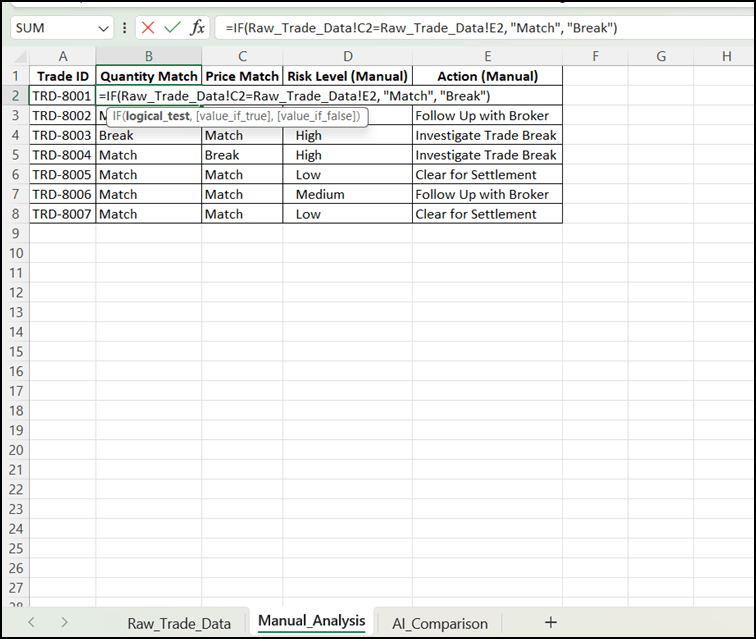
1. Check Quantities: In Cell B2 (under Quantity Match),
enter =IF('Raw_Trade_Data'!C2='Raw_Trade_Data'!E2, "Match", "Break")
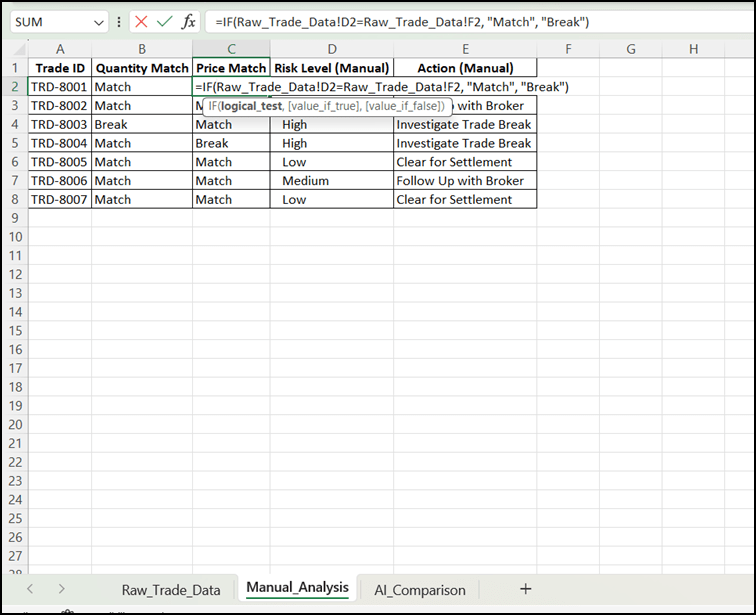
2. Check Prices: In Cell C2 (under Price Match), enter =IF('Raw_Trade_Data'!D2='Raw_Trade_Data'!F2, "Match", "Break")
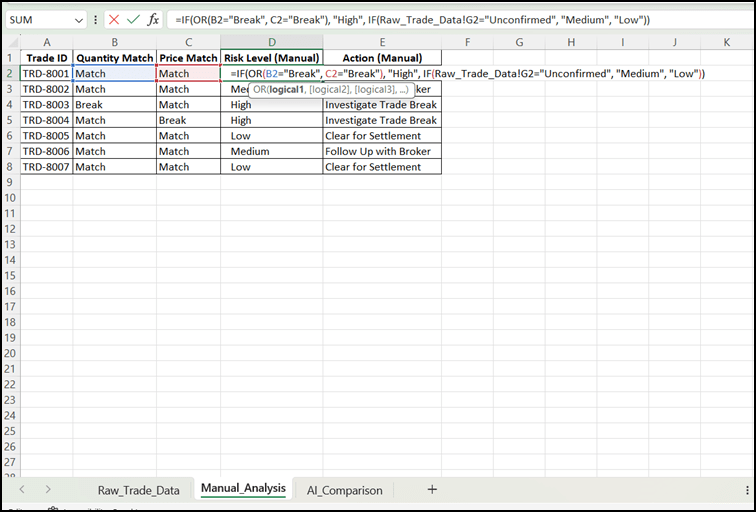
3. Assign Risk Level: In Cell D2, enter
=IF(OR(B2="Break", C2="Break"), "High", IF('Raw_Trade_Data'!G2="Unconfirmed", "Medium", "Low"))
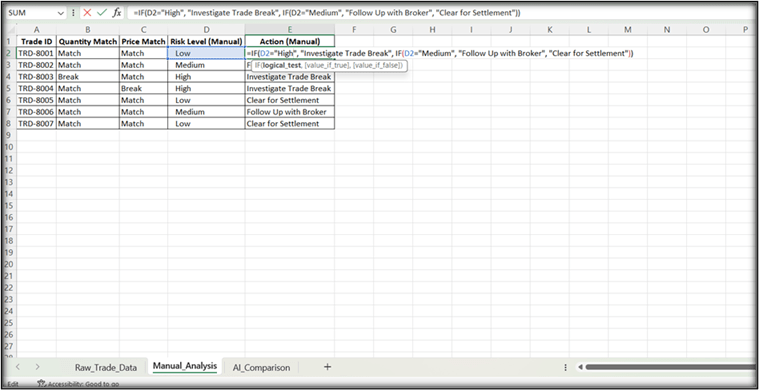
4. Assign Action: In Cell E2, enter
=IF(D2="High", "Investigate Trade Break", IF(D2="Medium", "Follow Up with Broker", "Clear for Settlement"))
Open the AI_Comparison worksheet
4
You will enter the AI results here later and compare them with the manual results you just generated.
Task 2: Create Instructions for AI
The AI needs clear instructions to understand what it should check.
Open ChatGPT, Gemini, Claude, or another approved AI tool
1
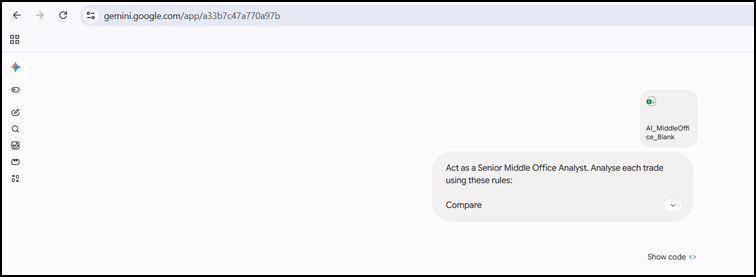
Attach the excel document and enter the following instructions
2
Act as a Senior Middle Office Analyst. Analyse each trade using these rules:
Compare FO Quantity with Broker Quantity and FO Price with Broker Price.
If either value is different, classify the trade as High Risk.
If the values match but the trade is Unconfirmed, classify it as Medium Risk.
If the values match and the trade is Confirmed, classify it as Low Risk.
Actions required:
High Risk → Investigate Trade Break
Medium Risk → Follow Up with Broker
Low Risk → Clear for Settlement
Return the results in a table with: Trade ID | Risk Level | Action
Act as a Senior Middle Office Analyst. Analyse each trade using these rules:
Compare FO Quantity with Broker Quantity and FO Price with Broker Price.
If either value is different, classify the trade as High Risk.
If the values match but the trade is Unconfirmed, classify it as Medium Risk.
If the values match and the trade is Confirmed, classify it as Low Risk.
Actions required:
High Risk → Investigate Trade Break
Medium Risk → Follow Up with Broker
Low Risk → Clear for Settlement
Return the results in a table with: Trade ID | Risk Level | Action
Submit the prompt and wait for the AI's response
3
Task 3: Review the AI Results
Check whether the AI has correctly analysed each trade.
Look for:
Correct Trade ID
Correct Risk Level
Correct Action
Pay particular attention to trades where the quantity or price does not match.
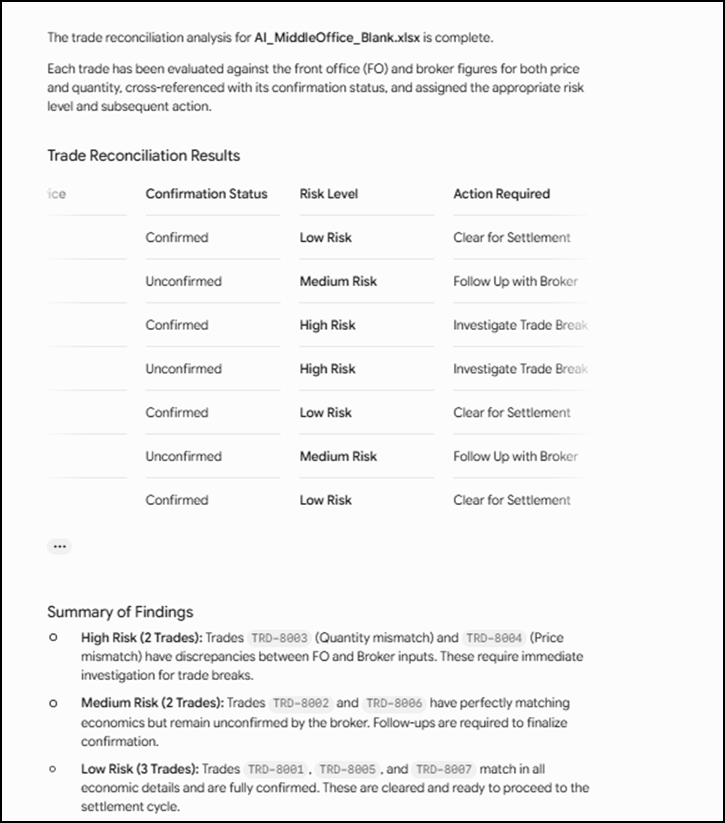
The AI checked each trade by comparing the Front Office (FO) quantity and price with the Broker's quantity and price, and also checked whether the trade was confirmed.
TRD-8001, TRD-8005, TRD-8007: Everything matches and is confirmed → Low Risk → Clear for Settlement
TRD-8002, TRD-8006: Trade details match, but confirmation is pending → Medium Risk → Follow Up with Broker
TRD-8003: Quantity does not match → High Risk → Investigate Trade Break
TRD-8004: Price does not match → High Risk → Investigate Trade Break
In simple terms: AI found 2 high-risk, 2 medium-risk, and 3 low-risk trades and suggested the appropriate action for each.
Task 4: Compare AI Results with the Manual Analysis
Now check whether the AI produced the same results as the manual analysis.
Copy the AI's results
1
Open the AI_Comparison worksheet
2
Paste the AI's Risk Level and Action into the appropriate columns
3
| Trade ID | Risk Level | Action Required |
|---|---|---|
| TRD-8001 | Low Risk | Clear for Settlement |
| TRD-8002 | Medium Risk | Follow Up with Broker |
| TRD-8003 | High Risk | Investigate Trade Break |
| TRD-8004 | High Risk | Investigate Trade Break |
| TRD-8005 | Low Risk | Clear for Settlement |
| TRD-8006 | Medium Risk0 | Follow Up with Broker |
| TRD-8007 | Low Risk | Clear for Settlement |
Compare the AI results with the manual results
4
In Column D – Match with Manual?, enter:
Yes – if the AI result matches.
No – if the AI result is different.
In Column E – Notes / Observations, record important details about how the AI performed
5
1. Click Cell E2.
2. Type your observation (e.g., "AI correctly identified the trade break" or "AI assigned the correct risk level").
3. Press Enter to save the note and move down.
By Content ITV