Content ITV PRO
This is Itvedant Content department
Managing Configuration using Ansible Variables and Templates
Pre-Lab Preparation
Ansible is installed on the Control Node.
Managed Nodes are available.
Passwordless SSH is configured.
Inventory file is configured.
Nginx is installed on Managed Nodes.
Internet connectivity is available.
Task 1: Verify Connectivity
1
Navigate to the Ansible working directory.
cd ~/ansible-lab2
2
Verify connectivity with managed nodes
ansible all -i inventory -m pingTask 2: Create Variables File
1
Create a variables file.
vi vars.yml
Add the following variables
app_name: ContentSphere
web_port: 80
3
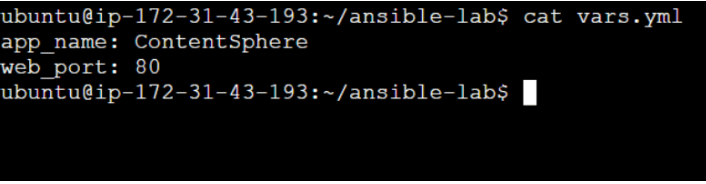
Verify the variables file
cat vars.yml
Task 3: Create Nginx Template
1
Create a template file.
vi nginx.conf.j2
2
Add the following content
server {
   listen {{ web_port }};

   location / {
       return 200 "Welcome to {{ app_name }}";
   }
}
3
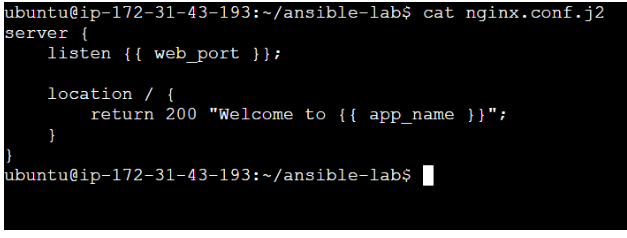
Verify the template file
cat nginx.conf.j2Task 4: Create Ansible Playbook
1
Create a playbook.
vi deploy-nginx.yml2
Add the following playbook.
- name: Configure Nginx using Variables and Templates
 hosts: all
 become: yes
vars_files:
- vars.yml
Task 5: Execute Playbook
1
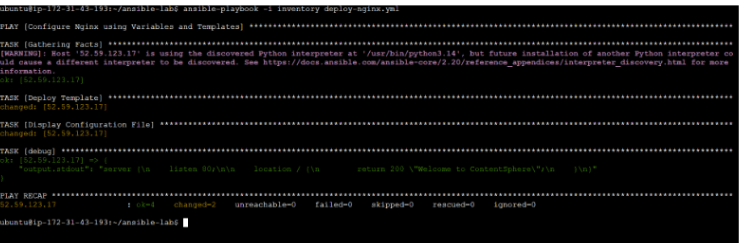
Run the playbook
ansible-playbook -i inventory deploy-nginx.yml
2
Verify successful execution.
Expected Output: PLAY RECAP
failed=0
Task 6: Verify Template Deployment
1
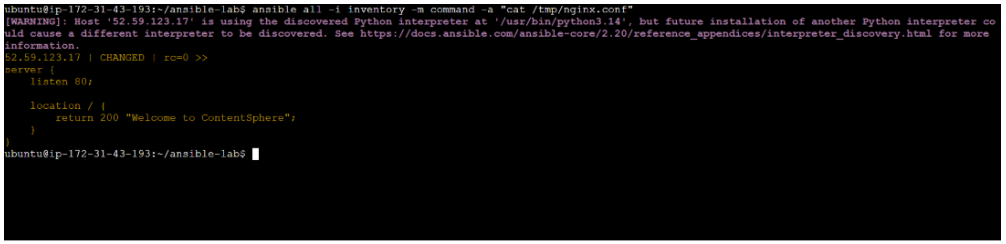
Verify generated configuration file
ansible all -i inventory -m command -a "cat /tmp/nginx.conf"
2
Expected Output
server {
   listen 80;

   location / {
       return 200 "Welcome to ContentSphere";
   }
}
Great job!
Created Variables.
Created a Jinja2 Template.
Used Variables inside Templates.
Deployed configuration files using Ansible.
Automated Nginx configuration management.
Verified dynamic configuration deployment across managed nodes.
Checkpoint
By Content ITV