The Front-End Fresh Workshop


👋🏾






The Agenda!
Sept 25th
Front-End Engineering in 2024 & Mastering React

Oct 2nd
Building Large Scale Web Apps
Oct 9th
Building a Personal Brand & Breaking Into FAANG
Oct 16th
Leveling Up From Junior To Senior To Staff
Sessions will happen 7:30PM — 9:00 PM (Wednesdays)
Q&A
(Dedicated Q/A periods)
Recordings
(Will be shared on Slack)
Exercises
(to work on between sessions)
You can reach out to me anytime on Slack through-out the 4 weeks!
Happy to answer questions/help where I can async.
Who's part of the cohort?
Designers/Creative Directors
Backend Engineers
Fullstack Engineers
Junior Frontend Engineers
Senior Frontend Engineers/Team Leads
I want to make this workshop as helpful to everyone as much as possible.
Introductions!

Houtan
Borys
today's folks

Navyatha
Menna

Anthony
Bilal



Q/A!
Any questions?
Today's Agenda!
Front-End Engineering in 2024 & Mastering React
- JavaScript
- React
- Common and important concepts in React
- Data Fetching
- React + TypeScript
- Frameworks (Vite, Remix, Next.js)
- React 19, RSCs, and new APIs
- Front-End Engineering in 2024
Front-End Engineering in 2024
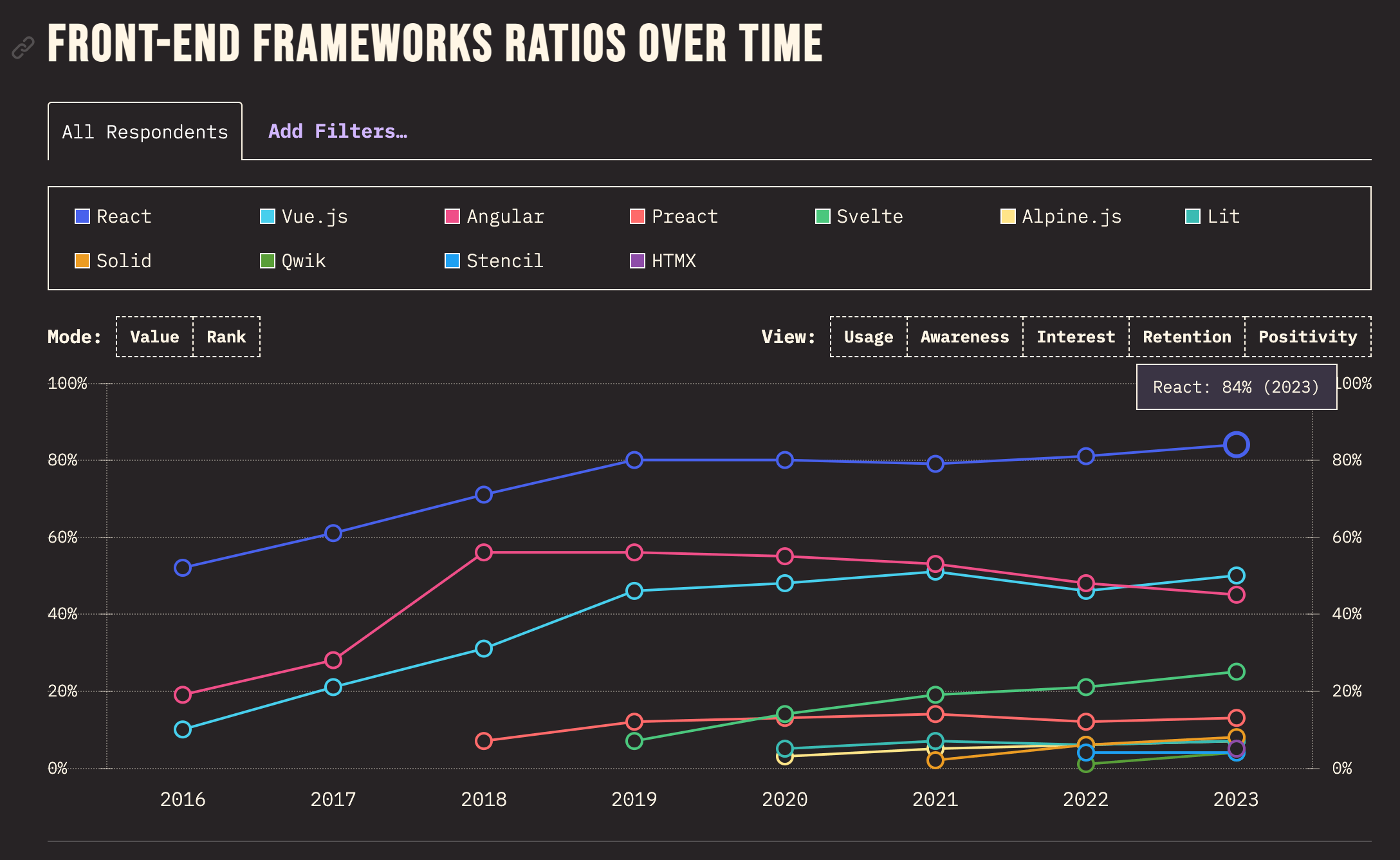
Front-End Engineering in 2024
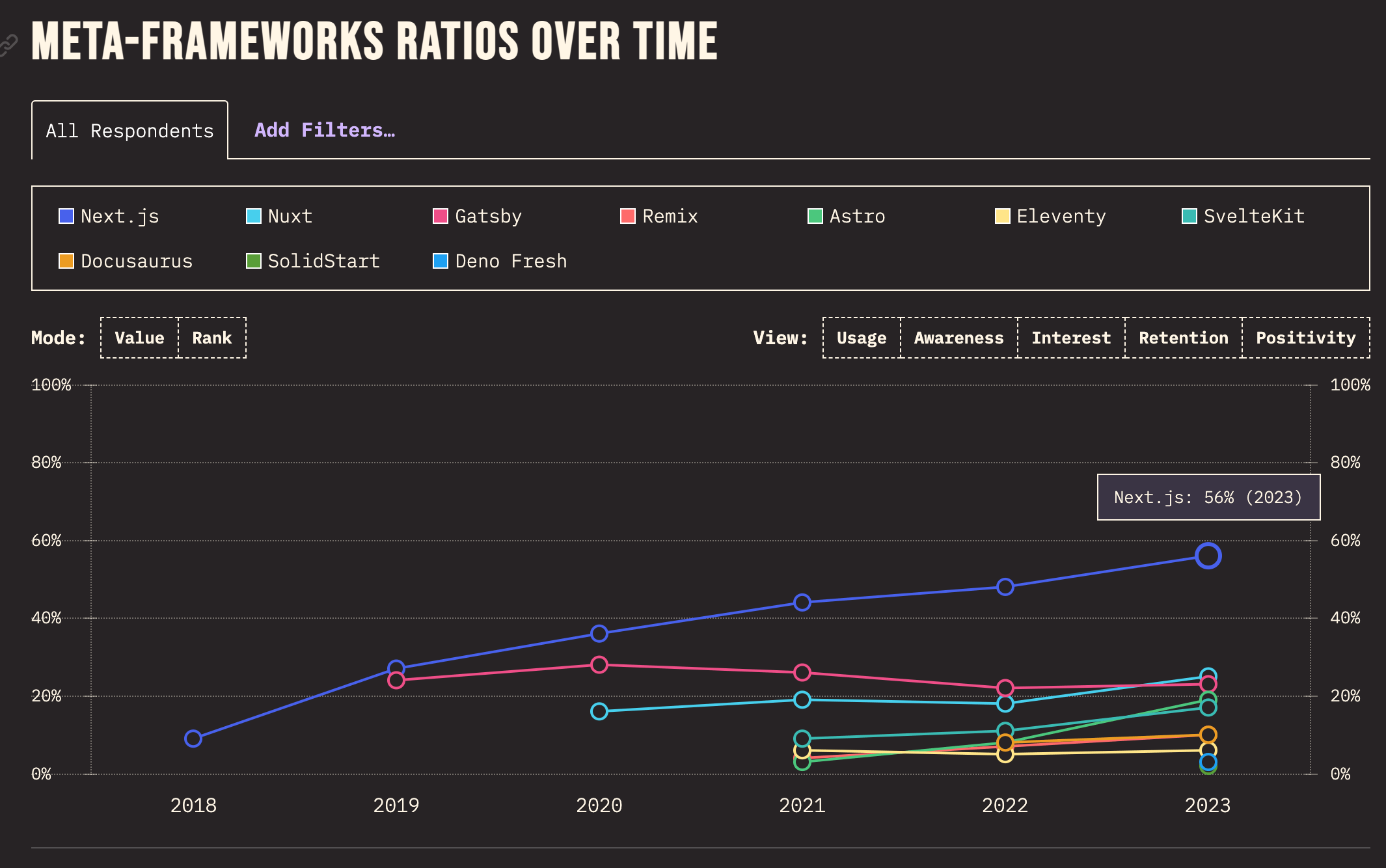
Front-End Engineering in 2024
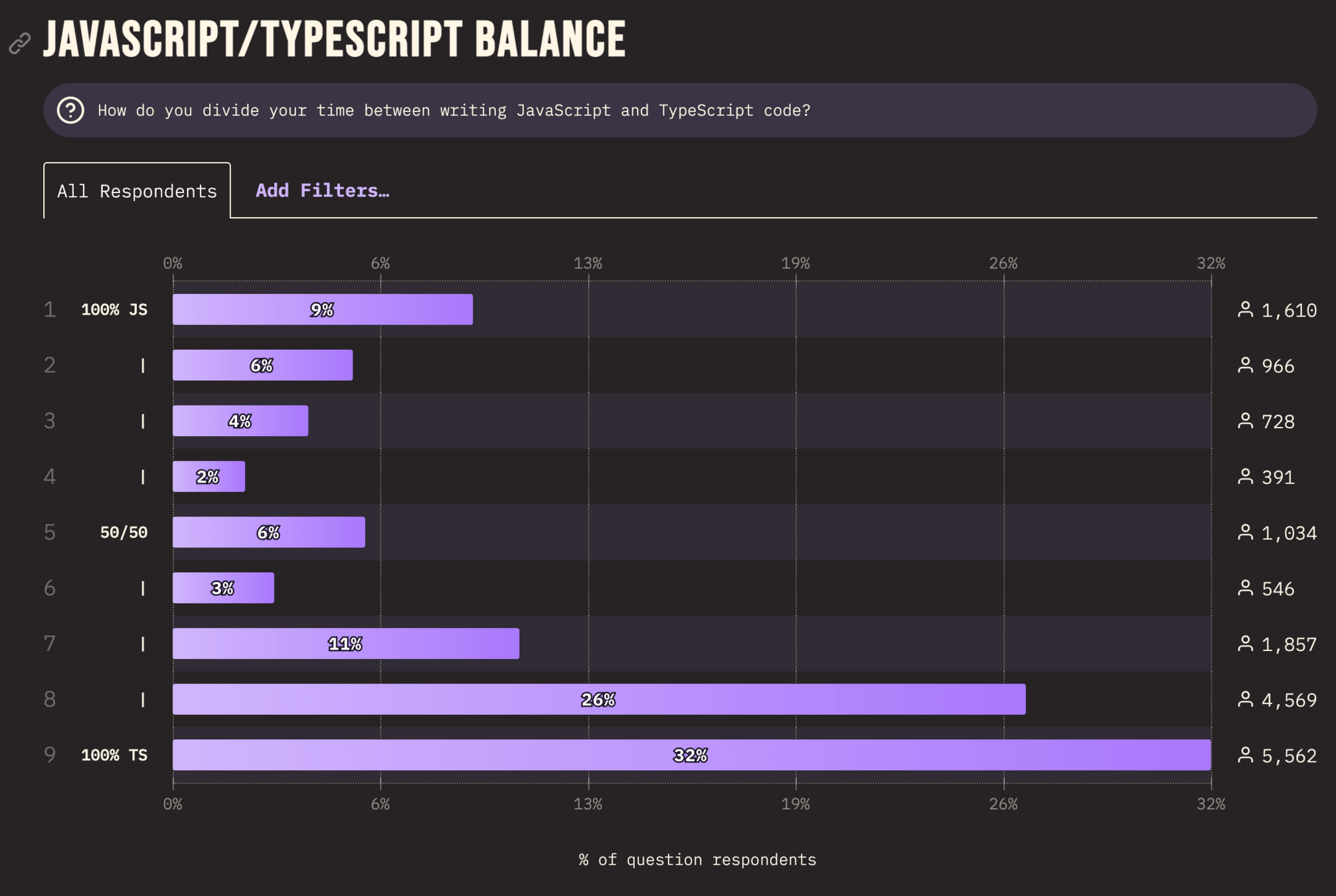
Front-End Engineering in 2024
- Mobile Responsiveness
- Accessibility
- User Experience (UX) & Interaction Design
- Performance Optimization
- Web Security
- API Integration
many different focus areas
- Infra/build-tooling
Front-End Engineering in 2024
- Front-End Engineer
- Front-End Engineer
- Product Engineer
- Design Engineer
- UI/UX Engineer
- Web Developer
- Creative Developer
JavaScript
<form>
  <label for="name">Name:</label>
  <input type="text" id="name" name="name" />

  <label for="email">Email:</label>
  <input type="email" id="email" name="email" />

  <input type="submit" value="Submit" />
</form>
HTML
form {
  max-width: 400px;
  margin: 20px auto;
  padding: 20px;
  border: 1px solid #ccc;
  border-radius: 8px;
  background: #f9f9f9;
}

label {
  display: block;
  margin-bottom: 8px;
  font-weight: bold;
}

/* ... */
CSS
JavaScript
JavaScript is often used for one of two things — Interactivity & Dynamically updating content.
This could involve changing elements on the page in response to user actions, such as form submissions, button clicks, or real-time data fetching (e.g., updating live scores or news feeds).
JavaScript
<form>
  <label for="name">Name:</label>
  <input type="text" id="name" name="name" />

  <label for="email">Email:</label>
  <input type="email" id="email" name="email" />

  <input type="submit" value="Submit" />
</form>
let form = document.querySelector('form');
let nameInput = form.querySelector('#name');
let emailInput = form.querySelector('#email');
form.addEventListener('submit', function(e) {
e.preventDefault();
let name = nameInput.value;
let email = emailInput.value;
console.log(`Name: ${name}, Email: ${email}`);
});JavaScript

function Form() {
  // creating state object
  const [formData, setFormData] = React.useState(
    { name: "", email: "" }
  );

  // handle change in our form inputs
  function handleChange(e) {
    setFormData({ ...formData, [e.target.name]: e.target.value });
  }

  // handle form submit
  function handleSubmit(e) {
    e.preventDefault();
    console.log(formData);
  }

  return (
    <form onSubmit={handleSubmit}>
      <label htmlFor="name">Name:</label>
      <input type="text" id="name" name="name" onChange={handleChange} value={formData.name} />
      <label htmlFor="email">Email:</label>
      <input type="email" id="email" name="email" onChange={handleChange} value={formData.email} />
      <input type="submit" value="Submit" />
    </form>
  );
}
React
Declarative Programming
React
React
React
TypeScript
Lodash
Vite
Redux
Tailwind
HTML
CSS
JavaScript
compiled
React
With standard JavaScript and HTML, we used query selectors and event listeners to add interactivity to our form.
With React, we achieve this by building our JavaScript logic into our component since components allow us to couple HTML and JavaScript together. In other words, we use a more declarative approach to building out the user interface (UI)!
React
- State
- Components
- Props
- Lifecycle
- Hooks
- Component re-rendering
- Frameworks (Vite, Remix, Next.js)
- React 19, RSCs, and new APIs
- Data Fetching
- React + TypeScript
State
import { useState } from 'react';

export default function Counter() {
  const [count, setCount] = useState(0);

  function handleClick() {
    setCount(count + 1);
  }

  return (
    <button onClick={handleClick}>
      You pressed me {count} times
    </button>
  );
}
State
import { useState } from 'react';

export default function Counter() {
  const [count, setCount] = useState(0);

  function handleClick() {
    setCount(count + 1);
  }

  return (
    <button onClick={handleClick}>
      You pressed me {count} times
    </button>
  );
}
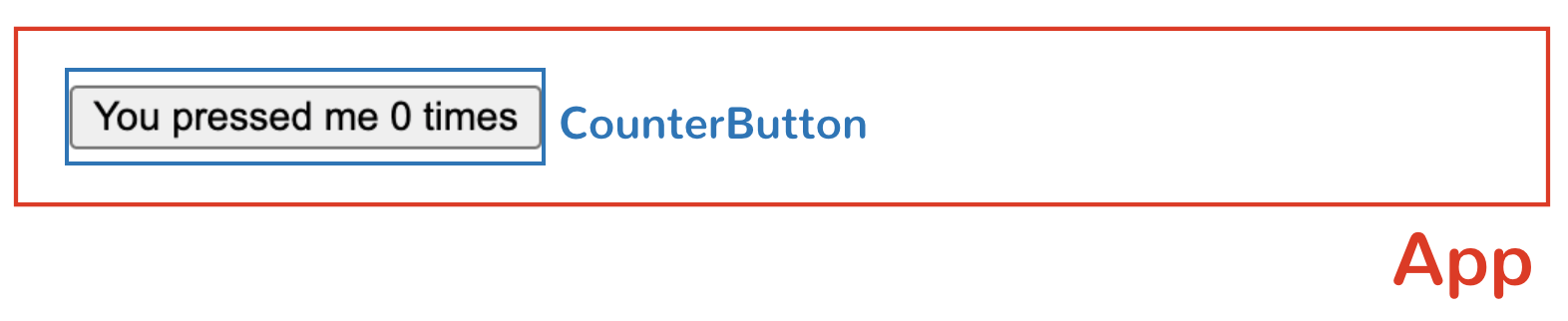
Components
import { useState } from 'react';

function CounterButton() {
  const [count, setCount] = useState(0);

  function handleClick() {
    setCount(count + 1);
  }

  return (
    <button onClick={handleClick}>
      You pressed me {count} times
    </button>
  );
}

export default function App() {
  return (
    <div>
      <CounterButton />
    </div>
  );
}
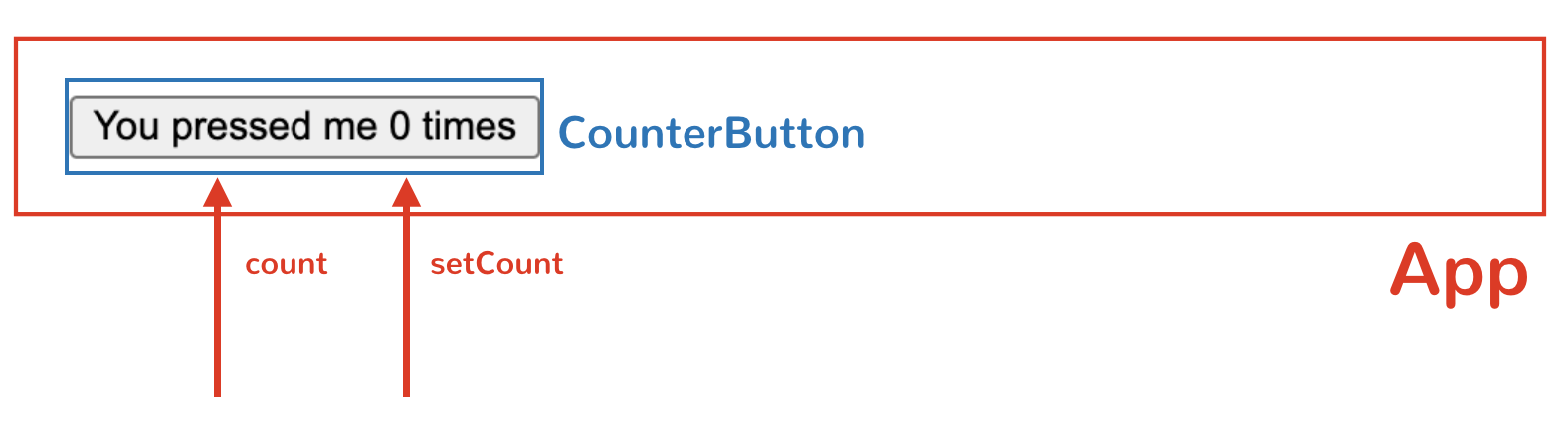
Props
import { useState } from 'react';

function CounterButton({ count, setCount }) {
  function handleClick() {
    setCount(count + 1);
  }

  return (
    <button onClick={handleClick}>
      You pressed me {count} times
    </button>
  );
}

export default function App() {
  const [count, setCount] = useState(0);

  return (
    <div>
      <CounterButton
    	count={count}
		setCount={setCount}
	  />
    </div>
  );
}
Props
Any time state or props change in a component, React re-renders the component. This re-rendering is triggered so that the component can display the most up-to-date data in the UI.
React uses an internal algorithm called reconciliation to efficiently update only the parts of the DOM that have changed, rather than re-rendering the entire UI.
Props
Lifecycle
In React, a component's lifecycle refers to the series of stages it goes through from creation (mounting), updating (when state or props change), to removal (unmounting) from the DOM.
The useEffect hook allows you to run side effects at specific stages of this lifecycle, such as after the component mounts, updates, or unmounts
Lifecycle
import { useState, useEffect } from 'react';

function CounterButton() {
  const [count, setCount] = useState(0);

  useEffect(() => {
    console.log('Component mounted');
    return () => console.log('Component unmounted');
  }, []);

  function handleClick() {
    setCount(count + 1);
  }

  return (
    <button onClick={handleClick}>
      You pressed me {count} times
    </button>
  );
}
useEffect(() => {
console.log('Component mounted');
return () => console.log('Component unmounted');
}, []);Lifecycle
import React, { useEffect } from "react";

export const FunctionComponent = () => {
  useEffect(() => {
    console.log("run for every component render");
  });

  return (
    // ...
  );
}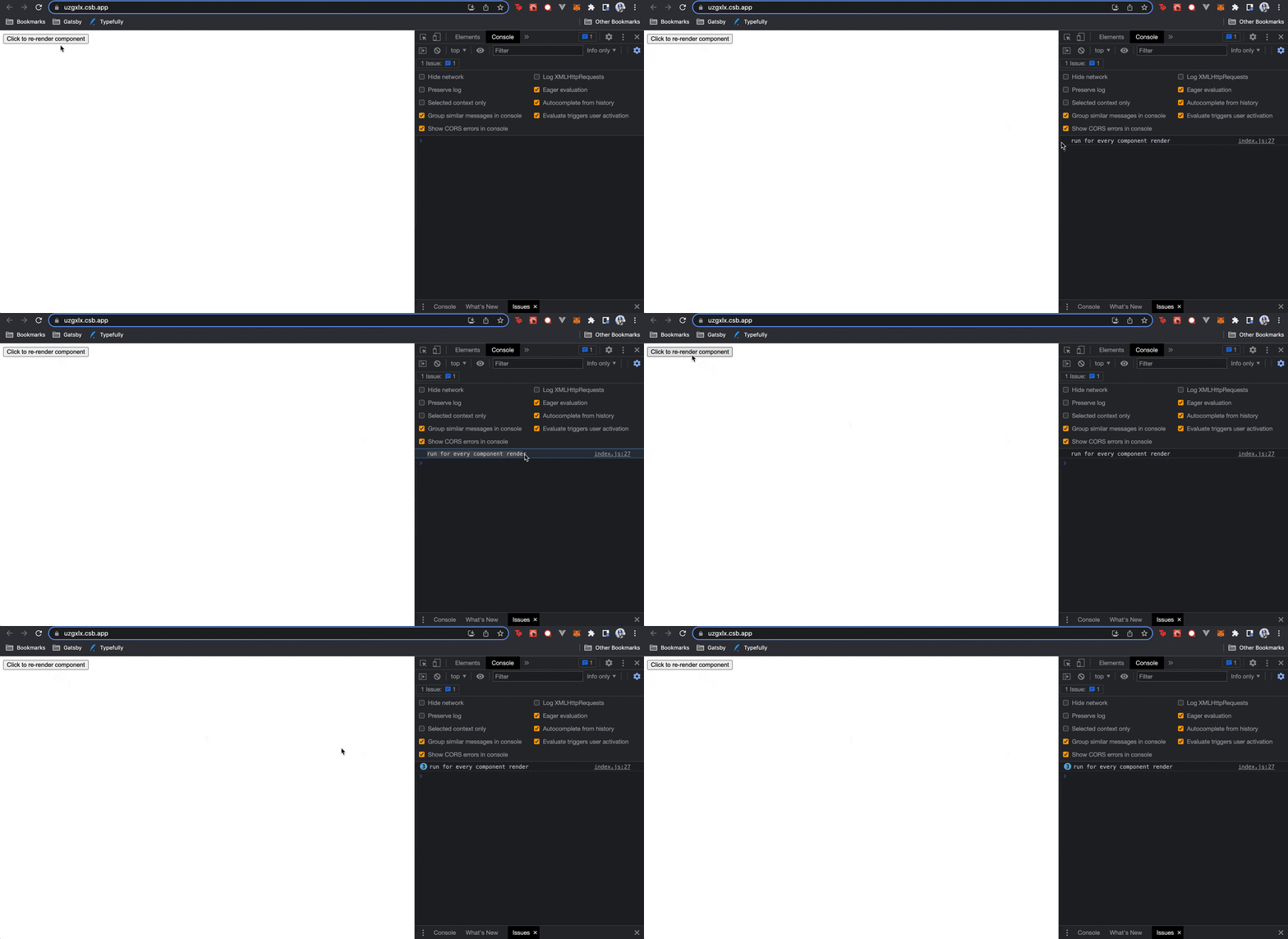
Run effect on every render
Lifecycle
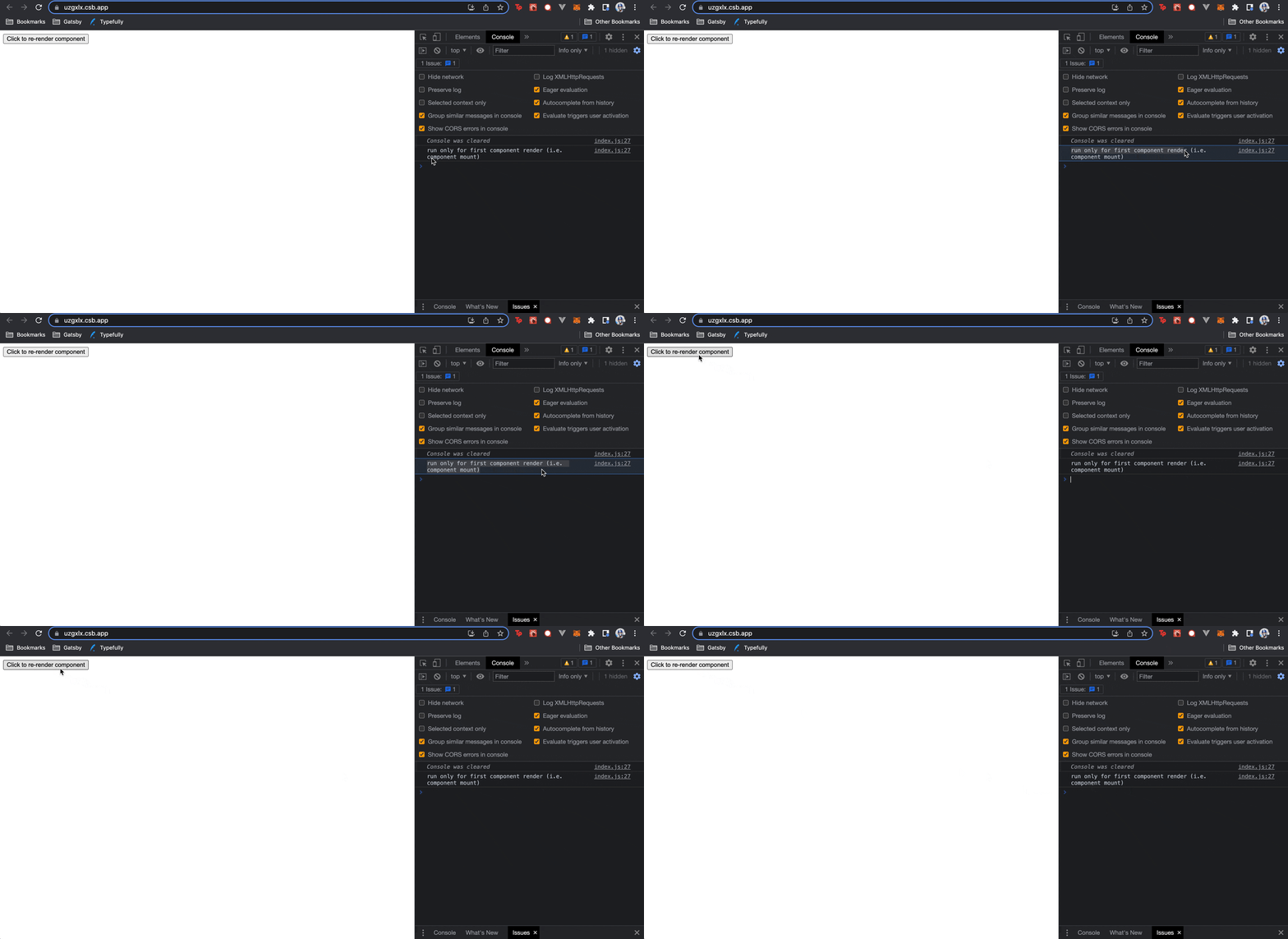
import React, { useEffect } from "react";

export const FunctionComponent = () => {
  useEffect(() => {
    console.log("run only for first render");
  }, []);

  return (
    // ...
  );
}
Run Effect Only on First Render (i.e., on mount)
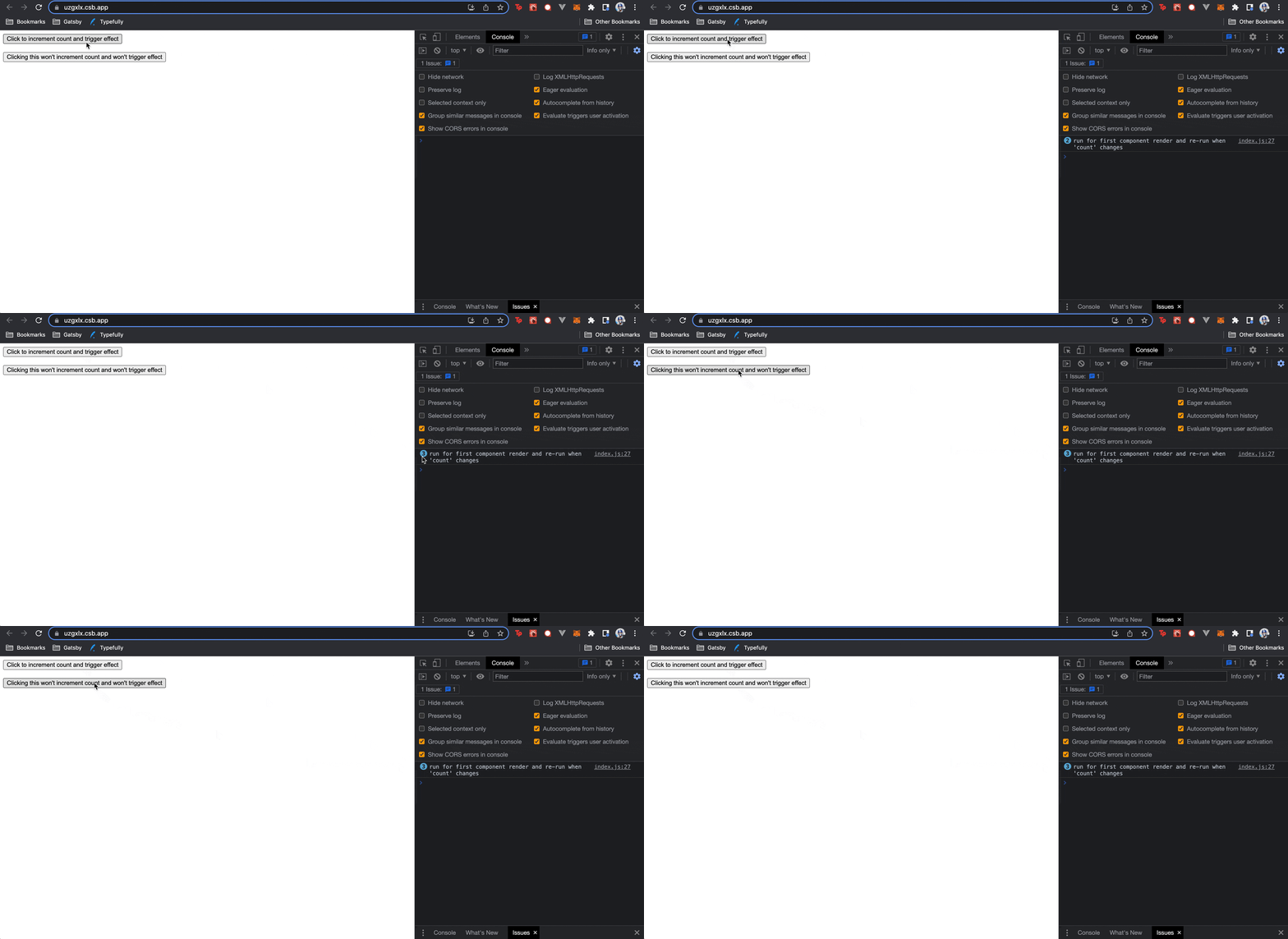
Lifecycle
import React, { useState, useEffect } from "react";

export const FunctionComponent = () => {
  const [count, setCount] = useState(0);

  useEffect(() => {
    console.log(
      `run for first component render
       and re-run when 'count' changes`
    );
  }, [count]);

  return (
    <button onClick={() => setCount(count + 1)}>
      Click to increment count and trigger effect
    </button>
  );
};
Run Effect on First Render and Rerun When Dependency Changes
Other Concepts
State → useReducer
Props → Context
Components → Server-Side Rendering (SSR) & SSG
State → Redux
State + Effect → Custom Hooks
Components → React.lazy / Suspense
Data Fetching
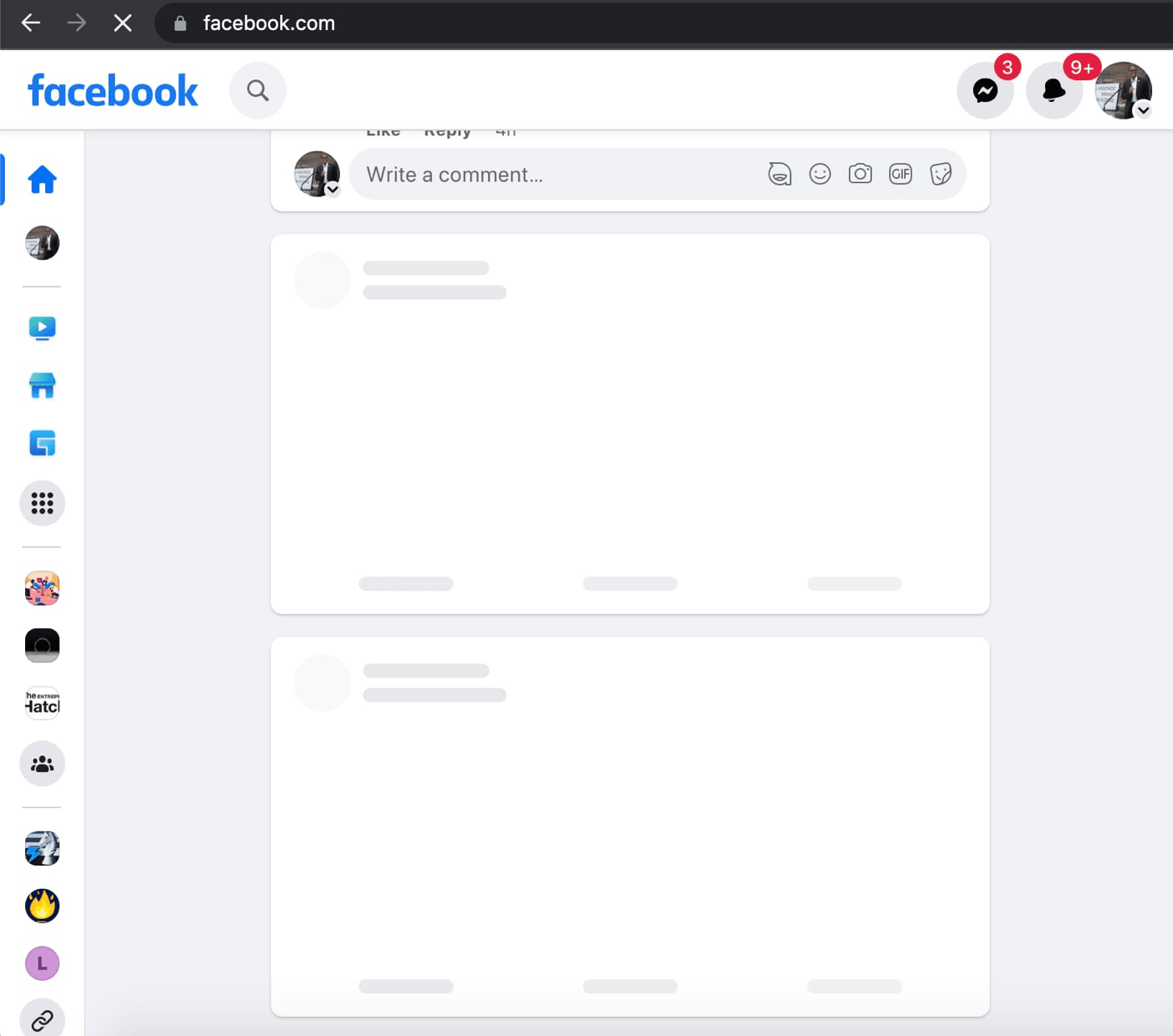
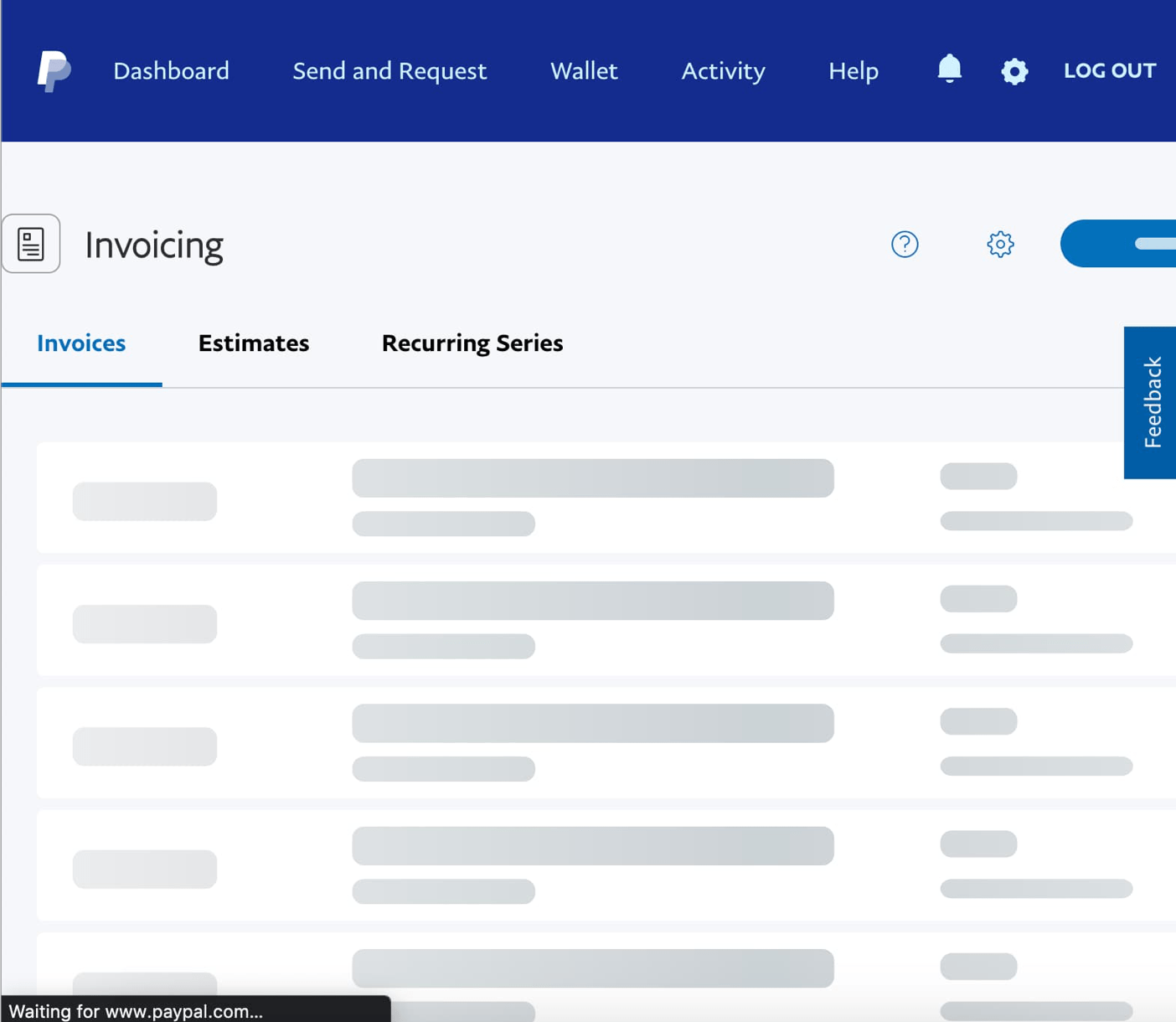
Data Fetching
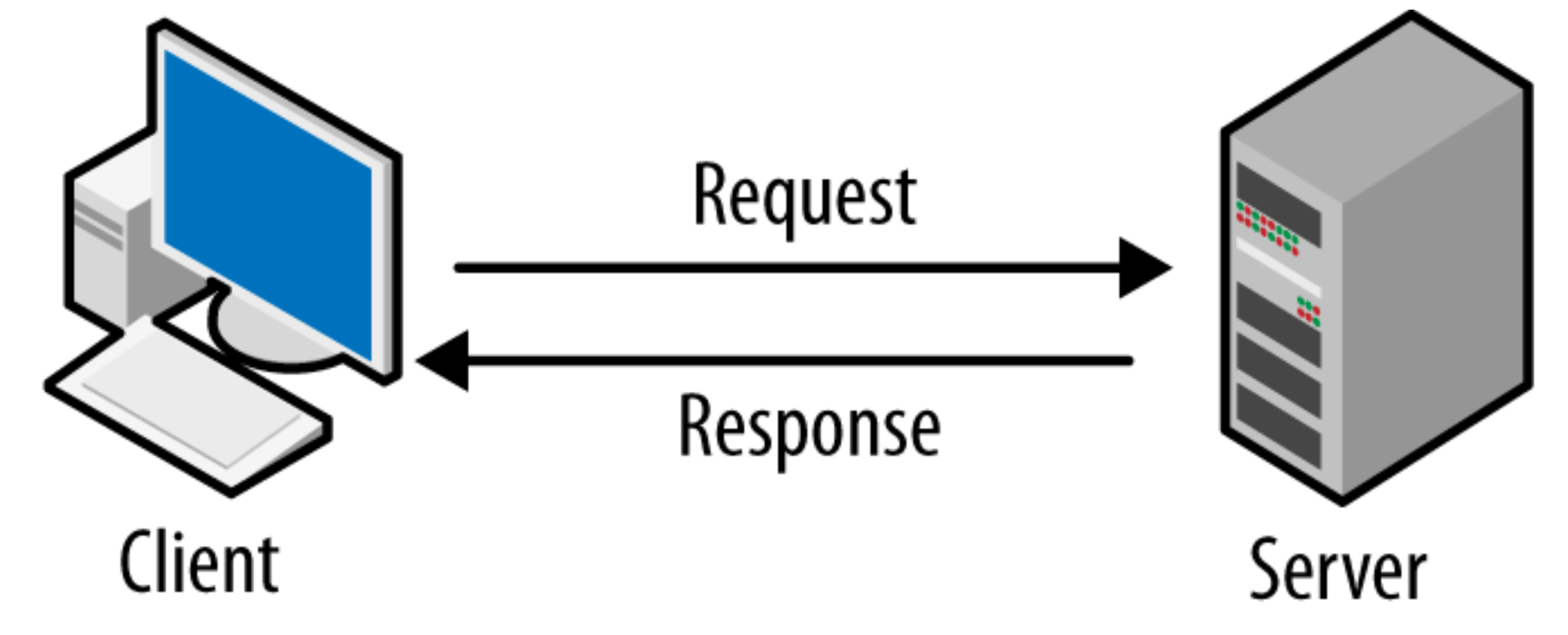
Data Fetching
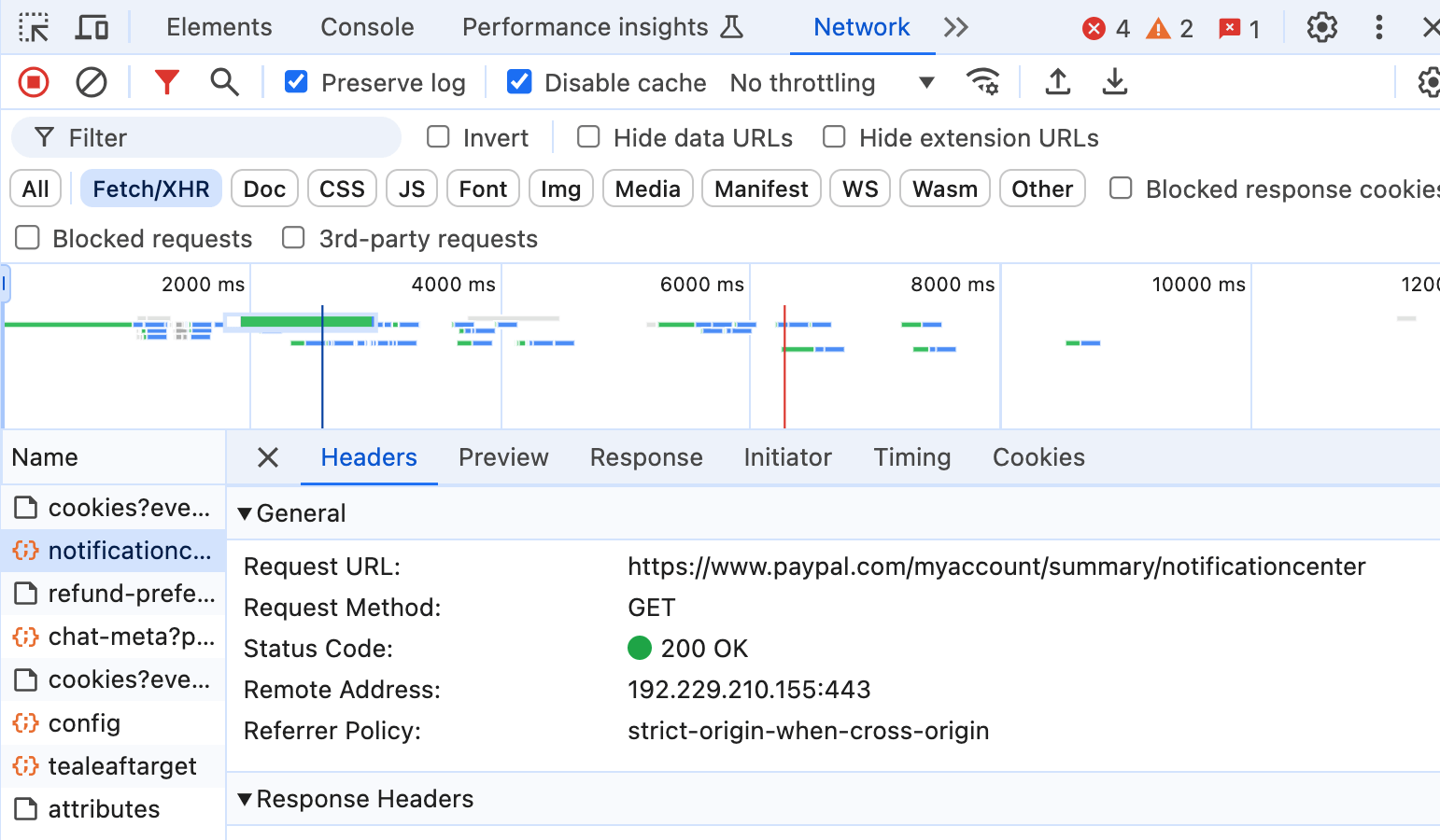
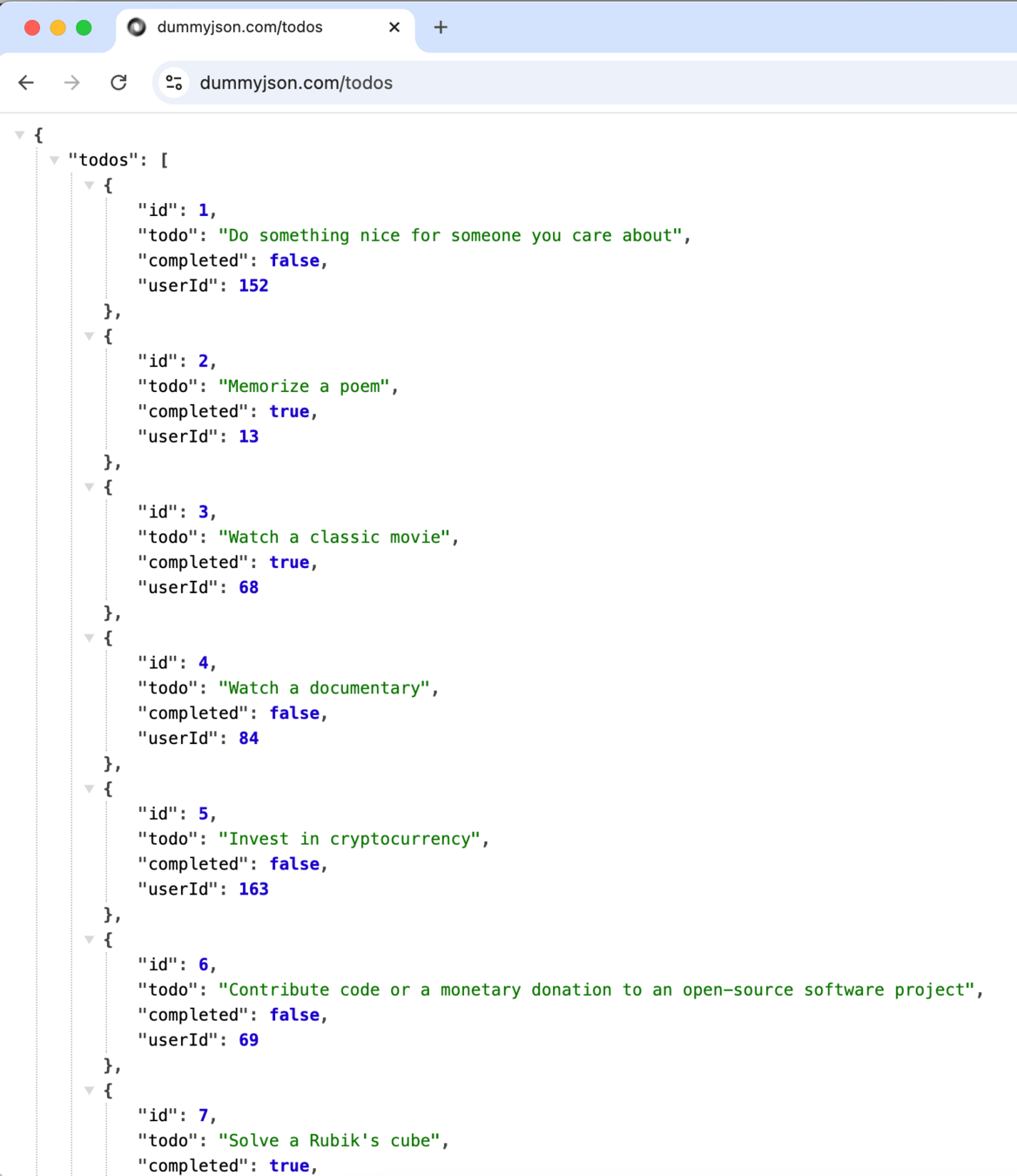
HTTP Requests (REST APIs)
GraphQL
WebSockets
Server-Sent Events (SSE)
Realtime Database / Firestore (e.g. Firebase)
gRPC
Data Fetching
GET
POST
PUT
DELETE
Data Fetching

Data Fetching
Data Fetching
import { useEffect } from "react";

const App = () => {
  // ...
  useEffect(() => {
    async function fetchData() {
      try {
        const response = await fetch(
          "https://api.example.com/data",
        );
        if (!response.ok) {
          throw new Error(
            "Network response was not ok",
          );
        }
        const data = await response.json();
        console.log(data);
      } catch (error) {
        console.error(
          "There was a problem:",
          error.message,
        );
      }
    }

    fetchData();
  }, []);
  // ...
};Data Fetching
import { useEffect } from "react";
import axios from "axios";

const App = () => {
  // ...
  useEffect(() => {
    async function fetchData() {
      try {
        const response = await axios.get(
          "https://api.example.com/data",
        );
        console.log(response.data);
      } catch (error) {
        console.error(
          "There was a problem:",
          error.message,
        );
      }
    }

    fetchData();
  }, []);
  // ...
};Data Fetching
import { useEffect, useState } from "react";
import axios from "axios";

const App = () => {
  const [data, setData] = useState(null);
  const [loading, setLoading] = useState(false);
  const [error, setError] = useState(null);

  useEffect(() => {
    async function fetchData() {
      setLoading(true);
      setError(null);
      try {
        const response = await axios.get("https://api.example.com/data");
        setData(response.data);
      } catch (err) {
        setError(err.message);
      } finally {
        setLoading(false);
      }
    }
    fetchData();
  }, []);

  if (loading) return <p>Loading...</p>;
  if (error) return <p>Error: {error}</p>;

  return (
    <div>
      <h1>Fetched Data:</h1>
      <pre>{data.information}</pre>
    </div>
  );
};
Initial State
Fetch data and set state properties
render template based on state
Data Fetching

Data Fetching
This encompasses a very large part of web/UI development
- Make API requests
- Show loading/error indicator states
- Show data when available
Data Fetching
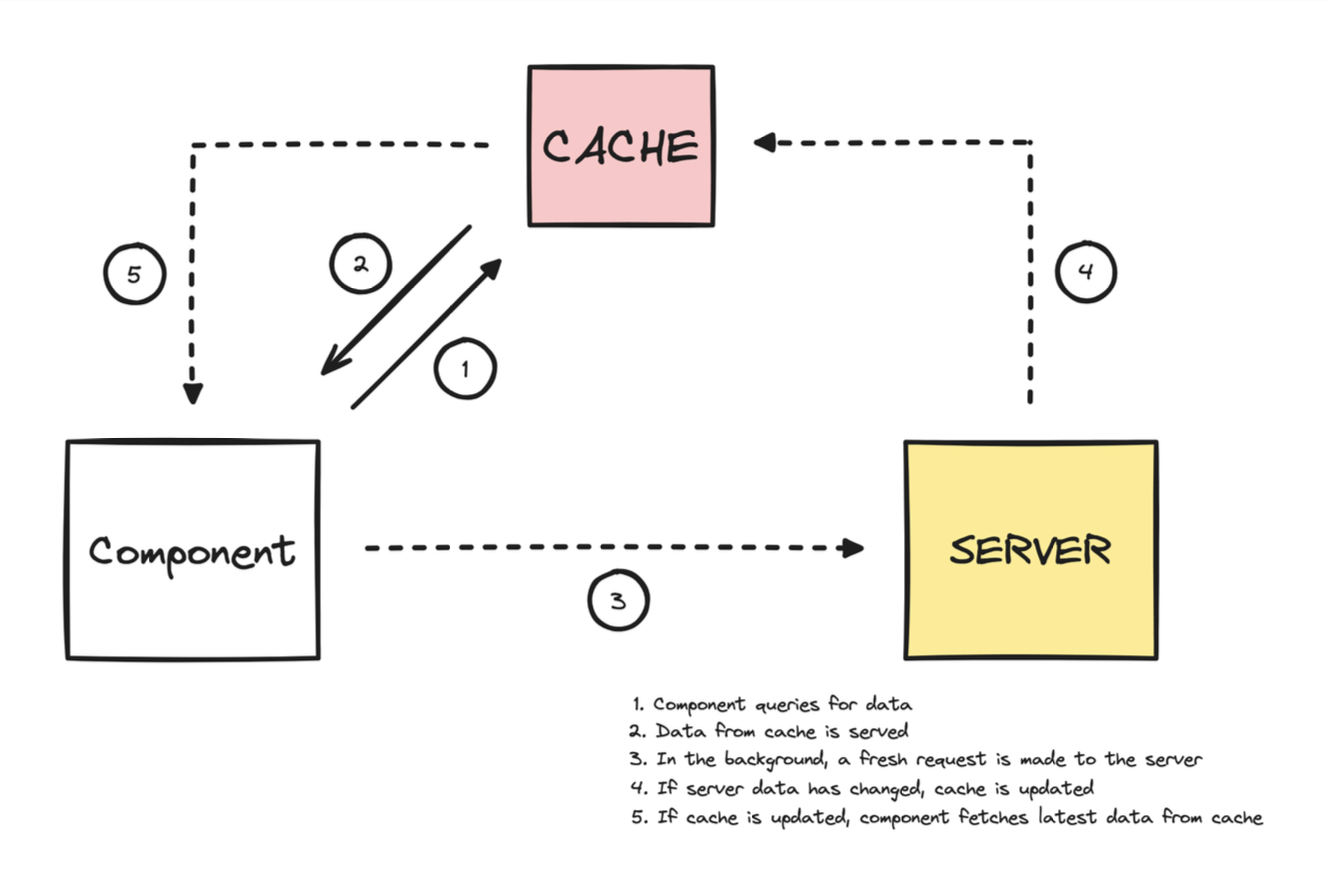
More sophisticated data-fetching libraries
Data Fetching
More sophisticated data-fetching libraries
Libraries that provide Hooks, caching, synchronization, etc., to make data-fetching easier for larger web applications.
Data Fetching
import { useQuery } from "@tanstack/react-query";
import axios from "axios";

const fetchTodoList = async () => {
  const response = await axios.get(
    "https://jsonplaceholder.typicode.com/todos",
  );
  return response.data;
};

export function App() {
  const { data, isLoading, isError } = useQuery(
    {
      queryKey: ["todos"],
      queryFn: fetchTodoList,
    },
  );
  // ... further code to display/utilize the data
}
Data Fetching
export function App() {
  const { data, isLoading, isError } = useQuery(
    {
      queryKey: ["todos"],
      queryFn: fetchTodoList,
    },
  );

  if (isLoading) {
    return <p>Request is loading!</p>;
  }

  if (isError) {
    return <p>Request has failed :(!</p>;
  }

  return (
    <div>
      <h1>Todos List</h1>
      <ul>
        {data.map((todo) => (
          <li key={todo.id}>{todo.title}</li>
        ))}
      </ul>
    </div>
  );
}
Fetch data
render template based on state
Data Fetching
const {
  data,
  dataUpdatedAt,
  error,
  errorUpdatedAt,
  failureCount,
  failureReason,
  fetchStatus,
  isError,
  isFetched,
  isFetchedAfterMount,
  isFetching,
  isInitialLoading,
  isLoading,
  isLoadingError,
  isPaused,
  isPending,
  isPlaceholderData,
  isRefetchError,
  isRefetching,
  isStale,
  isSuccess,
  refetch,
  status,
} = useQuery(
  {
    // options
  },
  queryClient,
);
const {
// ... returnsd
} = useQuery(
{
queryKey,
queryFn,
gcTime,
enabled,
networkMode,
initialData,
initialDataUpdatedAt,
meta,
notifyOnChangeProps,
placeholderData,
queryKeyHashFn,
refetchInterval,
refetchIntervalInBackground,
refetchOnMount,
refetchOnReconnect,
refetchOnWindowFocus,
retry,
retryOnMount,
retryDelay,
select,
staleTime,
structuralSharing,
throwOnError,
},
queryClient,
)
Data Fetching
Caching
Data Fetching
Caching

Data Fetching
Caching
Data Fetching
Developer Tools
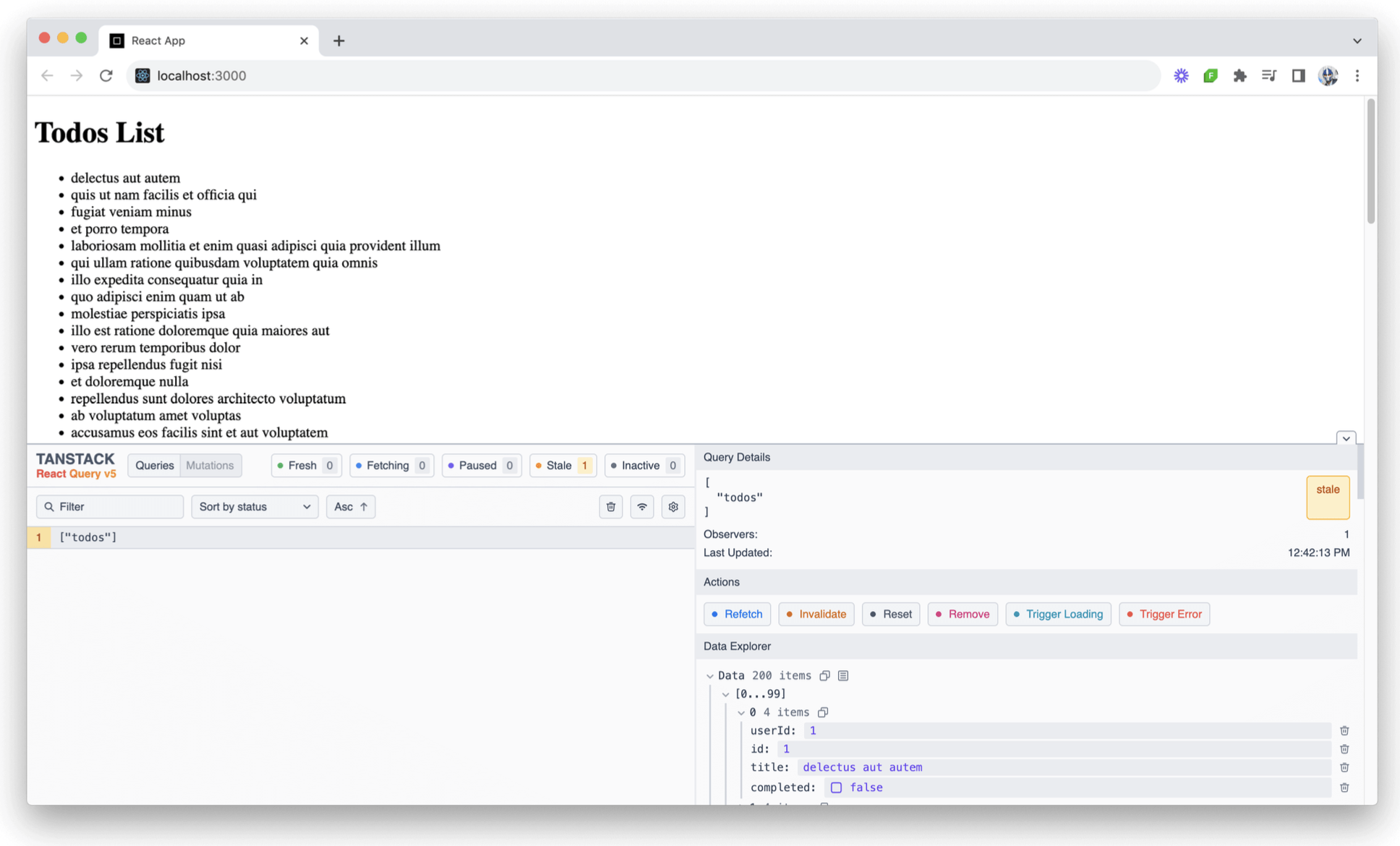
Data Fetching
- Design your data model well
- Optimize your endpoints
- Batch requests where applicable
- Prioritize and defer
- Use lazy-loading
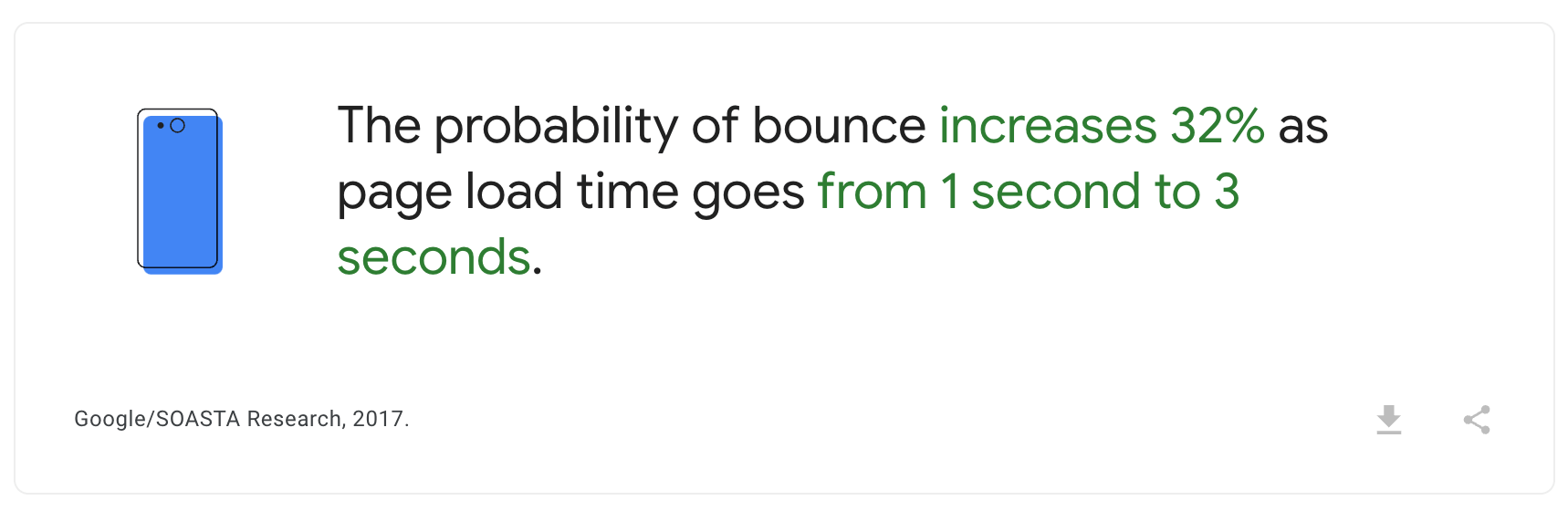
- Leverage caching
- Evaluate the use of GraphQL
- Monitor/analyze performance
[Backend]
[Backend]
Data Fetching
Q/A + 10 min Break!
Any questions?
React + TypeScript
let variable = 5
// ...
variable = "5"
React + TypeScript
let variable: number = 5

variable = "5"
Type 'string' is not assignable to type 'number'
React + TypeScript
- Better Developer Experience
- Easier Maintenance
- Better Collaboration
React + TypeScript
Typed Props
React Hooks
Type Inference
Declaration Files
Autogen API types
React + TypeScript
Typed Props
interface Props {
  name: string;
  age: number;
}

const Person = ({ name, age }: Props) => {
  return (
    <div>
      <p>Name: {name}</p>
      <p>Age: {age}</p>
    </div>
  )
}
<Person name={false} age={[30]} />Type 'boolean' is not assignable to type 'string'Type 'number[]' is not assignable to type 'number'React + TypeScript
React Hooks
const [name, setName] = useState<string>("Hassan")(newValue: string) => voidstringReact + TypeScript
React Hooks
type Theme = 'light' | 'dark'
const ThemeContext = createContext<Theme>('light')

const ThemedComponent = () => {
  const theme = useContext(ThemeContext)
}
'light' | 'dark'React + TypeScript
React Hooks
interface UseFetchResult<T> {
  data: T | null;
  loading: boolean;
  error: string | null;
}

function useFetch<T>(url: string): UseFetchResult<T> {
  // ...
  // ...

  return { data, loading, error }
}
React + TypeScript
React Hooks
type Data = { id: string, name: string }

const App = () => {
  const { data, loading, error } = useFetch<Data>("https://example.com")
  // ...
}
Data | nullbooleanstring | nullReact + TypeScript
Type Inference
const [name, setName] = useState<string>("Hassan")(newValue: string) => voidstringReact + TypeScript
Type Inference
const [name, setName] = useState("Hassan")(newValue: string) => voidstringReact + TypeScript
Type Inference
const [name, setName] = useState<string | null>("Hassan")React + TypeScript
Declaration Files
yarn add <package_name>React + TypeScript
Declaration Files
yarn add lodashReact + TypeScript
Declaration Files
import { uniq } from 'lodash'

const App = () => {
  const uniqueArr = uniq([2, 1, 2]);

  return (
   //...
  );
}
Cannot find module 'lodash' or its corresponding type declarations.const uniqueArr: anyReact + TypeScript
Declaration Files
declare module 'lodash' {
  export function chunk<T>(array: T[], size?: number): T[][];
  export function flatten<T>(array: T[][]): T[];
  export function uniq<T>(array: T[]): T[];
  // ...
}lodash.d.tsReact + TypeScript
Declaration Files
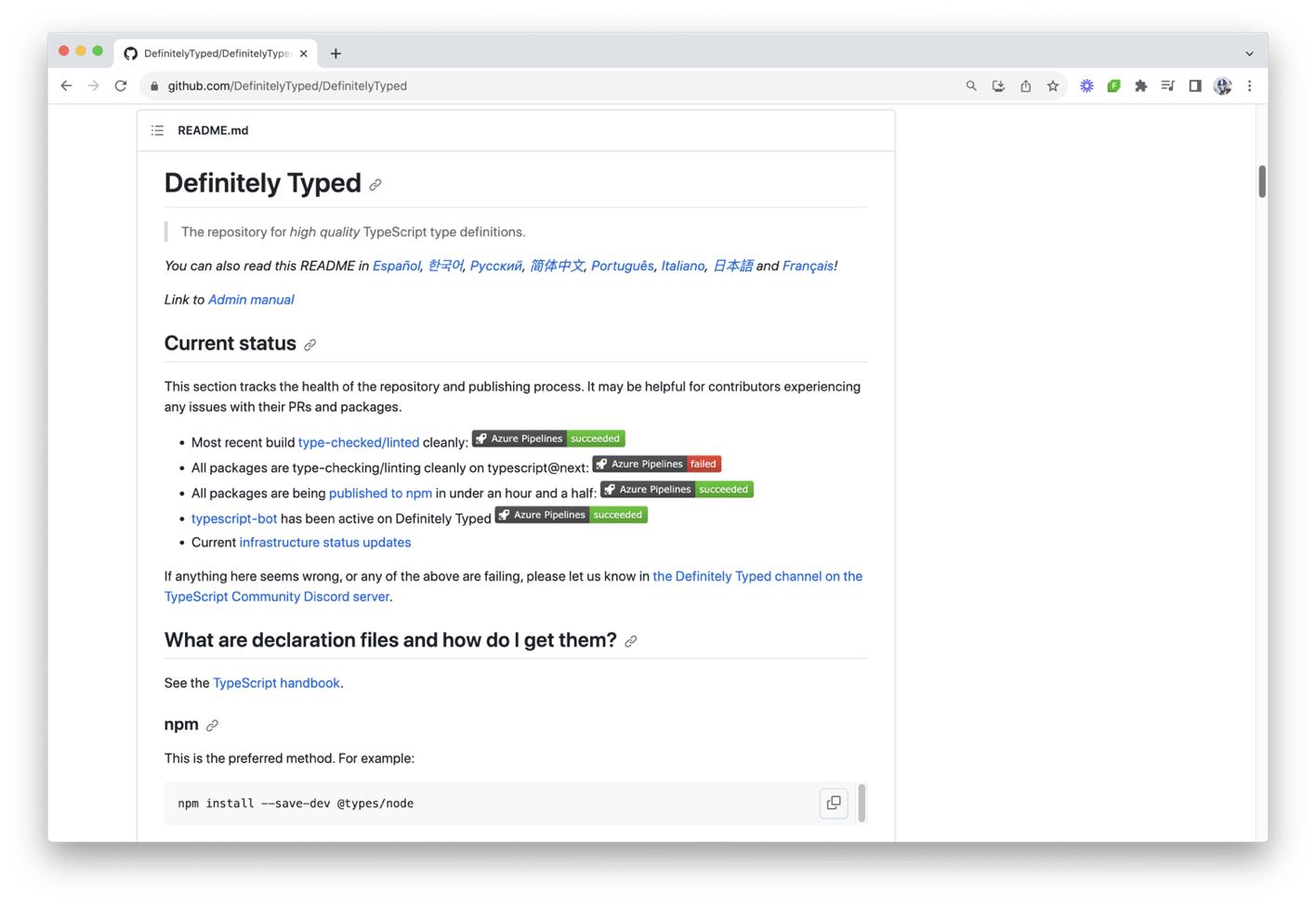
React + TypeScript
Declaration Files
yarn add -D @types/lodashReact + TypeScript
Declaration Files
import { uniq } from 'lodash'

const App = () => {
  const uniqueArr = uniq([2, 1, 2]);

  return (
   //...
  );
}
const uniqueArr: number[]React + TypeScript
Declaration Files
declare module 'lodash' {
  export function chunk<T>(array: T[], size?: number): T[][];
  export function flatten<T>(array: T[][]): T[];
  export function uniq<T>(array: T[]): T[];
  // ...
}lodash.d.tsReact + TypeScript
Declaration Files
{
  // ...
  "include": [
      "./path/to/declarations/*.d.ts",
      // other paths
  ],
  // ...
}tsconfig.jsonReact + TypeScript
Auto-generating types from APIs
type User {
  id: ID!
  name: String!
}

type Query {
  getUser(id: ID!): User
}

type Mutation {
  createUser(name: String!): User!
}
GraphQL
React + TypeScript
Auto-generating types from APIs
interface UserData {
  getUser: {
    id: string;
    name: string;
  };
}

interface UserVariables {
  id: string;
}

const UserComponent: React.FC<UserProps> = ({ userId }) => {
  const { data, loading, error } = useQuery<UserData, UserVariables>(GET_USER, {
    variables: { id: userId },
  });
};
GraphQL
React + TypeScript
Auto-generating types from APIs
GraphQL
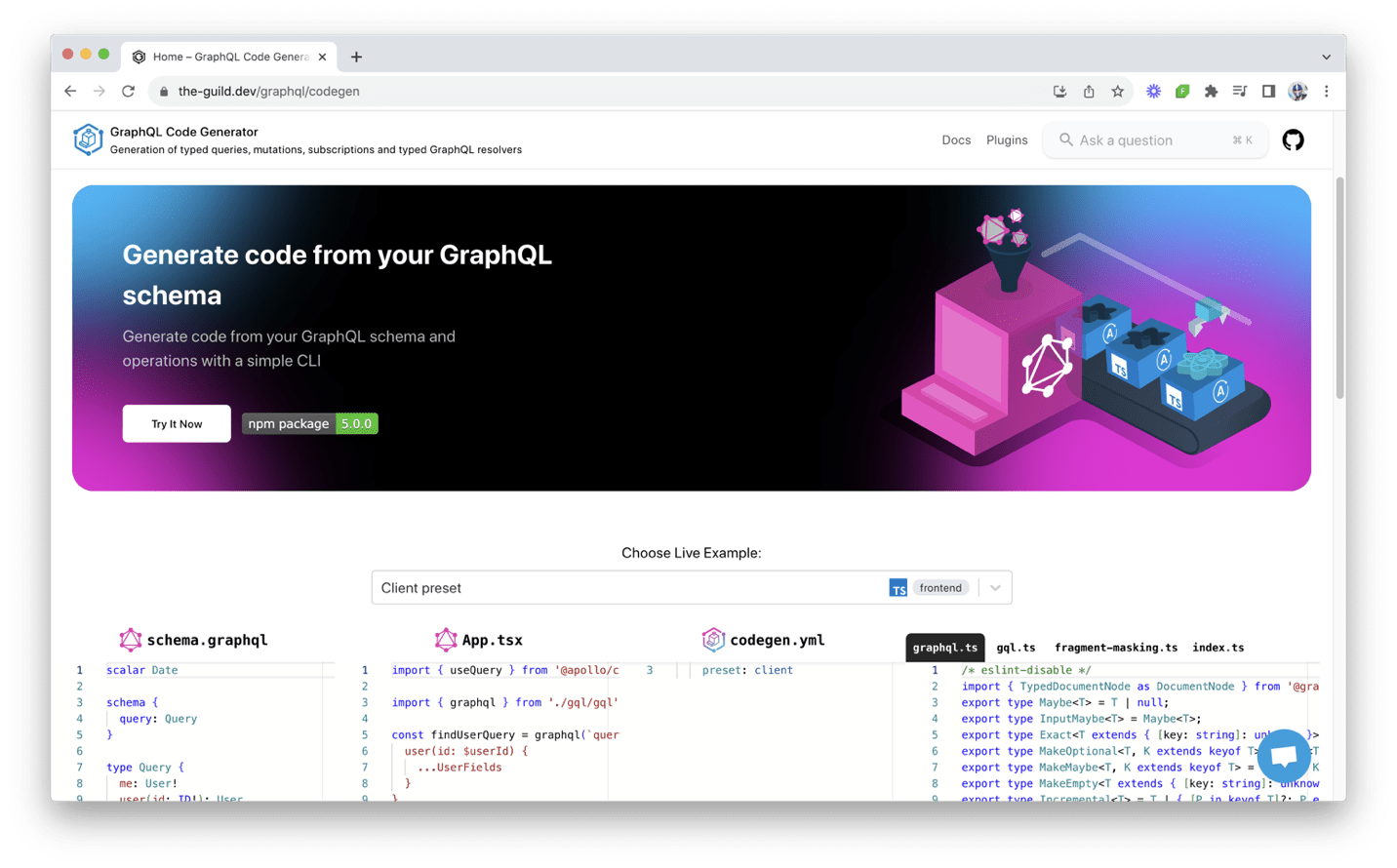
React + TypeScript
Auto-generating types from APIs
GraphQL
React + TypeScript
Auto-generating types from APIs
GraphQL
type User {
  id: ID!
  name: String!
}

type Query {
  getUser(id: ID!): User
}

type Mutation {
  createUser(name: String!): User!
}
type User = {
__typename?: 'User';
id: string;
name: string;
};
type Query = {
__typename?: 'Query';
getUser: User | null;
};
type Mutation = {
__typename?: 'Mutation';
createUser: User | null;
};React + TypeScript
Auto-generating types from APIs
REST
openapi: 3.1.0
# ...
paths:
  /user:
    get:
      operationId: getUser
      parameters:
        - name: id
          schema:
            type: string
      responses:
        '200':
          content:
            application/json:
              schema:
                $ref: '#/components/schemas/User'
    post:
      operationId: createUser
      responses:
        '201':
          content:
            application/json:
              schema:
                $ref: '#/components/schemas/User'
# ...
React + TypeScript
Auto-generating types from APIs
REST
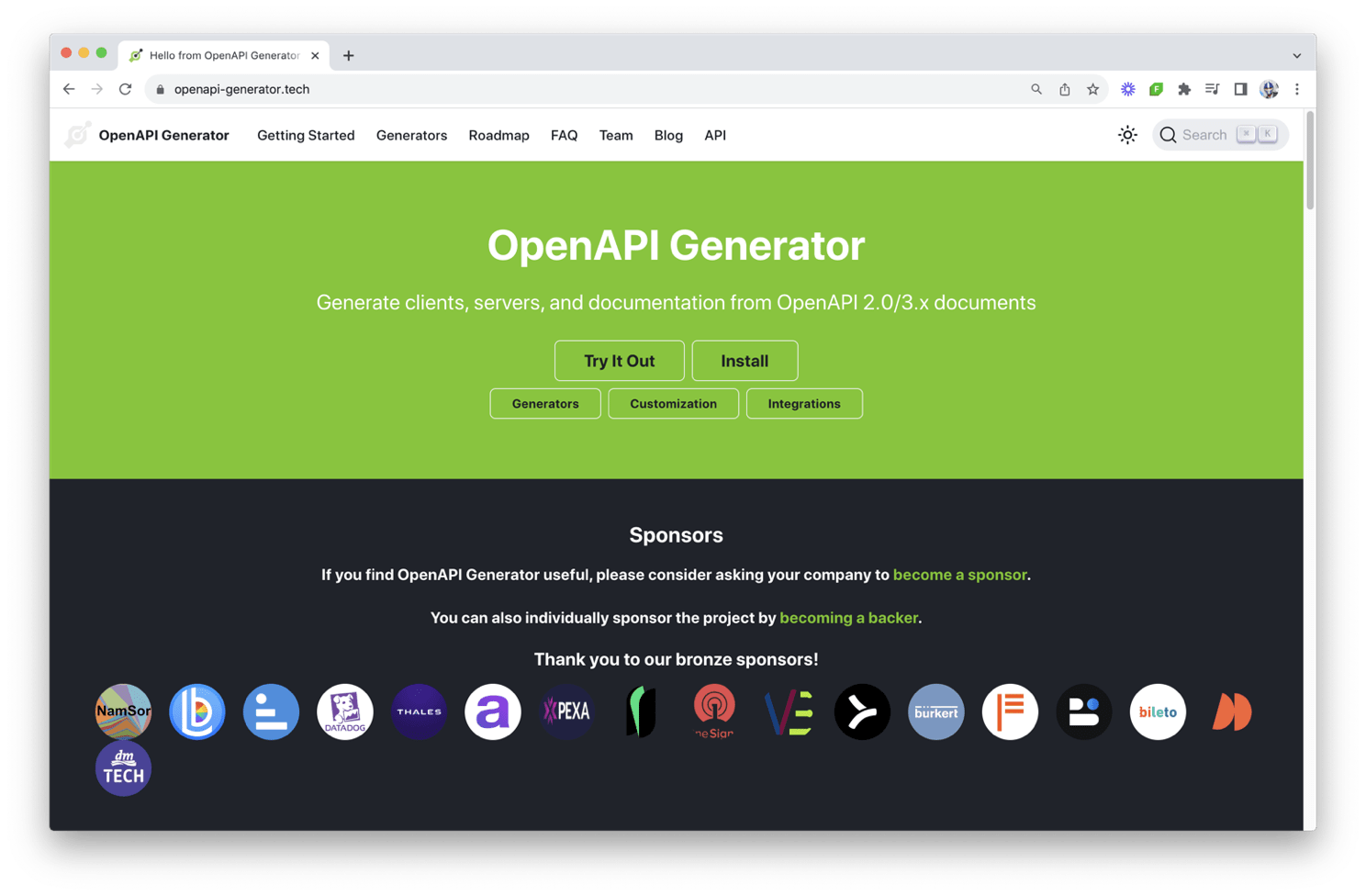
React + TypeScript
Auto-generating types from APIs
REST
openapi: 3.1.0
# ...
paths:
  /user:
    get:
      operationId: getUser
      parameters:
        - name: id
          schema:
            type: string
      responses:
        '200':
          content:
            application/json:
              schema:
                $ref: '#/components/schemas/User'
    post:
      operationId: createUser
      responses:
        '201':
          content:
            application/json:
              schema:
                $ref: '#/components/schemas/User'
# ...
type User = {
__typename?: 'User';
id: string;
name: string;
};
type Query = {
__typename?: 'Query';
getUser: User | null;
};
type Mutation = {
__typename?: 'Mutation';
createUser: User | null;
};React + TypeScript
- Ensure all component props are typed
- Utilize React Hooks with proper types
- Leverage TypeScript’s type inference
- Import and use declaration files
- Rely on tools that auto-generate API types
Frameworks
Frameworks help streamline the development process by providing tools and optimized environments for building faster, scalable, and modern web applications.
Frameworks
<!DOCTYPE html>
<html>
  <head>
    <title>React Example</title>
    <meta charset="UTF-8" />
  </head>

  <body>
    <div id="app"></div>

    <script
      crossorigin
      src="https://unpkg.com/react@17/umd/react.production.min.js"
    ></script>
    <script
      crossorigin
      src="https://unpkg.com/react-dom@17/umd/react-dom.production.min.js"
    ></script>
    <script src="https://unpkg.com/@babel/standalone/babel.min.js"></script>
    <script type="text/babel">
      ReactDOM.render(
       <h1>React in a simple HTML file!</h1>,
       document.getElementById("app")
      );
    </script>
  </body>
</html>
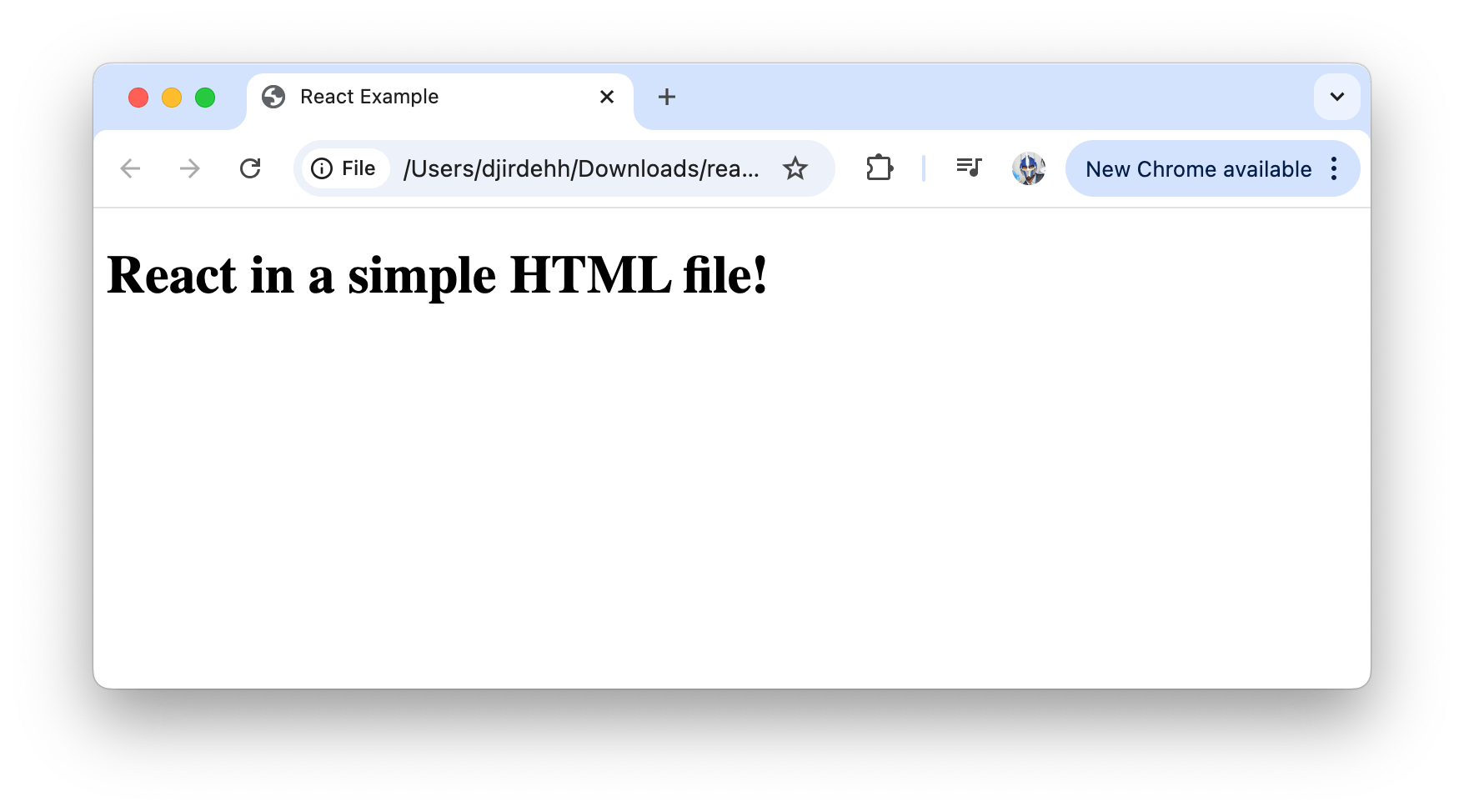
Frameworks
- Cumbersome to deal with JSX
- Lack of optimization (tree-shaking, code-splitting, etc.)
- Lack of support on Server-side rendering, TypeScript, Testing, etc.
- Poor maintainability
- We want JavaScript modules/components in their own files
Frameworks



Frameworks
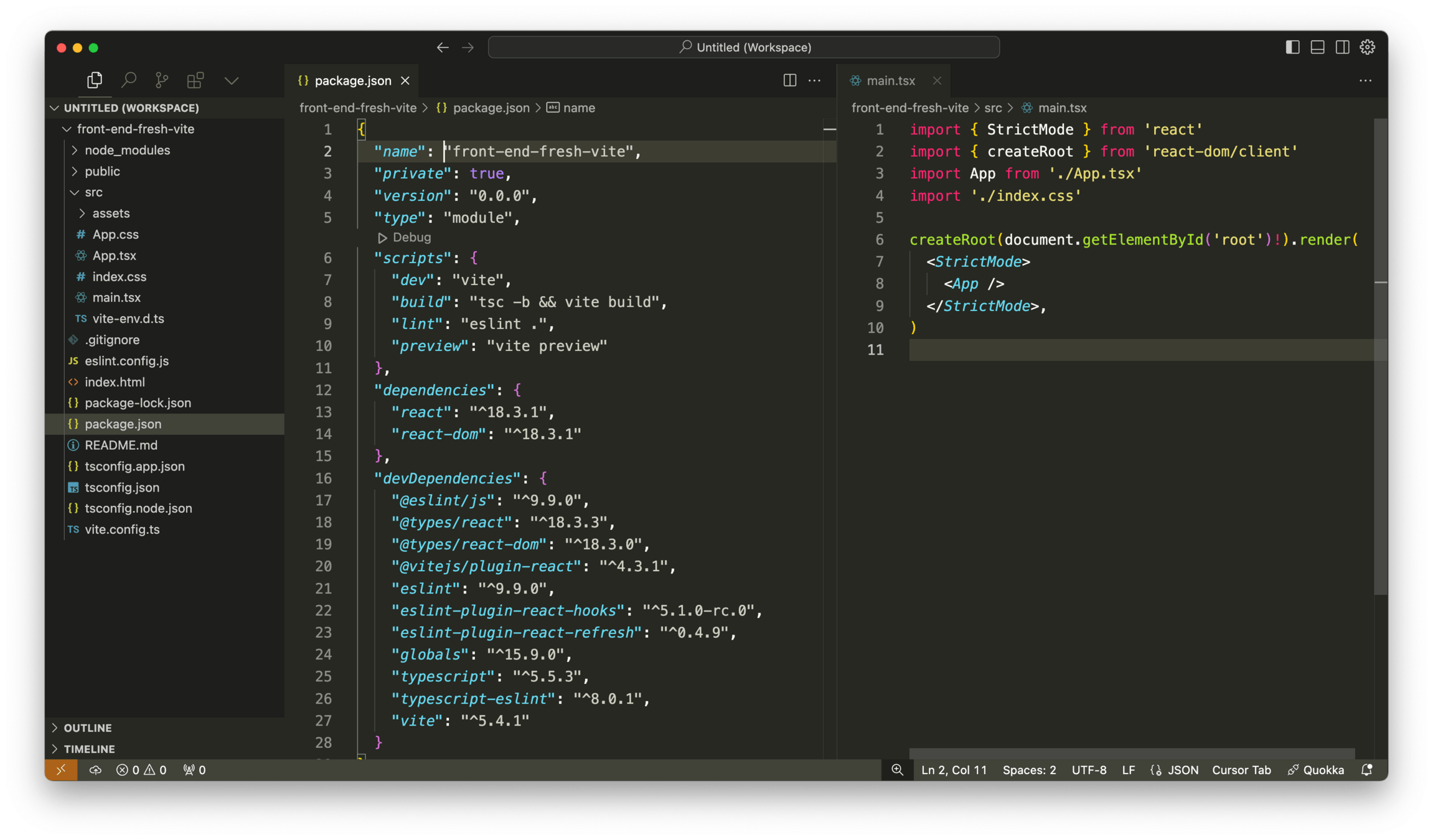
Packages/npm/yarn/etc.
Frameworks
Optimized build/ step
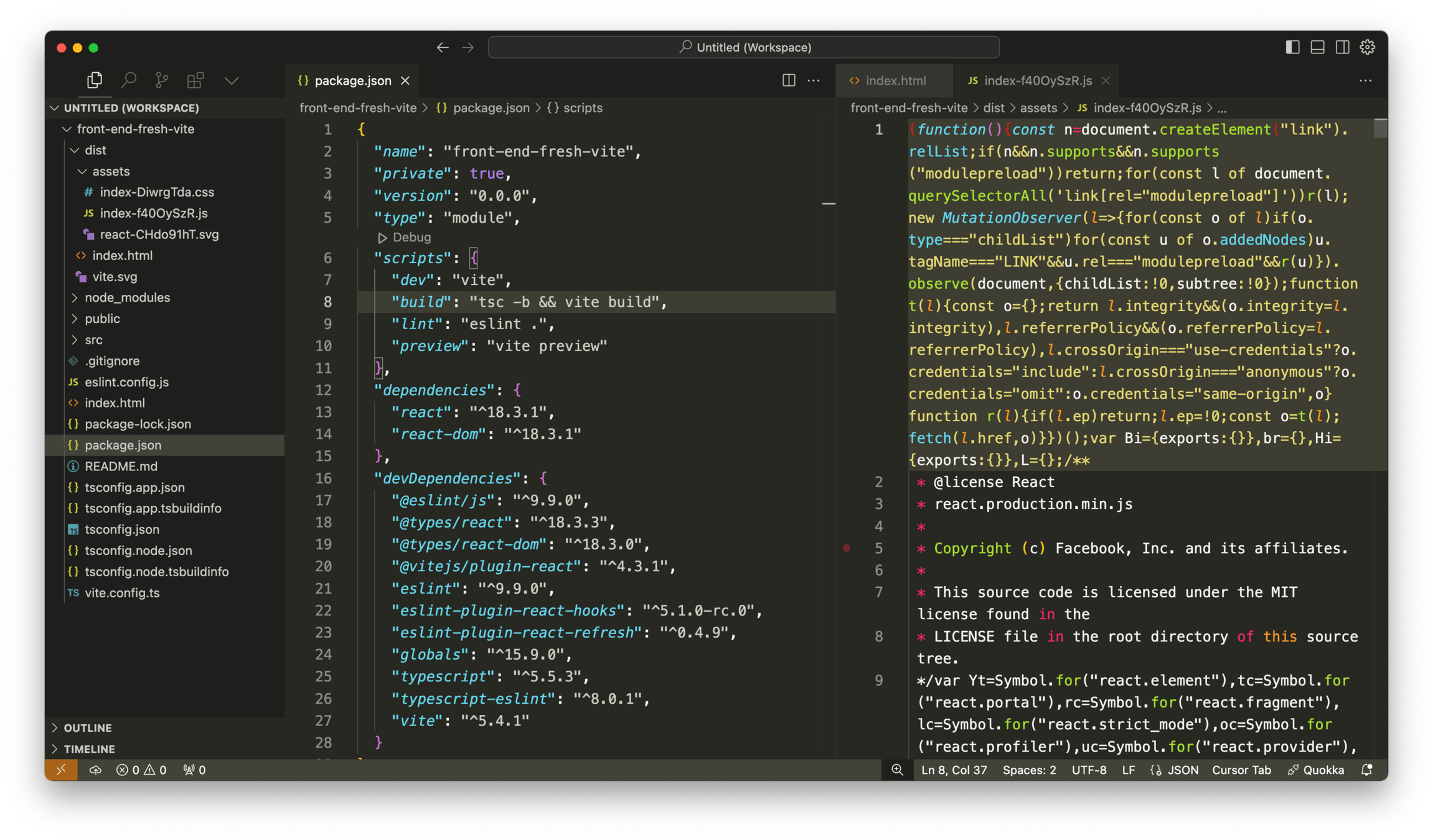
Frameworks
TypeScript
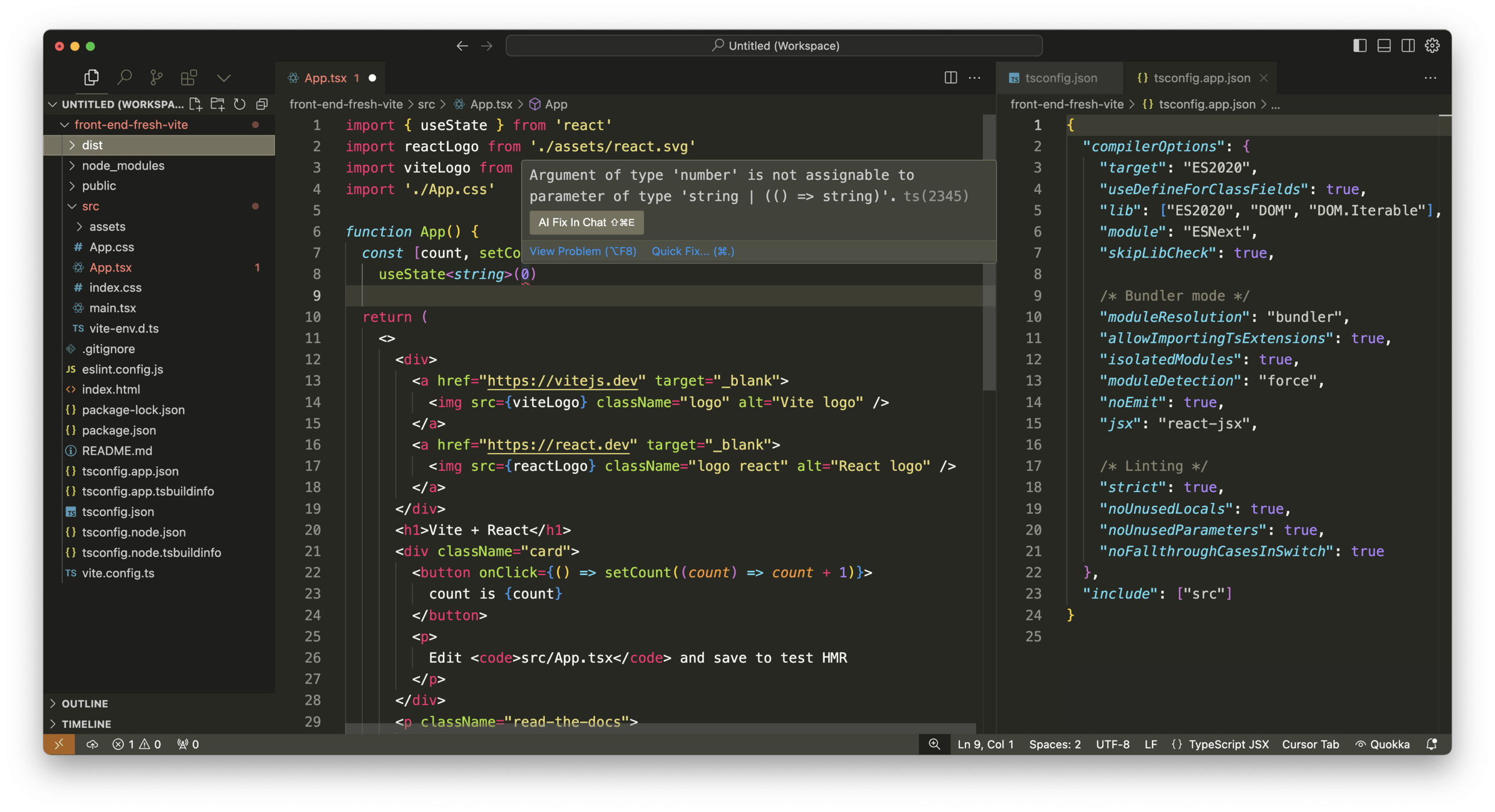
Frameworks
HMR (Hot Module Replacement)
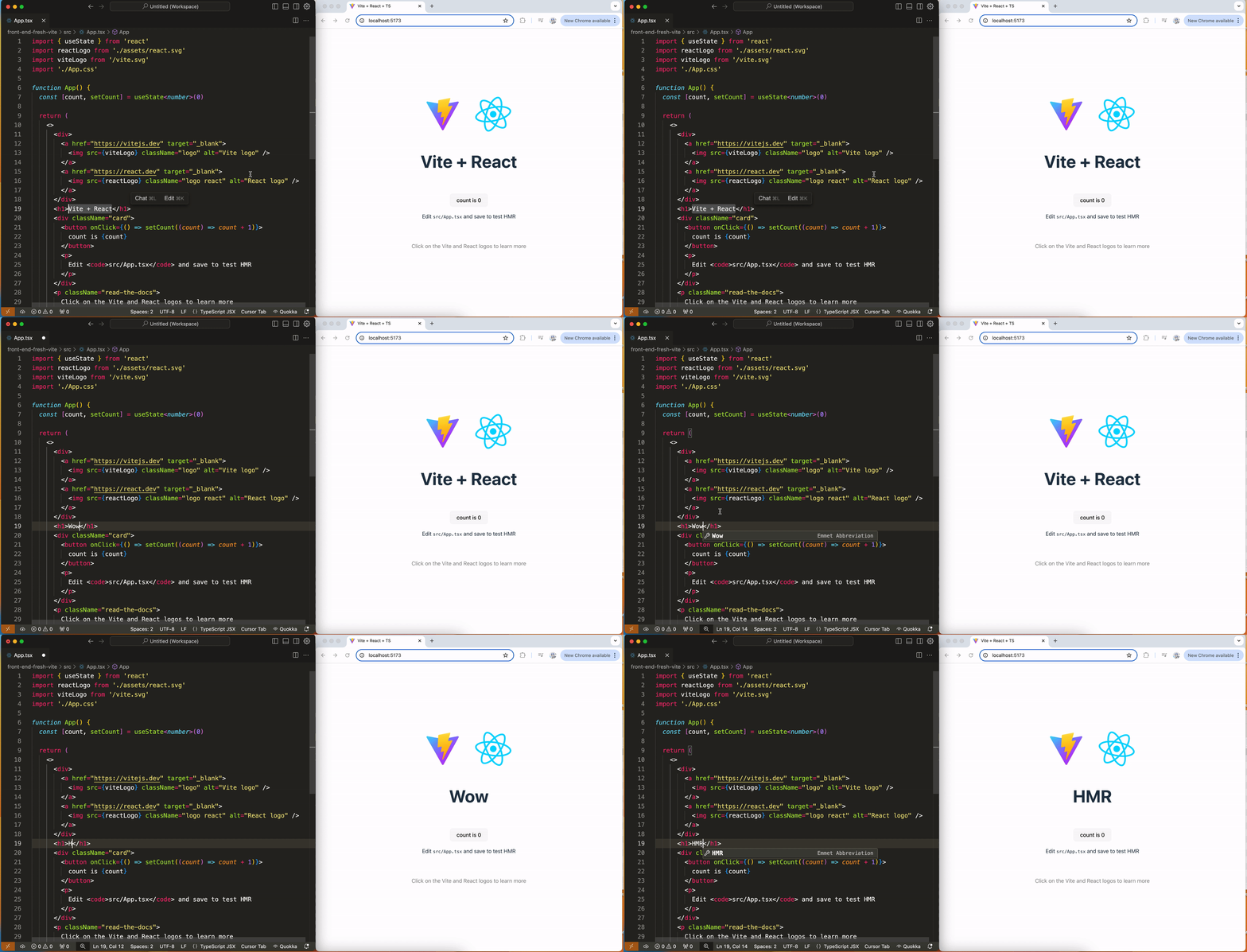
Frameworks
- Vite: A fast build tool focused on rapid development and hot module replacement, perfect for small-to-medium projects and prototyping.
- Next.js: A React-based framework offering server-side rendering and static site generation, ideal for SEO-optimized, large-scale applications.
- Remix: A full-stack framework with a focus on performance and user experience, excelling at building highly interactive and data-driven applications.
React 19
A large part of how we use web applications today involves interacting with forms for various purposes, from user authentication to data submission to e-commerce transactions, feedback collection, search queries, and much more.
React 19
import React, { useState, useCallback } from 'react';

const submitForm = async () => {
  // form submit logic here
};

export function Component() {
  // create form state
  const [formState, setFormState] = useState(null);
  const [isPending, setIsPending] = useState(false);

  // handle form submission
  const formAction = useCallback(async (event) => {
    event.preventDefault();
    setIsPending(true);
    try {
      const result = await submitForm();
      setFormState(result);
    } catch (error) {
      setFormState({ message: 'Failed to complete action' });
    }
    setIsPending(false);
  }, []);

  // display form template
  return (
    <form onSubmit={formAction}>
      {/* Form Template */}
    </form>
  );
}
React 19
In React 18, this concept of transitioning the UI from one view to another in a non-urgent manner was given the name of transitions.
In React 19, the concept of transitions is taken a step further as functions that use async transitions are now referred to as Actions.
React 19
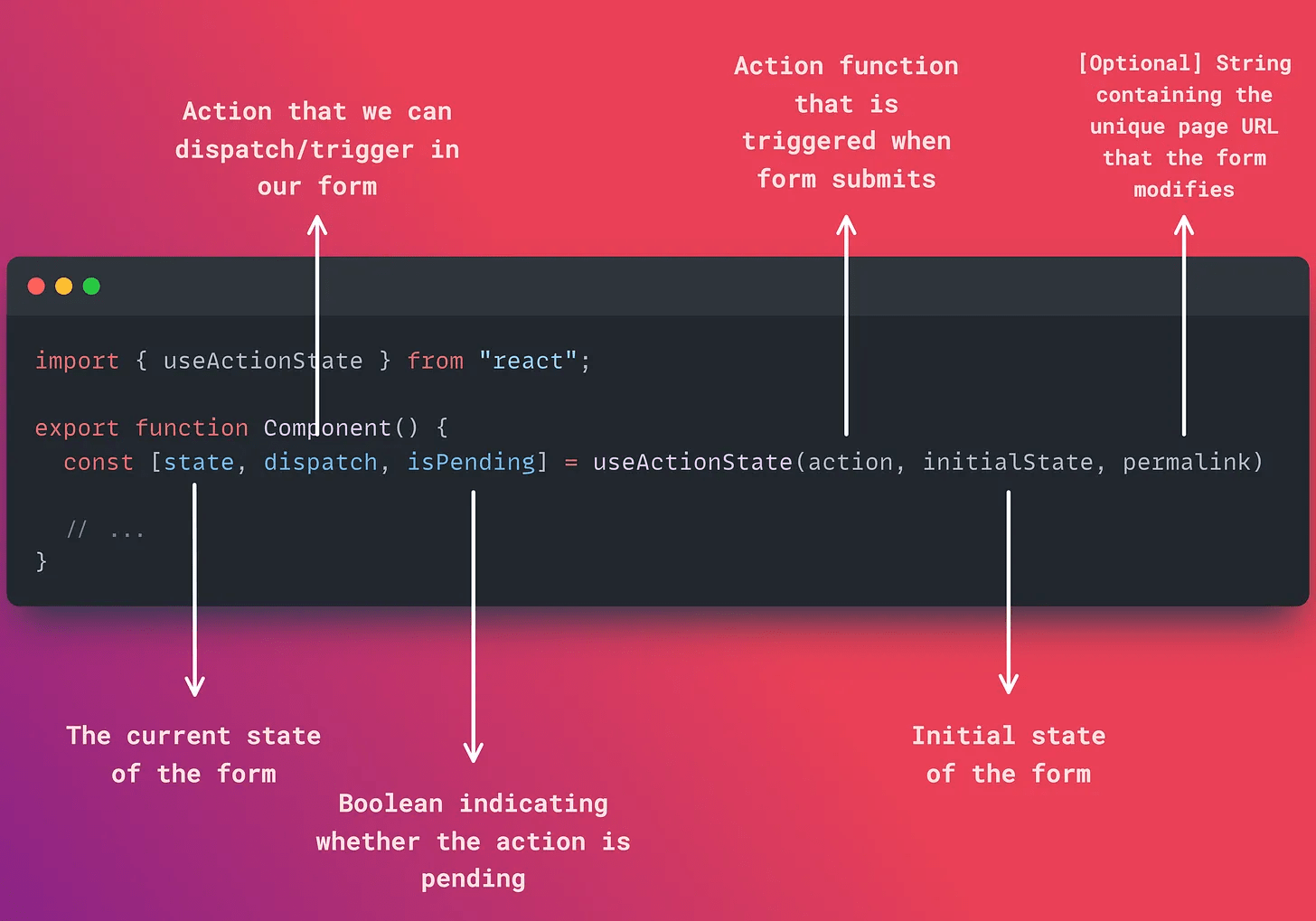
React 19
import { useActionState } from "react";

const submitForm = async (formData) => {
  /* form submit fn that calls API */
};

const action = async (currentState, formData) => {
  try {
    const result = await submitForm(formData);
    return { message: result };
  } catch {
    return { message: "Failed to complete action" };
  }
};

export function Component() {
  const [state, dispatch, isPending] = useActionState(
    action,
    null
  );

  // ...
}React 19
import { useActionState } from "react";

const submitForm = async (formData) => {
  /* form submit fn that calls API */
};

const action = async (currentState, formData) => {
  try {
    const result = await submitForm(formData);
    return { message: result };
  } catch {
    return { message: "Failed to complete action" };
  }
};

export function Component() {
  const [state, dispatch, isPending] = useActionState(
    action,
    null
  );

  return (
    <form action={dispatch}>
      {/* ... */}
    </form>
  );
}
React 19
import { useActionState } from "react";

const submitForm = async (formData) => {/* ... */};

const action = async (currentState, formData) => {/* ... */};

export function Component() {
  const [state, dispatch, isPending] = useActionState(
    action,
    null,
  );

  return (
    <form action={dispatch}>
      <input type="text" name="text" disabled={isPending} />

      <button type="submit" disabled={isPending}>
        Add Todo
      </button>

      {state.message && <h4>{state.message}</h4>}
    </form>
  );
}
React 19
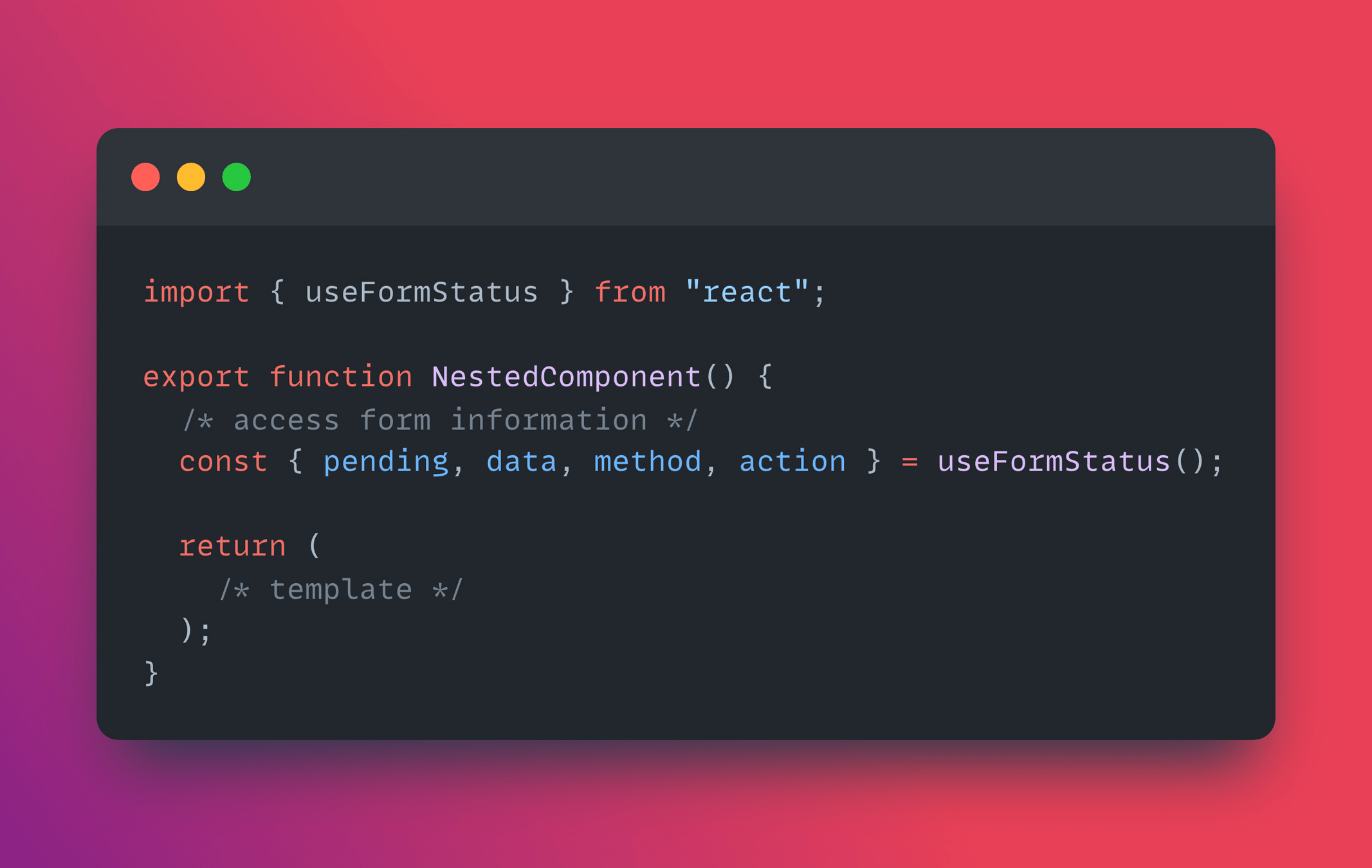
React 19
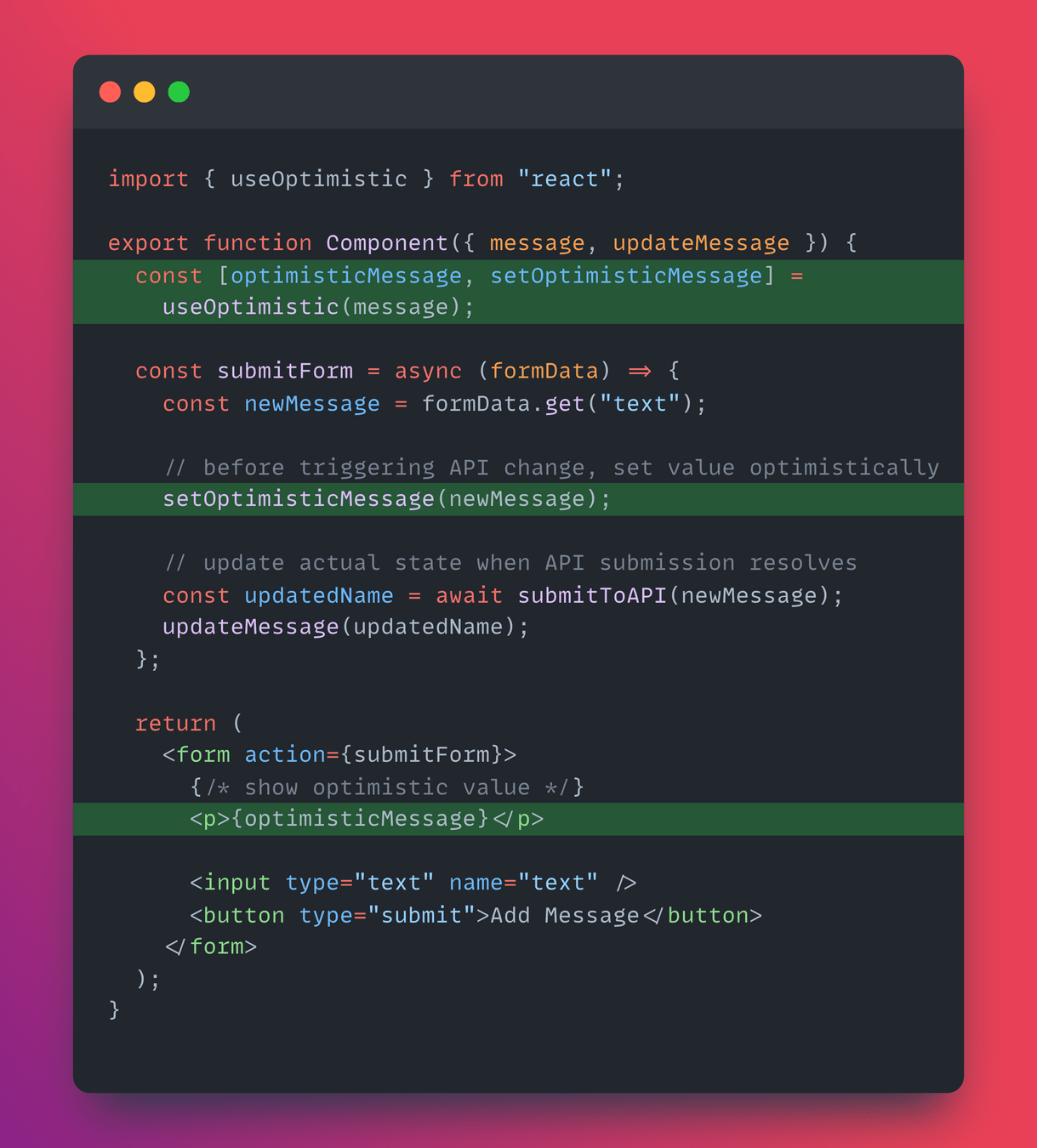
React 19
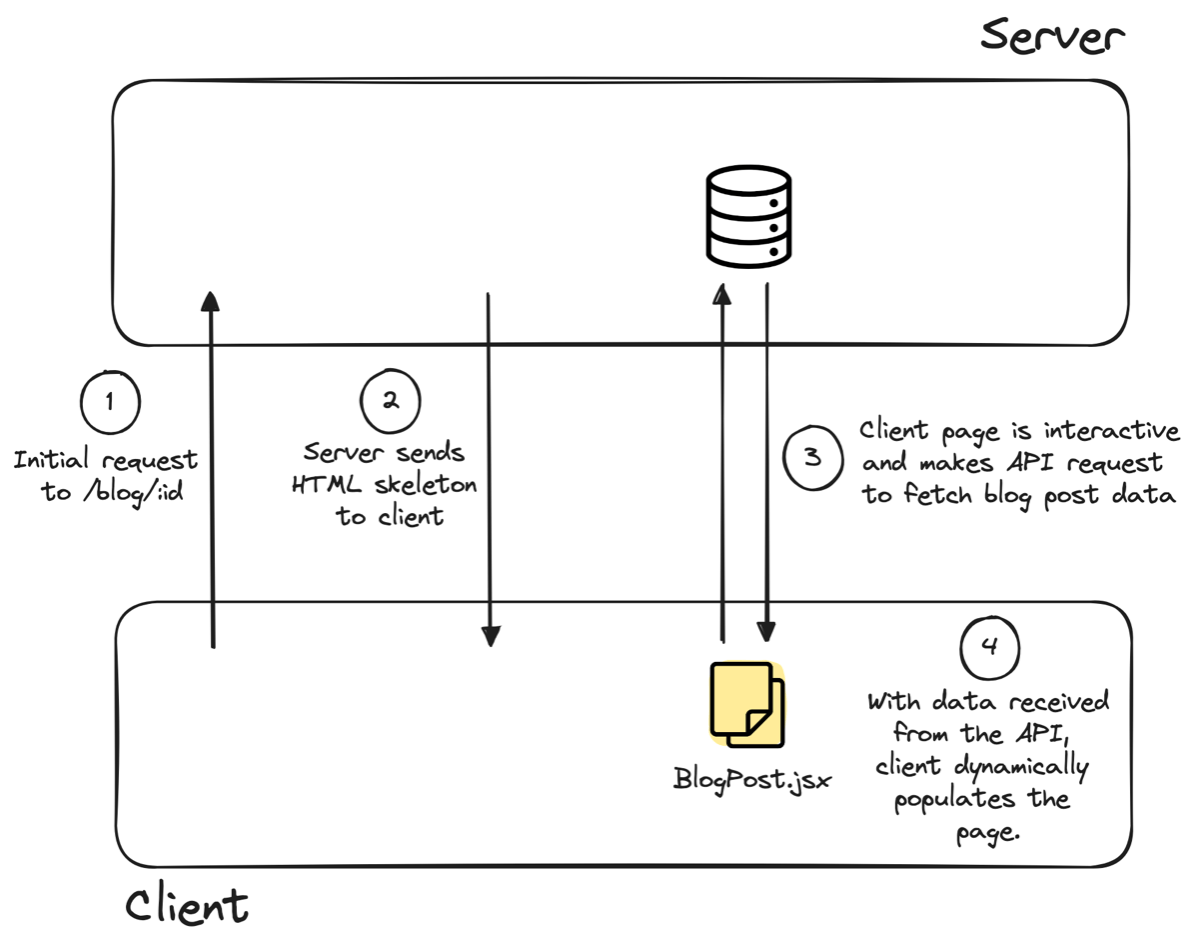
Unlike traditional React components, which run solely in the browser, React Server Components allow for a seamless integration of server-side rendering into the React architecture.
React 19
Server-side rendering
Client-side rendering
All the rendering happens on the client
React 19
Server-side rendering




React 19
Server-side rendering

React 19
Server-side rendering
React 19
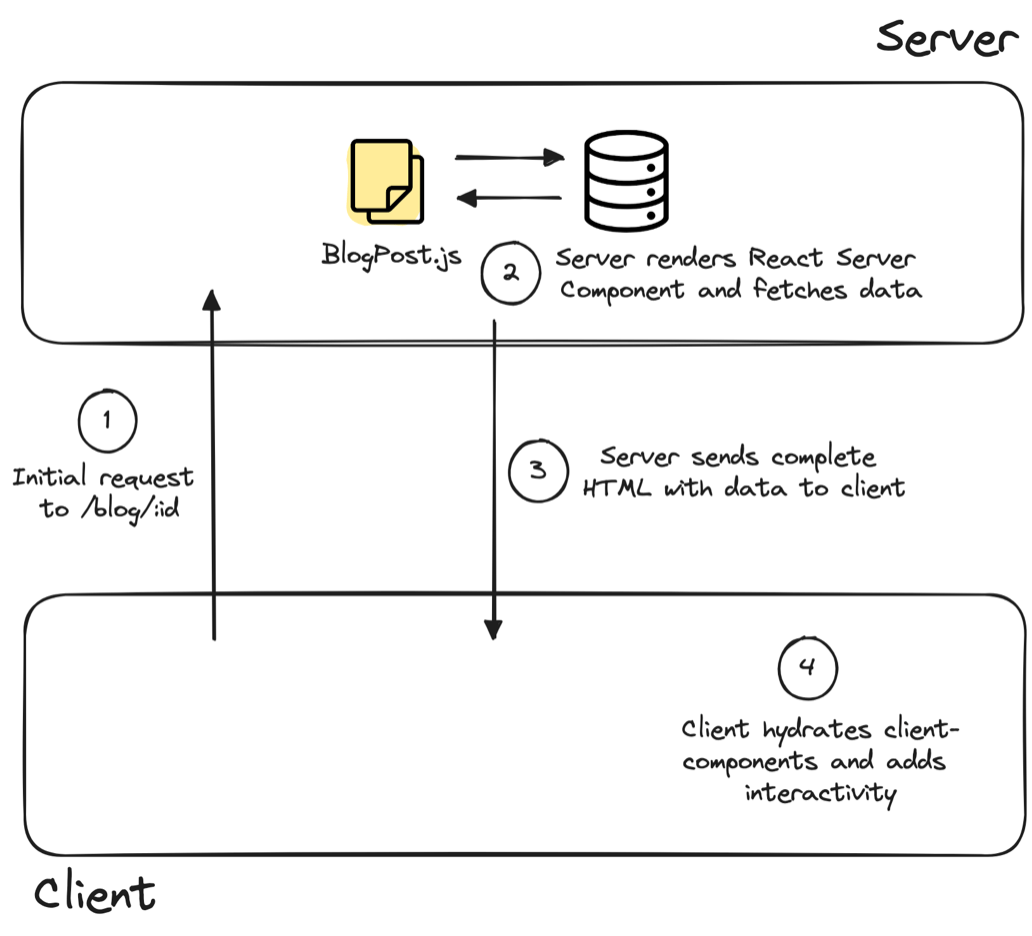
React Server Components are a new capability in React that allows us to create stateless React components that run on the server.
React 19
React 19
import db from "./database";

// React Server Component
async function BlogPost({ postId }) {
  // Load blog post data from database
  const post = await db.posts.get(postId);

  // Load comments for the post from database
  const comments = await db.comments.getByPostId(postId);

  return (
    <div>
      <h2>{post.title}</h2>
      <p>{post.content}</p>
      <h3>Comments</h3>
      <ul>
        {comments.map((comment) => (
          <li key={comment.id}>
            <Comment {...comment} />
          </li>
        ))}
      </ul>
    </div>
  );
}
React 19
Since Server Components are run on the server and not the browser, they’re unable to use traditional React component APIs like useState.
React 19
// React Client Component
"use client"

export function Comment({ id, text }) {
  const [likes, setLikes] = useState(0);

  function handleLike() {
    setLikes(likes + 1);
  }

  return (
    <div>
      <p>{text}</p>
      <button onClick={handleLike}>Like ({likes})</button>
    </div>
  );
}
React 19
Using RSCs currently requires a compatible server and client environment, which often means relying on a framework. For a significant period of time, Next.js was the only framework supporting RSCs, paving the way for their adoption.

Front-End Fresh (Session #1)
- JavaScript
- React
- Common and important concepts in React
- Data Fetching
- React + TypeScript
- Frameworks (Vite, Remix, Next.js)
- React 19, RSCs, and new APIs
- Front-End Engineering in 2024
Front-End Fresh (Session #1)
- Design Systems & Component Libraries
- State Management
- Internationalization
- Organizing Code
- Personalization & A/B Testing
- Testing
- Deployment
What's coming next week?
Front-End Fresh (Session #1)
#1 Spin up a Vite / React Project
Take-home coding exercises
- Ensure you have Node/npm installed
- Build out a simple React component
- Use State
- Counter/Todo Input/Form
#2 Interact with an API
- Interact with an API when component mounts for the first time OR after an action is taken
#3 Build up from 1) and 2)
- Try out TypeScript (if you haven't before)
- Try a framework/library you haven't tried before
- Next.js
- Remix
- Try out React 19 (in beta)
Front-End Fresh (Session #1)
Q/A
The Front-End Fresh Workshop (Sept 25th)
By djirdehh