AI for Customer Service Automation


✕
Knowledge Graph Construction
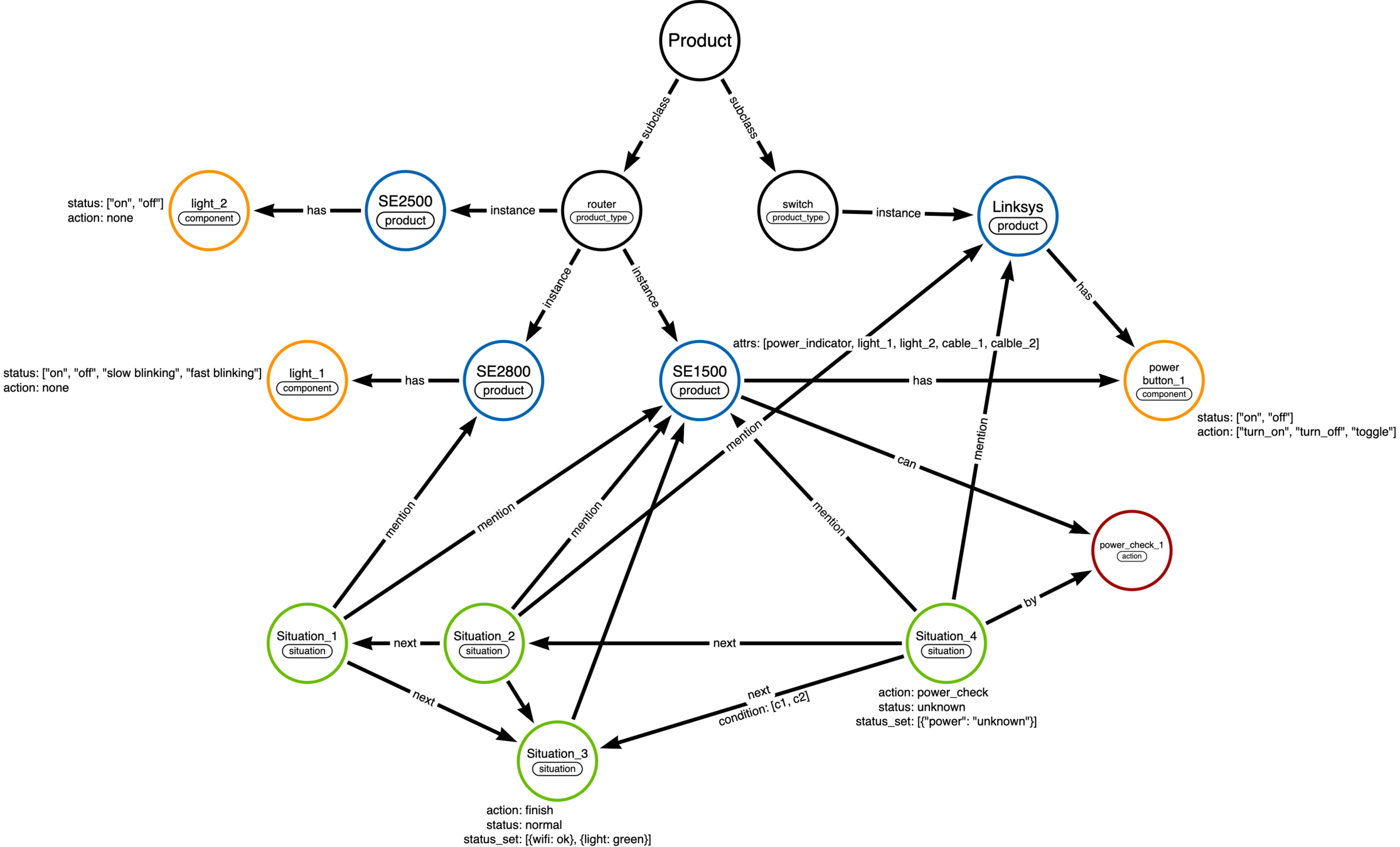
Knowledge(environment) = action
e.g. The power light is not bright → Check power socket
Connective
¬ : negative (否定)
∧ : conjunction (合取)
∨ : disjunction (析取)
→ : implication (蕴含)
↔︎ : equivalence (等价)
Predicate
isFruit(apple) → unary
isFather(a, b) → binary
isBetween(a,b,c) → ternary
Information Retrieval
Environment Location
Knowledge Graph Embedding in the further research?
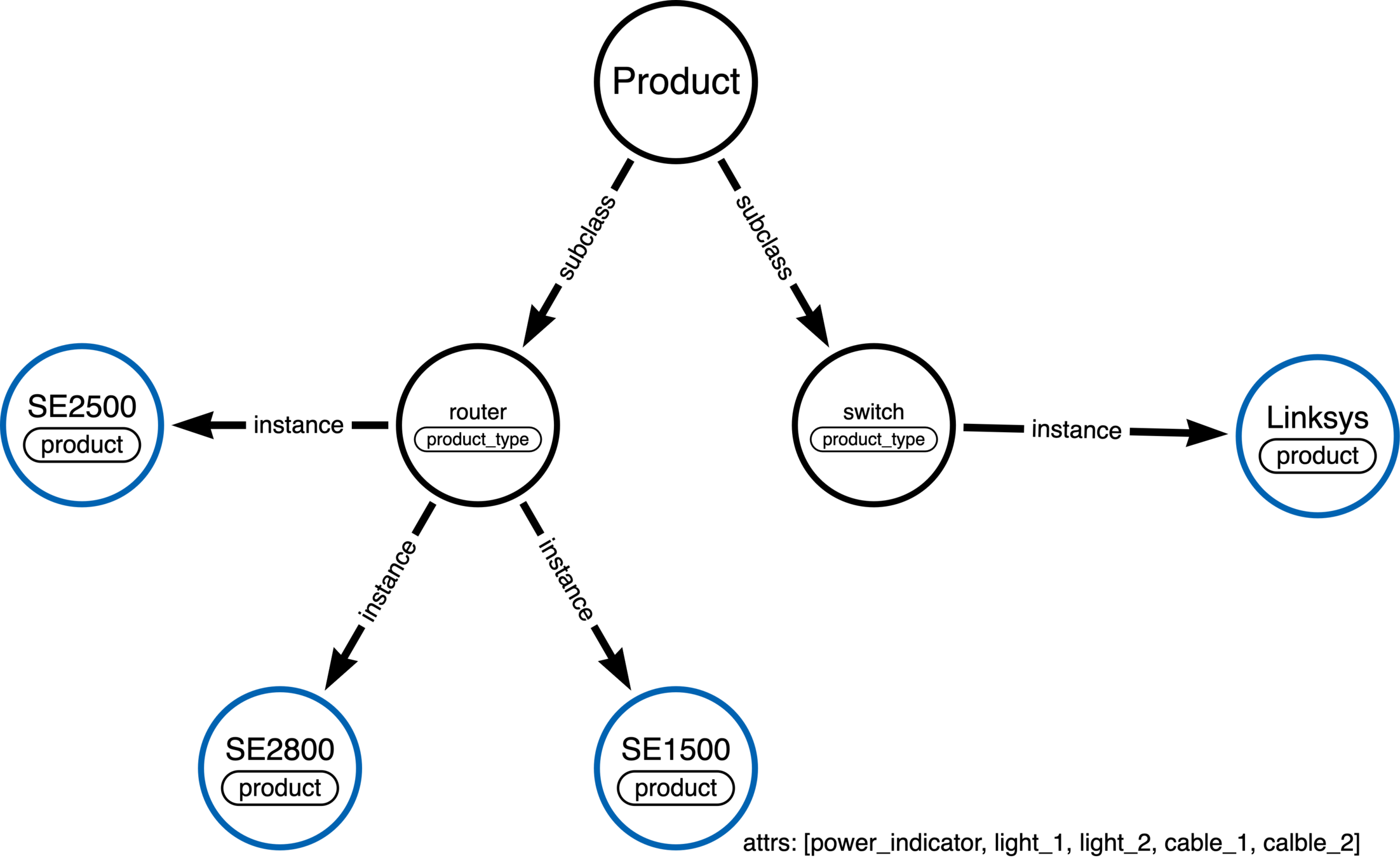
Entity Recognition
from genre.fairseq_model import GENRE
from genre.entity_linking import get_end_to_end_prefix_allowed_tokens_fn_fairseq as get_prefix_allowed_tokens_fn
from genre.utils import get_entity_spans_fairseq as get_entity_spans

# Load the model
model = GENRE.from_pretrained("../models/fairseq_e2e_entity_linking_aidayago").eval()

sentences = ["Hi, I have just bought one of your routers. I think the router is not working. No Wifi. No internet connection."]

prefix_allowed_tokens_fn = get_prefix_allowed_tokens_fn(model, sentences)

model.sample(
    sentences,
    prefix_allowed_tokens_fn=prefix_allowed_tokens_fn,
)

# Output
# Hi, I have just bought one of your { routers } [ Router (computing) ]. I think the { router } [ Router (computing) ] is not working. No { Wifi } [ Wi-Fi ]. No { internet } [ World Wide Web ] connection.
Checklist Templates
Situation_4
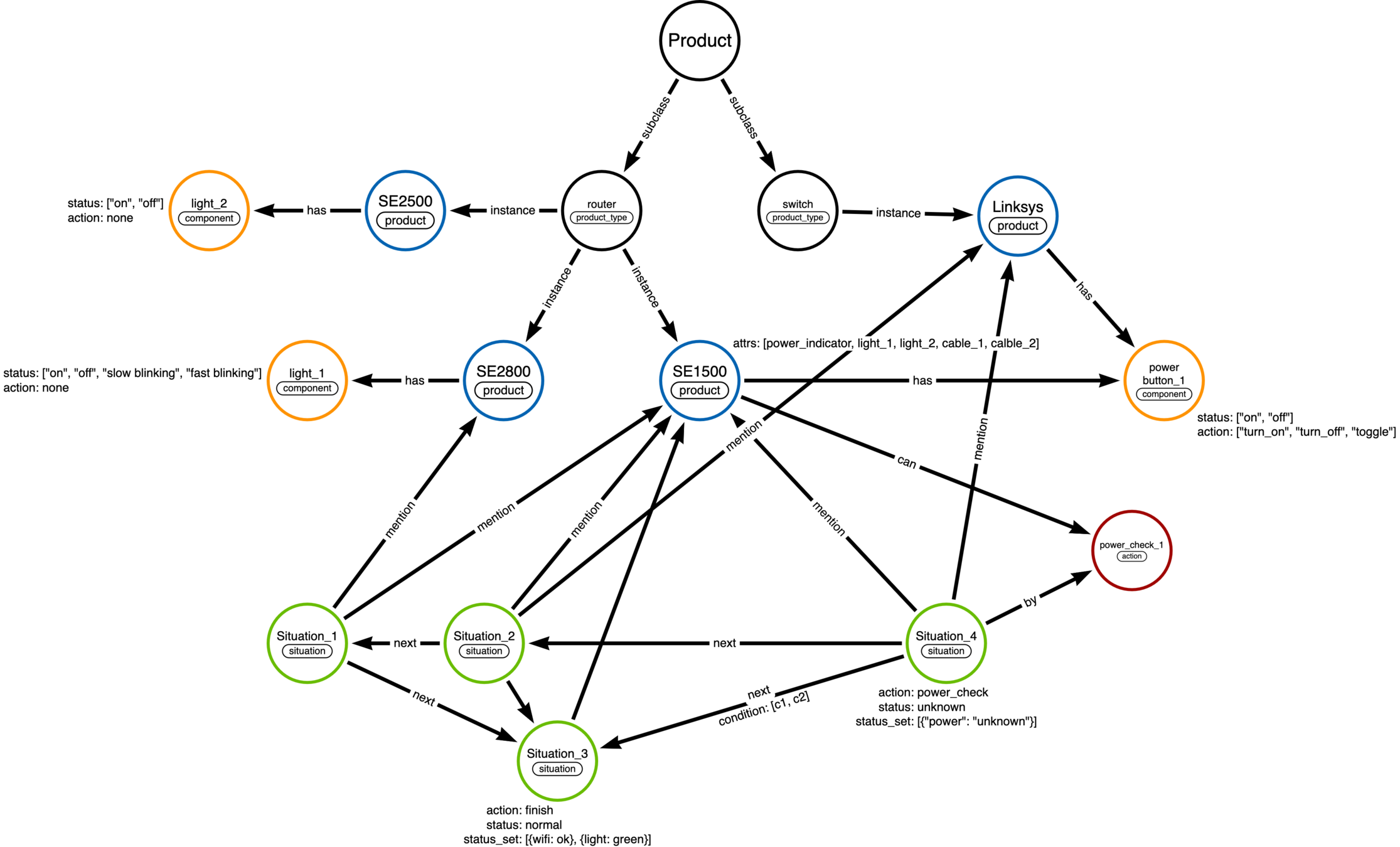
{
  "observation": {
    "SE1500": {
      "is_power_button_on": unknown,
      "is_power_button_off": unknown,
      "is_power_light_on": unknown,
      "is_power_light_off": unknown,
      "is_light_1_blinking": unknown,
      "is_light_2_blinking": unknown,
      "is_cable_1_used": unknown,
      "is_cable_2_used": unknown,
    },
    "Linksys": {
      "is_power_button_on": unknown,
      "is_power_button_off": unknown,
      "is_power_light_on": unknown,
      "is_power_light_off": unknown,
      "is_cable_1_used": unknown,
      "is_cable_2_used": unknown,
    }

  },
  "action": {
    "name": "power_check"
    "object": "power_button"
    "query": "check if the power button is up"
  },
  "next": [
    {
      "condition": {
        "SE1500": {
          "is_power_button_on": yes,
          "is_power_button_off": no,
          "is_power_light_on": unknown,
          "is_power_light_off": unknown,
          "is_light_1_blinking": unknown,
          "is_light_2_blinking": unknown,
          "is_cable_1_used": unknown,
          "is_cable_2_used": unknown,
        },
        "Linksys": {
          "is_power_button_on": unknown,
          "is_power_button_off": unknown,
          "is_power_light_on": unknown,
          "is_power_light_off": unknown,
          "is_cable_1_used": unknown,
          "is_cable_2_used": unknown,
        }
      },
      "next_situation": "situation_3"
    }
  ]
}
State Transition
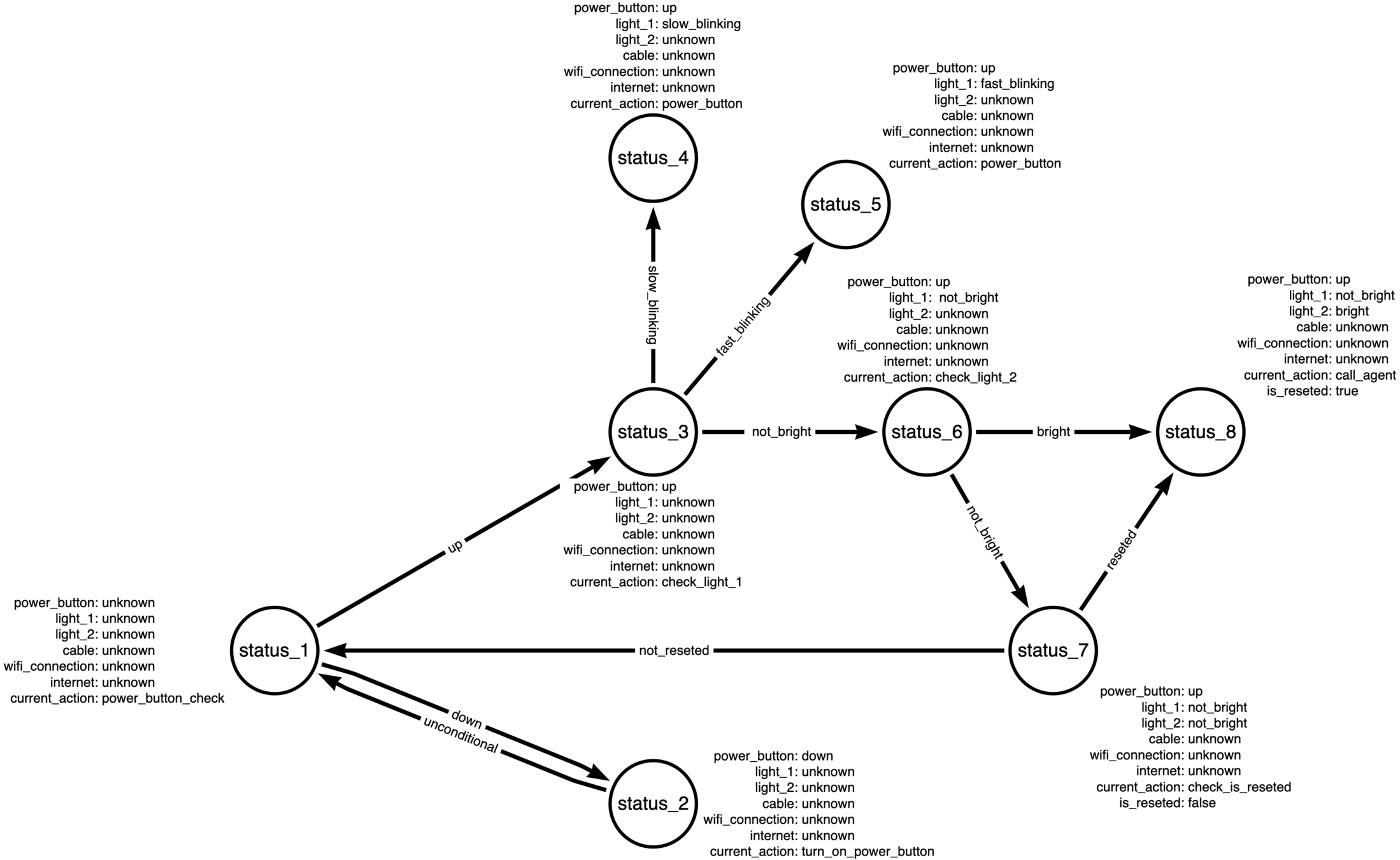
Lanugage Understanding
Ask Questions
Understand Answers
Ask Questions
# Model Number Check
Given the context: Hi, I have just bought one of your routers and connected to a switch. I think the router is not working. No Wifi. No internet connection.
Generate a question for the customer to ask what the model number of your router is.

Question: ** What is the model number of your router? **

# Power Button Check
Given the context: Hi, I have just bought one of your routers and connected to a switch. I think the router is not working. No Wifi. No internet connection.
Generate a question for the customer to ask if the power button is up.

Question: ** Is the power button on the router up? **

# Power Light Check
Given the context: Hi, I have just bought one of your routers and connected to a switch. I think the router is not working. No Wifi. No internet connection.
Generate a question for the customer to ask what the status of the power light is (always bright / slow blinking / fast blinking).

Question: ** Is the power light on your router always bright, slow blinking, or fast blinking? **
Understand Answers
# Model Number Check
Q: What is the model number of your router?
A: My router number is CBS110-8T-D.

The router number is ** CBS110-8T-D **.

# Power Button Check
Q: Is the power button on the CBS110-8T-D router up?
A: Yes.

the power button on the CBS110-8T-D router is ** up **.

# Power Light Check
Q: Is the power light on your router always bright, slow blinking, or fast blinking?
A: It is fast blinking.

The power light on the CBS110-8T-D router is ** fast blinking **.
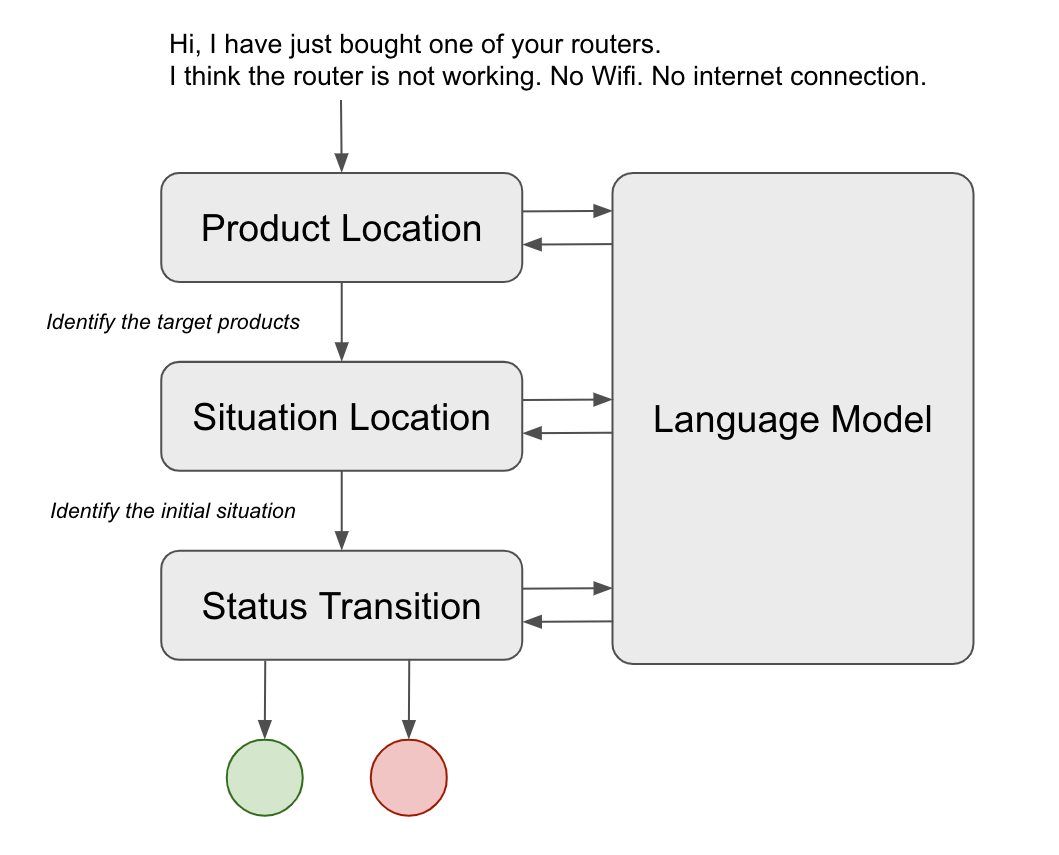
Pipeline
Title Text
deck
By elfsong