Angular
Best Practices


https://angular-checklist.io
Architecture

Smart & Dumb Components
Dumb
- Receives data through @Inputs and communicates with its direct parent through @Outputs.

@Component({
    ...
})
export class DumbComponent {
  @Input()  data: unknown;
  @Output() someEvent = new EventEmitter<unknown>();
}
Dumb
- Receives data through @Inputs and communicates with its direct parent through @Outputs.
- Should not receive Observables as inputs.
@Component({
    ...
})
export class DumbComponent {
  @Input()  data: Observable<unknown>;
}
Dumb
- Receives data through @Inputs and communicates with its direct parent through @Outputs.
- Should not receive Observables as inputs.
- Can use other dumb components as children
- Can use other dumb components as children.
<div *ngIf="data.name">
    <dumb-component-name>
        {{data.name}}
    </dumb-component-name>
</div>
Dumb
- Receives data through @Inputs and communicates with its direct parent through @Outputs.
- Should not receive Observables as inputs.
- Can use other dumb components as children.
- Should not fetch any data.
@Component({
    ...
})
export class DumbComponent implements OnInit {
  ngOnInit() {
    this.apiService.fetchExtraInfo()
                   .subscribe(x => this.extraInfo = x);
  }
}
Dumb
@Component({
    ...
})
export class UserComponent implements OnInit {
   @Input() user: User;
}
<ng-container *ngIf="user">
<h3>{{ user.name }}</h3>
<h5>{{ user.lastName}}</h5>
</ng-container>Dumb
It should only be used to
visualize data
Smart
- They know how to fetch data and persist changes.

@Component({
    ...
})
export class SmartComponent implements OnInit {
  ngOnInit() {
    this.apiService.getUser()
                   .subscribe(u => this.user = u);
  }

  updateUsername(username:string){
    this.apiService.updateUsername(username)
                    .subscribe(...);
  }
}
Smart
- They know how to fetch data and persist changes.
- They pass data down to dumb components as much as possible.
- They pass data down to dumb components as much as possible.
<user-profile [username]="user.name" [pictureUrl]="user.pictureUrl">

</user-profile >
Smart
- They know how to fetch data and persist changes.
- They pass data down to dumb components as much as possible.
- Listen for events emitted by dumb components.
<user-profile [user]="user"
(pictureClicked)="onUserPictureClicked($event)">

</user-profile >
Smart
@Component({
    ...
})
export class SmartComponent implements OnInit {
  users$:Observable<User>;

  ngOnInit() {
   this.users$ = this.apiService.getUsers();
  }

  onUserSelected(user:User){
    this.dialog.open(UpdateUserComponent, {data: user});
  }
}
<ng-container *ngFor="let user of (users$ | async)">
<user-info [user]="user" (click)="onUserSelected(user)">
</user-info>
</ng-container>Smart
Component used to orchestrate data
- Dumb components are completely reusable. (Defined API and Independent of business logic)
- Dumb components are easy to test as they are completely isolated.
- Application is easier to reason about.
- If problem fetching data - business logic -> Smart components
- Problem displaying data -> Dumb component
Benefits
Components
Release resources in ngOnDestroy
What to release?
-
Observable subscriptions
-
Intervals
Release resources in ngOnDestroy
@Component({
    ...
})
export class Component implements OnInit, OnDestroy  {
  subscription :Subscription;

  ngOnInit() {
   const source = interval(1000);
   this.subscription = source.subscribe(val => console.log(val));
  }

  ngOnDestroy(){
    this.subscription.unsubscribe();
  }
}
Minimize logic in templates
<div *ngIf="users && users.length > 1 && visible">
    <span> {{user.name}} </span>
    <span> {{user.lastName}} </span>
</div>
@Component({
...
})
export class SomeComponent {
users: User[];
visible: boolean;
usersExistsAndVisible() {
return this.users && this.users.length > 1 && this.visible;
}
}<div *ngIf="usersExistsAndVisible()">
<span> {{user.name}} </span>
<span> {{user.lastName}} </span>
</div>
Performance
User trackBy option on *ngFor
 <video-thumbnail *ngFor="let video of videos; trackBy: trackById" [video]="video">
</video-thumbnail>
@Component({
...
})
export class SomeComponent {
videos: Video[];
trackById(index, item) {
return item.id;
}
}RxJS

Subscription Management Strategy
- Imperatively
- async pipe
- take(n) - first
- takeUntil
// hold a reference to the subscription object
const subscription = interval(1000).subscribe(console.log);

// use the subscription object to kill the subscription
subscription.unsubscribe();
Not very helpful to manage multiple subscriptions
1. Imperatively
2. async pipe
@Component({
  template: `{{data$ | async}}`,
  ...
})
export class SomeComponent {
  data$ = interval(1000);
}- subscribe to an Observable
- unsubscribe from the Observable when the component is destroyed by hooking into the onDestroy hook
3. take(n) - first
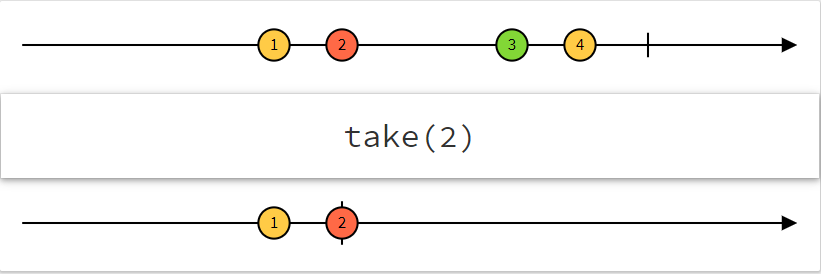
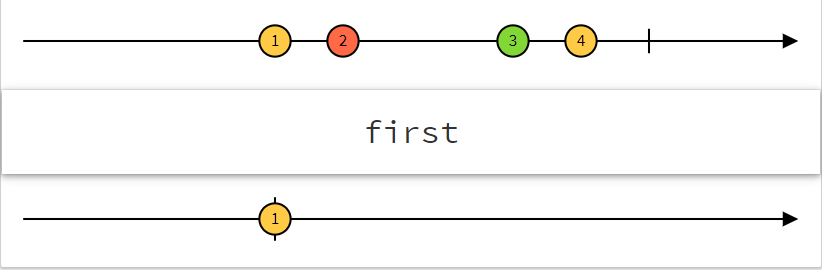
3. take(n) - first
@Component({
  ...
})
export class SomeComponent {
  ngOnInit() {
    source.pipe(take(1)).subscribe(val => console.log(val));
  }
}
4. takeUntil
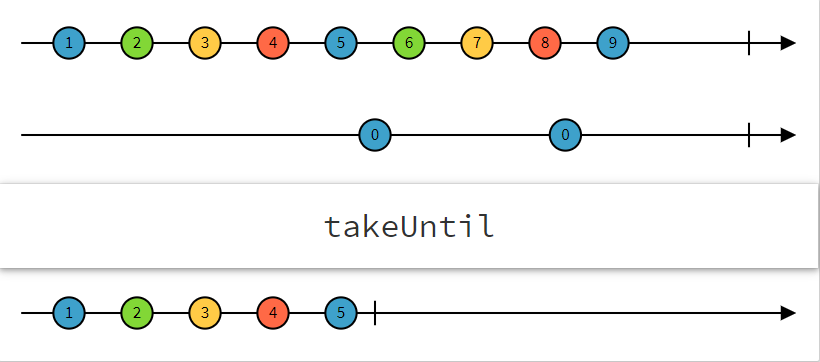
4. takeUntil
@Component({...})
export class SomeComponent implements OnInit, OnDestroy {
  private destroy$ = new Subject();
  users: Array<User>;
  groups: Array<Group>;

  constructor(private usersService: UsersService) {}

  ngOnInit() {
    // long-living stream of users
    this.usersService.getUsers()
     .pipe(
       takeUntil(this.destroy$)
     )
     .subscribe(
       users => this.users = users;
     );

    // long-living stream of groups
    this.usersService.getGroups()
     .pipe(
       takeUntil(this.destroy$)
     )
     .subscribe(
       groups => this.groups= groups;
     );
   }

   ngOnDestroy() {
     this.destroy$.next();
   }
}
Angular best practices
By Felipe Jaramillo Gómez