Design Patterns and Application Architecture
Hoang Nguyen
February 25, 2025
Agenda
-
OOP and Principles
-
Design Patterns
-
Architecture & Design
-
Practical Application
Introduction to OOP
Definition: A programming paradigm based on the concept of "objects", which can contain data and code.
Introduction to OOP
Key Principles:
- Encapsulation: Bundling the data and methods that operate on the data.
- Abstraction: Hiding complex implementation details and showing only the essential features.
- Inheritance: Mechanism to create a new class using properties and methods of an existing class.
- Polymorphism: Ability to present the same interface for different data types.
OOP Anti-patterns
SOLID Principles
- Single Responsibility (S)
- Open/Closed (O)
- Liskov Substitution (L)
- Interface Segregation (I)
- Dependency Inversion (D)
SOLID Principles
Single Responsibility (S):
- A class should have only one reason to change
- Each class should handle one specific functionality
- Example: Link
SOLID Principles
Open/Closed (O):
- Software entities should be open for extension but closed for modification
- Use interfaces and abstract classes to allow extensions
- Example: Link
SOLID Principles
Liskov Substitution (L):
- Subtypes must be substitutable for their base types
- Derived classes must be usable through the base class interface
- Example: Link
SOLID Principles
Interface Segregation (I):
- Clients should not be forced to depend on interfaces they don't use
- Break interfaces into smaller, specific ones
- Example: Link
SOLID Principles
Dependency Inversion (D):
- High-level modules should not depend on low-level modules
- Both should depend on abstractions
- Example: Link
SOLID Principles
Benefits:
- Maintainable and scalable code
- Easier to test and debug
- More flexible and reusable
- Reduced coupling between modules
Composition over Inheritance
- Definition: A design principle that suggests using object composition rather than inheritance for reuse.
-
Benefits:
- More flexible design
- Avoids tight coupling
- Easier to modify at runtime
- Prevents deep inheritance hierarchies
- Example: Link
Introduction to Design Patterns
- Definition of Design Patterns: General repeatable solutions to common problems in software design.
- Importance: Promote code reuse, better architecture, and efficient communication among developers.
Categories of Design Patterns
- Creational Patterns
- Structural Patterns
- Behavioral Patterns
Creational Patterns
Definition: Creational patterns deal with object creation mechanisms, trying to create objects in a manner suitable to the situation. They help make a system independent of how its objects are created, composed, and represented.
Creational Patterns
Key Characteristics:
- Encapsulation: Hide creation logic from client code
- Flexibility: Allow system to be independent of how objects are created
- Reusability: Promote reuse of object creation code
- Complexity Management: Handle complex object creation scenarios
Creational Patterns
Common Creational Patterns:
- Factory: Creation of objects without specifying the exact class.
- Abstract Factory: Provides an interface for creating families of related objects.
- Builder: Separates the construction of a complex object from its representation.
- Prototype: Creates new objects by cloning an existing object (prototype).
- Singleton: Ensures a class has only one instance and provides global access to it.
Factory Pattern
- Purpose: Creates objects without exposing the instantiation logic.
- Code Example: Link
Factory Pattern
When to Use:
- Complex/Dynamic Object Creation
- Decoupling
- Reusable Creation Logic
Exercise
Complex Document Generation System
Imagine you need to create a system that generates different types of documents (PDF, HTML, Word) with varying content structures like:
- Headers
- Footers
- Main content sections
- Tables
- Images
- Metadata
Which pattern can be applied here to initialize a Document object with many configurations?
Structural Patterns
Definition: Structural patterns deal with how classes and objects are composed to form larger structures. They help ensure that when parts of a system change, the entire system doesn't need to change.
Structural Patterns
Key Characteristics:
- Composition: Focus on how objects and classes can be combined to form larger structures
- Relationship Management: Handle relationships between objects effectively
- Flexibility: Allow systems to change their composition at runtime
- Simplification: Make complex systems easier to manage
Structural Patterns
Common Structural Patterns:
- Adapter: Allows incompatible interfaces to work together by wrapping an object in an adapter.
- Composite: Composes objects into tree structures to represent part-whole hierarchies.
- Proxy: Provides a surrogate or placeholder to control access to an object.
- Facade: Provides a simplified interface to a complex subsystem.
- Decorator: Adds new responsibilities to objects dynamically.
- Flyweight: Reduces the cost of creating and manipulating a large number of similar objects.
Adapter Pattern
- Purpose: Allows incompatible interfaces to work together by wrapping an object in an adapter to make it compatible with another class.
- Code Example: Link
Adapter Pattern
When to Use:
- When you want to use an existing class that doesn't fit your interface
- When you need to create a reusable class that cooperates with classes that don't share compatible interfaces
- When you want to create a middle-layer class that serves as a converter between your code and a third-party class
Exercise
Complex Media Conversion System
Imagine you're building a multimedia processing library that supports many methods:
- Convert video formats
- Extract audio
- Generate thumbnails
- Apply filters
- Add watermarks
- Handle metadata
Exercise
Imagine you're building a simple document viewer application. Opening and loading document files can be resource-intensive, especially for large files. Additionally, some documents might require special permissions to access.
If you load all documents immediately when the application starts, it would be slow and waste memory. You need a way to:
1. Load documents only when the user actually wants to view them
2. Check if the user has permission to view a document before loading it
3. Keep track of which documents are being accessed
How can you implement these requirements without changing your existing document handling code?
Behavioral Patterns
Definition: Behavioral patterns deal with communication between objects, how objects interact and distribute responsibilities among themselves.
Behavioral Patterns
Key Characteristics:
- Communication: Focus on how objects communicate with each other
- Responsibility Distribution: Define clear patterns of communication between objects
- Loose Coupling: Reduce dependencies between communicating objects
- Flexibility: Allow changing behavior at runtime
Behavioral Patterns
Common Behavioral Patterns:
- Observer: Notifies a group of objects about changes in the state of another object.
- Strategy: Enables selecting an algorithm's behavior at runtime.
- Command: Encapsulates actions as objects, allowing parameterization of clients.
- State: Allows an object to alter its behavior when its internal state changes.
- Mediator: Reduces coupling between objects by making them communicate via a mediator object.
- Chain of Responsibility: Passes requests along a chain of handlers until one handles it.
Observer Pattern
-
Purpose: Defines a one-to-many dependency between objects so that when one object changes state, all its dependents are notified and updated automatically.
-
Code Example: Link
Observer pattern
When to Use:
-
Event Handling Systems:
-
GUI frameworks (button clicks, form submissions)
-
System state changes (file system watchers)
-
Real-time data updates (stock prices, sensor readings)
-
-
Distributed Systems:
-
Message queues
-
Publish/subscribe systems
-
Event-driven architectures
-
Exercise
Payment Processing System
Imagine you're building an e-commerce platform that needs to handle multiple payment methods (Credit Card, PayPal, Cryptocurrency, etc.) with different processing logic for each method.
Design patterns anti-patterns
How about the design patterns for complex business/enterprise applications?
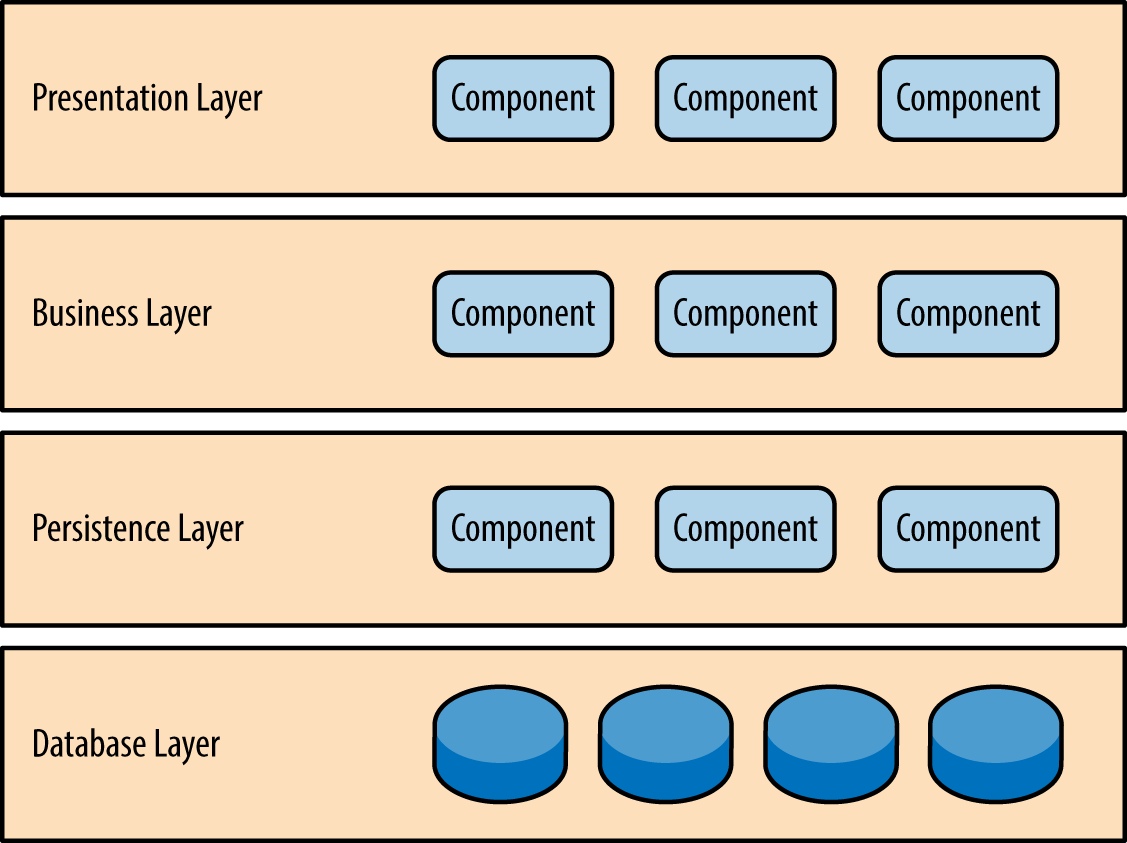
Layered Architecture
Layered Architecture
Common Structure:
- Presentation Layer (UI/API)
- Application Layer (Services)
- Domain Layer (Business Logic)
- Infrastructure Layer (Data Access)
- Example: Link
Limitations of Layered Architecture
Problems with Scale:
- Layers become tightly coupled over time
- Business logic leaks between layers
- Domain model becomes anemic
- Changes require updates across all layers
- Hard to maintain as complexity grows
- Difficult to enforce boundaries
- Often leads to "Big Ball of Mud"
Clean Architecture
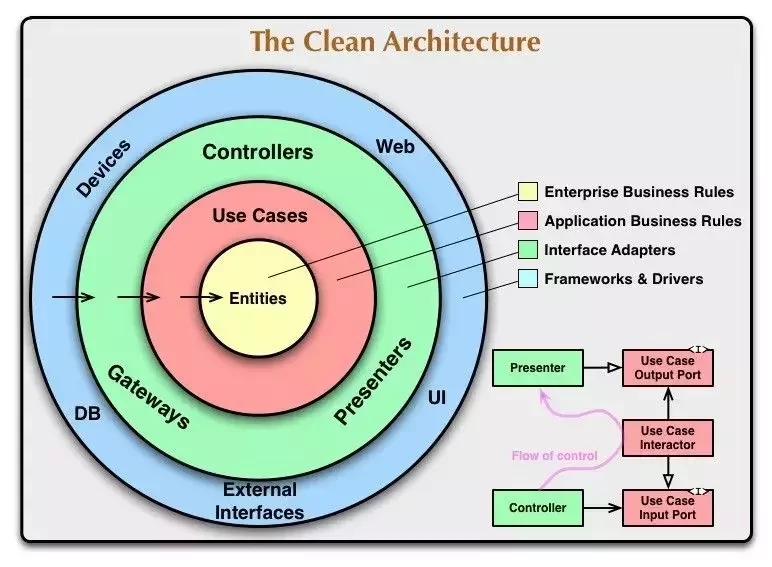
Definition: A software architecture pattern that emphasizes separation of concerns, organizing code so that it is independent of frameworks, UI, and databases.
Clean Architecture
Clean Architecture
Key Principles:
- Dependency Rule: Dependencies only point inward
- Dependency Inversion: High-level modules should not depend on low-level modules. Both should depend on abstractions.
- Isolation: Business rules isolated from UI and database
- Testability: The architecture facilitates automated testing by isolating components.
Clean Architecture
Structure:
- Entities Layer (Core)
- Use Cases Layer
- Interface Adapters Layer
- Frameworks & Drivers Layer (External)
Clean Architecture
Entities:
- Contains enterprise-wide business rules and data structures
- Pure business objects with no dependencies
- Represents core business concepts (e.g., Customer, Order, Product)
- Has no knowledge of other layers
- Most stable layer, changes least frequently
- Contains validation rules that are universally true for the entity
Clean Architecture
Use Cases Layer:
- Implements application-specific business rules
- Orchestrates the flow of data to and from entities
Clean Architecture
Use Cases Layer:
- Characteristics:
- One class per use case (e.g., CreateOrderUseCase, UpdateUserProfileUseCase)
- Independent of UI, database, and external concerns
- Uses interfaces (ports) to communicate with outer layers
- Contains input/output boundary interfaces
- Defines DTOs (Data Transfer Objects) for input/output
Clean Architecture
Use Cases Layer:
- Responsibilities:
- Validation of business rules
- Authorization checks
- Orchestrating multiple entities
- Managing transactions
Clean Architecture
Interface Adapters Layer:
- Converts data between the format most convenient for use cases/entities and the format most convenient for external agencies
- Contains:
- Controllers: Handle HTTP requests, CLI commands, or other entry points
- Presenters: Format data for display (UI, API responses, etc.)
- Gateways: Abstract interfaces for external services
- Repositories: Implement data access interfaces defined by use cases
Clean Architecture
Interface Adapters Layer:
- Characteristics:
- No business rules
- Purely technical implementations
- Implements interfaces defined by inner layers
Clean Architecture
Interface Adapters Layer:
- Responsibilities:
- Data format conversion
- Request/Response handling
- Input validation
- Error handling and mapping
- Database operations
- External service integration
Clean Architecture
Interface Adapters Layer:
- Example Components:
- REST Controllers
- GraphQL Resolvers
- Database Repositories
- External API Clients
- View Models/DTOs
- JSON/XML Formatters
Clean Architecture
Frameworks & Drivers Layer:
- Outermost layer containing frameworks and tools
- Acts as glue code connecting the application to external world
Clean Architecture
Frameworks & Drivers Layer:
- Contains:
- Web Frameworks: Express, Spring, Django, etc.
- Database Systems: MySQL, MongoDB, PostgreSQL
- UI Frameworks: React, Angular, Vue
- External Services: Payment gateways, email services
Clean Architecture
Frameworks & Drivers Layer:
- Characteristics:
- Highly volatile and changeable
- Contains configuration code
- Minimal business logic
- Easily replaceable
Clean Architecture
Frameworks & Drivers Layer:
- Example Components:
- Web server configuration
- Database connection setup
- ORM configurations
- UI components
- External API configurations
- File system operations
Clean Architecture
Benefits:
- Independent of frameworks
- Testable business logic
- Independent of UI
- Independent of database
- Independent of external agencies
Clean Architecture
Clean Architecture
Relation to OOP and SOLID:
- OOP principles like encapsulation and abstraction support the goals of Clean Architecture
- Single responsibility, Dependency inversion contributes to design of Clean Architecture
How to design domain model for an enterprise application?
Domain-Driven Design (DDD)
Definition: A software design approach focusing on modeling software to match a domain according to input from domain experts.
Domain-Driven Design (DDD)
Key Concepts:
- Ubiquitous Language
- Bounded Contexts
- Domain Model
-
Building Blocks
- Entities: Objects with identity and lifecycle
- Value Objects: Immutable objects without identity
- Aggregates: Cluster of associated objects treated as a unit
- Services: Operations that don't belong to any entity
- Example: Link
Ubiquitous Language in DDD
Definition:
- A common, rigorous language between developers and domain experts
- Shared vocabulary that is used in code, documentation, and conversation
- Evolves as the team's understanding of the domain grows
Ubiquitous Language in DDD
Characteristics:
- Precision: Terms have specific, agreed-upon meanings
- Consistency: Same terms used everywhere in the bounded context
- Evolution: Language grows and changes with the project
- Documentation: Captured in code, tests, and documentation
Ubiquitous Language in DDD
Implementation:
- Use domain terms in class names (e.g.,
OrderConfirmationnotProcessResult) - Model methods after business processes (e.g.,
confirmOrder()notupdateStatus()) - Name variables using domain terminology
- Document using business language
- Avoid technical terms in domain logic
Ubiquitous Language in DDD
Benefits:
- Reduces translation between technical and business concepts
- Improves communication with domain experts
- Makes code self-documenting
- Ensures consistent understanding across team
- Helps identify domain concepts early
Domain Model in DDD
Definition:
- A conceptual model of the domain that incorporates both behavior and data
- The heart of the business software
- A structured vision of the domain
- Distillation of shared knowledge
Domain Model in DDD
Characteristics:
- Rich in behavior (not anemic)
- Encapsulates complex business rules
- Reflects domain expert's mental model
- Independent of technical concerns
- Uses ubiquitous language
Domain Model in DDD
Implementation Guidelines:
- Keep business rules in the domain model
- Use value objects for concepts without identity
- Create rich behavior instead of anemic models
- Enforce invariants within the model
- Use domain events for side effects
Domain Model in DDD
Benefits:
- Captures complex business rules accurately
- Provides single source of truth for domain logic
- Makes business rules explicit and testable
- Reduces bugs in business logic
- Improves maintainability
- Facilitates communication with domain experts
Domain Model in DDD
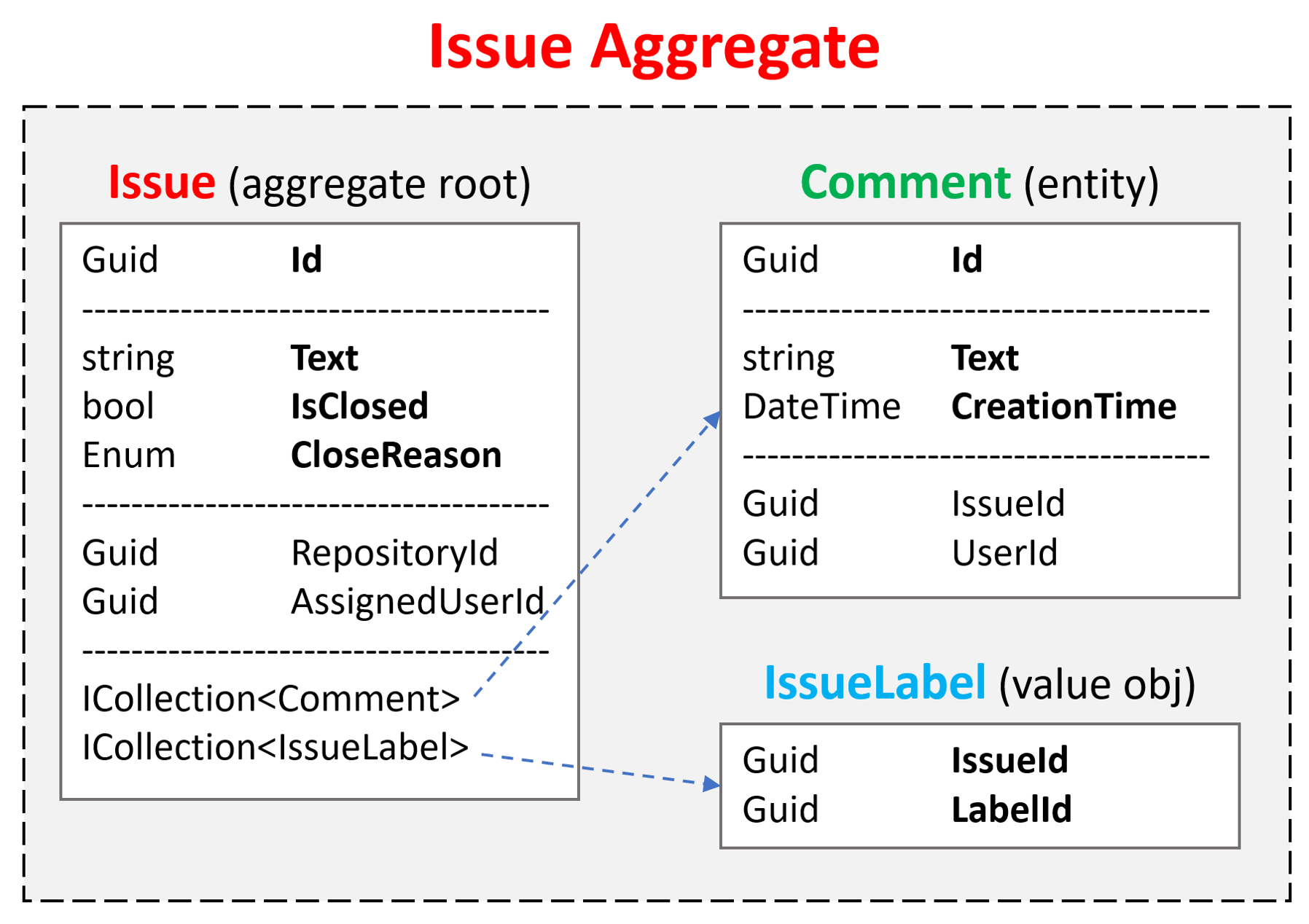
Domain Model in DDD
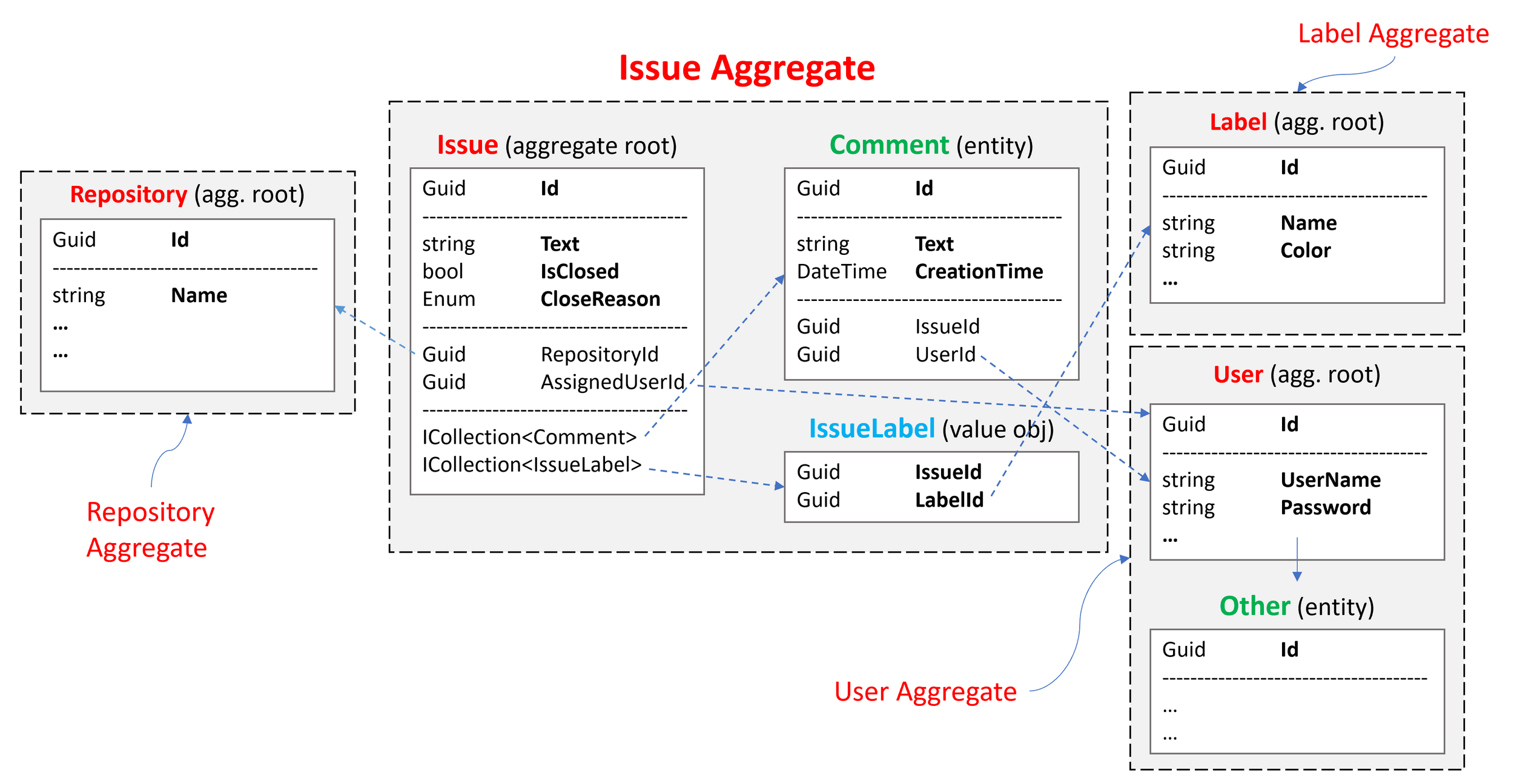
Domain Model in DDD
Bounded Contexts in DDD
Definition:
- Explicit boundary within which a domain model exists
- Defines where specific terms and concepts of Ubiquitous Language apply
- Separates different parts of a large system
Bounded Contexts in DDD
Characteristics:
- Each context has its own Ubiquitous Language
- Same term can mean different things in different contexts
- Clear boundaries between different parts of the system
- Independent implementation within each context
Bounded Contexts in DDD
Implementation Strategies:
- Separate modules or services per context
- Different database schemas
- Independent deployment units
- Context-specific data models
- Clear interface contracts between contexts
Bounded Contexts in DDD
Benefits
- Enables different modeling approaches per context
- Reduces complexity by dividing system
- Prevents model pollution
- Clarifies team boundaries
- Supports microservices architecture
Bounded Contexts in DDD
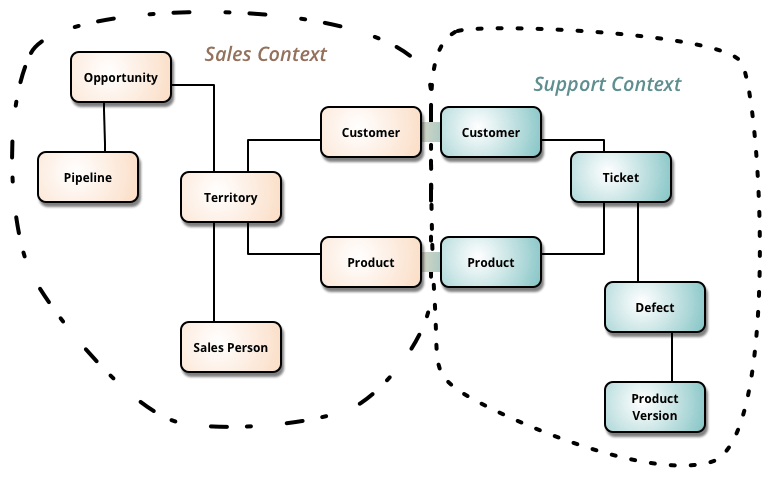
Clean architecture anti-patterns
- Mixing layers
- Wrong dependencies
- Framework coupling
- Business logic leaks
- Poor boundary control
- Example: Link
Conclusion
- OOP promotes structured, maintainable code, and design patterns provide solutions for common design problems.
- Importance of Clean Architecture and DDD: Combining clean architecture and DDD can create maintainable and testable systems.
Common Pitfalls to Avoid
-
Wrong Abstraction: A wrong abstraction is worse than code duplication
- Duplicate code is better than the wrong abstraction
- Wait until you see the pattern emerge from duplication
- Don't force patterns where they don't fit
-
Over-Engineering: Start simple, add complexity only when needed
- Don't add flexibility that you don't need yet
- YAGNI (You Aren't Gonna Need It)
Exercise: Clean Architecture
Design a library management system using Clean Architecture principles. Requirements:
- Implement core entities (Book, Member, Loan)
- Create use cases for borrowing/returning books
- Add interface adapters for web and console interfaces
- Implement persistence using different databases
References
- https://refactoring.guru/refactoring
- https://github.com/iluwatar/java-design-patterns
- https://blog.cleancoder.com/uncle-bob/2012/08/13/the-clean-architecture.html
- https://www.amazon.com/Domain-Driven-Design-Tackling-Complexity-Software/dp/0321125215
- https://github.com/eliostvs/clean-architecture-delivery-example/tree/master
Q&A
Any Questions?
Object-Oriented Programming and Design Patterns
By Minh Hoàng Nguyễn