
Continuous Integration, Delivery, and Deployment
CI

Disclaimer
Example
- Highly theoretical presentation
- Some people have limited experience with CI/CD
- Need a real world example
- Developer issues PR to dev branch
- Peers review code, CI visible in GIT integrations
- PR is merged, webhook hits CI
- CI checks out code, initializes environment, fixtures
- CI runs unit tests, installs and runs ngrok, notifies GI
- GI runs tests against ngrok tunnel with fixture data
- CI waits for GI to complete. Stops on failure
- CI SSHs into remote machine, runs:
- Git pull
- Dependency install
- Database migrate
- Server restart
- CI notifies Slack, server is live
- Total downtime: 0.2s for minor versions, 2s for major.
Existing Project CD with CircleCI and Ghost Inspector
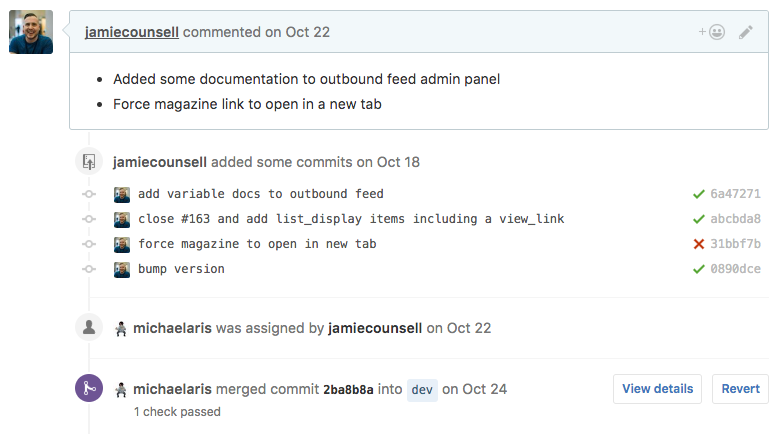
- Developer issues PR to dev branch
- Peers review code, CI visible in GIT integrations
- PR is merged, webhook hits CI
Existing Project CD with CircleCI and Ghost Inspector
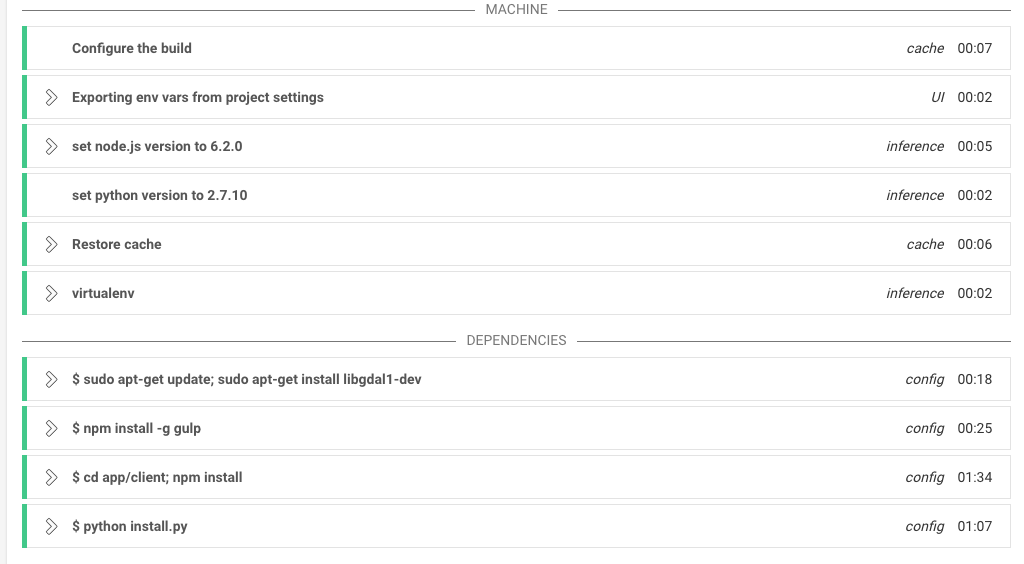
- CI checks out code, initializes environment, fixtures
- CI runs unit tests, installs and runs ngrok, notifies GI
Existing Project CD with CircleCI and Ghost Inspector
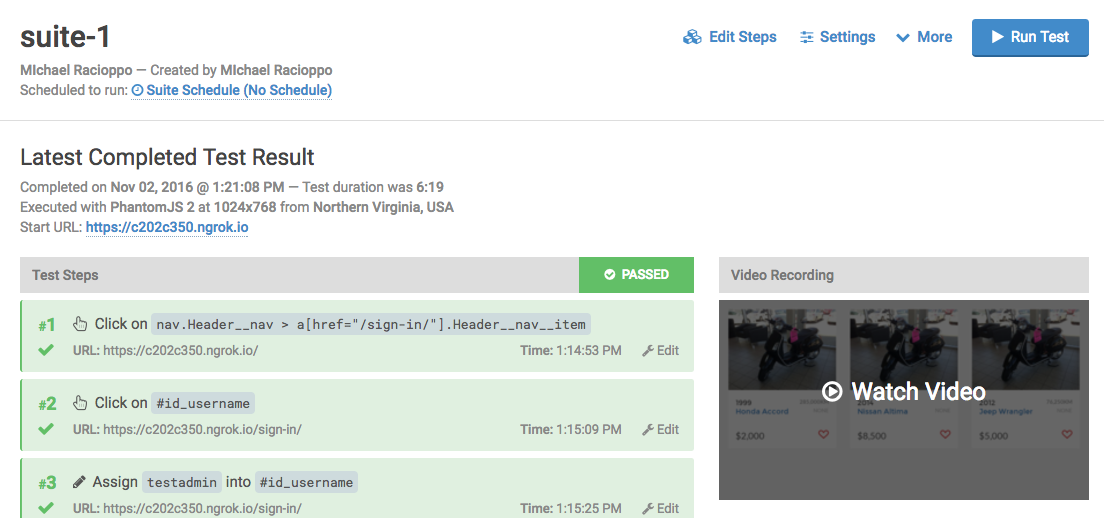
- GI runs tests against ngrok tunnel with fixture data
- CI waits for GI to complete. Stops on failure
Existing Project CD with CircleCI and Ghost Inspector
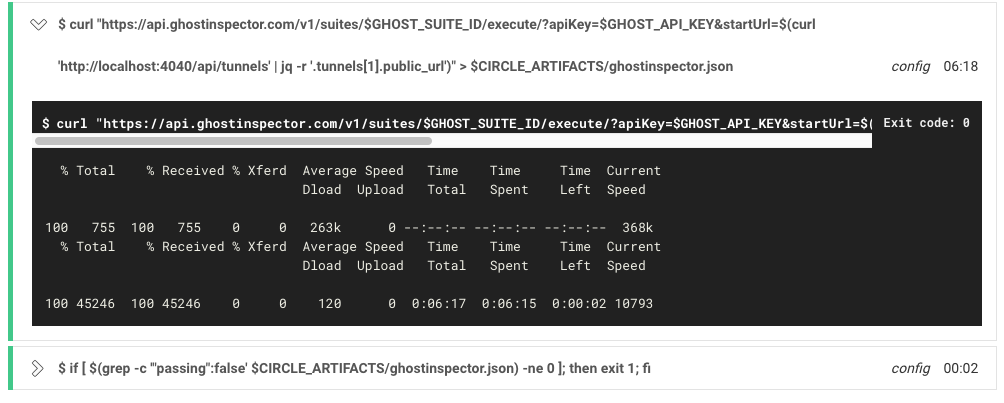
- CI SSHs into remote machine, runs:
- Git pull
- Dependency install
- Database migrate
- Server restart
- CI notifies Slack, server is live
- Total downtime: 0.2s for minor versions, 2s for major.
Existing Project CD with CircleCI and Ghost Inspector

Continuous Integration
Continuous Delivery
Continuous Deployment
Continuous Integration
-
A strategy for how a developer can integrate code into the mainline continuously
- The difference between continuously and frequently is project dependent
- Delivery frequency depends on work unit size
- Continuous delivery prefers small tasks
- Management of integration is obviously VC agnostic
- Often simply a strategy of code management
- Commonly referred to at KG as git flow
Continous Delivery
- An extension of continuous integration
- CD requires CI
- More of a concept than a practice
- Often linked closely with Agile principles
- Concerned with early and frequent delivery
- Focused on delivering value, not code
- Delivery must embrace your "definition of done"
- Similar or synonymous to Continuous Deployment
We will refer to the whole CI/CD/CD ecosystem as Continous Delivery
Continuous Deployment
- As developers, we may think of this as delivery
- Delivery is a concept, deployment is an action
- Involves the process of deploying already integrated code to deliver improved, removed, or modified value
- Usually involves transferring updated source/dist to a remote
- Can be as simple as FTP, or as complex as multi-node delivery using Docker, etc.
- I normally just use a bash script or something more native (Fabric, etc.)
"You never mentioned tests!"
- Testing is concerned with preventing
- Integration of broken code
- Delivery of broken functionality
- Deployment of broken systems
- Tests can be used in every step of the continuous delivery lifecycle
- The CI/CD lifecycle is somewhat agnostic to verification steps
Integration
Build Server
VC

Service Node




Developer
Updates
Notifies
Builds For
Notifies

Service Node
- Good CI is service agnostic
- Service node could be anything. Commonly:
- Build updates (ie. Slack notifications)
- Trigger a deployment process
- Branch changes, revert stable branch, notify developers
Delivery/Deployment
Deploy Server
Deploy Node
Notifies
Executes
Targets
Notifies
Build Server

Deploy Script

Deploy Node
- Good CD is deploy target agnostic
- Deploy node could be anything. Commonly:
- AWS EC2 CodeDeploy to remote
- .NET WebDeploy/FTP to remote
- Heroku deploy
- Docker Trusted Registry update
- SSH deploy to remote
- Various server commands (restart, migrate, etc.)
- Artifact storage

Delivery/Deployment
CI
CD
Note: Build/Deploy server are often the same
Verification
CI
CD
Code Review
Unit/Integration Tests
X
- Verification steps intercept during certain points
- Stop the flow of defective code
- Code reviews catch badly written code
Local Unit Tests
Utilizing VC in CD
- KG developers should be familiar with this common GIT Flow model
- Following a similar model is ideal for CI
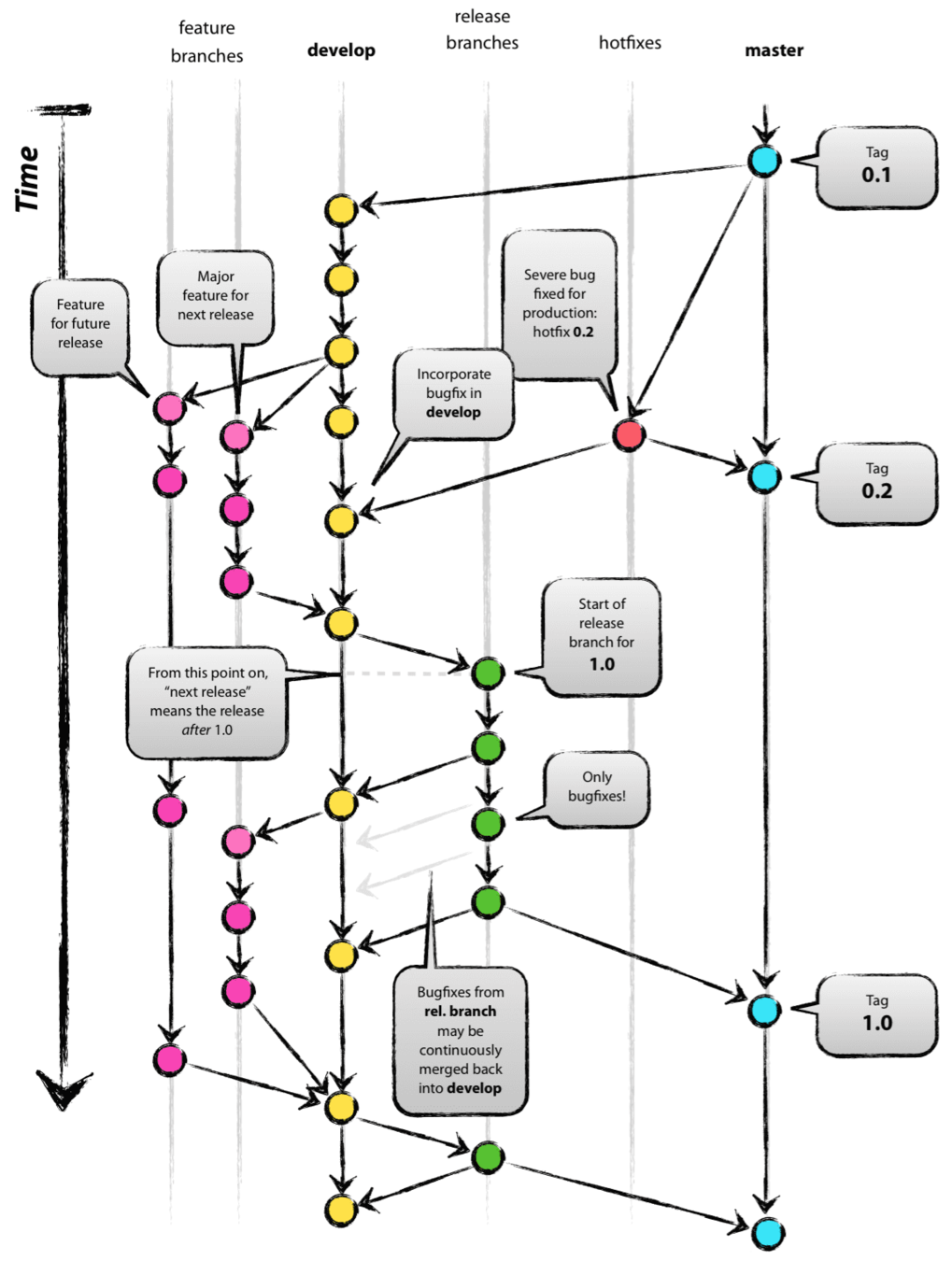
See: http://nvie.com/posts/a-successful-git-branching-model/
Utilizing VC in CD
- Version control can do more than trigger a build
- Use VC to target deployments
- Protected branches can trigger a build/deploy to a server
- For example:
| Branch | Deploy Target |
|---|---|
| develop | Dev server |
| stage | Staging server |
| master or release/* | Production server |

Utilizing VC in CI/CD
- Proper git flow helps manage automated CD
- Release branches can be targeted for production
- Feature branches stop deployments while features are incomplete
- Code reviews can ensure quality of code
- Note: builds should occur on every remote update
- Deploys can be either manually or triggered by certain branches
Utilizing VC in CI/CD
- Use of automated production deploys is highly contested
- I've been doing it for years
- Use of automated develop and staging deploys should not be
- Saves time
- Decreases frequency of human error
- Speeds up delivery process
- Ensures that VC contains all information necessary to replicate project state
Choosing a CI provider
- Price often calculated per project, build, or concurrent container
- Need to consider (per project):
- Price
- Environment/OS support
- Concurrency support
- Configuration style
- Built-in deployment options
- Opinion: Prefer providers that offer configuration via some sort of script (commonly YAML)
Configuring CD
- Set up SSH keys for GIT/remote access
- Usually done within CD provider settings
- Always avoid using passwords for production environments
Configuring CD
- Teach build server how to build and run the code
- Install dependencies
- Load fixtures, migrate database
- Fixtures are incredibly useful and should be used to isolate integration tests
- A good configuration allows the build server to expose a working application
Configuring CD
- Teach build server how to run tests and verify
- Unit tests are great, but we have a working application
- Integration tests are better here
- ie. Protractor, Ghost Inspector, etc.
- Can use something like ngrok to expose the application to a third party
Configuring CD
- Teach build server how to deploy. This often includes:
- A bash script or something similar
- An automated deploy task for a service like Heroku or AWS EC2
- A health check or simple request to ensure the application updated properly
Configuring CD
- CD can be configured in a web GUI in almost all cases
- It is ideal to configure CD in a file whenever possible
- If you check out an older version, you can also check out the old build process
- Two people can work at the same time on branches that have different build requirements
- DR can be automated more easily
CD Integration Tests
- Example time!
- In-build integration tests
Example Configuration
machine:
  python:
    version: 2.7.10
  node:
    version: 6.2.0
dependencies:
  pre:
    - npm install -g gulp
    - cd app/client; npm install
test:
    post:
        # Load fixtures
        - app/entry.js loaddata testdata.json

        # Run tests
        - npm test
deployment:
  staging:
    branch: dev
    commands:
      - ssh web@dev.website.com "cd app; git checkout dev; git pull origin dev;"
      - ssh web@dev.website.com "cd app; ./install.sh; sudo systemctl restart server;"
  production:
    branch: master
    commands:
      - ssh web@website.com "cd app; git checkout master; git pull origin master;"
      - ssh web@website.com "cd app; ./install.sh; sudo systemctl restart server;"
Example Integration Tests
...
test:
    post:
        # Load fixtures
        - app/entry.js loaddata testdata.json

        # Run tests
        - npm test

        # Start our application
        - app/entry.js runserver 8000 --insecure

        # Download ngrok and open tunnel to our application
        - wget https://bin.equinox.io/a/6xUGYveZLH7/ngrok-2.0.9-linux-amd64.zip
        - unzip ngrok-2.0.9-linux-amd64.zip
        - ./ngrok authtoken $NGROK_TOKEN
        - ./ngrok http 8000

        # Download json parser for determining ngrok tunnel
        - wget http://stedolan.github.io/jq/download/linux64/jq
        - chmod +x jq

        # Execute Ghost Inspector tests using the ngrok tunnel
        - curl "https://api.ghostinspector.com/v1/suites/$GHOST_SUITE_ID/execute/?apiKey=$GHOST_API_KEY&startUrl=$(curl 'http://localhost:4040/api/tunnels' | jq -r '.tunnels[1].public_url')" > $CIRCLE_ARTIFACTS/ghostinspector.json
        # Exit with a fail status if any tests have failed
        - if [ $(grep -c '"passing":false' $CIRCLE_ARTIFACTS/ghostinspector.json) -ne 0 ]; then exit 1; fi

... etc
Simplifying CD
- The biggest barrier to entry to decent CD is a complicated local setup and build process
- There are often a few commands people need to run
- npm install
- npm install again
- gulp build
- database migrations
- etc.
- Simplify this early with a single application entry point
- Again, something as simple as install.sh
Keeping CD Throughput High
- Keeping CD Throughput high can be difficult
- Dependency install and integration tests can take forever
- Run unit tests as a pre-push hook to decrease failure rates
- Run nightly builds on every branch to identify issues early
- Bamboo and other providers allow you to separate build/deploy segments
Ship it!
CI
By Jamie Counsell