Cloud Infrastructure
super-high-level architecture
Classic Web Infrastructure
- Often monolithic and complex
- Resistant to change due to high risk and laziness
- On-premise systems
- Servers hosted within organization's walls
- Static and unmoving, unable to scale
Cloud Infrastructre
- Modern approach to web infrastructure
- Comprised of many smaller parts
- Each part is often a standalone system
- Infinite possible combinations
- Physically separated concerns
- Increases:
- Scalability
- Reliability
- Availability
- Agility
Common Components
- Database
- Storage
- Load Balancer
- Cache
- Content Delivery Network (CDN)
- Application Server
Everything is a server!
- Database server
- Storage server
- Load Balancer server
- Cache server
- Content Delivery Network (CDN) server
- Application server
- Highly specialized servers
- Under the hood, there's an operating system, hard drive, etc.
Database
- Stores persistent data (think information)
- Two types
- Managed (ex. AWS RDS)
- Unmanaged (configured by hand, more flexible)
- Important considerations
- Backups
- Redundancy
- Distribution/sharding

Storage
- Stores files (think assets)
- Images, videos, sound
- Documents
- Essentially a hard drive in the sky
- Examples:
- Amazon S3
- Azure blob storage
- Used to store assets that users upload
- Profile photos
- Documents, etc.

Why Separate Storage?
- Classic architecture stores all data on the application server
- Connecting cloud resources can often be more work (and higher cost)
- Especially during development
- The main reason we separate is:
- Deal with failure
- Scale efficiently
- Treat servers like cattle rather than pets
Why Separate Storage?

Why Separate Storage?
Why Separate Storage?
v1.1
v1.0
Why Separate Storage?
v1.1
v1.0

Load Balancers
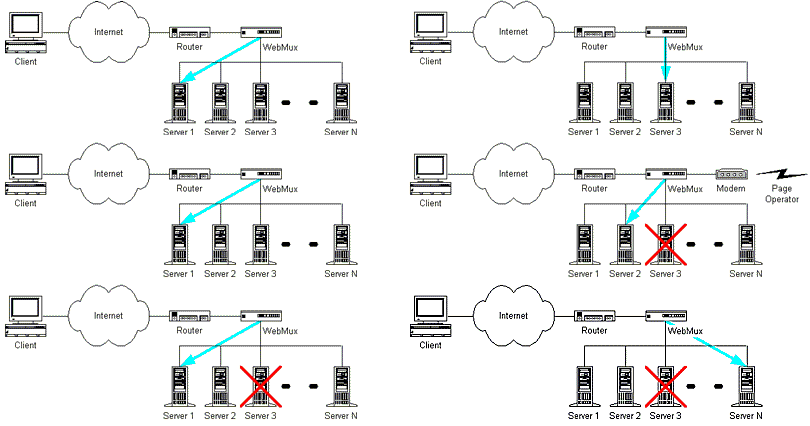
- Splits load from users among many servers
- One single entry point for many servers
- DNS points your www domain name to LB
- The load balancer
- Receives request from user
- Locates server that can handle it
- Sends request to that server
- Communicates response with user
- Can also handle SSL (so application servers don't have to)

Load Balancer Decisions
- Load balancers decide which server to send request to
- Decision methods:
- Round robin
- Fastest average response time
- Least connected
- IP hash (same user, same server)
- Sticky sessions
- Health checks determine if a server is available to handle requests
- False negatives better than false positives
Load Balancer RR
Cache
- Stores information that changes or can change
- Gets information to users faster
- Often sits between the client and server, serving information it has and forwarding requests if it doesn't
- Stops servers from generating the same thing many times
- ex. Homepage is cached for 20 minutes
CDN
- Stores information that rarely changes
- Spreads information across a worldwide network
- Popular for content, but still possible for private content
- ex. Every image has a unique name and is distributed across CDN forever
- Can act as a proxy to simplify deployment (ex. CloudFront)

Application Server
- The brain of the application
- Holds and runs your code
- Handles the actual business logic
- Communicates with other services (email, database, etc.)
- Often deployed in groups for redundancy
- The server (you know, the one that's down)
- Capable of housing most other components inside itself
- Jack of all trades - master of one - the application itself
What users see
request information
retrieve information
Classic Architecture
Server houses:
- Application
- Database
- Cache
- etc.
request
response
www.website.com
- User makes request for page or information directly to server
- Server processes request, retrieves data or cached page, and sends back to user in a response
Classic Architecture with External Database
Server houses:
- Application
- Cache
- etc.
request
response
- Server processes request
- Sends external request to database
- Generates response
- Moves data storage to specialized server
What if we wanted more application servers?
mywebsite.com?
- Load balancer is just a server
- It has an IP, which we point the domain to
- It then passes the request to someone else
- Clients must reach servers by IP
- DNS helps us resolve a hostname to an IP
- Each server has its own IP
- Which IP do we use?
35.45.112.6
35.45.112.7
35.45.112.8
Basic Load Balanced
- User sends request to LB (the middle-man)
- LB finds available server
- Server looks up data in DB (if necesary)
- Server responds to LB, LB passes to user
?
Distributed Database
- Many databases work together
- Some complexities
- How data is updated across each
- Which data is sent to which database
Caching Layer
- Request goes through cache first
- If cache knows the answer, it provides it
- Otherwise, the cache asks the servers
- Much faster than asking application servers
- During failure, cache can still respond
- Will always be stale
- Can handle short downtimes well
Storage
- Cloud-based external hard drive!
- Makes sure all servers have access to file
- Optimized for file delivery
- Browser can also retrieve data directly from it
Full-featured CDN, DNS, DDoS vendors
- The rightmost cloud here can be any of the previous examples
- Like a CDN with more features
- Offers DDoS mitigation options
- Can dynamically change DNS
- direct to closer servers
- avoid servers that are down

Considerations During Design
- Availability
- 100% uptime is impossible
- Don't underestimate time
- Infrastructure can take days or weeks to get set up properly for complex applications
- Update management (Dev Ops)
- Most updates require some downtime - minimize downtime and maximize agility
- Load
- 99% of websites require very little hardware, but when they do, it's a lot
- Security
- DDoS protection, firewalls, etc. protect against attack, which is rare but catastrophic
- Disaster Recovery (DR)
- Roll back databases and systems quickly - how does this impact users?
fin
Web Infrastructure
By Jamie Counsell