IDE/EDITOR
- Sublime Text (version 2.0 stable) (*)
- Notepad++
- Dreamweaver
- Netbeans
- Eclipse (Aptana)
- Visual Studio
Sublime Text
- Light weight
- Free
- Many plugins (Python)
- Easy to use ("Keyboard only"), can... customize anything
- Cross Platform (Windows, iOS, Linux)
- Split Editing
- Suggest for many programing languages
- ... and more :)
- Download: http://www.sublimetext.com/2 (using portable version)
Sublime Plugins (Highlight)
- Package Control
- Emmet
- Trailing Spaces
- HTML Beautify
- Javascript Beautify
- jQuery
- JsMinifier
- Code Formatter
Sublime - Suggestion/Auto Complete
(*) HTML (only after entering a < character)
-
Auto Complete
-
Manually Showing Completions
- Commit on Tab
Tips - General
-
Show the Command Palett: Ctrl+Shift+P
- Deactivate update check: add "update_check": false to user settings
- Using Alt+C to do inline calculations (Super Calculator)
- Using Key Bindings - User to customize keyboard shortcuts
Tips - HTML
-
Find & Multiselect: Ctrl+D
-
Quick select Tag: Expand Selection to Tag (Ctrl+Shift+A)
Tips - Javascript
-
Quick select block (of code): Ctrl+Shift+M
Tips - CSS
-
Type CSS 3 property & TAB to generate Cross-Browser CSS3 Rule
-
Type w<number> & TAB; the same with height;
Notepad++
- Light Weight
- Total free
- Many Plugins
- Only Windows
- Easy to use
- Emmet
Notepad++ - Plugins (Highlight)
- Plugin Manager (*)
-
Explorer
-
Indent By Fold
-
Finger Text
-
HTML Tag
-
NppCalc
- JSMin
(*): Plugin Manager plugin is included in Notepad++ release. Download manual at:
http://www.brotherstone.co.uk/npp/pm/PluginManager_1.0.2_UNI.zip
and unzip to plugins directory
Tips - General
-
Always using UTF-8 without BOM Encoding
-
Using Settings/Preferences/Backup to enable backup. function.
- Using Ctrl+Shift+U Convert to upper case and Ctrl+U Convert to lower case
- Using Folder To Current File of Explorer plugin to quick navigating to current directory of current file.
-
Column Mode Editing: Alt+Mouse-dragging or Alt+Shift+Arrow keys
-
Enter to evaluates the expressions (NppCalc)
Tips - HTML
-
Using
Indent by Fold/Reindent File
to reindent your HTML and
check missing HTML tag
- Ctrl+Shift+T to select whole tag (xml/html) - plugin HTML Tag
Tips - Javascript
- Functional List: Function List Panel is a zone to display all the function (or method) find in current file.

- Using Ctrl+Alt+M to format (JSMinNpp) and Plugins/JSMin/JSMin to minifing whole javascript file
Emmet
-
Emmet (previously known as Zen Coding) is a web-developer’s toolkit that can greatly improve your HTML & CSS workflow.
- Extension/Plugin for many editor/IDE (NetBeans, Eclipse, SublimeText, Notepad++, Coda, Komodo Edit/IDE, Dreamweaver...)
- Abbreviations/CSS Abbreviations
- ...ref: http://docs.emmet.io/
Abbreviations
-
Syntax
-
Element types
-
Implicit tag names
-
“Lorem Ipsum” generator
CSS Abbreviations
-
Vendor prefixes
-
Gradients
- Fuzzy search
Actions KEYMAP (SUBLIME)
-
Expand Abbreviation: ctrl+e/tab
-
Match Tag Pair: ctrl+alt+j
-
Go to Matching Pair: -
-
Wrap with Abbreviation: shift+ctrl+g
-
Go to Edit Point: ctrl+alt+left (prev); ctrl+alt+right (next)
-
Select Item: shift+ctrl+. (next); shift+ctrl+, (prev);
-
Toggle Comment: ctrl+shift+forward_slash ("/")
-
Split/Join Tag: shift+ctrl+`
-
Remove Tag: shift+ctrl+;
-
Merge Lines: -
-
Update Image Size: ctrl+u
-
Evaluate Math Expression: shift+ctrl+y
- Increment/Decrement Number: alt+up/down
- Reflect CSS Value: shift+ctrl+r
-
Encode/Decode Image to data:URL: ctrl+'
REVISION CONTROL
VERSION CONTROL/SOURCE CONTROL
-
GIT (*
)
- SVN
-
VCS
(*): http://en.wikipedia.org/wiki/Git_(software)
About Resource Management & Version control
-
Local Version Control (db stored in pc)
-
Celtralized version control systems (cvcss, included cvs, subversion, perforce (?)) have single server that contains all the versioned files.
-
Distributed version control systems (dvcss: git, mercurial, bazaar, darcs) fully mirror the repository, Every checkout is really a full backup of all the data.
Git - History
-
Git was initially designed and developed by
Linus Torvalds
for
Linux kernel
development in 2005
-
Many developers of the
Linux kernel chose to give up access to BitKeeper
-
The copyright holder of BitKeeper, Larry McVoy, had
withdrawn free use of the product
-
Torvalds wanted a distributed system
that he could use
like BitKeeper
Git - The Goals
-
Speed
-
Simple design
-
Strong support for non-linear development (thousands of parallel branches)
-
Fully distributed
- Able to handle large projects like the Linux kernel effeciently (speed and data size)
Git - Install
Downloading resource:
-
MsysGit: https://code.google.com/p/msysgit/downloads/list (using portable version)
- Tortoisegit (for interface - is a port of Tortoise SVN for GIT): https://code.google.com/p/tortoisegit/wiki/Download?tm=2
Configurating for TortoiseGit:
- Uncompress MsysGit
- Install TortoiseGit
- Set Git path (pointing to MsysGit)
- Setup SSH key (for future using)
Git - Operations (wiki)
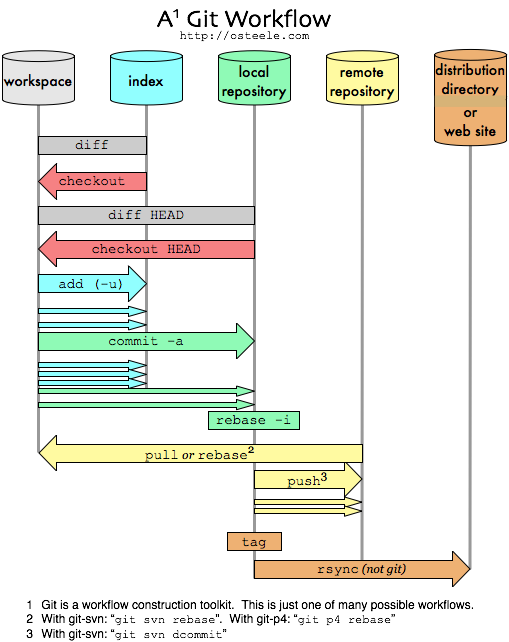
Git - Working with Tortoise Git
Functions:
-
Git Clone: initialize a new one from an existing resource
-
Git Create repository: create a new resource
-
Pull: get resource from a host (Ex: GitHub)
-
Fetch: get but not merge with staging
-
Push: upload resource to a host
-
Diff: compare a file for differences.
-
Show log: commit history
-
Repo browser: browsing the repository
- Rebase: restore from version
-
Resolve: mark file in conflict state is now resolve
Git - Status
-
Committed
-
Modified
- Staged (“Changed but not updated” that is, unstaged).
- Conflict/Resolved
development tool
By jhjh