test
CONTENTS
-
HTML5 (Syntax, Semantic Elements, Attributes)
-
CSS3 - Effects (Animation, Transform, Transition)
-
Frameworks for Mobile
-
Problems/Notes
-
Canvas
HTML5 Features
Troll: http://www.w3schools.com/html/html5_intro.asp
SYNTAX
-
HTML5 does not have the same syntax rules as XHTML
-
HTML5 is flexibility and support the followings:
- Uppercase tag names.
- Quotes are optional for attributes.
- Attribute values are optional.
- Closing empty elements are optional
Example
| 1 |
<!
DOCTYPE html
>
|
| 2 |
<
html
>
|
| 3 |
<
head
>
|
| 4 |
<
meta
charset
=
"
UTF-8
"
>
|
| 5 |
<
title
>
Title of the document
</
title
>
|
| 6 |
</
head
>
|
| 7 |
<
body
>
|
| 8 |
Content of the document......
|
| 9 |
</
body
>
|
| 10 |
</
html
>
|
Document structure
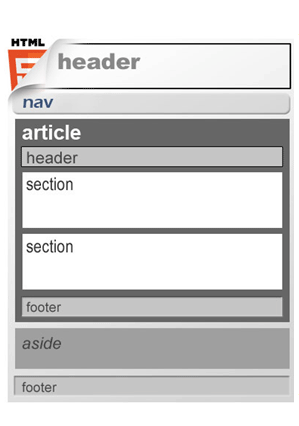
HTML4
| 1 |
<body>
|
| 2 |
<div id="header">...</div>
|
| 3 |
<div id="nav">...</div>
|
| 4 |
<div class="article">
|
| 5 |
<div class="Header">...</div>
|
| 6 |
<div class="section"><p>...</p></div>
|
| 7 |
<div class="section"><p>...</p></div>
|
| 8 |
<div class="footer">...</div>
|
| 9 |
</div>
|
| 10 |
<div class="aside">...</div>
|
| 11 |
<div id="footer">...</div>
|
| 12 |
</body>
|
HTML5 Semantic Elements
| 1 |
<
body
>
|
| 2 |
<
header
>
...
</
header
>
|
| 3 |
<
nav
>
...
</
nav
>
|
| 4 |
<
article
>
|
| 5 |
<
header
>
...
</
header
>
|
| 6 |
<
section
>
<
p
>
...
</
p
>
</
section
>
|
| 7 |
<
section
>
<
p
>
...
</
p
>
</
section
>
|
| 8 |
<
footer
>
...
</
footer
>
|
| 9 |
</
article
>
|
| 10 |
<
aside
>
...
</
aside
>
|
| 11 |
<
footer
>
...
</
footer
>
|
| 12 |
</
body
>
|
HTML5 Semantic Elements...
- <header>...</header>: defines a header for a document or section.
- <section> ... </section>: defines a generic document or application section.
- <article>...</article>: defines an independent piece of content of a document.
- <aside>...</aside>: defines a piece of content that is only slightly related to the rest of the page.
- <footer>...</footer>: defines a footer for a document or section.
- <nav>...</nav>: defines a set of navigation links.
- <figure>...</figure>: used to associate a caption together with some embedded content, such as a graphic or video.
-
<figcaption>...</figcaption>: defines a caption for a <figure> element
HTML5 SEMANTIC ELEMENTS...
(I have a date on . / We open at every morning.)
HTML5 SEMANTIC ELEMENTS...
Title
HTML
By jhjh