CSS Specificity
Fix !important
Why using Important!
- CSS not work
- Selector overwritten by another
- Use !important to force it to work
Important! can help but
- Overwritten with another Element anytime
- Difficult to take care in long term
What is CSS SPECIFICITY
- Choose CSS Selector that has "the most power" using with Element
CSS SPECIFICITY
.box{} = 10
#redbox{} = 100
<div class="box" id="redbox">

.box { background: white; }
#redbox { background: red; }
<div class="box">
<a href="#">Hello</a>
</div>
a { color: blue; }
.box a { color: red; }
Hello
.box{} = 10
.box a{} = 11
How to calculate POWER
- Put CSS in Element +1000P
- Put 1 ID +100P
- Put 1 Class +10P
- Put 1 Element (HTML tag) +1P
#box {}
.box {}
div {}
<a style="color: red">
Example
div a {} = 2P
.box a {} = 11P
div h1 a span = 4P
.page h1 a = 12P
If powers are equal , Select the last one.
Tips
- Avoid to use #ID
- Do not write selector overlap unnecessarily
Makes more different between selector
.box-inside {} better than .box .box-inside {}
but .box .box-inside {} use when .box-inside {} not work
Tips
- Do not specific to write single layer selector
- Always use Class
.box {} better than div.box {}
but div.box {} use when .box {} not work
Easy to overwrite and reuse
TIPS
Tips 1 Use ID but less power
#box {} +100P
[id="box"] {} +10P
Tips 2 Add power but not overlap
.button { } +10P , page a {} +11P
.button.button {} +20P , .page a {} +11P
<div class="page">
    <div class="button">
        <a href="#">Click</a>
    </div>
</div>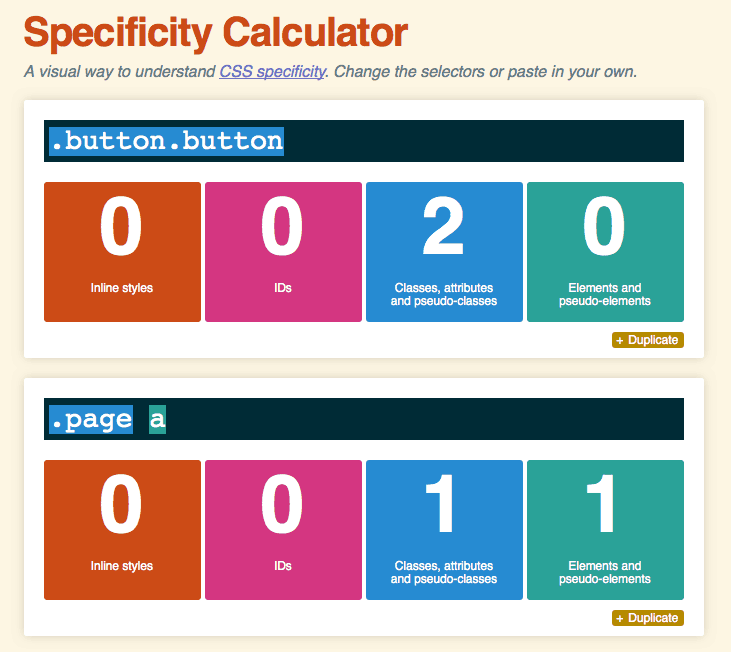
CSS Specificity Fix !important
By Jiratha Laothong