A Guide to Sharing

<meta property="og:url" content="http://www.nytimes.com/when-great-minds-dont-think-alike.html"/><meta property="og:type" content="article"/><meta property="og:title" content="When Great Minds Don’t Think Alike"/><meta property="og:description" content="How much does culture influence creative thinking?"/><meta property="og:image" content="http://static01.nyt.com/images/19iht.jpg"/>The canonical URL for your page.
The title of your article without any branding such as your site name.
A brief description of the content, usually between 2 and 4 sentences.
The name of your website (such as IMDb, not imdb.com).
The URL of the image that appears when someone shares the content.
In order to use Facebook Domain Insights you must add the app ID to your page. Domain Insights lets you view analytics for traffic to your site from Facebook. Find the app ID in your App Dashboard.
og:urlog:titleog:descriptionog:site_nameog:imageog:app_idBASIC TAG
You may also want to add two additional tags to improve distribution of your content and more engagement:
The type of media of your content. This tag impacts how your content shows up in News Feed. If you don't specify a type, the default is website. Each URL should be a single object, so multiple og:type values are not possible. Find the full list of object types in our Object Types Reference
The locale of the resource. Defaults to en_US. You can also use og:locale:alternate if you have other available language translations available. Learn about the locales we support in our documentation on localization.
og:typeog:locateTEST YOUR MARKUP

You can test your markup by passing a URL through the URL Debugger. This will show the tags the crawler scraped as well as any errors or warnings.
MEDIA CONTENT TYPES
You can add additional markup if your content includes audio, video, or location information. See all standard object properties in our Object Types Reference.
VIDEO
Use a secure URL for both the og:video:url and og:video:secure_url tags to make your video eligible to play in-line in News Feed.
You can use og:video for all content types. This section describes how to use additional tags to optimize the look of videos on Facebook. Facebook supports both mp4 and Flash videos.

The URL for the video. If you want the video to play in-line in News Feed, you should use the https:// URL if possible.
Equivalent to og:video
Secure URL for the video. Include this even if you set the secure URL in og:video.
MIME type of the video. Either application/x-shockwave-flash orvideo/mp4.
Width of video in pixels. This property is required for videos.
Height of video in pixels. This property is required for videos.
Specify an image for a high quality preview in News Feed
og:videoog:video:urlog:video:source_urlog:video:typeog:video:widthog:heightog:image<meta property="og:site_name" content="YouTube">
<meta property="og:url" content="https://www.youtube.com/watch?v=pzPxhaYQQK8">
<meta property="og:title" content="Ultimate Funny Pug Video Compilation 2013 [HD]">
<meta property="og:image" content="https://i.ytimg.com/vi/pzPxhaYQQK8/maxresdefault.jpg">
<meta property="og:description" content="Cute and funny pug dog videos for you to enjoy! Puppies & Babies
& Kitties OH MY! New videos all the time! Subscribe: https://www.tinyurl.com/funnyplox Follo...">
<meta property="og:type" content="video">
<meta property="og:video:url" content="https://www.youtube.com/embed/pzPxhaYQQK8">
<meta property="og:video:secure_url" content="https://www.youtube.com/embed/pzPxhaYQQK8">
<meta property="og:video:type" content="text/html">
<meta property="og:video:width" content="1280">
<meta property="og:video:height" content="720">
IMAGES
Use this set of properties for content that contains more than one image. See Sharing Best Practicesfor guidance on how best to use og:image.
URL for the image. To update an image after it's been published, use a new URL for the new image. Images are cached based on the URL and won't be updated unless the URL changes.
Equivalent to og:image
MIME type of the image. One of image/jpeg, image/gif orimage/png
https:// URL for the image
Width of image in pixels. Specify height and width for your image to ensure that the image loads properly the first time it's shared.
Height of image in pixels. Specify height and width for your image to ensure that the image loads properly the first time it's shared.
og:imageog:image:urlog:image:secure_urlog:image:typeog:image:widthog:imgage:height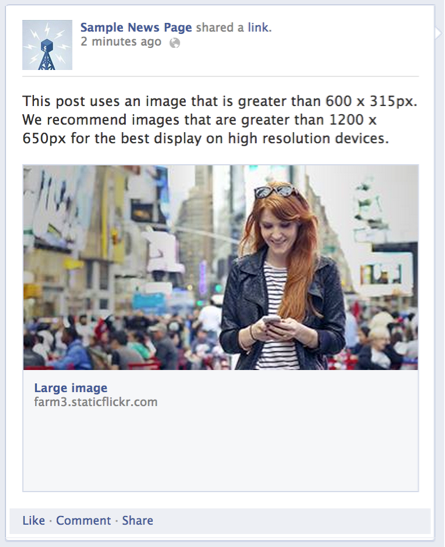
HOW BEST TO USE og:image

IMAGE SIZES
Use images that are at least 1200 x 630 px for the best display on high resolution devices. At the minimum, you should use images that are 600 x 315 px to display link page posts with larger images.
SMALL IMAGE
If your image is smaller than 600 x 315 px, it will still display in the link page post, but the size will be much smaller.
MINIMUM IMAGE SIZE
The minimum image size is 200 x 200 pixels. If you try to use an image smaller than this you will see an error in the URL Debugger.
Facebook, other - og:
Twitter - twitter:
https://developers.facebook.com/tools/debug/og/object/
https://developers.facebook.com/docs/sharing/webmasters
Reference
A Guide to Sharing
By Jiratha Laothong