Web Components
Jim Cook
Columbus NG Meetup
jcook@transcordia.com
https://github.com/ng-columbus/webcomponents
https://slides.com/oravecz/web-components/live
Are Web Components Ready?
- Browser Support
- Best Practices
- Tooling
- Frameworks
A Meta Specification
- Custom Elements
- HTML Imports
- HTML Templates
- Shadow DOM
Custom Elements
Custom Elements
- Allows the creation of custom HTML elements
- e.g. <my-element></my-element>
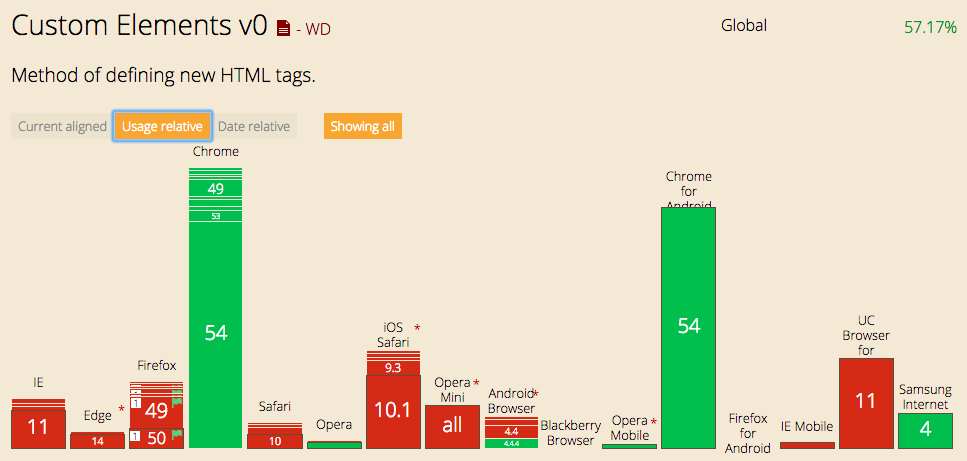
- v0 supported in Chrome 33, February 2014
- v1 supported in Chrome 54, October 2016
Custom Elements v0
Custom Elements v1
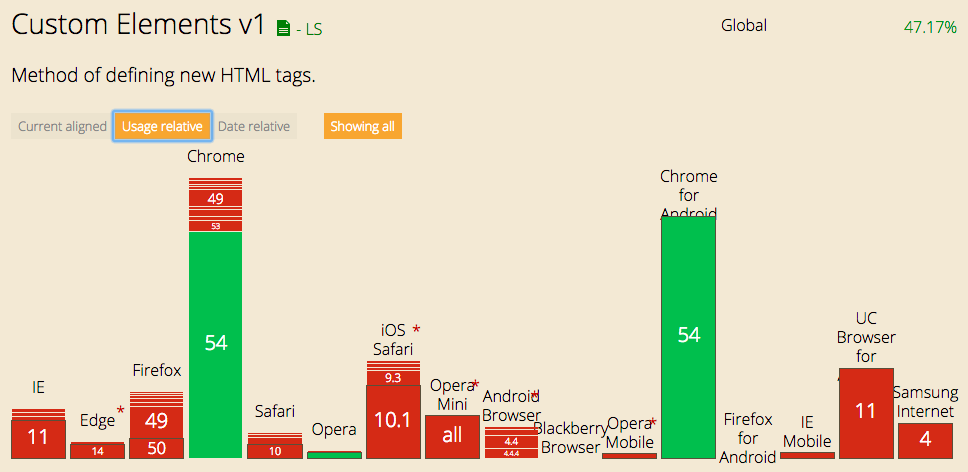
Polyfill Support for v1
- @webcomponents/custom-elements
- 4K gzip (8K minified)
- Supports Firefox, Safari, Edge and IE11
Class Methods
-
constructor()
Called when the element is created or upgraded -
connectedCallback()
Called when the element is inserted into a document, including into a shadow tree
-
disconnectedCallback()
Called when the element is removed from a document
-
attributeChangedCallback(attrName, oldV, newV, ns)
Called when an attribute is changed, appended, removed, or replaced on the element. Only called for observed attributes.
-
adoptedCallback(oldDocument, newDocument)
Called when the element is adopted into a new document
Demo
Custom Elements
Custom Elements++
- Create a new web component
- Using only JavaScript
- Native support in Chrome
- All browsers pledging support in 2017
- Small 4K polyfill for non-Chrome browsers until then
Custom Elements--
- Very manual process
- Styles applied globally
Shadow DOM
Shadow DOM
- The web page consists of a single DOM tree
- Any component can be a container for a new DOM sub-tree called a Shadow DOM
- Shadow DOM creates an encapsulation layer
- CSS styles declared in Shadow DOM only apply to the DOM elements within
- Element references and id values are specific to the shadow DOM
- document.getQuerySelector() in the app will not find elements in the Shadow DOM
- Shadow DOM can be open or closed
Shadow DOM Native
- Chrome
- v0 since Chrome 25 (Jan 2013)
- v1 since Chrome 53 (Aug 2016)
- Safari
- v0 since Safari 10 (Sep 2016)
- v1 since Safari 10 (Sep 2016)
- Firefox
- v0 since FF 29 (Apr 2014)
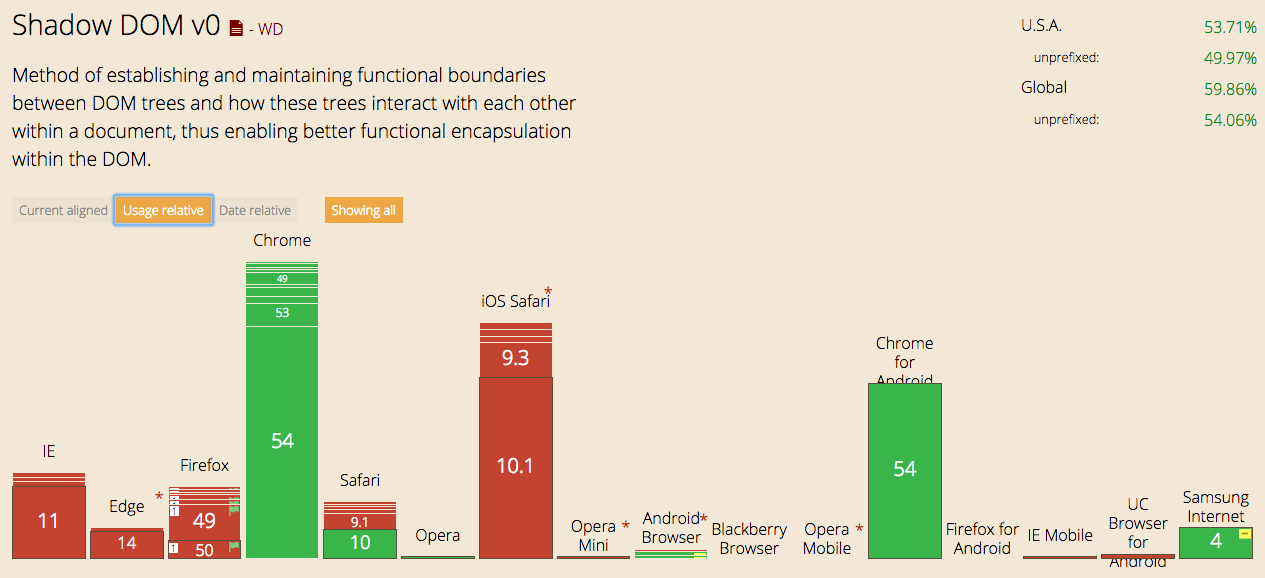
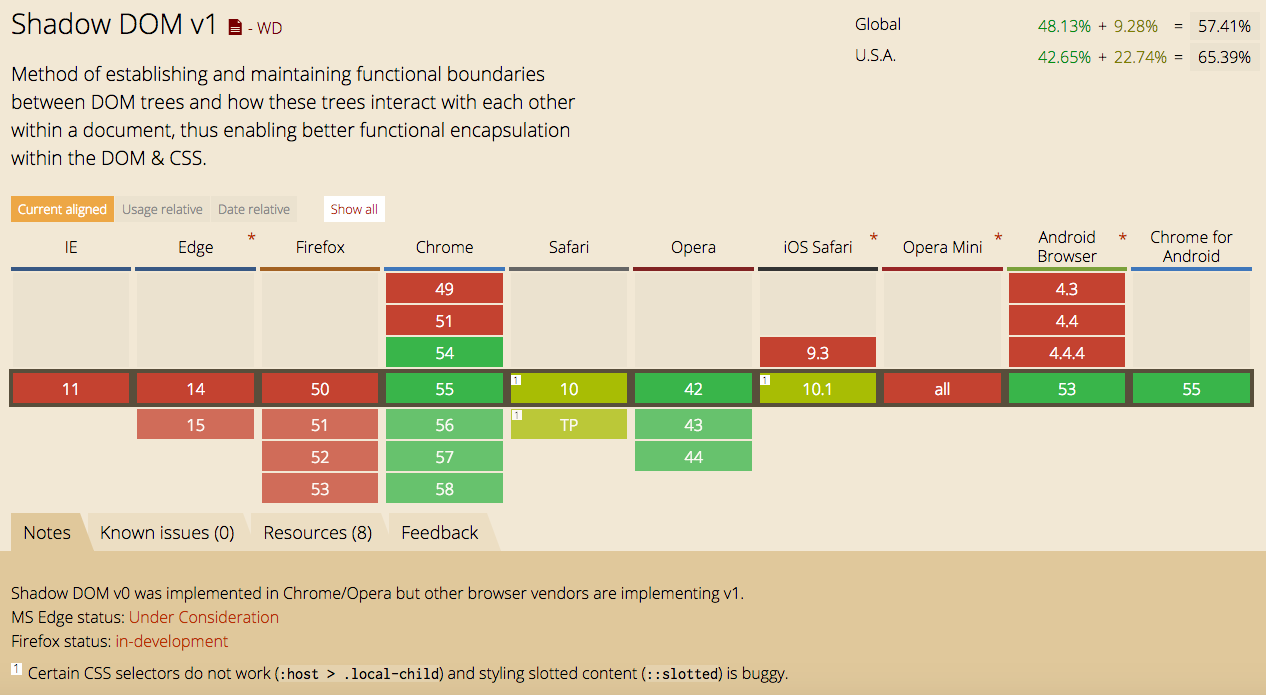
Polyfills for Shadow DOM
- @webcomponents/shadydom
- 12K gzip (26K minified)
- Supports Firefox and Edge/IE11
HTML Templates
HTML Templates
- Defines HTML content that is parsed but not rendered
- No support for data or event binding; all of that is manual
- Can contain Javascript, CSS and HTML
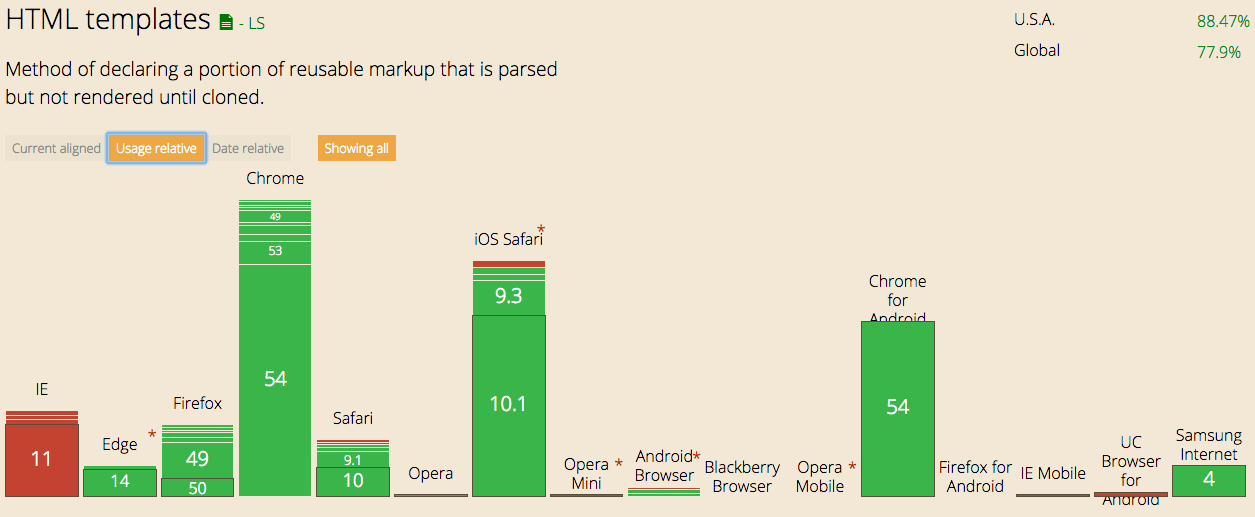
Polyfill Support for HTML Templates
- webcomponents/template
- 4K gzip (12K unminified)
- Supports IE11
Demo
HTML Templates
Are Templates Worth It?
- No data binding, no events
- No virtual DOM support (bad thing?)
- Can encapsulate CSS and scripts (actually, most DOM elements are supported)
- Convenient with complex components using a lot of composition
- Plays nice with Shadow DOM
HTML Imports
HTML Imports
- Provide standard way to load HTML
- Allows dependencies amongst layers of HTML
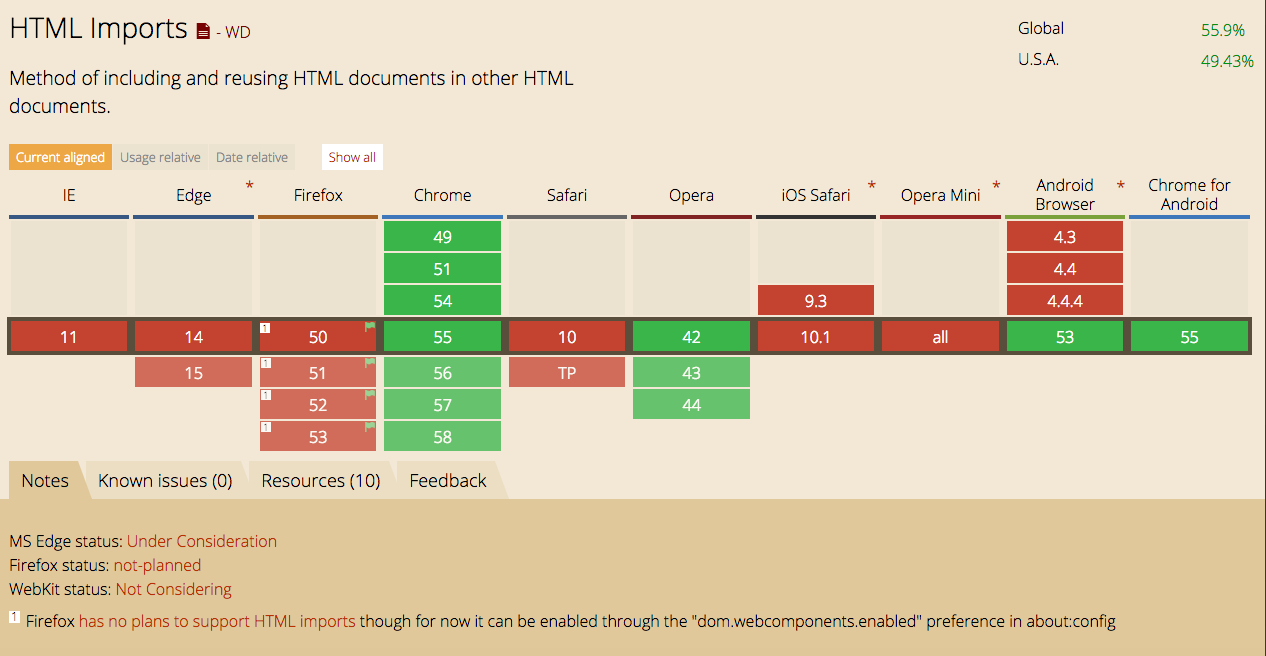
Polyfill Support for
HTML Imports
- @webcomponents/html-imports
- 4K gzip (8K minified)
- Supports Firefox, Safari, Edge and IE11
- Work in Progress
- Also included as part of webcomponents.js in the meantime
HTML Imports
Demo
HTML Imports
- A simple abstraction can provide code that works with and without polyfills
- Apple (Safari) has said they will not implement
- Mozilla (Firefox) has said they will not implement
- Polyfill is not as efficient as native support
- Perhaps we have to wait longer for this to be standardized
Web Component Ecosystem
The Polyfills
- Produced by the Google Polymer team
- webcomponents-lite.min.js (16k gzip)
- Custom Elements, HTML Imports
- webcomponents.min.js (36k gzip)
- Lite + Shadow DOM
- v1 Polyfills now available (in various states)
- HTML Imports (3.1k gzip)
- ShadyDOM (10.2k gzip)
- ShadyCSS (9.0k gzip)
- Custom Elements (2.6k gzip)
- Total - 25k gzip
Tooling
- Polymer
- X-Tag
- SkateJS
Polymer
- Built and supported by Google
- Version 1.7.1, 2.0 in the works
- Has its own Summit
- Crossed the line from component library to platform
- Has its own binding language for templates
- No virtual DOM support
- 49.6k gzip, 86k with polyfills (v0)
X-Tag
- Originated in Mozilla, Now in Microsoft
- Not much of a community
- No template assistance
- 5k gzip, 20k gzip with polyfills
SkateJS
- One man project - Trey Shugart
- Pretty active development
- Tries to do the least possible to make web components supported across all browsers (IE11)
- Provides its own template API, leverages Google's incremental DOM (very nice actually)
- 4K + 8K gzip, 48k with polyfills (v1)
Vulcanize
- Build tool similar to Webpack/Rjs but for HTML Imports
- Result is an uber HTML import
Thanks
- https://github.com/ng-columbus/webcomponents
- https://github.com/skatejs/skatejs
- https://github.com/x-tag/core
- https://github.com/Polymer/polymer
- https://developers.google.com/web/fundamentals/getting-started/primers/shadowdom
- https://developers.google.com/web/fundamentals/getting-started/primers/customelements
- https://www.html5rocks.com/en/tutorials/webcomponents/template/
- https://www.html5rocks.com/en/tutorials/webcomponents/imports/
Jim Cook
Columbus NG Meetup
jcook@transcordia.com
Web Components
By James Cook