Key Benefits
- Software Version Management
- It works on my Computer but not yours
- It works on my Computer but not yours
- Clean and Fast Installation on software
- scenario: getting started with Redis
- scenario: getting started with Redis
- Ease of Deployment from one env to another
Docker Containers
Consistent way to Start and Build
- Contain its own process space
- Own network interface
- Private directories
- Entire Environment is sandboxed
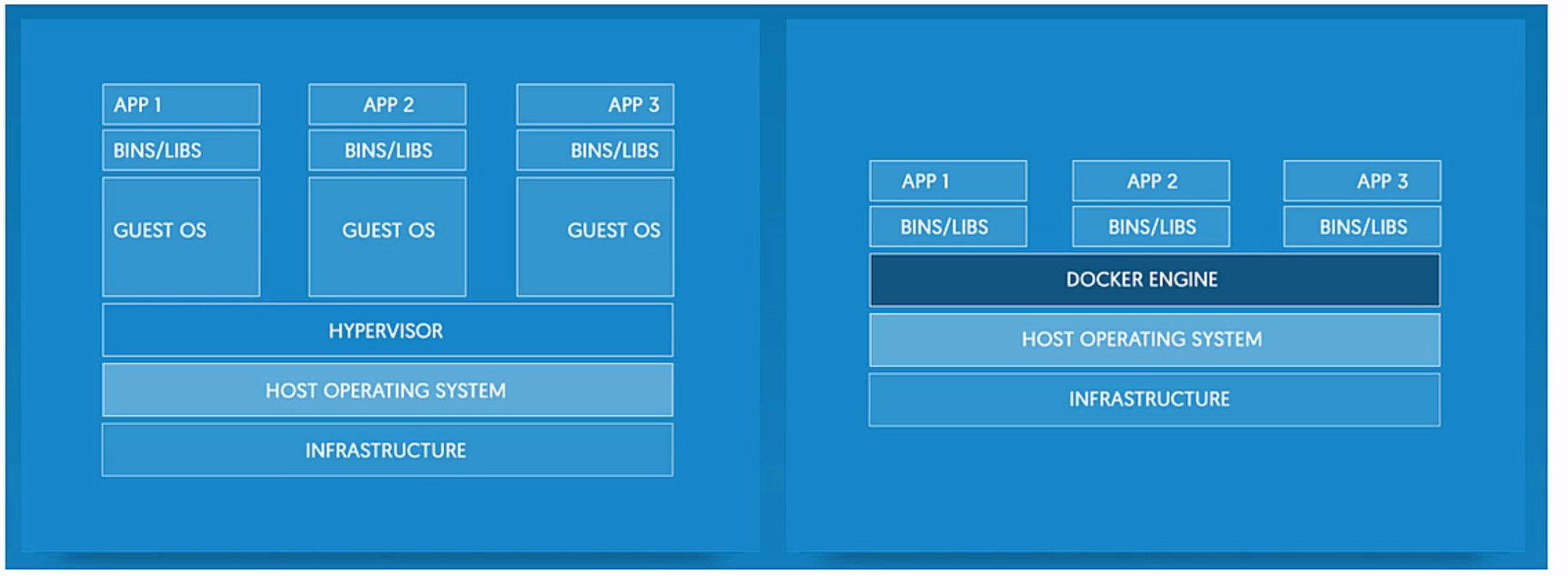
Sounds very identical to VM! But docker is much lighter
Docker Image
Blue Print to create a Docker Container
- A Docker Image is a layer of other docker images.
- Efficient, one layer can be share across multiple container.
- ubuntu is use as base image, one image of ubuntu is used across 4 different containers.
- Docker Image is immutable, once build, it cannot be changed. If changes are made, you will get a new image as a result.
Docker Image
Popular command
- docker pull [image name]
- pull redis, dotnet, node, etc...
- docker run [image name]
- run the image you pulled
- docker images
- list all the images
- docker ps
- list all containers
- docker
- show all available command
Container Volume
Persisting Data within Container
- Read/Write Layer in a container directory
- Multiple container can share the same directory
- Volume are persisted after container is gone
- The volume are located in the host OS, can be mapped with -v [host dir]:[container dir]
- you can inspect the container with docker inspect
docker run -v ${pwd}:/var/www [image name]Tools
- Docker Client: interface that Interact with daemon
- Docker Daemon: the engine powering Docker
- Docker Compose:
- VSCode Docker Integration
Docker Image
Blueprint to create a docker container
- Immutable
- Overlay on top of another Image(s)
OS level Virtualization
Text
deck
By ringo kam