


Player-Computer Interaction
USER STUDIES
UNIT 5:
Prof. Dr. Eike Langbehn
Department of Media Technology
Faculty of Design, Media and Information
Hamburg University of Applied Sciences


SECTION NAME
EXAMPLES
UNIT 2:
AGENDA
PLAYER-COMPUTER INTERACTION
UNIT 5: USER STUDIES
1. INTRO
2. REQUIREMENT
ANALYSIS
3. GAME
DESIGN
0. ORGANIZATION
4. GETTING STARTED
WITH GODOT
5. USER
STUDIES
6. ANALYSIS OF
HUMAN FACTORS
7. INTERACTION
DESIGN
8. ADVANCED PROGRAMMING
WITH GODOT
9. EVALUATION
MODELS
10. MARKET
ANALYSIS
11. NARRATIVE
DESIGN
12. GAME ENGINE
ARCHITECTURE
LEARNING outcomes
- Knowledge about different methods of evaluation
- Understanding how to design and analyze user studies
PLAYER-COMPUTER INTERACTION
UNIT 5: USER STUDIES
Usability
PLAYER-COMPUTER INTERACTION
UNIT 5: USER STUDIES
Usability refers to the effectiveness, efficiency and satisfaction with which specified users achieve specified goals in particular environments.
- Learnability: How fast can users learn working with a certain interface and how easy is it for them to do more or less complex tasks when working with the interface for the very first time?
- Efficiency: How fast are users in accomplishing different tasks once they have internalized the functionality of the interface design?
- Errors: Do users make many errors when working with the interface? Are those severe errors and can they easily cope with them?
- Satisfaction: How satisfied are users after working with the interface concerning the time they had to invest? Was the interface pleasant to use?
Hewett et al.: ACM SIGCHI Curricula for Human-Computer Interaction, 2009
usability evaluation
PLAYER-COMPUTER INTERACTION
UNIT 5: USER STUDIES
definition
"Evaluation is the analysis, assessment, and testing of...
- entire UI
- input/output device
- interaction technique"
methods
- Analytical vs Empirical Methods
- Cognitive Walkthrough
- Heuristic Evaluation
- Formative Evaluation
- Summative Evaluation
- Questionnaires
- Interviews and Demos
usability metrics
- System Performance
- frame rate
- latency
- network delay
- Task performance
- speed
- accuracy
- errors
- Subjective Response
- ease of use/learning
- satisfaction
- comfort
categories
- Expert tests
- User tests
- Quantitative tests
- Qualitative tests
J.J. LaViola et al.: 3D User Interfaces: Theory and Practice (Usability and HCI), 2017
decide framework
PLAYER-COMPUTER INTERACTION
UNIT 5: USER STUDIES
-
Determine Goals
- Who wants the evaluation?
- Why should the evaluation be conducted?
- What should be investigated?
-
Explore the Question
- What is the question that the evaluation should answer
- Big questions need to be separated in several smaller ones
-
Choose Evaluation Method
- Which method should be chosen?
- Depends on goals and question
- Often combination of several methods
-
Identify Practical Issues
- Which aspects influence the evaluation?
- Equipment, time, budget, expertise
- Pilot studies essential for correct procedure
-
Decide on Ethical Issues
- Certification of ethics committee necessary?
-
Evaluate
- Analyzing and interpretation of collected data
Y. Rogers et al.: Interaction Design, 2012
classification
PLAYER-COMPUTER INTERACTION
UNIT 5: USER STUDIES
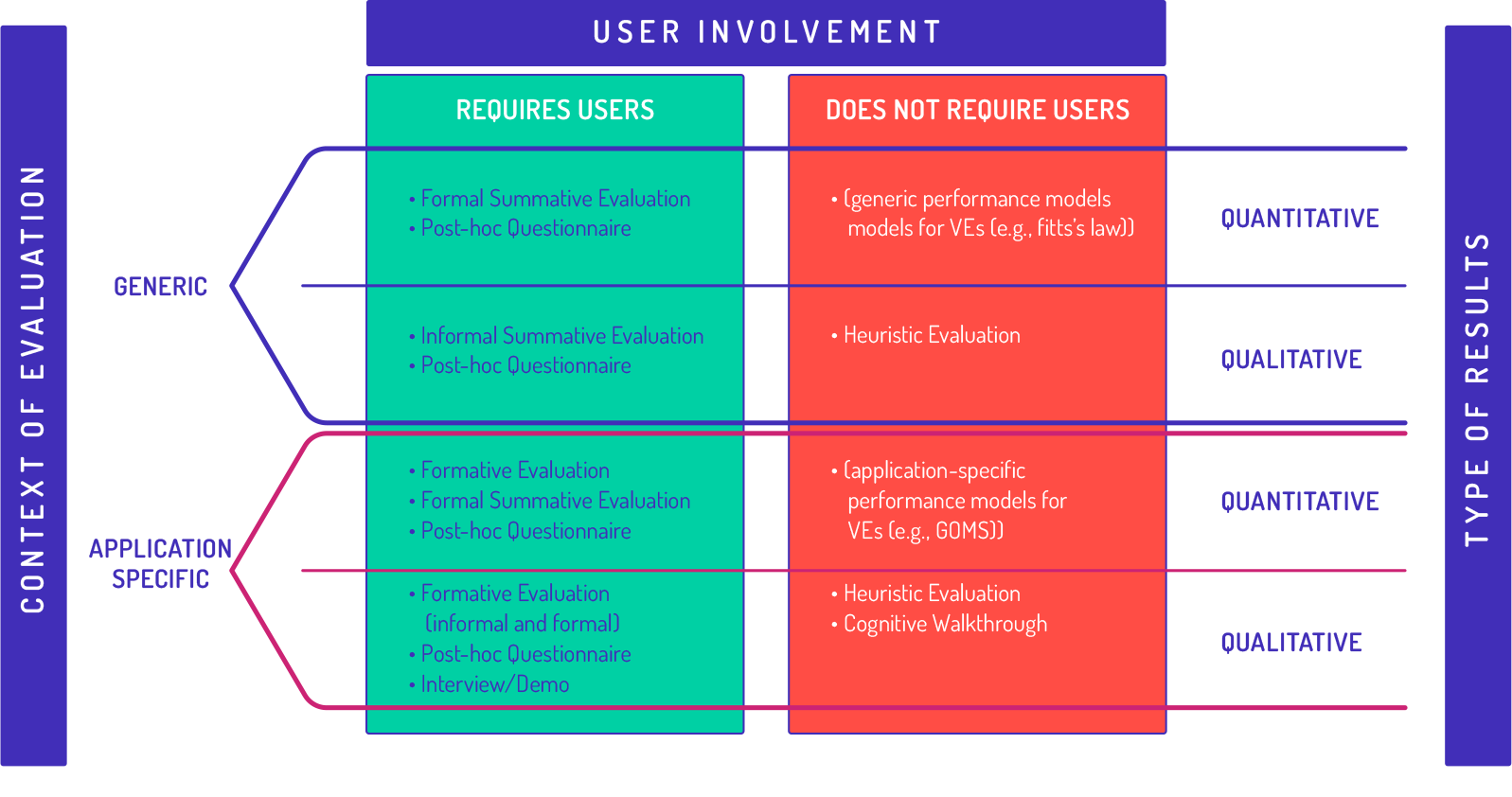
-
Field Study:
scientific observation under natural conditions -
Laboratory study:
scientific method to test hypotheses via experiments
When among a set of observations, any single observation is a word, or a sentence, or a description, or a code that represents a category then the data is qualitative.
When among a set of observations, any single observation is a number that represents an amount or a count, then the data are qualitative,
Witte & Witte: Statistics, 2009
J.J. LaViola et al.: 3D User Interfaces: Theory and Practice (Usability and HCI), 2017
evaluation approach
PLAYER-COMPUTER INTERACTION
UNIT 5: USER STUDIES
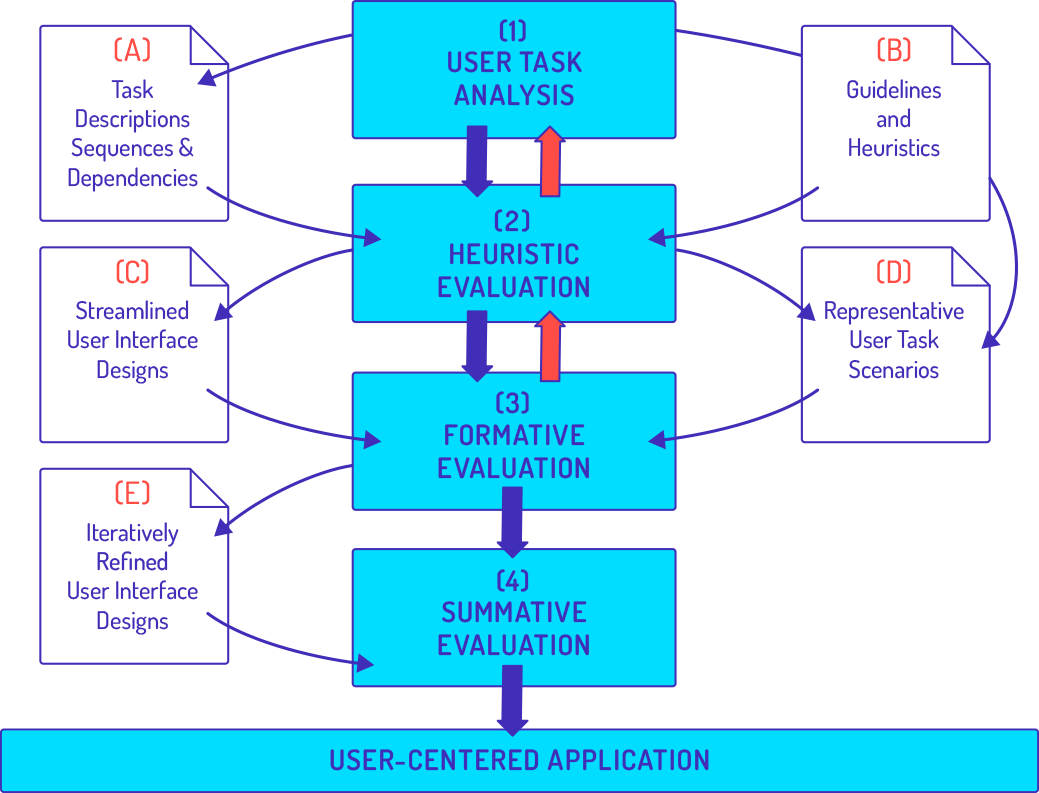
Joseph L. Gabbard, Deborah Hix, and J. Edward Swan, 1999, User-Centered Design and Evaluation of Virtual Environments, IEEE Comput. Graph. Appl. 19, 6(November 1999), 51-59
evaluation guidelines
PLAYER-COMPUTER INTERACTION
UNIT 5: USER STUDIES
General Guidelines
- Begin with informal evaluation
- Choose an evaluation approach that meets your requirements
- Use a wide range of metrics
J.J. LaViola et al.: 3D User Interfaces: Theory and Practice (Usability and HCI), 2017
guidelines for formal experimentation
- Design experiments with general applicability
- Use pilot studies to determine which variables should be tested in the main experiment
- Use automated data collection for system performance and task performance metrics
- Look for interactions between variables - rarely will a single technique be the best in all situations
quantitative analysis
PLAYER-COMPUTER INTERACTION
UNIT 5: USER STUDIES
- Descriptive Statistics
- Minimum, Maximum
- Mean (Sum divided by #responses)
- Standard deviation
- Median (mean value in ordered list)
- Modus (value that occurs most often)
- Example: 0, 1, 1, 1, 3, 4, 4, 6, 10, 10
- Types:
- Explorative study to find hypotheses
- Hypothesis-based study to numerically verify/falsify hypothesis
- There are at least 2 hypotheses in each test:
- (Alternative) Hypothesis: An expected effect of the conditions on the measured values
- Null Hypothesis: Conditions do not have the effect on the measured values
- Goal: Prove hypothesis, reject null hypothesis
- Example:
- Hypothesis: The means of the measured values differ between the conditions
- Null hypothesis: The means are equal
- Statistical test: comparison of means
Statistical Test
- Choose the correct statistical test
- Perform test
- Interpret & present results

| Question 1 | Question 2 | Question 3 | |
|---|---|---|---|
| Participant 1 | ... | ... | ... |
| Participant 2 | ... | ... | ... |
| Participant 3 | ... | ... | ... |
| Participant 4 | ... | ... | ... |
| Participant 5 | ... | ... | ... |
variables
PLAYER-COMPUTER INTERACTION
UNIT 5: USER STUDIES
- Independent variable
- what is being compared (conditions A,B,C ...)
- Dependent variables
- what is being measured
- Scale level describes applicable statistical tests
- 4 scale levels
- Nominal
- no natural order
- Examples: Gender, Profession, dichotomous answers of type "yes/no"
- Ordinal
- with natural order
- Examples: usage ("every day", "once a week", "once a month", ...)
- Interval
- with natural order, equal distances between values, no absolute zero
- Examples: Temperature in degrees celsius
- Ratio
- with natural order, equal distances between values, no absolute zero
- Examples: Income (in Euro), Age (in years), weight, size, length
- Nominal
choose correct statistical test
PLAYER-COMPUTER INTERACTION
UNIT 5: USER STUDIES
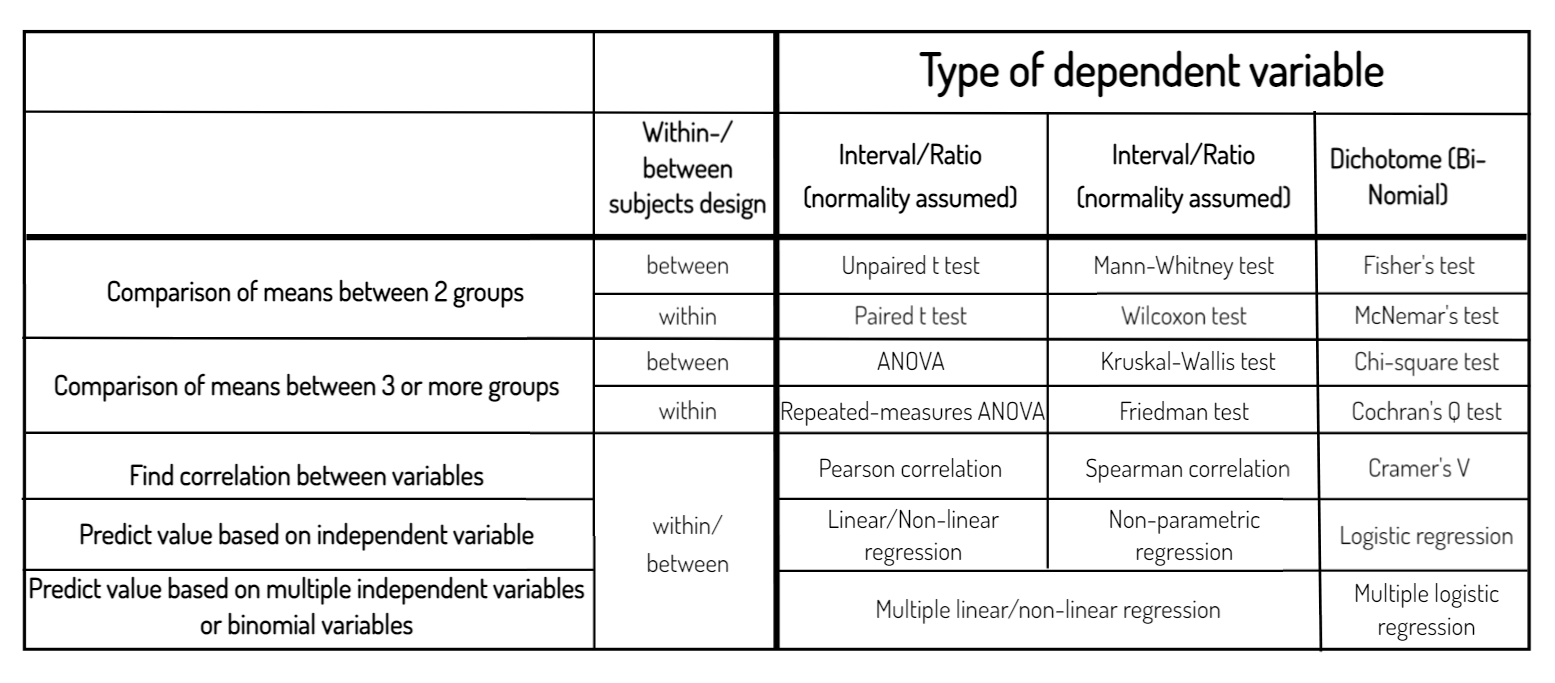
Participants in experiment either do all conditions (within-subjects design) or only a part of the conditions (between-subjects design) or a bit of both (mixed design)
Scale level of variable
Normal distribution
Statistical test


Choose correct statistical test
PLAYER-COMPUTER INTERACTION
UNIT 5: USER STUDIES
Type of dependent variable
Interval/Ratio
(normality assumed)
Interval/Ratio
(normality assumed)
Dichotome (Bi-
Nomial)
Within-/ between subjects design
Comparison of means between 2 groups
Comparison of means between 3 or more groups
Find correlation between variables
Predict value based on independent variable
Predict value based on multiple independent variables or binomial variables
between
within
Unpaired t test
Paired t test
Mann-Whitney test
Wilcoxon test
Fisher's test
McNemar's test
between
within
ANOVA
Kruskal-Wallis test
Chi-square test
Repeated-measures ANOVA
Friedman test
Cochran's Q test
within/
between
Pearson correlation
Spearman correlation
Cramer's V
Linear/Non-linear
regression
Non-parametric
regression
Logistic regression
Multiple linear/non-linear regression
Multiple logistic
regression
Example: experiment
PLAYER-COMPUTER INTERACTION
UNIT 5: USER STUDIES
- Do people interact in 3D faster/slower than in 2D?
- Independent variable: UI (3D interaction or 2D interaction)
- Dependent variable: Time to complete task (in seconds)
- Hypothesis: Mean time to complete task differs between 2D and 3D interaction
- Null hypothesis: Mean time between 2D and 3D is equal
- Within-subjects design: All participants do all conditions
Participant 1
Participant 2
Participant 3
3D
2D
17 sec
12 sec
19 sec
15 sec
13 sec
10 sec
Example: experiment
PLAYER-COMPUTER INTERACTION
UNIT 5: USER STUDIES
> t.test(my_data_3D,my_data_2D,
  paired=TRUE,...)
 Paired t-test
 data: my_data_3D and my_data_2D
 t = 2.4575, df = 9, p-value = 0.01815
Statistics in R
p<.05 then
significant
- Reported as..
"A paired-samples t-test was conducted to compare task completion time between conditions with 3D interaction and 2D interaction. We found a significant difference in the results for 3D interaction (M=16.1,SD=2.1) and 2D interaction (M=12.2,SD=2.2) at the 5% significance level; t(9)=2.4575, p=.018. The results suggest that 2D interaction is faster than 3D interaction."
results
PLAYER-COMPUTER INTERACTION
UNIT 5: USER STUDIES
- Statistical tests say whether significant differences were shown and hypothesis can be accepted (p<.05)
- When p>.05 then no differences were shown (does not mean that there are none, just that we didn't show any)
- There is no "a little bit significant" ;-)
- http://mchankins.wordpress.com/2013/04/21/still-not-significant-2/
- Significant differences do not mean "big" or "important"
- Even small and unimportant differences can be (statistically) significant
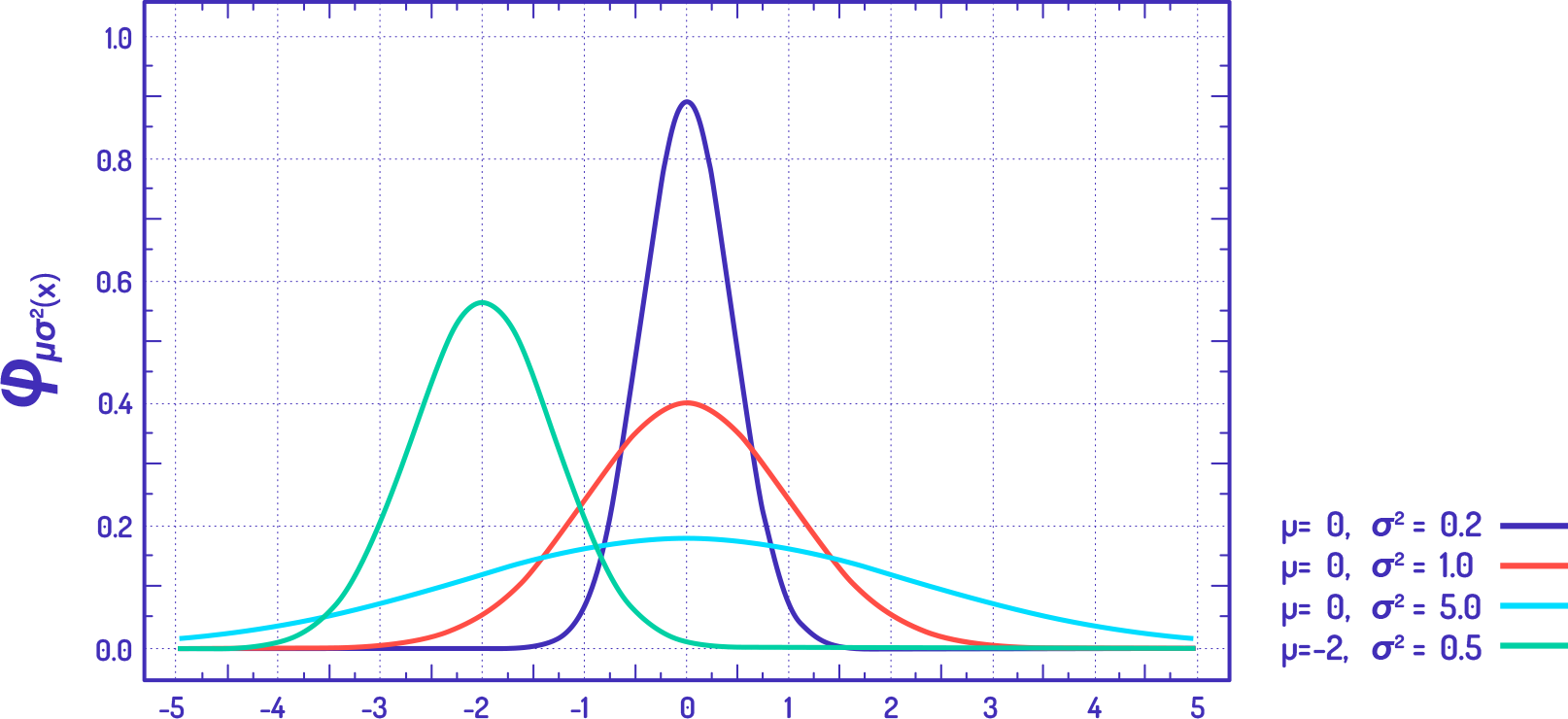
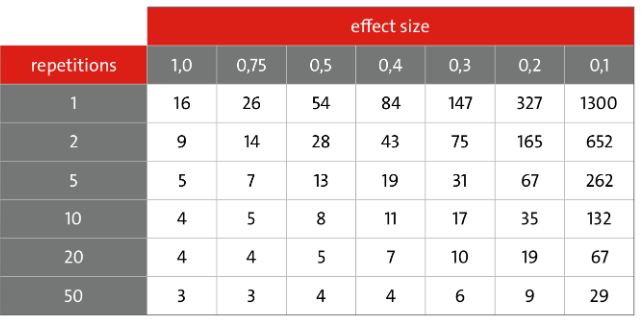
- Effect size (in [0,1] shows how strong the conditions have an effect on the measured values (% of variance that can be explained by differences in conditions)
- Expected effect size implies how many participants we need
- 0 (will never get significant)
- small effect size (many)
- large effect size (few)
effect size
repetitions
Necessary number of participants depending on repetitions and effect size (p = 0.05)
Player-Computer Interaction
The contents of this Open Educational Resource are licensed under the Creative-Commons Attribution 4.0 International license (CC BY 4.0)
Attribution: Eike Langbehn, Anh Sang Tran, Peter Wood
Unit 5 - Final ?
By sangow