Java Tutorial
(slide ver)
https://hackmd.io/@speedcubing/java
You should read this slide along w/ this following files:
講師介紹
Contact info:
- Discord: speedcubing
- IG: speedcubing.top
- Email: cubing@speedcubing.top
- GitHub: TheSpeedCubing
總之以前在 成電 教過同樣的課。
Java Introduction
Java?
咖啡? 咖啡杯?
- 簡單
- 跨平台
- 物件導向 (OOP)
- 程式清晰易懂
- 垃圾蒐集機制 (GC)
缺點?
程式字元數可能有點多
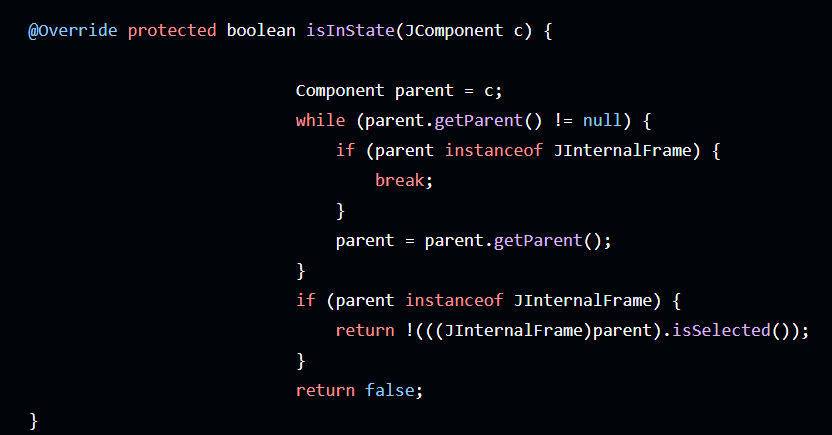
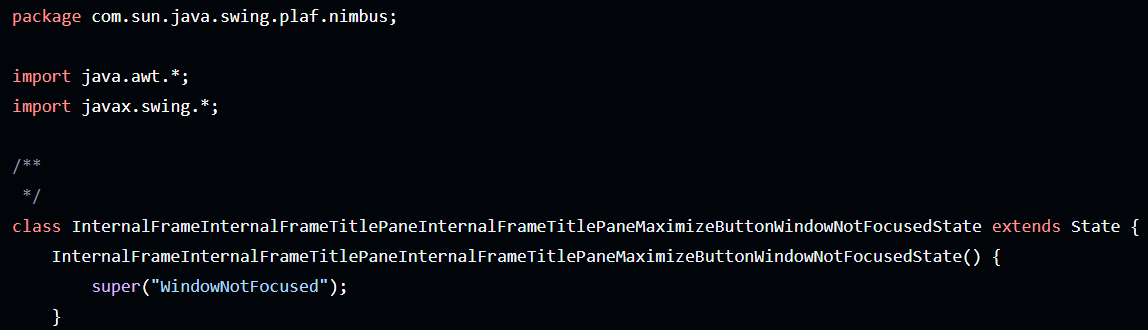
單字都很長?
類別名稱可以取成
InternalFrameInternalFrameTitlePaneInternalFrameTitlePaneMaximizeButtonWindowNotFocusedState
這麼長?!
應用?
Web Backend -> Spring Web
Android Application -> Android Studio
Large Game Development -> Minecraft
Java如何運作?
JDK/JRE/JVM?
-
JDK
Java Development Kit,
包含編譯器、一些編譯工具、Library、JRE
主要目的為開發、把程式碼編譯為bytecode -
JRE
Java Runtime Environment,
Java的執行環境,有了這個就可以執行Java程式 -
JVM
Java Virtual Machine,
執行Java程式的時候, 會建立一個JVM,
把byte code轉成machine code並且執行
編譯 執行
Java程式
JDK
bytecode
JRE
JVM
machine code
可以移植到其他有JRE的環境 ->
建立JVM
單獨一個.java編譯出.class
很多個.java可以編譯出.jar (一大包.class)
只有Java能給JVM跑?
否
Kotlin, Scala, Groovy...
JDK
bytecode
JRE
JVM
machine code
可以移植到其他有JRE的環境 ->
建立JVM
甚至連Python都有社群支援
開發環境
IDE
-
Intellij IDEA -> 首選
-
Eclipse -> 您還好嗎?
-
Visual Studio Code
不要再VS Code了 好嗎?
Text Editor
- Notepad++ ->
這傢伙主張台獨 - Notepad
- Visual Studio Code
- vi
- nano
-
Microsoft Word,nah, not this type of "editor"
能修改檔案的都ok。
Package
重要但是暫時不會碰到
簡單講, 就是組織class/interface的結構,
本質上就是目錄(資料夾)。
妥善的存放class/interface在適當的package能保持組織性。
照這個範例, 我們的專案目錄(java/)有
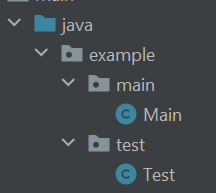
java/
- example/
  - main/
    - Main.java
  - test/
    - Test.java
package example.test;
public class Test {
}
如果說想要在Test中使用不在同個package的Class
需要import <classpath>
package example.test;

import example.main.Main;

public class Test {
    // Main...
}
可以使用*來一次import一個package內所有的Class
package example.test;

import example.main.*;

public class Test {
    // Main...
}
但大家都亂取, 會不會衝突? 會不會找不到別人的程式?
會的。 假設有兩份example.test.Test.java
第二個會無法載入。
怎麼搞?
使用 倒反域名.projectname
如果有人在ttussc.com寫了一個叫做Service的專案
把程式碼都放在 com.ttussc.service 裡面即可
(就是資料夾com/ttussc/service/)
(package 請全部小寫, 求求你。)
com/
- ttussc/
  - service/
    - Main.java
    - utils/
      - Util.java

org/
- github/
  - paperspigot/
    - Main.java
    - utils/
      - Util.java
      - PushBasedHopper.java
看吧? 這樣兩個Main.java就不會衝突了。
Hello World
我們這裡先不討論外層的class, 先專注於Main Class中的內容
建立一個.java檔, 當做主要的(入口)。
我這裡檔名想取成Main.java
所以寫一個Main class
public class Main {

}
接下來寫程式入口方法。(main)
如果說, 你是直接執行一個.class, 裡面應該只會寫一個入口方法。
(如果你是一個jar, 裡面可能有多個入口方法, jar內部會有一個/META-INF/MANIFEST.MF file, 裡面有寫Main class究竟是哪一個。)
不是很重要
public class Main {
   public static void main(String[] args) {
      System.out.print("hello, world");  // 輸出字串"hello, world"
   }
}-
public(之後會講) -
static(之後會講) -
void(無回傳值) (之後會講) -
main(String[] args)
有一個字串陣列參數 代表command line args。
編譯/執行
假設檔名叫做Main.java
1. 編譯成bytecode
javac Main.java2. 執行在Main.class裡面的入口函式:
java Main2. 執行某個.jar
java -jar xxx.jarCommand Line Args
java Main a b c假設你執行Java程式時, 後面有附帶參數
或是
java -jar xxx.jar a b c參數會在入口方法的String[]中。
public class Main {
   public static void main(String[] args) {
      for(String s : args) {
          System.out.println(s); // a b c
      }
   }
}
Basic introduction
of String
字串系統有字串池在維護
你永遠不知道你兩個內容一樣的字串是不是同個物件, 使用==比較物件是沒意義的。(之後會講)
因此請使用.equals()
String s = "hello";
String s2 = "world";

boolean b = s.equals(s2);

System.out.println(b);
String Pool
建立字串
String s = "123";(可能會去字串池找也是"123"的字串物件)
(強迫建立新字串物件, 沒必要)
String s = new String("456");字串物件除了用變數, 也可以用" "表示。
所以你今天在路上, 不管看到
或是
s 跟 "abcdef" 都是物件。
都可以對他呼叫方法, 像是.equals()
String s = ...;"abcdef"String s = "hello";
"abcdef".equals(s);
s.equals("anotherString");
s.equals("s2");字串長度: String#length()
字串取第i個自元: String#charAt(int)
String s = "hello";

int i = s.length(); // 5

char c = s.charAt(1); // 'e'
String Contactenation
如果是字串+字串, 會組成字串。
"abc" + 1

"abc1"
"abc" + "def"
"abcdef"如果是字串+基本類別:
"abc" + 1 + 1

"abc11"
"abc" + (1 + 1)
"abc2"Basic I/O
System class
System class內有兩個field,
in 跟 out
分別是輸入/輸出流物件
輸出
System.out.print
有兩個方法可用:
System.out.print(obj); -> 輸出obj
System.out.println(obj); -> 輸出obj, 換行
引數可以是任何資料型別。
System.out.print("Hello ");
System.out.println("World");

"Hello World\n"
輸入
Scanner
建立一個Scanner物件, 內含很多種輸入方法。
Scanner sc = new Scanner(System.in);

sc.nextInt() // int
sc.nextByte() // byte
sc.nextLong() // long
sc.nextShort() // short
sc.nextBoolean() // boolean
sc.nextFloat() // float
sc.nextDouble() // double
sc.nextLine() // 輸入一整行的"字串"
sc.next() // 輸入"字串", 以空格區分
java.util.Scanner
輸入
緩衝Reader + 輸入流Reader
一次讀一整行, 執行速率較快。
BufferedReader reader = new BufferedReader(new InputStreamReader(System.in));

String s = reader.nextLine();
不是很重要
來寫個Lab吧
嘗試輸入一行字串, 把它輸出出來。
使用Scanner與System.out.println
import java.util.Scanner;

public class Main {
    public static void main(String[] args) {
        Scanner scanner = new Scanner(System.in);
        String s = scanner.next();
        System.out.println(s);
    }
}
Syntax/Naming
除了風格問題,也會影響
可讀性、可維護性、可擴展性。
請用心編寫優雅的程式。
Comments
雖然現在可能提倡 "程式碼即為註解"
意即: 無須註解, 程式碼清晰到能直接描述。
但是很難做到。
註解寫法:
// 這是一行註解

/*
  這是一堆註解
  這是一堆註解
  這是一堆註解
*/
建議: 請在//後面多一個空格。
建議: 請不要在/*或*/的同一行撰寫註解。
// 輸出Hello World
System.out.println("Hello World");
如果覺得在一行程式後面寫註解影響可讀性, 可以往上移
System.out.println("Hello World"); // 輸出Hello World如果註解想要描述多行程式,
註解前一行, 註解的程式結尾請留空白
int i = 1;

// 輸出Hello World
System.out.print("Hello ");
System.out.println("World");

int j = 2;
Naming
Class, Interface: 大駝峰
public class NetworkManager {
}
Method: 小駝峰
方法名如果有動詞, 應該要放一個單字
public static void run() {
}
public static void getName() {
}
public class User {
int id;
String name;
}non static final var: 小駝峰
static final var: 大寫/底線
static final MAX_VALUE = 2147483647;Declare Variables
告訴compiler你要用name去refer一個資料
寫法:
type name;- 不可使用關鍵字
-
開頭只能用
A-Z,a-z,_,$ -
其他只能用
A-Z,a-z,_,$,0-9 - 沒有長度上限
變數命名規則
(Java編譯期間自己建立的變數會以$開頭, 因此儘量不要使用$)
Three Types of Variables
- 在class內, Method外, 叫做 "member variable" ("成員變數"), "field"
- 在Method裡面的, 叫做local variable
- 宣告Method中寫的, 叫做參數(parameter)
class Main {
    int i; // field

    public static int add(int a, int b) { // parameter
        int result = a + b; // local variable
        return result;
    }
}-
member variable (field)
如果沒有寫初始值, 會直接使用該原始型別的初始值。
但這不是一個好的程式風格。 -
初始值
- Primitive Type: default value
- Reference Type: null
-
local variable
不會有初始值。
存取未初始化的局部變數會有CE。 -
初始值
- Reference Type: not initialized
- Primitive Type: not initialized
public class Main {

    int i; // 0
    Object o; // null

    // you should always write the initial value.
    int j = 0;
    Object obj = null;

    public static void main(String[] args) {
        int i; // not initialized
        Object o; // not initialized
    }
}
Primitive Data Type
| Type | Size(bit) | Limit/Details | Default Value (Field) |
|---|---|---|---|
| byte | 8 | -128 ~ 127 | 0 |
| short | 16 | -32768 ~ 32767 | 0 |
| int | 32 | -2147483648 ~ 2147483647 | 0 |
| long | 64 | -2^63 ~ 2^63-1 | 0L |
| float | 32 | (1+8+23) (see IEEE754) | 0.0F |
| double | 64 | (1+11+52) (see IEEE754) | 0.0D |
| char | 16 | 0 ~ 65535 | \u0000 |
| boolean | 1 | true / false | false |
byte, short, int, long 皆為 2's complement integer.
float, double 為 IEEE 754 floating point.
boolean 只有 true, false.
char 是 Unicode 字元.
Primitive Data Type只有值的概念, 沒有參考, 指標。
宣告Primitive變數的時候,
會使用一個約4bytes大小 + (符合該型別大小->不一定) 的記憶體空間。
int i; // 宣告i變數, 值等於初始值
i = 3; // 把i設為3
int i = 3;範例:
數字寫法
整數
10000; // int
2147483650L; // long
2147483650; // invalid

int i = 10000; // 10000 int
int i2 = 2147483650L; // invalid
int i3 = 2147483650; // invalid

long l = 10000; // 10000 long
long l2 = 2147483650L; // 2147483650 long
long l2 = 2147483650; // invalid
如果整數L/l結尾, 則為long, 否則為int. (建議使用大寫)
整數
// number 26 in decimal
int decVal = 26;

// number 26 in octal
int octVal = 032;

// number 26 in hexadecimal
int hexVal = 0x1a;
int hexVal2 = 0x1A;

// number 26 in binary
int binVal = 0b11010;
使用不同數字系統來表示數值
浮點數
123.4 // double
1.234e2 // 科學記號
1.234f // float
如果以以F/f結尾, 則為float, 否則為double,
並且可選擇以D/d結尾. (建議使用大寫)
也可使用E/e來表示科學記號
其他範例
int j, k, l; // 可以一次宣告多個
int n = -30, o = 1000; // 可以一次宣告多個

char c = '\u2001';
char c2 = 'a';
char c3 = 492;

boolean b = true;
boolean b2 = false;
底線
可以在數字之間任意新增底線_, 除了:
數字頭尾
int i = _123; // invalid
int i2 = 1_23; // valid
int i3 = 123_; // invalid
int i4 = 0x_123; // invalid
數字頭尾
float f1 = 3_.1415F; // invalid
float f2 = 3._1415F; // invalid
F/L/D之前
插在radix前/中/後
int i4 = _0x52; // invalid
int i5 = 0_x52; // invalid
int i6 = 0x_52; // invalid
long l = 9999_L; // invalid不是很重要
Type Casting
byte b = 1;
char c = 2;
short s = 3;
int i = 4;
long l = 5;
float f = 6;
double d = 7;
Implicit Casting
long l = i;
float f = i;值不會受影響的都可以隱式轉型, 像是
int to long
int to float
byte b = 1;
char c = 2;
short s = 3;
int i = 4;
long l = 5;
float f = 6;
double d = 7;
Explicit Casting
int i = (int) l;
int i2 = (int) f;
值會受影響的, 要顯示轉型, 像是
long to int
float to int
byte b = 1;
char c = 2;
short s = 3;
int i = 4;
long l = 5;
float f = 6;
double d = 7;
轉為浮點數
整數都可以隱式轉為浮點數
float可以隱式轉為double
double要顯式轉為float
double d = f;float f = (float) d;byte b = 1;
char c = 2;
short s = 3;
int i = 4;
long l = 5;
float f = 6;
double d = 7;轉為整數
浮點數都要顯式轉為整數
如果是一個較大的型別要轉為較小的型別,
需要顯式轉換
long i = (long) d;float f = (float) d;Operators
Assignment Operator
int i = 1;
i = i + 1;
把右邊的值assign到左邊的變數
對於類別來說, 讓左邊的變數參考右邊的物件
Object o = new Object();Arithmetic Operators
+
-
*
/
%
加法 (也可用於字串相加)
減法
乘法
除法
取餘數 (remainder)
Unary Operators
+
-
++
--
!
表示正值 (不寫也是正值)
把一個expression"負"
數值+1
數值-1
反轉boolean
Unary Operators
int i = +1;
int j = 1;

int k = -2;
k = -k;

i++;

--j;

boolean b = true;
boolean c = !b;
Unary Operators
int i = 10, j=10;
System.out.println(i++); // 10
System.out.println(++j); // 11
System.out.println(i); // 11
System.out.println(j); // 11
i++ 等同於 i+=1 , return the original value(回傳原始值)
++i 等同於 i+=1 , return the updated value(回傳原始值+1)
Equality and Relational Operators
==
!=
>
<
>=
<=
(works for boolean aswell, but you shouldn't do b1 == b2,
use conditional operator instead ...)
Conditional Operators
&&
||
(for boolean operand)
boolean t = true;
boolean f = false;
boolean b1 = t && f; // false
boolean b2 = t || f; // true
Conditional Operators
在 || , 如果其中一個成立, 後面的邏輯皆不會判斷
public class Main {
   public static void main(String[] args) {
       if(a() || b()) {
           System.out.println("hello, world");
       }
   }

   public static boolean a() {
       System.out.println("a");
       return true;
   }

   public static boolean b() {
       System.out.println("b"); // 不會執行
       return true;
   }
}
Bitwise and Bit Shift Operators
&
|
^
~
<<
>>
>>>
Bitwise AND
Bitwise OR
Bitwise XOR (exclusive OR)
Bitwise NOT
Bitwise Left Shift
Bitwise Right Shift (會考慮正負號的bit)
Bitwise Right Shift
Priority
Unary Operators ++ -- + - !
Type Casting
Arithmetic Operators * / %
Arithmetic Operators + -
Relational Operators < <= > >=
Equality Operators == !=
AND &&
OR ||
Assignment Operator = *= /= %= += -=
同級的, 先後會以左到右
說實在的, 還是建議多打一點括號沒關係,
程式可讀性比較重要, 不要太依賴先後順序
x + y / 100 // 不建議
x + (y / 100) // 建議
還有, 在運算符之間打一點空白,
是個好習慣。
// 不建議
int i=x+(y/100);
if(i>0){
    // ...
}

// 建議
int i = x + (y / 100);
if (i > 0) {
    // ...
}
Expression
是一個以變數, 運算子, method invocations組成的值
int cadence = 0;

anArray[0] = 100;

System.out.println("Element 1 at index 0: " + anArray[0]);
int result = 1 + 2; // 這裡有兩個expression !

if (value1 == value2)
System.out.println("value1 == value2");
int length = "Hello".length(); // 這裡有兩個expression !
Statements
很像是自然語言的一個句子。
一個statement夠成一個完整的執行單元。
aValue = 8933.234;

aValue++;

System.out.println("Hello World!");

new Object();
Blocks
是一個內有{0,}個statement的statement
{
    System.out.println("Hello World!");
    int i = 0;
}
區塊內變數名不能重複
// 錯誤
{
   int a;
   {
       int a;
   }
}
if, else
顧名思義,if 就是如果…,就…
if (boolean)
  //statement
範例:
int a = 1;
if (a == 1)
   System.out.print("hello world");
前篇說過, Block也算是一個statement
int a = 1;
if (a == 1) {
   System.out.print("hello world");
   System.out.print("hello world!!!");
}
如果要在 if 後面在新增更多種情況可以用 else if
int a = 5487;
if (a > 10000) {
    System.out.print("too expensive");
} else if(a > 5000) {
    System.out.print("deal"); // 會執行這行
}
if 或是 else if 都不成立, 可以接 else
int a = 3000;
if (a > 10000) {
    System.out.print("too expensive");
} else if (a > 5000) {
    System.out.print("deal");
} else {
    System.out.print("cheapest is the dearest"); // 會執行這行
}
不能在非Block的敘述內宣告變數。
if (a > 10000)
    int i = 1; // not allowed

if (a > 10000)
    Object o = new Object(); // not allowed
一律不建議省略大括號
int a = 1;
if (a == 1)
    System.out.print("Hello World");
System.out.println("End of this section");
int a = 1;
if (a == 1) {
System.out.print("Hello World");
}
System.out.println("End of this section");switch, case, yield
- 資料可以是: byte, short, int, char, String, enum
- 只要case符合, 就開始執行該case下寫的所有statement, 直到break
- 如果想要or的效果, 放兩行case即可。
- default是最後都不符合的case
範例:
int i = 1;
switch (i) {
    case 0:
        System.out.println("0");
    case 1:
        System.out.println("1");
    case 2:
    case 3:
        System.out.println("2 3");
    default:
        System.out.println("default");
}
1
2 3
default可以拿來作成類似if else的形式(每個case都break)
int i = 1;
switch (i) {
  case 0:
    System.out.println("0");
    break;
  case 1:
    System.out.println("1"); // 1
    break;
  case 2:
  case 3:
    System.out.println("2 or 3");
    break;
  default:
    System.out.println("default");
}1到 Java12+ , 可以使用 ->
-
-> :不能混用 -
->後寫一個statement
int i = 1;
switch (i) {
  case 0 ->
    System.out.println("0");
  case 1 ->
    System.out.println("1");
  case 2, 3 ->
    System.out.println("2 or 3");
  default ->
    System.out.println("default");
}1switch 可以回傳值
int i = 1;
String result;
switch(i) {
    case 0:
        result = "zero";
        break;
    case 1:
        result = "one";
        break;
    default:
        result = "not-sure";
}
int i = 1;
String result = switch(i) {
case 0 -> "zero";
case 1 -> "one";
default -> "not-sure";
};可寫成
Enhanced Switch
如果你除了return值, 還想要做一些其他的敘述,
就可以用yield。
int i = 1;
String result = switch(i) {
    case 0:
        yield "zero";
    case 1:
        yield "one";
    default:
        System.out.println("why?");
        yield "not-sure";
};
int i = 1;
String result = switch(i) {
case 0 ->
yield "zero";
case 1 ->
yield "one";
default -> {
System.out.println("why?");
yield "not-sure";
}
};Array
注意, 宣告變數只是表示該變數的型別
不代表有建立Array, 跟其他變數宣告一樣。
int[] arr;
int arr2[]; // 不建議
宣告Array變數
建立一個有10個int的陣列,
並assign到arr變數
arr = new int[10];建立Array
int[] arr = new int[3];
// 此時arr = {0,0,0}

String[] arr2 = new String[3];
// 此時arr2 = {null,null,null}
建立Array
如果是基本型別, 內值會是初始值
如果是參考型別, 內值會是null
int[] arr = {1, 2, 3, 4, 5};
String names = {"Olympic", "Titanic", "Britannic"};

arr = {6, 7, 8, 9, 10}; // not allowed以初始值建立Array
{}只有在初始值時能使用
請養成在,後留space的好習慣。
int[] arr = new int[4];

//設值

// 把arr的第一項設為122
// {122, 0, 0, 0}
arr[0] = 122;

// 把arr的第一項設為97
// {122, 97, 0, 0}
arr[1] = 97;

// 取值
int k = arr[0];
System.out.println(k); // 122
取值, 設值
相信大家都知道C的Array Index是從0開始, Java也是。
值的記憶體位置會連續
int[] arr = new int[4];

System.out.println(arr.length); // 4
陣列長度
arr.lengthint[][] arr;
int[][] arr2 = new int[3][3];
int[][] arr3 = {{1, 2, 3}, {4, 5, 6}};
System.out.println(arr3.length); // 2
System.out.println(arr3[0].length); // 3多維Array
while
如果敘述成立->執行, 直到條件不成立為止
while (boolean)
    // statement
int i = 0;
while (i < 5) {
System.out.print(i + " ");
i++;
}0 1 2 3 4範例
int i = 0;
while (i < 5) {
    System.out.print(i + " ");
    i++;
}
0 1 2 3 4int[] arr = {0, 1, 2, 3, 4};
int i = 0;
while (i < arr.length) {
System.out.println(arr[i]);
i++;
}0 1 2 3 4do while
執行->如果敘述成立->執行->.., 直到條件不成立為止
do {
    // statements
} while (boolean);
int i = 5;
do {
System.out.print(i + " ");
i--;
} while (i > 0);5 4 3 2 1for
直接看:
for (初始化; boolean; 每完成一次後執行的動作) {
    ...
}
直接看:
for (初始化; boolean; 每完成一次後執行的動作)
	// statement
for (initialization; termination; increment)
// statement一樣, 請養成在;後面留space的好習慣。
範例
for (int i = 0; i < 5; i++) {
     System.out.println(i);
}
int[] arr = {0, 1, 2, 3, 4};
for (int i = 0; i < arr.length; i++) {
System.out.println(arr[i]);
}0 1 2 3 40 1 2 3 4初始化的變數離開for就沒了。
for 小括號內的三個部分不一定要寫
int i = 0;
for (; i < 5; i++) {
System.out.println(i);
}
// 0 1 2 3 4int i = 0;
for (; i < 5;) {
System.out.println(arr[i]);
i++;
}如果寫到這樣, 不如去用 while
無限執行的迴圈
for (;;) {
System.out.println("infinity !!!");
}while (true) {
System.out.println("infinity !!!");
}個人覺得 while 好過 for
你覺得只是為了迭代陣列
要宣告i變數, 設立終止條件, 還要i++ 很麻煩?
int[] arr = {0, 1, 2, 3, 4};
for (int i = 0; i < arr.length; i++) {
    System.out.println(arr[i]);
}Enhanced Switch
for (DataType element : array) {
    // do something with the element
}
int arr[5] = {0, 1, 2, 3, 4};
for (int e : arr) {
System.out.println(e);
}int[] arr = {0, 1, 2, 3, 4};
for (int i = 0; i < arr.length; i++) {
System.out.println(arr[i]);
}對比起來, 是不是好讀很多?
普通寫法
使用Enhanced for
let's write some... codes?
ok so, you should know how to
- read input from the standard input stream
- use String
- use the for loop
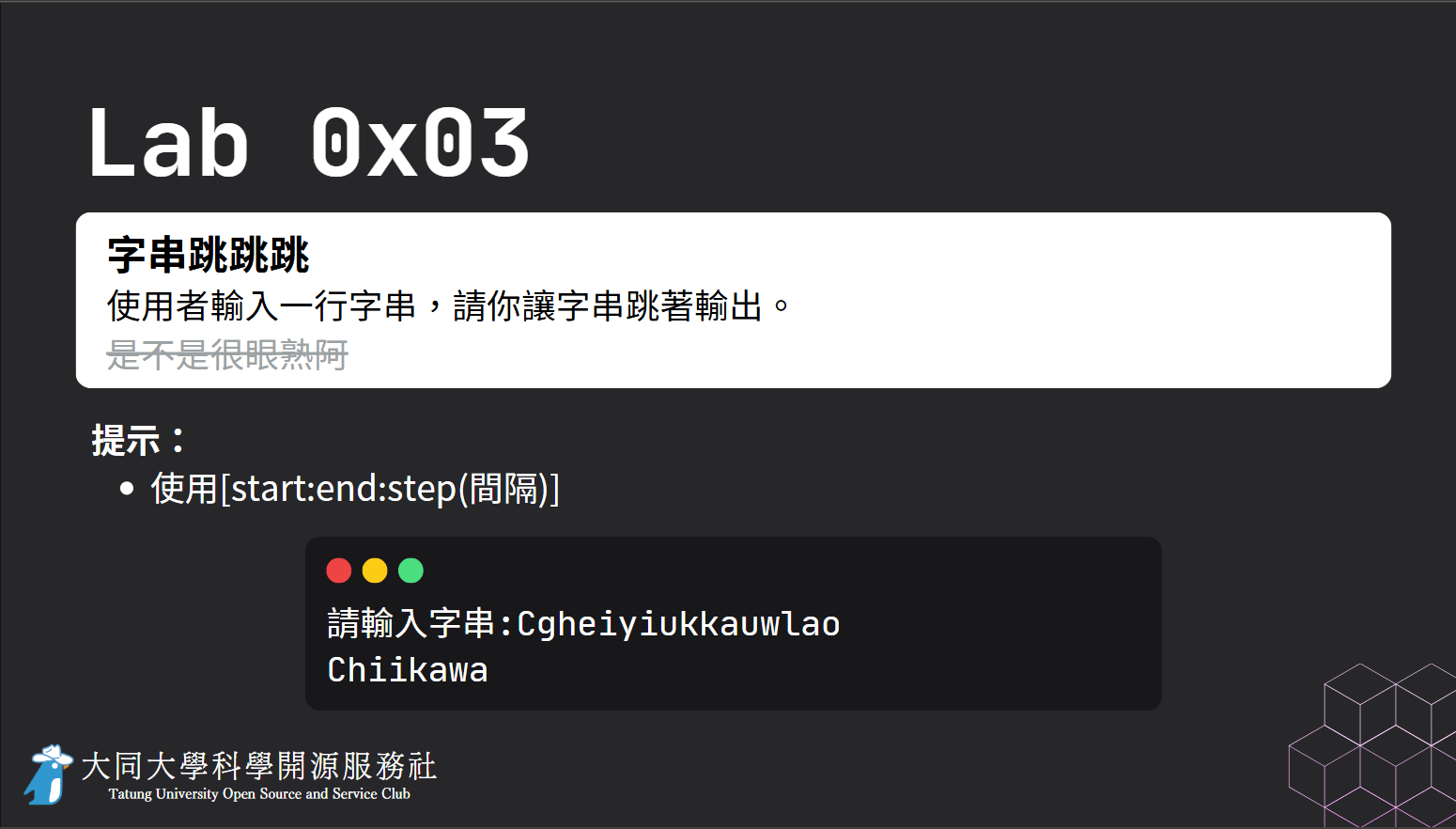
2
只能乖乖使用for loop
-
________________
import java.util.Scanner;

public class Main {
    public static void main(String[] args) {
        Scanner scanner = new Scanner(System.in);
        String s = scanner.next();
        for(int i = 0; i < s.length(); i += 2) {
            System.out.println(s.charAt(i));
        }
    }
}
Class
我想看看一個解釋...
假設你在寫一個程式
你有很多二維的點座標
所以你寫了一堆
int x1, y1, x2, y2, x3, y3;
可以說是物件藍圖
class內部的non-static-member決定了物件的樣子。
物件 是類別的實例
宣告Class
class MyClass { // class body, not-a-block
    /*
      這裡可以宣告
      - 成員變數(member variable) (field)
      - 建構子(constructor)
      - 方法(method)
      這些都是class的成員。
    */
}前面寫的public static void main(String[] args)
也是屬於你前面寫的Main class的成員。
宣告成員變數(Field)
class Point {
    public int x;
    public int y;
}
由三個部分組成.
- {0,} 個修飾符, 如access modifiers…
- Data Type
- Name
基於封裝精神, 把Field設為private是很常見的行為,
只寫有需要調用的方法, 像是getter, setter會使程式碼更好維護。
Class應該只能公開必須公開的成員。
//---------- in Point.java ----------
class Point {
    private int x;
    private int y;

    //getter & setter
    public int getX() {
        return x;
    }

    public int getY() {
        return y;
    }

    public void setX(int newVal) {
        x = newVal;
    }

    public void setY(int newVal) {
        y = newVal;
    }
}
//---------- in Main.java ----------
public class Main {
public static void main(String[] args) {
Point p = new Point();
p.setX(100);
p.setY(200);
System.out.println(p.getX() + " " + p.getY()); // 100 200
}
}因此這裡把Field設為private
並且只公開一些必要的方法
Object
我們有class, 也就是類別(物件藍圖)
那要怎麼建立物件?
new ClassName()如下面的範例,我建立了一個"Point"的類別
並且用new建立Point object
class Point {
    public int x;
    public int y;
}

public class Main {
    public static void main(String[] args) {
        new Point(); //建立了object
    }
}
Point
Point
p1
Point
Point
p2
這個孤兒之後會被回收
new Point();Point p1 = new Point();Point p2 = new Point();stack
ref
NOT BE USED
比較物件
a == b比較兩者是不是同一個物件
a.equals(b)如果類別有@Override equals(Object o),
那就是用他寫的方法, 否則預設是==
像是String就是
Objects.equals(a, b)等同於
(a == b) || (a != null && a.equals(b))適用於: 想要用equals(), 但a可能是null的時候
使用物件內的Field
在class內使用class的field
fieldName可以直接用名子存取
在class外使用class的field
objectReference.fieldName範例
class Point {
    public int x;
    public int y;

    public void print() {
       // 可以直接用fieldName
        System.out.println("(" + x + ", " + y + ")");
    }
}

public class Main {
    public static void main(String[] args) {
        Point p1 = new Point();

        // objectReference.fieldname
        p1.x = 100;
        p1.y = 200;
        int x = p1.x;
        int y = p1.y;

        System.out.println("(" + x + ", " + y + ")");
    }
}
參考
(Primitive Type, Object)
(物件)變數其實一個參考, 它會參考(refer to, ->) 物件。
很像是指標指向物件的意思。
但口頭上不會一直說p參考某物件
通常直接說p是某物件就好了
Point p = new Point(); // p 參考 new出來的物件

System.out.println(p.x + " " + p.y); // 0 0

Point p2 = p; // p2 參考 p 參考的物件

p2.x = 200; // 把 p2 參考的物件的x改掉

System.out.println(p.x + " " + p.y); // 200 0
Point p = new Point(); // p 參考 new出來的物件
System.out.println(p.x + " " + p.y); // 0 0
Point p2 = p; // p2 參考 p 參考的物件
p2.x = 200; // 把 p2 參考的物件的x改掉
System.out.println(p.x + " " + p.y); // 200 0 Point
p
Point
p2
Point p = new Point();Point p2 = p;stack
基本類型因為只有值的概念
所以不會改變原本的值
int i = 1; // i 值是 1

System.out.println(i); // 1

int j = i; // j 值是 i 的值

j = 30; // j 值是 30

System.out.println(i); // 1
Access Modifiers
| default | private | protected | public | |
|---|---|---|---|---|
| same class | ||||
| same package subclass | ||||
| same package non-subclass | ||||
| diff package subclass | ||||
| diff package non-subclass |
N
N
N
N
N
N
N
Y
Y
Y
Y
Y
Y
Y
Y
Y
Y
Y
Y
Y
簡單來講
- public 給任何地方使用
- private 只給自己class用
- protected 只給自己/自己的子class, 同package用
- default 只給自己, 同package用
Method
modifiers return-type method-name(parameter-list) { // method body

}
宣告Method
像是之前寫過的入口方法
modifiers return-type method-name(parameter-list) {


}
public static void main(String[] args) {


}
void代表無回傳值
參數名不可重複
public static void f(int i, double i) {

}
// not allowed
如果無parameter, 空白即可
public static void printHello() {
    System.out.println("Hello World!");
}
Method Signature
Method Name & Parameter Types 用來唯一標示一個方法
一個class內不能有同樣Method-Signature的方法。
public static int sum(int i, int j) {
    return i + j;
}
範例
sum(int, int)method signature:
可知, return-type / modifier不同
不代表Method Signature不同
private long sum(int i, int j) {
    return i + j;
}
範例
sum(int, int)method signature:
public static int sum(int i, int j) {
    return i + j;
}
Overloading
如果有多個方法使用同個名子, 但是Method Signature不同, 即為Overloading。
public class Printer {
    public static void print(int i) {
        // ...
    }
    public static void print(double f) {
        // ...
    }
    public static void print(String s) {
        // ...
    }
}
註: 請妥善使用, 否則程式碼可讀性有機會變差。
VarArgs
如果最後一個Parameter是Array
或是只有一個Array Parameter
可以用Type... 代替
public class Main {
    public static void main(String[] args) {
        int[] arr = {1, 2, 3, 4, 5};
        double d = 1.0;

        f(d, arr);
        // f(d, 1, 2, 3, 4, 5); // not allowed

        g(d, arr);
        g(d, 1, 2, 3, 4, 5);
    }

    static void f(double d, int[] arr) {
        //...
    }

    static void g(double d, int... arr) {
        //...
    }
}
這很常見嗎?
public static void printf(String format, Object... args) {
    // ...
}
有的, 像是printf
public static void printf(String format, Object... args) {
    // ...
}
printf("%d %d\n", 100, 200);使用物件內的方法
在class內使用class的method
methodName(argumentList);可以直接用名子存取
在class外使用class的method
objectReference.methodName(argumentList);class Point {
public int x;
public int y;
public void set(int nextX, int nextY) {
x = nextX;
y = nextY;
}
public void setAndPrint(int nextX, int nextY) {
set(nextX, nextY); // methodName(argumentList);
print(); // methodName(argumentList);
}
public void print() {
System.out.println("(" + x + ", " + y + ")");
}
}
public class Main {
public static void main(String[] args) {
Point p = new Point();
// objectReference.methodName(argumentList);
p.print(); // (0, 0)
p.set(300,400);
p.print(); // (300, 400)
p.setAndPrint(500, 600) // (500, 600)
}
}傳入Primitive Data Type Arguments
傳入參數時是被passed by value
也就是一個value的copy
public class PassPrimitiveByValue {

    public static void main(String[] args) {

        int x = 3;

        // invoke passMethod() with
        // x as argument
        passMethod(x);

        // print x to see if its
        // value has changed
        System.out.println(x); // 3

    }

    // change parameter in passMethod()
    public static void passMethod(int p) {
        p = 10;
    }
}
傳入Reference Data Type Arguments
參考類型, 也是passed by value
參數會直接是參考的copy
class IntWrapper {
    int i;
}
public class PassReferenceByValue {

    public static void main(String[] args) {

        IntWrapper x = new IntWrapper();
        intWrapper.i = 3;
        // invoke passMethod() with
        // x as argument
        passMethod(x);

        // print x to see if its
        // value has changed
        System.out.println(x.i); // 10

    }

    // change parameter in passMethod()
    public static void passMethod(IntWrapper p) {
        p.i = 10; // 此時 p 跟 x 參考的物件一樣
    }
}
Point
x
IntWrapper
p
IntWrapper x = new IntWrapper();passMethod(x);
// ...
void passMethod(IntWrapper p) {stack
passMethod start
passMethod end
傳入Reference Data Type Arguments
但還是不能直接更改原本的參考變數x
class IntWrapper {
    int i;
}
public class PassReferenceByValue {

    public static void main(String[] args) {

        IntWrapper x = new IntWrapper();
        intWrapper.i = 3;
        // invoke passMethod() with
        // x as argument
        passMethod(x);

        // print x to see if its
        // value has changed
        System.out.println(x.i); // 3

    }

    // change parameter in passMethod()
    public static void passMethod(IntWrapper p) {
        p = new IntWrapper(); // 無法改變 x 的參考
    }
}
Point
x
IntWrapper
p
IntWrapper x = new IntWrapper();passMethod(x);
// ...
void passMethod(IntWrapper p) {Point
IntWrapper
p = new IntWrapper();x參考的IntWrapper還是不變。
stack
passMethod start
passMethod end
Constructor
Constructor 不屬於 Method !
一個class會有constructor, 在建立object時被呼叫。
- 必須與class同名
- 沒有return-type
- 可以寫多個constructor, 但參數不能一樣
如果class沒有任何constructor,
implict constructor就會存在。無參數,無body
class Point {
    public int x;
    public int y;
}
class Point {
public int x;
public int y;
// implict constructor
public Point() {
}
}it's actually...
我們來寫一些constructor...
class Point {
    public int x;
    public int y;

    public Point() {
        x = -1;
        y = -1;
    }

    public Point(int startX, int startY) {
        x = startX;
        y = startY;
    }
}

public class Main {
    public static void main(String[] args) {
        Point p = new Point();
        System.out.println(p.x + " " + p.y); // -1 -1

        Point p = new Point(100, 200);
        System.out.println(p.x + " " + p.y); // 100 200
    }
}
this
this指的是目前的物件
this不能放在static方法中 (之後會講)
為什麼我們在這個class裡面了, 還要用目前的物件?
class Point {
    public int x;
    public int y;

    public Point(int startX, int startY) {
        // 明明這裡可以直接存取到目前物件的成員?
        x = startX;
        y = startY;
    }
}

public class Main {
    public static void main(String[] args) {
        Point p = new Point(100, 200);
    }
}
有了this, 你可以這樣寫
class Point {
    public int x;
    public int y;

    public Point(int x, int y) {
        /*
          this就是指現在這個物件
          也就是 剛剛new出來的物件
        */
        this.x = x;
        this.y = y;
    }

    public void print() {
        System.out.println(this.x + " " + this.y);
    }
}

public class Main {
    public static void main(String[] args) {
        Point p = new Point(100, 200);
        p.print();
    }
}
或是說想使用這個物件, 像是用於呼叫方法的參數
class Point {
    public int x;
    public int y;

    public Point(int x, int y) {
        this.x = x;
        this.y = y;
    }

    public void reset() {
        /*
          this就是指現在這個物件
          也就是 剛剛new出來的物件
        */
        OtherClass.reset(this);
    }
}

class OtherClass {
    public static void reset(Point p) {
        p.x = 0;
        p.y = 0;
    }
}

public class Main {
    public static void main(String[] args) {
        Point p = new Point(100, 200);
        p.reset();
        p.print();
    }
}
在Constructor使用this
你可以在呼叫建構子時, 呼叫另一個建構子。
這叫做"explicit constructor invocation"
class Point {
    public int x;
    public int y;

    //不如直接呼叫下面的建構子, 更優雅。
    public Point() {
        /*
        this.x = -1;
        this.y = -1;
        */
        this(-1, -1);
    }

    public Point(int x, int x) {
        this.x = x;
        this.y = y;
    }
}

public class Main {
    public static void main(String[] args) {
        Point p1 = new Point();
        System.out.println(p1.x + " " + p1.y); // -1 -1

        Point p2 = new Point(100, 200);
        System.out.println(p2.x + " " + p2.y); // 100 200
    }
}
class Point {
private int x;
private int y;
public Point(int x, int x) {
this.x = x;
this.y = y;
}
public int getX() {
return this.x;
}
public void setX(int x) {
this.x = x;
}
public int getY() {
return this.x;
}
public void setY(int y) {
this.y = y;
}
}最後, 把field 設為private
只把我要提供的四個方法public
class Circle {
    private Point p;
    private int y;

    public Circle(int x, int y, int r) {
        this.p = new Point(x, y);
        this.r = r;
    }

    public int getX() {
        return p.x;
    }

    public void setX(int x) {
        p.setX(x);
    }

    public int getY() {
        return this.x;
    }

    public void setY(int y) {
        this.y = y;
    }

    public int getR() {
        return this.r;
    }

    public void setR(int r) {
        this.r = r;
    }
}
class Rectangle {
private Point p1;
private Point p2;
public Rectangle(Point p1, Point p2) {
this.p1 = p1;
this.p2 = p2;
}
public Point getP1() {
return p1;
}
public Point getP2() {
return p2;
}
public void setP1() {
this.p1 = p1;
}
public void setP2() {
this.p2 = p2;
}
}Static
static field
當你建立物件的時候, 像是之前的Point
每個Point物件都有自己的x, y field的值。
有時候, 你希望每個物件都共享同一個field。
此時, 把Field設為static即可。
也可稱為Class Variable,
因為對於一個static field而言,
不管class有多少個實例, 他永遠只有一個值,
那就是與class有關連, 與物件沒有關聯。
因此, 不需要物件就可以存取static field。
non static field反之。
Example: 每個Point共享一個pointCount值
class Point {
    public static int pointCount = 0;
    private int x;
    private int y;
    // ...
}
class Point {
public static int pointCount = 0;
private int x;
private int y;
public Point(int x, int y) {
this.x = x;
this.y = y;
// 在class內可以直接使用staticFieldName
pointCount++;
}
void something() {
int pointCount = -1;
// 區域變數衝突
int count = Point.pointCount;
}
// ...
}
public class Main {
public static void main(String[] args) {
// 正常在Class外使用
int count = Point.pointCount;
// 強烈不建議
Point p = new Point();
int count = p.pointCount;
}
}Class.staticFieldNamestaticFieldNameobjectReference.staticFieldNameClass.staticFieldNamestatic method
不需要物件就可以呼叫static method。
內部不能存取this
non static method反之。
class Test {
    public static int k = 3;

    public static void print() {
        System.out.println("Hello");
    }

    public static void test() {
        print(); // 在Class內使用
    }
}
public class Main {
    public static void main(String[] args) {
        Test.print(); // 在Class外使用

        Test t = new Test();
        t.print(); // 強烈不建議
    }
}ClassName.methodName(args)methodName(args)objectReference.methodName(args)static method 內 不能呼叫non-static方法, 不能寫this
non-static method 內 能呼叫static方法
Constant
static final 用於定義常數。
static final double PI = 3.141592653589793;
static final int MAX_VALUE = 2147483647;
Extends
如果
Child extends Parent
此時
Child 會有 Parent 的成員。
Parent 為 Child 的"superclass" (父類別)
Child 為 Parent 的"subclass" (子類別)
一個class只能同時繼承一個class
但是可以A繼承B , B繼承C, 這樣C會有A,B的成員
Constructor
class Printer {
    public Printer() {
        System.out.println("init Printer");
    }
    public void print(String s) {
        System.out.println(s);
    }
}

class MyPrinter extends Printer {
    public MyPrinter() {
        // super();
        System.out.println("init MyPrinter");
    }
    public void myPrint(String s) {
        System.out.println("[A] " + s);
    }
}
public class Main {
public static void main(String[] args){
// child class
MyPrinter p = new MyPrinter();
// init Printer
// init MyPrinter
p.myPrint("hello"); // [A] hello
p.print("hello"); // hello
// parent class
Printer pa = new Printer();
// init Printer
pa.print("hello"); // hello
}
}public class Main {
public static void main(String[] args){
MyPrinter p = new MyPrinter();
Printer p2 = new Printer();
// 這樣也可以, 但是會沒辦法用MyPrinter內的方法
// 要先轉成MyPrinter
Printer p3 = new MyPrinter();
// p3.print(); // not allowed
}
}java.lang.Object
Object class 是整個Class繼承樹的根,
也就是說
每個類別都會是Object的子類別。
如果你的class沒有繼承任何類別,
那該class會繼承Object
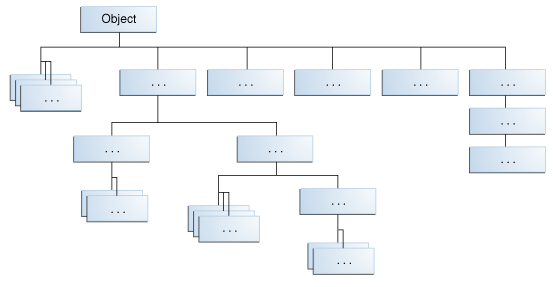
因此每個物件都可以有
toString(), equals(), hashCode()等方法
這些全部都是從java.lang.Object繼承來的
// 建立Copy
protected Object clone() throws CloneNotSupportedException

// 預設會是 ==
public boolean equals(Object obj)

// 被GC呼叫時, 查看參考用
protected void finalize() throws Throwable

// 取得hashcode
public int hashCode()

// 取得String表示
public String toString()
可以把變數Child轉成Parent, Parent轉成Child, (instance是同一個)
public class Main {
    public static void main(String[] args) {
        MyPrinter p = new MyPrinter();

        Printer p2 = p; //upcasting
        System.out.println(p2 == p); //true

        Printer p3 = new MyPrinter();
        MyPrinter p4 = (MyPrinter) p3;
        System.out.println(p3 == p4); //true

        // Not castable
        Printer p5 = new Printer();
        MyPrinter p6 = (MyPrinter) p5; // ClassCastException
    }
}
Instanceof
可以來判斷一個instance是不是屬於某一個class/interface(child也行)的instance
public class Main {
    public static void main(String[] args){
        Printer s = new Printer();
        MyPrinter v = new MyPrinter();
        boolean b = s instanceof Printer;
        boolean b2 = s instanceof MyPrinter;
        boolean b3 = v instanceof Printer;
        boolean b4 = v instanceof MyPrinter;
        System.out.println(b); //true
        System.out.println(b2); //false
        System.out.println(b3); //true
        System.out.println(b4); //true
    }
}
@Override
子類別在繼承父類別時,
會繼承父類別的Method(non-static non-final)
如果想要在子類別中,改寫從父類別繼承下來的方法:
直接寫一個一樣的方法
並且可以加一個@Override Annotation (強烈建議寫@Override)
class Printer {
    public void print(String s) {
        System.out.println(s);
    }
}

class MyPrinter extends Printer {

    @Override
    public void print(String s) {
        System.out.println("[A] " + s);
    }
}

public class Main {
    public static void main(String[] args) {
        // child class
        MyPrinter p = new MyPrinter();
        p.print("hello"); // [A] hello

        // parent class
        Printer p2 = new Printer();
        p2.print("hello"); // hello
    }
}
Super
如果子類別override print()方法,
super.print()可以使用父類別原有的print()方法。
super 用來呼叫父類別的方法/建構子
class Printer {
    public void print(String s) {
        System.out.println(s);
    }
}

class MyPrinter extends Printer {

    @Override
    public void print(String s) {
        System.out.println("[A] " + s);
    }

    public void parentPrint(String s) {
        super.print(s);
    }
}

public class Main {
    public static void main(String[] args) {
        // child class
        MyPrinter p = new MyPrinter();
        p.print("hello"); // [A] hello
        p.parentPrint("hello"); // hello

        // parent class
        Printer p2 = new Printer();
        p2.print("hello"); // hello
    }
}
constructor param issue
假設父類別的constructor
- 沒有() constructor
- 每個constructor都需要parameter
我們需要用super(…)
在子類別手動呼叫父類別的constructor
class Printer {

    private int version;

    public Printer(int version) {
        this.version = version;
        System.out.println(ersion);
    }

    public void print(String s) {
        System.out.println(s);
    }

}

class MyPrinter extends Printer {

    public MyPrinter() {
        super(0); // 一定要手動呼叫, 因為預設的super()不能用了
    }

    public MyPrinter(int version) {
        super(version); // 一定要手動呼叫, 因為預設的super()不能用了
    }

    public void myPrint(String s) {
        System.out.println("[A] " + s);
    }
}
Final
public static void main(String[] args) {

  final int a = 1;


  // a = 2 // final 變數無法修改

  // 不能宣告無初始值的final變數
  // final double b;
  // final Ship s;

  final Point p = new Point(100, 200);
  p.setX(200); // 你還是可以呼叫成員方法
  // p = new Point(300, 400); // final變數無法修改
}
final local variable
必需對該變數定義初始值, 不得更改數值
public class Main {
    public static void main(String[] args) {
        int i = 1;
        test(i);
    }

    public static int test(final int i) {
       i = 3; // not allowed
       System.out.println(i);
    }
}
Final Parameter
該parameter在Method中無法更改.
public class Main {
	static final int MAX_HEIGHT = 1080;

    public static void main(String[] args) {
        // ...
    }
}
如果是static final field, 請盡量用全大寫,底線命名
如果是non-static field
初始值可以從constructor提供 但一樣未來無法更改數值
class Point {
    private final int x;
    private final int y;

    public Point() {
        this(-1, -1);
    }

    public Point(int x, int x) {
        this.x = x;
        this.y = y;
    }

    /*
    public void setX(int x, int y) {
        this.x = x;
        this.y = y;
    }
    */
}
public class Main {
public static void main(String[] args) {
Point p2 = new Point(100, 200);
// p2.y = 300; // now allowed
}
}Interface
一台印表機,可能都有"列印"的功能。
作為印表機的使用者,你不需要知道底層是如何運作的,只要功能能用就行了。
這是因為所有的印表機都遵守了一個共同的「介面規範」
確保所有印表機都具備這些基本功能。
這樣一來,無論你用哪台印表機,都能用相同的方式來操作,而不需要學習不同的控制方法。
interface(介面) 可以說是一個Method Set template
但是你仍然算是宣告一個參考資料型態
你還是可以到處使用interface Name。
class 能 implement 多個interface
Interface 能 extend 多個 Interface
private method
- 無法被子類別實作的輔助方法
Members of Interface
static method
- Access Modifier: default 會變為 public
variable
- 預設是public static final
- 不能是private / protected
Members of Interface
interface TestInterface {
    int i = 1; // 預設會 public static final

    private void helperMethod() { // private method

    }

    static void hello() { // static method
        System.out.println("Hello");
    }
}

class Main {
    public static void main(String[] args) {
        int i = TestInterface.i;
        TestInterface.hello();
    }
}是一個無Method Body的方法
- Method Body, 用; 改寫
- 在Interface中 不能被private/protected修飾
- default 會變為 public
- 必須在abstract class/interface裡面。
- interface中, 無須以abstract修飾
Abstract Method
interface IPrinter {
    void print(String s);
}
interface IPrinter {
void print(String s);
}
class TypeA implements IPrinter {
@Override
public void print(String s) {
System.out.println("[A] " + s);
}
}
class TypeB implements IPrinter {
@Override
public void print(String s) {
System.out.println("[B] " + s);
}
}
是一個無Method Body的方法
- 有預設的實作
- 可以被子類別實作
- 不能被 static/final/private/protected修飾
Default Method
interface IPrinter {
    default void print(String s) {
        System.out.println(s);
    }
}
Default Method
interface IPrinter {
    default void print(String s) {
        System.out.println(s);
    }
}

class TypeA implements IPrinter {
    @Override
    public void print(String s) {
        System.out.println("[MyPrinter]" + s);
    }
}

class TypeB implements IPrinter {
    // it use the Printer's default print(String s)
}
Default Method
public class Main {
    public static void main(String[] args) {
        Printer a = new TypeA();
        a.print("test"); // [A] test

        Printer b = new TypeB();
        b.print("test"); // test
    }
}
public class Main {
public static void main(String[] args) {
Printer a = new TypeA();
TypeB b = new TypeB();
printHelloWorld(a);
printHelloWorld(b);
}
public static void printHelloWorld(Printer c) {
c.print("Hello World");
}
}因為a, b 都是 Printer,
所以可以丟進Printer引數中
正因為如此, 如果底層把印表機的邏輯寫好,
把底層的getPrinter寫好,
在比較上層的程式碼, 我們可以不在乎印表機是誰。
透過介面提供的方法操作。
讓程式碼與實作的各種(印表機)類別解耦。
class PrinterManager {
    private static Printer typeB = new TypeB();
    private static Printer typeA = new TypeA();
    public static Printer getPrinter() {
        // 這裡可能會找一台沒人在用的Printer之類的
        while(...) {
            if (...) return typeB;
            else if (...) return typeA;
        }
    }
}


public class Main {
    public static void main(String[] args) {
        Printer a = PrinterManager.getPrinter();
        a.print("hello"); // 用就對了
    }
}
關於繼承...
假設interface A extends interface B
如果有個class C implements A
等於class C implements A, B
(Interface 能 extend 多個 Interface)
interface Movable {
    void move(int x, int y);
}

interface Runnable extends Movable {
    void run(int speed);
}

class Human implements {
    // move
    // run
}
關於繼承...
class 能 implement 多個interface
interface Movable {
    void move(int x, int y);
}

interface Runnable {
    void run(int speed);
}

class Human implements Movable, Runnable {
    // move
    // run
}
Abstract Class
被abstract修飾的class無法直接被實例化, 但可以被繼承。
內可含abstract methods
如果有個子類別繼承某個abstract methods
子類別通常會實作所有父類別的abstract methods,
如果沒有, 子類別也需是abstract class
abstract class Printer {

    abstract void print(String s);

    public void TestOutput() {
        print("testing printer...");
    }
}

class TypeA extends Printer {

    @Override
    public void print(String s) {
        System.otu.println("[A] " + s);
    }
}

public class Main {
    public static void main(String[] args){
        Printer p = new TypeA();
        p.print("hello"); // [A] hello
        p.TestOutput(); // [A] testing printer...
    }
}
Abstract vs Interface
- Abstract Class
- 你的父子類別通常很有關係
- 你希望有些成員不是public
- 你想宣告non-static或是non-final fields
- Interface
- 你的interface與class可以關係不大
- 你想指定某些class的行為, 但不在乎他是怎麼實作的
- 你想使用多重implement
Anonymous Class
前面我們寫過一些interface, abstract class,
並且有個子類別繼承他們,
但是每次我們要建立一種介面實作,
或是抽象類別的子類,
就要建立一個class,
有時候只是希望一次性使用, 就會很麻煩。
所以我們可以不直接寫子類別,
直接new 一個interface/abstract class,
並且要實作方法。
new InterfaceOrAbstractClass(constructor param) {declaration};class Printer {
public void print(String s) {
System.out.println(s);
}
}
public class Main {
public static void main(String[] args) {
Printer v = new Printer() {
@Override
public void print(String s) {
System.out.print("Class : " + s);
}
};
v.print("Hello"); // Class : Hello
}
}interface IPrinter {
void print(String s);
}
public class Main {
public static void main(String[] args) {
IPrinter v2 = new IPrinter() {
@Override
public void print(String s) {
System.out.print("Interface : " + s);
}
};
v2.print("Hello"); // Interface : Hello
}
}abstract class PrinterAbstract {
public abstract void print(String s);
}
public class Main {
public static void main(String[] args) {
PrinterAbstract v3 = new PrinterAbstract() {
@Override
public void print(String s) {
System.out.print("Abstract Class : " + s);
}
};
v3.print("Hello"); // Abstract Class : Hello
}
}總之class, abstract class, interface寫法都一樣。
Lambda
如果Interface 的non-static方法只有一個
我們可以把傳統的Interface Anoymous Class改寫成:
(param) -> statement new InterfaceName() {
@Override
public void methodName(param... ) {
// do something
}
};(param) -> {
// do something
}interface MathFunction {
void run(int x,int y);
}
public class Main {
public static void main(String[] args) {
// 原本寫法
MathFunction sum = new MathFunction() {
@Override
public void run(int x, int y) {
System.out.println(x + y);
}
};
sum.run(10, 20); // 30
MathFunction multiply = (x, y) -> {
int result = x * y;
System.out.println(result);
};
multiply.run(10, 20); // 200
MathFunction subtract = (x, y) -> System.out.println(x - y);
subtract.run(20, 10); // 10
}
}
interface MathFunction {
    void run(int x);
}

public class Main {
    public static void main(String[] args) {
        MathFunction pow = x -> System.out.println(x * x);
        pow.run(20); // 400
    }
}
如果param只有一個的話可以省去小括號
Lambda with return value
(param) -> <return value>(param) -> {
...
return ...;
} new InterfaceName() {
@Override
public Type methodName(param... ) {
return ...;
}
};interface MathFunction {
int run(int x,int y);
}
public class Main {
public static void main(String[] args) {
MathFunction sum = new MathFunction() {
@Override
public int run(int x,int y) {
return x + y;
}
};
System.out.println(sum.run(10,20))); //30
MathFunction multiply = (x,y) -> {
int result = x * y;
return result;
};
System.out.println(multiply.run(10,20)); //200
//x * y is the return value itself.
MathFunction subtract = (x,y) -> x - y;
System.out.println(subtract.run(20, 10)); // 10
}
}Method Reference
- static method
ClassName::staticMethodName
- non-static method
object::nonstaticMethodName
- constructor
ClassName::new
如果Lambda
直接把參數呼叫另一個方法
可以用該方法的Method Reference代替。
class Methods {
    public static int sum(int x, int y) {
        return x + y;
    }
}
如果說有這個sum方法存在 (不管是誰寫的)
(x, y) -> Methods.sum(x, y)那此時我可以把
(x, y) -> x + y改成
那此時就是直接把參數呼叫另一個方法
所以可以改寫成
Methods::sum(x, y);class Test {
public int sum(int x, int y) {
return x + y;
}
}如果是非靜態方法
Test obj = // ...

(x, y) -> obj.sum(x, y)

obj::sum
(x, y) -> new Point(x, y);如果是呼叫建構子
Point::new可以寫成
Exception
當在方法執行時出了錯, 可能會生成一個Throwable物件, 包含錯誤資訊
丟擲例外之後,
會嘗試在Call Stack(呼叫方法堆疊)
逆序尋找一個能處理Throwable的throwable handler。
如果找到能處理的, 就好了。
如果沒找到, 程序會結束。
Throwable分成兩種:
-
Error: 比較不太會發生
- 像是OutOfMemoryError,StackOverflowError
-
Exception: 在程式中比較常遇到
- 像是NullPointerException,IOException
Checked, Unchecked
-
Checked: 必須顯式處理的Exception
- 在方法內要用try-catch處利, 否則要寫throws
-
Unchecked: 反之
- 有RuntimeException 與 Error
-
Throwable:
-
Exception:
- IOException
- …
- …
-
RuntimeException (Unchecked)
- NullPointerException
- …
- …
-
Error: (Unchecked)
- NoClassDefFoundError
- OutOfMemoryError
- …
- …
-
Exception:
try-catch
try {
    // code
} catch (ExceptionType ex) {

} catch (ExceptionType ex) {

}
使用一個Exception Handler catch 多種Exception
try {
    // code
} catch (IOException | SQLException ex) {

} catch (OtherException ex) {

}
try block結束之後會執行finally block
try {
    // code
} catch (ExceptionType ex) {

} catch (ExceptionType ex) {

} finally {

}
public static void main(String[] args) {
String s = "hello";
try {
int i = Integer.parseInt(s);
System.out.println(i);
} catch (NumberFormatException e) {
e.printStackTrace();
}
}字串轉為整數
public static void main(String[] args) {
    String s = ...;
    try {
        int i = Integer.parseInt(s);
        System.out.println(i);
    } catch (Exception e) {
        e.printStackTrace();
    }
}
throws
如果method內可能有exception會出現,
但是你不想要在此method處理,
可以使用 throws Exception1, Exception2 ...
把可能出現的例外丟給上層call stack處理。
如果Method內有未處理的checked exception,
則必須寫throws
public static void main(String[] args) {
    try {
        connect("https://api.speedcubing.top");
    } catch (IOException ex) {
        //
    }
}

public static void connect(String url) throws IOException {
    new URL(url).openConnection();
}
public static void main(String[] args) {
try {
connect("https://api.speedcubing.top");
} catch (IOException ex) {
//
}
}
public static void connect(String url) throws IOException {
new URL(url).openConnection();
}Custom Exception
找一個Exception, 然後extends他, 完事。
- extends Exeption來製作Checked Exception
- extends RuntimeException來製作Unchecked Exception
class NumberOutofRangeException extends RuntimeException {

}

class NumberChecker {
    public static void check(int i, int low, int high) {
        if(i < low || high < i) {
            throw new NumberOutofRangeException();
        }
    }
}

public class Main {
    public static void main(String[] args) {
        int i = 20;
        NumberChecker.check(i, 100, 200);
        System.out.println(i);
    }
}
try-with-resources
resource是指程式執行完後需要關閉的物件,
會實作java.lang.AutoCloseable
try (Statement statement = con.createStatement()) {
    ResultSet rs = statement.executeQuery(query);
}
statement物件離開try block後會被釋放。
Java Tutorial
By speedcubing