webutvikling og api-design
02: Component architecture: Composition!
- View library for web apps (browser)
- Declarative
- React: Put this value here
- JQuery:
- 1. Retrieve this value like this
- 2. Display it here like this
-
3. Update the value like this
- Static webapp!

Model-View-Controller?
- Pattern for separation of logic
- blah blah
- MVP?
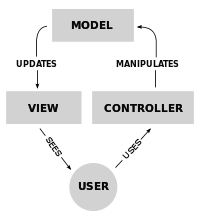
http://en.wikipedia.org/wiki/Model%E2%80%93view%E2%80%93controller
React "Templates"
We can do better: JSX?
Returned from a "render" function in the JS class:
Requires Babel (or similar)—I take care of it for now
render() {
  return (
    <div>
      <p>Hello</p>
    </div>
  );
}
Data binding with props
// ES2015 class syntax
class Greeting extends React.Component {
  render() {
    return (
      // JSX
      <p>Hello, {this.props.name}</p>
    );
  }
}

// NB: JSX
var greeting = <Greeting name="Martin" />;

// Add the element to the DOM
ReactDOM.render(
  greeting,
  document.getElementById('container')
);Component lifecycle
-
constructor(props) (duh)
-
componentWillMount()
-
componentDidMount()
-
render()
- (… and some others)
State
class Counter extends React.Component {
 constructor(props) {
  super(props);

  // define state object with defaults in constructor
  this.state = {
   count: 0,
  };
 }

 componentWillMount() {
  setInterval(
   () => this.setState({count: this.state.count + 1}),
   1000
  );
 }

 render() {
  return (
   <h1>{this.state.count}</h1>
  );
 }
}

ReactDOM.render((
 <Counter />
), document.getElementById('container'));- "Dynamic" props
- Can be changed
- setState({...})
- setState({...})
-
Local to the component
- Can be passed to children as props
- Automatically rerenders children
Example: Counter
class Counter extends React.Component {
  constructor(props) {
    super(props);

    // define state object with defaults in constructor
    this.state = {
      count: 0,
    };
  }

  componentWillMount() {
    setInterval(
        () => this.setState({count: this.state.count + 1}),
        1000
    );
  }

  render() {
    return (
        <h1>
          {this.state.count}
        </h1>
    );
  }
}- Counts from 0
- Every second
Composition
- Components "own" other components
- No inheritance (only React.Component)
- No field variables, only props
- Functional components:
- No state
- component = f(props) => jsx
higher-order components
Component that consists of only other components
Working with children
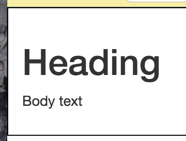
ReactDOM.render((
 <A>
  <B /> {/* "Child" node: passed to A as props.children */}
 </A>
), document.getElementById('container'));

class B extends React.Component {
 render() {
  return (
   <div>
    <h1>Heading</h1>
    <p>Body text</p>
   </div>
  );
 }
}

class A extends React.Component {
 render() {
  return (
   <div style={{padding: '1em', border: 'solid black 1px'}}>
    {this.props.children} {/* Render B */}
   </div>
  );
 }
}
General, reusable wrappers!
#justjsthings
JS: Array#Map
- "Maps" an array to a new array
- Useful for mapping data to JSX components
var arr = [{v: 1}, {v: 2}, {v: 3}];

var numbersOnly = arr.map(element => element.v);
// [1, 2, 3]
people.map(person => (
<div>
<h1>{person.name}</h1>
<p>Occupation: {person.occupation}</p>
</div>
));document.window
- Global variable provided by the browser
- Also in Node: called "global"
- Also in Node: called "global"
- Can be used to make anything globally accessible
- Similar to a Singleton; Evil?
- Alternative in next lecture.
// somewhere
window.state = {
 albums: ['Kintsugi', 'Transatlanticism'];
};

// another file
const albums = window.state.albums;
function.bind
- Defines what this means inside the function
// somewhere
function print() {
 console.log(this.text);
}

// elsewhere
class Hello {
 constructor() {
  this.text = 'hello, world!';

  const bound = print.bind(this);
  bound();
 }
}
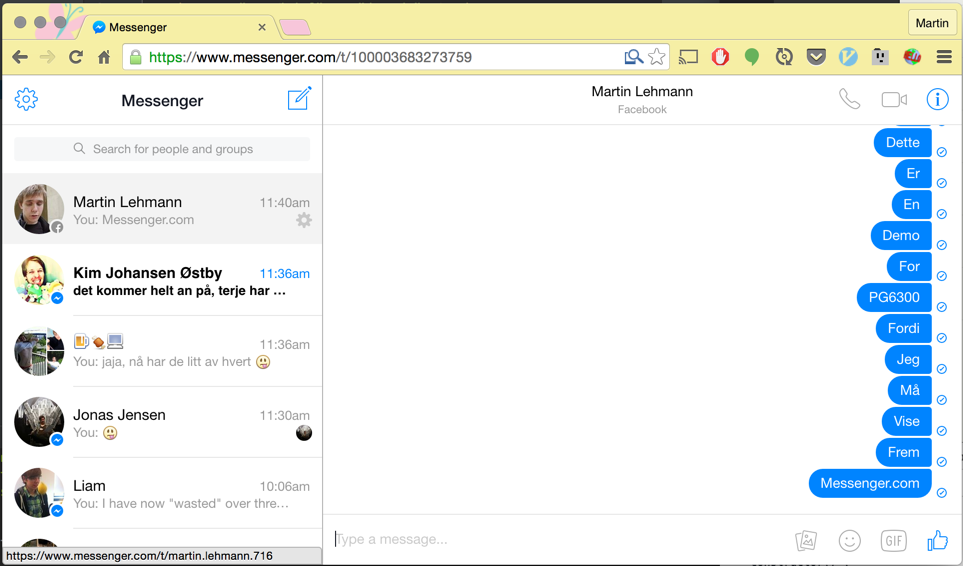
<Live>: Messenger.com
Exercise
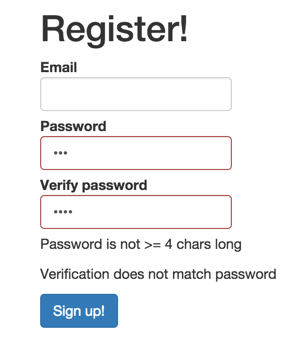
Reactify with proper validation:
- Email /.+@.+\..+/
- Password /.{4,}/
- Verification == Password
Bonus: Show has-error on form-group (bootstrap)
PG6300-15-02 Component architecture: Composition & HOC
By theneva
PG6300-15-02 Component architecture: Composition & HOC
Forelesning 2 i PG6300-15 Webutvikling og API-design