webutvikling og api-design
04: Node, Fetch, basic REST, Express

- JS on the server (not the browser)
- Built on the V8 JS Engine (Chrome)
- Runs on all platforms (Win/OSX/Linux)
- Still not compiled
- Pretty darn fast
- Package (3rd party lib) manager for JS
- Used a lot for Node (but also the browser)
- Comes with Node installation
- Comes with Node installation
- Easy to publish packages!


First node app
'use strict';

class Person {
  constructor(name) {
    this.name = name;
  }
}

const liam = new Person('Liam');
console.log(liam);
index.js
➜ node index.js
Person { name: 'Liam' }
Run the code with node <filename>
('use strict'; to allow classes for now)
- Metadata for NPM
- In project root
- Similar to pom.xml
package.json
{
  "name": "timetracker-client-react",
  "scripts": {
    "build": "webpack --config webpack.config.prod.js",
    "dev": "node -r babel/register dev-server.js"
  },
  "dependencies": {
    "bootstrap": "^3.3.5",
    "react": "^0.14.3",
    "react-dom": "^0.14.3",
    "react-redux": "^4.0.0",
    "redux": "^3.0.4",
    "style-loader": "^0.13.0",
    "superagent": "^1.4.0"
  },
  "devDependencies": {
    "babel": "^5.8.34",
    "babel-core": "^5.8.25",
    "babel-loader": "^5.3.2",
    "babel-plugin-react-transform": "^1.1.1",
    "express": "^4.13.3",
    "react-transform-catch-errors": "^1.0.0",
    "react-transform-hmr": "^1.0.1",
    "redbox-react": "^1.2.0",
    "redux-devtools": "^2.1.5",
    "webpack": "^1.12.6",
    "webpack-dev-middleware": "^1.2.0",
    "webpack-hot-middleware": "^2.5.0"
  }
}
$ npm install

$ npm install --save react

$ npm install --save-dev babel
Libs (modules)
@
./node_modules/
npm scripts
- Give names to shell commands
- Has installed modules on path
{
  "name": "f03-npm-scripts",
  "scripts": {
    "build": "concat src/**/*.js > output/script.js"
  }
}
➜ npm run buildBabel require hook
// app.js

import express from 'express';
console.log('hi');
➜ node app.js
/Users/theneva/code/webutvikling-og-api-design/f04/app.js:1
(function (exports, require, module, __filename, __dirname) { import express from 'express';
                                                              ^^^^^^

SyntaxError: Unexpected token import
    at exports.runInThisContext (vm.js:53:16)
    at Module._compile (module.js:404:25)
    at Object.Module._extensions..js (module.js:432:10)
    at Module.load (module.js:356:32)
    at Function.Module._load (module.js:311:12)
    at Function.Module.runMain (module.js:457:10)
    at startup (node.js:136:18)
    at node.js:972:3
➜ f04 git:(master) ✗ node --require babel-register app.js
hi(requires .babelrc with es2015 preset)
The full power of Babel with Node
Express
- Easy-to-use webserver for Node
- Extremely popular
import express from 'express';
const app = express();

app.get(
 '/',
 (req, res) => res.send('Hello!')
);

app.listen(
 1234,
 () => console.log('Listening on port 1234!')
);
➜ node --require babel-register app.js
Listening on port 1234!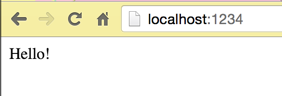
Serve data as JSON
// app.js

// ...

const app = express();

const greeting = {
  to: 'Liam',
  from: 'Martin',
  message: 'Hello, there!',
};

app.get('/', (req, res) => res.send(greeting));

// ...
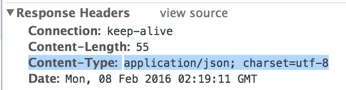
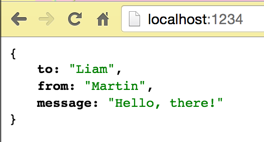
Express defaults to JSON for objects/arrays
Accept data as JSON (Node)
// app.js

import bodyParser from 'body-parser';
import express from 'express';

const app = express();

// middleware for everything under path /
app.use('/', bodyParser.json());

const greeting = {
  to: 'Liam',
  from: 'Martin',
  message: 'Hello, there!',
};

app.get('/', (req, res) => res.send(greeting));

app.listen(1234, () => console.log('Listening on port 1234!'));
- Not default
- Use a library (like body-parser)
- Add it as "middleware" to relevant routes
Fetch data from server
<!-- index.html -->

<!DOCTYPE html>
<html>
<body>
  <script>
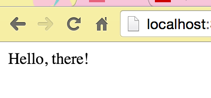
    fetch('http://localhost:1234/')
      .then(response => response.json())
      .then(greeting => document.write(greeting.message))
      .catch(err => document.write(err));
  </script>
</body>
</html>
OOps: CORS
<!DOCTYPE html>
<html>
<body>
  <script>
    fetch('http://localhost:1234/')
      .then(response => response.json())
      .then(greeting => document.write(greeting.message))
      .catch(err => document.write(err));
  </script>
</body>
</html>
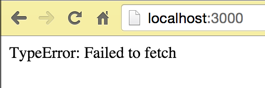

Cross-Origin Resource Sharing
Solution?
import cors from 'cors';
import express from 'express';

const app = express();
app.use('/', cors());
- Use the cors package (npm <3)
- … but be aware that CORS exists for a reason
REST basics
- Architectural style for sharing data on the server
- Exposes "resources" via the URL
- /users
- /posts
- /posts/{postId}/comments
- Uses standard HTTP communication
- Typically serves data (JSON or XML)—not HTML
- Can be extremely simple
A way to work with data
- Based on HTTP:
- HTTP POST (create)
- HTTP GET (read)
- HTTP PUT (update)
- HTTP DELETE (…)
- … some more
- HTTP POST (create)
- Everything is a "resource"
- <url>/users
- <url>/users/{userId}
- <url>/posts
- <url>/users/{userId}/posts
What's an "HTTP request"?
// A GET request

GET / HTTP/1.1
Host: localhost:1234
Connection: keep-alive
Accept: */*
// Response to that request
HTTP/1.1 200 OK
X-Powered-By: Express
Access-Control-Allow-Origin: *
Content-Type: application/json; charset=utf-8
Content-Length: 55
Date: Mon, 08 Feb 2016 02:46:42 GMT
Connection: keep-alive
{"to":"Liam","from":"Martin","message":"Hello, there!"}- Literally <headers>\n\n<body>
- Same for req AND res
- Same for req AND res
- The Internet is CRAZY fragile
- Parsed by the browser

JUST
A WAY
TO DO IT
GraphQL?
Testing a REST api
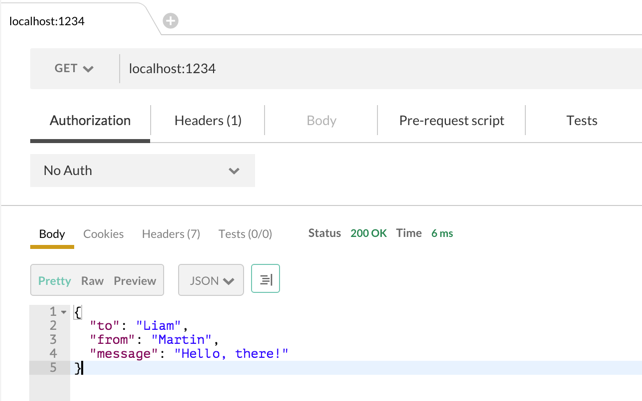
➜ curl http://localhost:1234
{"to":"Liam","from":"Martin","message":"Hello, there!"}%
cURL!
Assignment 1!
(PDF)
PG6300-15-04 Node, Fetch, basic REST, Express
By theneva
PG6300-15-04 Node, Fetch, basic REST, Express
Lecture 4 in PG6300-15 Webutvikling og API-design