webutvikling og api-design
08: "Sessions" with JWT
Database!

Relations vs. Documents
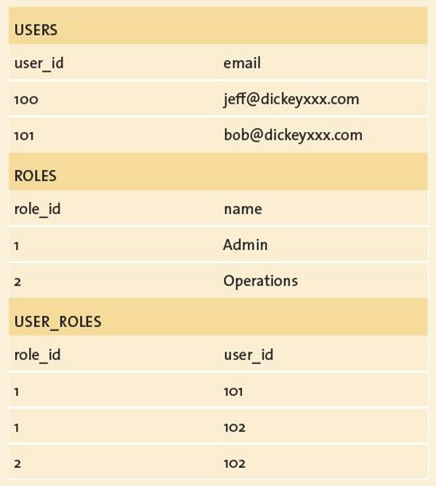
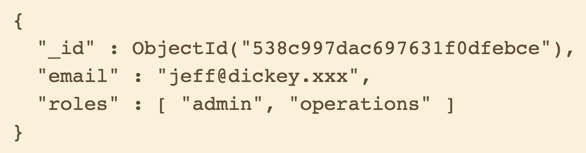

Storage format: BSON
- Binary JSON
- ObjectId based on timestamp
- Documents "=" objects
Joins
Enter MongoDB
$ mongo exampleDb
MongoDB shell version: 2.6.5
connecting to: exampleDb

> db.users.insert({username: 'Theneva'})
WriteResult({ "nInserted" : 1 })

> db.users.insert({username: 'HeroK0'})
WriteResult({ "nInserted" : 1 })

> db.users.find()
{ "_id" : ObjectId("54c5fbe88ede449775e517d2"), "username" : "Theneva" }
{ "_id" : ObjectId("54c5fbf58ede449775e517d3"), "username" : "HeroK0" }
http://docs.mongodb.org/manual/installation/
Don't make things before using them!
- MongoDB creates…
- DB
- Collections ("tables")
- … BUT ensure that things work!
Express <3 Mongoose
var app = require('express')();
var mongoose = require('mongoose');

app.use(require('body-parser').json());

var personSchema = new mongoose.Schema({
	name: { type: String, required: true }
});

var Person = mongoose.model('Person', personSchema);

app.get('/person', function(req, res) {
	var person = new Person({
		name: 'Martin'
	});

	res.send(person);
});

app.listen(1234);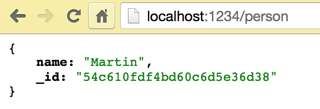
Users & sessions
- Problem: we need to identify clients (users)
- Solution:
- Login with username + password
- Give client a small piece of information
- Client sends the information with every request
Cookies & tokens
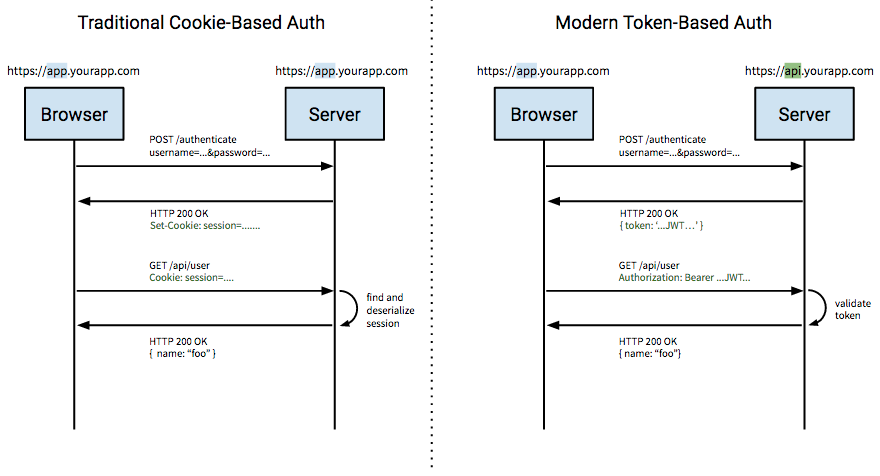
Tokens <3
- Play nice across domains
- Stateless (if you want)
- Decoupled from specific auth scheme
- No need for session store
- Cookies are for browsers
Tokens…
- Client requests a token with…
- Username
- Password
- Server…
- generates
- signs
- (encrypts)
- sends
- Can store data (not just an ID)
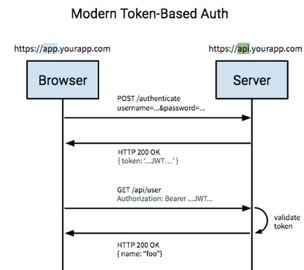
JSON web token (JWT) "jot"
- A handy token definition
- Standard: https://tools.ietf.org/html/rfc7519
- Standard: https://tools.ietf.org/html/rfc7519
- Signed with a "secret" known only to the server
- Faster than session stores (decoded using math)
- Not encrypted by default—just signed
JWT under the hood
eyJ0eXAiOiJKV1QiLCJhbGciOiJIUzI1NiJ9.eyJ1c2VybmFtZSI6InZhbGlkVXNlcm5hbWUifQ.N5ppD4k72pbST4_DESbHzqjrFCZK4QEzhGHI0H49GtM
header: { "typ": "JWT", "alg": "HS256" }
payload: { "username": "validUsername" }
<signature>
signature = HMACSHA256(
base64UrlEncode(header) + "." +
base64UrlEncode(payload) +
<secret>)
JWT with Node
const jwt = require('jwt-simple');

const secret = 'some top secret string';

const payload = {
  username: 'theneva',
};

// Token for sending
const signedToken = jwt.encode(payload, secret);
console.log(signedToken); // eyJ0eXAiOiJKV1QiLC…

// Decode the token using the secret
const decodedPayload = jwt.decode(signedToken, secret);
console.log(decodedPayload); // { username: 'theneva' }
There's a package for that!
jwt-simple to the rescue
JWT with Express
const app = require('express')();
const jwt = require('jwt-simple');

app.post('/sessions', (req, res) => {
	// get and validate login info

	if (invalid) {
		// respond with 401 unauthorized
	} else {
		// encode jwt with payload & sign with secret
		// return the jwt
	}
});

app.get('/user', (req, res) => {
	// verify & decode jwt
	// get jwt payload username
	// retrieve user by username from DB
	// return user info
});

app.listen(1234, () => console.log('listening on port 1234'));
Example
Client: LocalStorage
// Store
localStorage.token = 'something';

// Get
const token = localStorage.token;- window.localStorage
- or just localStorage
- or just localStorage
- A "plain" object!
JWT + Client
function authenticate() {
  const url = api + '/authenticate';

  const body = {
    username: 'blah',
    password: 'glola'
  };

 fetch(url, {
    method: 'post',
    headers: {
      'Content-Type': 'application/json'
    },
    body: JSON.stringify(body),
  })
  .then(res => res.text())
  .then(token => localStorage.token = token);
}
function getWithToken(url) {
 return fetch(url, {
  headers: {
   'X-Token': localStorage.token
  }
 });
}
THIS IS PLAIN JS!
Bcrypt
var bcrypt = require('bcryptjs');

var password = 'ananas';

var passwordHash = bcrypt.hashSync(password, 10);
console.log(password + ' -> ' + passwordHash);

var isMatch = bcrypt.compareSync(password, passwordHash);
console.log(isMatch);
- Password in plaintext?
- Encrypted?
NOPE: Example!
ASsignment 2
- Redux
- Database connection (MongoDB)
- Login (db, users stored in DB)
- Assignment text published later today
- Draft for feedback April 3
PG6300-15-08 "Sessions" with JWT
By theneva
PG6300-15-08 "Sessions" with JWT
Lecture 8 in PG6300-15 Webutvikling og API-design