webutvikling og api-design
09: Testing!
Automated Testing!
- Kode that tests other code
- Automatically run (on build?)
- Can be run on file changes
- Like webpack, but for QA
- Verifies that the program works as intended
Three types (+++)
-
Unit
-
Single module in complete isolation
-
Single module in complete isolation
- Integration
- Between dependencies
- Actually start the server
- End-to-end
- Start the server
- Auto-click buttons
- No manual testing
Mocha
- Framework & test runner
- describe & it
describe('GET /messages', () => {
 it('should require a token', (done) => {
  // do something
 });
});
import { greet } from '../Greeting.js';
describe('Greeting', () => {
it('should greet on the form "Hello, <name>!', () => {
const result = greet('Liam');
const expected = 'Hello, Liam!';
// now what?
});
});Simple JS module
API endpoint
Chai
- Sexy assertion library
- Used with Mocha
import { expect } from 'chai'; // !

import { greet } from '../Greeting.js';

describe('Greeting', () => {
 it('should greet on the form "Hello, <name>!', () => {
  const result = greet('Liam');
  const expected = 'Hello, Liam!';

  // this is what
  expect(result).to.equal('Hello, ' + name + '!');
 });
});
Some details
- Run tests with $ mocha
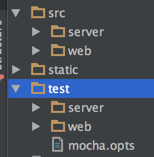
- Mocha looks for tests in ./test/*.js
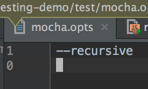
- ./test/**/*.js with --recursive
- ./test/**/*.js with --recursive
- mocha.opts file for settings
Installation
- $ npm install --save-dev mocha
- $ npm install --save-dev chai
ES2015 support
- $ npm install --save-dev babel-register
- $ mocha --compilers js:babel-register
- .babelrc file (ditch the query thing pls)
Custom reporters
$ mocha --reporter <reporter>
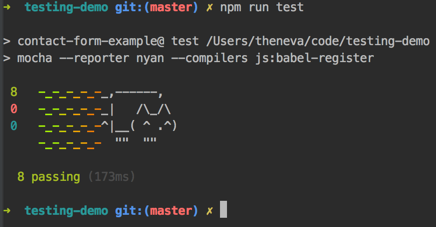
(the important things)
Server-side testing
- Let's just test the API endpoints
- Not really unit tests
describe('GET /messages', () => {
 it('should return a JSON array', () => {

  // Make the API available

  // Send a request

  // Verify the response

  // Notify Mocha you are done

 });
});
Server-side testing
import express from 'express';
import api from '../api.js';

const app = express();

describe('GET /messages', () => {
 it('should return a JSON array', () => {

  // Make the API available
  app.use(api);

  // Send a request

  // Verify the response

  // Notify Mocha you are done

 });
});
Server-side testing
import express from 'express';
import request from 'supertest';

import api from '../api.js';

const app = express();

describe('GET /messages', () => {
 it('should return a JSON array', () => {

  // Make the API available
  app.use(api);

  // Send a request
  request(app)
   .get('/messages')

  // Verify the response

  // Notify Mocha you are done

 });
});-
supertest
- Based on superagent
- Popular HTTP lib
- Before fetch
- $ npm i -D supertest
Server-side testing
import express from 'express';
import request from 'supertest';

import api from '../api.js';

const app = express();

describe('GET /messages', () => {
 it('should return a JSON array', () => {

  // Make the API available
  app.use(api);

  // Send a request
  request(app)
   .get('/messages')

  // Verify the response
   .expect(200)
   .expect('Content-Type', /json/)

  // Notify Mocha you are done

 });
});-
supertest
- Based on superagent
- Popular HTTP lib
- Before fetch
- $ npm i -D supertest
Server-side testing
import express from 'express';
import request from 'supertest';

import api from '../api.js';

const app = express();

describe('GET /messages', () => {
 it('should return a JSON array', done => {

  // Make the API available
  app.use(api);

  // Send a request
  request(app)
   .get('/messages')

  // Verify the response
   .expect(200)
   .expect('Content-Type', /json/)

  // Notify Mocha you are done
   .end(done);

 });
});-
supertest
- Based on superagent
- Popular HTTP lib
- Before fetch
- $ npm i -D supertest
Server-side testing
import express from 'express';
import request from 'supertest';
import { expect } from 'chai';

import api from '../api.js';

const app = express();

describe('GET /messages', () => {
 it('should return a JSON array', done => {

  // Make the API available
  app.use(api);

  // Send a request
  request(app)
   .get('/messages')

  // Verify the response
   .expect(200)
   .expect('Content-Type', /json/)
   .expect(res => {
     expect(res.body).to.be.instanceOf(Array);
   })

  // Notify Mocha you are done
   .end(done);

 });
});-
supertest
- Based on superagent
- Popular HTTP lib
- Before fetch
- $ npm i -D supertest
front-end: Jest?
npm install --save-dev babel-jest \
                       babel-preset-jest \
jest-cli- Looks for __tests__/*.js
- Designed to test modules (export/import, aka single files)
- mocks all modules automatically
jest.mock('XHR'); // note: by default, this is done automatically in Jest
doWork();
const MockXHR = require('XHR');
// assert that MockXHR got called with the right arguments
let oldXHR = XHR;
XHR = function MockXHR() {};
doWork();
// assert that MockXHR got called with the right arguments
XHR = oldXHR; // if you forget this bad things will happenMeh, just use Mocha
import React from 'react';
import TestUtils from 'react-addons-test-utils';
import EmailInput from '../../../src/web/components/EmailInput.jsx';

describe('EmailInput', () => {
  it('is a div that contains a label', () => {
    // ...
  });
});-
Pure functions are easy to test
- Redux => everything is a prop
- Components are functions of props
- Small components are easiest
Shallow rendering
-
react-addons-test-utils
- Render a component one level deep
import React from 'react';
import TestUtils from 'react-addons-test-utils';

import { expect } from 'chai';

describe('EmailInput', () => {
 it('should be a div', () => {
  const renderer = TestUtils.createRenderer();

  renderer.render(
    <EmailInput label={label}
      placeholder={placeholder}
      onChange={onChange}/>
  );

  const component = renderer.getRenderOutput();

  // Verify that a div is displayed
  expect(component.type).to.equal('div');
 });
});
import { expect } from 'chai';
import React from 'react';
import TestUtils from 'react-addons-test-utils';
import EmailInput from '../../../src/web/components/EmailInput.jsx';
describe('EmailInput', () => {
it('contains expected tags & label', () => {
const label = 'Email goes here';
const placeholder = 'someone@example.xyz';
const onChange = email => {};
const renderer = TestUtils.createRenderer();
renderer.render(
<EmailInput label={label}
placeholder={placeholder}
onChange={onChange}/>
);
const component = renderer.getRenderOutput();
// Verify that a div is displayed
expect(component.type).to.equal('div');
// ... that contains only a label
const labelElement = component.props.children;
expect(labelElement.type).to.equal('label');
expect(labelElement.props.children[0]).to.equal(label);
const inputElement = labelElement.props.children[1];
expect(inputElement.type).to.equal('input');
});
});
ASsignment 2
- Redux
- Database connection (MongoDB)
- Login (db, users stored in DB)
- Assignment text published later today
- Hand in at the end of the course
PG6300-15-09 Testing!
By theneva
PG6300-15-09 Testing!
Lecture 9 in PG6300-15 Webutvikling og API-design