
Cường Trần
Cường Trần on slides.com
By Cường Trần / cuongtran3001@gmail.com
Install express js via npm:
//Create project folder
$ mkdir expresjs-gs
$ cd expresjs-gs


//Initialize for package.json
$npm init


//Install express js
$npm i express --save-devCreate expres server and response to request:
//app.js file
//Create express server
var express = require('express');
var app = express();

//Simple response
app.get('/', function (req, res) {
  res.send('Hello World!');
});

//Run server
app.listen(3000, function () {
  console.log('Example app listening on port 3000!');
});
Run the app:
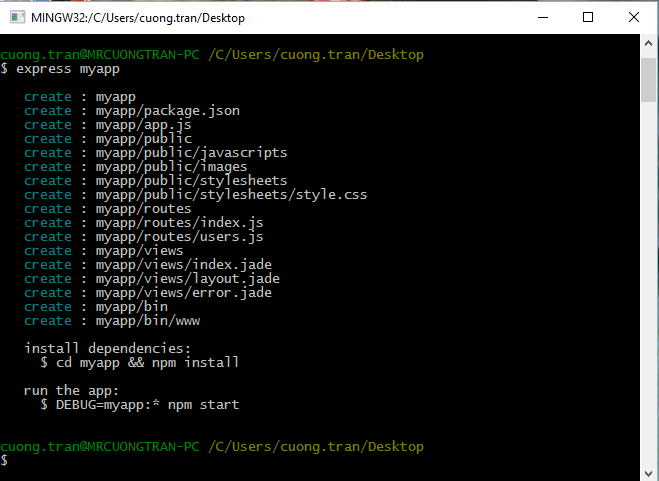
$ node app.jsInstall express-generator:
$ npm install express-generator -gInstalling node modules & run app: http://localhost:3000
$ npm install & npm startGenerate project:
$ express PROJECT_NAMEDetermine how an application responds to a client request to a particular endpoint
Each route can have one or more handler functions, which are executed when the route is matched
Route structure:
app.METHOD(PATH, HANDLER)Example:
app.get('/', function (req, res) {
  res.send('Hello World!');
});
app.post('/', function (req, res) {
res.send('Got a POST request');
});app.delete('/user', function (req, res) {
res.send('Got a DELETE request at /user');
});Route paths:
app.get('/', function (req, res) {
  // http://localhost:3000/
});
app.get('/about', function (req, res) {
// http://localhost:3000/about
});app.get('/ab?cd', function(req, res) {
// http://localhost:3000/acd
// http://localhost:3000/abcd
});Route paths:
app.get('/ab+cd', function(req, res) {
  // http://localhost:3000/abcd
  // http://localhost:3000/abbcd
  // http://localhost:3000/abbbcd
  // ... n time of b
});
app.get('/ab*cd', function(req, res) {
// http://localhost:3000/abXYZcd
// http://localhost:3000/ab123cd
// http://localhost:3000/ab[ANYTHING]cd
});Route paths:
app.get('/ab(cd)?e', function(req, res) {
  // http://localhost:3000/abe
  // http://localhost:3000/abcde
});
app.get(/a/, function(req, res) {
// http://localhost:3000/abcd
// http://localhost:3000/123a
// http://localhost:3000/aaaa
// anything contains 'a' in route
});app.get(/.*fly$/, function(req, res) {
// http://localhost:3000/butterfly
// http://localhost:3000/[ANYTHING]fly
});Route handlers:
var a = function (req, res, next) {
  //TODO HERE

  next();
}

var b = function (req, res, next) {
  //TODO HERE

  next();
}

var c = function (req, res) {
    //TODO HERE

    //and no next()
}

app.get('/url', [a, b, c]);Chainable route handlers by app.route():
app.route('/url')
  .get(function(req, res) {
    //TODO

  })
  .post(function(req, res) {
    //TODO

  })
  .delete(function(req, res) {
    //TODO

  })
  .put(function(req, res) {
    //TODO

  });
Modular route handlers:
//controller/cat.js

var cat = express.Router();

cat.get('/', function(req, res) {
  //TODO
});

cat.get('/url', function(req, res) {
  //TODO
});

module.exports = cat;Modular route handlers:
//controller/dog.js

var dog = express.Router();

dog.get('/', function(req, res) {
  //TODO
});

dog.get('/url', function(req, res) {
  //TODO
});

module.exports = dog;Modular route handlers:
var app = module.exports = express();
var cat = require('./controllers/cat');
var dog = require('./controllers/dog');

app.use('/cat', cat);

app.use('/dog', dog);

app.listen(3000);
Middleware functions are functions that have access to the request object (req), the response object (res), and the next middleware function in the application’s request-response cycle
Middleware functions can perform the following tasks:
Create middleware:
//translate.js

var googleTranslate = require('google-translate')('YOUR-API-KEY');

var translate = function(text, lang, cb) {
    googleTranslate.translate(text, lang, function(err, translation) {
        if (!translation) cb(err, null);
        cb(err, translation.translatedText);
    });
}
var translate = require('./translate');
var app = express();
app.use('/translate', translate);
app.listen(3000);Usage:
Application level middleware:
//ex 01
app.use('/user/:id', function (req, res, next) {
  console.log('Request Type:', req.method);
  next();
});

//ex 02
app.use('/user/:id', function(req, res, next) {
  console.log('Request URL:', req.originalUrl);
  next();
}, function (req, res, next) {
  console.log('Request Type:', req.method);
  next();
});
Usage:
Bind application-level middleware to an instance of the app object by using the app.use() and app.METHOD() functions
Application level middleware:
app.get('/user/:id', function (req, res, next) {
  // if the user ID is 0, skip to the next route
  if (req.params.id == 0) next('route');
  // otherwise pass the control to the next middleware function in this stack
  else next(); //
}, function (req, res, next) {
  // render a regular page
  res.render('regular');
});

// handler for the /user/:id path, which renders a special page
app.get('/user/:id', function (req, res, next) {
  res.render('special');
});
Usage:
Skip the rest of the middleware functions from a router middleware stack: next('route')
Router level middleware:
var app = express();
var router = express.Router();

// a middleware function with no mount path. This code is executed for every request to the router
router.use(function (req, res, next) {
  console.log('Time:', Date.now());
  next();
});
Usage:
Router-level middleware works in the same way as application-level middleware, except it is bound to an instance of express.Router()
- next('route') ???
Error handling middleware:
app.use(function(err, req, res, next) {
  console.error(err.stack);
  res.status(500).send('Something broke!');
});
Usage:
Error-handling middleware always takes four arguments.
Built in middleware:
app.use(express.static('public'));
app.use(express.static('uploads'));
app.use(express.static('files'));
Usage:
The only built-in middleware function in Express is express.static
Third party middleware:
//install
//$ npm install cookie-parser

var express = require('express');
var app = express();
var cookieParser = require('cookie-parser');

// load the cookie-parsing middleware
app.use(cookieParser());
Usage:
Install the Node.js module for the required functionality, then load it in your app at the application level or at the router level
//step 1:
app.set('view engine', 'pug');


//step 2:
app.get('/', function (req, res) {
  res.render('index', { title: 'Hey', message: 'Hello there!'});
});
Usage:
You define error-handling middleware last, after other app.use() and routes calls
var bodyParser = require('body-parser');
var methodOverride = require('method-override');

app.use(bodyParser.urlencoded({
	extended: true
}));

app.use(bodyParser.json());

app.use(methodOverride());

//error handling here
app.use(function(err, req, res, next) {
  // logic
});Can define several error-handling middleware functions, much like you would with regular middleware functions
var bodyParser = require('body-parser');
var methodOverride = require('method-override');

app.use(bodyParser.urlencoded({
	extended: true
}));

app.use(bodyParser.json());

app.use(methodOverride());

app.use(logErrors);
app.use(clientErrorHandler);
app.use(errorHandler);Default error handling:
Built-in error handler
If you call next() with an error after you have started writing the response, the Express default error handler closes the connection and fails the request
The default error handler can get triggered if you call next() with an error in your code more than once, even if custom error handling middleware is in place
Default error handling:
function errorHandler(err, req, res, next) {
  if (res.headersSent) {
    return next(err);
  }
  res.status(500);
  res.render('error', { error: err });
}The req object represents the HTTP request and has properties for the request query string, parameters, body, HTTP headers, and so on
app.get('/user/:id', function(req, res) {
  res.send('user ' + req.params.id);
});req.app
This property holds a reference to the instance of the Express application that is using the middleware.
//index.js
app.get('/viewdirectory', require('./mymiddleware.js'))
//mymiddleware.js
module.exports = function (req, res) {
res.send('The views directory is ' + req.app.get('views'));
});req.baseUrl
The URL path on which a router instance was mounted.
var greet = express.Router();

greet.get('/jp', function (req, res) {
  console.log(req.baseUrl); // /greet
  res.send('Konichiwa!');
});

app.use('/greet', greet); // load the router on '/greet'req.body
Contains key-value pairs of data submitted in the request body
var app = require('express')();
var bodyParser = require('body-parser');
var multer = require('multer'); // v1.0.5
var upload = multer(); // for parsing multipart/form-data

app.use(bodyParser.json()); // for parsing application/json
app.use(bodyParser.urlencoded({ extended: true })); // for parsing application/x-www-form-urlencoded

app.post('/profile', upload.array(), function (req, res, next) {
  console.log(req.body);
  res.json(req.body);
});req.body
Contains key-value pairs of data submitted in the request body
var app = require('express')();
var bodyParser = require('body-parser');
var multer = require('multer'); // v1.0.5
var upload = multer(); // for parsing multipart/form-data

app.use(bodyParser.json()); // for parsing application/json
app.use(bodyParser.urlencoded({ extended: true })); // for parsing application/x-www-form-urlencoded

app.post('/profile', upload.array(), function (req, res, next) {
  console.log(req.body);
  res.json(req.body);
});req.params
This property is an object containing properties mapped to the named route “parameters”
app.use('/user/:name', function(req, res, next) {
  //req.params.name

  next();
});req.query
This property is an object containing a property for each query string parameter in the route. If there is no query string, it is the empty object, {}.
// GET /search?q=tobi+ferret
req.query.q
// => "tobi ferret"

// GET /shoes?order=desc&shoe[color]=blue&shoe[type]=converse
req.query.order
// => "desc"

req.query.shoe.color
// => "blue"

req.query.shoe.type
// => "converse"What's else?
req.cookies
req.method
req.hostname
req.path
req.ip
req.ips
...
What's else?
req.cookies
req.method
req.hostname
req.path
req.ip
req.ips
...
req.accepts(types)
Checks if the specified content types are acceptable, based on the request’s Accept HTTP header field
req.accepts('html');
// => "html"

req.accepts('text/html');
// => "text/html"

req.accepts('application/json');
// => "application/json"

req.accepts(['json', 'text']);
// => "json"List of databases supported by Express:
MySQL
$ npm install mysqlvar mysql = require('mysql');
var connection = mysql.createConnection({
host : 'localhost',
user : 'admin',
password : 'root'
});
connection.connect();
connection.query('SELECT * FROM product', function(err, rows, fields) {
if (err) throw err;
console.log('The product are: ', rows);
});
connection.end();MongoDB
$npm install mongodbvar MongoClient = require('mongodb').MongoClient;
MongoClient.connect('mongodb://localhost:27017/my_db', function(err, db) {
if (err) {
throw err;
}
db.collection('products').find().toArray(function(err, result) {
if (err) {
throw err;
}
console.log(result);
});
});What should we do:
What shouldn't we do:
Listen for the uncaughtException event, emitted when an exception bubbles all the way back to the event loop
app.get('/search', function (req, res) {
  // Simulating async operation
  setImmediate(function () {
    var jsonStr = req.query.params;
    try {
      var jsonObj = JSON.parse(jsonStr);
      res.send('Success');
    } catch (e) {
      res.status(400).send('Invalid JSON string');
    }
  });
});
Try-catch works only for synchronous code. Because the Node platform is primarily asynchronous (particularly in a production environment), try-catch won’t catch a lot of exceptions
app.get('/', function (req, res, next) {
  // do some sync stuff
  queryDb()
    .then(function (data) {
      // handle data
      return makeCsv(data)
    })
    .then(function (csv) {
      // handle csv
    })
    .catch(next);
});

app.use(function (err, req, res, next) {
  // handle error
});By Cường Trần
ExpressJS