
Cường Trần
Cường Trần on slides.com
By Cường Trần / cuongtran3001@gmail.com
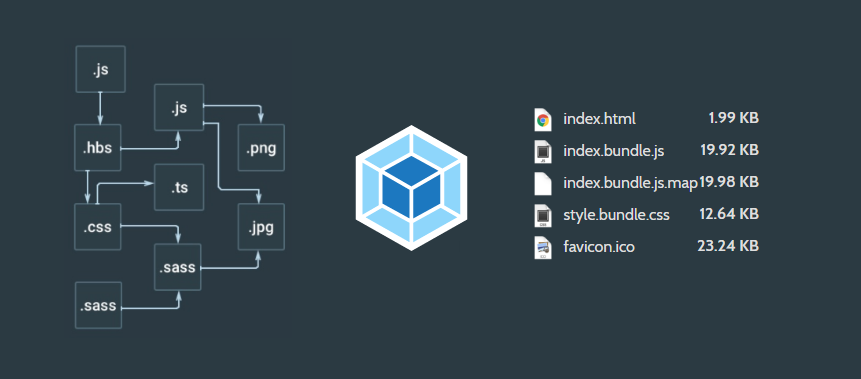
Webpack is a tool to build JavaScript modules in your application
Configure webpack: webpack.config.js
module.exports = {
  entry: './app/index.js',
  output: {
    filename: 'bundle.js',
    path: './dist'
  }
}
Run:
webpack

Hash: a3c861a7d42fc8944524
Version: webpack 2.2.0
Time: 90ms
   Asset     Size  Chunks             Chunk Names
index.js  1.56 kB       0  [emitted]  main
[0] ./app/index.js 170 bytes {0} [built]Create a bundle:
mkdir webpack-demo && cd webpack-demo

npm init -y

npm install --save-dev webpack

npm install --save lodash
webpack --help # Shows a list of valid cli commands
Show help:
Create js file: app/index.js
function component () {
  var element = document.createElement('div');

  /* lodash is required for the next line to work */
  element.innerHTML = _.map(['Hello','webpack'], function(item){
    return item + ' ';
  });

  return element;
}

document.body.appendChild(component());Create html file: index.html
<html>
  <head>
    <title>Webpack demo</title>
    <script src="https://unpkg.com/lodash@4.16.6" type="text/javascript"></script>
  </head>
  <body>
    <script src="app/index.js" type="text/javascript"></script>
  </body>
</html>Problem???
Import lodash:
import _ from 'lodash';

function component () {
  var element = document.createElement('div');

  /* lodash is required for the next line to work */
  element.innerHTML = _.map(['Hello','webpack'], function(item){
    return item + ' ';
  });

  return element;
}

document.body.appendChild(component());Change index.html to load a single bundled js file:
<html>
  <head>
    <title>Webpack demo</title>
    <!--script src="https://unpkg.com/lodash@4.16.6" type="text/javascript"></script-->
    <!--script src="app/index.js" type="text/javascript"></script-->
  </head>
  <body>
    <script src="dist/bundle.js" type="text/javascript"></script>
  </body>
</html>Change index.html to load a single bundled js file:
webpack app/index.js dist/bundle.jsGlobal:
npm install webpack -gnpm install webpack --save-dev
npm install webpack@<version> --save-devLocal:
ENTRY
Single entry: starting point of the graph of all application dependencies. For example:
module.exports = {
  entry: './path/to/my/entry/file.js'
};


//OR

const config = {
  entry: './path/to/my/entry/file.js'
};

module.exports = config;ENTRY
Multi main entry:
module.exports = {
  entry: ['./path/to/my/entry/file.js', './path/to/my/entry/otherfile.js']
};ENTRY
Object syntax: define entry/entries with object syntax way:
const config = {
  entry: {
    app: './src/app.js',
    vendors: './src/vendors.js'
  }
};

module.exports = config;OUTPUT
Tell Webpack how to write compiled files to disk
const config = {
  output: 'bundle.js'
};

module.exports = config;OUTPUT
Using filename and path to specify the name of output file on disk:
const config = {
  entry: './src/app.js',

  output: {
    filename: 'bundle.js',
    path: __dirname + '/build'
  }
}
module.exports = config;OUTPUT
Keep the same name as input by using [name]:
const config = {
  entry: './src/app.js',

  output: {
    filename: '[name].js',
    path: __dirname + '/build'
  }
}
module.exports = config;
It is right for multi main entry.
What are loaders?
Loaders are transformations that are applied on a resource file of your app.
They are functions (running in node.js) that take the source of a resource file as the parameter and return the new source.
Install loader:
npm install xxx-loader --save-dev

//for example
npm install sass-loader --save-dev
see LIST OF LOADERS
Using loader:
01- require:
02 - configuration:
03 - cli:
require("jade!./template.jade");
//uses the "jade-loader" (that is installed from npm to "node_modules") to
//transform the file "template.jade"
{
module: {
loaders: [
{ test: /\.jade$/, loader: "jade" }
]
}
}webpack --module-bind jadeQuery parameters:
accept normal query format(?key=value) and JSON object(?{key: value})
//require
require("url-loader?mimetype=image/png!./file.png");


//configuration
{
    test: /\.png$/,
    loader: "url-loader",
    query: { mimetype: "image/png" }
}

//cli
webpack --module-bind "png=url-loader?mimetype=image/png"How to write loader:
A node module export a function
// Identity loader
module.exports = function(source) {
  return source;
};


// Identity loader with SourceMap support
module.exports = function(source, map) {
  this.callback(null, source, map);
};Asynchronous Module Definition
id: module name
dependencies: specifies which module dependencies the module being defined has
factory: can be a function or object
define(id?: String, dependencies?: String[], factory: Function|Object);Create named module:
define('myModule', ['jquery'], function($) {
    // $ is the export of the jquery module.
    $('body').text('hello world');
});


// and use it
require(['myModule'], function(myModule) {});Create anonymous module:
define(['jquery'], function($) {
    $('body').text('hello world');
});Create mutiple dependencies module:
define(['jquery', './math.js'], function($, math) {
    // $ and math are the exports of the jquery module.
    $('body').text('hello world');
});;Create export value module:
define(['jquery'], function($) {

    var HelloWorldize = function(selector){
        $(selector).text('hello world');
    };

    return HelloWorldize;
});Create module using requirent to load depenencies:
define(function(require) {
    var $ = require('jquery');
    $('body').text('hello world');
});By Cường Trần
webpack