Graphics Programming Virtual Meetup


Discord

Tiny Renderer
Software Rasterizer
Lessons 0-2
Following SSloy's Tutorial
My reference implementation
Lesson 0
Setup
Project Setup
- Needs`tgaimage.h` header
- Then copy-paste code
#include "tgaimage.h"

const TGAColor white = TGAColor(255, 255, 255, 255);
const TGAColor red = TGAColor(255, 0, 0, 255);

int main(int argc, char** argv)
{
    TGAImage image(100, 100, TGAImage::RGB);
    image.set(52, 41, red);
    // i want to have the origin at the left bottom corner of the image
    image.flip_vertically();
    image.write_tga_file("output.tga");
    return 0;
}
Output (scaled up)
Lesson 1
Bresenham’s Line Drawing Algorithm
First Attempt
void line(int x0, int y0, int x1, int y1, TGAImage& image, TGAColor color)
{
    // step size of 0.1
    for (float t = 0.; t < 1.; t += .01)
    {
    	// linearly interpolate between x0 & x1 and y0 & y1
        int x = x0 + (x1 - x0) * t;
        int y = y0 + (y1 - y0) * t;
        image.set(x, y, color);
    }
}
Simply iterate "along" the line segment, turning on pixels as you go over them
Issues
- Only takes 100 steps
- Leaves gaps!
- No aliasing
line(-100, -100, 500, 500, image, white);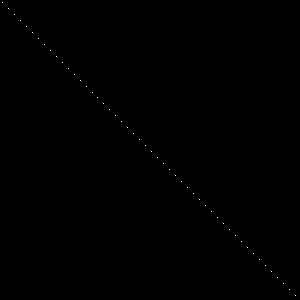
Second Attempt
void line(int x0, int y0, int x1, int y1, TGAImage& image, TGAColor color)
{
	//increment X by one every step
    for (int x = x0; x <= x1; x++)
    {
    	// get the current distance we are from x0 to x1 on a range of 0 to 1
        float t = (x - x0) / (float)(x1 - x0);
        // linearly interpolate y using that value between 0 to 1
        int y = y0 * (1. - t) + y1 * t;
        image.set(x, y, color);
    }
}
Have a step size of 1 pixel on the x axis, then linearly interpolate for the y axis
Better?
- Doesn't account for y axis!
- If the line goes down faster than it goes over , the y axis needs to take many steps but the x only takes one.
- We can do better!
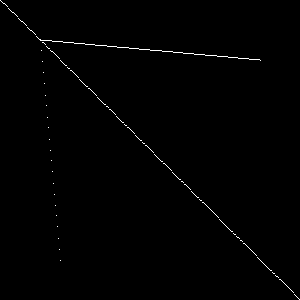
line(-100, -100, 500, 500, image, white);
line(40, 40, 60, 260, image, white);
line(40, 40, 260, 60, image, white);
Attempt 3
if (std::abs(x0-x1)<std::abs(y0-y1)) {
	std::swap(x0, y0);
        std::swap(x1, y1);
        steep = true;
    }
}
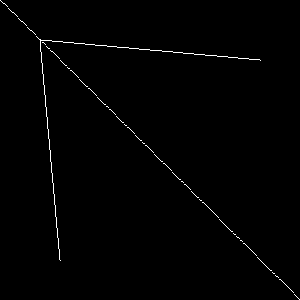
Solution: Choose the steeper axis and iterate on that
Find the larger delta and make "X" represent that
Account for 'negative direction'
if (x0 > x1) {  // make it left−to−right
    std::swap(x0, x1);
    std::swap(y0, y1);
}
Now "X" is just which ever was the steeper axis
for (int x = x0; x <= x1; x++) {
    float t = (x - x0) / (float)(x1 - x0);
    int y = y0 * (1. - t) + y1 * t;
    if (steep) {
        image.set(y, x, color);  // if transposed, de−transpose
    } else {
        image.set(x, y, color);
    }
}
Much better!
Attempt-4
- Factor out repeated calculations
- `derrer` is the slope
- Used to update the non major axis
- `error` is an accumulator
int dx = x1 - x0;
int dy = y1 - y0;
float derror = std::abs(dy / float(dx));
float error = 0;
int y = y0;- Modify for loop
- Remove linear interpolation calculation every iteration
- Update off-axis value if `error` > 0.5
- and reset accumulator
for (int x = x0; x <= x1; x++) {
    if (steep) {
        image.set(y, x, color);
    } else {
        image.set(x, y, color);
    }
    error += derror;
    if (error > .5) {
    	//make sure we increment in the 'right' direction
        y += (y1 > y0 ? 1 : -1);
        error -= 1.;
    }
}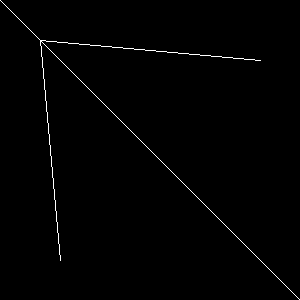
Fixed Diagonal issues!
Attempt 5
- Remove floating point entirely
- Do this by changing the scale of `error` and `derror`
- Use minor axis difference instead of raw 'slope'
int dx = x1 - x0;
int dy = y1 - y0;
int derror2 = std::abs(dy) * 2;
int error2 = 0;
int y = y0;
for (int x = x0; x <= x1; x++) {
    if (steep) {
        image.set(y, x, color);
    } else {
        image.set(x, y, color);
    }
    error2 += derror2;
    if (error2 > dx) {
        y += (y1 > y0 ? 1 : -1);
        error2 -= dx * 2;
    }
}
Wireframe Rendering
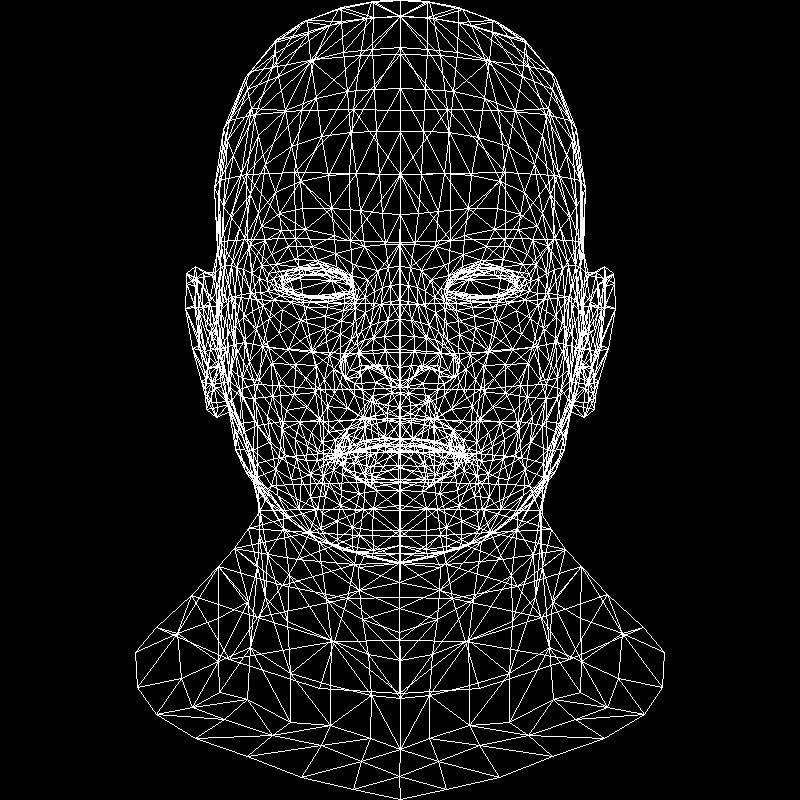
Must load the `.obj` models first
Copy-Paste `model.h` `model.cpp` and `geometry.h` into the project
Model model{"obj/african_head.obj"};
TGAImage image(width, height, TGAImage::RGB);
for (int i = 0; i < model.nfaces(); i++) {
    std::vector<int> face = model.face(i);
    for (int j = 0; j < 3; j++) {
        Vec3f v0 = model.vert(face[j]);
        Vec3f v1 = model.vert(face[(j + 1) % 3]);
        int x0 = (v0.x + 1.) * width / 2.;
        int y0 = (v0.y + 1.) * height / 2.;
        int x1 = (v1.x + 1.) * width / 2.;
        int y1 = (v1.y + 1.) * height / 2.;
        line(x0, y0, x1, y1, image, white);
    }
}
Lesson 2
Triangle Rasterization & back face culling
Line Sweep Algorithm
- Sort vertices of the triangle by their y-coordinates
- Rasterize simultaneously the left and the right sides of the triangle
- Draw a horizontal line segment between the left and the right boundary points
implementation
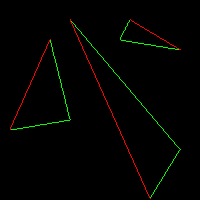
void triangle(Vec2i t0, Vec2i t1, Vec2i t2, TGAImage &image, TGAColor color) {
    // sort the vertices, t0, t1, t2 lower−to−upper (bubblesort yay!)
    if (t0.y>t1.y) std::swap(t0, t1);
    if (t0.y>t2.y) std::swap(t0, t2);
    if (t1.y>t2.y) std::swap(t1, t2);
    line(t0, t1, image, green);
    line(t1, t2, image, green);
    line(t2, t0, image, red);
}
Issue
- There are 'two' green lines for each red
- Can't easily sweep left to right
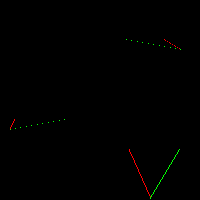
- Solution: Split red into two lines, create 2 subtriangles
- Second triangle is rendered here
void triangle(Vec2i t0, Vec2i t1, Vec2i t2, TGAImage &image, TGAColor color) {
    // sort the vertices, t0, t1, t2 lower−to−upper (bubblesort yay!)
    if (t0.y>t1.y) std::swap(t0, t1);
    if (t0.y>t2.y) std::swap(t0, t2);
    if (t1.y>t2.y) std::swap(t1, t2);
    int total_height = t2.y-t0.y;
    for (int y=t0.y; y<=t1.y; y++) {
        int segment_height = t1.y-t0.y+1;
        float alpha = (float)(y-t0.y)/total_height;
        float beta  = (float)(y-t0.y)/segment_height;
        Vec2i A = t0 + (t2-t0)*alpha;
        Vec2i B = t0 + (t1-t0)*beta;
        if (A.x>B.x) std::swap(A, B);
        for (int j=A.x; j<=B.x; j++) {
            image.set(j, y, color); // attention, due to int casts t0.y+i != A.y
        }
    }
    for (int y=t1.y; y<=t2.y; y++) {
        int segment_height =  t2.y-t1.y+1;
        float alpha = (float)(y-t0.y)/total_height;
        float beta  = (float)(y-t1.y)/segment_height;
        Vec2i A = t0 + (t2-t0)*alpha;
        Vec2i B = t1 + (t2-t1)*beta;
        if (A.x>B.x) std::swap(A, B);
        for (int j=A.x; j<=B.x; j++) {
            image.set(j, y, color); // attention, due to int casts t0.y+i != A.y
        }
    }
}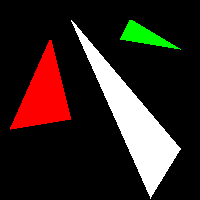
Final Output
Is there a better way?
- Line-sweep works for monolithic processors
- Modern hardware isn't a single core
- Determine if a pixel is within a triangle
- Then shade it accordingly
Possible psuedo code
triangle(vec2 points[3]) {
    vec2 bbox[2] = find_bounding_box(points);
    for (each pixel in the bounding box) {
        if (inside(points, pixel)) {
            put_pixel(pixel);
        }
    }
}
Barycentric Coordinates
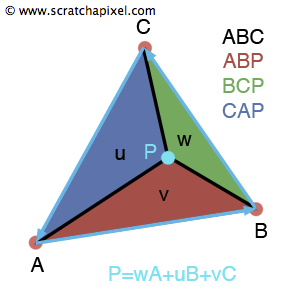
- Given a triangle ABC and a point P
- The coordinates of P with respect to ABC
P = (1 - u - v)A + uB + vC
Point P has coordinates (u,v) in the basis A, AB, and AC
P = A + u\overrightarrow{AB} + v\overrightarrow{AC}
A barycentric coordinate system (in 2D) is when the location of a point is specified by reference to a triangle's vertices.
Rearrange
u\overrightarrow{AB} + v\overrightarrow{AC} + \overrightarrow{PA} = 0
Linear System of Equations
\begin{Bmatrix}
u\overrightarrow{AB}_x + v\overrightarrow{AC}_x + \overrightarrow{PA}_x = 0 \\
u\overrightarrow{AB}_y + v\overrightarrow{AC}_y + \overrightarrow{PA}_y = 0
\end{Bmatrix}
Rewrite in matrix form
\begin{Bmatrix}
\begin{bmatrix} u & v & 1 \end{bmatrix} & \begin{bmatrix} \overrightarrow{AB}_x \\ \overrightarrow{AC}_x \\ \overrightarrow{PA}_x \end{bmatrix} = 0\\
\begin{bmatrix} u & v & 1 \end{bmatrix} & \begin{bmatrix} \overrightarrow{AB}_y \\ \overrightarrow{AC}_y \\ \overrightarrow{PA}_y \end{bmatrix} = 0
\end{Bmatrix}
- Want a vector (u,v,1) which is orthogonal to both (ABx,ACx,PAx) and (ABy,ACy,PAy)
- To find an intersection of two straight lines in a plane, it is sufficient to compute the cross product.
Vec3f barycentric(Vec2i *pts, Vec2i P)
{
    Vec3f u = cross(
        Vec3f(pts[2][0] - pts[0][0], pts[1][0] - pts[0][0], pts[0][0] - P[0]),
        Vec3f(pts[2][1] - pts[0][1], pts[1][1] - pts[0][1], pts[0][1] - P[1]));
    /* `pts` and `P` has integer value as coordinates
       so `abs(u[2])` < 1 means `u[2]` is 0, that means triangle is degenerate
       in this case return something with negative coordinates */
    if (std::abs(u[2]) < 1) return Vec3f(-1, 1, 1);
    return Vec3f(1.f - (u.x + u.y) / u.z, u.y / u.z, u.x / u.z);
}
void triangle(Vec2i *pts, TGAImage &image, TGAColor color) {
Vec2i bboxmin(image.get_width()-1, image.get_height()-1);
Vec2i bboxmax(0, 0);
Vec2i clamp(image.get_width()-1, image.get_height()-1);
for (int i=0; i<3; i++) {
for (int j=0; j<2; j++) {
bboxmin[j] = std::max(0, std::min(bboxmin[j], pts[i][j]));
bboxmax[j] = std::min(clamp[j], std::max(bboxmax[j], pts[i][j]));
}
}
Vec2i P;
for (P.x=bboxmin.x; P.x<=bboxmax.x; P.x++) {
for (P.y=bboxmin.y; P.y<=bboxmax.y; P.y++) {
Vec3f bc_screen = barycentric(pts, P);
// if P is > (0,0,0), then P is withing the triangle
if (bc_screen.x<0 || bc_screen.y<0 || bc_screen.z<0) continue;
image.set(P.x, P.y, color);
}
}
} Plug into psuedocode

Tada!
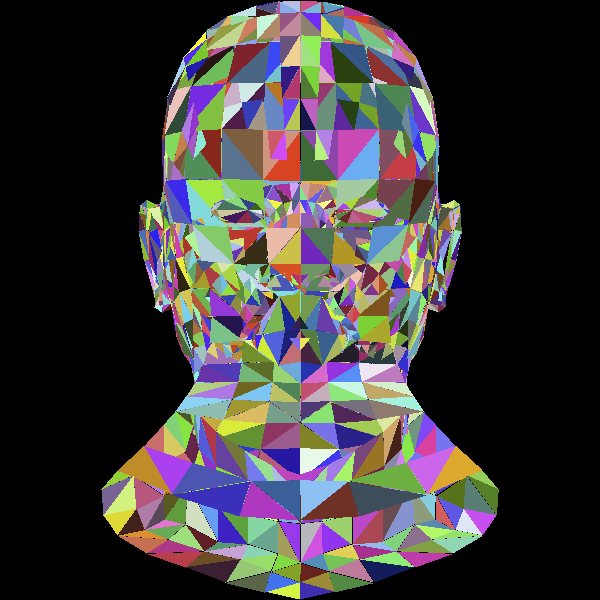
Lets Draw a model instead
We'll use random colors too
for (int i = 0; i < model.nfaces(); i++) {
    std::vector<int> face = model.face(i);
    vec2 screen_coords[3];
    for (int j = 0; j < 3; j++) {
        vec3 world_coords = model.vert(face[j]);
        screen_coords[j] =
            vec2((world_coords.x + 1.) * width / 2.,
                 (world_coords.y + 1.) * height / 2.);
    }
    triangle(screen_coords, image,
                TGAColor(rand() % 255, rand() % 255, rand() % 255, 255));
}
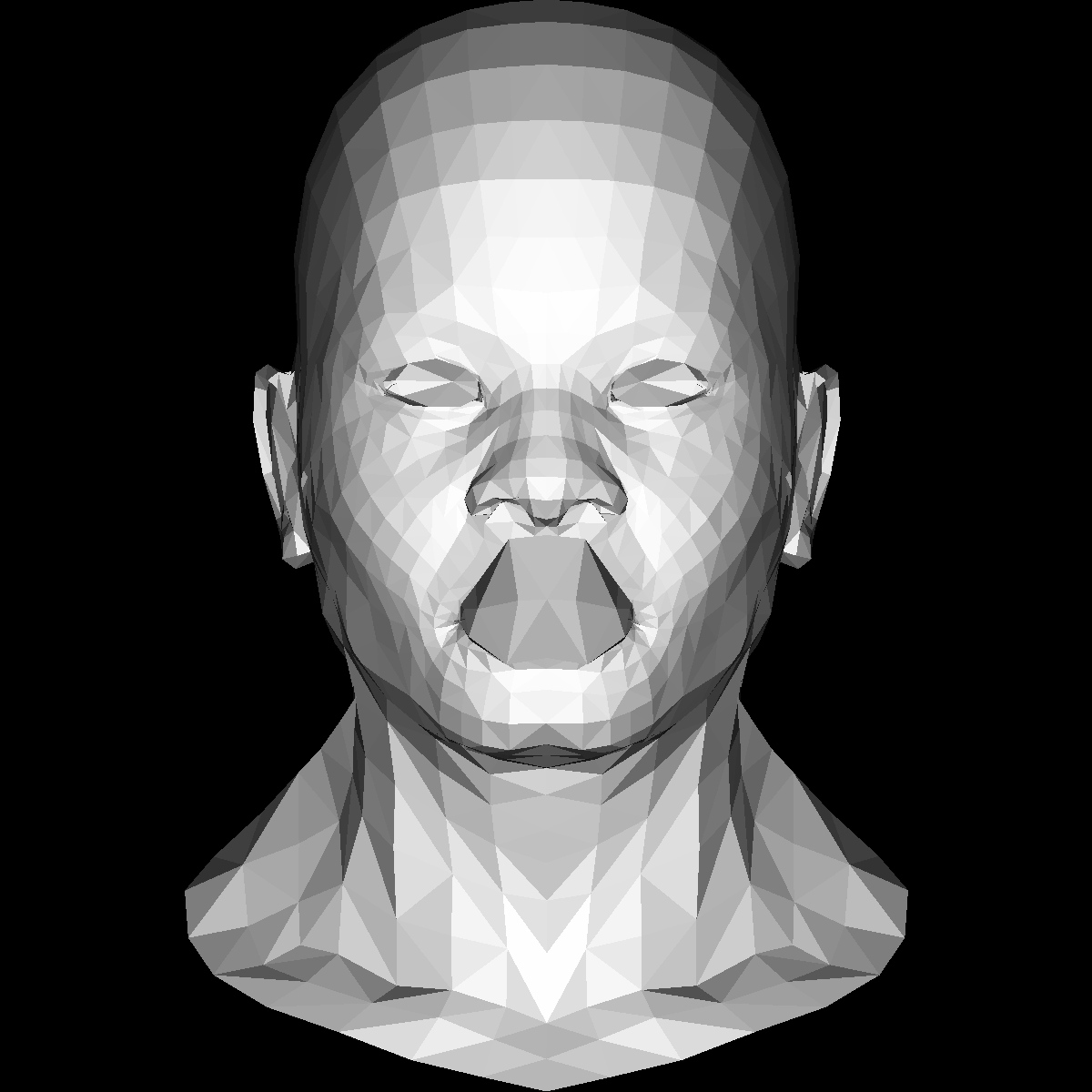
Now to add shading & lighting
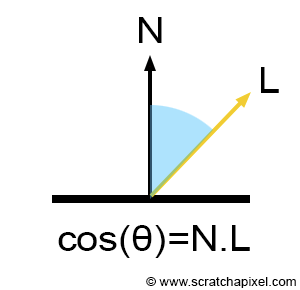
Simple lighting: Lambertian Reflectance
Or just Lamberts cosine law
for (int i=0; i<model->nfaces(); i++) {
    std::vector<int> face = model->face(i);
    Vec2i screen_coords[3];
    Vec3f world_coords[3];
    for (int j=0; j<3; j++) {
        Vec3f v = model->vert(face[j]);
        screen_coords[j] = Vec2i((v.x+1.)*width/2., (v.y+1.)*height/2.);
        world_coords[j]  = v;
    }
    Vec3f n = (world_coords[2]-world_coords[0])^(world_coords[1]-world_coords[0]);
    n.normalize();
    float intensity = n*light_dir;
    // Negative direction means lighting is behind the polygon
    // Allows very simple version of backface culling
    if (intensity>0) {
        triangle(screen_coords, image,
        	TGAColor(intensity*255, intensity*255, intensity*255, 255));
    }
}
Graphics Programming Virtual Meetup
TinyRenderer Lesson 0-2
By Charles Giessen