Graphics Programming Virtual Meetup


Discord
vk_mini_path_tracer
Chapter 7
Descriptors
Link to the tutorial
https://nvpro-samples.github.io/vk_mini_path_tracer/
Source code
https://github.com/nvpro-samples/vk_mini_path_tracer
End of this chapter

Descriptors
- How we give data to shaders on the GPU
- Conceptually like pointers
- But with more bells and whistles
- Point to things like:
- VkBuffers
- VkImages
- arrays of Buffers/Images
- Subregions of Buffers/Images
5 'objects' to consider
- Descriptors - actual 'pointers' to the data
- Descriptor Sets - collection of Descriptors
- Descriptor Pools - where Descriptor Sets are allocated from
- Descriptor Set Layouts - define the contents of a Descriptor Set
- Like a partial function signature
- Pipeline Layouts - collection of Descriptor Set Layouts
- The 'full' function signature
Basic steps in this process
- Create a VkDescriptorSetLayout
- Create a VkDescriptorPool large enough to store the descriptors sets needed
- Allocate a VkDescriptorSet from the pool
- Update the descriptor set using vkUpdateDescriptorSets
- Create a VkPipelineLayout using the descriptor set layout
- Use that pipeline layout when creating a VkPipeline
- Lastly, call vkCmdBindDescriptorSets after binding the pipeline while recording the command buffer
Visual Representation
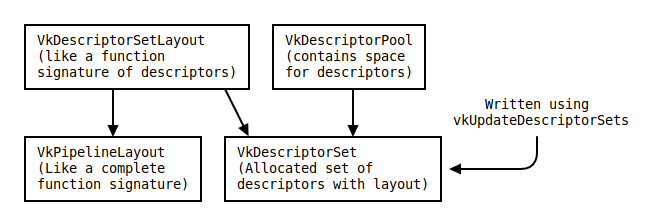
Descriptor sets are complicated
- Extremely flexible
- Extremely obtuse at first
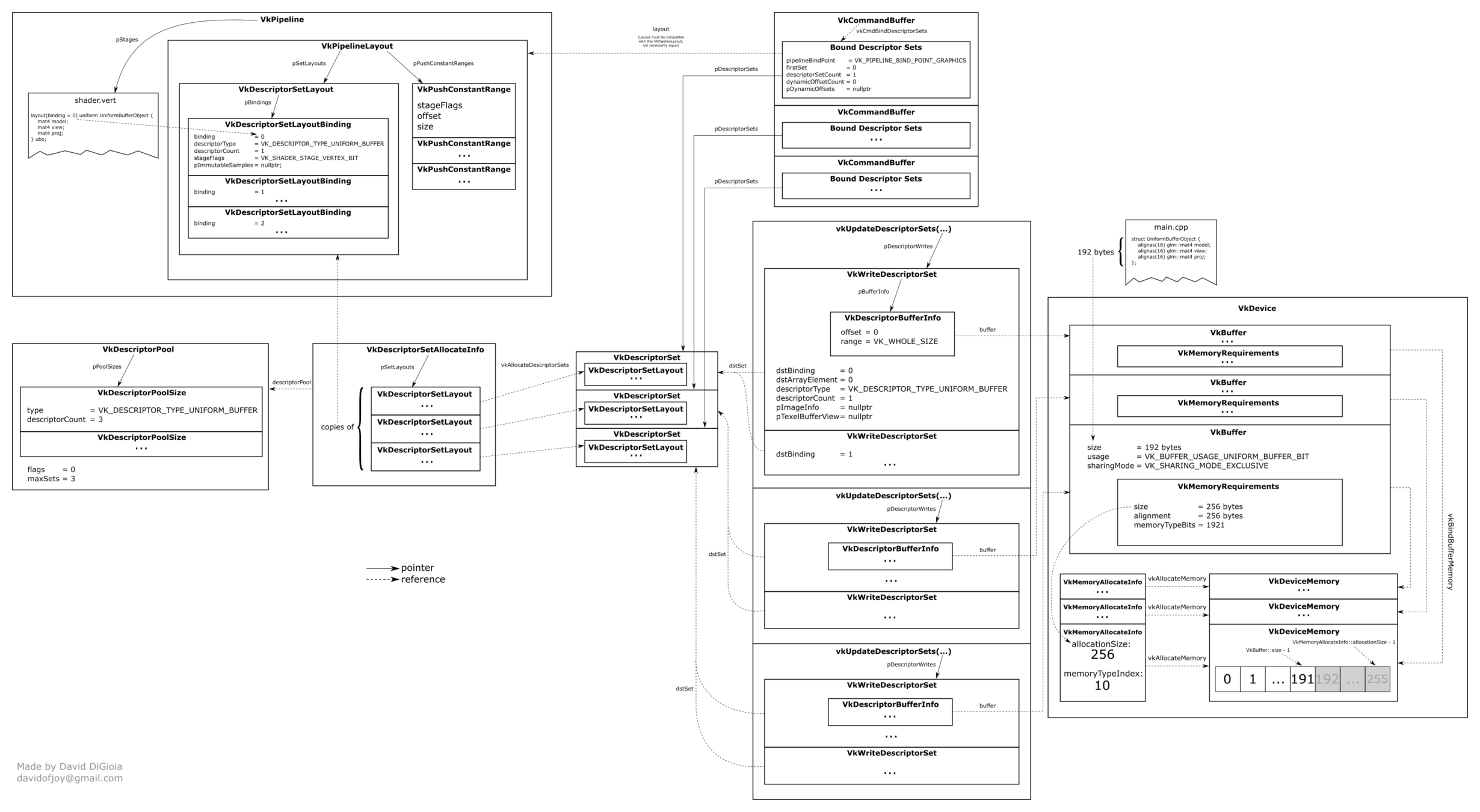
https://github.com/David-DiGioia/vulkan-diagrams
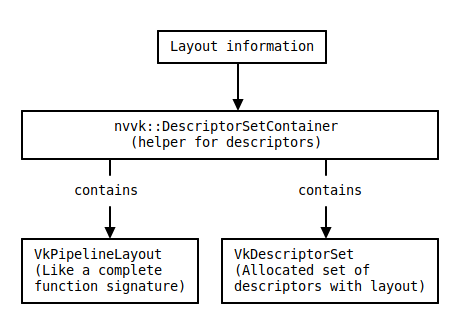
nvvk to the rescue!
- Limited requirements
- Hardcode this part
- Only going to need 1 VkDescriptorSet and 3 Descriptors in total
- nvvk::DescriptorSetContainer elides much boilerplate
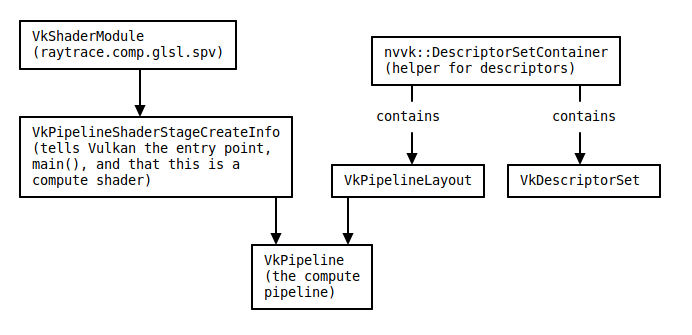
VkPipeline now looks like this
"Why are they so complicated"
- Allow binding groups of descriptors all at once
- These groups can have different 'update' frequencies
- Per-frame, Per-camera, Per-Material, Per-Mesh
- Only update whats needed
- Pipelines can 'mix & match' descriptor sets
- Same descriptor set usable in many pipelines
- Don't need to use the exact same layout object
- Compatible layouts are a-okay
- Can't update a descriptor set while its 'bound' (in a pipeline)
- Vulkan 1.2 adds mechanisms to lessen the restriction
CommandBuffer Recording
- vkBeginCommandBuffer
- bind the compute pipeline
- bind the descriptor set
- at the 'compute bind point'
- Dispatch the compute shader (in the pipeline)
- vkEndCommandBuffer
Shader Code Tutorial
- For each (x,y) pixel in the 800 × 600 image, write the linear RGB color (x/800,y/600,0)
- Jinks!
- Not "explained" in this tutorial
- Actual tutorial here
- https://thebookofshaders.com/
- layout(binding = 0, set = 0) buffer storageBuffer
- describes the 'descriptor'
- binding = 0, the first descriptor in its set
- set = 0, belongs to the first set
- 'buffer', descriptor is of type buffer
- storageBuffer, the name
- float imageData[], the contents of the buffer
- An array of data
#version 460

layout(local_size_x = 16, local_size_y = 8, local_size_z = 1) in;

layout(binding = 0, set = 0) buffer storageBuffer
{
  float imageData[];
};
Shader Header
void main() {
  // The resolution of the buffer, which in this case is a hardcoded vector
  // of 2 unsigned integers:
  const uvec2 resolution = uvec2(800, 600);

  // Get the coordinates of the pixel for this invocation:
  // .-------.-> x
  // |       |
  // |       |
  // '-------'
  // v
  // y
  const uvec2 pixel = gl_GlobalInvocationID.xy;

  // If the pixel is outside of the image, don't do anything:
  if((pixel.x >= resolution.x) || (pixel.y >= resolution.y)) {
    return;
  }
  // Create a vector of 3 floats with a different color per pixel.
  const vec3 pixelColor = vec3(float(pixel.x) / resolution.x,  // Red
                               float(pixel.y) / resolution.y,  // Green
                               0.0);                           // Blue
  // Get the index of this invocation in the buffer:
  uint linearIndex = resolution.x * pixel.y + pixel.x;
  // Write the color to the buffer.
  imageData[3 * linearIndex + 0] = pixelColor.r;
  imageData[3 * linearIndex + 1] = pixelColor.g;
  imageData[3 * linearIndex + 2] = pixelColor.b;
}
Shader Main
Vectors in shaders
- built in type
- vec2,vec3,vec4
- Can use member access for each component
- myVector.z = third component
- xyzw, rgba, stpq all valid
- Allows 'swizzling'
- myVector.xy = returns the first two components of the vector as a vec2
- myVector.zzzz = returns a vec4 with only the 'z value in every component
Onto the actual code!
- Need to add one more header for descriptor set stuff
#include <nvvk/descriptorsets_vk.hpp> // For nvvk::DescriptorSetContainer- No longer needed
- Can comment out
- Could be handy in the future
// Add the required device extensions for Debug Printf. If this is confusing,
// don't worry; we'll remove this in the next chapter.
deviceInfo.addDeviceExtension(VK_KHR_SHADER_NON_SEMANTIC_INFO_EXTENSION_NAME);
VkValidationFeaturesEXT      validationInfo  = nvvk::make<VkValidationFeaturesEXT>();
VkValidationFeatureEnableEXT validationFeatureToEnable
    = VK_VALIDATION_FEATURE_ENABLE_DEBUG_PRINTF_EXT;
validationInfo.enabledValidationFeatureCount  = 1;
validationInfo.pEnabledValidationFeatures     = &validationFeatureToEnable;
deviceInfo.instanceCreateInfoExt              = &validationInfo;
#ifdef _WIN32
  _putenv_s("DEBUG_PRINTF_TO_STDOUT", "1");
#else   // If not _WIN32
  putenv("DEBUG_PRINTF_TO_STDOUT=1");
#endif  // _WIN32
Remove Debug Printf
- Add this after vkCreateCommandPool
- Only need 1 'binding' right now
- The storage buffer
- Only need 1 of them as well
- initLayout creates the DescriptorSetLayout
// Here's the list of bindings for the descriptor set layout, from raytrace.comp.glsl:
// 0 - a storage buffer (the buffer `buffer`)
// That's it for now!
nvvk::DescriptorSetContainer descriptorSetContainer(context);
descriptorSetContainer.addBinding(
    0, VK_DESCRIPTOR_TYPE_STORAGE_BUFFER, 1, VK_SHADER_STAGE_COMPUTE_BIT);


// Create a layout from the list of bindings
descriptorSetContainer.initLayout();
Create the descriptor set layout
- Simple as calling a functoin
- Only need one descriptor set, allocate space only enough for one in the pool
- No push constants = can create the pipeline layout here as well
// Create a descriptor pool from the list of
// bindings with space for 1 set, and allocate that set
descriptorSetContainer.initPool(1);
// Create a simple pipeline layout from the descriptor set layout:
descriptorSetContainer.initPipeLayout();
Create the pool and pipeline layout
- Create a 'VkDescriptorWrite'
- helper fills in the details for us
- Describes *what* to make a descriptor out of
- Here its the buffer we made in Chapter 4
- Then call `vkUpdateDescriptorSets` with this data
// Write a single descriptor in the descriptor set.
VkDescriptorBufferInfo descriptorBufferInfo{};
descriptorBufferInfo.buffer = buffer.buffer;    // The VkBuffer object
descriptorBufferInfo.range
    = bufferSizeBytes;  // The length of memory to bind; offset is 0.
VkWriteDescriptorSet writeDescriptor
    = descriptorSetContainer.makeWrite(
        0 /*set index*/, 0 /*binding*/, &descriptorBufferInfo);

vkUpdateDescriptorSets(context, // The context
    1, &writeDescriptor,  // An array of VkWriteDescriptorSet objects
    0, nullptr);   // An array of VkCopyDescriptorSet objects (unused)
Writing Descriptors
- Remove this block of code
// For the moment, create an empty pipeline layout. You can ignore this code
// for now; we'll replace it in the next chapter.
VkPipelineLayoutCreateInfo pipelineLayoutCreateInfo
    = nvvk::make<VkPipelineLayoutCreateInfo>();
pipelineLayoutCreateInfo.setLayoutCount             = 0;
pipelineLayoutCreateInfo.pushConstantRangeCount     = 0;
VkPipelineLayout pipelineLayout;
NVVK_CHECK(vkCreatePipelineLayout(context,
    &pipelineLayoutCreateInfo, VK_NULL_HANDLE, &pipelineLayout));
New Pipeline Layout
pipelineCreateInfo.layout = descriptorSetContainer.getPipeLayout();- Replace with this
- Lets look at the arguments
void vkCmdBindDescriptorSets(
    // The command buffer to record this command to.
    // Subsequent commands in it will use these bindings.
    VkCommandBuffer        commandBuffer,
	// Where to bind the descriptors (in this case, the compute pipeline bind point).
    // Some commands use bindings from different bind points (e.g. compute dispatches
    // use the compute pipeline bind point, draw calls use the graphics bind point).
    VkPipelineBindPoint    pipelineBindPoint,
    // The pipeline's pipeline layout (like a function signature, excluding push constant ranges)
    VkPipelineLayout       layout,
    // (Set to 0) Number to add to the descriptor set index
    uint32_t               firstSet,
    // Number of descriptor sets in the `pDescriptorSets` array
    uint32_t               descriptorSetCount,
    // A pointer to an array of descriptor sets
    const VkDescriptorSet* pDescriptorSets,
    // (Unused) Number of dynamic offsets in the next array.
    uint32_t               dynamicOffsetCount,
    // (Unused) Pointer to an array of dynamic offsets.
    const uint32_t*        pDynamicOffsets
);
Descriptor Set Binding
- Much simpler if you have everything ready
- only are binding the single descriptor set
- Could bind multiple
- The pipeline 'type' must match
- Here its compute
- Can use the same descriptor set in different pipelines binds points
// Bind the descriptor set
VkDescriptorSet descriptorSet = descriptorSetContainer.getSet(0);
vkCmdBindDescriptorSets(cmdBuffer, VK_PIPELINE_BIND_POINT_COMPUTE,
    descriptorSetContainer.getPipeLayout(), 0, 1,
    &descriptorSet, 0, nullptr);
Actual code for binding
- We need enough workgroups to cover our image
- Use the following formula
// integer ceiling code equivalent
ceil(float(a)/float(b)) == (a + b - 1)/b

// Run the compute shader with enough workgroups to cover the entire buffer:
vkCmdDispatch(cmdBuffer,
    (uint32_t(render_width) + workgroup_width - 1) / workgroup_width,
    (uint32_t(render_height) + workgroup_height - 1) / workgroup_height,
    1);
Update our dispatch count

- nvvk again does all the heavy lifting
descriptorSetContainer.deinit();Now to clean up once we are done
What we should get
- Allows us to write a vec3 instead of 3 components
- without 'scalar', GLSL interprets imageData along 4 byte boundaries
- 'scalar' tells GLSL that the elements are packed together consecutively in memory.
- Note the change from float to vec3
#extension GL_EXT_scalar_block_layout : require
...

// The scalar layout qualifier here means to align types according to the alignment
// of their scalar components, instead of e.g. padding them to std140 rules.
layout(binding = 0, set = 0, scalar) buffer storageBuffer
{
  vec3 imageData[];
};
...

imageData[linearIndex] = pixelColor;
Cleaner buffer writing with Scalar Block Layout
Closing notes
- DebugPrintf creates descriptor sets in the background
- Without it we have to create our own descriptor set
- Nice article explaning descriptor binding in more detail
- https://developer.nvidia.com/vulkan-shader-resource-binding
Graphics Programming Virtual Meetup
Vulkan Mini Path Tracer Chapter 7
By Charles Giessen