ECSE 321 - Tutorial 6
Dominic Charley-Roy
https://github.com/dominiccharleyroy
dominic.charley-roy @ mail.mcgill
CSV and Serialization
Comma
Separated
Values!
What's that?
- CSV is a popular format for storing data in text form.
- "Easy" to convert an object to a text file and back.
- Serialization describes a mechanism used to convert an object/structure into a series of bytes and back.
- Why is this useful? Where would it be useful in your project?
Simplest Format
- Note that CSV is not standardized.
- Each row represents an object.
- Each field is separated by a comma.
- Suppose we had objects containing a first name, a school name, a degree name, and a graduation year. This could be saved like so:
Dominic,McGill,Bachelor of Science,2015
John,Concordia,Bachelor of Arts,2016
Laura,UQAM,Bachelor of Commerce,2017
Spreadsheet Example
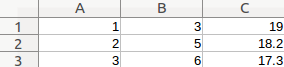
- CSV is a great format for storing spreadsheet data in a file.
- Most spreadsheet software let you import data from CSV.
1,3,19.00
2,5,18.200
3,6,17.300
Data Headers
CSV lets us optionally use the first row as headers, naming each field/column.
These names are formatted like a regular CSV row.
Name,Program,Age
Dominic,Computer Science,22
Michael,Engineering,22
Jennifer,Math,21
Annie,Management,19
Fred,Art History,20
But what if my data has commas?!
Quotes Fields
If we have commas in a field, we can wrap the entire field in double-quotes.
This tells CSV parsers that any comma within the double quotes is meant to be part of the data!
Name,Program,Age
"Charley-Roy, Dominic",Computer Science,22
"James, Michael",Engineering,22
"O'Connor, Jennifer",Math,21
"Panini, Annie",Management,19
"Lestrange, Fred",Art History,20
But what if my data has "quotes"?!
Escaping Quotes
To do this, we have to wrap a field in quotes and, for any quote which is part of the data, add a quote in front of it.
Name,Program,Age
"Dominic ""Nickname"" Charley-Roy",Computer Science,22
"Michael ""Nickname"" James",Engineering,22
"Jennifer ""Nickname"" O'Connor",Math,21
But what if I don't like commas... :(
The Delimiter
- The delimiter is the character which separates fields in CSV files! By default, it is a comma.
- Most parsers let you specify the character. Note that this should be a character and not more!
- Some common examples: |, tab, space
x|y
1|10
2|20
3|30
Apache Commons CSV

Apache Commons CSV
- Java library
- Easy to use!
- It's super flexible! Supports both reading from a CSV file and writing to one!
-
Installation:
1. Download and unzip the zip file
2. Move the jar file to your project
3. Add the jar to your project's build path.
Reading time!
Reading from a file using ACC (Apache Commons CSV) is super simple!
The first step is to build a CSVFormat, which will describe the formatting of our file (delimiter, are headers present, etc.).
We then create a CSVParser based on the format and a FileReader.
The CSVReader provides us with a list of CSVRecords!
Creating the CSVFormat
The default format uses commas as a delimiter, supports double quotes, and does not have the first row as headers.
CSVFormat myFormat = CSVFormat.DEFAULT;To enable a header row, we call a method on the format. This will build a new format.
CSVFormat myFormat = CSVFormat.DEFAULT.withHeaders();We can also hard-code headers instead of putting a header row.
CSVFormat myFormat = CSVFormat.DEFAULT.withHeaders(
    "Name", "Age", "Location");
More CSVFormat Tricks
If we want to change the delimiter to a pipe (|):
CSVFormat myFormat = CSVFormat.DEFAULT.withDelimiter('|');These can also be chained! Suppose we want the pipe delimiter and a header row:
CSVFormat myFormat = CSVFormat.DEFAULT
    .withDelimiter('|')
    .withHeader();
There's a lot more options, so I encourage you to check them out! For example, we can have comments in CSV files...
Creating a CSVParser
Once we have our format, we can create our CSVParser! This will wrap around a Reader and a CSVFormat.
Note: Creating a FileReader can throw an exception, so we need to make sure to take that into consideration...
CSVParser parser = new CSVParser(
    new FileReader("data.csv"), myFormat);
When we are done with our CSVParser, we need to close it to prevent memory leaks. This will also close the FileReader!
parser.close();Extracting the Records!
CSVParser makes it very easy to get our data! We simply call getRecords to get a list of our CSVRecords!
Note: If we have a header row, this will not be included in the list if we set up our format correctly!
List<CSVRecord> records = parser.getRecords();Protip: Since this is a list, this is iterable! So we can use the special for-each loop to go over each record!
for (CSVRecord record : parser.getRecords()) {
    // ... insert coolness here.
}
The CSVRecord!
Each CSVRecord represents a row in our data file! It works like a 0-indexed array of strings, so if we wanted the third field we would do:
String thirdField = record.get(2);If we are using headers, we can also use the header name of the field! Suppose we have a field named grade...
int grade = Integer.parseInt(
    record.get("grade"));
Writing to CSV files...
The Writing Process
- Create our CSVFormat like before.
Note: If you want headers, you have to hard-code them using withHeaders. - Create a CSVPrinter wrapped around a stream and a CSVFormat
- Print our records to the CSVPrinter
- Close the printer!
Building a Printer...

Wait no...
Creating the CSVPrinter!
We wrap the CSVPrinter around a stream, usually a FileWriter.
CSVPrinter printer = new CSVPrinter(
    new FileWriter("data.csv"), myFormat);
Again we have to make sure to close the printer when we are done with it to prevent memory leaks (and make sure it saves!)
printer.close();Saving Records
There are two ways to save records! The first is to simply pass in all the arguments as arguments to the printRecord method. This can be done in two ways.
// Method 1
printer.printRecord("Dominic", 22, "McGill");
// Method 2
String[] fields = new String[] {
    "Dominic", "23", "McGill"};
printer.printRecord(fields);
The second is to record the fields one by one and then add the new line.
printer.print("Dominic");
printer.print(23);
printer.print("McGill");
printer.println();
Making our code easily serializable!
Possible Approach
We want to create some kind of general, consistent way to serialize our object. In a game, you may have a lot of object you want to serialize, so this is important...
- Create 1 class which provides read and write methods for all of our objects.
- Create an interface providing both a read and write method. Each class that we will want to serialize will have a corresponding interface implementation.
This is important because field order matters in a CSV file, so we need to be consistent!
Sample Data Class 1
public class Person {
	private String firstName;
	private String lastName;
	private int age;

	public Person(String firstName, String lastName, int age) {
		this.firstName = firstName;
		this.lastName = lastName;
		this.age = age;
	}

	public String getFirstName() {
		return firstName;
	}

	public String getLastName() {
		return lastName;
	}

	public int getAge() {
		return age;
	}
}
Sample Data Class 2
public class Course {
	private String name;
	private int enrolled;

	public Course(String name, int enrolled) {
		this.name = name;
		this.enrolled = enrolled;
	}

	public String getName() {
		return name;
	}

	public int getEnrolled() {
		return enrolled;
	}
}
Approach 1
This approach has 1 class responsible for all of our serialization. It exposes methods for each class.
public class Serializer {
	public CSVParser createParser(FileReader reader) {
		// ...
	}
	public CSVPrinter createPrinter(FileWriter writer) {
		// ...
	}
	public Person readPerson(CSVRecord record){
		// ...
	}
	public void writePerson(Person person, CSVPrinter printer) {
		// ...
	}
	public Course readCourse(CSVRecord record){
		// ...
	}
	public void writeCourse(Course course, CSVPrinter printer) {
		// ...
	}
}
Sample Implementation
public Person readPerson(CSVRecord record){
	return new Person(
			record.get(0),
			record.get(1),
			Integer.parseInt(record.get(2)));
}

public void writePerson(Person person, CSVPrinter printer)
		throws IOException {
	printer.printRecord(
			person.getFirstName(),
			person.getLastName(),
			person.getAge());
}
Approach 2
This approach makes use of generics to define an interface which class-specific serializers will implement.
public interface CSVSerializer<C> {
	public C read(CSVRecord record);
	public void write(CSVPrinter printer, C object)
			throws IOException;
}
Sample Implementation
public class PersonSerializer implements CSVSerializer<Person> {
	@Override
	public Person read(CSVRecord record) {
		return new Person(
				record.get(0),
				record.get(1),
				Integer.parseInt(record.get(2)));
	}

	@Override
	public void write(CSVPrinter printer, Person person) throws IOException {
		printer.printRecord(
				person.getFirstName(),
				person.getLastName(),
				person.getAge());
	}
}
Some pitfalls...
- Never forget to close both the CSVParser and the CSVPrinter. Forgetting might lead to memory leaks as well as data not being saved!
- If you want to read and write a data structure, make sure to always keep the expected field order consistent in both methods! Declaring constants can help for this...
- Be careful with automatic headers. They're fine when reading, but you need to specify them when writing!
A
Note on
Sanitizing
We want clean data.
Now that you are considering saving data potentially input by a user, there are some things you need to check for...
- Be careful if you are doing things like saving a user's data in a file named after their username. What if their username is too long, contains invalid characters, or is something like .. (previous directory in Linux)
- Make sure to always validate data before writing. What if you forget to check if something is an integer when writing, and then on read we do Integer.parseInt?
- Note: be careful with sensitive data. Some things need encryption/hashing, such as passwords!
Copy of Copy of Copy of ECSE 321 - Tutorial 3
By dominiccharleyroy