JavaScript
Joel Ross
Autumn 2026 (B)
View of the Day
-
JavaScript Intro
-
Variables
-
DOM Elements
-
Functions
-
Arrays & Loops
-
Objects
Updating Lecture Code
# switch to starter branch to get new starter code
git checkout starter

# download new starter code
git pull

# switch back to main branch for coding
git checkout main

# merge in new starter code (use default msg)
git merge starter --no-edit

# code and enjoy!
Get the starter code from the starter branch, but do all of your work on main.
JavaScript
(more in the course text)



!=

Hello World
/* My first program (in JavaScript) */
console.log("Hello world!"); //prints
script.js

Including JavaScript
Where?
<!DOCTYPE html>
<html>
<head>
  <!-- include here to load before page (or defer) -->
  <script src="js/my-script.js" defer></script>
</head>
<body>
   ... content ...


   <!-- include here to load "after" html -->
   <!-- put it here for this course -->
   <script src="js/my-script.js"></script>
</body>
<html>
Include an external script file
<script src="path/to/my-script.js"></script>JavaScript Console
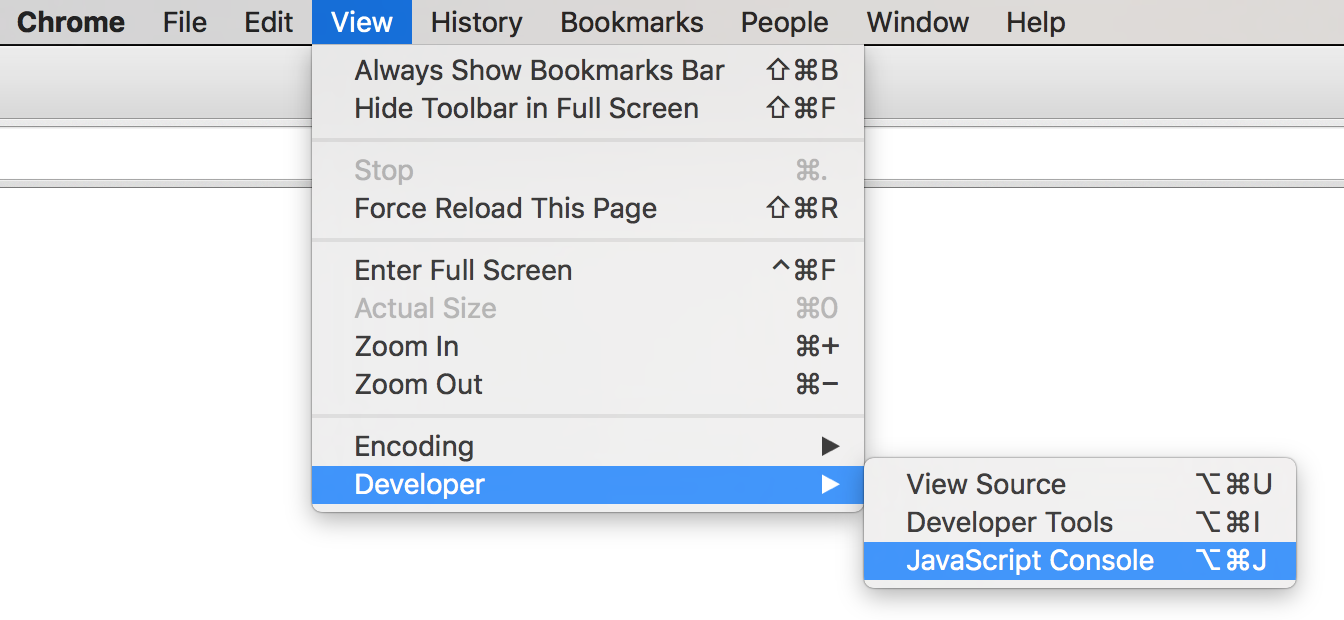
Open
"terminal"
Structuring JavaScript
Similar to R and Python, JavaScript has no main() method. Instead, each line of code in the script file is executed one at a time, top to bottom.
It's like the entire file is the body of main()!
/* index.js */
/* This is the ENTIRE contents of the file! */
console.log("Hello world!");  //executed first
console.log("I'm doing JavaScript!");  //executed second
Practice
Use two (2) console.log() statements to say hello to your neighbor. Show them your message in your browser!
JavaScript Variables
Variables are dynamically typed, so they take on the type (Number, String, Array, etc) of their current value.
let x = 'hello'; //value is a String

x = 42; //value is now a Number
Any
unassigned
variable has a
value of
undefined
//create a variable (not assigned)
let hoursSlept;
console.log(hoursSlept); //=> undefined
camelCase variables
declare as variable
no let (already declared)
let and const
const x = 4;
x = 5; // TypeError: Assignment to constant variable.

let y = 1.5;
y = 2; // ok!
Variables declared with const are constant and cannot be reassigned later (though properties can be changed).
Variables declared with let can be reassigned.
Best practice is to use const whenever you can.
Do not use var.
Use const wherever you can!
The DOM
(Document Object Model)
A
structural model of information represented by HTML.
The model is
a tree of element nodes.
The DOM provides functions that allows computer programs (e.g., JavaScript) to access and manipulate it.
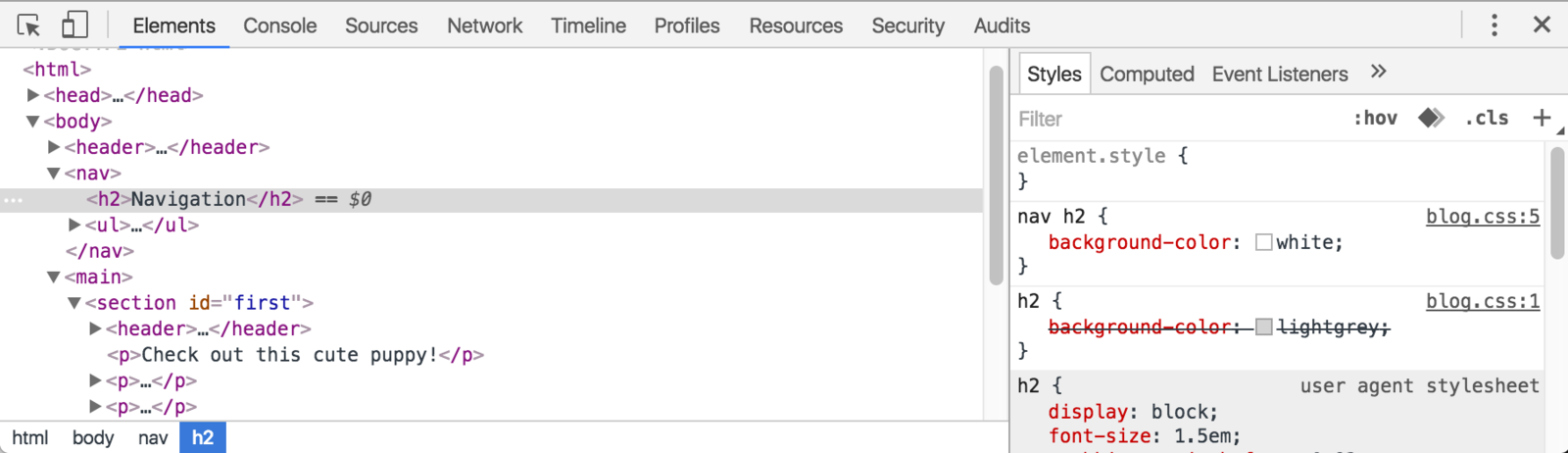
The DOM
Referencing Elements
Use the document.querySelector() function to get a reference to a DOM (HTML) element, which you can assign to a variable.
The function's argument is a string (in quotes!) of a CSS selector for that element.
//select the <h1> element
//returned value is an HTML Element (type)
const headingElement = document.querySelector('h1');

/* can use any valid CSS selector */
//selects the first element with `class="alert"`
const alertElement = document.querySelector('.alert');
Changing Elements
const paragraph = document.querySelector('p');
const image = document.querySelector('img');
const input = document.querySelector('input');

//change the paragraph's content
paragraph.textContent = "This is new content!";

//change the content (including HTML)
paragraph.innerHTML = "This is <em>new</em> content!";

//change element attributes
image.src = 'path/to/different_picture.png'; //change src

//access element properties
const inputttedValue = input.value;

//change element class(es)
paragraph.classList.add('bg-dark'); //give it the `bg-dark` class

//add specific CSS property (but better to use a class!)
//note that property names are camelCase
paragraph.style.fontSize = '2rem'; //change font-size
Access element properties (using dot notation) to modify the element.
Type Coercion
JavaScript will "coerce" operators to try and match types.
console.log('40' + 2)
console.log('40' - 4)


const num = 10
const str = '10'

// What are the values of each expression?
// (they will all be booleans, true/false)
const bool1 = (num == str)
const bool2 = (num === str)
const bool3 = ('' == 0) //empty String compare to 0
Creating Elements
Create new elements using document.createElement()
New elements need to be added to the existing DOM tree with e.g., appendChild()
//create an element
const newParagraphElem = document.createElement('p');

//give it content/etc
newParagraphElement.textContent = "new content";

//get reference to element already on the page
const mainElem = document.querySelector('main');

//append the new element as last child
mainElem.appendChild(newParagraphElem);
<main>
  <p>old content</p>
</main>
<main>
<p>old content</p>
<p>new content</p>
</main>Functions
Functions in JavaScript are like
static methods in Java
//JavaScript
function greet(greeting, name){
    return greeting + ", " + name;
}


const msg = greet("Hello", "World");
//Java
public static String greet(String greeting, String name){
return greeting + ", " + name;
}
public static void main(String[] args){
String msg = greet("Hello", "World");
}
No
access modifier
or return type declared
parameters have no type
parameters are
comma-separated
Call with parens and assign result, like Java
Functions
Functions in JavaScript look like functions in Python, except with C-style blocks (using {})
//JavaScript
function greet(greeting, name){
    return greeting + ", " + name;
}


const msg = greet("Hello", "World");
# Python
def greet(greeting, name):
return greeting + ", " + name
msg = greet("Hello", "World")Arrays
//declare arrays using literal syntax
const lettersArray = ['a', 'b', 'c']; //literal syntax
const thingsArray = ['dogs', 2.5, true, [3,4,0]]; //can mix types
const emptyArray = []; //an array with no values in it

//access array elements using bracket notation
console.log(lettersArray[0]); //'a'
console.log(lettersArray[4]); //undefined
lettersArray[5] = 'f'; //assigning out of bounds grows array
console.log(lettersArray); //['a', 'b', 'c', , , 'f']

//Use the `.length` property to get the length of the array
//(based on the last index; undefined is considered a value!)
console.log(lettersArray.length); //6

//arrays have methods as well!
lettersArray.push('z'); //add 'z' to the end
JavaScript arrays are sequences of value, similar to arrays in Java or lists in Python.
For Loops
JavaScript supports Java-style indexed for loops, as well as a "for of" syntax (similar to enhanced for loop in Java or a Python loop). Use "for of" to iterate through arrays, "for in" is only used to iterate through an Object by keys.
const myArray = [1, 2, 3, 4];

//for loop to iterate through indices
for(let i=0; i<myArray.length; i++){
  const theItem = myArray[i]; //access element at index
  console.log(theItem);
}

//loop array items
for(const theItem of myArray) {
  console.log(theItem)
}
Objects
Objects are an unordered set of key-value-pairs.
-
Like a dictionary: have the word (the key) and the definition (the value). Use the key to "look up" the value.
-
a.k.a a Map or a Hash (HashMap in Java, list in R, dict in Python)
-
a.k.a. an associative array
Objects are like arrays, except the "indices" are strings!
//declare objects using literal syntax
const agesObj = {'sarah':42, 'amit':35, 'zhang':13}
const typeExamples = {'anInt':12, 'aStr':'dog', 'anArr':[1,2]}
const emptyObj = {}

////can omit quotes on keys, but they are actually strings!
const englishToSpanish = {one:'uno', two:'dos'}
const numWords = {1:'one', 2:'two', 3:'three'}

//global function to get the keys of an object (as an array)
const keysArray = Object.keys(numWords) //[ '1', '2', '3' ]
Accessing Properties
Access individual values in a dictionary by using bracket notation, using the key as the "index".
const agesObj = {alice:40, bob:35, charles:13};

//access ("look up") values
console.log( agesObj['alice'] ); //=> 40
console.log( agesObj['bob'] ); //=> 35
console.log( agesObj['charles'] ); //=> 13

//keys not in the object have undefined values
console.log( agesObj['fred']); //=> undefined

//assign values
agesObj['alice'] = 41;
console.log( agesObj['alice'] ); //=> 41

agesObj['fred'] = 19; //adds the key and assigns value
can assign to any key w/o "initializing"!
Accessing Properties
const person = {
  firstName: 'Alice',
  lastName: 'Wong',
  age: 40,
  favorites: {
    music: 'jazz',
    food: 'pizza',
    numbers: [12, 42]
  }
};

const name = person['firstName']; //get value of 'firstName' key
person['lastName'] = 'Jones'; //set value of 'lastName' key
console.log(person['firstName']+' '+person['lastName']); //"Alice Jones"

const chosenValue = "food" //e.g., from user input
const favFood = person['favorites'][chosenValue]; //object in the object
                //object           //value

const firstNumber = person['favorites']['numbers'][0]; //12
person['favorites']['numbers'].push(7); //push 7 onto the Array
keys can be variables
Can reference values (called properties) with bracket notation, using the "key" as the "index"
Accessing Properties
Can also reference values using dot notation (like attributes
of a class). Similar in concept to $ notation in R.
const person = {
  firstName: 'Alice',
  lastName: 'Wong',
  age: 40,
  favorites: {
    music: 'jazz',
    food: 'pizza',
    numbers: [12, 42]
  }
};

const name = person.firstName; //get value of 'firstName' key
person.lastName = 'Jones'; //set value of 'lastName' key
console.log(person.firstName+' '+person.lastName); //"Alice Jones"

const chosenValue = "food" //e.g., from user input
const favFood = person.favorites.chosenValue; //undefined!!
              //object         //value

const firstNumber = person.favorites.numbers[0]; //12
person.favorites.numbers.push(7); //push 7 onto the Array
no variables in this syntax
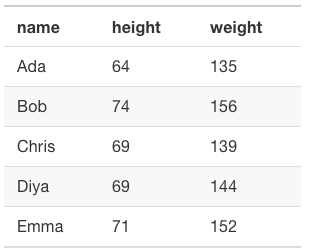
"Data Tables"
Use an array of objects with shared properties to represent a data table (like from a spreadsheet)
//Arbitrary list of people's names, heights, and weights
const people = [
    {name: 'Ada', height: 64, weight: 135},
    {name: 'Bob', height: 74, weight: 156},
    {name: 'Chris', height: 69, weight: 139},
    {name: 'Diya', height: 69, weight: 144},
    {name: 'Emma', height: 71, weight: 152}
]
Action Items!
Action Items!
-
Complete task list for Week 4 (all items)
-
Read: through Chapter 11
-
Problem Set 04 due Friday
-
Can start on Problem Set 05 (problems a & b)
-
Project Draft 1 due next week
Next week is really busy! Get caught up now!
Next: Interactivity through Functional Programming
info340au26b-javascript
By Joel Ross