CI Test System Quick Talk
41 projects
- virtualization team 發現 cluster 清除錯誤的問題,與 DSM 不相容問題等
- 測試到 user create fail
- 測試到 ssh login fail
- dsm-BackupApp unittest fail
- MailPlus 省下大量手動測試各種 spam mail 的時間
- 預先得知 kernel 升級 會造成 DSM 開不了機
Intro
For What?
No more teaching
Quickly figure out bug
As SPEC
End how to verify nightmare
Take over
...
Problem
- Everyone use different test method/framework
- Forget to run unittest
- Hard to deploy test envrionment
- No Report
- ...
Problem
-
Everyone use different test method/framework- Uniform framework (python-unittest)
-
Forget to run unittest- We run for you
-
Hard to deploy test envrionment- Lots of libraries to setup environment and send webapi
-
No Report- Website to show report and result
Two Parts
- CI
- Union CI system
- Both QC & RD can add test scripts
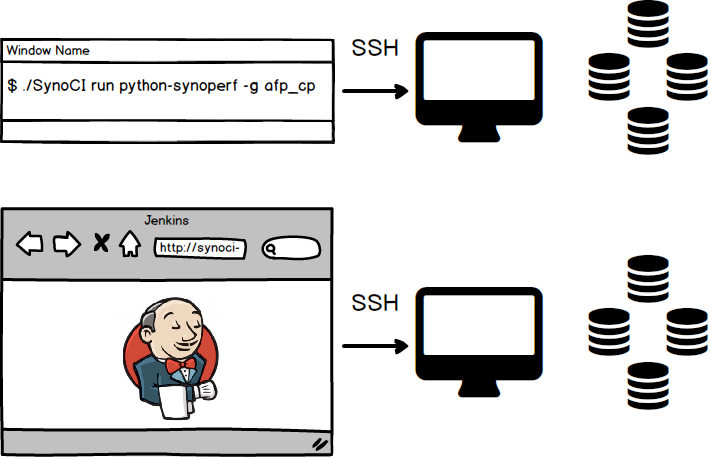
- Performance
- Union environment & script
- Simple UI to trigger
- Visualisation queue & Job percentage
Object
- Waht is archtecture of SynoCI framework?
- How to write, run and check result of test?
What our framework would do?
- Trigger Time
- DSM/SRM build
- Package build
- Manually
- Framework Do
- Install DS/Router to specific version
- Framework Not Do
- install package
- create volume
- create share ....
Arch Introduce
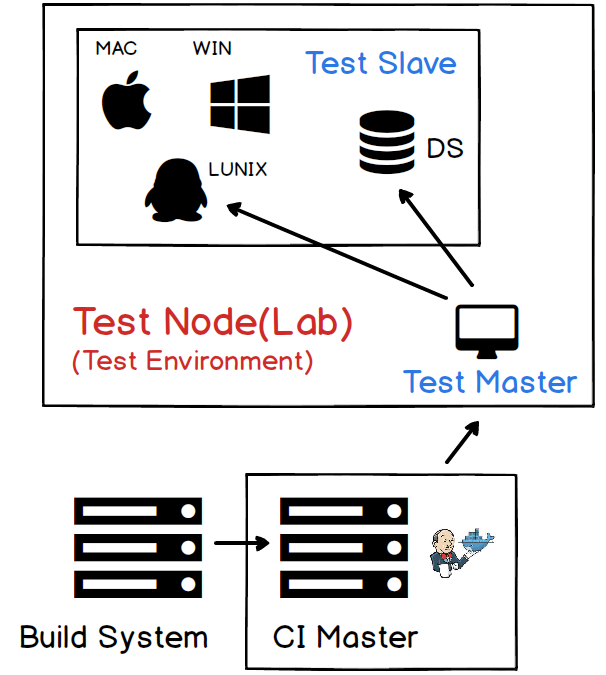
Role
-
Jenkins + CI Master
-
Test Master
-
DS + Win + Mac
Jenkins + CI Master
-
Entry point
-
Maitain job queue
-
One lab exec one job at the same time
-
-
Setup CI system environment
-
Flow
-
update CI Master scripts code
-
create new jenkins job
-
update jenkins job confing
-
update pkg-dsm version mapping
-
-
Command test Master to do things
Test Master
-
Setup DS environemnt & Run test scripts
-
Flow
-
update test scripts code to specific branch
-
Run SynoCI
-
-
Code
-
pkgscripts-ng/ci_utils/*
-
lnxscripts/ci_utils/*
-
DS + Win + Mac
-
Receive commands to run
- ssh + telent
- webapi
- pyro
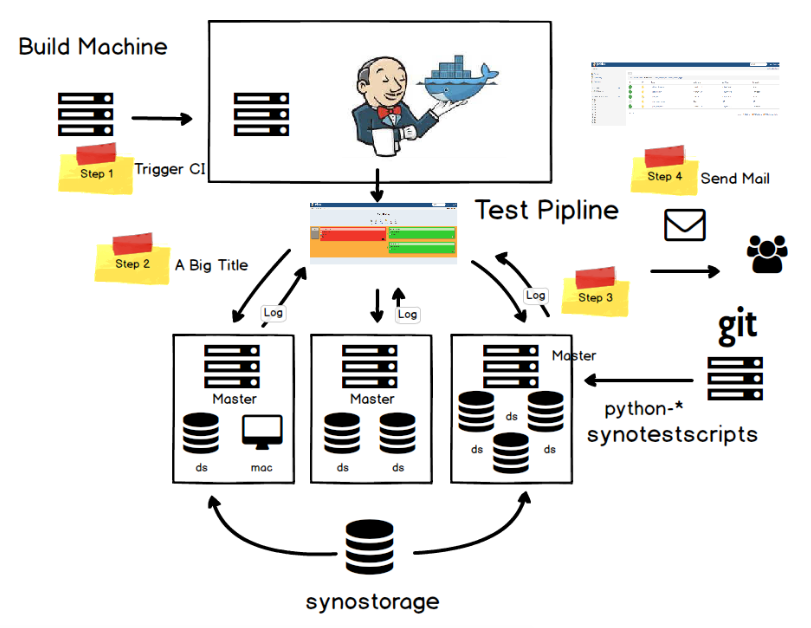
Test Master
- DSM
- lnxscripts/SynoCI
- Package
- pkgscripts-ng/SynoCI
- Run SynoCI would auto change to python virtual env
% ./SynoCI -h
usage: SynoCI [COMMAND] [OPTIONS]

optional arguments:
  -h, --help  show this help message and exit

commands:

  Genereral commands:
    list          List tasks of the suite
    update        Update CIENVS library include (python-synowebapi,python-synodeploy
                                                ,python-synopyro,python-synomail)
    log           Show last run result log of the suite
    list_suites   List all suites

  Code generate commands:
    new           Create a testsuites template
    gen           Generate a testcase
    gen_webapi    Generate a webapi testcase
    del           Undo code generate with "generate"

  Run the tests:
    run           Run tests
SynoCI Run
positional arguments:
  suite                 Run the testsuites

optional arguments:
  -h, --help            show this help message and exit
  -t testcase [testcase ...], --testcases testcase [testcase ...]
                        test case list
  -g PATH, --group PATH
                        specify group to run
  -c PATH, --config PATH
                        config file path [Default:
                        /synosrc/package/source/[Your
                        Project]/SynoTest/config.py]
  -d PATH, --dslist PATH
                        Config file of test DiskStation list [Default:
                        /synosrc/package/CIENVS/venv/etc/ds_conf.py]
  -w PATH, --winlist PATH
                        Config file of Windows list [Default:
                        /synosrc/package/CIENVS/venv/etc/win_conf.py]
  -m PATH, --maclist PATH
                        Config file of Mac list [Default:
                        /synosrc/package/CIENVS/venv/etc/mac_conf.py]
  -x PATH, --lnxlist PATH
                        Config file of Linux list [Default:
                        /synosrc/package/CIENVS/venv/etc/linux_conf.py]
  -l LEVEL, --loglevel LEVEL
                        debug|info|warning|error|critical [Default: info]
  -u, --unittest        Only run unittest
  -r, --regression      Only run regression test
  --ds_version DS_VERSION
                        specify ds version
  --pkg_version PKG_VERSION
                        package version store in
                        SYNOTESTCONF._SYNOCI_PKG_VERSION
SynoCI update
% ./SynoCI update -h
usage: SynoCI [COMMAND] [OPTIONS] update [-h] [-U] [-p PATH] [-v]

example:
  SynoCI update      // Update CIENVS and update local projects(python-syno*)

example:
  SynoCI update -U   // Update CIENVS but not update local project

optional arguments:
  -h, --help            show this help message and exit
  -U, --no_update_local
                        Not update python-* projects from git server or not
  -p PATH, --path PATH  The path to clone projs [Default:
                        /synosrc/package/source]
  -v, --verbosity       Show all update to stdout
Write Test
Simplest Webapi Test
-
Find project to place scripts
-
SynoCI new
-
Write jenkins_job.yml
-
Write test
-
SynoCI run
import unittest
from synowebapi.webapi import WebAPI
from synodeploy.ds_deploy.remote_cmd_exec import RemoteCmdExec

class TestWebapiTest(unittest.TestCase):
    ''' This is a Python unittest Example'''
    DS = SYNOTESTCONF.DS

    @classmethod
    def setUpClass(cls):
        pass

    @classmethod
    def tearDownClass(cls):
        pass

    def test_utilization_webapi(self):
        params = {
            "method":"get",
            "version":1,
            "type":"current",
            "resource":[
                "cpu","memory",
                "network"
            ]
        }
        with WebAPI(host=self.DS.ip, usr=self.DS.usr, pwd=self.DS.pwd, port=5000) as webapi:
            ret = webapi.sendAPI(api='SYNO.Core.System.Utilization', **params)
            self.assertEqual(ret["success"], True)

    def test_synogetkeyvalue(self):
        with RemoteCmdExec(self.DS) as api:
            cmd = '/usr/syno/bin/synogetkeyvalue /etc/synoinfo.conf company_title'
            ret_code, out, err = api.remote_exec_cmd(cmd)
            self.assertEqual(ret_code, 0)
            self.assertEqual(out.strip(), 'Synology')
More example on synotestscripts
Check Result
CI Report
-
Report Web
-
synotestscripts/ci-report-web/README.md
-
-
Jenkins log
DB
-
Postgres
-
Host: 10.12.12.182
-
Account: ci_report
-
Password: ci_report
-
Database: ci_report
-
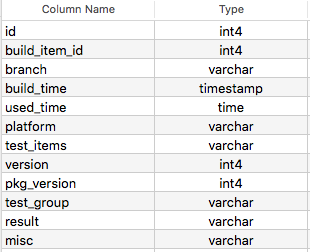
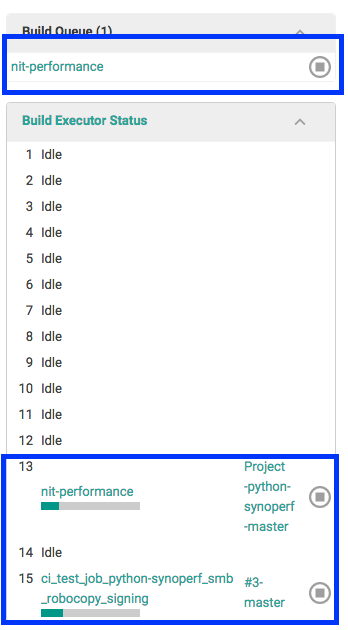
Build queue
Running Status
Why Using Jenkins?
Q&A
Synology CI Talk
By nit nit