




Juan Romero-Luis
Science Communication & UX Researcher
Teacher Juan Romero Luis
Feb 7, 2024
Unit 3
bit.ly/BWD23U3
N
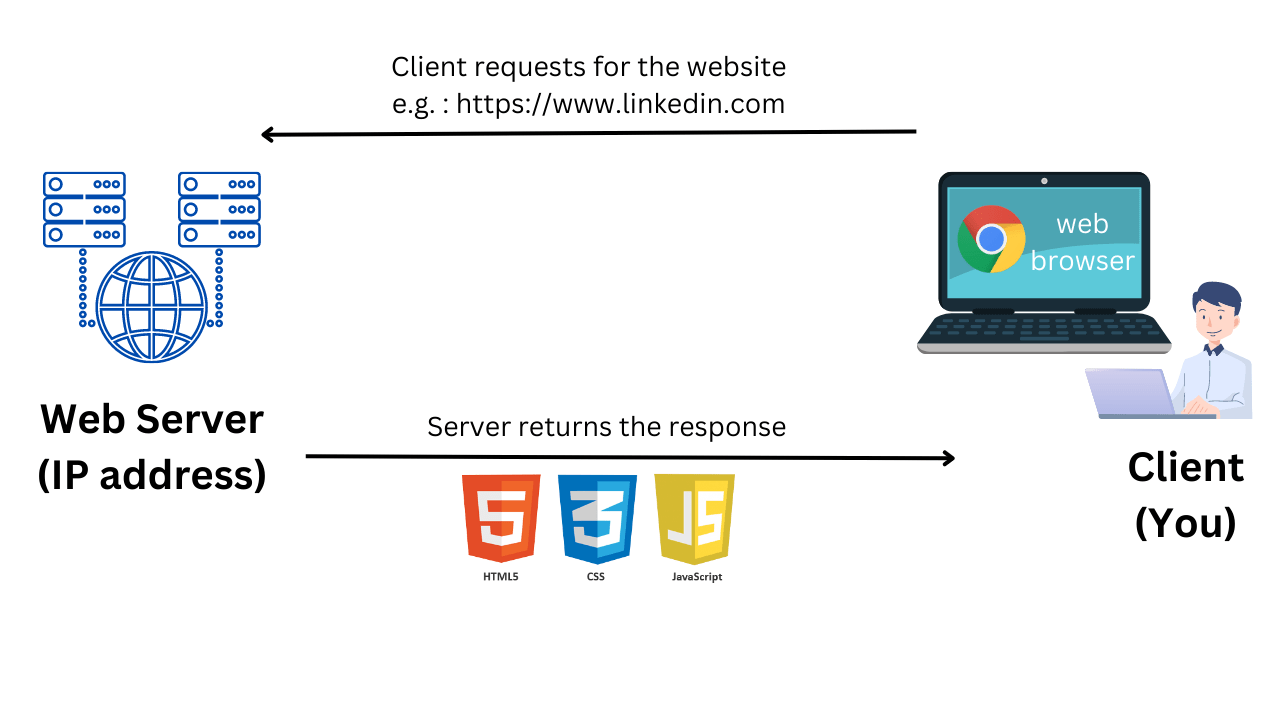
What are internet protocols?
They are a set of rules and conventions that define how devices communicate and exchange data on the Internet.
N
N
N
Source: john3s.
Hypertext Markup Language
What is HTML?
<p>This is a paragraph.</p>
Element
Opening tag
Closing tag
Content
<h1>This is a heading</h1>
<div>


</div>
<p>This is a paragraph inside a box.</p>
Closing tag
Content
Opening tag
Opening tag
Closing tag
Element 2
Element 1
<p>This is some text. <br> This is some more text on a new line.</p>
🎯 Try the <br> element in JSfiddle.
Unique tag
<p>This is text in <i>italic</i>.</p>
Opening tag
Closing tag
Element 2
Element 1
🎯 Try the <strong>, tags in JSfiddle.<i>, <mark> <em> in
<!DOCTYPE html>
<html>
  <head>
    <title>My First Web Page</title>
  </head>
  <body>
    <h1>Welcome to My First Web Page</h1>
    <p>This is a paragraph of text on my web page.</p>
  </body>
</html>
Teacher Juan Romero Luis
Feb 8, 2024
Unit 3
bit.ly/BWD23U3
<!-- This is a comment -->
<p>This is a paragraph.</p>
<!-- This is another comment -->
🎯 Create a comment in HTML using JSfiddle to see how it behaves.
<ul>
  <li>Apple</li>
  <li>Banana</li>
  <li>Cherry</li>
</ul>
<ol>
  <li>Apple</li>
  <li>Banana</li>
  <li>Cherry</li>
</ol>
Ordered list
Unordered
Teacher Juan Romero Luis
Feb 14, 2024
Unit 3
bit.ly/BWD23U3
<a href="https://www.eg.com">Linked text.</a>
<img src="image.jpg" alt="Description">
Opening tag
Closing tag
Unique tag
Attribute
Attribute 1
Attribute 2
<a href="https://www.eg.com">Linked text.</a>
<img src="image.jpg" alt="Description">
Name
Value
Name
Value
Name
Value
<p>Visit our <a href="http://www.example.com/contact.html">contact page</a> for more information.</p>
Paths in HTML refer to the way we specify the location of resources such as images, links, or other files that we want to use or reference in our HTML document.
What are paths in HTML?
An absolute path points to the same location in a file system, regardless of the current working directory.
<img src="http://www.example.com/images/picture.jpg">
📂 example directory
📂 images
🏙️ picture.jpg
📂 Directory
📄mysite.html
Absolute path
A relative path is a path relative to the current working directory.
<img src="picture.jpg">
📂 Directory
📄site.html
📂 images
🏙️ picture.jpg
📂 Directory
📄site.html
🏙️ picture.jpg
<img src="images/picture.jpg">
<img src="../images/picture.jpg">
<img src="../../images/picture.jpg">
📂 Directory
📂 images
🏙️ picture.jpg
📂 folder
📄site.html
📂 Directory
📂 images
🏙️ picture.jpg
📂 folder
📂 folder
📄site.html
Teacher Juan Romero Luis
Feb 21, 2024
Unit 3
bit.ly/BWD23U3
Remember to use quotation marks when inserting attribute values
If an image does not display, ensure the correct path has been included. Verify in which folder the image is located
Although links can be unnested, if you are linking text, it must be nested within a paragraph or heading
<p>
Paragraph is here with a
<a href="https://example.com">link</a>.
</p>
name="value"
<img src="image/image.jog">
<a href="https://www.example.com" target="_blank" title="Visit Example Website">Click here.</a>
Teacher Juan Romero Luis
Feb 22, 2024
Unit 3
bit.ly/BWD23U3
<table>
  <tr>
    <th>Header 1</th>
    <th>Header 2</th>
  </tr>
  <tr>
    <td>Cell 1 of Row 2</td>
    <td>Cell 2 of Row 2</td>
  </tr>
  <tr>
    <td>Cell 1 of Row 3</td>
    <td>Cell 2 of Row 3</td>
  </tr>
</table>
| Header 1 | Header 2 |
|---|---|
| Cell 1 of Row 2 | Cell 2 of Row 2 |
| Cell 1 of Row 3 | Cell 2 of Row 3 |
<table>: This tag defines the table itself. Every table begins and ends with this tag.<tr>: This stands for 'table row'. This tag is used to define each row in the table.<th>: This stands for 'table header'. This tag is used to define a header cell in the table, which is typically used to label columns or rows.<td>: This stands for 'table data'. This tag is used to define each cell in the row.
<thead>: This element is used to group the header content in an HTML table. <tbody>: This element is used to group the body content in an HTML table. <tfoot>: This element is used to group the footer content in an HTML table. It is used to store information such as total, sum, etc., that is calculated from the data in the table cells.| Header 1 | Header 2 |
|---|---|
| Cell 1 of Row 2 | Cell 2 of Row 2 |
| Cell 1 of Row 3 | Cell 2 of Row 3 |
| Footer 1 | Footer 2 |
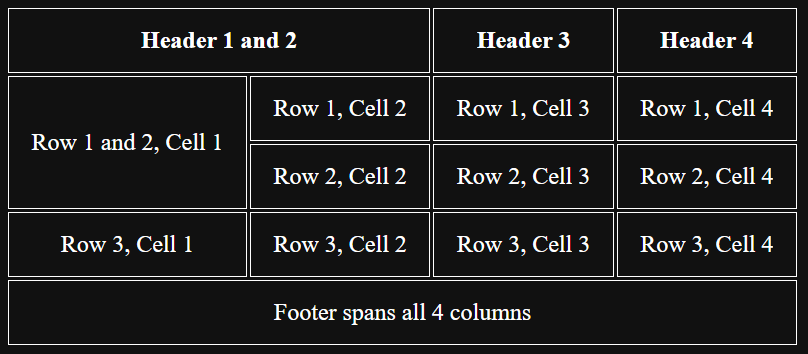
colspan is used to make a cell span multiple columns. For example, if you want a cell to span 3 columns, you would use <td colspan="3">. rowspan is used to make a cell span multiple rows. For example, if you want a cell to span 2 rows, you would use <td rowspan="2">. Teacher Juan Romero Luis
Feb 28, 2024
Unit 3
bit.ly/BWD23U3
<img src="image.jpg" alt="A beautiful sunset over the mountains" width="500" height="600" title="Sunset over the Rockies">
<!-- using img tag to insert an SVG file -->
<img src="image.svg" alt="Description of SVG">
<!-- inline SVG -->
<svg width="100" height="100">
  <circle cx="50" cy="50" r="40" stroke="green" stroke-width="4" fill="yellow" />
</svg>
N
N
<video src="sample.mp4" alt="Description of the video" width="320" height="240" controls autoplay loop muted>
 <p> Your browser does not support the video tag. </p>
</video>
N
<iframe src="https://www.example.com" title="Example Website" width="500" height="300" frameborder="1" allowfullscreen></iframe>
Teacher Juan Romero Luis
Feb 29, 2024
Unit 3
bit.ly/BWD23U3
<!DOCTYPE html>
<html lang="en">
...
</html>
<!DOCTYPE html>
<html lang="en">
  <head>
      <title>Introduction to HTML - Web Development Course</title>
  </head>
  ...
</html>
<!DOCTYPE html>
<html lang="en">
  <head>
      <title>Introduction to HTML - Web Development Course</title>
      <meta charset="UTF-8">
      <meta name="author" content="Author Name">
      <meta name="description" content="Free Web tutorials">
      <meta http-equiv="refresh" content="30">
      <meta name “robots” content=”noindex”>
  </head>
  ...
</html>
<!DOCTYPE html>
<html lang="en">
  <head>
      <title>Introduction to HTML - Web Development Course</title>
      <meta charset="UTF-8">
      <meta name="author" content="Author Name">
      <meta name="description" content="Free Web tutorials">
      <meta http-equiv="refresh" content="30">
      <link rel="stylesheet" type="text/css" href="mystyle.css">
  </head>
  ...
</html>
<!DOCTYPE html>
<html lang="en">
  <head>
      <title>Introduction to HTML - Web Development Course</title>
      <meta charset="UTF-8">
      <meta name="author" content="Author Name">
      <meta name="description" content="Free Web tutorials">
      <meta http-equiv="refresh" content="30">
      <link rel="stylesheet" type="text/css" href="mystyle.css">
      <script src="myscripts.js"></script>
  </head>
  ...
</html>
<!DOCTYPE html>
<html lang="en">
  <head>
      <title>Introduction to HTML - Web Development Course</title>
      <meta charset="UTF-8">
      <meta name="author" content="Author Name">
      <meta name="description" content="Free Web tutorials">
      <meta http-equiv="refresh" content="30">
      <link rel="stylesheet" type="text/css" href="mystyle.css">
  </head>
  <body>
  	<!-- Your HTML code -->
  	<script src="myscripts.js"></script>
  </body>
</html>
Is this a void element?
By Juan Romero-Luis


