







Juan Romero-Luis
Science Communication & UX Researcher
Teacher Juan Romero Luis
May 5, 2025
Unit 6
bit.ly/BWD24U6
bit.ly/BWD23U6
bit.ly/BWD23U5
What is responsive design?
JavaScript is a popular programming language primarily used for enhancing the interactivity and functionality of web pages. It allows for the creation of dynamic content, including animations, interactive forms, and more complex features like games and web applications.
JavaScript is primarily used for client-side web development to make web pages interactive
Java is a general-purpose programming language used for a wide range of applications, including server-side development, Android development, and big data technologies
N
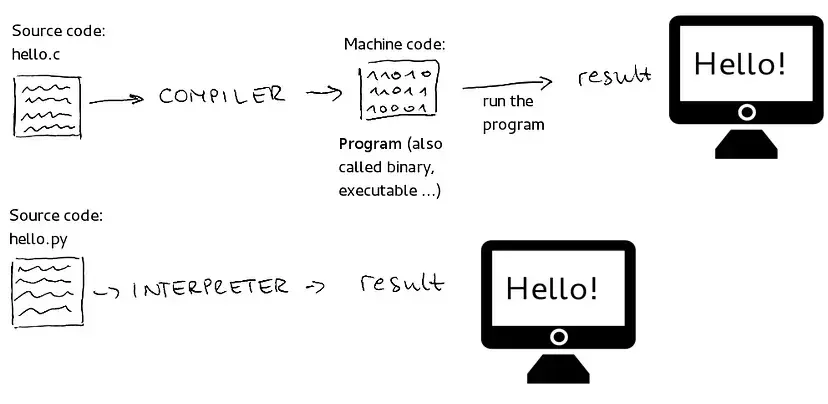
JavaScript is considered an interpreted language because the code is executed line by line by a JavaScript engine inside the browser at runtime.
JS organizes software design around data, or objects, rather than functions and logic. In other words, it focuses on what developers want to manipulate, rather than how they want to manipulate it.
offers a high degree of flexibility through:
allows applications to be broken down into smaller, manageable parts or modules
facilitates code reuse, as one class can inherit properties and methods from another class
enables interaction with the webpage via the Document Object Model (DOM)
<button onclick="alert('Hello World!')">Click me</button>
<!-- The onlcick executes the code when the button is clicked. -->

<p onload="alert('Welcome to my website!')">
<!-- The onload event is triggered when the entire content of the webpage has been loaded. -->

<p onmouseover="this.style.color='red';">Hover over me!</p>
<!-- The onmouseover event is triggered when a user moves their mouse over an HTML element.-->

<p onmouseout="this.style.color='black';">Hover over me!</p>
<!--The onmouseout event is activated when a user moves their mouse away from an HTML element.-->

<input type="text" onkeydown="console.log('You pressed a key!')">
<!--The onkeydown event is triggered whenever a key is pressed down.-->
page.html
<!DOCTYPE html>
<html>
	<head>
      <script>
        function myFunction() {
          document.getElementById("demo").innerHTML = "Paragraph changed.";
        }
	  </script>

	</head>
	<body>
	...
	</body>
</html>
<!DOCTYPE html>
<html>
	<head>

	</head>
	<body>
		...
     <script>
        function myFunction() {
          document.getElementById("demo").innerHTML = "Paragraph changed.";
        }
	  </script>
	</body>
</html>
<!DOCTYPE html>
<html>
	<head>
	   <script src="main.js">
       </scritp>
	</head>
	<body>
	...
	</body>
</html>
<!DOCTYPE html>
<html>
	<head>
	</head>
	<body>
	...
     <script src="main.js">
     </scritp>
	</body>
</html>
page.html
page.html
function ...
main.js
Teacher Juan Romero Luis
May 5, 2025
Unit 6
bit.ly/BWD24U6
N
var x = 10;
// This is a statement that declares a variable x and assigns the value 10 to it.
Each statement corresponds to a command for the browser, as if you were instructing the browser to "do this".
var x = 10;
var y = 9
Each statement is separated by a semicolon ( ; ). It is not mandatory but highly recomended.
function greetUser() {
  var name = 'John';
  console.log('Hello, ' + name);
}
//In this function, the statements within the curly brackets '{ }' form a block that's executed together when the function is called.
Statements can be structured into blocks, initiated with curly brackets '{ }'. These brackets are used to cluster multiple statements that need to be executed collectively.
function checkNumber(number) {
    if (number > 10) {
        return "The number is greater than 10.";
    } else if (number < 10) {
        return "The number is less than 10.";
    } else {
        return "The number is exactly 10.";
    }
}
//In this function (an example of grouped statements) if the input number is greater than 10, it returns "The number is greater than 10.". If the number is less than 10, it returns "The number is less than 10.". If the number is exactly 10, it returns "The number is exactly 10.".
JavaScript is case-sensitive.
var lastname = "Romero Luis";
var lastName = "Pérez González";
document.getElementById('change') //This is correct
document.getelementbyid('change') //This won't work
CamelCase is a naming convention in which each word in a compound word is capitalized, except possibly the first word.
var my_variable = 5 + 3;
var myVariable = 2 * 2;
JavaScript ignores multiple spaces. You can add white space to your script to make it more readable.
var foo =                    'hello world';
var foo = 'hello world';
Just like in mathematics, parentheses () are used to change the order of operations and indicate priority.
2 * 3 + 5 // equals 11, multiplication occurs first
2 * (3 + 5) // equals 16, due to parenthesis, the sum occurs first
// This is a single-line comment

/*
This is
a multi-line
comment
*/
By Juan Romero-Luis


