



Pankaj Parkar
Indian | 30 | Ex MVP | Angular GDE
👥
Team of 6
Auth
Payment
Catalog
Checkout
👥
👥
👥
Auth
Payment
Catalog
Checkout
👥
👥
👥
👥
👥
👥
👥
👥
👥
👥
👥
👥
Auth
Payment
Catalog
Checkout
👥
👥
👥
👥
👥
👥
👥
👥
👥
👥
👥
Host / Shell
Navbar
Footer
Remote
Remote
Remote
Remote
<router-outlet />module.exports = withNativeFederation({
name: 'cart',
exposes: {
'./routes': './cart/app.routes.ts',
},
...
}Senior Software Engineer


@pankajparkar
@pankajparkar
remoteEntry.json instead of .js — a plain manifest, not runtime magicng add @angular-architects/native-federationnpx nx g @nx/angular:application catalog --port=4201
npx nx g @nx/angular:application cart --port=4202
npx nx g @nx/angular:application checkout --port=4203npx create-nx-workspace@latest angular-mfe
--preset=angular-monorepo
--appName=shellCreate shell app
install native
federation
Create remote apps
npx nx g @angular-architects/native-federation:init
  --project=catalog --port=4201 --type=remote

npx nx g @angular-architects/native-federation:init
  --project=cart --port=4202 --type=remote

npx nx g @angular-architects/native-federation:init
--project=checkout --port=4203 --type=remote{
path: 'cart',
loadChildren: () =>
loadRemoteModule('cart', './CartModule')
.then(m => m.CartModule)
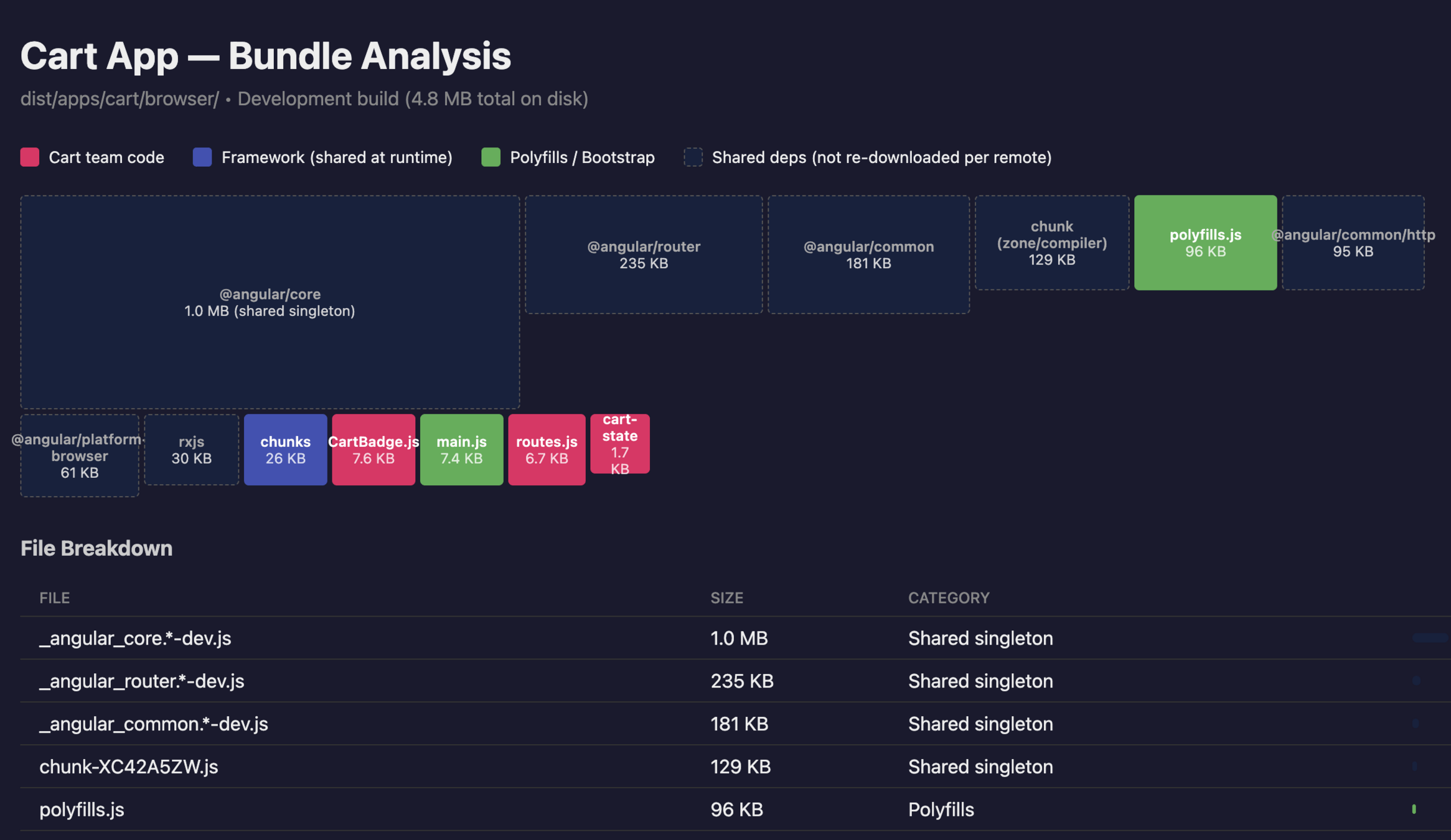
}exposes: {
'./routes': './apps/cart/src/app/app.routes.ts',
'./CartBadge':
'./apps/cart/src/app/cart-badge.component.ts',
} ,
shared: {
...shareAll({
singleton: true,
strictVersion: true,
requiredVersion: 'auto',
}),
},apps/cart/federation.config.ts
apps/cart/app/routes.ts
@pankajparkar
/catalog  →  loadRemoteModule → CatalogModule
/cart     →  loadRemoteModule → CartModule
/checkout → loadRemoteModule → CheckoutModuleBad Good
/components remote → /checkout remote (payments team)
/utils remote → /catalog remote (catalog team)
/services remote → /cart remote (cart team)module.exports = {
// ... rest of config
shared: share({
// 1. Angular Core: Must be a singleton and very strict
"@angular/core": {
singleton: true,
strictVersion: true,
requiredVersion: 'auto'
},
"@angular/common": {
singleton: true,
strictVersion: true,
requiredVersion: 'auto'
},
// 2. Utility libs: Maybe you DON'T want a singleton (each app gets its own)
"lodash": {
singleton: false,
requiredVersion: '^4.17.0',
strictVersion: false
},
"ui-library": {
singleton: true,
strictVersion: false
}
})
};Remote should work:
How to
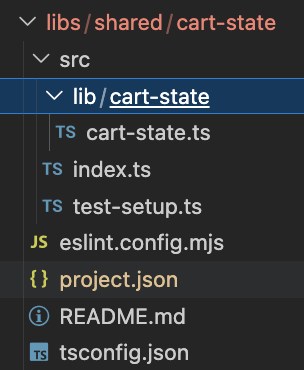
Service with Angular Signal
@Injectable({ providedIn: 'root' })
export class CartStateService {
  private readonly _cartItems = signal<CartItem[]>([]);

  readonly cartItems = this._cartItems.asReadonly();

  readonly cartCount = computed(() =>
    this._cartItems()
     .reduce((total, item) => total + item.quantity, 0)
  );

  readonly cartTotal = computed(() => ...);

  addToCart(product: Product) { ... }

  removeFromCart(productId: number) { ... }

  clearCart() {...}
}
module.exports = {
shared: share({
...
"ui-library": {
singleton: true,
strictVersion: false
},
})
};module.exports = withNativeFederation({
name: 'cart',
exposes: {
'./routes': './apps/cart/src/app/app.routes.ts',
'./CartBadge': './apps/cart/src/app/cart-badge.component.ts',
},
...
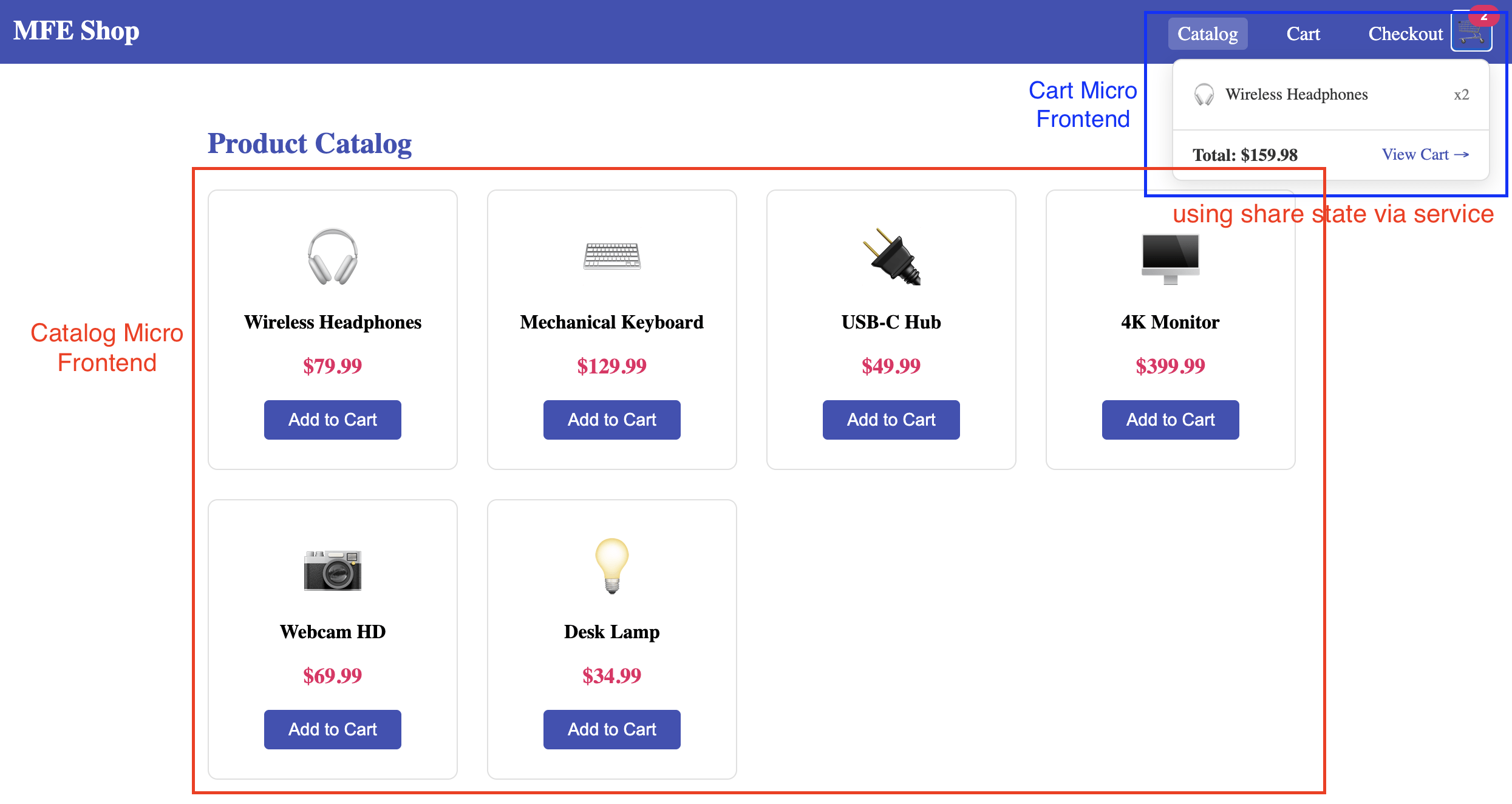
}loadRemoteModule('cart', './CartBadge')
.then(m => this.cartBadge = m.CartBadgeComponent)
.catch(() => console.warn('Cart badge unavailable'));<ng-container *ngComponentOutlet="cartBadge" />@pankajparkar
By Pankaj Parkar